 Email Settings Guide
Quick answer: Sonic.net email uses imap.sonic.net on 993 for IMAP or pop.sonic.net on 995 for POP3, each over SSL. Sending goes through mail.sonic.net on 587 with STARTTLS. Sonic asks for your password on incoming and outgoing alike. Sign in with your full sonic.net address. Sonic recommends IMAP. On POP, Sonic keeps deleted mail for 7 days.
What Changed Recently#
Related email providers: Juno email settings, NetZero IMAP settings, Altafiber email settings, Armstrong IMAP settings, Astound email settings, Breezeline IMAP settings
Sonic.net uses a separate host for each protocol and asks for your password both ways. Here is the current status and what a sonic.net address needs today.
Worth knowing
Each protocol has its own host. Incoming IMAP uses imap.sonic.net, incoming POP3 uses pop.sonic.net and outgoing uses mail.sonic.net.
Worth knowing
Authentication is required both ways. Sonic asks for your username and password on the incoming server and the outgoing server. Keep it on for both.
Worth knowing
Sonic recommends IMAP. It keeps mail on the server so a phone and a laptop stay in sync. POP downloads mail to one device.
Before You Begin#
Handle these two basics before anything else. Skip them and your email app will reject the connection even when every server value is correct.
1. Create the mailbox
Incoming is imap.sonic.net for IMAP or pop.sonic.net for POP3. Outgoing is mail.sonic.net. All three take your full address.
Where: Any email app
2. Know your Sonic password
The login is your full sonic.net address. The password is your Sonic email password, needed on incoming and outgoing.
Where: Find your settings →
About Sonic#
Sonic is an independent internet provider in California known for fiber, DSL and a strong stance on customer privacy. Email addresses end in sonic.net and run on Sonic servers.
Sonic has served Northern California since 1994 from its base in Santa Rosa. For email the thing to remember is the three hosts. Incoming uses imap.sonic.net or pop.sonic.net, while sending uses mail.sonic.net. Sonic asks for your password on every server. It recommends IMAP so your devices stay in step.
| Service Name | Sonic Email |
| Email Domain | sonic.net |
| Provider | Sonic |
| IMAP Host | imap.sonic.net |
| Based In | Santa Rosa, CA |
| Email Type | sonic.net, such as you@sonic.net |
| Webmail | webmail.sonic.net |
| SMTP Host | mail.sonic.net |
| Protocols Supported | IMAP, POP3, SMTP |
| App Password Needed | No, mailbox password |
| Username | Full email address |
Sonic Webmail Login#
You can always read your mail in a browser. The official Sonic pages are:
Find Your Settings#
Sonic settings use three hosts. Incoming picks imap.sonic.net or pop.sonic.net, while outgoing always uses mail.sonic.net.
- Open your email app and add a new account.
- Choose IMAP for imap.sonic.net.
- Set incoming to 993 for IMAP or 995 for POP3.
- Set outgoing to mail.sonic.net on 587 with authentication.
Sonic IMAP Settings#
IMAP keeps a Sonic mailbox in sync. Mail stays on the server, so a laptop and a phone read one shared inbox. The incoming host is imap.sonic.net over 993.
| IMAP Server | imap.sonic.net | |
| Port | 993 | |
| Encryption | SSL/TLS (required) | |
| Username | Your full sonic.net address | |
| Password | Your mailbox password | |
| Authentication | Required |
Sonic POP3 Settings#
POP3 downloads mail to 1 device. Pick it only if you want a local copy on a single computer. Not sure? See the comparison below.
| POP3 Server | pop.sonic.net | |
| Port | 995 | |
| Encryption | SSL/TLS (required) | |
| Username | Your full email address | |
| Password | Your mailbox password |
Sonic SMTP Settings#
SMTP handles outgoing mail. If you can read mail but not send it, the problem is here.
| SMTP Server | mail.sonic.net | |
| Port (SSL) | 465 | |
| Port (STARTTLS) | 587 | |
| Encryption | SSL or STARTTLS (required) | |
| Username | Your full email address | |
| Password | Same as incoming mail | |
| Authentication | Required. Switch on outgoing server authentication in the client. |
465 with SSL. Many home connections block port 25. Sonic sends on 587 with STARTTLS. Port 465 with SSL also works. Confirm outgoing authentication is on.
Check Sonic Settings Online#
You don't need to download anything to check Sonic settings online. This page is the lookup: every value is verified, current and copyable straight from your browser. Not sure your address is a Sonic one? Enter it below to check in a moment.
Does my email address use these settings?
Runs in your browser only. Your address is never sent anywhere or stored.
Want to verify the account itself before configuring an app? Sign in at Sonic webmail, which confirms your address and password work. If webmail opens, any email app connects with the tables above.
Look Up IMAP Settings for Any Email Domain#
This page covers Sonic. For every other address, work email on a company domain included, we run a free online lookup database: imapsettings.com.
imapsettings.com
Complete email settings database, by Univik
Enter any email address and get the incoming and outgoing server settings for that domain in 1 step:
Your address is used only to find the settings for that domain. Nothing is stored or shared.
Username and Password#
Both come from your Sonic account. The username is your whole sonic.net address and the password is your Sonic email password. There is no separate app password.
Username is the full address
Type you@sonic.net in full, with the part after the at sign. Sonic turns down a bare mailbox name.
Put that same address on both incoming and outgoing.
Password is the mailbox one
This is your Sonic email password, the same one that opens Sonic webmail. Reset it from your Sonic account if an app keeps refusing it.
Sonic uses one password for webmail and for an email app, so there is nothing extra to generate.
Set Up Sonic in Email Clients#
The servers and ports are always the same. Only the menus differ. Jump to your app:
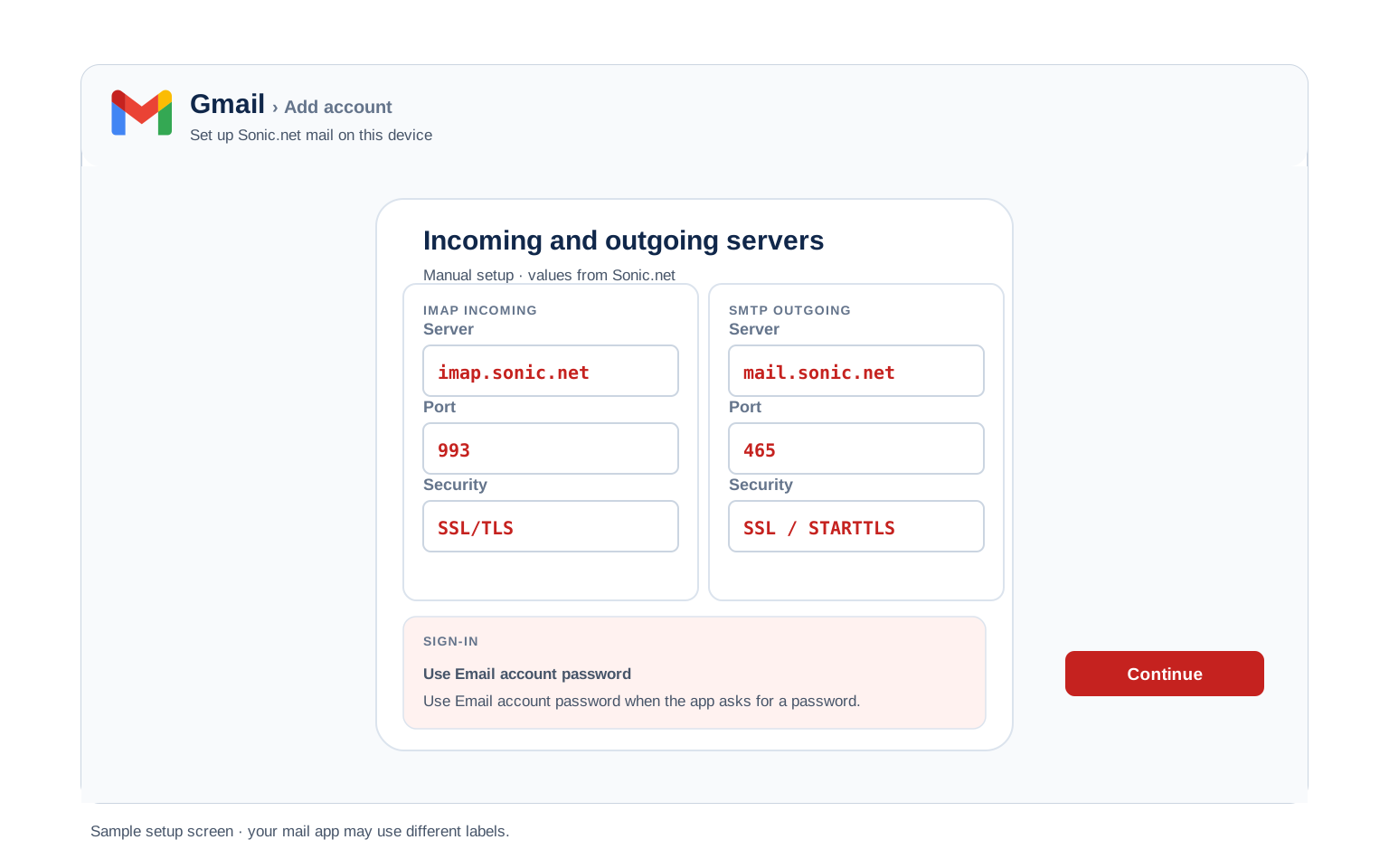
Outlook (Windows and Mac)
- In Outlook select Add Account, then turn on manual setup under Advanced options.
- Choose IMAP and set incoming to
imap.sonic.neton 993 with SSL. - Set outgoing to
mail.sonic.neton 587 with STARTTLS. - Enter the full address and mailbox password when Outlook prompts you.
- Send a test message to yourself to prove both paths.
Apple Mail (macOS)
- In Mail select Add Account, then pick Other Mail Account.
- Give your name, sonic.net address and Sonic password, then continue.
- Enter imap.sonic.net for incoming and mail.sonic.net for outgoing.
- Keep the SSL ports so nothing sends in plain text.
- Save and wait for the mailbox to load.
iPhone and iPad
- In Settings open Mail, then tap Mail Accounts and Add Account.
- Tap Other then Add Mail Account and fill your details.
- Keep IMAP chosen and put imap.sonic.net for incoming with mail.sonic.net for outgoing.
- Leave the secure ports iOS fills, since Sonic expects encryption.
- Tap Save and let iOS run its check.
Android
- Open your mail app and tap Add account, then Other or IMAP.
- Put in your address and password. Switch to manual setup if it stalls.
- For incoming use imap.sonic.net on 993 over SSL.
- For outgoing use mail.sonic.net on 587 with STARTTLS.
- Save and swipe down to fetch your mail.
Thunderbird
- In Thunderbird pick Account Actions, then Add Mail Account.
- Type your name, sonic.net address and Sonic password, then Continue.
- Wait for detection, then make sure IMAP with SSL is picked.
- If detection fails, type imap.sonic.net and mail.sonic.net in yourself.
- Hit Done and the folders fill in on the first sync.
Sonic Webmail Settings#
Server settings connect your apps. These controls decide how the mailbox behaves on the server. They live in Sonic webmail, which opens at webmail.sonic.net.
Signature
Add one in the Sonic webmail preferences. It rides on mail sent from the browser. A desktop app keeps its own signature.
Vacation Auto Reply
Turn on a vacation reply in Sonic webmail. The Sonic server sends it, so it goes out even when your computer is off.
Filters and Folders
Build filters in Sonic webmail. A server side rule sorts a message before any device downloads it. An in app rule only runs while that app is open.
Spam and Blocked Senders
Sonic screens incoming mail for spam. Block unwanted senders in Sonic webmail. Flagged mail lands in the spam folder for a look.
POP3 vs IMAP#
| Feature | IMAP | POP3 |
|---|---|---|
| Where mail lives | On the Sonic server | Downloaded to 1 device |
| Multiple devices | ✅ Everything stays in sync | ❌ Each device sees different mail |
| Sent and deleted mail | ✅ Synced everywhere | ⚠️ Stays only on that device |
| Offline reading | ⚠️ Cached mail only | ✅ Full local copy |
| Server storage used | Yes, counts against your quota | Can be freed after download |
| Best for | Phone + computer, everyday use | Single PC, local archives |
Sonic Sending and Storage Limits#
A few details are worth knowing before you move a mailbox or bulk forward. Here is how Sonic mail is set up:
| Setup protocol | IMAP or POP3 |
| Login name | Full sonic.net address |
| IMAP host | imap.sonic.net |
| POP3 host | pop.sonic.net |
| SMTP host | mail.sonic.net on 587 |
| Authentication | Required both ways |
Troubleshooting Sonic Connections#
Find the exact error your email app shows, then apply the fix:
| Error you see | What it means | Fix |
|---|---|---|
| Username or password rejected | Short username or wrong password | Use your full sonic.net address with your Sonic password. A bare mailbox name is turned down. |
| Cannot send on port 25 | ISP blocks the default SMTP port | Switch outgoing to mail.sonic.net on 587 with STARTTLS. Confirm outgoing authentication is on. |
| Not sure which incoming host | IMAP and POP3 use different names | IMAP is imap.sonic.net on 993. POP3 is pop.sonic.net on 995. Sending is always mail.sonic.net on 587. |
| Cannot send even after signing in | Outgoing also needs authentication | mail.sonic.net requires your username and password too. Turn on outgoing authentication and use your full address on 587. |
| Cannot connect to server | Wrong port or encryption | Set 993 with SSL incoming and 465 with SSL outgoing. A firewall on your own machine can block it as well. |
| Repeated password prompt | Short username or a typo | Clear the saved login, then put in the full address with the mailbox password. |
| Messages stuck in Outbox | SMTP authentication is off | Enable "outgoing server requires authentication" with the same login as incoming mail. |
| Deleted a POP message by mistake | It is in DELETED_MESSAGES for 7 days | Open webmail, find the DELETED_MESSAGES folder and copy the message back. Sonic purges that folder after 7 days, so act promptly. |
| A DELETED_MESSAGES folder appeared in webmail | It is the POP safety net | That folder catches POP deletions for 7 days. It stays empty on an IMAP setup and does not need removing. |
Reader Reported Fixes
Match the host to the protocol. IMAP takes imap.sonic.net and POP3 takes pop.sonic.net. Sending always uses mail.sonic.net.
Test the login in webmail first. Sign in at webmail.sonic.net with your address and Sonic password. If webmail opens, the credentials are right and the issue is in the app settings.
Deleted a POP Message? Sonic Keeps It for 7 Days #
POP has a habit of removing mail from the server the moment your app downloads it. Sonic softens that. When a POP client tells the server to delete a message, Sonic does not throw it away. It moves the message into a folder on the server named DELETED_MESSAGES.
That folder is a safety net. It holds the deleted message for 7 days before Sonic purges it. Within those 7 days you can open webmail or any IMAP client, find the DELETED_MESSAGES folder and copy the message back.
IMAP works differently. Deleted mail lands in Trash or Deleted Messages, which Sonic clears after 14 days. The cleanest way to avoid losing mail at all is to use IMAP on imap.sonic.net so your messages stay on the server.
| Detail | Value |
|---|---|
| POP delete goes to | DELETED_MESSAGES folder |
| Kept for | 7 days |
| Restore with | Webmail or an IMAP client |
| IMAP Trash kept for | 14 days |
| Best way to avoid loss | Use IMAP |
Moving Mail In or Out?#
Sonic mail speaks plain IMAP, so a mailbox moves in or out like any standard account. Each folder stays on the server until the copy finishes.
Take a copy first. Back up the mailbox before a move. A note that arrives mid switch can sit on either side. A copy keeps you safe.
Carrying mail across? The Univik Email Migration Tool moves each folder over an IMAP link. Give it imap.sonic.net with your Sonic password on this side and the other account opposite.
Rather hand it off? Our Email Migration Services team runs the whole move and verifies each folder arrived.
Use These Settings in Univik Email Backup#
The same IMAP settings above let you download your complete Sonic mailbox to your computer. Univik Email Backup saves everything as PST, MBOX, EML or PDF files you keep forever, even if the account closes.
- Download Univik Email Backup and install it on Windows.
- Select Sonic from the source list. If Sonic is not listed, pick a plain IMAP account.
- Give the complete email address with your mailbox password. The login name is always the whole email address.
- When the backup tool wants server details, hand it imap.sonic.net on port 993 with SSL. Take those values straight from the IMAP table above, with port
993over SSL. - Pick a saving format and folder, then start the backup. Large mailboxes download in the background.
Univik Tools That Use These Settings#
Many people land here while migrating or archiving a mailbox. All 3 tools use the same IMAP settings from this page:

Email Backup
Download your complete Sonic mailbox to PST, MBOX, EML or PDF before switching or closing the account.
Email Backup Tool →
Email Migration Tool
Copy every folder from Sonic straight into Gmail, Microsoft 365 or any other account. No manual export needed.
Email Migration Tool →
Email Converter Tool
Already have MBOX, EML or OST files from an old export? Convert them to PST, PDF or any format your new app opens.
Email Converter Tool →Prefer to hand the whole migration to experts?
If the hostnames and passwords feel like busywork, you can let the tool handle it. Univik's migration team handles the complete project: planning, transfer, verification and a report showing every folder made it. Since 2013, for single mailboxes up to full company moves.
Email Settings Glossary#
IMAP
Internet Message Access Protocol. Reads mail that stays on the server, so all your devices see the same inbox, folders and read status.
POP3
Post Office Protocol version 3. Downloads mail to 1 device and can remove it from the server. Older method, still useful for local archives.
SMTP
Simple Mail Transfer Protocol. Sends your outgoing mail. Every account needs it next to IMAP or POP3, which only receive.
SSL / TLS / STARTTLS
Encryption for the connection. SSL/TLS encrypts from the start (ports 993, 995, 465). STARTTLS upgrades a plain connection (port 587).
Sonic Password
Your Sonic email password, the same one that opens Sonic webmail. Sonic asks for it on incoming and outgoing. There is no separate app password.
imap.sonic.net
The Sonic incoming host for IMAP. It runs on 993 over SSL and keeps mail on the server.
pop.sonic.net
The Sonic incoming host for POP3. It runs on 995 over SSL and downloads mail to one device.
mail.sonic.net
The Sonic outgoing host. It sends on 587 with STARTTLS and always needs authentication.
Sonic
The independent California internet provider behind sonic.net email. It has served the area since 1994.
Sonic Webmail
The browser inbox at webmail.sonic.net. It reads the same mail your app does.
STARTTLS
The encryption Sonic uses on outgoing mail. It upgrades the connection on port 587 to a secure one.
Outgoing Authentication
Sonic asks for your username and password when you send, not only when you receive. Turn it on in your app.
DELETED_MESSAGES Folder
A server folder where Sonic parks messages a POP client deletes. It holds them for 7 days so you can restore one from webmail.
Graymail Folder
The Sonic webmail folder for suspected spam. Its contents expire after 7 days.
Trash Auto-Expiry
Sonic clears Trash and Deleted Messages after 14 days. Move anything you want to keep out of those folders.
How We Verify These Settings#
Univik builds email backup, migration and converter software since 2013. Our tools sign in to Sonic over IMAP and SMTP every day for thousands of users, so a changed server, port or login rule shows up in our connection logs before most guides notice it.
Every value on this page is confirmed with three checks: a live IMAP and SMTP connection from Univik Email Backup, a comparison against the Sonic guides and a sign in with a real mailbox using the full address. We re verify after any provider announcement and at least once a quarter.
Found something that no longer matches what Sonic shows you? Tell us and we will retest and update the page, with the change logged in what changed recently.
 Help & Support
Frequently Asked Questions
Incoming uses imap.sonic.net on 993 for IMAP or pop.sonic.net on 995 for POP3, each over SSL. Sending uses mail.sonic.net on 587 with STARTTLS and authentication. Sign in with your full sonic.net address and your Sonic email password. The IMAP settings section holds the full table.
Check the username first. It must be the complete address rather than the part before the at sign. Use your full sonic.net address as the username, not a bare mailbox name. The password is your Sonic email password. Sonic asks for it on outgoing too.
Sonic recommends IMAP on imap.sonic.net. It keeps mail on the server so every device matches. POP on pop.sonic.net downloads mail to one device and can lose it if that device fails. Full comparison here.
Yes. The server, ports and encryption match on iPhone, Android and Windows. Only the path to the settings screen shifts by app, which the client setup guides spell out.
Sonic gives each protocol its own host. IMAP uses imap.sonic.net, POP3 uses pop.sonic.net and sending uses mail.sonic.net. The ports differ but the login is the same on all three.
Yes. Keep SSL on incoming and STARTTLS on outgoing so your sign in never travels in the open. Sonic uses 993 or 995 for incoming and 587 for outgoing.
An email client with IMAP downloads mail as it syncs, but a dedicated backup tool is faster and saves standard files you can open anywhere. See how to back up your Sonic mailbox. If you already exported files in another format, an email converter changes them to PST, PDF or whatever your new app opens.
With Sonic the usual cause is an outgoing setting. Confirm mail.sonic.net has outgoing authentication turned on with your full address. Keep incoming on imap.sonic.net over 993 and leave SSL on.
A migration tool copies mail across the two accounts on an IMAP link. Give the Sonic IMAP settings with your Sonic password on this side and the destination details on the other. Each folder lands with its dates intact.
If setting this up feels risky or you have many accounts to move, our managed email migration service does the entire job for you.
Yes, within 7 days. Sonic moves POP-deleted mail into a server folder named DELETED_MESSAGES and keeps it for 7 days. Open webmail or an IMAP client, find that folder and copy the message back before Sonic purges it. The recover deleted POP mail section covers this.
Other Email Provider Settings
Summary: Sonic Settings at a Glance
- IMAP: imap.sonic.net, port 993, SSL/TLS
- POP3: pop.sonic.net, port 995, SSL/TLS
- SMTP: mail.sonic.net, port 587, STARTTLS
- Username is always your full email address
- Authentication required on both servers
- Pick IMAP for phone + computer sync
- Full address as the username
- Username is always the full email address