 Email Settings Guide
Quick answer: Tiscali email runs on Tiscali settings. Every protocol connects to imap.tiscali.it. IMAP is on 993, POP3 on 995 and SMTP on 465, each secured with SSL. Your username is the full address and the mailbox password you set in Tiscali settings lets you in. Your exact values also sit under your Tiscali mail settings in Tiscali settings. New Outlook looping your login? set it up as IMAP by hand.
What Changed Recently#
Related email providers: Libero email settings, Virgilio IMAP settings, TIM email settings, Aruba IMAP settings
A host changes how you sign in more often than it changes the server names. Here is the current status for Tiscali and what it means for your setup.
Worth knowing
Use the full address. Tiscali turns down a bare mailbox name. Put you@tiscali.it in both the incoming and the outgoing server.
Worth knowing
Three servers, one for each job. Read over IMAP on imap.tiscali.it. Read over POP on pop.tiscali.it. Send through smtp.tiscali.it.
Worth knowing
Katamail runs on Tiscali. A katamail.com or katamail.it address moved to the Tiscali servers in 2013, so it uses the settings on this page.
Before You Begin#
Handle these two basics before anything else. Skip them and your email app will reject the connection even when every server value is correct.
1. Create the mailbox
Add the address under your mail settings in Tiscali settings and set its password. That password is the one your apps use.
Where: Tiscali settings then your mail settings
2. Open your Tiscali mail settings
Click the Katamail note next to the address, then your Tiscali mail settings to read the server name and secure ports.
Where: Find your settings →
About Tiscali Mail#
Tiscali Mail is the mail service of Tiscali, an Italian internet company. A mailbox reads in a browser at mail.tiscali.it. It also works in Outlook, Apple Mail or Thunderbird.
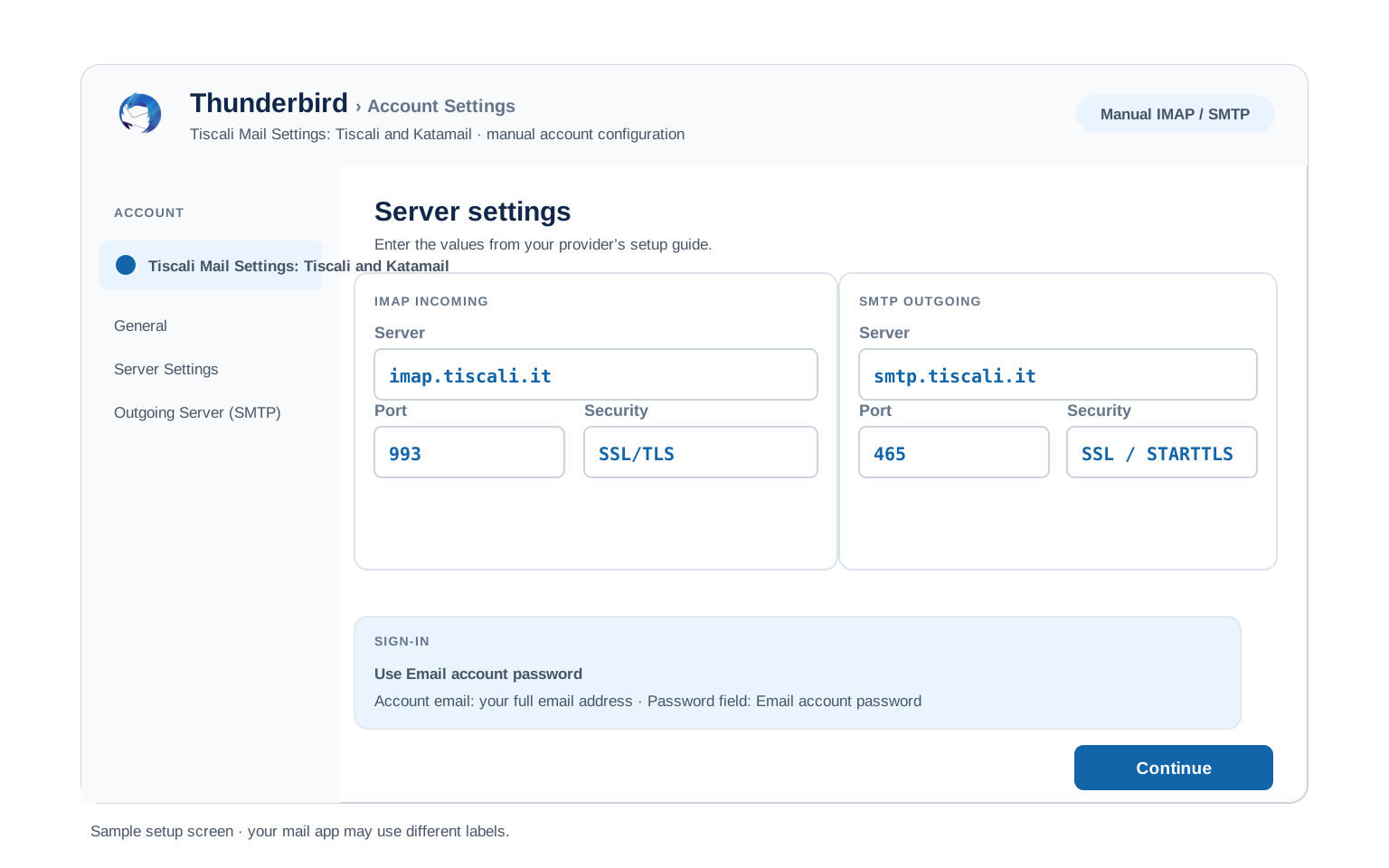
Incoming mail uses imap.tiscali.it on 993 for IMAP. For POP the host is pop.tiscali.it on 995. Outgoing uses smtp.tiscali.it on 465 with a sign-in. The username is your full address. The outgoing server needs authentication with the same address and password. Tiscali took over Katamail in 2013, so a katamail.com or katamail.it address is now a Tiscali mailbox on the same servers.
| Service Name | Tiscali Mail |
| Run By | Tiscali Italia |
| Address Domains | tiscali.it (also katamail.com, katamail.it) |
| Incoming Server | imap.tiscali.it 993 (POP pop.tiscali.it 995) |
| Outgoing Server | smtp.tiscali.it, port 465 SSL |
| Authentication | Required on the outgoing server |
| Username | Full email address |
| Webmail | mail.tiscali.it |
Tiscali Webmail Login#
You can always read your mail in a browser. The official sign in pages are:
Find Your Settings#
IMAP is ready the moment a mailbox exists, so nothing needs switching on. To read the exact values for one address, Tiscali lists them inside Tiscali settings.
- Log in to Tiscali settings from your Tiscali client area.
- Open your mail settings in the Email section.
- Click the Katamail note beside your address, then your Tiscali mail settings.
- Pick your app or read the manual settings for the server name and secure ports.
Tiscali IMAP Settings#
IMAP is the incoming choice Tiscali points most people to. Mail stays put on the server, so a laptop and a phone read one shared inbox. Pull the exact server name from your Tiscali mail settings in Tiscali settings.
| IMAP Server | imap.tiscali.it | |
| Port | 993 | |
| Encryption | SSL/TLS (required) | |
| Username | Your full email address, including @tiscali.it | |
| Password | Your mailbox password | |
| Authentication | Required |
Tiscali POP3 Settings#
POP3 downloads mail to 1 device. Pick it only if you want a local copy on a single computer. Not sure? See the comparison below.
| POP3 Server | pop.tiscali.it | |
| Port | 995 | |
| Encryption | SSL/TLS (required) | |
| Username | Your full email address | |
| Password | Your mailbox password |
Tiscali SMTP Settings#
SMTP handles outgoing mail. If you can read mail but not send it, the problem is here.
| SMTP Server | smtp.tiscali.it | |
| Port (SSL) | 465 | |
| Port (STARTTLS) | 587 | |
| Encryption | SSL or STARTTLS (required) | |
| Username | Your full email address | |
| Password | Same as incoming mail | |
| Authentication | Required. Switch on outgoing server authentication in the client. |
465 with SSL. Many home connections block port 25. Tiscali also supports 587 and 26 if 465 is blocked. Confirm outgoing authentication is on.
Check Tiscali IMAP Settings Online#
You don't need to download anything to check Tiscali IMAP settings online. This page is the lookup: every value is verified, current and copyable straight from your browser. Not sure your address uses Tiscali servers? Type it below and find out instantly.
Does my email address use these settings?
Runs in your browser only. Your address is never sent anywhere or stored.
Want to verify the account itself before configuring an app? Sign in at Tiscali webmail, which confirms your address and password work, then confirm an Tiscali password exists. If both pass, any email app connects with the tables above.
Look Up IMAP Settings for Any Email Domain#
This page covers Tiscali. For every other address, work email on a company domain included, we run a free online lookup database: imapsettings.com.
imapsettings.com
Complete email settings database, by Univik
Enter any email address and get the incoming and outgoing server settings for that domain in 1 step:
Your address is used only to find the settings for that domain. Nothing is stored or shared.
Username and Password#
Both come from the mailbox itself. The username is the whole email address and the password is the one you chose when you built the address in Tiscali settings. A standard Tiscali mailbox uses no Tiscali password.
Username is the full address
Type you@tiscali.it in full, with the part after the at sign. Tiscali turns down a bare mailbox name.
Put that same address on both incoming and outgoing.
Password is the mailbox one
This is the webmail password you set under your mail settings in Tiscali settings, not your Tiscali client area login. Reset it there if an app keeps refusing it.
The two factor prompt in the Tiscali client area guards billing, not the mailbox connection.
Set Up Tiscali in Email Clients#
The servers and ports are always the same. Only the menus differ. Jump to your app:
Outlook (Windows and Mac)
- In Outlook select Add Account, then turn on manual setup under Advanced options.
- Choose IMAP and set incoming to
imap.tiscali.iton 993 with SSL. - Set outgoing to the same server on 465 with SSL.
- Enter the full address and mailbox password when Outlook prompts you.
- Send a test message to yourself to prove both paths.
Apple Mail (macOS)
- In Mail select Add Account, then pick Other Mail Account.
- Give your name, Tiscali address and password, then continue.
- Enter imap.tiscali.it with SSL on incoming and outgoing.
- Keep the SSL ports so nothing sends in plain text.
- Save and wait for the mailbox to load.
iPhone and iPad
- In Settings open Mail, then tap Mail Accounts and Add Account.
- Tap Other then Add Mail Account and fill your details.
- Keep IMAP chosen and put imap.tiscali.it in both server boxes.
- Leave the secure ports iOS fills, since Tiscali expects SSL.
- Tap Save and let iOS run its check.
Android
- Open your mail app and tap Add account, then Other or IMAP.
- Put in your address and password. Switch to manual setup if it stalls.
- For incoming use imap.tiscali.it on 993 over SSL.
- For outgoing use smtp.tiscali.it on 465 over SSL.
- Save and swipe down to fetch your mail.
Thunderbird
- In Thunderbird pick Account Actions, then Add Mail Account.
- Type your name, Tiscali address and password, then Continue.
- Wait for detection, then make sure IMAP with SSL is picked.
- If detection fails, type imap.tiscali.it in yourself.
- Hit Done and the folders fill in on the first sync.
Tiscali Webmail Settings#
Server settings connect your apps. The controls here shape how the mailbox acts on its own. They live in Tiscali webmail, opened at mail.tiscali.it in any browser.
Signature
Add one in the webmail preferences. It rides on mail sent from webmail. A desktop app keeps a signature of its own.
Vacation Auto Reply
Set an autoresponder in Tiscali settings and give it start and end dates. The Tiscali server delivers it, so it fires even when your machine is off.
Filters and Folders
Create filters from the Tiscali webmail filters in Tiscali settings. A server side rule sorts a message ahead of any device fetching it. A rule set inside an app only works while that app is running.
Spam and Blocked Senders
Tiscali runs SpamAssassin on incoming mail. Set the threshold and block unwanted senders in Tiscali settings. Flagged mail lands in the junk folder for a look.
POP3 vs IMAP#
| Feature | IMAP | POP3 |
|---|---|---|
| Where mail lives | On the Tiscali server | Downloaded to 1 device |
| Multiple devices | ✅ Everything stays in sync | ❌ Each device sees different mail |
| Sent and deleted mail | ✅ Synced everywhere | ⚠️ Stays only on that device |
| Offline reading | ⚠️ Cached mail only | ✅ Full local copy |
| Server storage used | Yes, counts against your quota | Can be freed after download |
| Best for | Phone + computer, everyday use | Single PC, local archives |
Tiscali Mail at a Glance#
Every value for a tiscali.it or katamail address in one place:
| Incoming (IMAP) | imap.tiscali.it, port 993, SSL |
| Incoming (POP3) | pop.tiscali.it, port 995, SSL |
| Outgoing (SMTP) | smtp.tiscali.it, port 465, SSL |
| SMTP alternative | Port 587 with STARTTLS |
| Authentication | Required on the outgoing server |
| Username | Full email address |
| Katamail | Same servers as tiscali.it |
| Webmail | mail.tiscali.it |
Troubleshooting Tiscali Connections#
Find the exact error your email app shows, then apply the fix:
| Error you see | What it means | Fix |
|---|---|---|
| Username or password rejected | Short username or wrong password | Use the full email address with the mailbox password from Tiscali settings, not the client area login. |
| Cannot send on port 25 | ISP blocks the default SMTP port | Switch outgoing to 465 with SSL. Tiscali also accepts 587 and 26 if 465 is blocked. |
| Receives mail but will not send | Authentication is off on the outgoing server | Set the outgoing server to smtp.tiscali.it on port 465 with SSL, then switch authentication on with your full address and password. Without the sign-in, smtp.tiscali.it refuses the send. |
| Katamail address will not connect | Old katamail server names entered | A katamail.com or katamail.it mailbox now lives on the Tiscali servers. Put imap.tiscali.it and smtp.tiscali.it in the server fields, keep your full katamail address as the username, then reconnect. |
| Cannot connect to server | Wrong port or encryption | Set 993 with SSL incoming and 465 with SSL outgoing. A firewall on your own machine can block it as well. |
| Repeated password prompt | Short username or a typo | Clear the saved login, then put in the full address with the mailbox password. |
| Messages stuck in Outbox | SMTP authentication is off | Enable "outgoing server requires authentication" with the same login as incoming mail. |
| New Outlook redirects to a Microsoft login | Outlook treats Tiscali as a Microsoft account | Add the account by hand as IMAP rather than a work or school account. Type imap.tiscali.it:993 and smtp.tiscali.it:465 with SSL, with authentication on and your Tiscali password. |
| Old Outlook profile keeps failing | A stale Tiscali profile is in the way | Open Control Panel then Mail then Show Profiles on Windows and remove the old Tiscali profile. Add the account again as IMAP with the servers above. |
Reader Reported Fixes
Copy from your Tiscali mail settings. When a manual setup will not connect, the your Tiscali mail settings page in Tiscali settings prints the exact server name and ports for that mailbox. Pasting those in clears the guesswork behind most failed setups.
Test the login in webmail first. Sign in at webimap.tiscali.it with the full address and mailbox password. If webmail works, the credentials are right and the issue sits in the app settings.
When New Outlook Bounces Your Sign-In#
A common snag has nothing to do with the servers. New Outlook for Windows treats a Tiscali address as if it were a Microsoft account and sends you to a Microsoft login. Outlook on Android does the same. The sign-in then loops or shows an error like "The operation attempted is invalid".
The fix is to set the account up by hand as a plain IMAP account, so Outlook stops trying its own login flow. Work through these in order:
| Step | What to do |
|---|---|
| Add it as IMAP | When Outlook asks, choose IMAP by hand. Do not pick a work or school account. Do not let it redirect to a Microsoft sign-in. |
| Type the ports inline | Enter the servers with the port after the name: imap.tiscali.it:993 and smtp.tiscali.it:465, both with SSL. Set authentication on the outgoing server with your full address and Tiscali password. |
| If 465 refuses | Switch the outgoing port to 587 with STARTTLS, then sign in again. |
| Clear an old profile | On Windows, open Control Panel then Mail then Show Profiles and remove a stale Tiscali profile before you add the account again. |
| PEC mailbox? | A Tiscali PEC box uses its own servers. Read from mail.tiscalipec.it on 993 and send through smtp.tiscalipec.it on 465, both with SSL. |
Moving Mail In or Out?#
Tiscali mail speaks plain IMAP, so a mailbox moves in or out like any Tiscali account. Each folder stays on the server until the move finishes.
Take a copy first. Back up the mailbox before a move. A note that arrives mid switch can sit on either side. A copy keeps you safe.
Carrying mail across? The Univik Email Migration Tool moves each folder over an IMAP link. Give it the Tiscali server name and mailbox password on this side and the other account opposite.
Rather hand it off? Our Email Migration Services team runs the whole move and verifies each folder arrived.
Use These Settings in Univik Email Backup#
The same IMAP settings above let you download your complete Tiscali mailbox to your computer. Univik Email Backup saves everything as PST, MBOX, EML or PDF files you keep forever, even if the account closes.
- Download Univik Email Backup and install it on Windows.
- Select Tiscali from the source list. If it isn't listed by name, choose IMAP.
- Give the complete email address with your mailbox password. The login name is always the whole email address.
- When the backup tool wants server details, hand it imap.tiscali.it on port 993 with SSL for Tiscali. Take those values straight from the IMAP table above, with port
993over SSL. - Pick a saving format and folder, then start the backup. Large mailboxes download in the background.
Univik Tools That Use These Settings#
Many people land here while migrating or archiving a mailbox. All 3 tools use the same IMAP settings from this page:

Email Backup
Download your complete Tiscali mailbox to PST, MBOX, EML or PDF before switching or closing the account.
Email Backup Tool →
Email Migration Tool
Copy every folder from Tiscali straight into Gmail, Microsoft 365 or any other account. No manual export needed.
Email Migration Tool →
Email Converter Tool
Already have MBOX, EML or OST files from an old export? Convert them to PST, PDF or any format your new app opens.
Email Converter Tool →Prefer to hand the whole migration to experts?
If the hostnames and passwords feel like busywork, you can let the tool handle it. Univik's migration team handles the complete project: planning, transfer, verification and a report showing every folder made it. Since 2013, for single mailboxes up to full company moves.
Email Settings Glossary#
IMAP
Internet Message Access Protocol. Reads mail that stays on the Tiscali server, so every device shows the same inbox. Use imap.tiscali.it on port 993 with SSL.
POP3
Post Office Protocol version 3. Downloads mail to one device and can clear the server. Use pop.tiscali.it on port 995 with SSL if you prefer POP.
SMTP
Simple Mail Transfer Protocol. Sends your outgoing mail through smtp.tiscali.it on port 465 with SSL. It needs a sign-in with your address and password.
SSL and STARTTLS
Two ways to encrypt the link. SSL is on from the first byte, on 993, 995 and 465 for Tiscali. STARTTLS on 587 upgrades a plain link, an alternative some apps offer for sending.
imap.tiscali.it
The incoming server for IMAP on a Tiscali or Katamail address. Set it on port 993 with SSL.
pop.tiscali.it
The incoming server for POP. Set it on port 995 with SSL if you want mail on one device.
smtp.tiscali.it
The outgoing server for a Tiscali or Katamail address. Set it on port 465 with SSL and a sign-in.
Katamail
An older Italian mail service Tiscali took over in 2013. A katamail.com or katamail.it address is now a Tiscali mailbox, on the Tiscali servers.
Tiscali Mail Webmail
The browser view of your mail at mail.tiscali.it. Handy for a quick check. It is also where you reset a forgotten password.
Full Email Address
Your username for the server is the whole address. The same value works for incoming and outgoing.
Authentication
The sign-in the outgoing server asks for. Switch it on so smtp.tiscali.it accepts your mail, with the same address and password as the incoming server.
tiscali.it
The Tiscali mail domain, run by Tiscali Italia. A mailbox carries an address like you@tiscali.it, which is also your username.
New Outlook for Windows
The rebuilt Outlook app. It leans on a Microsoft-style login, so a third-party mailbox like Tiscali often needs a manual IMAP setup.
Modern Authentication
A sign-in that hands off to the provider's own login page. Tiscali uses a plain password instead, which is why New Outlook can stumble on it.
Tiscali PEC
Tiscali's certified email, on its own servers mail.tiscalipec.it and smtp.tiscalipec.it. A PEC box does not use the standard tiscali.it servers.
How We Verify These Settings#
Univik builds email backup, migration and converter software since 2013. Our tools sign in to Tiscali over IMAP and SMTP every day for thousands of users, so a changed server, port or login rule shows up in our connection logs before most guides notice it.
Every value on this page is confirmed with three checks: a live IMAP and SMTP connection from Univik Email Backup, a comparison against the Tiscali guides and a sign in with a real mailbox using the full address. We re verify after any provider announcement and at least once a quarter.
Found something that no longer matches what Tiscali shows you? Tell us and we will retest and update the page, with the change logged in what changed recently.
 Help & Support
Frequently Asked Questions
Incoming is imap.tiscali.it on port 993 with SSL for IMAP. For POP the host is pop.tiscali.it on port 995. Outgoing is smtp.tiscali.it on port 465 with SSL. The outgoing server needs a sign-in with your full address and password.
The Tiscali servers. Tiscali took over Katamail in 2013, so a katamail.com or katamail.it mailbox runs on imap.tiscali.it, pop.tiscali.it and smtp.tiscali.it. Enter your full katamail address as the username.
IMAP is the better default. It keeps mail on the Tiscali server so a phone and a laptop show the same inbox. POP downloads to one device and can remove mail from the server, which suits a single machine you back up yourself.
Your username is the full address, like you@tiscali.it, not the part before the at sign. A katamail address works the same way, as the whole address.
The outgoing server most likely lacks a sign-in. Set it to smtp.tiscali.it on port 465 with SSL, then switch authentication on with your full address and password. Without the sign-in, smtp.tiscali.it refuses the send.
Send through smtp.tiscali.it on port 465 with SSL. Port 587 with STARTTLS is an alternative. Switch authentication on and use the same address and password as the incoming server.
Open mail.tiscali.it and choose the forgotten-password link, then follow the steps. If a mobile number is on the account, Tiscali can text a one-time code to set a new password. Update the new password in every app afterwards.
Open mail.tiscali.it and sign in with your full address and password. Webmail is the quickest way to check mail without a client. It is also where you reset a forgotten password. A katamail address signs in the same way.
No. A katamail.com or katamail.it mailbox uses the same Tiscali servers, ports and security. The only thing that differs is the domain in your address, which is also your username.
New Outlook for Windows tries a Microsoft-style login on a Tiscali address, so the sign-in loops. Add the account by hand as IMAP, not as a work or school account. Type imap.tiscali.it:993 and smtp.tiscali.it:465 with SSL, switch authentication on and use your Tiscali password. If it still fails, remove an old Tiscali profile in Control Panel then Mail. You can also read your mail at mail.tiscali.it in the meantime.
Other Email Provider Settings
Summary: Tiscali Settings at a Glance
- IMAP: imap.tiscali.it, port 993, SSL/TLS
- POP3: pop.tiscali.it, port 995, SSL/TLS
- SMTP: smtp.tiscali.it, port 465 or 587
- Username is always your full email address
- Tiscali mailbox on the Tiscali servers
- Pick IMAP for phone + computer sync
- Full address as the username
- Username is always the full email address