Quick Answer
To export Kerio contacts and calendar, you start from this limit: Kerio Connect has no built-in bulk export for contacts. GFI says contacts are stored as .eml files with vCard content, the standard contact format. It describes a Webmail download for a calendar in the ICS format, the standard calendar file. Both options need either a live server or admin access to the store folder.
A store copy lets you look at the Contacts and Calendar folders without the server.
If you want to export Kerio contacts and calendar, start with the one fact from GFI that shapes the plan. Kerio Connect has no built-in way to export all the contacts at once. I read five GFI pages and two RFC pages. They show what a live server lets you do and what a store copy lets you do.
- If you still have a live server, use Webmail for the calendar and ask your admin about contacts.
- With the server gone, put the store folder, which Kerio uses for all of its mail, on another disk first so your contacts stay as .eml files.
- If you copy personal and public contacts into one folder, expect some files with the same name, for example 00000001.eml.
Where Does Kerio Keep Contacts and Calendar Items?
GFI's raw contacts article says contacts are stored in the .eml format with vCard content. vCard is a standard format for contact details. Each of the contacts folders has a #msgs subfolder next to the index.fld, search.fld and metadata files. Public contacts sit under #public\Contacts\#msgs, either global or per domain. To find the folder on your own server, GFI gives the Windows path as C:\Program Files\Kerio\MailServer\store\mail\domain\user\Contacts\#msgs. On Linux it starts at /opt/kerio/mailserver/store/mail and on macOS at /usr/local/kerio/mailserver/store/mail.
GFI's contacts article adds that the contacts you sync are converted into an internal Kerio format and kept in .eml files. The page does not describe how calendar items are stored. None of the five GFI pages I read for this guide names a Calendar folder.
How Can You Export Kerio Contacts?
GFI gives three options and also suggests a third-party client like Outlook or Apple Contacts for a mass export. Each option has a limit. The table puts the three options side by side.
| Option | What GFI says | Limit |
|---|---|---|
| Copy the raw .eml files | Contacts sit under Contacts\#msgs in the store. | Needs admin access to the store folder and a manual conversion. |
| Export2csv.sh script | Collects .eml contacts into Contacts.csv with name and email fields. | The page names Linux and macOS and says personal and public files may share names. |
| Forward a single contact | A contact can be sent as a VCF (vCard) file from the right-click menu. | Works for single contacts and not for a bulk export. |
GFI's contacts to CSV article says to put Export2csv.sh in the folder with your .eml files, make it executable (allow it to start as a program) and start it. You need admin access to the mail folder and a user account that can start scripts as root, which is the main administrator account on Linux and macOS. The result is a file called Contacts.csv. The page names Linux and macOS only, so check it before you try it on a Windows store. If you try it, keep your original .eml files as they are and work on a copy. You should also check your Contacts.csv against a few contacts you know.
GFI's contacts article says that VCF is the most compatible format for importing contacts later, for example through Outlook. It also says Kerio has no built-in bulk import. You can read the format in RFC 6350, which describes vCard as a way to store and share details about people. GFI's contacts article also says Apple's .abbu archive is not supported.
If you plan to move to the new Outlook with IMAP, remember that, according to GFI, an IMAP sync leaves calendars and contacts behind. You will need a separate export for them.
How Can You Export a Kerio Calendar to ICS?
GFI's calendar export article describes a download from Webmail. You log in to the Webmail, open the Integration option for a device, select See other options, then Setup your PC manually, then Microsoft Outlook. Finish with Download .ics file. The file uses the iCalendar format, which RFC 5545 describes as a way to exchange calendaring and scheduling information.
The Webmail download needs a working login to a live server. If your server is gone, you cannot use it. GFI says the method is a manual transfer for moving calendars to other providers and that the procedure for Google Calendar is similar. If you have many users, you will repeat it for each one.

How to Look at Kerio Contacts and Calendar Folders From a Store Copy
Univik Kerio Converter opens a copy of your store on Windows and lists the folders of each mailbox. In my test copy the folder tree shows Contacts, Calendar, Tasks and Notes next to the mail folders. The Export tab has the item type options.
- Copy the store. Start from a copy on a spare disk, so your contacts and calendar stay as they are.
- Load the copy. From the app, use Open Kerio Connect Folder and choose your copy.
- Open the folder tree. Select a mailbox on the Mailboxes tab and look for the Contacts and Calendar folders.
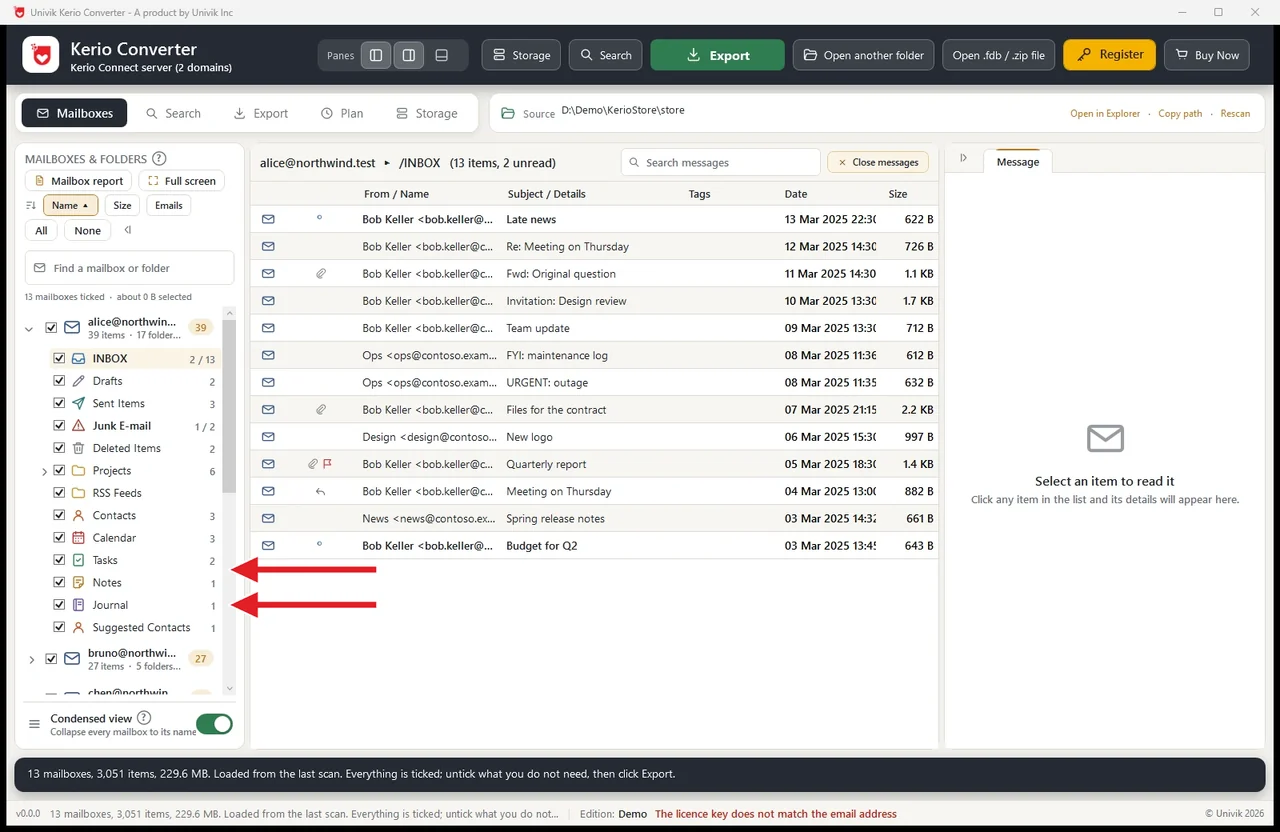
The folder tree lists Contacts and Calendar next to mail folders. - Set item types. Open the Export tab and check the item type options for Contacts and Calendar.
- Export one folder. Export a single contacts folder first and open the result before you export more.
Limitations: I did not check which file format each target produces for contacts and calendar items. Export one contacts folder and one calendar folder first, then open the results in the program where you plan to use them. If a field is missing, you will know before you go further. The converter needs Windows 11 or Windows 10.
The converter lists the Contacts and Calendar folders of a store copy on Windows, so you can see them before you export.
Download Free Trial Select a Licence - From $299Load a copy in the trial and look at one contacts folder first.
What If Your Exported Contacts or Calendar Look Wrong?
If your export looks off, start with the cheapest check.
Do this: Rename one set before you merge. GFI says a personal contact and a public contact can have identical file names, for example 00000001.eml.
Do this: Check your login. GFI says that method needs a live Webmail session with the credentials of your account.
Do this: Export to VCF instead. GFI says the .abbu archive is not supported.
If a contacts folder still looks empty, contact Univik support and tell them where you found it.
Which Pages Back This Kerio Contacts Guide?
On November 20, 2026 I opened five GFI pages. Four of them are the raw contacts export article, the contacts to CSV article, the calendar to ICS article and the contacts in Kerio Connect article. The fifth is the new Outlook compatibility article, which I used for the IMAP point about the new Outlook. I also opened two RFC pages, one for vCard and one for iCalendar. Four of the five GFI pages list March 18, 2025 as the publish date in their page data. The raw contacts article shows no date.
None of the GFI pages names a Kerio Connect version. I could not confirm the .vcf and .ics extensions from the RFC text I read, so this guide takes them from the GFI pages only.
- GFI says Kerio Connect has no built-in bulk export for contacts.
- Contacts are .eml files with vCard content under Contacts\#msgs.
- GFI describes a Webmail download that gives a calendar as an .ics file.
- Export2csv.sh builds Contacts.csv and the page names Linux and macOS.
- Test each output format on one folder before you go further.
FAQ: Export Kerio Contacts and Calendar
How do I export Kerio contacts and calendar?
Use Webmail for a calendar download if your server is live. For contacts, copy the .eml files from the store or use a converter on a store copy.
Does Kerio Connect have a bulk contacts export?
GFI says Kerio Connect does not provide a built-in way to export all contacts at once. Single contacts can be forwarded as VCF.
How are Kerio contacts stored?
GFI says contacts are .eml files with vCard content in a Contacts folder, under a #msgs subfolder.
How do I export a Kerio calendar to ICS?
GFI describes a Webmail download through Integration, Setup your PC manually and Download .ics file. It needs a live login.
Is there a script that exports Kerio contacts to CSV?
GFI describes Export2csv.sh, which builds Contacts.csv with full name and email fields. The page names Linux and macOS.
Does IMAP migration move Kerio contacts and calendars?
GFI says an IMAP sync with the new Outlook leaves calendars and contacts behind. Other IMAP targets can have the same limit, so check yours.
Can I see Kerio contacts and calendar folders without the server?
Yes. Univik Kerio Converter shows them in the folder tree of a store copy on Windows. I did not check each output format. In the trial, each folder is limited to 25 items.
Which vCard and iCalendar standards apply?
RFC 6350 covers vCard and RFC 5545 covers iCalendar. I read their abstracts and not their extension rules.

I opened five GFI pages and two RFC pages for the storage, export and format facts.