Quick Answer
If you found a Kerio Outlook Connector FDB file, it is the offline cache that the connector keeps on your Windows PC. It sits in AppData\Local\Kerio\Outlook Connector and is not a plain text file, so Notepad cannot show your mail.
The AdoptDB utility from GFI can restore it into a new Outlook profile, but only with Outlook 2010. A converter that reads the .fdb file directly works without Outlook 2010 and without the server.
If your Kerio server is gone and an old Windows PC still has your Outlook profile, your mail may exist only as .fdb files in a hidden folder. You can read those files without the server. I read five GFI pages about the Kerio Outlook Connector cache and the new Outlook. I used only what they say about where the files sit and which tool restores them.
- If you can still reach the old PC, copy the whole Kerio Outlook Connector folder to a second disk and keep working on the duplicate.
- If the Kerio server is gone, do not clear the cache or remove the Outlook profile, because you may not be able to download your mail again.
- If you only have a .zip of the cache, keep it as it is and open the .zip itself.
Where Is the Kerio Outlook Connector FDB File on Windows?
GFI gives you the cache folder for each Windows version. Windows hides the AppData folder by default, so switch on the Hidden items option of File Explorer before you look for it.
| Windows version | Cache folder (GFI store-location and import pages) |
|---|---|
| Windows 10 | C:\Users\<user>\AppData\Local\Kerio\Outlook Connector |
| Windows Vista and 7 | C:\Users\<user>\AppData\Local\Kerio\Outlook Connector\<profile name> |
| Windows XP | C:\Documents and Settings\<username>\Application Data\Kerio\Outlook Connector\<profile name> |
GFI lists no separate path for Windows 11, so you should start with the Windows 10 path. If you have more than one Outlook profile, open each folder under Outlook Connector. Each profile gets its own folder. GFI's AdoptDB page shows a name like recover.XXXXXXXX-XXXX-XXXX-XXXX-XXXXXXXXXXXX, which is the profile name followed by a GUID, a long random ID code.
What Is an FDB File in Kerio Outlook Connector?
GFI says Kerio Outlook Connector (Offline Edition) uses *.FDB files to store its data. GFI's AdoptDB page says the FDB file is not encrypted but is also not plain text, so Notepad shows nothing you can read. If you try a text editor, you will not find readable mail. GFI's import page adds that Kerio Outlook Connector 7.2 and later keep several files named with folder IDs, while Kerio Connect 7.1 used a single store file.
Treat these files as the last copy of your mailbox. If your Kerio server is already gone, you cannot download the mail again. Copy the whole profile folder before you try anything on it. GFI says clearing the cache resets the profile and the account data is then rebuilt by syncing with the server again, so do not use Empty cache on a profile you need.

How Does GFI's AdoptDB Utility Open a Kerio FDB File?
GFI's AdoptDB page describes a utility called AdoptDB (DBadopter). It reaches the .fdb files of your old profile and updates them so they work in a new Outlook profile. GFI says the process is fully offline and needs no server connection.
GFI lists the AdoptDB steps in a fixed order.
- Create an Outlook profile named
recover. Add a Kerio Outlook Connector account to it, sign in once and close Outlook. - Stop the Kerio Connect service. Delete the contents of the new
recover.GUIDfolder and copy the old profile files into it. - Unzip
dbadopter_8_3.zipfor 32-bit Outlook ordbadopter_8_3_x64.zipfor 64-bit Outlook to the root of the C: drive. - Open Command Prompt in
C:\adoptdb\DbAdopterand enterAdoptDb.exe /p recover. - When AdoptDB finishes, open the
recoverprofile in Outlook. Export to PST if you want a copy.
GFI sets these conditions for you to check first. The procedure needs Outlook 2010 and a configured Kerio Outlook Connector profile. GFI says it did not test later Outlook versions. The import page says both download packages work with Kerio Outlook Connector 8.4 and newer. They import only your personal store, which is your own mailbox without shared or public folders. They also cannot import files that ransomware encrypted. The page adds that the restored profile should stay offline so that a later sync cannot overwrite it. If you are unsure whether your PC meets these conditions, check your Outlook version first, because the rest of the method depends on it.
What If You Use Outlook 2013 or Later or the New Outlook?
GFI's import page says only Outlook 2010 is supported and did not test later versions, so I would not rely on AdoptDB with Outlook 2013 or later. On the new Outlook, GFI's page on the new Outlook notes that Kerio Outlook Connector is a COM add-in, a type of Outlook extension built for classic Outlook, so it cannot be used there. If your PC has Outlook 2016, 2019 or the new Outlook, AdoptDB cannot open the restored profile, because it needs Outlook 2010.
If that is your situation, you can read the .fdb file with a converter that does not need Outlook 2010. For more on what the new Outlook changes for Kerio, read Kerio Outlook Connector and the new Outlook. For the .fdb file type alone, read the Kerio FDB converter page.
How to Open a Kerio FDB File Without Kerio on Windows
Once you have a copy of your profile folder, Univik Kerio Converter opens it on Windows. The start screen has a button for exactly this file type. The Kerio Connect service can stay off. I tested the converter on a Kerio Connect store with 13 mailboxes and 3,051 items, not on an .fdb profile.
- Copy the profile folder. Copy the whole Kerio Outlook Connector profile folder to another disk. You can also use a .zip of that folder.
- Open the cache. Start the converter and select Open Outlook Connector cache file (.fdb / .zip). You can also drag a folder, an .fdb file or a .zip onto the window. The cache you copied is read as it is, so the originals stay as they were.
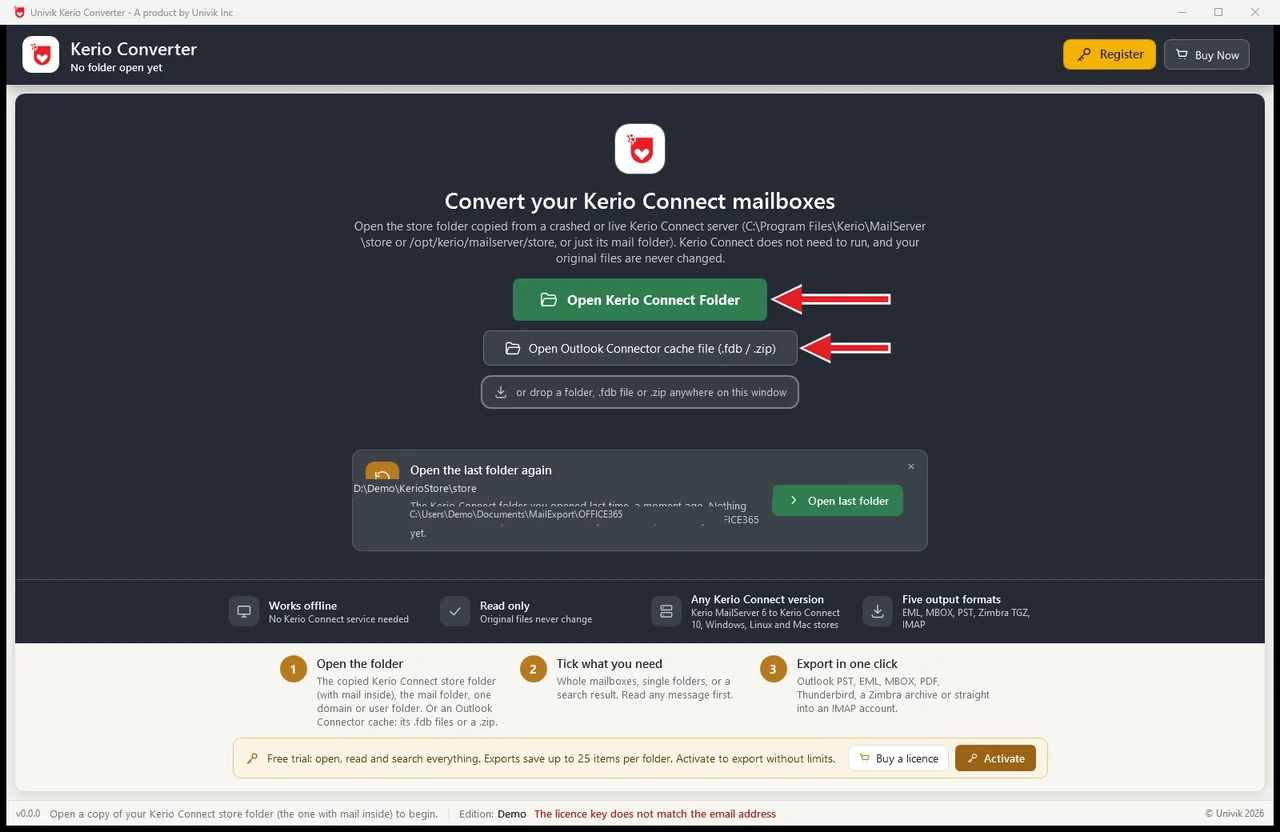
The second arrow marks the Outlook Connector cache button. Dragging an .fdb file or a .zip onto the window opens it too. - Check the folders. Open a mailbox to see its folder tree. If your Outlook profile synced Contacts, Calendar, Tasks, Notes or Journal, look for them next to the mail folders.
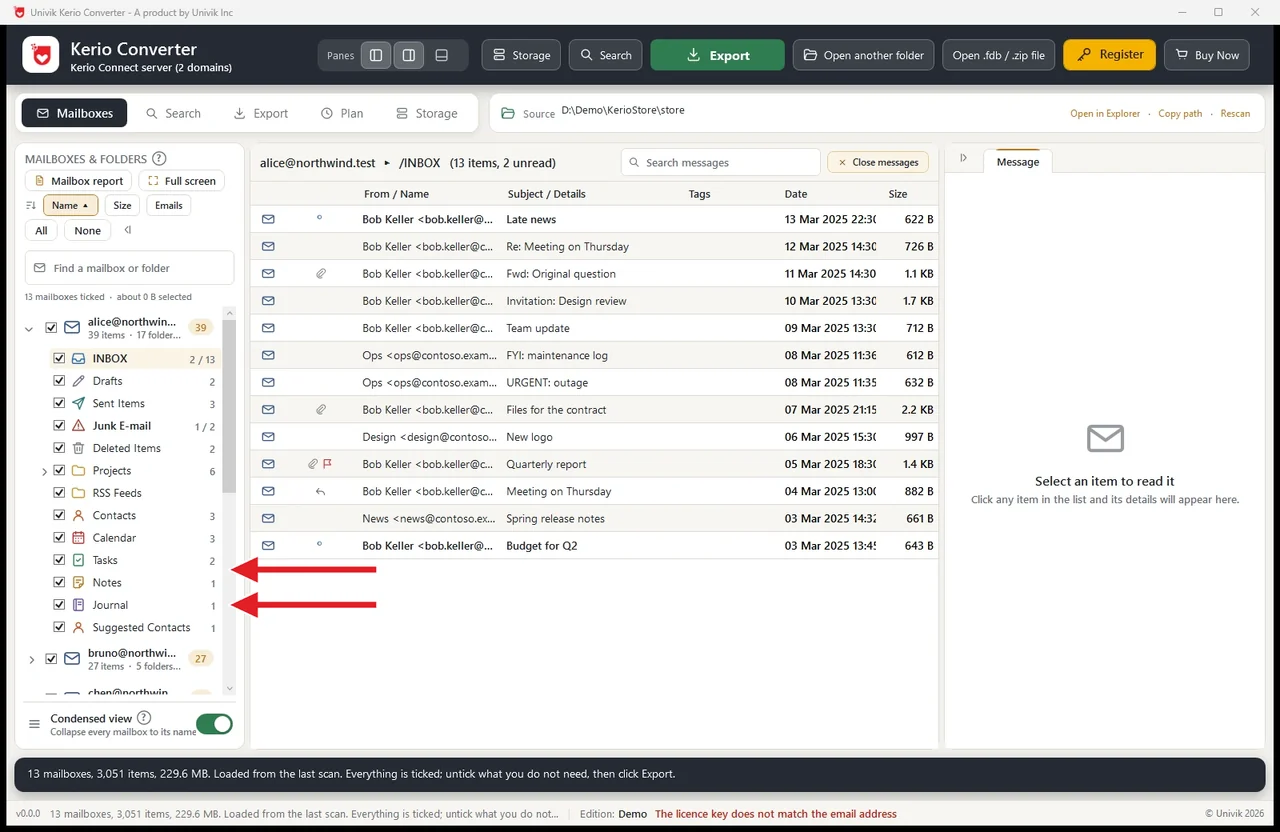
The arrows mark the Tasks and Journal folders. Select any message to read it. - Search and read. Select a message to read it. You can also open the Search tab to look across every mailbox before you export.
- Save what you need. Go to the Export tab and select the target format. The list has nine formats, among them PST and MBOX.
Limitations: the trial reads and searches the whole profile you open. An export contains only the first 25 items of a folder. I did not open an .fdb source for this article, so test one profile first. The converter needs Windows 11 or Windows 10.
A copy of your Outlook Connector cache opens read-only on Windows, so you can read your mail before your old PC or server is gone for good.
Download Free Trial Select a Licence - From $299Open one profile in your trial and compare its folders with the ones in your Outlook.
What If the FDB Folder Is Missing or Will Not Open?
Do this: Switch on the Hidden items option of File Explorer. GFI says the AppData folder is hidden by default.
Do this: Stop there and keep your copy. GFI says only Outlook 2010 is supported, so open the .fdb files with a converter instead.
Do this: Look for an older copy of your profile folder on a backup or another disk. GFI says clearing the cache resets the profile, so any older copy of the files is your only source.
If your .fdb files still do not open, contact Univik support and tell them your Outlook version plus the Kerio Outlook Connector version.
What Is This Kerio FDB Guide Based On?
I read five GFI pages on November 20, 2026: GFI on AdoptDB, GFI on the KOFF store location, GFI on the import procedure, GFI's page on the new Outlook and GFI on clearing the cache. I used vendor pages only. If you want to confirm a detail, open the GFI page that matches the section.
GFI's pages do not say what the .fdb format is built on, so this guide does not either. I also did not test AdoptDB, because it needs Outlook 2010 and a Kerio profile. Everything about it comes from GFI's pages.
- GFI says Kerio Outlook Connector (Offline Edition) stores its data in *.FDB files that are not encrypted and are not plain text.
- On Windows 10 the cache sits in C:\Users\<user>\AppData\Local\Kerio\Outlook Connector, a folder that is hidden by default.
- GFI's AdoptDB utility works offline but needs Outlook 2010 and imports only the personal store.
- Outlook 2013 and later and the new Outlook are not covered by the AdoptDB method.
- A converter opens a copy of the .fdb files or a .zip on Windows without the Kerio server.
FAQ: Open a Kerio FDB File
Where is the Kerio Outlook Connector FDB file?
On Windows 10 GFI gives C:\Users\<user>\AppData\Local\Kerio\Outlook Connector. On Windows Vista and 7 each profile has its own subfolder inside it. The folder is hidden by default, so switch on the Hidden items option in File Explorer first.
What is an FDB file in Kerio Outlook Connector?
GFI says Kerio Outlook Connector (Offline Edition) uses *.FDB files to store its data. The file is not encrypted but it is not plain text, so a text editor cannot show the mail.
Can I open a Kerio FDB file in Notepad?
No. GFI says the FDB file is not plain text. Open it with GFI's AdoptDB utility in a new Outlook profile or with a converter that reads .fdb files.
Does AdoptDB work with Outlook 2016 or the new Outlook?
No. GFI says the procedure needs Outlook 2010 and did not test later versions. GFI also says the Kerio connector is not compatible with the new Outlook.
Does AdoptDB need the Kerio server?
No. GFI says the process is fully offline and needs no server connection. It does need Outlook 2010 and a configured Kerio Outlook Connector profile.
Does AdoptDB import shared and public folders?
No. GFI says only the personal store is imported. Shared and public folders are not.
Can I open an .fdb file without Kerio or Outlook 2010?
Yes. Univik Kerio Converter opens an Outlook Connector cache as .fdb files or a .zip on Windows. The Kerio Connect service can stay off. Your original files stay unchanged.
Should I clear the Kerio cache before I copy it?
No. GFI says clearing the cache resets the profile and the account data is rebuilt by syncing with the server again. Copy the folder first and work on the copy.

I read GFI's Kerio support pages for cache paths, AdoptDB conditions and Outlook limits.