Quick Answer
Check Kerio mailbox size on disk before you migrate. WebAdmin, the Kerio admin screen, can show a wrong size after a crash or a storage error, because GFI says WebAdmin calculates usage from files that can become damaged. GFI also recommends mailboxes under 20 GB and fewer than 10,000 items per folder.
Plan the largest mailbox on its own and test one mailbox first.
If you plan a Kerio migration, the first number you need is how much mail each user has. The size that WebAdmin shows is not always the size on your disk. WebAdmin is the web page where you administer Kerio Connect. I went through four GFI pages to see why your numbers differ and what you can measure before your export window starts. The export window is the time slot you book for the export.
- If WebAdmin and your disk disagree, measure the disk first, as the GFI domain quota article does.
- GFI recommends mailboxes under 20 GB, so test a larger mailbox on its own before you migrate.
- If you can, open a copy of your store folder, where Kerio stores its mailboxes, so your live server stays as it is.
Why Does Kerio WebAdmin Show a Different Mailbox Size?
GFI's article on incorrect user quota gives the reason. Kerio Connect stores a user's size in a file called stats.usr and each folder's size in status.fld. After a server crash or a storage error those files can be damaged. Then WebAdmin shows a wrong quota, which is the storage figure for that user.
GFI's manual page on folder size comes from an older manual and describes the same problem. If you compare WebAdmin usage with what Windows reports for a user's folder, the two can differ. Its fix is to delete stats.usr, re-index the folder and clear the folder size value in status.fld.
What Does a Domain Quota Mismatch Look Like?
GFI's article on domain quota gives an example. A domain quota is the storage figure for all users of one mail domain. Disk showed 69 GB, the domain quota screen showed 77 GB and user quotas added up to 61 GB. GFI reads that pattern as a display problem and says the cause could be a glitch in WebAdmin or a wrongly displayed user quota.
If you see numbers like these, do not size your export window from WebAdmin. Measure your store folder on disk instead, because GFI's domain quota article checks the figures against disk usage first.
| Where you look | What it tells you | How far you can trust it |
|---|---|---|
| WebAdmin user list | The storage usage that Kerio calculates. | GFI says it can be wrong after a crash or a storage error. |
| Domain quota screen | The storage used by a whole domain. | GFI shows a case where it was higher than the sum of the users. |
| Folder size on disk | The real size of the store folder of a user. | The measure that GFI compares the screens against. |
Which Size Limits Does GFI Recommend for Kerio Mailboxes?
GFI's article on mailbox limits recommends keeping a mailbox under 20 GB and fewer than 10,000 items in a folder. It says large folders can make folder opening and search slow. Treat any mailbox over those numbers as the first one to plan.
GFI's limits page does not define what counts toward quota. None of the four pages mention Deleted Items, so this guide does not claim they are included. Ask your Kerio admin if the answer changes your plan.

How to Find the Largest Kerio Mailbox Before You Export
Univik Kerio Converter opens your store copy on Windows with a Storage tab and a Plan tab. The demo store I tested is small: 229.6 MB across 13 mailboxes and 3,051 items. If you open your own copy, the tabs show you which mailbox is largest before you commit to a window.
- Duplicate the store. Copy the Kerio store folder to a spare disk while the Kerio service is stopped.
- Load the copy. In the app, choose Open Kerio Connect Folder and point it at your copy.
- Open Storage. Go to the Storage tab and sort by size. The largest mailbox is the one to plan first.
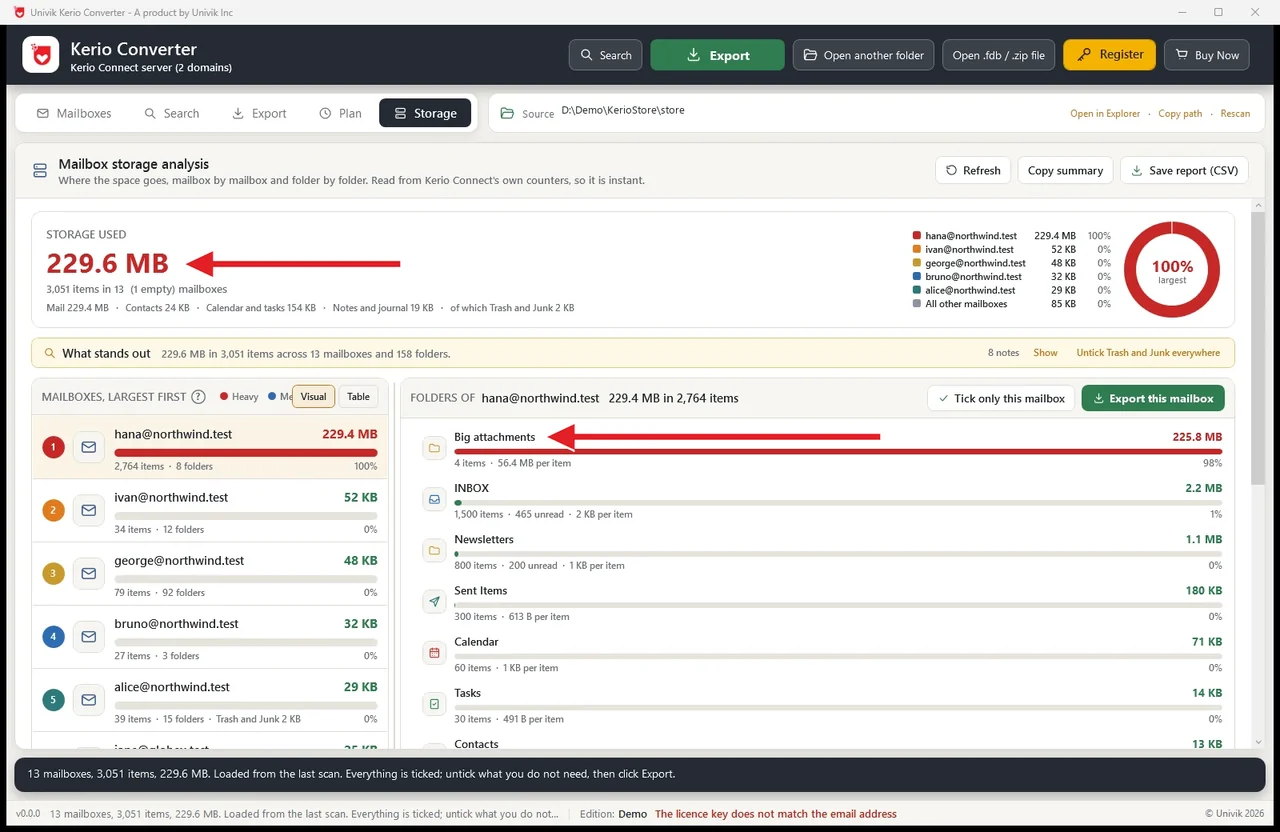
The Storage tab lists each mailbox with its size. - Open Plan. Go to the Plan tab and choose a time window for the batch that fits the largest mailbox.
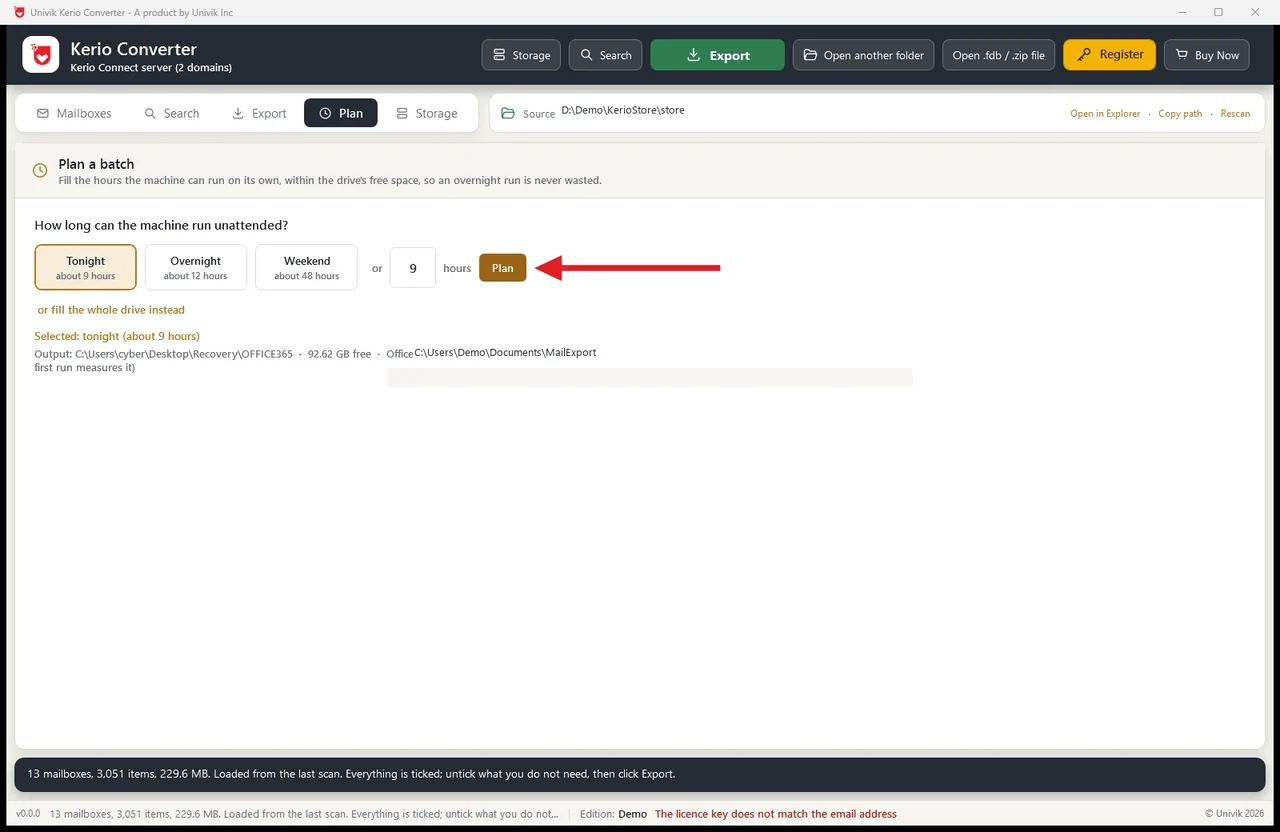
The Plan tab lists time windows for a batch. - Save the list. Use the report option to keep the size list for your migration notes.
Limitations: I did not check how the Plan tab calculates a time for a large store, so treat a window as a starting point. You should test one mailbox first. The converter needs Windows 11 or Windows 10.
The converter lists mailbox sizes from a store copy on Windows and helps you choose a window for a batch.
Download Free Trial Select a Licence - From $299Load a copy in the trial and look at the Storage tab before you book the window.
What If the Sizes Still Look Wrong?
When your numbers disagree, take the cheapest check first.
Do this: Measure your user folder on disk. GFI says a damaged stats.usr can make the screen wrong.
Do this: Compare your disk, your domain quota and your user quotas as GFI does. A higher domain figure points to a display problem.
Do this: GFI recommends fewer than 10,000 items per folder and says to split larger folders into sub-folders. Test such a folder on its own before you export.
If a mailbox is far larger on disk than anyone expected, contact Univik support and tell them how large it is.
Which GFI Pages Back This Mailbox Size Guide?
My four GFI sources, opened on November 20, 2026, are the user quota article, the folder size manual page, the domain quota article and the mailbox limits article. GFI dated three of them March 18, 2025 in the page metadata. The older manual page shows only a 2021 copyright line.
The pages explain how a displayed size can go wrong. They give you no rule for turning gigabytes into export hours, so this guide gives none.
- GFI says WebAdmin sizes come from stats.usr and status.fld, which can be damaged after a crash.
- A domain figure can be higher than the sum of its users, as in the GFI example of 69, 77 and 61 GB.
- GFI recommends mailboxes under 20 GB and fewer than 10,000 items per folder.
- Measure the store on disk before you size the export window.
- Plan the largest mailbox on its own and test one first.
FAQ: Kerio Mailbox Size Before Migration
How do I check Kerio mailbox size before migration?
Measure the store folder of each user on disk or open a copy of the store in a Windows converter that has a Storage tab. WebAdmin can show a wrong size after a crash.
Why does Kerio WebAdmin show the wrong mailbox size?
GFI says the user size sits in stats.usr and the folder size in status.fld. After a crash or a storage error those files can be damaged.
Why is the domain storage higher than the sum of the users?
GFI shows a case with 69 GB on disk, 77 GB on the domain quota screen and 61 GB across the users. It calls the cause a WebAdmin glitch or a wrong user quota.
How large should a Kerio mailbox be?
GFI recommends keeping a mailbox under 20 GB and keeping fewer than 10,000 items per folder.
Do Deleted Items count toward a Kerio quota?
The four GFI pages I read do not say. Ask your Kerio admin before you rely on that.
Can I find the largest Kerio mailbox without the server?
Yes. Univik Kerio Converter shows mailbox sizes from a store copy on Windows through its Storage tab. The trial caps every folder at 25 items when you export.
How long does a Kerio migration take?
The GFI pages do not give a rule for it. Test one mailbox and scale from that result.
Does the converter plan the export window?
Kerio Converter has a Plan tab where you choose a time window for a batch. I did not check how it calculates a time for a large store.

The size files, the quota example and the limits come from four GFI pages that I checked.