Quick Answer
If you move Kerio Connect to your Microsoft 365 account with the IMAP migration from Microsoft, only mail folders move. Contacts, calendar items and tasks stay behind. A mailbox is limited to 500,000 items and no message can be larger than 35 MB.
If the Kerio server is off, you can read the mail from a copy of the store folder and send it to the Microsoft 365 mailbox from Windows.
If you need to move Kerio Connect to Microsoft 365, you have three ways to get the mail there. Microsoft's IMAP migration (IMAP is the standard way a mail program reads a mailbox from a server) copies each mailbox from a Kerio server that is still switched on. A copy of the store folder, which is where Kerio keeps its mail files, lets you send the same mail from files when the server is off or the license has lapsed. A PST file is the third way and needs classic Outlook, the older Outlook for Windows. I read three Microsoft pages and two GFI pages. Every way leaves something behind, so this guide shows what each one moves for you.
- If you plan an IMAP batch (a group of mailboxes that Microsoft copies together), create every user in Microsoft 365 first, because Microsoft says each user must already exist in Microsoft 365 before you migrate.
- If your Kerio server is already off, skip the batch and keep a copy of the store folder on another disk.
- If you need contacts and calendars, plan a separate step, because IMAP moves mail folders only.
What Are Your Options to Migrate Kerio to Office 365?
The table compares three ways. If you are unsure which one fits, read the last column first, because it shows what you must handle yourself.
| Way | What you need | What moves | What you handle yourself |
|---|---|---|---|
| IMAP migration batch | A switched-on Kerio server that Microsoft 365 can reach, one Microsoft 365 mailbox per user and a CSV file. | Inbox items and other mail folders. | Contacts, calendar items and tasks, per Microsoft. |
| Copy of the store, then an export | The Kerio store folder on a Windows PC plus a Microsoft 365 sign-in. | The item types you select on the Export screen. | Check one mailbox first, because trial exports end at 25 items in each folder. |
| PST export and import | Classic Outlook with a working Kerio account. | Mailbox content that shows in your Outlook profile. | Views, permissions, AutoArchive settings, rules and blocked senders. |
How Does the Microsoft 365 IMAP Migration Work With Kerio?
Microsoft's IMAP pages describe the order of work. You create the users in Microsoft 365, then a CSV file, then an IMAP migration endpoint and finally the migration batch. The endpoint stores the connection settings for your Kerio server, starting with its server name. GFI's page on Microsoft 365 migration says your Kerio server should offer IMAPS (secure IMAP) on port 993 or IMAP with STARTTLS on port 143.
The CSV file has three columns named EmailAddress, UserName and Password. EmailAddress is the Microsoft 365 mailbox, while UserName and Password are that user's sign-in on your Kerio server. Microsoft allows up to 50,000 rows and 10 MB per file. For my demo store with 13 mailboxes the file would need 13 user rows under the header row.
When you choose how to sign in, Microsoft names two main ways. One is each user's own password. The other is an admin account that signs in for every row. The admin way works only if your Kerio server supports it. Microsoft names Exchange, Dovecot and Mirapoint as servers that do. Kerio Connect is not on that list, so you should expect to give each user's own password. If a user changes a password later, Microsoft warns that the sync fails.
Once a batch starts, Microsoft says the source and Microsoft 365 synchronise once a day. While the batch is open, new mail on your Kerio server is copied once a day. After you delete the batch, mail that reaches your Kerio server is no longer copied. If you still receive mail on your Kerio server, keep the batch open until your MX change has taken effect. The MX change tells the internet to deliver mail for your domain to Microsoft 365. Microsoft says the change can take up to 72 hours.
What Does an IMAP Migration to Microsoft 365 Leave Behind?
Microsoft's IMAP troubleshooting page says only items in a user's inbox or other mail folders can be migrated. Contacts, calendar items and tasks cannot be moved that way, so you have to handle them yourself. If you rely on those items, plan a separate move for them before you start. The same page gives two limits: 500,000 items can be migrated from a mailbox and the maximum message size is 35 MB.
The GFI page on Microsoft 365 migration adds two points that matter for Kerio. A CSV file can import contacts into Outlook but not mail, because the CSV for an IMAP batch is only a list of mailboxes and sign-in details. That page points to a manual export of calendars to .ics files but gives no steps for importing them into Microsoft 365. If you need your calendars, test that step on one account before you plan the rest.
A PST file is a third option when you still have classic Outlook. GFI says you export the mailbox to a .pst file and then import that file in classic Outlook. The new Outlook does not support importing a mailbox or calendar from a PST. One guide covers how a Kerio PST export works in classic Outlook. A second guide covers how to import a PST into Microsoft 365 for the upload step. GFI also says a PST does not include views, permissions, AutoArchive settings, message rules or blocked senders lists.

How to Send Kerio Mailboxes to Microsoft 365 From a Store Copy
When your Kerio server is off, a copy of the store folder is enough to begin. Univik Kerio Converter opens that copy on Windows, so you do not need an IMAP endpoint or the server's passwords. The Export tab lists Office 365 as one of nine targets. If you want to confirm the result, you can open the mailbox in Outlook on the web once the export ends.
- Make the copy. Keep the store folder of the stopped Kerio server on an extra disk and use that disk for every later step.
- Open the copy. On the start screen of the converter, select Open Kerio Connect Folder and browse to your copy.
- Decide the pairs. The Office 365 screen shows a Map mailboxes list, so decide which Kerio mailbox goes to which Microsoft 365 user before you start.
- Choose Office 365. On the Export tab, select Office 365. The screen lists Sign in as a person, Admin impersonation and Microsoft Graph PowerShell.
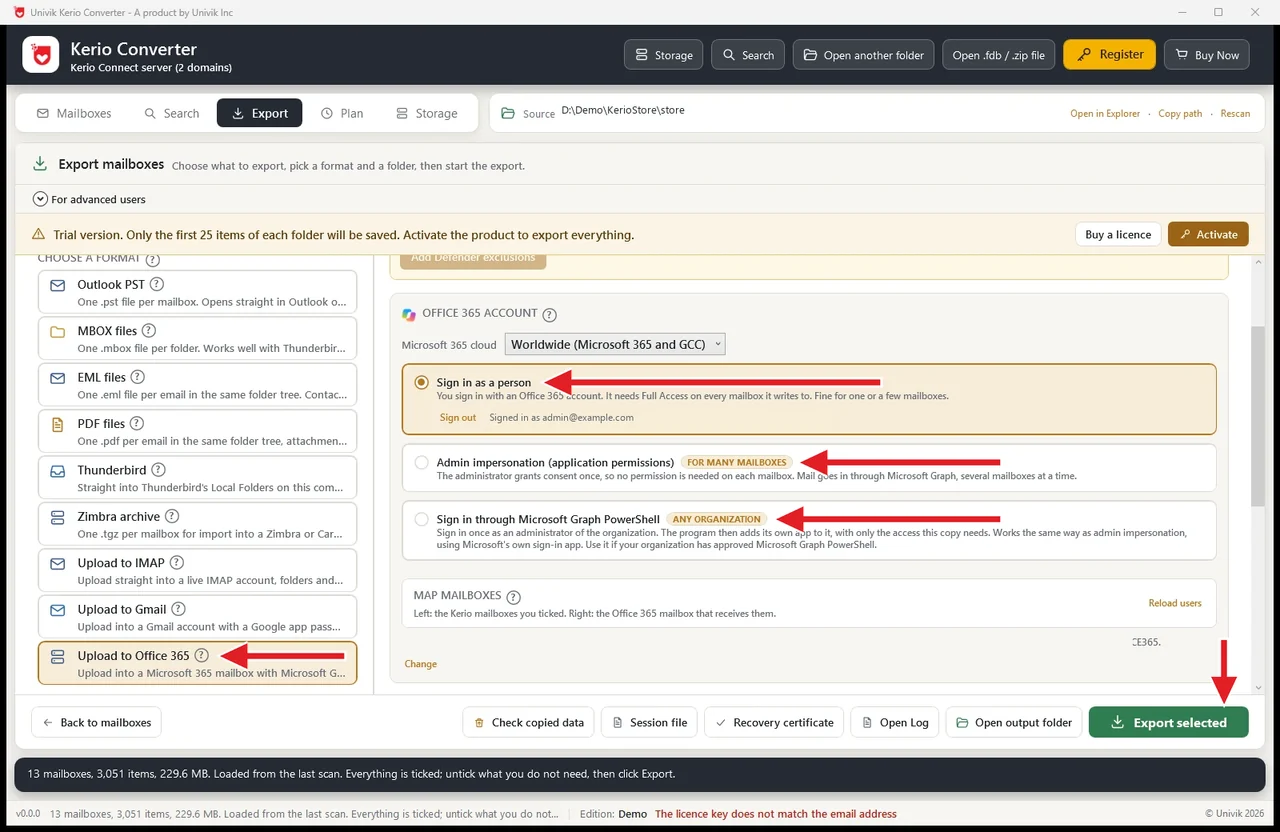
The Office 365 tab shows three sign-in options above the list that pairs each mailbox with a user. - Check one mailbox first. Send one mailbox in the trial and open it in Outlook on the web. Compare the folder list with the one in your copy before you move the rest.
Limitations: in the trial you can open and search every mailbox, but each folder stops at 25 items. I did not move a mailbox into a Microsoft 365 account for this article. I cannot report the speed or which item types arrive there, so test one mailbox before you plan the rest. The converter needs Windows 11 or Windows 10.
Your store copy opens read-only on Windows and Office 365 is one of the targets, so the old server can stay off while you move the mail.
Download Free Trial Select a Licence - From $299Send one mailbox to a test user in your trial, then check its folders in Outlook on the web before you plan the rest.
What If Your Kerio to Microsoft 365 Migration Fails or Skips Items?
Most problems come from the sign-in, item types or the size limit. If you see an error, note the exact message before you change anything, because the exact wording of the message helps you find the right cause.
Do this: Check the UserName and Password columns first. Microsoft says each row needs a valid sign-in for the source server. A changed password makes the sync fail.
Do this: Treat them as a separate step. GFI says a CSV file can import contacts but not mail. It describes only a manual .ics export for calendars.
Do this: Look for it in the store copy. Microsoft says the maximum message size that can be migrated is 35 MB, so save that message as an .eml file and send it another way.
If an export to Microsoft 365 still fails, contact Univik support and tell them the sign-in option you chose and your Kerio Connect version.
What Is This Kerio to Office 365 Guide Based On?
On November 20, 2026 I read five pages. The Microsoft pages are Microsoft on IMAP migration, Microsoft on IMAP CSV files and Microsoft on IMAP troubleshooting. The GFI pages are GFI on Microsoft 365 migration and GFI on moving content out of Kerio. The IMAP pages show different update dates, so I took limits from the troubleshooting page and CSV rules from the CSV page.
Microsoft changes these pages, so open the live page before you create a batch. If a number in your Microsoft 365 account differs from this guide, trust the live page. If you are the Microsoft 365 admin, you can compare each limit with your own admin center. I did not perform a migration for this article, so everything about the IMAP batch comes from Microsoft and GFI.
- Microsoft says an IMAP migration moves only items in the inbox and other mail folders.
- Contacts, calendar items and tasks need a separate step when you use IMAP.
- Microsoft documents 500,000 items per mailbox and a 35 MB maximum message size.
- GFI describes no official tool for moving mail out of Kerio Connect.
- A store copy lets you start the move when the Kerio server is off.
FAQ: Migrate Kerio to Office 365
How do I migrate Kerio to Office 365?
Create the users in Microsoft 365 first. If your Kerio server is still switched on, use Microsoft's IMAP migration with a CSV file. If the server is off, copy the store folder and send the mailboxes from the copy with a Windows converter.
Does the IMAP migration move Kerio contacts and calendars?
No. Microsoft says only items in the inbox and other mail folders can be migrated. Contacts, calendar items and tasks need a separate step.
What are the Microsoft 365 IMAP migration limits?
Microsoft says a maximum of 500,000 items can be migrated from a mailbox and the maximum message size is 35 MB. One CSV file can have up to 50,000 rows and 10 MB.
What does the IMAP migration CSV file contain?
The IMAP migration CSV file has three columns named EmailAddress, UserName and Password. EmailAddress is the Microsoft 365 mailbox. UserName and Password are the sign-in on your Kerio server, so the file is only a list of users and sign-ins with no mail in it.
Can I migrate Kerio Connect to Microsoft 365 while the server is off?
Yes. Univik Kerio Converter opens a store copy on Windows and has an Office 365 tab. The IMAP batch needs a server that Microsoft 365 can reach. In the trial, each folder ends at 25 items.
Does Kerio Connect have an official tool to migrate to Microsoft 365?
No. GFI describes no official tool for moving mail out of Kerio Connect and adds that GFI Support does not assist with the migration itself.
Can I import a Kerio PST into the new Outlook?
No. GFI says importing a mailbox or calendar from a PST is not supported in the new Outlook. Use classic Outlook for that step.
How often does the Microsoft 365 IMAP migration sync?
Microsoft says the source and Microsoft 365 synchronise once a day while the batch is open. After you delete the batch, mail that reaches your Kerio server is no longer copied.

I read Microsoft Learn and GFI for the IMAP steps, the CSV rules and the limits.