Quick Answer
If you want Thunderbird to read Kerio mail, you can use an IMAP account or a local copy. An IMAP account needs a Kerio server that answers. Messages stay on the server unless a folder is set to download automatically. A local copy keeps the messages in your own Thunderbird profile.
A Kerio store contains .eml files and not MBOX files, so a store copy needs a conversion before Thunderbird can use it.
When you import Kerio mail into Thunderbird, the first question is whether the Kerio server still answers. An IMAP account in Thunderbird reads the mail from the server. A local copy keeps the messages in your own Thunderbird profile, which is the folder where Thunderbird stores your mail and settings, so it works after the server is gone. I read Mozilla's profile page and the Thunderbird source docs. Those two pages explain why an IMAP account and a local copy end up with different results on your PC.
- If your Kerio server still answers, add an IMAP account first, but treat it as a viewer and not as a copy.
- With the server off, put a copy of the Kerio mail folder, called the store folder, on a second disk before you do anything else.
- If you plan to copy a Thunderbird profile, close Thunderbird first, as Mozilla says.
How Can You Import Kerio Mail Into Thunderbird?
The table lists three ways and shows what each one needs and what you end up with in Thunderbird.
| Way | What it needs | What you get in Thunderbird |
|---|---|---|
| IMAP account | A Kerio server that answers and the user password. | Folders that show what is on the server. Messages download only for folders set to download automatically. |
| Import an MBOX file | MBOX files for the folders, which a Kerio store does not contain. | Folders in Thunderbird. A hand import can leave empty folders, so test with a small file first. |
| Store copy and a converter | A spare-disk copy of your Kerio store folder and a Windows PC to open it on. | The mail from your copy, which you check after a test export. |
Does an IMAP Account Give You a Copy of Your Kerio Mail?
An IMAP account is the quickest start if the server answers, but it is not a backup. The Thunderbird source docs say that messages of an IMAP folder are stored locally only if the folder is set to download automatically. Otherwise the local store stays empty and each message downloads when you open it.
If your Kerio server is switched off or shut down, an IMAP account stops working. Any folder that Thunderbird did not download then has nothing to show. If you want to check your own setup, switch off the network and open an old message. A message that was never downloaded will not open.
Where Does Thunderbird Keep Local Mail on Windows?
Mozilla's profile page gives the profile folder on Windows as C:\Users\<your Windows login username>\AppData\Roaming\Thunderbird\Profiles\. To reach it from inside Thunderbird, open the menu, then Help, then Troubleshooting Information and select Open Folder next to Profile Folder. Mozilla tells you to shut Thunderbird down before a profile is copied or moved.
The Thunderbird source docs explain the format of the message files. A folder is stored as an mbox file or as a maildir directory, which is a folder with one file per message. Mbox is the default for local storage. An mbox file contains a whole folder of messages. Each folder also has an .msf file, a database of message headers. When you plan an import, you need the messages themselves and not only the .msf files.
If you try to bring an MBOX file in by hand, expect some trouble. An import by hand can leave folders that look empty, so test with a small file first. A Kerio store does not contain MBOX files at all. It keeps each message as a separate .eml file. For the layout of a Kerio store, read where Kerio Connect keeps its messages.

How to Send Kerio Mail to Thunderbird From a Store Copy
If the server is gone, your source is a copy of the store folder. Univik Kerio Converter opens the copy on a Windows PC and includes a Thunderbird tab, so you do not have to convert the .eml files by hand. The tab shows a status line that tells you whether Thunderbird is closed.
- Keep the files. Put a full copy of the Kerio store folder on a spare disk while the old server is off.
- Close Thunderbird. Mozilla tells you to shut Thunderbird down before a profile is copied or moved. The converter shows the status of Thunderbird on its tab.
- Load the copy. Start the app and use Open Kerio Connect Folder. Browse to the spare disk and select the mailboxes you want.
- Choose Thunderbird. Go to the Export tab and select Thunderbird. The tab shows the detected profile and its status.
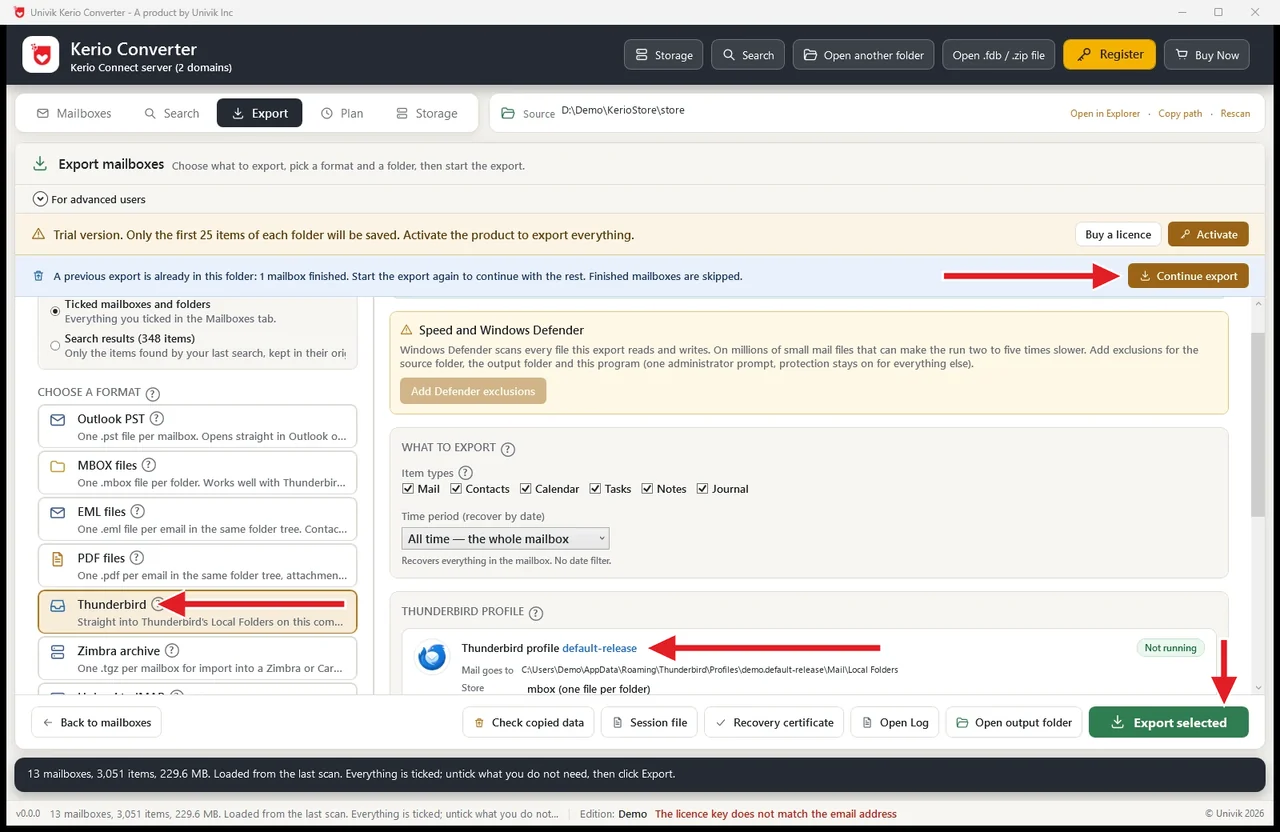
The status line on the Thunderbird tab shows whether Thunderbird is closed. - Open one result. After a test export of one mailbox, start Thunderbird and look for its folders. Compare them with the folder list in your copy.
Limitations: the trial lets you read and search the whole copy. An export stops after 25 items per folder. I did not open an exported folder in Thunderbird for this article, so I cannot tell you where each folder appears there. Test with one mailbox before you move the rest. The converter needs Windows 11 or Windows 10.
The converter reads your store copy on Windows and has a Thunderbird target, so you do not need to convert each .eml file yourself.
Download Free Trial Select a Licence - From $299Send a single mailbox through the trial, then look at it in Thunderbird before you schedule the rest.
What If Thunderbird Shows Empty Folders After the Import?
If the folders appear without messages, try the three checks in order, starting with the cheapest.
Do this: Close Thunderbird, then start it again and check the folder. A hand import can leave folders without messages, so test with one small mailbox.
Do this: Open the folder settings and look at the download option. The source docs say an IMAP folder stores messages locally only if it downloads automatically.
Do this: Open Troubleshooting Information from the Help menu and select Open Folder next to Profile Folder. Mozilla describes this path.
If Thunderbird still shows no messages, contact Univik support and tell them the Thunderbird version and where you looked.
Which Pages Back This Kerio to Thunderbird Guide?
On November 20, 2026 I opened two pages. They are Mozilla on profiles and Thunderbird source docs on folder storage. The Mozilla page was last updated on September 13, 2025 and the source docs on November 17, 2026.
The Mozilla page does not mention Local Folders or mbox files, so the mbox details in this guide come from the source docs. For anything about your own Thunderbird, check the folder yourself.
- An IMAP account in Thunderbird reads from the server and is not a backup.
- The Thunderbird source docs say IMAP messages are stored locally only for folders set to download automatically.
- Mozilla gives the Windows profile folder as AppData\Roaming\Thunderbird\Profiles and says to close Thunderbird before you copy it.
- A Kerio store keeps .eml files, so it needs a conversion before Thunderbird can use it as local mail.
- Test one mailbox before you move the rest.
FAQ: Import Kerio to Thunderbird
How do I import Kerio emails into Thunderbird?
Add an IMAP account if the Kerio server still answers. If it does not, copy the store folder first. Then send the mailboxes from that copy through a Windows converter with a Thunderbird target.
Does Thunderbird keep a local copy of my Kerio IMAP mail?
Only for folders set to download automatically. The Thunderbird source docs say that otherwise the local store stays empty and messages download on demand.
Where is the Thunderbird profile folder on Windows?
Mozilla gives C:\Users\<your Windows login username>\AppData\Roaming\Thunderbird\Profiles\ for the profile folder. You can also open it from Help, Troubleshooting Information, Open Folder.
Which file format does Thunderbird use for local folders?
The Thunderbird source docs say a folder is an mbox file or a maildir directory, which is a folder with one file per message. Mbox is the default for local storage.
Does a Kerio store contain MBOX files?
No. A Kerio store keeps each message as a separate .eml file, so you need a conversion step before Thunderbird can use it as local mail.
Can I import Kerio mail into Thunderbird without the server?
Yes. On a Windows PC, Univik Kerio Converter loads a store copy and has its own Thunderbird tab. The trial exports up to 25 items per folder.
Should I close Thunderbird before I copy its profile?
Yes. Mozilla tells you to shut Thunderbird down before a profile is copied or moved.
Why does Thunderbird show folders but no messages after an import?
An import by hand of MBOX or EML files can leave folders that look empty. Test with one small mailbox and compare the folder in Thunderbird with your copy.

I read Mozilla's profile page and the Thunderbird source docs for the profile path and the storage formats.