Quick Answer
If you need to find where Kerio Connect keeps your emails, look in its main store folder, where each message is a separate .eml file. The default store is C:\Program Files\Kerio\MailServer\store on Windows, /opt/kerio/mailserver/store on Linux and /usr/local/kerio/mailserver/store on Mac.
Each mailbox sits at mail\domain\user and folders like INBOX have a #msgs subfolder with the messages. The path can differ if someone changed it during installation.
If your Kerio Connect server is old, broken or about to be replaced, you may need to find its mail on disk before anyone switches it off. Kerio does not keep one file for each mailbox. It keeps each message as a separate file, so you need to know which folder to open and what the file names mean.
Everything in this guide comes from three GFI help pages that I used for this guide. They cover store folder locations, exporting contacts from raw data and restoring backup content. I used only what those pages say and left out anything they do not cover.
- If your Kerio Connect server still starts, stop the Kerio Connect service and copy the whole store folder to another disk before you do anything else.
- If the server no longer starts but its disk is readable, attach the disk to another computer and look for the folders listed in the folder table.
- If a backup ZIP is all that is left, unzip it. GFI shows the same layout under an
@backup\storefolder.
Where Is the Kerio Connect Store on Windows, Linux and Mac?
GFI's store directory page gives one default path for each system. The table lists them with the folders you should find inside. If your server uses Windows, start with the first row. If it uses Linux or Mac, take the matching row instead. If a path on your server differs from the table, trust your own disk over the table.
| System | Default store path | Folders to find inside |
|---|---|---|
| Windows | C:\Program Files\Kerio\MailServer\store | mail, archive and lists |
| Linux | /opt/kerio/mailserver/store | mail, archive and lists |
| Mac | /usr/local/kerio/mailserver/store | mail, archive and lists |
The page adds that the store path is the default and can differ if it was changed during installation. If the default folder is missing, search the disk for a folder that has a mail folder inside, because that is how GFI describes the layout.
What Is Inside the Kerio Connect Store Folder?
Each subfolder of the store has its own purpose. The table tells you which one you need. When you look for your own mail or a colleague's mail, open the user folder, which is named after the username. A mailbox for anna@example.com sits in mail\example.com\anna.
| Folder | What it keeps |
|---|---|
mail\domain\user | The mailbox of one user. The domain and user parts come from the username. |
mail\#public | Global public folders that are common to all domains. |
mail\domain\#public | Public folders of one domain. |
mail\domain\resource folder | Files of one resource, which has its own folder apart from user mailboxes. |
archive | Archived messages. This is the default location. Your server may use another path chosen in its configuration. |
lists | Mailing list archives, messages that wait for a moderator and list admin files. |
What Do #msgs Folders and Hex .eml Names Mean?
Open a folder of a mailbox, for example INBOX or Sent Items. It has a subfolder named #msgs and the messages are inside that subfolder. GFI's restore page shows this layout inside a backup: @backup\store\mail\domain.com\username\INBOX\#msgs, with the same pattern for Sent Items, Calendar and Contacts. Every email and contact is an .eml file with a random hex name (a short code of digits and letters), for example 0000000a.eml.
If you look at a hex name like 0000000a.eml, you learn nothing about the subject or the date, so the folder is the only label a message has. Keep the folder names when you copy files, because you cannot rebuild them from the file names. Do not rename files in your original store. The only rename GFI mentions is for a restore, where a file whose name is already taken can get another hex name.
Next to #msgs, GFI's restore steps name five more files that a folder needs: index.fld, search.fld, status.fld, metadata.dbb and metadata.dbo. An .eml file is a standard email message file, so most mail programs open one. If you need only one message, you can view a single .eml file without installing anything.
Where Does Kerio Connect Keep Contacts and Calendar Items?
According to GFI, contacts are .eml files that contain vCard data, a standard format for contact details. Each contacts folder has its own #msgs subfolder with index and search files. When you need your address book, the table shows where to look.
| Contact type | Path under the store |
|---|---|
| User contacts | mail\DOMAIN\USER_NAME\Contacts\#msgs |
| Global public contacts | mail\#public\Contacts\#msgs |
| Domain public contacts | mail\DOMAIN\#public\Contacts\#msgs |
GFI's contacts page does not say where calendar items are stored. Its restore page lists a Calendar\#msgs folder next to Contacts in the same layout, so calendar items appear to be .eml files too. If you need calendar items, look for Calendar\#msgs in the same user folder.

Read a Copy of the Kerio Store on Windows Without the Server
Once you have a copy, Univik Kerio Converter opens it on Windows, so the Kerio Connect server can stay switched off. My test store has 13 mailboxes with 3,051 items. The Mailboxes screen lists each mailbox with its item count, folder count and size. The list shows what the copy contains before any export starts. If you want to compare, open one mailbox in your copy and check its folders against your server. You can open the copy as often as you like because the converter only reads it, so your store stays as it was.
- Copy the store. Stop the Kerio Connect service and copy the store folder to your PC. You can also copy one domain folder or one user folder.
- Open it. Start the converter and select Open Kerio Connect Folder. It accepts the whole store, one mail folder, a domain folder or a user folder. It reads your copy and leaves the original files unchanged.
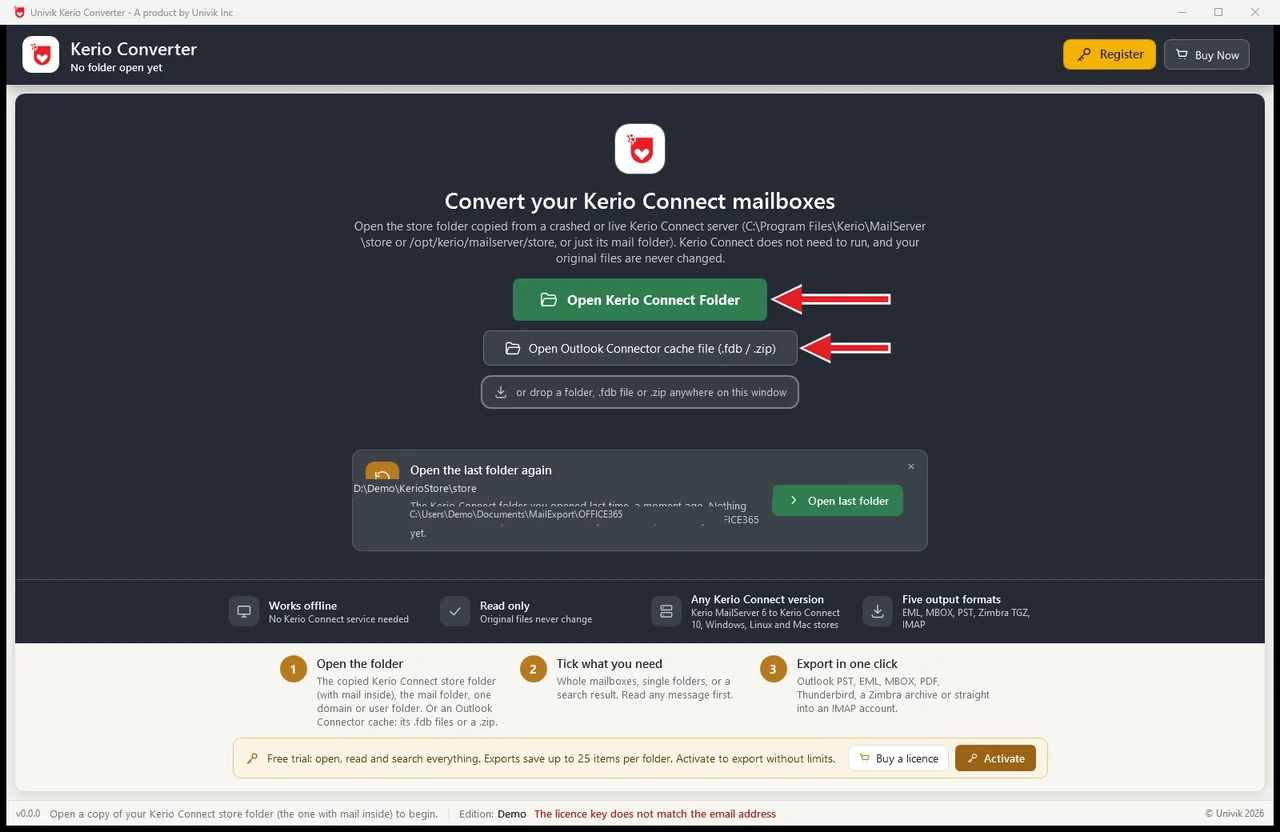
Open Kerio Connect Folder reads a store copy. Dragging a folder onto the window works as well. - Check the mailboxes. The Mailboxes list shows each mailbox with its items, folders and size. Keep the mailboxes you need selected.
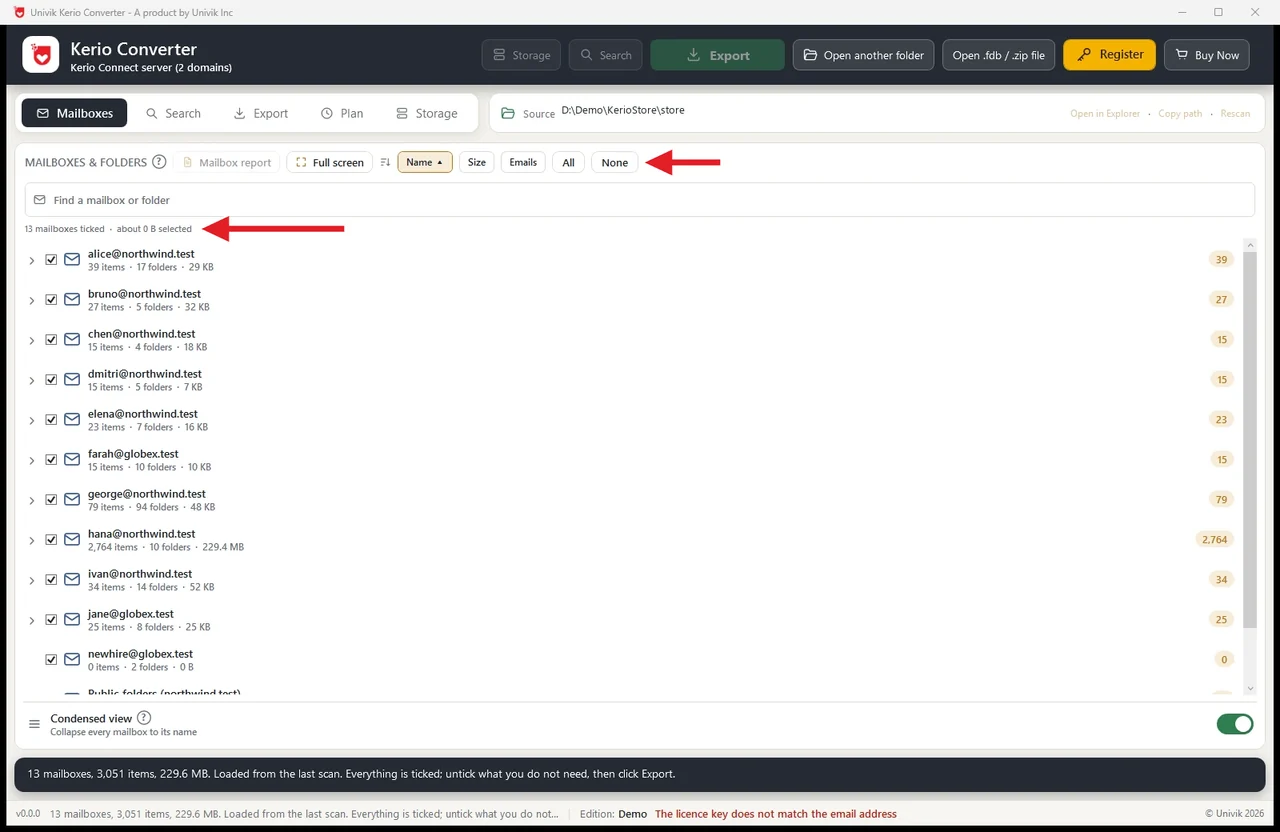
Each row is one mailbox. The All and None buttons select or clear every row. - Browse the folders. Open a mailbox to see INBOX, Sent Items, Contacts, Calendar, Tasks and Notes in one folder tree.
- Save what you need. Open the Export tab and choose a format. Nine export formats are listed, from PST and MBOX to Gmail and Office 365.
Limitations: in the trial you can open, read and search every mailbox. An export includes only the first 25 items in each folder, so test one mailbox before you export in bulk. The converter needs Windows 11 or Windows 10.
Kerio Converter opens a copy of the store folder read-only and lists every mailbox, so you can see what the server kept before you decide where it goes.
Download Free Trial Select a Licence - From $299Open one mailbox in the trial and compare its folders with the user folder in your store copy.
What If the Kerio Store Folder Looks Wrong or Empty?
Do this: Check whether the store was moved during installation, because GFI says the default name can differ. Search the disk for a folder that has a mail folder inside.
Do this: Open the archive folder next to mail. GFI lists it as the default location for archived messages, so look there for mail that Kerio archived.
Do this: Keep the folder names with the files and read the copy in a program that shows the folder tree. A name like 0000000a.eml shows no subject or date.
If the folders still look wrong, contact Univik support with your Kerio Connect version and the path you opened.
Which GFI Pages Back This Kerio Store Folder Guide?
I read three GFI pages on November 20, 2026: Store Directory Locations, Exporting Kerio Connect Contacts From Raw Data and Manually Restoring Backup Content. I used only GFI's own help pages because Kerio forum posts are mostly old and some no longer open. If a detail matters for your server, check it on the matching GFI page before you rely on it.
None of those pages describes a #deleted folder or a properties.fld file, so I left both out. I also have not opened a live Kerio Connect server for this article. The facts come from GFI's pages and from a copy of a test store that I opened in Windows. You can repeat each step on your own copy.
- Kerio Connect keeps every message and contact as its own .eml file with a random hex name.
- The default store is C:\Program Files\Kerio\MailServer\store on Windows, /opt/kerio/mailserver/store on Linux and /usr/local/kerio/mailserver/store on Mac.
- You find user mailboxes in mail\domain\user. Public folders sit in mail\#public and mail\domain\#public.
- Contacts are .eml files with vCard data in a Contacts\#msgs folder.
- You can read a copy of the store folder on Windows while your Kerio Connect server stays switched off.
FAQ: Where Does Kerio Connect Store Emails?
Where does Kerio Connect store emails?
Kerio Connect stores emails as .eml files in its store folder. The default store is C:\Program Files\Kerio\MailServer\store on Windows, /opt/kerio/mailserver/store on Linux and /usr/local/kerio/mailserver/store on Mac. User mailboxes sit in mail\domain\user inside that folder.
Why do Kerio Connect emails have names like 0000000a.eml?
Kerio Connect gives every message and contact a random hex file name. GFI shows 0000000a.eml as an example. The name shows no subject or date, so the folder tells you where the item belongs.
Where does Kerio Connect store contacts and calendars?
Contacts are .eml files with vCard data in a Contacts\#msgs folder, for example mail\DOMAIN\USER_NAME\Contacts\#msgs. GFI lists Calendar\#msgs next to Contacts in the same layout, so calendar items appear to be .eml files too.
Can I read a Kerio store without Kerio Connect installed?
Yes. The messages are standard .eml files, so you can open a single one in most mail programs. Univik Kerio Converter opens a copy of the whole store folder on Windows, lists the mailboxes and keeps the folder names, so the Kerio server can stay switched off.
Where is the Kerio Connect archive folder?
GFI gives the archive folder hierarchy as the archive folder inside the store by default. The page adds that the archive directory is the one chosen during configuration, so check that setting if the default folder is empty.
Why is my Kerio store folder in a different place?
GFI says the store path is the default and can differ if it was changed during installation. Search the disk for a folder that has a mail folder inside it.
Should I stop Kerio Connect before I copy the store?
Yes. Stop the Kerio Connect service before you copy the store folder, then copy the whole folder to another disk and work on the copy.
How do I check a copied Kerio store?
Open the copy and compare the mailbox list with the users on your server. Then open one folder in a mailbox and compare its item count with the user folder before you rely on the copy.

GFI's Kerio Connect support pages are the source of the store paths, file names and contact folders.