Quick Answer
If you move Kerio Connect to Google Workspace with the data import tool from Google, only email and label data move (a label is the Gmail version of a folder), so calendars and contacts stay behind. Each of your users needs an IMAP password. One import takes up to 100 IMAP users.
When the Kerio server cannot answer, a copy of its store folder still gives you the mail to send to Gmail.
When your company switches from Kerio Connect to Google Workspace, Google gives you two admin tools that read a mailbox over IMAP, the usual protocol that mail apps use to fetch mail from a server. Both need the Kerio server to answer. If the server is off or its license has lapsed, you need to start from the mail files instead. Those files sit in a copy of the store folder, the place on disk where all Kerio mail sits. I read three Google pages and one GFI page. This guide shows what each way moves and where it stops.
- If you plan to use the data import tool, confirm that your Kerio server is switched on and that IMAP is enabled for each user.
- If your Kerio server is off, copy its store folder to a second disk first.
- If you need calendars and contacts, plan separate steps, because Google says both tools move email and label data only.
Which Ways Move Kerio Mail to Google Workspace?
The table lists the ways side by side. When you compare them, look at the second column first, because it decides whether your Kerio server has to be switched on.
| Way | What it needs | What moves | Where it stops |
|---|---|---|---|
| Google data import tool | A Kerio server that answers over IMAP, a super admin and an IMAP password for each user. | Email and label data. | Up to 100 IMAP users in one import. Calendars and contacts stay behind. |
| Google migration tool for Exchange | A Windows PC, the server type and port, a service account file and a super admin address. | Email and label data. | Needs a Kerio server that answers over IMAP. Google suggests it when the server has no trusted TLS certificate or cannot be reached from Google. |
| Store copy and Windows software | The Kerio store folder on a PC plus a Google sign-in. | The item types you select before you export. | The trial ends each folder at 25 items. Test one user first. |
How Does Google's Data Import Tool Read a Kerio Mailbox?
Google's page on importing from an IMAP account places the tool in the Admin console under Data, then Data import and export, then Data import. Only a super admin, which is the main administrator account of your Google Workspace, can start it. The tool connects to your Kerio server by IMAP, so IMAP must be on for the Kerio account and for the Workspace account.
Google says the data import tool needs a server with a trusted TLS certificate, which is the security certificate for secure connections. The server must also accept connections from Google's IP ranges. You enter the server address and select Test connection. Each user needs an IMAP password. Google adds that some IMAP servers require an application specific password, which is a separate password made for one app. If you do not know whether each user has an IMAP password, check that before you plan the batch.
With up to 20 users you can type the accounts in by hand. With more you upload a CSV file, which Google says must be smaller than 128 MB. A single import takes up to 100 IMAP users, so a store with 250 mailboxes needs three imports. My demo store has 13 mailboxes, so it would fit in one.
You choose a start date. Google says the tool imports messages from that date up to the day you start. Two options decide whether deleted and spam messages come along. If new mail reaches Kerio after the import, Google offers a follow-up import, which it calls a delta import, for what arrived since.
What Does Google's IMAP Migration Leave Behind?
Google's page on IMAP migration says both tools move email and label data only. Calendar events, contacts, Drive files and other content stay behind. If you rely on your Kerio calendars and address books, you must move them in separate steps. Look at the calendar of your largest user first, so you know how much needs a separate move.
GFI's page on Microsoft 365 migration also covers contacts and calendars. It points to a manual .ics export for calendars and to workaround steps for contacts. GFI also says Kerio provides no official tool for moving mail out. When you have many users, the same page suggests a third-party utility.
Google Workspace Migration for Microsoft Exchange (GWMME) is the second tool on Google's page on mail from other accounts. It works on Windows as a program or from the command line. It asks for the server type, the security option and the port, which is 993 for SSL. For Cyrus or Courier servers you enter INBOX as the IMAP path prefix. It also needs a credentials file for a Google service account, which is an account that programs use to sign in to Google. It needs the address of a super admin too.

How to Send Kerio Mailboxes to Gmail From a Store Copy
If your Kerio server cannot answer, a copy of its store folder still has your messages. Univik Kerio Converter reads that copy on Windows and lists Gmail as one of nine targets. You sign in to Google from the Export tab, so no IMAP connection to Kerio is needed.
- Keep the folder. Copy the store folder from the stopped server to a second disk. Use that disk for the rest of the steps.
- Open it. Start the app, then use the Open Kerio Connect Folder button to browse to that disk.
- Choose Gmail. On the Export tab, select Gmail. The screen offers a Google sign-in or an app password, an OAuth toggle and an option named Export in existing folders.
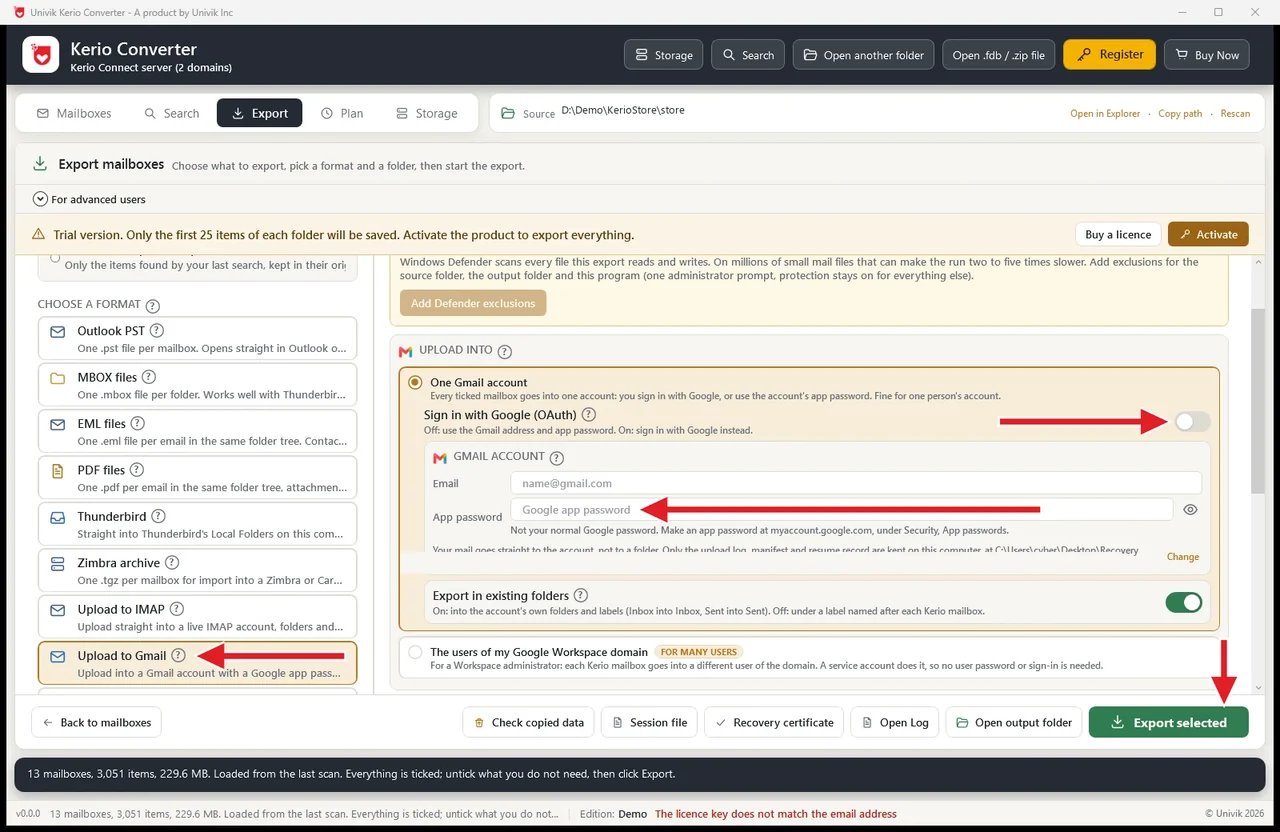
The Gmail tab shows the sign-in choices at the top and a separate option for a Workspace admin with many users. - Read every option. Check the names of the options on the screen before you start, because they decide where the mail goes. The screen also shows an option for a Workspace admin who moves many mailboxes.
- Test with one user. Send a single mailbox to a test Gmail account during the trial. Open it in Gmail and compare its folders with your copy.
Limitations: the trial lets you browse and search all mailboxes. Each folder ends at 25 items. I did not send a mailbox to a Google Workspace domain for this article, so I cannot say how folders appear as labels. Test one user before you plan the rest. The converter needs Windows 11 or Windows 10.
The converter reads a copy of your store folder and leaves the original alone. Gmail is one of nine targets, so you do not need an IMAP connection to the old server.
Download Free Trial Select a Licence - From $299Use the trial on one mailbox and look at the folders in Gmail before you plan the full move.
What If Your Kerio to Gmail Import Fails or Looks Incomplete?
Most failures come from the connection, the item types or the size of the batch. If you see an error, copy its exact text before you change a setting. If the import stops, look at the report in the Admin console first. The error text helps you tell which of the three causes applies. After you fix the cause, test again with one user.
Do this: Select Test connection and read the error. Google says the Kerio server needs a trusted TLS certificate and must accept connections from Google IP ranges.
Do this: Move them in separate steps. Google says both tools move email and label data only. GFI points to a manual .ics export for calendars and workaround steps for contacts.
Do this: Split the list into groups of 100 or fewer. Google says one import takes up to 100 IMAP users. A CSV file must be smaller than 128 MB.
If an export to Gmail still fails, contact Univik support. Include the sign-in option you used and your Kerio Connect version.
Which Sources Back This Kerio to Google Workspace Guide?
I read four pages for this topic on November 20, 2026. The Google pages are Google on importing from IMAP, Google on IMAP migration and Google on mail from other accounts. The GFI page is GFI on Microsoft 365 migration.
Google does not describe on these pages how IMAP folders become labels, so this guide does not either. If you manage the domain yourself, check the live pages before you plan a batch, because the limits change.
- Google says its IMAP tools move email and label data only.
- One data import takes up to 100 IMAP users. A CSV file must be smaller than 128 MB.
- Each user needs an IMAP password. Some servers also require an application specific password.
- GFI says Kerio has no official tool of its own for moving mail out and points to third-party utilities for large moves.
- A store copy gives you a starting point when the Kerio server cannot answer.
FAQ: Migrate Kerio to Google Workspace
How do I migrate Kerio to Google Workspace?
If your Kerio server answers over IMAP, a super admin can use the Google data import tool in the Admin console. Without a server, you start from the files in a copy of your store folder and use a Windows converter.
Does Google move Kerio calendars and contacts?
No. Google says the data import tool and GWMME move email and label data only. Calendar events and contacts need separate steps.
How many Kerio users can I import into Google at once?
Google says one import takes up to 100 IMAP users. With more than 20 users you upload a CSV file, which must be smaller than 128 MB.
Do I need each Kerio user's password for the Google import?
Yes. Google says each user needs an IMAP password. Some IMAP servers also require an application specific password.
Can I move Kerio Connect mail to Gmail without the server?
Yes. Univik Kerio Converter reads a store copy from your PC. Its Export tab has a Gmail target. Google's tools need a server that answers over IMAP. Trial exports end every folder at 25 items.
Is there an official Kerio tool that moves mail to Google?
No. GFI says Kerio has no official tool of its own for moving mail out and suggests third-party utilities when you have many users.
Are Kerio folders moved as Gmail labels?
Google says the tools move email and label data. Its pages do not describe how IMAP folders map to labels. Test one user and compare the result before you import the rest.
What is the IMAP port for the GWMME migration tool?
Google says the SSL port is 993. For Cyrus or Courier servers you enter INBOX as the IMAP path prefix.

I read three Google Workspace pages and one GFI page for the tools, limits and IMAP settings.