Quick Answer
You can open a Kerio Connect backup without restoring it. The backup is a ZIP archive. Mail inside it is stored as .eml files. A restore with the kmsrecover tool overwrites the data store, so reading an extracted copy is the safer first step.
A Kerio differential backup stores only what changed since the last full one, so start from a full backup.
If you have a Kerio Connect backup and the server is gone, you do not have to restore the whole thing to read one mailbox. GFI's recovery tool replaces data, but the backup itself is an ordinary ZIP archive with message files inside. I opened four GFI pages to check what the archive contains and what a restore overwrites.
- If this ZIP is your only copy, make a second one on another disk before you open it.
- If the server is still live, do not start kmsrecover without options on that server, because that overwrites the data store.
- If you only need mail, you can read an extracted store folder and leave your server alone.
What Is Inside a Kerio Connect Backup ZIP?
GFI's data recovery manual lists the parts of every backup archive. The table repeats that list in plain words and marks the part where your mail sits.
| Part of the ZIP | What it is | Do you need it for mail? |
|---|---|---|
@backup\store | The message store, where the mailboxes are kept. | Yes. This is where the mail sits. |
@backup license, sslca, sslcert | The license and the SSL certificate files. | No. |
mailserver.cfg and users.cfg | Server settings and user accounts. | No, but users.cfg helps you match mailbox folders to user names. |
.version.txt and .summary.txt | Version information about the backup tool and a summary of the backup. | No. |
A file name tells you which type of backup you have. GFI's manual gives the letters F for a full backup, D for a differential backup and C for a manual backup or backup copy. Its example name is F20120118T220007Z.zip. The time in that name is GMT. If you see only D files in a folder, the full backup they build on is stored somewhere else.
Is a Differential Backup Enough to Read Your Mail?
If you rely on a differential backup alone, you can miss mail. GFI's backup configuration manual says a differential backup stores files that were added or changed since the last full backup. If a user's mail did not change after that full backup, you may not find that mail in the differential file.
GFI's "Backups and Data Recovery" article adds that the default schedule is one full backup on Sunday morning and a differential backup on each day of the week. So a Wednesday file may show you only a small part of your store. When you need a complete view of one mailbox, start from your newest full backup.
Why Does kmsrecover Overwrite Your Current Mail?
The recovery tool is called kmsrecover. GFI's manual says that if you start it without any option (an extra setting typed after the command), all items in your Kerio Connect data store are overwritten. The data store is the folder where your live server keeps its mail. You have to stop Kerio Connect first and start the tool from its install folder.
The support article says the same in other words. It says KMSRecover is not designed to merge backed up content with what is already there. It replaces all existing content with backed up data. The -b option makes a safety backup first, but the manual warns that this roughly doubles your store size.
The kmsrecover tool can limit a restore. The -u option recovers the data of one user and -f recovers one folder of that user. The -f option needs -d and -u as well. If you are working on a server that is still live, read the manual page before you try either one.

Can You Copy One User's Mail Out of a Backup by Hand?
GFI's manual restoration article describes a manual copy. That article covers a user who deleted mail from Sent Items, Deleted Items and INBOX. The mail sits in a backup as .eml files named with hexadecimal (hex) codes, which mix digits with the letters a to f, for example 0000000a.eml, under store\mail\domain.com\username\INBOX\#msgs.
GFI says to rename a file to the next hex name if the same name already exists. It also says to re-index the affected mailbox after the copy. That article assumes you have admin access to your Kerio Connect server. If the server is not there, you need a way to read the .eml files without it.
How to Open a Kerio Backup Without Restoring It
Once you have a backup ZIP, you can read it with Univik Kerio Converter on your Windows PC. The app opens a store folder read-only, so you work on an extracted copy and your original archive stays as it was.
- Copy the backup. Copy your newest full backup ZIP, which has a file name starting with F, to a spare disk.
- Extract the copy. Right-click the ZIP in Windows and select Extract All. Keep the folder names as they are.
- Find the store. Open your extracted
@backupfolder and look for astorefolder inside. - Load the folder. Start the app and select Open Kerio Connect Folder. Browse to your extracted store folder.
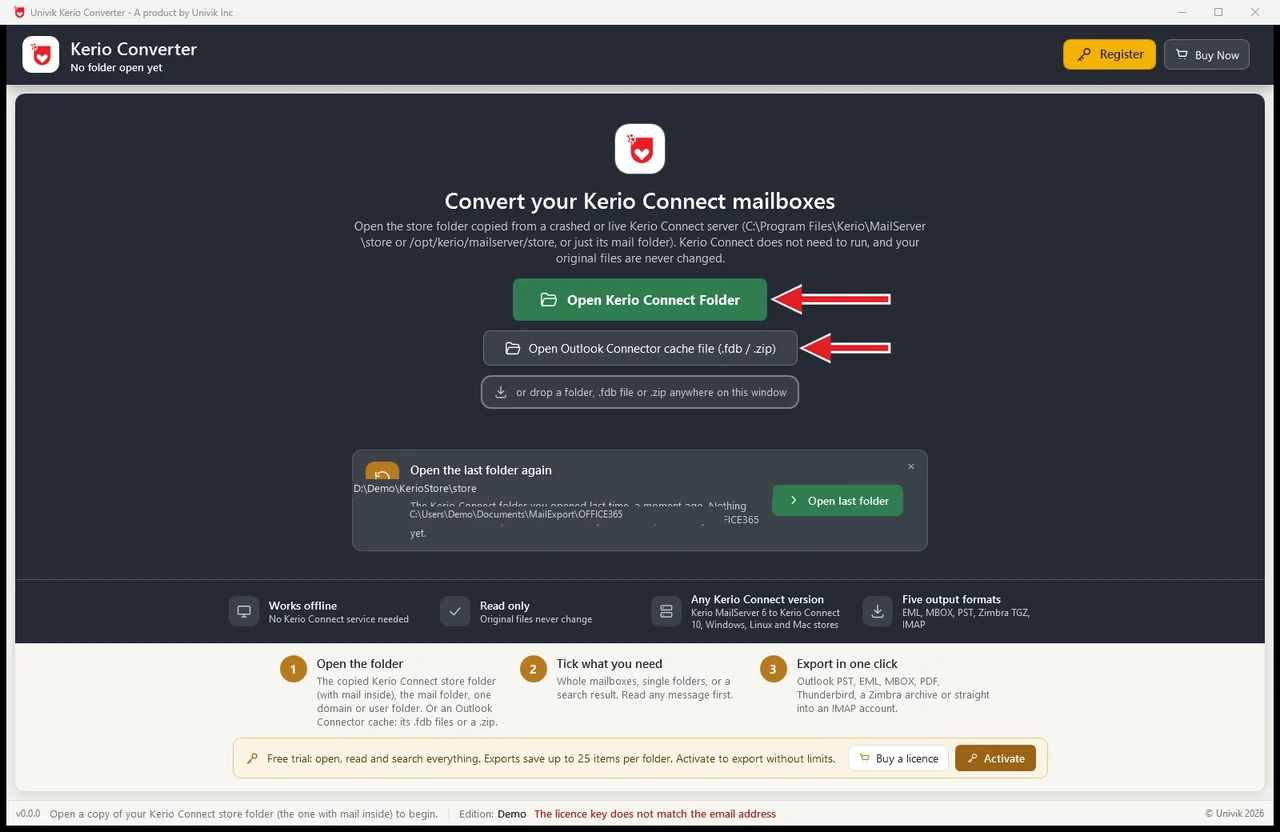
The first button on the start screen opens an extracted store folder. - Check one mailbox. Open the Mailboxes tab and compare its list with the users you expect. Preview one message before you export anything.
Limitations: I did not open the ZIP file itself in the converter for this article, so extract it first. I also did not combine a full backup with a later differential one. Use a full backup for a complete view and test one mailbox before you plan more. The converter needs Windows 11 or Windows 10.
The converter opens an extracted copy of the store read-only on Windows, so a backup can be checked before anyone replaces live data.
Download Free Trial Select a Licence - From $299Try a single mailbox with the trial and preview one message before any full export.
What If the Backup Looks Wrong After You Open It?
When something looks wrong, check the cheapest explanation first.
Do this: Check the file name. A D at the start means differential. GFI says those files contain only what changed since the last full backup. Open the full backup.
Do this: Leave them as they are. GFI says the .eml files are named with hex codes, for example 0000000a.eml.
Do this: Re-index the mailbox. GFI says the user needs to re-index the affected mailbox after a manual copy.
If a mailbox is still missing after these checks, contact Univik support and tell them which backup file you used.
Which GFI Pages Back This Kerio Backup Guide?
I opened four GFI pages on November 20, 2026. They are Data recovery in Kerio Connect, Configuring backup in Kerio Connect, Backups and Data Recovery and Manual Backup restoration for specific User emails. The manual pages show only a 2021 copyright line. The Backups and Data Recovery article has a March 18, 2025 publish date in its page data. The manual restoration article shows none.
None of the four pages names a Kerio Connect version number. They also do not say whether a restore needs the same version as your backup, so this guide does not say it either.
- A Kerio Connect backup is a ZIP with the store, the settings and the license files inside.
- GFI says kmsrecover without any of its options overwrites all items in the data store.
- A Kerio differential backup stores only what changed since the last full backup.
- The mail inside a backup is stored as .eml files with hex names.
- Extract a copy and read it read-only before you restore anything.
FAQ: Open a Kerio Backup Without Restoring
How do I open a Kerio backup without restoring it?
Copy the newest full backup ZIP to a spare disk and extract it. Then open the extracted store folder in a Windows converter that reads Kerio data read-only.
What is inside a Kerio Connect backup file?
GFI lists a ZIP with .version.txt, an @backup folder with the license, SSL files and the store, mailserver.cfg, users.cfg and .summary.txt.
What do the letters F, D and C mean in a Kerio backup name?
GFI gives F for a full backup, D for a differential backup and C for a manual backup or backup copy.
Does kmsrecover overwrite my current mail?
Yes. GFI says that without any of its options all items in the Kerio Connect data store are overwritten.
Can I restore only one user from a Kerio backup?
GFI describes a -u option for one user and a -f option for one folder of that user. The support article also says KMSRecover is not designed to merge content.
Is a differential Kerio backup complete?
No. GFI says a differential backup stores files added or changed since the last full backup.
Can Univik Kerio Converter open a Kerio backup?
Kerio Converter opens an extracted store folder on Windows. I did not test the ZIP file itself, so extract the archive first. The trial exports 25 items per folder at most.
Where does Kerio Connect keep messages inside a backup?
GFI shows .eml files under store\mail\domain.com\username\INBOX\#msgs, with hex file names.

The backup contents, file names and restore warnings come from four GFI pages that I opened.