Quick Answer
If you open your Kerio store, each message is already an .eml file, but its name is a hexadecimal code like 0000000a.eml. The name says nothing about subject or date, because those sit in the header fields, the lines at the top of the message inside the file. An export from a store copy keeps your folders together.
Copying single files works for a few messages and is a poor fit for a whole mailbox.
If you want your Kerio mail as .eml files, you may already have them, because Kerio saves every message as an .eml file in its store folder. I opened three pages to see how Kerio names those files and what an export adds. The short answer is that the names are hexadecimal (hex) codes, built from digits and the first six letters of the alphabet, so you get a message file but not a readable file name.
- If you only need a few messages, copying files from a backup may be enough.
- If you need your folders kept, use an export from a store copy.
- If you open the files in another program, test with the smallest folder first.
Why Are Kerio Emails Named Like 0000000a.eml?
GFI's manual restoration article shows mail as .eml files with hex names, for example 0000000a.eml. They sit in #msgs folders under a user folder. If a name is already taken, GFI says you can rename the file to another hex name that follows the pattern, 0000000b.eml in its example.
GFI's contacts to CSV article adds another case. GFI notes that contacts from personal and public folders can end up with the same file name, 00000001.eml for example. It recommends renaming one set before you combine them. The page is about contacts. Mail files from two different folders can clash the same way when you combine them.
What Is Inside an EML File?
RFC 5322 is the Internet standard for the format of an email message. It says a message is a set of header fields followed by an optional body, with an empty line between the two. Lines end with CR and LF (carriage return and line feed) and each line may have at most 998 characters.
Mail programs can open an .eml file because it follows the RFC 5322 format. It also means that a file name says nothing about subject or date, because those sit in the header fields inside the file.
If you sort a Kerio folder by file name, you sort by a hex number. GFI does not say whether that order matches the date of your messages, so check it on your own copy before you rely on it. If you need a date order, sort by the Date column in your mail program after you open the files.
| Part of the file | What RFC 5322 says | What it means for you |
|---|---|---|
| Header fields | Header fields come first and usually include sender, date and subject. | Subject and date sit inside the file. |
| Empty line | An empty line separates the header from the body. | Programs know where the text starts. |
| Line length | At most 998 characters per line, with 78 or fewer advised. | Mail programs expect lines of 998 characters or fewer. |
Can You Copy EML Files Straight From the Store?
You can copy them. GFI describes that method for restoring a user's deleted mail by hand. It says to copy files from a backup into the user's folders, rename a file if its name is already taken and re-index the mailbox, which makes Kerio rebuild its index. GFI describes the same copy for backups made with third-party tools. There you copy .eml files from the Sent Items and Deleted #msgs folders into the current folders. GFI describes this copy as a way to restore a user's deleted mail, with admin access to the server. The affected mailbox then needs a re-index.
Copying hex-named .eml files by hand is a poor fit for a whole mailbox. You would have to rebuild your folder tree yourself because hex names give you no folder or date information. An export that knows your folders keeps them together for you.

How to Export Kerio Mail to EML From a Store Copy
Univik Kerio Converter takes a store copy on Windows as its source and can save it to EML. Your original files stay as they are, because the app opens a copy read-only.
- Copy the store. Put a duplicate of the Kerio store folder on a separate disk.
- Load the copy. Open the app and choose Open Kerio Connect Folder. Browse to the folder you copied.
- Choose users. On the Mailboxes tab, select each user whose mail you want.
- Choose EML. Open the Export tab and select EML as the target.
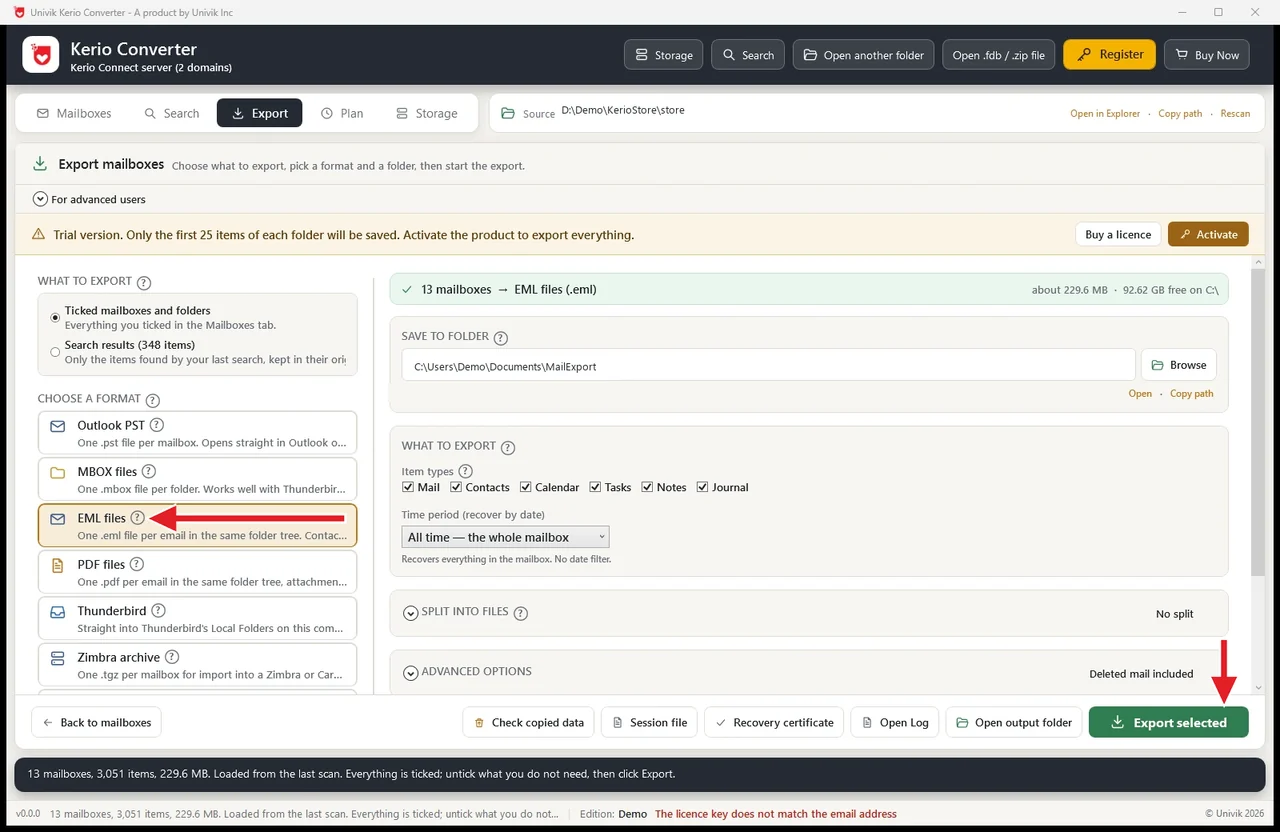
The Export tab lists EML as one of nine targets. - Check the result. Open one exported folder in the mail program you use and compare it with the folders listed in your copy.
Limitations: I did not record how the converter names exported files, so open one folder of results and look at the names before you export the rest. The converter needs Windows 11 or Windows 10.
Kerio Converter exports mailboxes from a store copy on Windows to EML and eight other targets.
Download Free Trial Select a Licence - From $299Export one mailbox in the trial and look at the file names before you export more.
What If Your EML Files Look Wrong?
If your files look off, test the simplest cause first.
Do this: You can give one another hex name that follows the pattern in that folder. GFI gives 0000000a.eml and 0000000b.eml as an example.
Do this: Open your file and read the header fields. RFC 5322 requires the date and the From line there and allows a subject.
Do this: Test with another mail program. RFC 5322 says lines must not pass 998 characters and should stay at 78 or fewer. A file that breaks this can show odd lines in some programs.
If an EML file still cannot be opened, contact Univik support and name the program you used.
Which Pages Back This Kerio EML Guide?
I opened three pages on November 20, 2026: two GFI articles and RFC 5322. The GFI articles are manual backup restoration for specific user emails and convert contacts eml files into a single csv file. RFC 5322 is dated October 2008. The first GFI page shows no date. The second one is dated March 18, 2025.
Export to EML and file naming are the only topics here. The folder layout of your store is explained in the guide to the Kerio store folder.
- A Kerio store keeps mail as .eml files with hex names like 0000000a.eml.
- Subject and date are inside the file, as RFC 5322 describes.
- GFI says you can rename a clashing file to another hex name that follows the pattern in that folder.
- Copying single files fits a few messages and not a whole mailbox.
- Check the output names on one folder before you export more.
FAQ: Export Kerio to EML
How do I export Kerio to EML?
Copy the store folder and export the mailboxes to EML from the copy with a Windows converter. A store already has .eml files, but with hex names.
Why are Kerio emails named 0000000a.eml?
GFI shows Kerio message files with hex names, for example 0000000a.eml, under #msgs folders.
Can I copy EML files straight from the Kerio store?
Yes for a few messages, as GFI describes for a manual restore. For a whole mailbox the folder tree is easier to keep with an export.
What does an EML file contain?
RFC 5322 describes header fields, an empty line and a body. Subject and date are in the header fields.
What if two Kerio EML files share a name?
GFI says you can rename a clashing file to another hex name that follows the pattern in that folder. On a live server the mailbox also needs a re-index.
Can Univik Kerio Converter export to EML?
Yes. It saves to EML and works from a Windows store copy. I did not record the output file names. In the trial, 25 items per folder are exported.
Is the line length of an EML file limited?
RFC 5322 says a line must not exceed 998 characters and should be 78 characters or fewer.
Where can I read about the Kerio store layout?
The guide on where Kerio Connect keeps its messages covers it. This page covers export and naming.

I opened two GFI pages and RFC 5322 for the file names and the message format.