Quick Answer
You can usually recover emails from a crashed Kerio server because the messages are files in the store folder. GFI describes damaged index and database files like index.fld and search.fld after a crash. It also describes a restore from backup when folders are missing. Copy the whole store to a spare disk first, then repair it or read the mail from the copy.
Two GFI repairs rename index.fld or delete search.fld, so try them on a duplicate copy first.
If your Kerio server crashed and your mail looks gone, your messages may still be on your disk. Kerio keeps each message as a file in the store folder. GFI describes damaged index files after a crash, which are the lists Kerio uses to find messages. It also covers missing or empty folders, which need a restore from backup. Four GFI pages that I opened for this guide show what a crash breaks and how to repair it.
- If your server will not start, copy your whole store folder to a spare disk before anything else.
- If you must repair, do it on the copy when you can.
- If a GFI page tells you to delete a file, check which one: GFI says delete for search.fld but rename for index.fld.
What Does a Kerio Server Crash Damage?
GFI's manual re-indexing article says files can be corrupted or damaged when the service crashes unexpectedly or the server has an outage. You may see mail stuck in the Outbox or errors that name a message file, for example 00000019.eml. That page adds that another program may lock files, which means it keeps them in use so Kerio cannot change them. Antivirus scanning of Kerio folders can cause this kind of trouble.
GFI's article on error 26 covers another symptom. Your mailbox shows no messages and your error log contains Unexpected error 26 or Cannot open database. GFI says search.fld of the affected folder is corrupted. Its fix is to stop the service, delete that file and reindex the mailbox, which makes Kerio rebuild the index.
What Should You Do First After the Crash?
Look at your store before you change anything, because GFI's power outage article starts with a check. Open the store folder, then mail, then the domain folder, then the folder of the affected user. See if the Inbox folder and its mail are there. If they are, GFI says to reindex the user. If the folders are gone or empty, GFI points to a restore from backup.
None of the repair pages I read tells you to copy your store first. I add the copy step myself. It costs you some time on a spare disk, but then you can make every repair on a duplicate.
| File or folder | What it is | What GFI says to do |
|---|---|---|
index.fld | An index of one folder. | Rename it to index.bad so Kerio rebuilds it. |
search.fld | A search database for one folder. | Delete it when error 26 appears, then reindex that mailbox. |
#msgs folder | The folder with message files. | GFI names no check here. I advise that you check it still has mail before you repair. |
How Do You Repair the Index Files on the Server?
GFI's manual re-indexing article describes a manual repair for older versions or for a case where automatic reindexing failed. If you follow it, you stop Kerio Connect, find index.fld in a damaged folder and rename it to index.bad. When your server starts again, Kerio rebuilds the index the next time a user opens that folder.
GFI's data consistency article describes the repair through the admin console. If you log in as an admin account that can read and change data, you can go to Accounts, then Users, select users and use More Actions, then Reindex Mailbox. For public folders, go to Configuration, then Domains, then Public Folders and select Reindex Folders. The page also says that from version 7.3.0 Kerio Connect checks the data store, the folder where it keeps its mail, in the background by itself.

How to Read Mail From a Crashed Kerio Server Without Repairing It
A repair needs a server that starts. If your server will not start at all, you can still reach your mail through a copy of the store. Univik Kerio Converter opens a copy read-only on a Windows PC, so the old server does not have to come back first.
- Stop the server. Stop Kerio Connect if it is still starting and stopping, so no file changes while you copy.
- Copy the store. Copy the whole store folder to a spare disk, including every mailbox folder.
- Load the copy. On a Windows PC, start the converter and use Open Kerio Connect Folder. Point it at your copy.
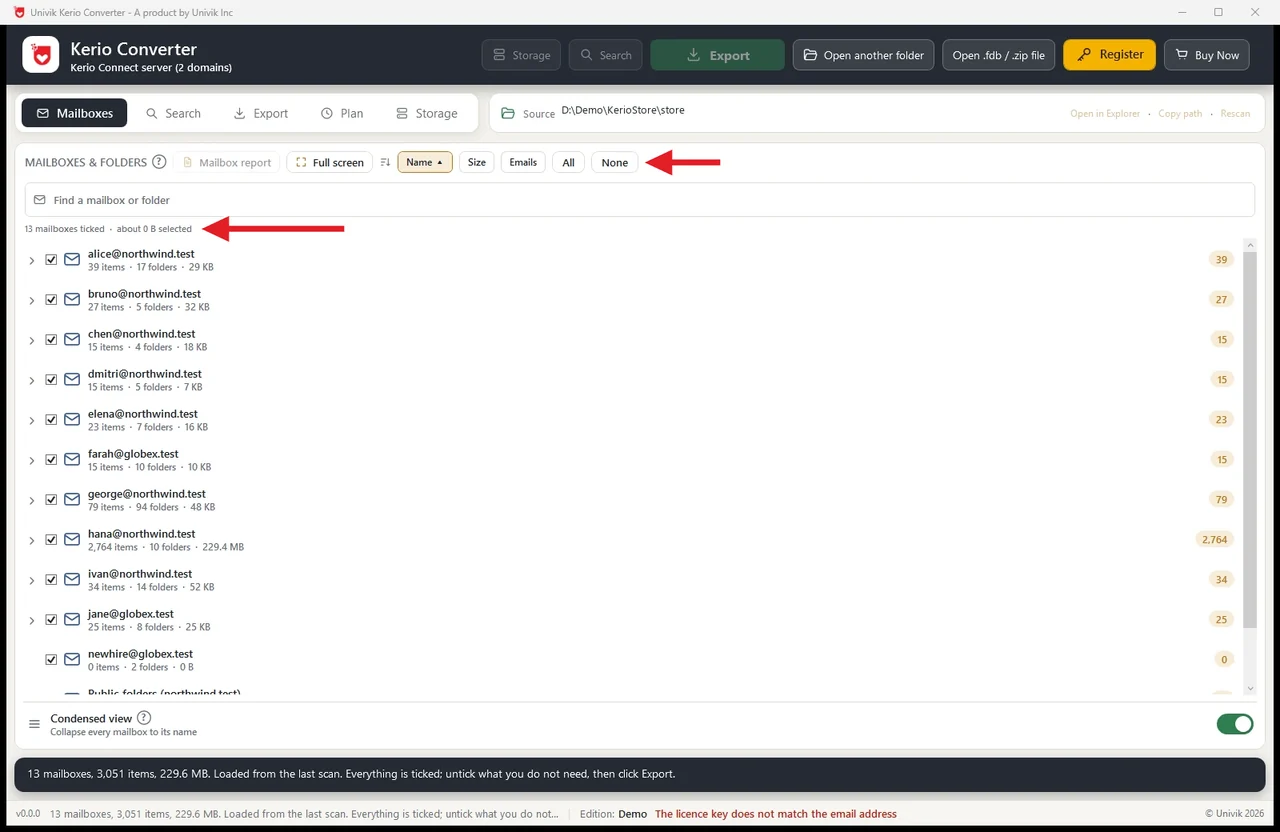
The Mailboxes tab lists the users found in your copy. - Check the mailboxes. Open the Mailboxes tab and compare its user list with the users you expect.
- Export one mailbox. Send one mailbox to a target and check the result before you export further.
Limitations: I did not test a store with damaged index files, so I cannot say how the converter reacts to every kind of damage. Open one mailbox first and compare its folders with what you expect to see. The converter needs Windows 11 or Windows 10.
The converter opens a copy of your store read-only on Windows, so you can reach mail while the old server stays down.
Download Free Trial Select a Licence - From $299Open a copy in the trial and check its Mailboxes tab first.
What If Some Mailboxes Open and Others Do Not?
When your copy opens only in part, go through the three symptoms in order, cheapest check first.
Do this: Check the Inbox folder in your store. GFI says to restore from backup if the folders are gone or empty.
Do this: Look at search.fld for that folder. GFI says it is corrupted. The fix is to delete it with the server stopped.
Do this: Reindex that user. GFI says to use More Actions, then Reindex Mailbox.
If a mailbox still fails to open, contact Univik support and tell them which folder fails.
Which GFI Pages Back This Crash Recovery Guide?
Four GFI articles, all opened on November 20, 2026, are manual re-indexing of user folders, lost data after a power outage, fixing data consistency issues and fixing error 26 and Cannot open database. Two pages have a March 18, 2025 date in their page data and the other two have none.
The only version number that GFI names is 7.3.0, which is an old version. None of the pages gives a Kerio Connect 10 procedure of its own, so check the current manual for your version.
- GFI describes damaged index and database files after a crash. Check your store before you assume the messages are intact.
- GFI says to rename index.fld to index.bad and to delete search.fld for error 26.
- GFI names Accounts, Users, More Actions and Reindex Mailbox for a console reindex.
- Copy the whole store to a spare disk before any repair.
- A store copy can be read on Windows without the old server.
FAQ: Recover Emails From a Crashed Kerio Server
How do I recover emails from a crashed Kerio server?
Copy the whole store folder to a spare disk first. Then repair the indexes as GFI describes or read the mail from the copy with a Windows converter.
Are my emails lost when the Kerio server crashes?
Not always. GFI describes corrupted index and database files after a crash and a restore from backup when folders are missing. Check your store before you assume the mail is intact.
What does Unexpected error 26 mean in Kerio?
GFI says the search.fld file of the affected folder is corrupted. Its fix is to stop the service, delete that file and reindex the mailbox.
How do I rebuild a Kerio index by hand?
Stop Kerio Connect, rename index.fld to index.bad in the damaged folder and start the server. The index is rebuilt on the next folder access.
Where do I reindex a mailbox in Kerio Connect?
GFI says to go to Accounts, then Users, select the user and use More Actions, then Reindex Mailbox.
Can I read Kerio mail if the server will not start?
Yes. Univik Kerio Converter can open a store copy that you place on a Windows PC. I did not test a store with damaged index files. The trial caps each folder at 25 items.
Should I copy the store before I repair it?
Yes. The GFI repair pages do not require it. A copy on a spare disk lets you repair a duplicate instead.
Which Kerio version do the GFI repair pages cover?
The GFI repair pages name version 7.3.0 for automatic reindexing. The pages give no separate Kerio Connect 10 procedure.

My notes on damaged files, repair steps and the version caveat come from GFI articles that I went through.