Quick Answer
If you want to export Kerio to PST, you have three ways. Classic Outlook (the older Outlook for Windows) with the Kerio Outlook Connector exports one account through File, Open & Export, Import/Export. It needs an account that still signs in.
If the server is gone, copy the store folder and save each mailbox as a .pst. The new Outlook cannot use the Kerio connector, so IMAP is the third way and it leaves calendars and contacts behind.
If you need your Kerio Connect mailbox as a .pst file, the method you need depends on one thing: whether your Kerio account still signs in. When it does, classic Outlook can export it. When your server is off or its licence has lapsed, you need to read the mail files directly. I read two GFI pages, one on the new Outlook and one on Microsoft 365 migration. I used only what they say.
- If your Kerio account still signs in to classic Outlook, you can export it with Outlook itself.
- If you use the new Outlook, you cannot use the Kerio connector there. IMAP does not bring calendars and contacts.
- If your server is off or your licence has lapsed, copy the store folder and read the mail files directly.
Which Way Exports Kerio to PST in Your Situation?
Each method needs something different from you. The table shows what you need, what you keep and where each way stops.
| Way | What it needs | What it keeps | Where it stops |
|---|---|---|---|
| Classic Outlook export | Classic Outlook, the Kerio Outlook Connector and a Kerio account that signs in. | Mail, contacts and calendar items that show in Outlook for that account. Views, permissions, AutoArchive settings, rules and blocked senders are not included. | One account at a time. It stops when the account or the server is gone. |
| IMAP in the new Outlook | The new Outlook and a live Kerio server. | Mail folders only. | GFI says IMAP does not sync calendars and contacts. |
| Store copy and a converter | A copy of the Kerio store folder and a Windows PC. | Mail, contacts, calendar, tasks, notes and journal items you select. | The trial stops at 25 items per folder. |
If you are unsure which row fits, ask yourself one thing. Can you open your Kerio mailbox in Outlook today? If so, read the next section first. If not, go to the store copy section.
How to Export Kerio to PST With Classic Outlook
When Outlook has the Kerio Outlook Connector and your account still signs in, you can export with Outlook's own wizard. GFI's Microsoft 365 page gives this menu path for classic Outlook: File, Open & Export, Import/Export. Next comes Export to a file, followed by the Outlook Data File (.pst) type.
Classic Outlook exports the account you are signed in to, so you repeat the export for each user. For a store like my test copy with 13 mailboxes, you would repeat it 13 times. If a user left the company and the account is already deleted, you have nothing to sign in to. This method stops there.
What Does the New Outlook Change for a Kerio PST Export?
GFI's page on the new Outlook says the Kerio Outlook Connector is not compatible with the new Outlook. The reason is that the connector is a COM add-in (the older kind of Outlook plug-in) and the new Outlook supports only web add-ins. It names IMAP as the only current way to sync a Kerio account there and says IMAP does not sync calendars and contacts.
If you export from the new Outlook, Microsoft's page shows Settings, then Files, then Export. It also says calendar and contacts items in .pst files are not available in new Outlook at this time. Because IMAP does not sync calendars and contacts, a PST exported from an IMAP account in the new Outlook should contain mail only. If you need contacts and calendar, use classic Outlook or a store copy. You can read how the Kerio Outlook Connector works with the new Outlook in more detail.
How Large Can an Exported Kerio PST File Be?
Microsoft Learn says a Unicode .pst (the current PST type) in Outlook 2010 and 2013 has a default limit of 50 GB. In Outlook 2007 and 2003 the default is 20 GB. If one of your Kerio mailboxes is bigger than that, plan to split it by date range.
When you work from a store copy, the Storage tab lists mailboxes from the largest down, so you see a problem mailbox before you export. The demo store I tested has 13 mailboxes, 3,051 items and 229.6 MB in total. The Export tab shows that total before you start. You can also set a time period and export one date range at a time. Read how to check the size of each Kerio mailbox if you plan a larger move.

How to Export Kerio Mailboxes to PST Without the Server
When your store folder is copied, Univik Kerio Converter reads it on Windows and saves each mailbox as a .pst file. Your Kerio Connect server can stay switched off. If you have no copy yet, where Kerio Connect stores emails shows where the store sits on Windows, Linux and Mac.
- Copy the store. With the Kerio Connect service stopped, copy the store folder to a disk on your PC. A single domain folder or user folder works too.
- Open it. In the converter, select Open Kerio Connect Folder. Your original store is not changed, because the export reads from the copy.
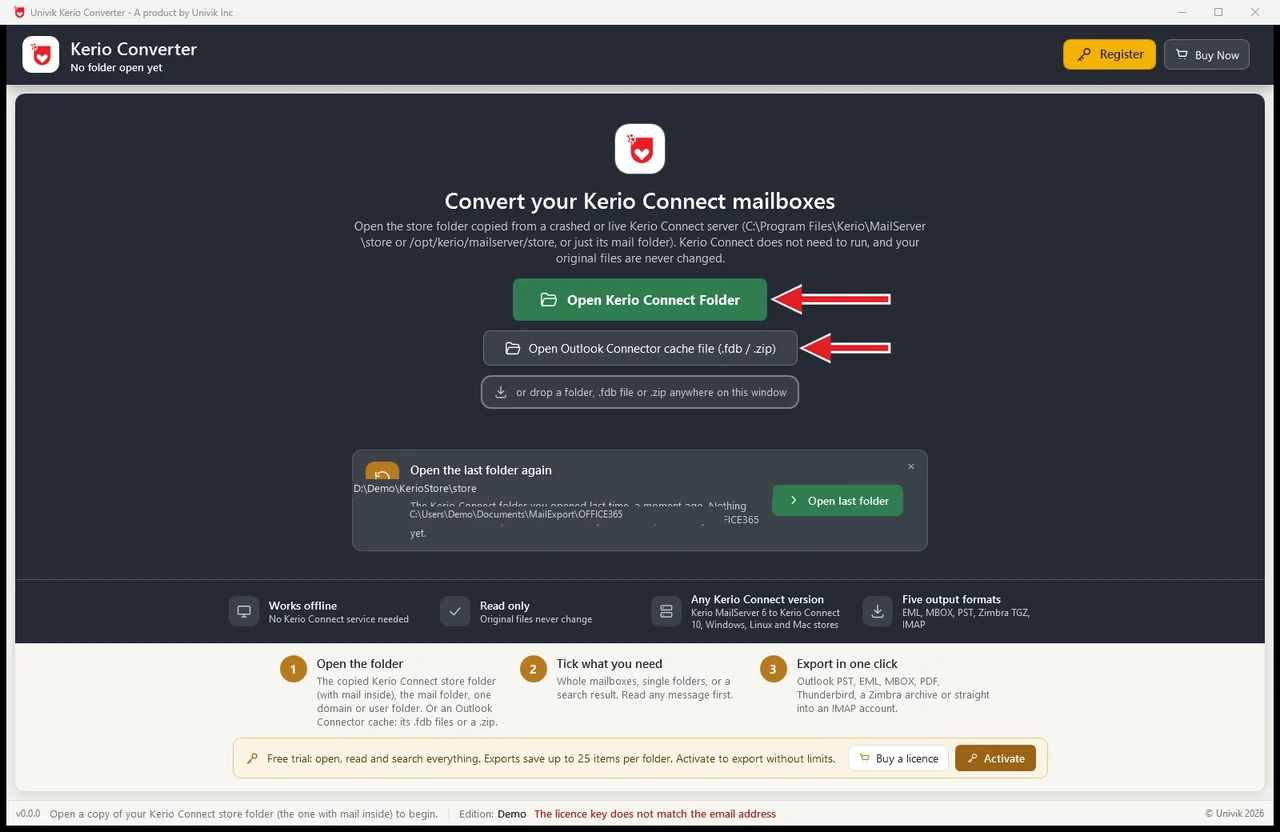
The first arrow marks Open Kerio Connect Folder, the button for a store copy. - Select the mailboxes. Keep the mailboxes you need selected in the Mailboxes tab. Each row shows items, folders and size.
- Choose Outlook PST. Open the Export tab and select Outlook PST. The converter saves one .pst file per mailbox. Choose a Save to folder, then set the item types and the time period you need.
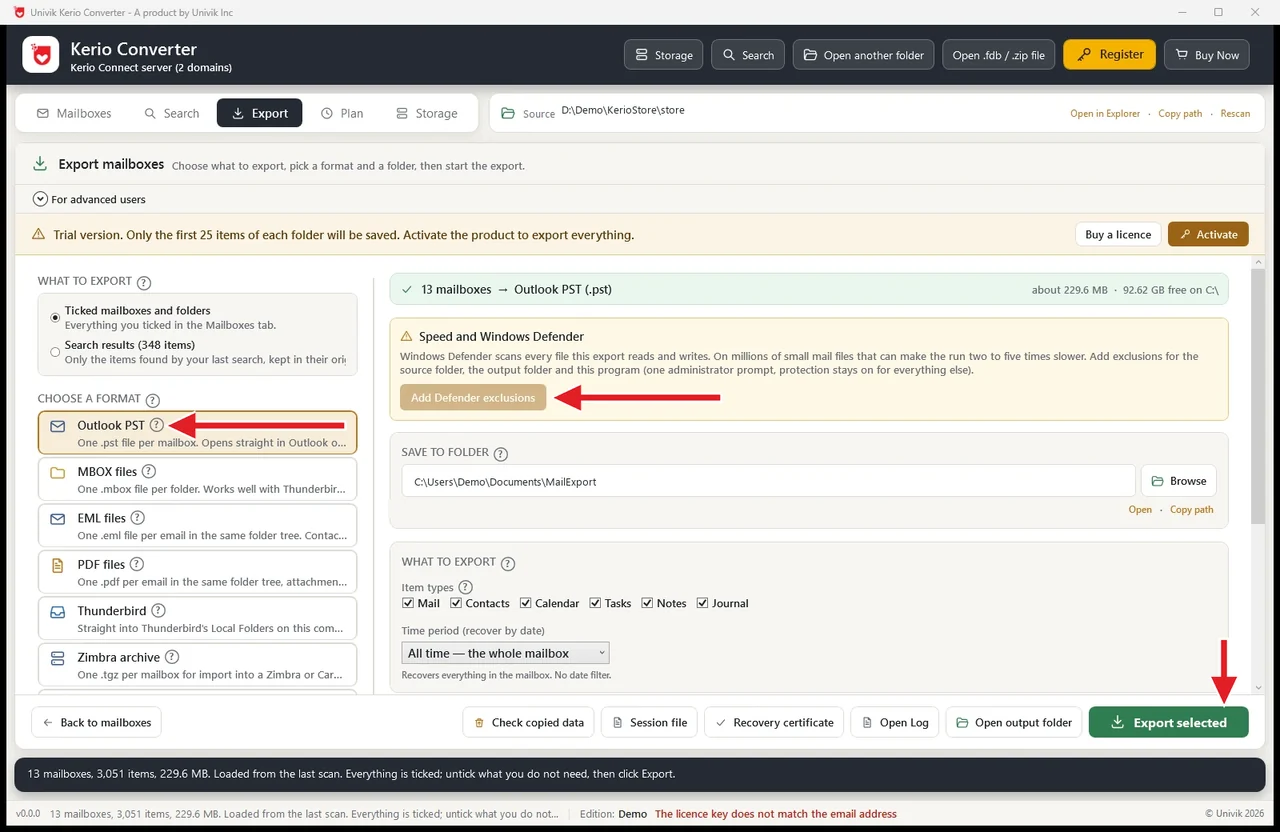
The first arrow marks Outlook PST. The second marks the Defender button and the third marks Export selected. - Export and open the files. Select Export selected. When it finishes, select Open output folder and open a .pst file in Outlook to compare its folders with the mailbox you chose.
Limitations: the trial opens and searches everything in your copy. An export stops at 25 items per folder, so test one mailbox before you plan a large batch. The converter needs Windows 11 or Windows 10. I did not test a store larger than 229.6 MB for this article.
The converter opens your store copy read-only and saves each mailbox you select, so the server can stay off during the export.
Download Free Trial Select a Licence - From $299Export one mailbox in the trial first and review its folders before you plan the full export.
What If the Kerio PST Is Empty or Items Are Missing?
Do this: Check the banner on your Export tab. In the trial each folder in the PST stops at 25 items, so expect a short file.
Do this: Check how the mailbox was reached. IMAP in the new Outlook gives mail folders only. Use classic Outlook with the connector or a store copy. Keep Contacts and Calendar selected under item types.
Do this: Open the file in classic Outlook. GFI says Microsoft does not support importing a PST in the new Outlook, so you need classic Outlook for that step. To put the PST into a Microsoft 365 mailbox, read import the PST into Microsoft 365.
If the PST still looks wrong, contact Univik support with your Outlook version and the way you exported.
What Is This Kerio PST Guide Based On?
I read four pages on November 20, 2026. The GFI pages are GFI on the new Outlook and GFI on Microsoft 365 migration. The Microsoft pages are Microsoft Learn on PST size limits and Microsoft Support on PST export. I used vendor and Microsoft pages only.
I did not test the Outlook export on a live Kerio account for this article. I took the classic Outlook steps from GFI's page. I took the export screen and the item counts from my test store.
- Classic Outlook can export a Kerio account to PST through File, Open & Export, Import/Export, but only while the account still signs in.
- GFI says the connector cannot be used in the new Outlook and that IMAP does not sync calendars and contacts.
- Microsoft Learn gives a default 50 GB limit for a Unicode PST in Outlook 2010 and 2013.
- A store copy opens on Windows without the Kerio server. Each selected mailbox is saved as its own .pst file.
- In the trial each folder stops at 25 items, so activate a licence before the real export.
FAQ: Export Kerio to PST
How do I export Kerio to PST?
If your Kerio account signs in to classic Outlook with the Kerio Outlook Connector, use File, Open & Export, Import/Export and export to an Outlook Data File (.pst). If the server is gone, copy the store folder and save each mailbox as a .pst with a converter on Windows.
Can the new Outlook use the Kerio Outlook Connector?
No. GFI says the connector is a COM add-in and the new Outlook supports only web add-ins. IMAP is the only current way to sync a Kerio account there.
Does IMAP bring Kerio calendars and contacts into Outlook?
No. GFI says IMAP does not sync calendars and contacts. A PST exported from an IMAP account therefore has mail folders only.
Does the new Outlook export calendar and contacts to PST?
Not at this time. Microsoft Support says calendar and contacts items in .pst files are not available in the new Outlook. Settings, Files, Export is the new Outlook path for mail.
How big can a Kerio PST file be?
Microsoft Learn gives a default limit of 50 GB for a Unicode .pst in Outlook 2010 and 2013. Outlook 2007 and 2003 default to 20 GB. Check the largest mailbox before you export.
Can I export every Kerio mailbox to PST at once?
Yes. Univik Kerio Converter lists the mailboxes of a store copy and saves one .pst file per mailbox. In the trial each folder stops at 25 items per export.
Can I export only some dates from a Kerio mailbox?
Yes. The Export tab has a time period option that is set to All time by default. You can set a date range and export one range at a time.
Does the export change my Kerio store?
No. The export reads from your copy of the store. Work on a copy so the live store stays as it is.

I read GFI's pages and Microsoft's pages for the Outlook limits and the menu paths.