Quick Answer
An IMAP account is an email account that your mail app reads from the provider's server over the IMAP protocol. Your messages and folders stay on that server, so every phone and computer shows the same mailbox.
IMAP email is the mail inside that account. Apps only display it, so a message deleted on a phone disappears from the laptop as well.
You have probably used an IMAP account without ever seeing the label. Outlook, iPhone Mail and Thunderbird all ask for an address, a password and a server name. Together, the details point at one of these accounts. This guide covers what the account contains, how it keeps your devices in step and what to do about a copy of your own.
I read RFC 9051 on 2 November 2026 along with the setup pages from Apple, Microsoft and Google. Each one is linked at the end of this guide. A separate test mailbox, not a Gmail or Outlook one, supplies the folder counts in this guide.
What Is an IMAP Account and What Does It Contain?
An IMAP account is a mailbox on a mail server plus the sign-in details that let your app reach it. IMAP stands for Internet Message Access Protocol. RFC 9051 is the current IMAP4rev2 standard, which says the protocol lets a client handle remote message folders in a way that is functionally equivalent to local folders. In plain words, your app treats the folders on the server as if they sat on your own drive.
Account details are the focus here. Our page on what is IMAP covers the protocol and its history, while what is an IMAP server covers the machine that holds your mailbox.
Five parts make up the account.
| Part | What it holds | Where it sits |
|---|---|---|
| Email address | Your login name for the mailbox, which is often the same as the address people write to | Typed into your app |
| Password or sign-in | Proof that the mailbox is yours, which some providers ask for through an app password or a sign-in in the browser | Checked by your provider |
| Mailbox folders | INBOX plus every other folder with all of the messages inside | Provider's server |
| Message flags | Marks like \Seen, \Answered and \Flagged on each message | Provider's server |
| Connection settings | The server name, the port and the security choice that tell your app where to connect | Saved in your app |
Also, INBOX is the one reserved name. RFC 9051 calls it the primary mailbox for a user on a server. Every other folder name comes from your provider or from you, which is why the test mailbox I used lists both Sent and Sent Items.
How Does an IMAP Account Work on Your Phone and Laptop?
An IMAP account works by keeping one master copy of your mail on the server while each app connects, signs in and displays what it finds there. Microsoft Learn describes the result for Exchange Online. By default, IMAP4 clients don't remove downloaded messages from the server, which makes it easy to reach the same mail from several computers.
A typical session runs in four steps.
- Connect. Your app opens a connection to port 993, where TLS starts at once. RFC 9051 calls this the Implicit TLS port and RFC 8314 prefers it over cleartext. Port 143 is the cleartext route. On that port only, the
STARTTLScommand is available. - Sign in. The app sends a
LOGINcommand with a plaintext password or anAUTHENTICATEcommand that names a SASL mechanism. - Pick a folder. The
SELECTcommand opens one folder. According to RFC 9051, each message in the folder carries a UID, an unsigned non-zero 32-bit value. - Show and update. Your app lists the messages and writes changes back to the server as flags. A read mark on your phone is therefore a flag on the server. Your laptop sees it during the next check.
RFC 9051 expects this kind of overlap. It notes that other agents can change the flags or remove messages while you work, which is what simultaneous access by several apps looks like.
Sending is a separate job, because RFC 9051 says IMAP4rev2 doesn't specify a means of posting mail and leaves that task to a mail submission protocol. That's why every app also asks for the details of an outgoing server.
How Do You Know If Your Email Is an IMAP Account?
You know it's an IMAP account when your app lists IMAP as the account type or connects to an incoming server that speaks IMAP. Most webmail services support it: Microsoft Learn says POP3 and IMAP4 are enabled by default for all users in Exchange Online. Google says IMAP access is always turned on in Gmail while the Enable IMAP and Disable IMAP choices went away from January 2025.
Still, a company or school can close the door. Microsoft Learn says an organization that disables Basic authentication in Exchange Online blocks legacy protocols, among them POP and IMAP. If your work address stops connecting, ask your administrator before you change anything in the app.
A quick behaviour test shows which kind of account you have. Read or delete a message on your phone and open your laptop at its next check. An IMAP account shows the same change on both devices. According to Mozilla, an edit in a POP3 app never reaches the server, so the second device stays as it was.
How Does Each App Label an IMAP Account?
Each app words the choice in its own way.
| App | What it shows when you add an account by hand |
|---|---|
| iPhone and iPad Mail | A prompt to choose IMAP or POP, then the boxes for Incoming Mail Server and Outgoing Mail Server |
| Outlook for Android and iOS | An IMAP option on the setup page when the app doesn't detect an IMAP account, with the server details in an extra settings menu |
| Thunderbird | Thunderbird's manual configuration page asks for the incoming mail server and the port plus a connection security setting |
A Gmail or Outlook.com address is not a different kind of account from an IMAP one. Gmail and Outlook.com are mail services. That account is the route an app takes into a mailbox on one of them.
What Do You Type to Add an IMAP Email Account to an App?
You type four things: your email address, a password or sign-in, the incoming server name and a port with TLS switched on. According to Apple Support, you will need to enter the settings manually if Mail can't find them. Wrong entries prompt you to edit the settings before saving.
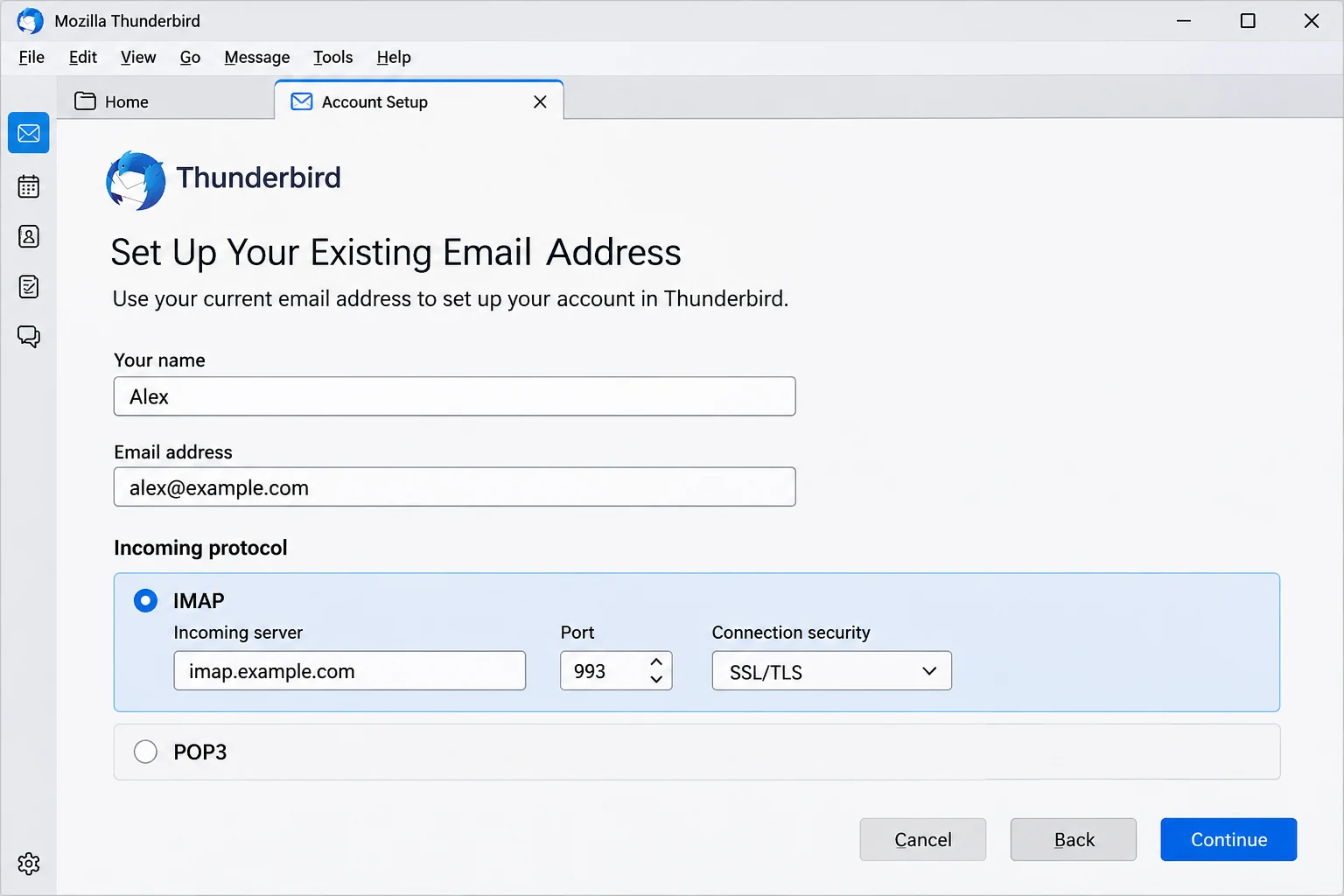
- Address. Use the full address in most apps. Some providers want a shorter username, so read the help page of your provider.
- Password or sign-in. Also, many providers now prefer a sign-in on their own page. Google says app passwords aren't recommended and are unnecessary in most cases. The page points to Sign in with Google in the email client instead.
- Server name. This is a host name like imap.example.com. If you don't have the name, how to find IMAP server lists the lookup routes.
- Port and security. Choose 993 with TLS. IANA lists the port as
imaps, the IMAP over TLS protocol.
Values for named providers sit in one place on Univik. Open our email settings pages and pick your service from the list.
Why Does Your IMAP Login Refuse to Connect?
Your IMAP login fails most often because the server name, the port or a sign-in detail is wrong. The other common cause is a provider that wants a different sign-in route.
Try this: Compare the server name and port with the help page of your provider one character at a time. Outlook for Android and iOS takes a port after the host name with a colon in between, like imap.server.com:993.
Try this: See whether your provider wants an app password or a sign-in on its own page. Gmail, for example, points to Sign in with Google.
Try this: Ask your administrator whether legacy sign-in is disabled for the mailbox. Microsoft Learn ties that setting to blocked POP and IMAP.
How Do You Save the Mail in an IMAP Account Before the Address Closes?
You keep a copy by signing in to the account from a desktop app that saves the folders as files on your PC. The account holds the only copy of your mail, so one deleted folder or one closed address removes it from every device at once. Is IMAP a backup covers what a sync keeps and what it loses. A copy saved earlier as EML, MBOX or PST stays on your PC if the address closes.
Add Your Account in Univik IMAP Backup
For a copy on disk I tested Univik IMAP Backup, a Windows program that counts as IMAP backup software. Add account sits under Open and Email Accounts. The window titled Add Email Account opens with Email and Password at the top. Under those two boxes, Advance Settings holds three fields: Imap Server, Imap Port with 993 filled in and a Secure Port tick box that starts ticked. Find fills in a server from your address.
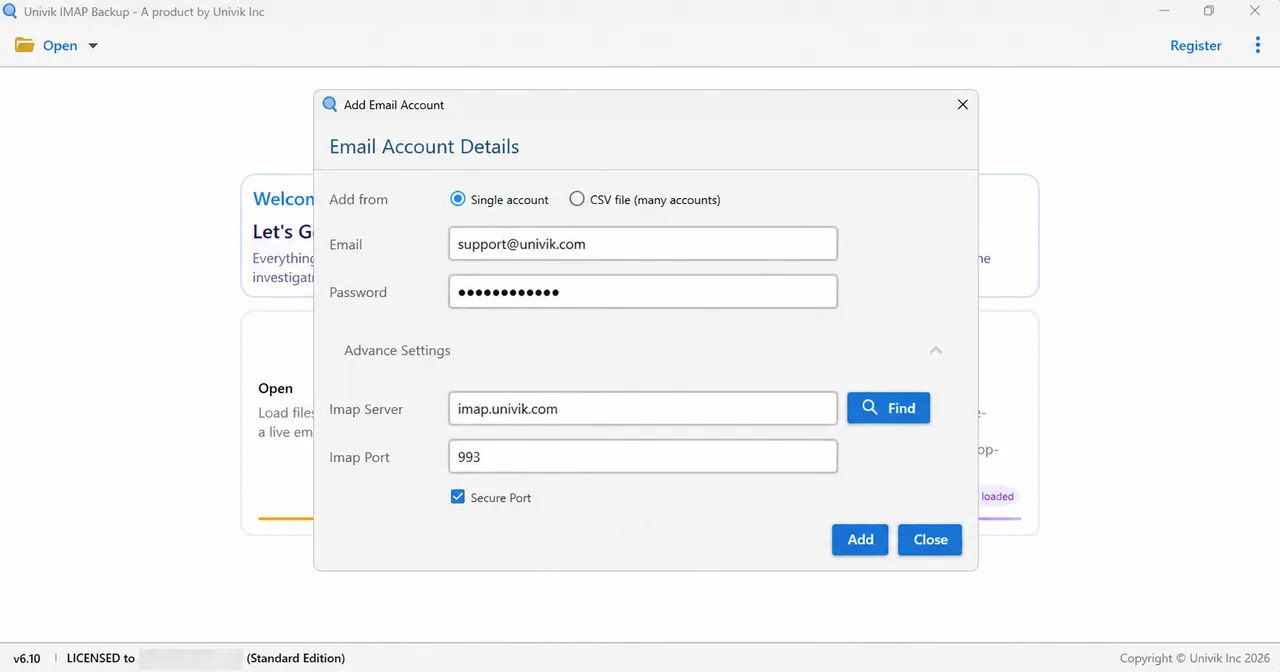
Hotmail, Outlook.com and Microsoft 365 addresses take a different route through the app. On 2 November 2026 I typed one into the Add Email Account window and landed on Microsoft's own sign-in page in my browser straight away. The server fields stayed hidden while the folder tree loaded.
Pick an Export Format From Email Files
Next, select Export and pick a format from the Email Files group. Export IMAP to PST writes Outlook files. Export IMAP to EML writes one file for each message. Export IMAP to MBOX writes one file for each folder.

What Does the Trial Copy Save From Each Folder?
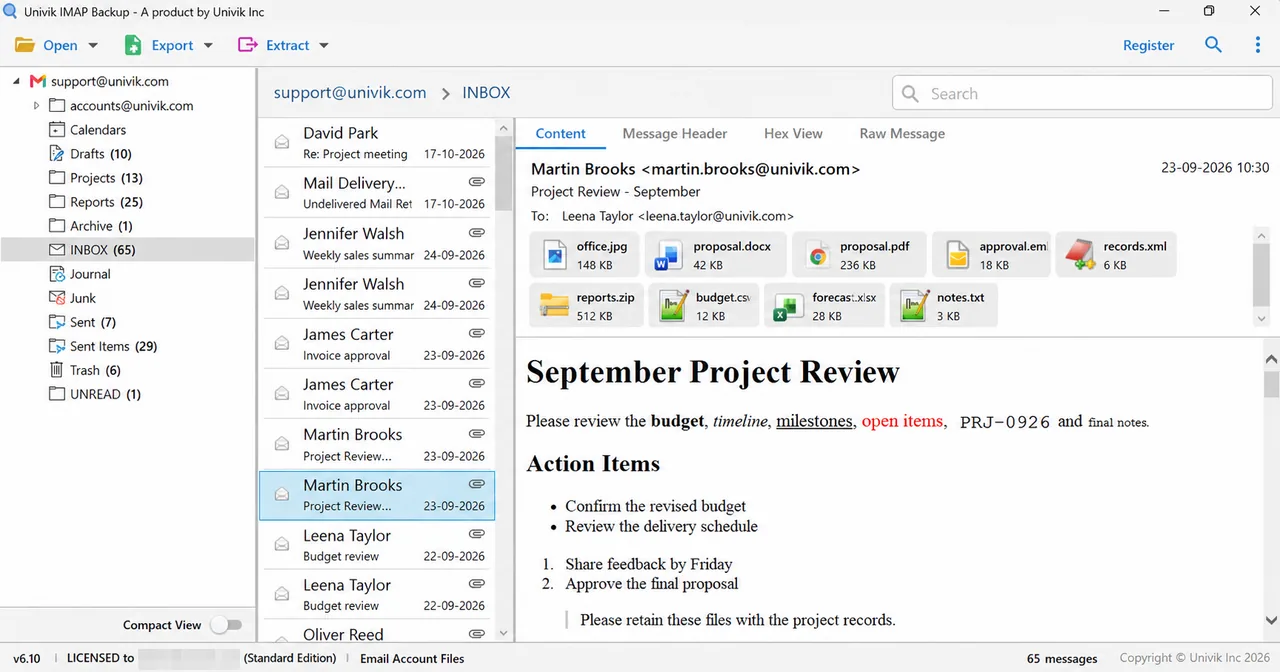
Finally, check Minimum Attachment Size to Export, which sits on the export screen. Its switch starts on with 35 MB filled in. Read that setting before pressing Save. In the trial edition each folder gives up 10 items at most. In my test mailbox that meant 10 items from INBOX (65 messages) and 10 from Sent Items (29 messages). Drafts has 10 and Trash has 6, so both were copied in full.
What Did One Test Account Hold Before and After the Copy?
Univik IMAP Backup Trial Edition 6.10 copied a test account into one PST file on 27 October 2026. The account held 157 messages in 9 folders plus 16 more in a sub-account, and the PST file held 81 messages. The table gives the count for each folder.
| Folder | On the server | In the PST file |
|---|---|---|
| Drafts | 10 | 10 |
| EML imp | 13 | 10 |
| eml sys | 25 | 10 |
| EML_Test_new | 1 | 1 |
| INBOX | 65 | 10 |
| Sent | 7 | 7 |
| Sent Items | 29 | 10 |
| Trash | 6 | 6 |
| UNREAD | 1 | 1 |
| Sub-account, 8 folders | 16 | 16 |
When Do You Need a File Copy of IMAP Mail?
My verdict: IMAP is the right choice for daily mail on all the devices you use. Add a local copy as soon as the mailbox holds mail you could not write again or the address could close.

- An IMAP account combines five parts: email address, password, mailbox folders, message flags and connection settings.
- Port 993 starts TLS at once, while port 143 is the cleartext route where only the STARTTLS command is available.
- Exchange Online enables POP3 and IMAP4 by default for all users, yet disabling Basic authentication blocks both protocols.
- Thunderbird, iPhone Mail and Outlook for Android and iOS each let you add an IMAP account by hand with an incoming server and port.
- A closed IMAP address removes its mail from every device at once, so only a file copy on your PC survives.
- A test account of 173 messages gave 81 in one trial PST file, because the trial writes 10 items per folder and smaller folders came out whole.
Questions About IMAP Mail
What is an IMAP account?
An IMAP account is an email account that your mail app reaches over the IMAP protocol, with messages and folders kept on the provider's server. Each app signs in, shows what is there and sends changes like deletes and read marks back to the server.
What does IMAP email mean?
IMAP email means mail you read through the Internet Message Access Protocol. The messages stay on the server and your apps display them, so one mailbox looks the same on a phone and a laptop.
Is an IMAP email account the same as a Gmail or Outlook account?
No. Gmail and Outlook.com are mail services. The account is the route an app takes into a mailbox on one of them. Google says IMAP access is always turned on in Gmail. Microsoft Learn says IMAP4 is enabled by default for all users in Exchange Online.
What details do I need to set up an IMAP account?
You need your email address, a password or sign-in, the incoming server name and a port with TLS. Port 993 starts TLS as soon as the connection opens. The help page of your provider gives the exact server name.
Does IMAP store my emails on my computer?
The mailbox sits on the server. Microsoft Learn says IMAP4 clients by default don't remove downloaded messages from it. A copy on your PC needs an export to EML, MBOX or PST from the app.
Can I use the same IMAP login on several devices?
Yes. Every phone and computer signs in to the same mailbox and sees the same folders. RFC 9051 notes that several agents can change flags or remove messages in one mailbox. A delete on one device therefore shows up on the others.
Does IMAP also send email?
No. RFC 9051 says IMAP4rev2 doesn't specify a means of posting mail. A mail submission protocol handles the sending. That's why your app asks for an outgoing server as well.
What happens to my mail if an IMAP account closes?
The mailbox on the server goes with the account. Each provider sets its own rules and dates, so check the help page of your provider. A copy you saved earlier as EML, MBOX or PST stays on the PC where you saved it.
How do I add a Hotmail or Outlook.com address to Univik IMAP Backup?
Type the address into the Add Email Account window. On 2 November 2026 that opened Microsoft's own sign-in page in my browser at once, with the server fields hidden and the folder tree loading afterwards.
How many items does the trial save from one mailbox?
The trial writes 10 items per folder. In my test mailbox INBOX lists 65 messages and the trial wrote 10. Open Minimum Attachment Size to Export before the first run, since its switch starts on at 35 MB.

On 2 November 2026 I compared each statement in this guide with the sources listed here. The test mailbox behind the folder counts was opened in the 6.10 trial edition.
Sources for this guide: