Quick Answer
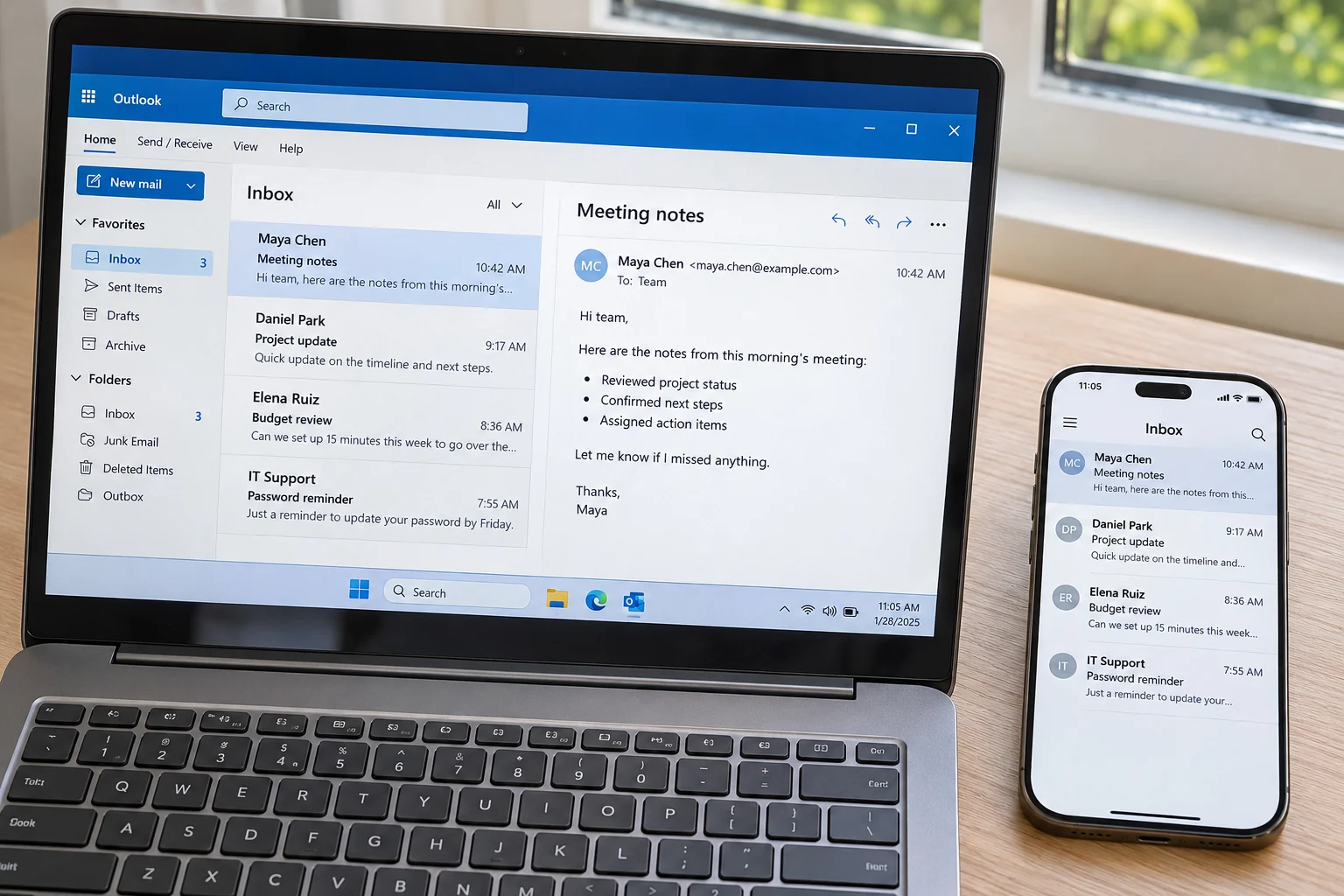
What is IMAP? IMAP is the Internet Message Access Protocol, an email standard that keeps your messages on a mail server and lets each app read them from there.
Folders, read marks and deletions are stored on the server, so every device you sign in from shows the same mailbox. IMAP receives and manages mail. SMTP sends it.
IMAP sits behind most of the mail you read on a phone or laptop. For this guide I went through RFC 9051, RFC 3501 and RFC 8314 on 2 November 2026. The definitions come from those standards and not from memory. Where I describe an app, I used a test mailbox with no provider behind it.
What Is IMAP and What Does IMAP Stand For?
IMAP stands for Internet Message Access Protocol. In plain terms, your mail app (the client) talks to a computer at your provider (the server) in a shared language. The standard behind that language, RFC 9051, says the client can access and manipulate messages on the server.
The IMAP definition fits in one line. It is a set of rules that lets a mail app read, sort and delete messages while the messages stay on the server. RFC 3501 says remote mailboxes behave like local folders. Because of that design, a folder you make on your laptop shows up on your phone too.
The IMAP meaning of the word "access" deserves a second look. IMAP gives your app access to mail without moving the mail to your device. RFC 1064 from 1988 used the older name Interactive Mail Access Protocol for the same idea.
| Term | Plain meaning | Defined in |
|---|---|---|
| IMAP | Internet Message Access Protocol is the standard for reading mail that stays on a server | RFC 9051 |
| Mailbox | A mailbox is a message folder that lives on the server | RFC 3501 |
| INBOX | INBOX is the reserved, case-insensitive name for a user's primary mailbox on a server | RFC 3501, section 5.1 |
| Flag | A flag is a status label kept on the server. The system flags are \Seen, \Answered, \Flagged, \Deleted and \Draft | RFC 9051, section 2.3.2 |
| UID | A UID is a 32-bit number that the server gives each message, so no other message in that mailbox can reuse it | RFC 3501, section 2.3.1.1 |
How Does the IMAP Protocol Work?
The IMAP protocol works as a conversation between a mail app and a mail server. The app sends commands and the server answers, while the mail itself stays on the server. Section 2.1 of RFC 9051 assumes a reliable data stream such as TCP for that conversation. RFC 9051 also says a connection is always in one of four states.
- Not Authenticated. Every connection starts here. RFC 3501 says the client must supply credentials before most commands are permitted.
- Authenticated. After sign-in, the app can work with mailboxes on the server. It can open one or make a new folder.
- Selected. RFC 9051 says a client must select a mailbox before commands that touch its messages are allowed.
- Logout. The app tells the server it is finished and the server closes the connection.
Which Commands Does an IMAP Session Use Most?
The table shows eight commands that cover most of a session.
| Command | What the command does | RFC 9051 section |
|---|---|---|
| LOGIN | LOGIN signs in with a plaintext user name and password. RFC 9051 advises against it except as a last resort | 6.2.3 |
| AUTHENTICATE | AUTHENTICATE starts a SASL exchange, so the sign-in method can change from one provider to the next | 6.2.2 |
| STARTTLS | STARTTLS upgrades a cleartext connection to TLS | 6.2.1 |
| SELECT | SELECT opens one mailbox so the app can work on its messages | 6.3.2 |
| FETCH | FETCH retrieves a message or only part of it, like its header or one body part | 6.4.5 |
| SEARCH | SEARCH finds the messages in the open mailbox that match criteria your app sends, so the server does the matching | 6.4.4 |
| IDLE | IDLE lets the server report new mail without the app asking again and again | 6.3.13 |
| LOGOUT | LOGOUT informs the server that the client is done with the connection | 6.1.3 |
How Do FETCH, IDLE and Flags Keep Your Mail on the Server?
FETCH can return a whole message, its header, its body or a body part (RFC 9051, section 2.4), so an app can ask for less than a whole message. Microsoft Support describes the effect in a mail app: an IMAP app downloads a message when you click on it, and attachments don't come down on their own. RFC 2177 from June 1997 explains why IDLE exists. The base protocol makes a client poll the server for changes. IDLE removes that polling.
Flags keep the state of your mailbox on the server. An app typically sets \Seen when you read a message and \Deleted when you delete one. RFC 9051 says \Deleted means the message is waiting for removal at the next EXPUNGE. Because flags live on the server, every device that signs in to the same mailbox sees the same read and unread marks.
Where Did IMAP Come From and Which Version Is Current?
IMAP4rev2 is the current version. RFC 9051 defines it in August 2021. The RFC obsoletes RFC 3501 and stays upwards compatible with IMAP4rev1.
The IMAP.org history page says IMAP was originally developed in 1986 at Stanford University. The earliest specification I read is RFC 1064 from July 1988, which calls the protocol Interactive Mail Access Protocol and leaves sending mail to a separate protocol like SMTP. M. Crispin is the author of the first four RFCs in the table.
| RFC | Date | Protocol name in the title | Relation to the others |
|---|---|---|---|
| RFC 1064 | July 1988 | Interactive Mail Access Protocol, Version 2 | RFC 1064 lets a workstation read mail from a mailbox server |
| RFC 1730 | December 1994 | Internet Message Access Protocol, Version 4 | RFC 1730 is designed to be upwards compatible from IMAP2 |
| RFC 2060 | December 1996 | Internet Message Access Protocol, Version 4rev1 | RFC 2060 obsoletes RFC 1730 |
| RFC 3501 | March 2003 | Internet Message Access Protocol, Version 4rev1 | RFC 3501 obsoletes RFC 2060 |
| RFC 9051 | August 2021 | Internet Message Access Protocol, Version 4rev2 | RFC 9051 obsoletes RFC 3501 |
I read the front page of each RFC in the table on 2 November 2026. Also, IANA still lists both RFC 3501 and RFC 9051 against the imap service name, so the registry points to both revisions.
What Is IMAP Used For and What Does It Leave to SMTP?
IMAP is used to receive and manage mail that sits on a server. Sending belongs to SMTP. RFC 9051 says IMAP doesn't define how to send mail and points to RFC 6409 for mail submission.
- Mailboxes The client can create, delete and rename mailboxes.
- New mail The client can check for new messages.
- Removal The client can remove messages permanently.
- Flags The client can set and clear flags.
- Search and fetch The client can search and fetch message attributes, texts or portions of them selectively.
SMTP handles the sending side. RFC 5321 sums up SMTP as the protocol that transfers mail reliably and efficiently. RFC 6409 reserves port 587 for message submission. A mail app therefore needs two sets of server details, one for receiving over IMAP and one for sending over SMTP. Each provider lists both on its page in our email settings directory.
Also, POP3 is the older, download-style alternative. RFC 1939 says POP3 is intended to permit a workstation to dynamically access a maildrop on a server host. The same RFC says POP3 is not intended to provide extensive manipulation operations of mail on the server. The full comparison sits in IMAP vs POP3.
To see how a mailbox looks inside an app, read what is an IMAP account. For the software on the provider's side, read what is an IMAP server.
What Is IMAP Over TLS and How Does It Sign You In?
IMAP over TLS, also called implicit TLS, encrypts the connection from the first message and uses port 993. RFC 8314 describes the "imaps" service this way. IANA lists it as port 993 with the description IMAP over TLS protocol.
The older route starts on cleartext port 143 and upgrades with the STARTTLS command. RFC 9051 lists both ports in section 2.1. RFC 8314 from January 2018 prefers implicit TLS and wants TLS 1.2 or newer. Providers are asked to deprecate cleartext access to mail as soon as practicable.
However, sign-in isn't the same job as encryption. RFC 9051 tells clients not to use the plaintext LOGIN command on unsecure networks. AUTHENTICATE with SASL covers other methods. RFC 7628 from August 2015 defines OAUTHBEARER for OAuth tokens, with IMAP examples in its text. Your provider picks the method, so one mailbox asks for a password while another opens a browser sign-in.
What Does IMAP Leave Out and Where Do You Keep a Copy of Your Mail?
The account rules at your provider decide how long mail on the server lasts, because IMAP holds it there. A delete on one device reaches the rest. That's why our guide to the question is IMAP a backup answers no. A copy saved as files on your PC sits outside the account. A change of web host carries the same risk. Our walkthrough on how to back up hosting email accounts covers that case.
Add Your Mailbox in Univik IMAP Backup
Univik IMAP Backup, our IMAP backup software, runs on Windows. In its toolbar, Open leads to Email Accounts and then Add account. Fill Email with your full address and Password with your mailbox password. Some providers want an app password there instead. Under Advance Settings, Imap Server holds the host name, Imap Port starts at 993 and Secure Port starts ticked. Select Find and the app looks the server up from your address.
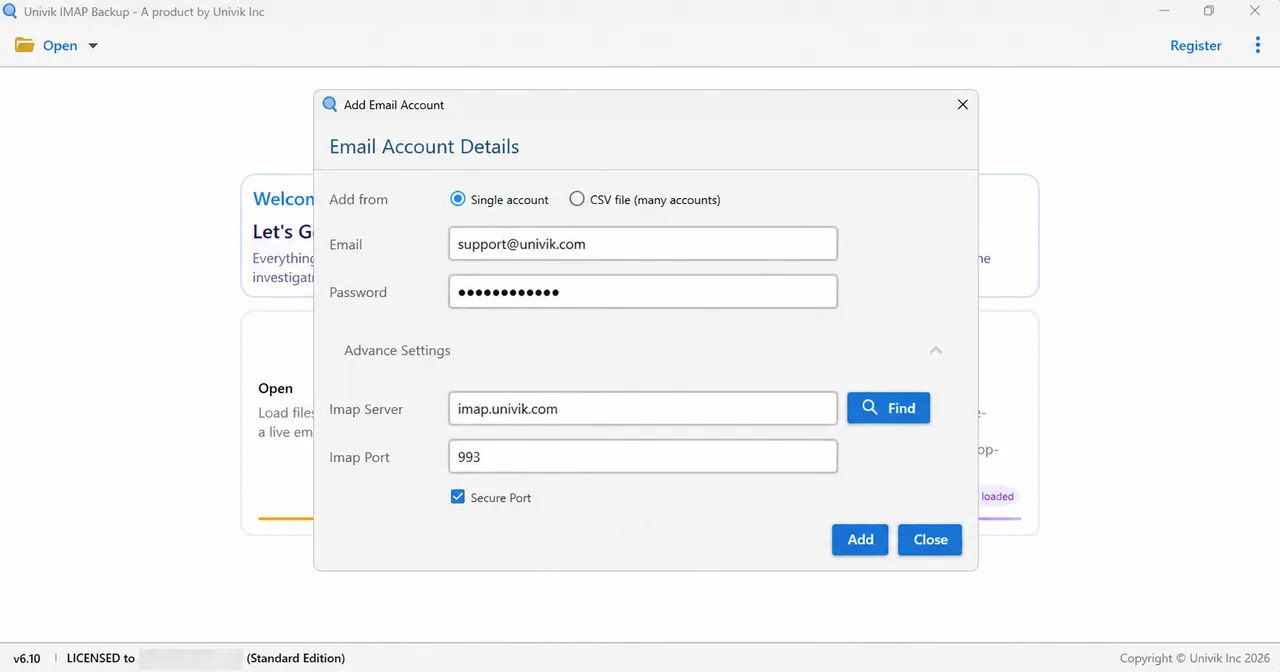
A Microsoft address follows a different route. Microsoft's own page for signing in came up in my browser right away when I entered a Hotmail address in Add account (tested 2 November 2026). The Imap Server fields never showed up and the folder tree loaded. A Microsoft 365 address did the same. A two-step account needed no app password.
Which Export Format Fits Your Copy?
Next, tick your folders. The Export menu then offers three formats under Email Files, which the table lists.

| Format | What gets written | Guide |
|---|---|---|
| PST | PST writes a file that Outlook opens | Export IMAP to PST |
| EML | EML writes one file for each message | Export IMAP to EML |
| MBOX | MBOX writes one file for each ticked folder | Export IMAP to MBOX |
What Do the 35 MB Filter and the Trial Limit Change?
Look on the export screen for Minimum Attachment Size to Export. Its switch starts on and holds 35 MB, so it filters your export until you decide otherwise. Select Save after you have checked it.
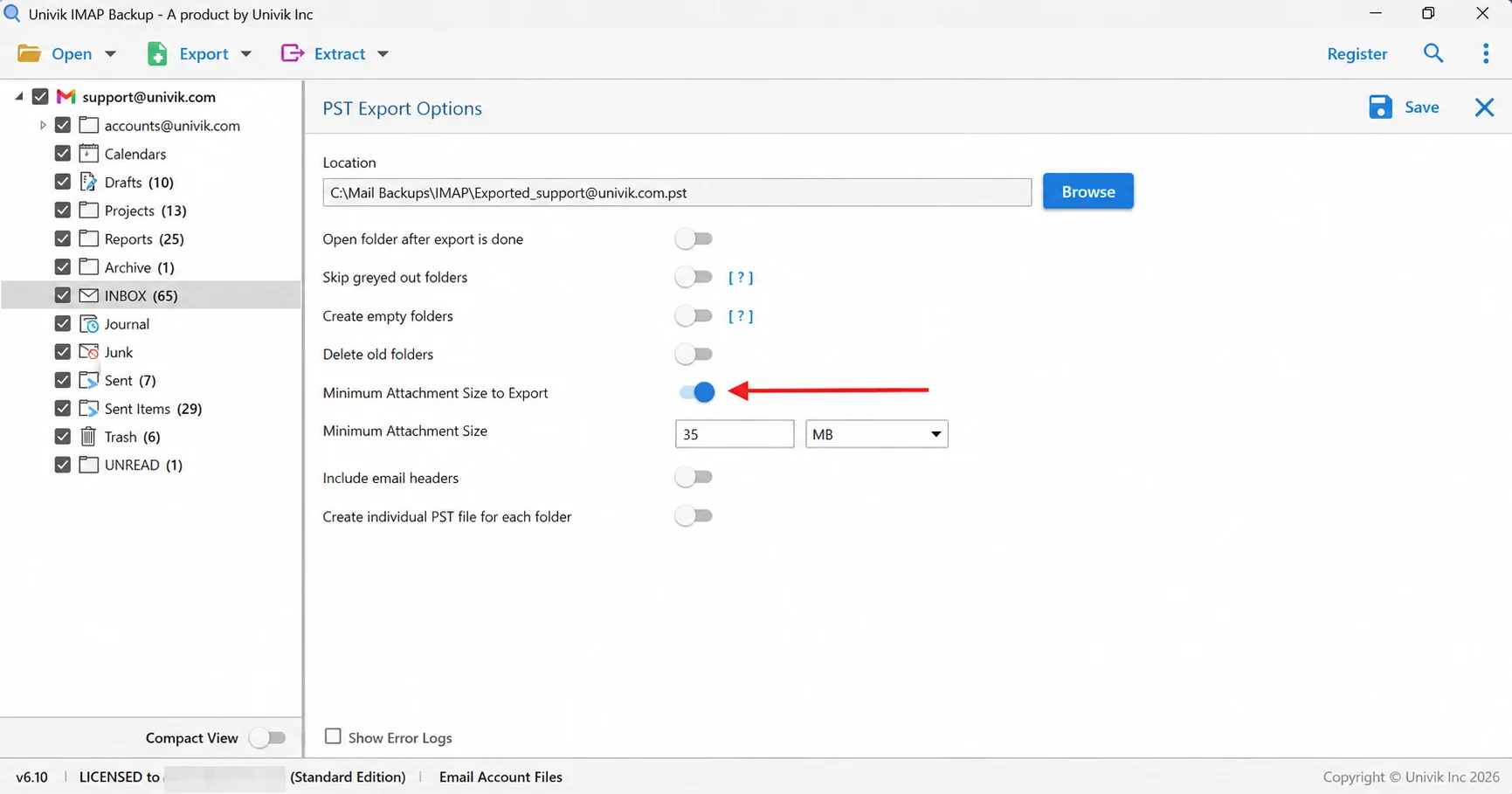
A trial copy of the app stops at 10 items in each folder. In a test mailbox outside any provider, INBOX held 65 messages and only 10 came out, while Trash held 6 and came out whole.
What Did a Test Mailbox Look Like After It Became Files?
Univik IMAP Backup Trial Edition 6.10 saved a test mailbox that belongs to no mail provider. I read the EML files back from disk on 28 October 2026. The table holds what an IMAP message carried into those files.
| Check on the saved files | Result |
|---|---|
| Files written | 14 EML files from three ticked folders: Drafts 10, EML_Test_new 1 and Sent Items 3 from a sub-account |
| Header lines | Six lines for sender, subject, date, message ID, content type and MIME version, plus a To line when the mail has a recipient |
| File date | Equals the date of the mail and not the day of the export |
| Attachments | Stay inside the file as a MIME part with their own file name |
| Folders | Nesting is kept, so Projects, Apollo and 2025 stayed nested in the PST run |
| Account name | The dot in an account name became an underscore in the output folder |
My verdict: IMAP is the right way to read one mailbox on several devices, as long as you also keep a file copy of any mail you can't afford to lose.
- RFC 9051 defines IMAP4rev2 in August 2021 and obsoletes RFC 3501, the IMAP4rev1 standard from March 2003.
- Port 993 carries IMAP over TLS from the first message, while port 143 starts in cleartext and upgrades with the STARTTLS command.
- SMTP handles sending, because RFC 9051 leaves mail submission to RFC 6409, which reserves port 587.
- Flags such as \Seen and \Deleted keep your read marks on the server, so every signed-in device shows the same mailbox state.
- PST, EML and MBOX files saved on your PC sit outside your account, so a delete on one device cannot reach them.
- EML files from a test mailbox carry six header lines for sender, subject, date, message ID, content type and MIME version, with file dates set to mail dates.
IMAP Questions and Answers
What is IMAP?
IMAP is the Internet Message Access Protocol, an email standard that lets a mail app read and manage messages that stay on a mail server. Folders, read marks and deletions are stored on the server, so every device that signs in to the same mailbox sees the same state. IMAP receives mail and SMTP sends it.
What does IMAP stand for?
The letters IMAP stand for Internet Message Access Protocol. Version 2 of the protocol, described in RFC 1064 from July 1988, went by the older name Interactive Mail Access Protocol.
What is the meaning of IMAP in an email app?
The IMAP label tells you the account reads its mail from a server and doesn't move the mail to your device. The app shows what the server holds, so deleting a message in the app changes the mailbox on the server as well.
Which RFC defines the IMAP protocol and which version is current?
RFC 9051 defines IMAP4rev2, the current version, which dates from August 2021. Its predecessor, RFC 3501 (IMAP4rev1 from March 2003), is obsolete but still registered with IANA. The two versions are upwards compatible.
Does IMAP send email?
No. RFC 9051 says IMAP doesn't define how to send mail and points to RFC 6409 for mail submission. Sending uses SMTP, so a mail app needs both IMAP and SMTP details.
Is IMAP secure?
IMAP traffic is protected when it runs inside TLS. RFC 8314 prefers implicit TLS on port 993 with TLS 1.2 or later. RFC 9051 tells clients not to use the plaintext LOGIN command on unsecure networks. Depending on your provider, sign-in uses a password, a generated app password or an OAuth token.
Does IMAP delete mail from the server?
IMAP deletes mail when an app asks for it. The client first sets the \Deleted flag. The server removes the message later, when an EXPUNGE command runs.
Do I still need a file copy of my IMAP mail?
Yes, if the mail matters to you. IMAP keeps one live copy on the server. A delete or an account closure on that side changes what every app shows. Files saved on your PC in PST, EML or MBOX format sit outside the account.
Can I save IMAP mail as PST, EML or MBOX files?
Yes. Univik IMAP Backup signs in with your email address and password and lists your folders with message counts. Select Export and choose PST, EML or MBOX under Email Files. Trial editions write 10 items per folder.


Reviewed on 2 November 2026 against the standards and the registry in this list. Folder counts in this guide were taken from a trial-edition test mailbox with no provider behind it.
Pages I read:
- RFC 9051: IMAP4rev2
- RFC 3501: IMAP4rev1
- RFC 8314: Cleartext Considered Obsolete
- IANA service names and port numbers registry
- Microsoft Support: What are IMAP and POP?
I also read RFC 1064, RFC 1730, RFC 2060, RFC 1939, RFC 2177, RFC 5321, RFC 6409, RFC 7628 and the IMAP.org history page.