Quick Answer
IMAP vs POP3 comes down to where your mail lives. IMAP keeps one shared copy on the server for every device, while POP3 downloads mail to a single device and removes the server copy by default.
The difference between IMAP and POP3 fits in two lines. Choose IMAP for a phone plus a laptop. Choose POP3 only for one computer that holds its own archive. Keep a second copy of that archive.
A mail app reaches your mailbox through one of two protocols. The choice shapes where the mail ends up. IMAP (Internet Message Access Protocol) works on mail that stays on the server. POP3 (Post Office Protocol, version 3) moves mail from the server to the device. SMTP is a third protocol that only sends mail, so it isn't part of this comparison.
I read RFC 1939 and RFC 9051 on 2 November 2026 and checked every claim in this guide against them or against a vendor help page. Where a claim comes from the help page of a provider, I name that page.
IMAP vs POP3: What Is the Core Difference?
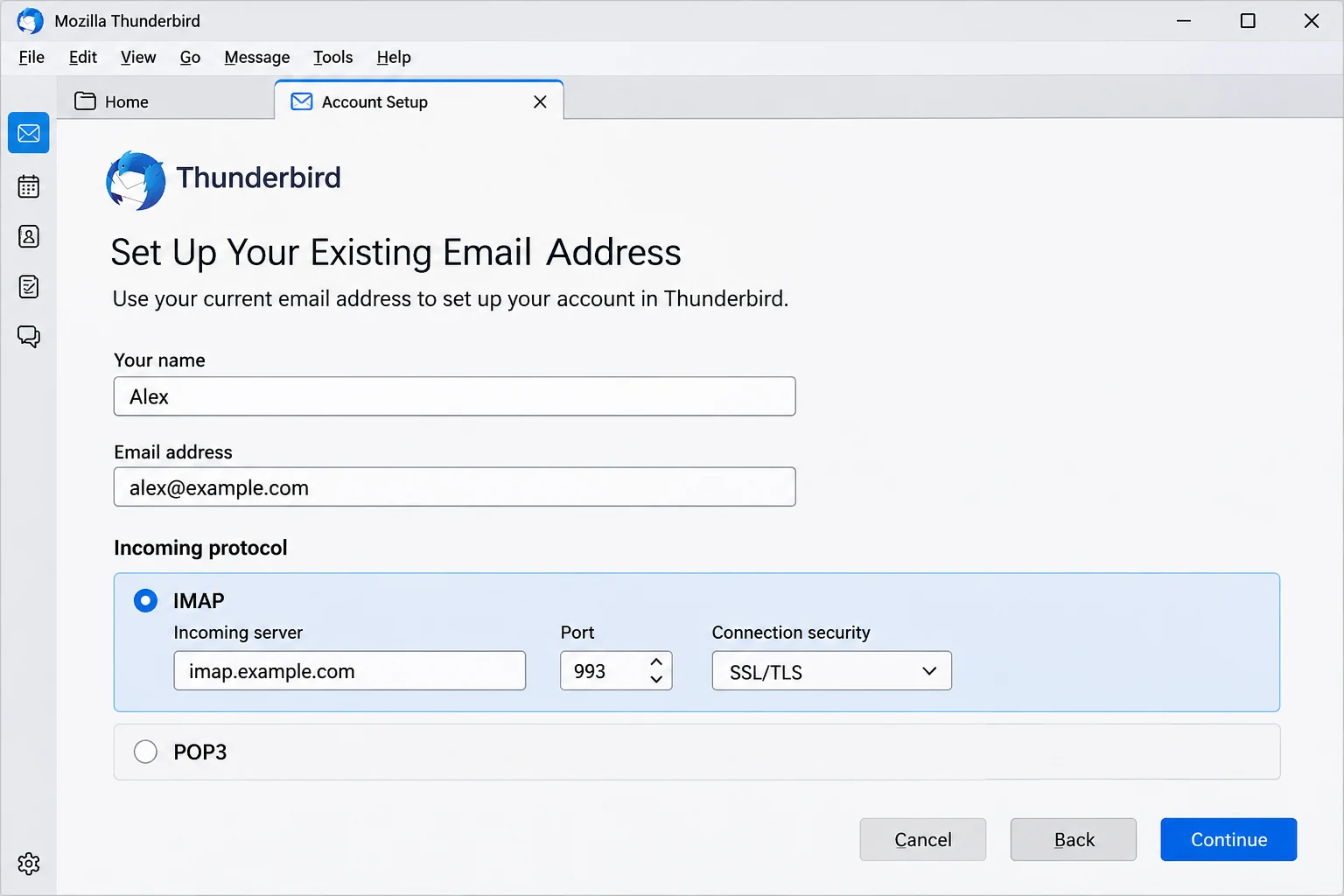
IMAP lets many apps share a single mailbox copy that stays on the server, while POP3 pulls mail down to one app. RFC 9051 defines IMAP4rev2, which lets a client read and manage messages on a server and treats remote mailboxes like local folders. RFC 1939 defines POP3 so that a workstation can reach a maildrop on a server, usually to retrieve the mail waiting there.
POP3 is version 3 of the Post Office Protocol, so a search for IMAP vs POP means the same comparison. The table lists the points that decide the choice.
| Point | IMAP | POP3 |
|---|---|---|
| Mail location | IMAP keeps the messages and the folders on the server | POP3 downloads messages to the app and most clients then remove the server copy |
| A delete | IMAP flags a message \Deleted and the server removes it at EXPUNGE | POP3 marks a message with DELE and the server removes it after the client sends QUIT |
| Folders | IMAP supports many folders on the server | POP3 downloads into a single folder, normally the Inbox |
| Devices | IMAP serves a phone and a laptop from the same copy | POP3 suits a single computer |
| New mail | IMAP servers can announce new messages while the client waits with the IDLE command | POP3 hands over new mail when the app opens a session and asks |
| Encrypted port | IMAP uses 993 with Implicit TLS | POP3 uses 995 with Implicit TLS |
| Standard | IMAP4rev2 is RFC 9051 (August 2021) and replaces RFC 3501 | POP3 is RFC 1939 (May 1996) |
Readers who want the protocol's history and vocabulary first can start with what is IMAP and come back here.

IMAP vs POP3 on the Server: What Happens When You Download or Delete?
POP3 usually moves your mail off the server when it downloads it, while IMAP leaves the mail on the server until someone deletes it. Microsoft Learn says POP3 clients remove downloaded messages from the email server by default and IMAP4 clients don't.
RFC 1939 explains the POP3 mechanics. The DELE command only marks a message as deleted. The server doesn't remove it until the session enters the UPDATE state, which happens after the client issues QUIT. A session that drops before QUIT removes nothing.
Most POP3 apps can leave the server copy alone. Google's help page for Gmail POP names the option in three apps. Outlook calls the option Leave a copy of messages on the server. Thunderbird calls the option Leave messages on server. In Apple Mail the box is Remove copy from server after retrieving a message, which must stay unticked.
IMAP deletes work in two steps. RFC 9051 flags a message \Deleted and removes it for good at EXPUNGE, so a delete on the phone reaches the laptop at the next sync.
- POP3 with removal The only copy is the set of files on your PC, so a failed disk takes the mail with it. Mozilla points out that POP3 mail isn't stored on a remote server and advises backing up your Thunderbird profile often.
- IMAP The only copy sits on the server, so a delete or an account closure reaches every device.
- POP3 with a kept copy Two copies exist until your provider's cleanup rules or your own delete removes the server one.
I found no step in either protocol that makes a second copy for you after reading RFC 1939 and RFC 9051 side by side.
POP3 vs IMAP for Several Devices, Folders and Offline Use
IMAP fits two or more devices because each app works on the same server copy, while Google's help page says POP can only be used for a single computer. Five details separate the two in daily use.
- Several devices Mozilla says IMAP changes like read marks, labels and moves are replicated to the server and to every connected device. POP3 changes made in one app aren't replicated on the server.
- Folders Microsoft Learn says POP3 downloads into a single folder on the client (typically the Inbox) and can't sync multiple folders. IMAP4 supports creating and accessing multiple folders on the server.
- Message identity RFC 9051 gives every message a UID and uses UIDVALIDITY to signal when those numbers no longer match the numbers from an earlier session. An IMAP app uses both to tell what it already holds.
- New mail An IMAP client that only polls sees new mail when it asks. RFC 2177 adds the IDLE command so the server can announce new messages while the client waits. It advises clients to re-issue IDLE at least every 29 minutes.
- Offline use RFC 9051 describes a capability for an offline client to resynchronize with the server. Thunderbird keeps downloaded IMAP messages usable offline and syncs your changes when it reconnects. POP3 mail opens offline because it already sits on your PC.
Is POP3 or IMAP More Secure?
Neither protocol is more secure on its own, because transport security comes from TLS and both protocols have an Implicit TLS port. RFC 8314 (January 2018) names port 995 for POP3 over TLS and port 993 for IMAP over TLS. The handshake starts the moment a connection opens.
RFC 8314 recommends TLS 1.2 or later and asks providers to deprecate cleartext as soon as practicable. The cleartext ports are 110 for POP3 and 143 for IMAP. RFC 9051 limits the STARTTLS command to cleartext ports, so port 993 never uses it. IANA lists all four ports in its registry. Each port and the choice next to it are laid out in IMAP port numbers.
The real security difference sits in where the copy lives. A POP3 download puts your mail on your PC, so the disk and the screen lock become the protection. IMAP keeps your mail on a server that the provider runs, so the sign-in becomes the protection.
Providers can switch either protocol off. On Exchange Online, Microsoft Learn lists POP3 and IMAP4 as on by default for every user. Turning on security defaults switches both off. Disabling Basic authentication also blocks both legacy protocols. If your app can't sign in, check that switch before you blame the password.
Which Should You Pick in IMAP vs POP3?
Pick IMAP when you read mail on more than one device or want the provider to hold the folders. Pick POP3 only when one computer is your single archive. The table matches common setups to a protocol.
| Your setup | Better fit | Reason |
|---|---|---|
| A phone and a laptop on one mailbox | IMAP | IMAP shows both devices the same folders and the same read marks |
| One desktop that keeps its own archive | POP3 | POP3 moves each message into local storage and the PC then holds the archive |
| A mailbox that two people open | IMAP | RFC 9051 describes simultaneous access to the same mailbox by multiple agents |
| A hosting mailbox with a small quota | POP3 with a saved copy | POP3 clients remove downloaded messages by default, which frees server space |
| An account you plan to close | Either, with a copy first | Neither protocol keeps a second copy for you |
Gmail offers both protocols. Google's help page says IMAP can be used across multiple devices with emails synced in real time, while POP can be used for a single computer. Server values for each provider sit on its own settings page. Gmail has one at Gmail email settings.
A host move changes the picture, because a closed mailbox takes its server copy with it. Read back up hosting email accounts before the move.
A POP3 vs IMAP switch means adding the account again. Mozilla says Thunderbird can't convert an account between the two protocols, so you set up a new IMAP account and keep the old one until you have compared the folders.
My verdict: use IMAP for everyday mail on more than one device. Keep a second copy whenever the mail matters to you, because IMAP and POP3 each leave you with one copy.
How Do You Save IMAP Mail Before You Switch to POP3?
On an IMAP mailbox the server holds the only copy of your mail. When that server drops a message, each of your devices loses it together. Whether that counts as a backup is answered in is IMAP a backup.
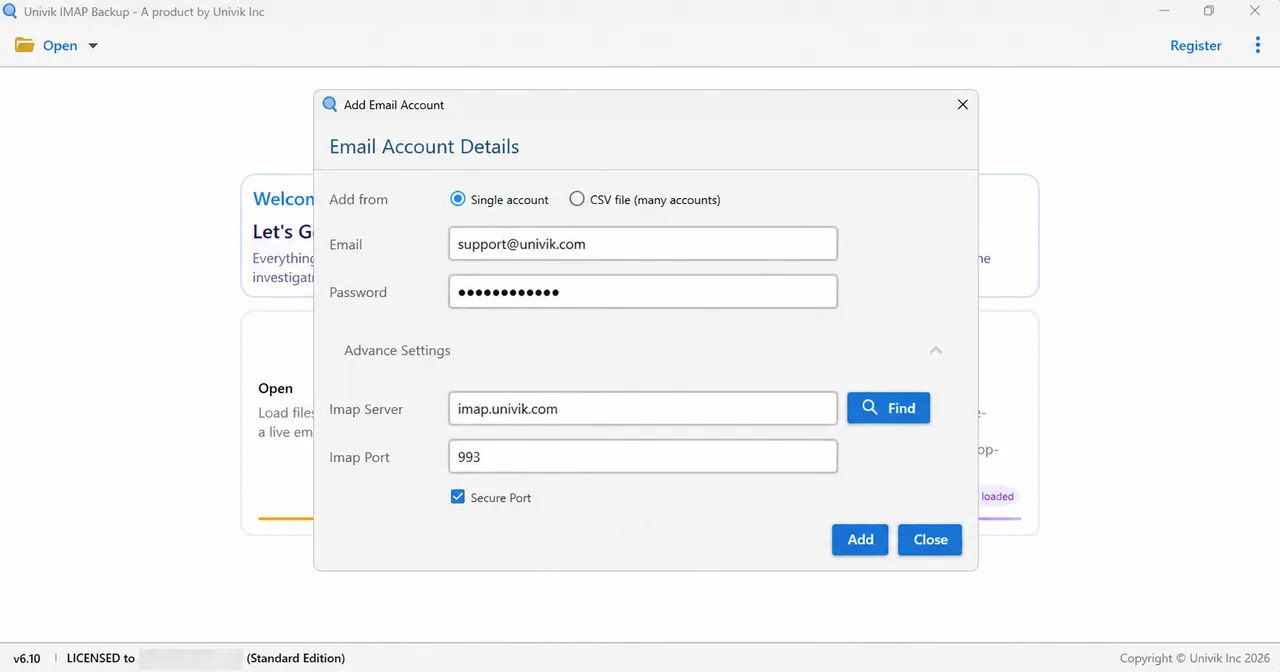
As IMAP backup software for Windows, Univik IMAP Backup reads a mailbox with the same address and password your mail app uses. The Add account command sits under Open and Email Accounts. Fill Email and Password next. Advance Settings reveals Imap Server and Imap Port with 993 filled in, plus a Secure Port box that comes ticked. Find looks the server up from your address when you don't know it.
Choose a Format and Check the 35 MB Filter
Open Export and look at Email Files, which lists three choices: EML, MBOX and PST. One guide covers each choice in turn: export IMAP to MBOX, export IMAP to PST and export IMAP to EML. Before saving, find Minimum Attachment Size to Export among the switches. Expect that switch to be on already, with 35 MB entered.

My test mailbox comes from no mail provider. INBOX listed 65 messages in the folder tree, yet the trial wrote only 10 of them because it caps every folder at 10 items. The first PST run wrote nothing at all until I turned that 35 MB filter off.
Hotmail, Outlook.com and Microsoft 365 Addresses
On 2 November 2026 I tried a Hotmail, Outlook.com and Microsoft 365 address in Add account. Microsoft's sign-in page appeared in my browser at once. No Imap Server boxes appeared and the folder tree loaded afterwards. Both routes have a guide: backup hotmail emails and backup office 365 email.
What Did the Folder Tree of a Test Mailbox Become After the Copy?
POP3 downloads into a single folder, normally the Inbox, while an IMAP mailbox is a tree of folders. Univik IMAP Backup Trial Edition 6.10 kept that tree when it copied a test mailbox that no mail provider hosts on 27 October 2026.
| Check | Result |
|---|---|
| Test mailbox | 157 messages in 9 folders plus a sub-account with 8 folders |
| One PST file | 17 folders under Top of Personal Folders |
| One PST file per folder | 17 files, one per mail-holding folder and named after it |
| Nesting | Projects, Apollo and 2025 stayed nested inside one another |
| Parent folder | Projects.pst holds Projects mail only and not its sub-folders |
| Empty folders | A folder with no mail got no file |
- RFC 1939 removes a POP3 message only after the client sends QUIT, so a session that drops before QUIT deletes nothing.
- Port 993 serves IMAP and port 995 serves POP3 over Implicit TLS, with cleartext on ports 143 and 110.
- Mozilla says Thunderbird cannot convert an account between POP3 and IMAP, so a switch means adding a new IMAP account.
- Microsoft Learn says POP3 cannot sync multiple folders, while IMAP4 supports creating and accessing multiple folders on the server.
- RFC 9051 and RFC 1939 describe no step in IMAP or POP3 that makes a second copy of your mail for you.
- A test IMAP mailbox with 17 mail-holding folders came out as 17 PST files, one for each folder, while POP3 downloads into a single folder.
Questions About POP3 and IMAP
What is the main difference in IMAP vs POP3?
IMAP keeps your mail and folders on the server and lets many devices work on that one copy. POP3 downloads mail to one device and most clients then remove the server copy. RFC 9051 defines IMAP and RFC 1939 defines POP3.
Does POP3 delete mail from the server?
Usually yes. Microsoft Learn says POP3 clients remove the downloaded messages from the server by default. RFC 1939 adds that the server removes a message marked with DELE only after the client ends the session with QUIT. Most apps have an option to leave a copy on the server.
Can one mailbox use both IMAP and POP3?
Many providers offer both. Microsoft Learn says Exchange Online enables POP3 and IMAP4 for all users by default, although security defaults turn them off. Using both on one mailbox lets POP3 remove messages that the IMAP apps expect to find, so set POP3 to leave a copy.
What does IMAP vs POP mean?
POP3 is version 3 of the Post Office Protocol, the version that mail apps use today. So IMAP vs POP asks the same question as a comparison with POP3.
Is IMAP or POP3 more secure?
Neither is more secure on its own. RFC 8314 gives both protocols an Implicit TLS port (993 for IMAP and 995 for POP3) and recommends TLS 1.2 or later. What differs is where the copy lives, on your PC for POP3 or on the server for IMAP.
Does IMAP work offline?
Yes, because the app keeps the messages it has downloaded. RFC 9051 describes a capability for an offline client to resynchronize with the server. Thunderbird keeps downloaded IMAP messages usable offline and syncs your changes after it reconnects.
Why does a POP3 account show only an Inbox?
Microsoft Learn says POP3 downloads messages into a single folder on the client (typically the Inbox) and can't sync multiple folders on the server. IMAP4 supports many folders.
Can I switch from POP3 to IMAP without losing mail?
Mozilla says Thunderbird can't convert an account between the two protocols, so you add the account again as IMAP. Keep the old account and its local folders until you have compared the folders in the new one.
How do I keep a copy of IMAP mail on my PC?
Univik IMAP Backup signs in with your address and password, lists the folders with their message counts and saves the ticked folders as EML, MBOX or PST files. The trial writes 10 items per folder.

Every claim was checked on 2 November 2026 against RFC text and vendor help pages. Folder counts come from a non-provider test mailbox opened in the trial edition of version 6.10.
Pages I read:
- RFC 8314: Cleartext Considered Obsolete
- RFC 1939: Post Office Protocol - Version 3
- RFC 9051: IMAP - Version 4rev2
- Microsoft Learn: POP3 and IMAP4 in Exchange Online
- RFC 2177 on the IMAP IDLE command
- IANA registry of service names and port numbers
- Google help page on reading Gmail through POP
- Mozilla Support article comparing IMAP and POP3