Quick Answer
To backup Hotmail emails, sign in to your mailbox on Microsoft's own page from a Windows IMAP app. No password goes into the app. Then choose your folders and write each one to your PC as a PST, EML or MBOX file.
Basic Authentication ended for Outlook accounts on 16 September 2024, so a typed password no longer works. Save your copy before Microsoft closes an unopened inbox, which its agreement sets at one year.
Hotmail, Live, MSN and Outlook.com addresses all sit on one Microsoft mailbox service. The Microsoft Services Agreement says it closes an Outlook.com inbox that is not opened for a year. It also says it cannot retrieve your content once the account is closed. A copy on your PC sits outside both rules.
I signed in to a live Hotmail mailbox on 2 November 2026. Typing the address into Add account opened Microsoft's sign-in in my browser and the folder tree loaded. The export screens of an IMAP backup app were tested by me on a mailbox from another provider, so every folder count in this guide comes from that test. I read each Microsoft statement on a Microsoft page on the same day.
Why Does a Hotmail Backup Start on Microsoft's Sign-In Page and Not With a Password?
The Microsoft settings page for Outlook.com lists OAuth2, which it calls Modern Auth, for IMAP, POP and SMTP. It states that Outlook.com requires it. Microsoft's notice set 16 September 2024 as the day Basic Authentication ended for Outlook accounts, so a guide that has you type a password into the server box no longer works.
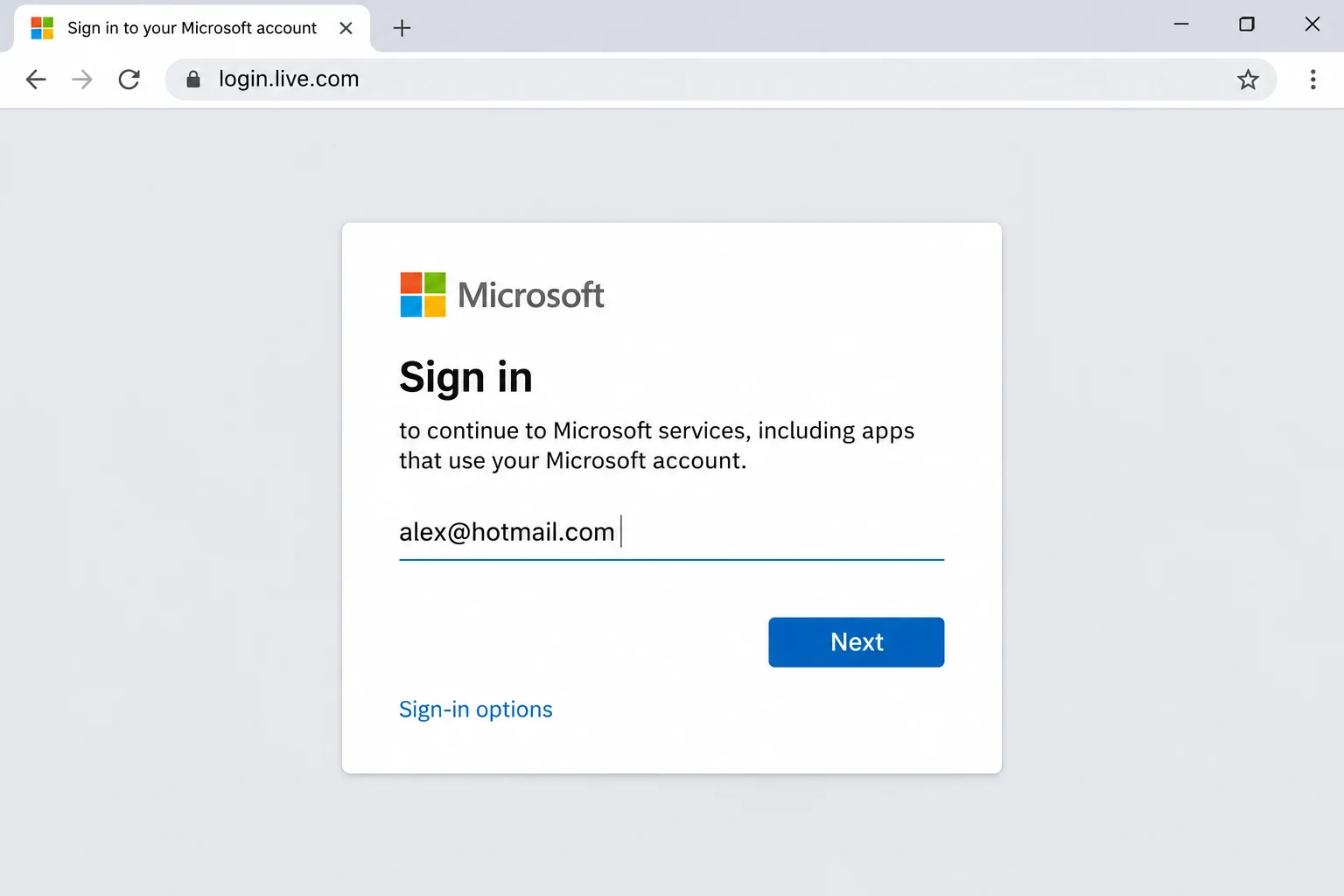
Univik IMAP Backup runs on Windows as IMAP backup software and it follows that rule. As soon as you type your Hotmail or Outlook.com address in Add account, Microsoft's sign-in opens in your browser, so you approve access on the Microsoft page and not in the app. POP3 and SMTP values are listed on our Outlook.com email settings page, but a copy of your mail uses neither.
yourname@hotmail.comThe whole address, including @ and the domain.- Sign-in
- Microsoft's own pageIt opens in your browser as soon as you type the address. You type no password in the app.
- Imap Server
outlook.office365.comMicrosoft's published IMAP endpoint, shown for reference. The app hides this field for a Hotmail address, so you type nothing there.- Imap Port
993Microsoft's published IMAP port, shown for reference.- Secure Port
- Ticked (SSL/TLS)Microsoft lists SSL/TLS for IMAP, so leave this box ticked.
The settings page uses one endpoint for @outlook.com, @hotmail.com and @live.com addresses, so a Hotmail address needs no route of its own.
Why Is a Microsoft App Password the Wrong Tool for This Backup?
The Microsoft page on app passwords says you need one only when two-step verification is on and an app cannot support it. Its examples are Outlook 2010 or earlier and the Xbox 360. This backup does not make you create one, because you approve access on the Microsoft page. I signed in to an account with two-step verification and no app password was asked for.
The Microsoft passwordless page lists Microsoft Authenticator, Windows Hello, security keys and SMS or email codes as ways to sign in without a password. Use the same method that you use at outlook.com and keep that phone or key within reach when the Microsoft page opens.
Before you open the app, sign in at outlook.com in a browser with your usual method. If that works, your sign-in details are current.
Does Outlook.com Need Its IMAP Switch On for This Backup?
Microsoft states that POP and IMAP access is disabled by default in Outlook.com. The switch sits under Settings, then Mail, then Forwarding and IMAP. It is named Let devices and apps use IMAP and you finish with Save. I signed in with that switch off and again with it on. The login and the folder tree worked both times, because Univik IMAP Backup signs in with OAuth. You can leave the switch as it is.
What Does Microsoft Close if Nobody Opens the Hotmail Mailbox?
The Microsoft Services Agreement (published 30 July 2026 and effective 30 September 2026) sets three rules.
- Inactive account You must sign in at least once in a two-year period. If you do not, Microsoft assumes the account is inactive and closes it.
- Outlook.com inbox You must sign in to your Outlook.com inbox and to OneDrive, separately, at least once in a one-year period. Otherwise Microsoft closes the inbox and OneDrive for you.
- After a closure Microsoft deletes the data and content tied to the account or detaches it from you. It cannot retrieve either one afterwards.
If you close the account yourself, Microsoft suspends it for 30 or 60 days. Our guide to close your Microsoft account covers the window. The agreement also says you should keep a regular backup plan.
Which Hotmail Folders Empty Themselves and What Happens at 15 GB?
The Microsoft page on Outlook.com storage describes three rules that change what a backup finds.
- Deleted Items Emails here are deleted automatically after 30 days. The folder counts against your mailbox storage until it is emptied.
- Junk Items in the Junk folder are deleted automatically after 10 days. A copy contains only the mail still sitting in Deleted Items and Junk when you run it.
- A full mailbox A free account gets 15 GB of email storage, kept apart from the free 5 GB of cloud storage. Past the email limit you cannot send or receive.
IMAP does not protect against any of these, because it shows the mail that is on Microsoft's server and keeps no copy of its own. Is IMAP a backup? sets out how the two differ. The EML export screen has a Delete old folders switch. It starts switched off, so keep it that way until you have checked one complete run.
Can Microsoft Itself Hand You a Hotmail Mailbox File?
Microsoft documents one route through desktop Outlook. The page on exporting an Outlook.com mailbox says new Outlook for Windows or classic Outlook for Windows can write a .pst file. Legacy Outlook for Mac can write an .olm file. Microsoft says the file includes email, contacts and calendar items as they stood on the day you create it. Microsoft points people without desktop Outlook to a free 30-day Microsoft 365 trial.
The route in this guide runs from a separate app and writes EML and MBOX. It saves mail folders, so use the Microsoft route for contacts and calendar items.
Who Needs to Backup Hotmail Emails Before an Unused Mailbox Is Closed?
- An address from the Hotmail or MSN years You have not opened the inbox for months and the one-year rule is getting closer.
- A mailbox near 15 GB You plan to clear the old years and want them saved as files first.
- A move to a new address You want every folder stored before you stop using the Hotmail address.
How Do You Backup Hotmail Emails Step by Step?
Enter your address, approve access on the Microsoft page, tick folders, choose a format in Export and finish with Save. To save Hotmail emails to PC in full, tick every folder in step 3.
The product screens in this part show a test mailbox from another provider. The Microsoft sign-in screen above is an example of the browser step.
- Add your address. In the main window pick Open, then Email Accounts and Add account. Enter your complete Hotmail or Outlook.com address in the Email box. Microsoft's sign-in then opens in your browser.
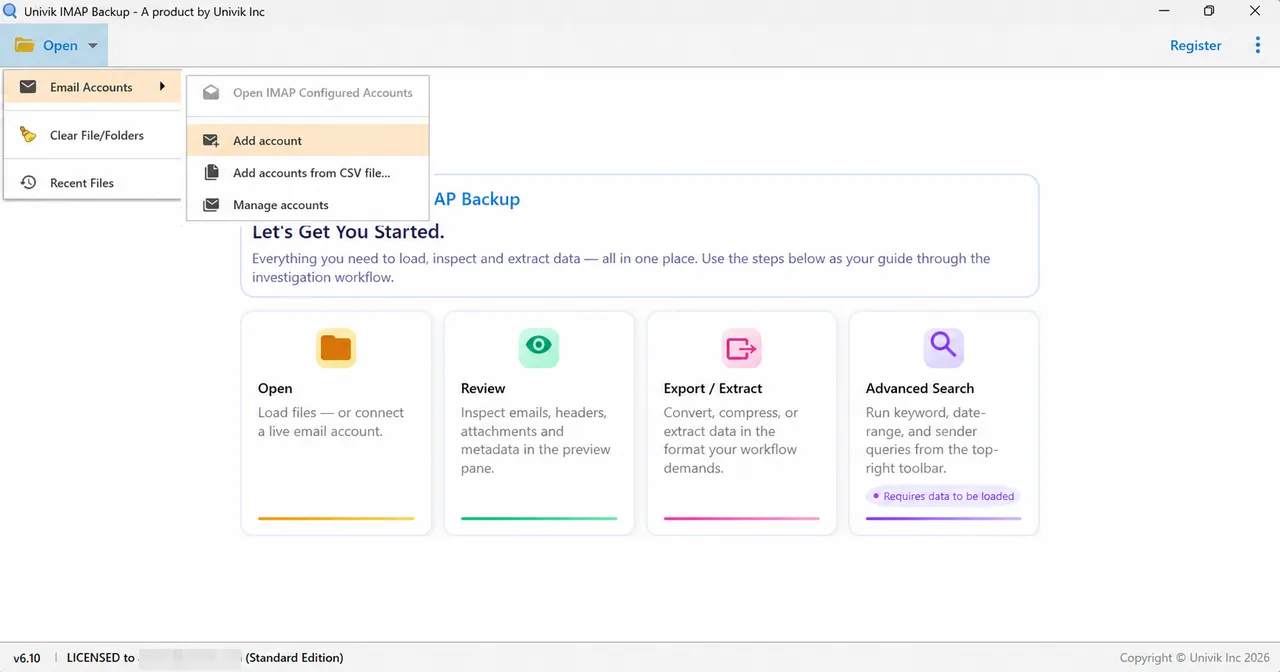
Open menu showing Email Accounts and its Add account entry. - Approve on Microsoft's page. Sign in there with the method you use at outlook.com and approve access for the app. You type no password into the app.
- Pick the folders. Each folder in the tree shows a message total next to a tick box. Tick whichever folders you want to keep and include Deleted Items and Junk while Microsoft has not yet emptied them.
- Pick a format and check the size filter. Select Export, then open Email Files and pick EML, MBOX or PST. The PST screen shows Minimum Attachment Size to Export already on and set to 35 MB. At that default my first test export wrote nothing, so look at it before continuing.

Email Files, the first group in the Export menu, holds EML, MBOX and PST. 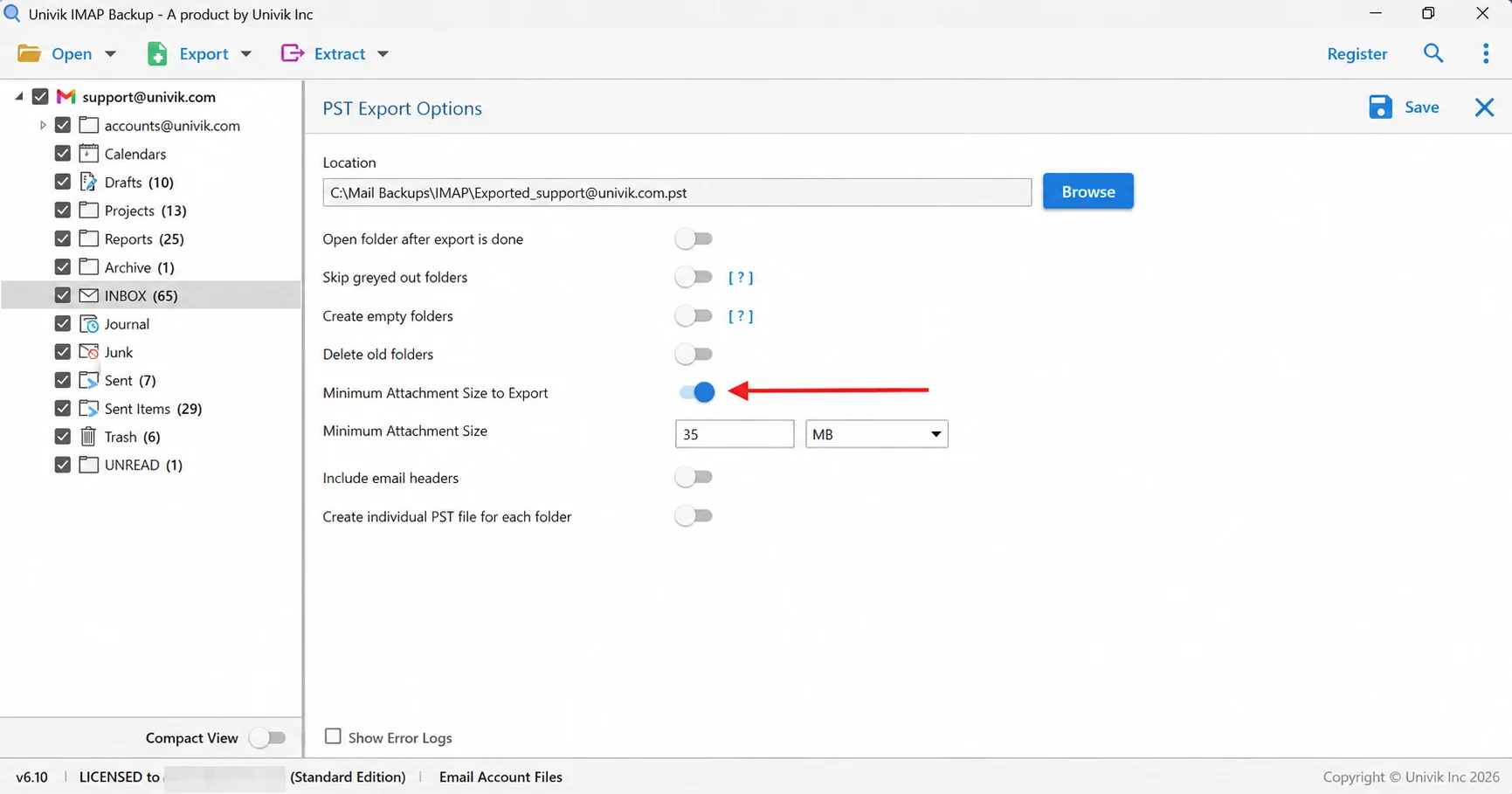
Arrow on the attachment size filter, which is set to 35 MB. - Save and verify. Select Save at the top right. A green bar appears when the export finishes. Then open the export folder and compare each folder's file total with the number shown in the tree.
Which File Format Keeps Hotmail Mail Usable After Microsoft Closes the Mailbox?
Each of the three Email Files formats opens without a Microsoft account, so each outlives the mailbox.
| Format | Output | Opens in |
|---|---|---|
| IMAP to PST guide | A single .pst for the whole account or one per folder | Outlook for Windows |
| IMAP to EML guide | A .eml file for each message, placed in folders that follow your tree | A File Explorer folder |
| IMAP to MBOX guide | A .mbox file for each ticked folder | Mozilla Thunderbird after an import |
Pick PST when Outlook will be your next mail program. Without Outlook, the browser-based Online PST Viewer opens a PST as well. To get senders and dates into a spreadsheet, export IMAP emails to CSV from Document Files.
Why Does a Hotmail Backup Come Back Short?
Two Microsoft rules explain most gaps. Deleted Items and Junk empty themselves on a timer. The mail inside a closed inbox cannot be fetched back. The folder tree lists a total for every folder, so counting the files is the quickest check.
The test mailbox is not a Hotmail mailbox. The tree lists INBOX at 65 and the trial wrote 10 files for it. Drafts lists 10 and all 10 were written.
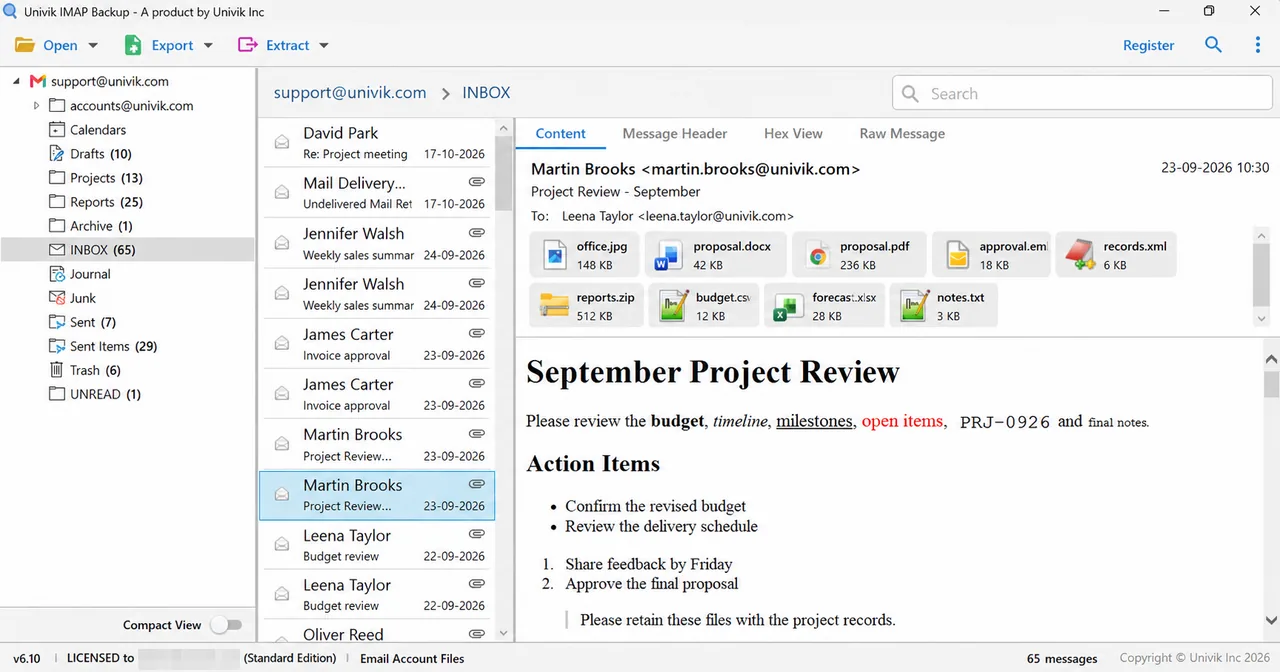
| Folder in the test mailbox | Total in the tree | Files written |
|---|---|---|
| INBOX | 65 | 10 |
| Drafts | 10 | 10 |
| Sent Items | 29 | 10 |
| Trash | 6 | 6 |
A licence lifts that cap. Each folder then gets as many files as its tree total. Attachments remain inside the saved messages. If you want them as standalone files, extract attachments from IMAP email once the backup is done.
What Should You Check if the Hotmail Backup Fails?
Try this: Sign in at account.live.com/activity, expand the matching Session Type event under Recent activity and select This was me.
Try this: Open outlook.com in the browser and sign in with the same method. If that fails too, repair your Microsoft account recovery details before the backup.
Try this: Switch Minimum Attachment Size to Export off, then select Save again. At its default that filter left my first PST run empty.
Try this: The trial edition writes 10 items per folder and a Demo Edition dialog explains the cap. Buying a licence removes it.
Anything else? Send the details to Univik support.

Hotmail Backup Questions
How do I backup Hotmail emails?
Type your Hotmail address in Add account in Univik IMAP Backup. Microsoft's sign-in opens in your browser, so approve access there. Tick your folders, choose PST, EML or MBOX in Export and select Save. The login worked for me with the Outlook.com IMAP switch off and on.
Does Hotmail still accept a typed password in an email app?
No. Microsoft set 16 September 2024 as the day Basic Authentication ended for Outlook accounts. The Microsoft settings page now lists OAuth2, called Modern Auth, for IMAP, POP and SMTP.
Is a Hotmail mailbox the same as an Outlook.com mailbox?
The page for adding an Outlook.com account names @outlook.com, @live.com, @hotmail.com and @msn.com as Microsoft email addresses. The settings page lists one IMAP endpoint for the first three endings. The app steps here cover Hotmail and Outlook.com addresses.
Can I backup Outlook.com email the same way?
Yes, for a personal Outlook.com address. Type it in Add account and approve access on the Microsoft page. A work or school mailbox has its own guide.
How do I save Hotmail emails to PC without Outlook?
Add the address in the app, approve the Microsoft sign-in and export to EML or MBOX. EML writes one file per message and MBOX one file per folder. The Microsoft export route needs desktop Outlook and writes a PST.
When does Microsoft close an unused Hotmail mailbox?
The Microsoft Services Agreement closes any account that goes two years without a sign-in. It also closes an Outlook.com inbox that is not opened at least once in a one-year period. After a closure the agreement says Microsoft cannot retrieve your content or data.
How long does Microsoft keep mail in Deleted Items and Junk?
The Microsoft storage page says Deleted Items empties automatically after 30 days and Junk after 10 days. Deleted Items counts against the 15 GB until it is emptied.
How do I know my Hotmail backup is complete?
Count the files inside each exported folder and set that number beside the folder's total in the tree. The test mailbox shows 65 for INBOX while the trial wrote 10, so a full match between folder totals and file counts needs a licence.
Do I need a Microsoft app password to backup Hotmail?
No. You approve access on Microsoft's page. Microsoft describes app passwords as a fallback for older apps and devices that cannot support two-step verification, like Outlook 2010 or earlier.

Every Microsoft statement in this guide was read on 2 November 2026 on the Microsoft pages named in this box. Folder counts come from a non-Hotmail test mailbox exported with IMAP Backup 6.10 in the trial edition.
Microsoft pages we read:
- POP, IMAP and SMTP settings for Outlook.com
- Modern Authentication Methods now needed to continue syncing Outlook Email in non-Microsoft email apps
- Microsoft Services Agreement
- Storage limits in Outlook.com
- Export your Outlook.com mailbox
- How to get and use app passwords