Quick Answer
To export IMAP emails to CSV, log in to the mailbox through an IMAP backup tool, tick your folders and run the CSV export. Choose the columns first. Each mail becomes one row and a single-file run puts every folder in one table with the folder name in a column.
Turn off or lower the 35 MB size filter before the first run, because it is on from the start.
A mailbox on an IMAP server cannot be counted by sender or sorted by subject like a table. A CSV file turns each mail into a row, so the sender, date and subject sit in columns that a spreadsheet can sort.
A tool has to log in to the server and build the rows itself. This guide walks through the CSV screen of IMAP Backup from top to bottom. It lists the 14 columns of the single file, shows how Excel read my result and explains why a first run can come out empty.
Why Export IMAP Emails to CSV Instead of PST or EML?
A PST or an EML export keeps mail as mail. A CSV export keeps one fact per cell. That suits questions about a whole mailbox. Who sent the most mail? Which subjects come back? Which folder holds the most?
RFC 4180 describes how a CSV file is laid out. A field that holds a line break or a double quote should be wrapped in double quotes. A mail body holds line breaks, so this rule decides whether one mail stays in one row.
Who Needs a Table of Mail From IMAP?
Rows beat files in four jobs.
- A mail auditor You list senders, dates and subjects before a review starts.
- A host mover Your hosting plan ends soon and you want an index beside the copy.
- A team lead You show a colleague which folder holds which mails without opening them.
- A paper-trail keeper You need to know which mails carried an attachment and where the file went.
How Do You Export IMAP Emails to CSV Straight From the Server?
For this guide I ran Univik IMAP Backup, which is IMAP backup software for Windows. It signs in over IMAP and pulls mail from the server, so a mail program does not need to hold the account first.
- Connect the mailbox. Open the Open menu, choose Email Accounts and press Add account. Enter your address and password. If the server name stays blank, Find under Advance Settings fills it in.
- Tick the folders. A message count sits beside each folder in the tree. Tick the folders you want and keep those counts for the final check.
- Open the CSV screen. The Export menu lists CSV in its Document Files group with PDF, HTML and TEXT.

The Export menu with its Document Files group. - Choose the columns. The box Select fields to export shows From, Subject and To as locked ticks. Message Body, Message Header, Raw Message, Cc and Bcc are optional. Raw Message made the biggest cells in my run, so leave it unticked unless you need it.
- Set the file switches. Three switches shape the file: Include attachment details, Single file for all folders and the Excel switch Limit characters length. All three start off. The size filter above them is on from the start at 35 MB. In my PST test it skipped all of the mail, so I turned it off before my second CSV run.
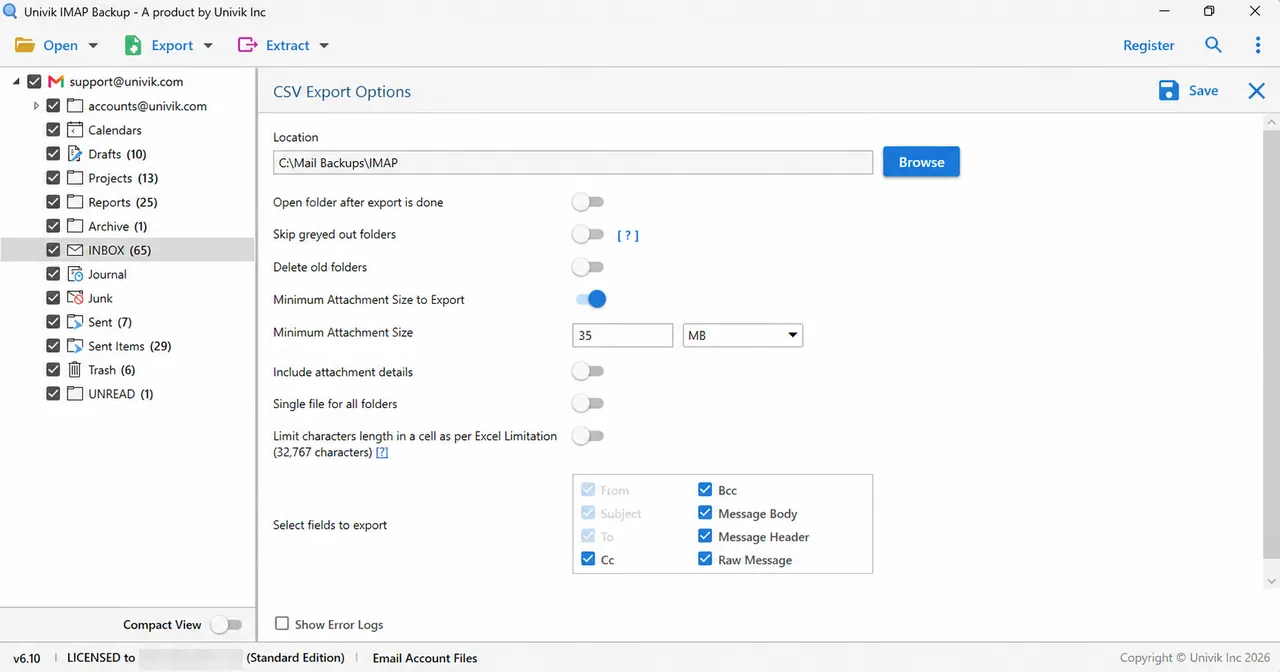
The CSV Export Options screen with the three file switches and the field box. - Save and check. Press Save in the top right corner. Count the rows and compare them with the folder counts.
Which 14 Columns Does the CSV File Hold?
My second run had Include attachment details and Single file for all folders both on and every field ticked. The file mails.csv held 14 columns in the order of the table.
| Column | What it holds in my file |
|---|---|
| Folder | The name of the folder, for example Drafts |
| Folder Path | The path from the account name, for example alice@northwind.test\Drafts |
| Attachment? | Yes when the mail has an attachment and empty when it has none |
| Attachments | The full Windows path of each saved attachment |
| Body | The text of the mail |
| Raw Message | The raw message text, the heaviest cells in the file |
| Date | Date and time as MM/DD/YYYY HH:MM:SS, for example 05/01/2025 14:48:03 |
| Subject | The subject line |
| From | The sender name, which was empty in my mailbox |
| From Email | The sender address |
| To | The recipients |
| Cc | The Cc recipients |
| Bcc | The Bcc recipients |
| Message Header | The header of the mail |
The From column stayed empty because my test mails carry no display name, so sort on From Email. My first run had both switches off and gave 10 columns: Body, Raw Message, Date, Subject, From, From Email, To, Cc, Bcc and Message Header. The second file added Folder, Folder Path, Attachment? and Attachments. Both switches changed between the runs, so I cannot say which adds which.

Single File or One CSV Per Folder?
The switch Single file for all folders decides how many CSV files you get.
| Setting | Files written |
|---|---|
| Single file for all folders on | One mails.csv in the account folder alice@northwind_test with 98 rows from 15 folders |
| Single file for all folders off | One CSV for each folder, for example Drafts.csv and Sent.csv, with 10 columns and no Folder column |
The dot in the account name alice@northwind.test became an underscore in the folder name. Choose the single file for Excel, because its Folder column names the folder of every row.
How Does Excel Open the IMAP CSV File?
I opened mails.csv through Data and From Text/CSV in Excel. The preview read the file as UTF-8 with 14 columns and one row per mail.
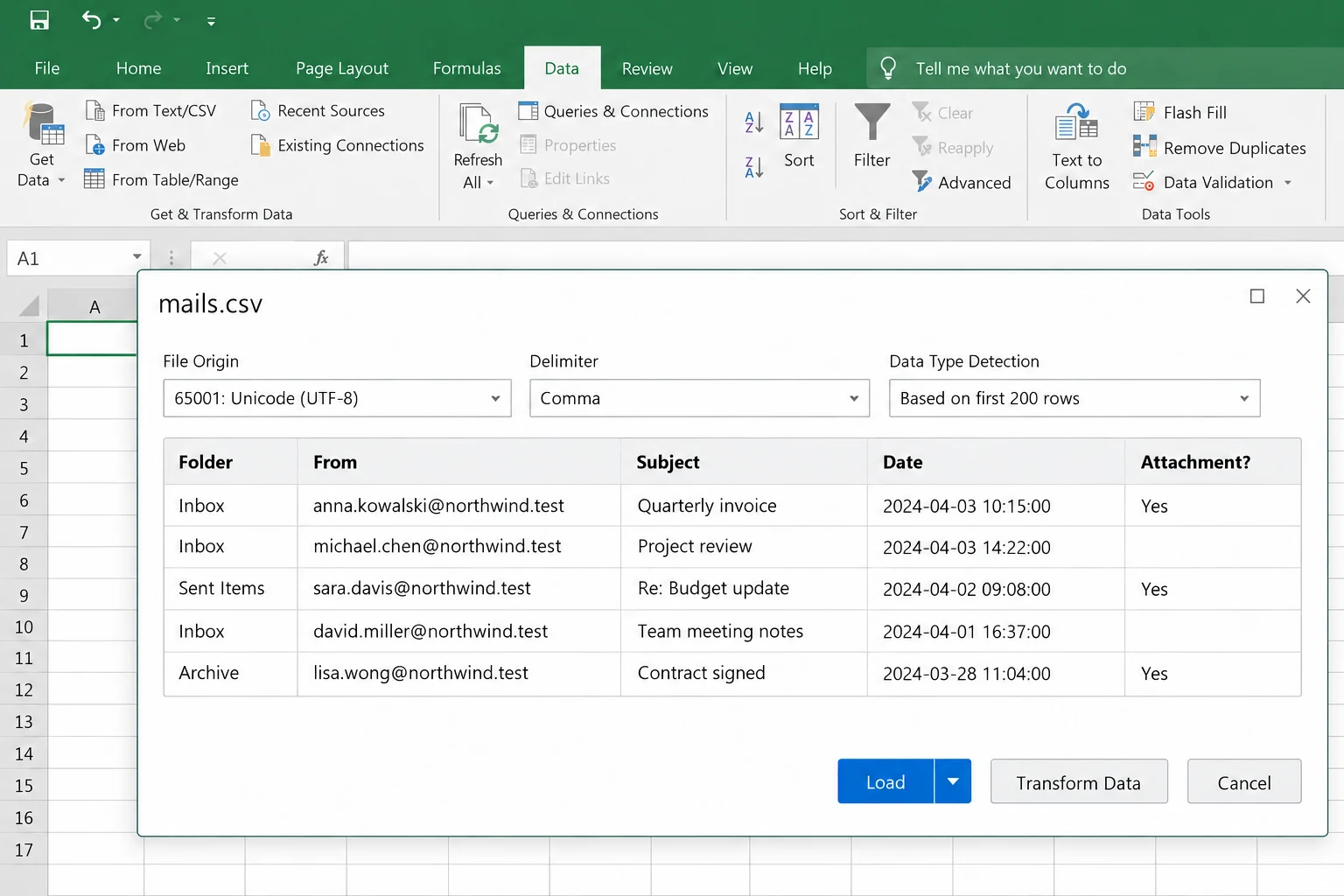
The older route did worse. File then Open starts the legacy Text Import Wizard. With a comma delimiter and a quote qualifier it split mails with line breaks over many rows in my test. Use From Text/CSV to get IMAP emails to Excel in one row each.
Microsoft's Excel limits page lists 32,767 characters as the most that one cell can contain. Columns end at 16,384 and rows at 1,048,576 in a worksheet. The switch Limit characters length carries the cell number in its label and it starts off. I ran it on only. The longest cell in my file held 32,277 characters and it was a Raw Message cell. The longest Body held 6,511.
The run also wrote mails_LongTextLog.txt (about 49 MB) with one entry per mail. I did not match its entries to the long cells, so read the log before you rely on it.
What Happens to Attachments in the CSV Export?
The second run wrote an Attachments folder next to mails.csv and saved every attachment of every mail in it. Files that shared a name got (1) or (2) added, as in my EML run. The Attachment? column read Yes in 43 of the 98 rows. The Attachments column holds the full Windows path of the saved file.
Log in with your address and password and tick the folders you want. Each mail inside them is written as one row.
Download Free Trial Select a Licence - From $99Start with one folder and check its rows against the count the tree shows.
What If Your CSV Export Looks Like This?
Do this: Look at Minimum Attachment Size to Export first. The filter is on from the start at 35 MB and it skipped all of the mail in my PST test. Turn the filter off or choose a smaller size, then press Save.
Do this: Close the file and open it again through Data and From Text/CSV. The legacy wizard behind File and Open split my multi-line mails over many rows.
Do this: Turn on the Limit characters length switch or untick Raw Message, the heaviest column in my file.
Do this: This is the trial limit. A dialog about the Demo Edition appears and asks for an upgrade to the licensed edition.
Does your CSV file look different from this page? Tell Univik support what you see.
- An export of IMAP mail to CSV writes one row per mail and the single-file run keeps the folder name in a column.
- Excel read mails.csv correctly through Data and From Text/CSV and split multi-line cells through the legacy wizard.
- One Excel cell holds 32,767 characters per Microsoft. The longest cell in my file held 32,277.
- The 35 MB size filter is on from the start, so look at it before the first run.
FAQ: Export IMAP Emails to CSV
How do I export IMAP emails to CSV?
Load the mailbox into IMAP Backup and tick your folders. Open Export, pick CSV and choose the columns. Set the three file switches and press Save.
Which columns does an IMAP CSV file hold?
With Include attachment details and Single file for all folders both on, my file held 14 columns: Folder, Folder Path, Attachment?, Attachments, Body, Raw Message, Date, Subject, From, From Email, To, Cc, Bcc and Message Header. With both off my files held 10.
Should I turn on Single file for all folders?
Turn it on for Excel. In my single-file run the Folder column named the folder of every row. A worksheet stops at 1,048,576 rows, so count your mails first.
How do I get IMAP emails to Excel from the CSV file?
Choose Data then From Text/CSV in Excel. The preview read my mails.csv as UTF-8 with 14 columns and one row per mail.
Why does one mail run over many rows in Excel?
File then Open starts the legacy Text Import Wizard, which split my multi-line cells over many rows. Use Data then From Text/CSV instead.
Does the CSV export save the attachments?
In my second run it did. An Attachments folder appeared next to mails.csv and the Attachments column held each saved file's full Windows path.
What does the Limit characters length switch do?
The Limit characters length switch names the 32,767-character Excel cell limit and starts off. I ran it on only. My longest cell held 32,277 characters.
Can I try IMAP to CSV before I buy?
Yes. The trial gives each folder 10 items, enough to check columns and row counts. Licences start at $99 for 2 PCs.

Sources for this page, written on October 31, 2026: IMAP Backup 6.10, the Excel limits page of Microsoft and the text of RFC 4180. Counts and column names come from a test mailbox that I opened in the trial edition.
Pages we read: