Quick Answer
To backup Alice Mail, log in over IMAP with a backup app, tick your folders and write them to your PC as PST, EML or MBOX files. TIM Mail keeps no backup, so your saved files are your only second copy.
TIM allows a mail client only for an address linked to a live TIM line or from a TIM connection. Make the copy before you cancel or move the line.
An @alice.it address now works through TIM Mail. The Guida TIM Mail says TIM Mail covers addresses at tim.it, alice.it and tin.it. The same page says the service has no data backup and recommends saving your mail to a computer.
To backup Alice Mail on a Windows PC and save Alice Mail emails as files, work through four parts: what you need first, the steps in an IMAP backup app, the file formats worth keeping and the checks that prove a copy is complete. I ran the app on a test mailbox that is not a TIM mailbox, so the counts on this page come from that mailbox. Every TIM fact comes from TIM's own pages, which I read on 1 November 2026.
Does TIM Mail Keep a Backup of Your Alice Mailbox?
No. TIM's guide states that TIM Mail does not include data backup. A copy on your own PC is therefore a copy that only you control.
Webmail is at mail.tim.it, but a mail client is a different matter. However, TIM's guide says a client works when the address is linked to an active TIM line or when you are connected to the TIM network. From another operator you get webmail only. An IMAP backup app logs in the way a mail client does, so you should expect the same rule to apply to it.
When Does TIM Empty an Unused Alice Mailbox?
After 90 or 180 days without a login, TIM may empty an Alice mailbox and delete every mail on its servers with no way back. The limit is 180 days when the mailbox is tied to a valid TIM ADSL or fibre contract or to a TIM mobile or prepaid line. In every other case it is 90 days.
TIM's general conditions for TIM Mail set these limits in Article 11.4. The version I read is valid from 31 March 2019. TIM must send notice before it limits an account. After that TIM may empty the mailbox, delete all mails and contacts on its servers and cut the mailbox size so that new mail stops arriving. You can ask online for the size to be restored, but the deleted mails stay lost.
Article 12 covers closing the account. It says TIM may close the account 180 days after the limits begin. A closed account loses all messages, files and contacts and TIM may give the address to another user. Article 11.5 empties the Trash folder after 7 days at most and the spam folder after 20 days.
| Rule in the TIM Mail conditions | Limit | Where it sits |
|---|---|---|
| Inactivity with a TIM broadband or mobile contract | 180 days without access | Article 11.4 |
| Inactivity in all other cases | 90 days without access | Article 11.4 |
| Closure of the account | 180 days after the limits begin | Article 12 |
| Trash folder | 7 days at most | Article 11.5 |
| Spam folder | 20 days at most | Article 11.5 |
The text counts the 180 days from the start of the limits and not from your last login. It also leaves open which limit applies when you hold both a broadband and a mobile contract. Check your own contract type before you rely on a date and copy the mail first.
Who Needs an Alice Mail Backup?
Four situations usually bring people to this task.
- A line canceller You plan to cancel the TIM line or move it to another operator and want your mail on your PC first.
- A long-time user Your alice.it address holds years of mail and you want files you can search offline.
- A family helper You look after a parent's mailbox and want a copy before any change to the phone or the password.
- An address switcher You are moving to a new address and want the old mail kept in folders on your PC.
What Do You Need Before You Backup Alice Mail?
Gather four things before the first login.
- Your full address TIM's settings page says the user name is the whole address, for example name@alice.it.
- Your mailbox password It is the one you type at mail.tim.it. If you forgot it, TIM's login page has recovery steps.
- A TIM line or a TIM connection TIM's guide ties mail clients to one of the two.
- The server for your domain TIM lists in.alice.it for alice.it, imap.tim.it for tim.it and imaps.tin.it for tin.it. Copy the port and the security setting from TIM Mail settings.
How Do You Backup Alice Mail Step by Step?
Add the mailbox, tick the folders, choose PST, EML or MBOX in the Export menu and press Save.
My test used Univik IMAP Backup. The IMAP backup software from Univik is a Windows program that logs in to a mailbox over IMAP directly, so no other mail program has to be set up for the account first. Steps 1 to 5 run in screen order.
- Connect the mailbox. Click Open and pick Email Accounts, then press Add account. Enter your full address and your password. Under Advance Settings enter the Imap Server and Imap Port for your domain and set the Secure Port tick box to match the security setting TIM lists. The Find button looks up a server name from your address, so compare what it fills in with the list above.
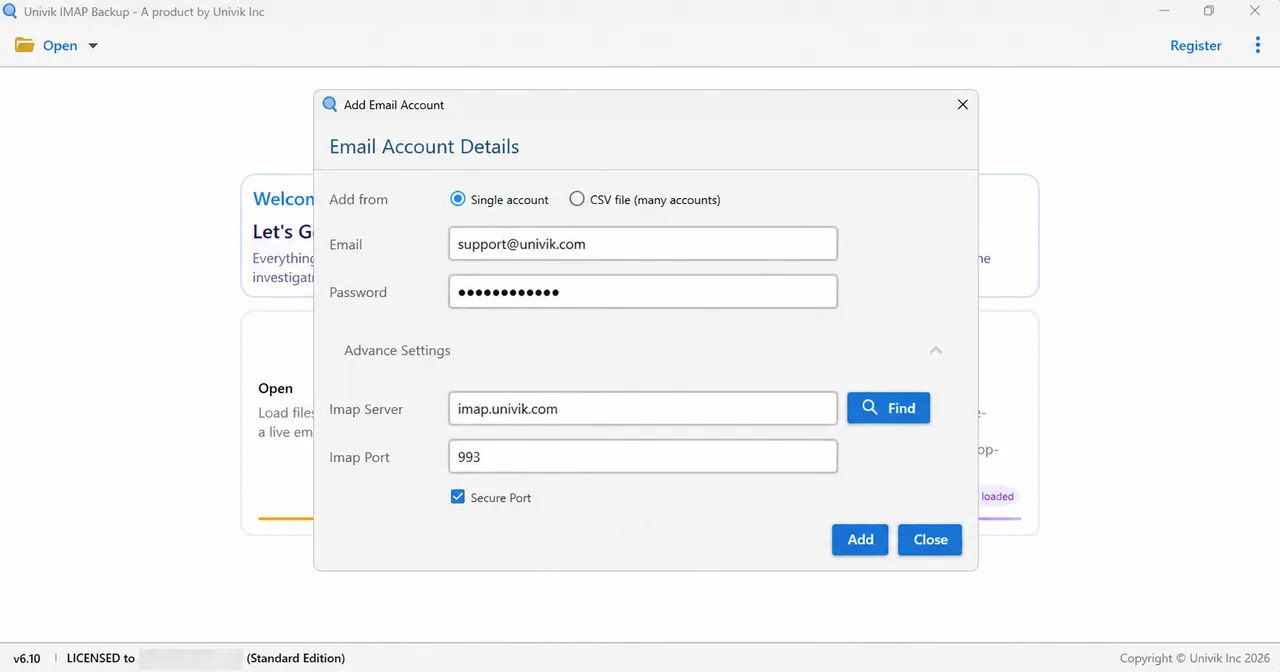
The Add account window with the Find button. - Tick the folders. Beside every folder in the tree you find a tick box and a message count. Leave a tick on each folder you want to save and clear the others.
- Choose the format. The Export menu groups EML, MBOX and PST under Email Files. PDF, HTML, TEXT and CSV sit under Document Files.

The Export menu with the Email Files group. - Review the settings. Minimum Attachment Size to Export is switched on at 35 MB when the app first opens. It held back all 173 mails in my PST test because none had an attachment that large. I turned it off before the real run.
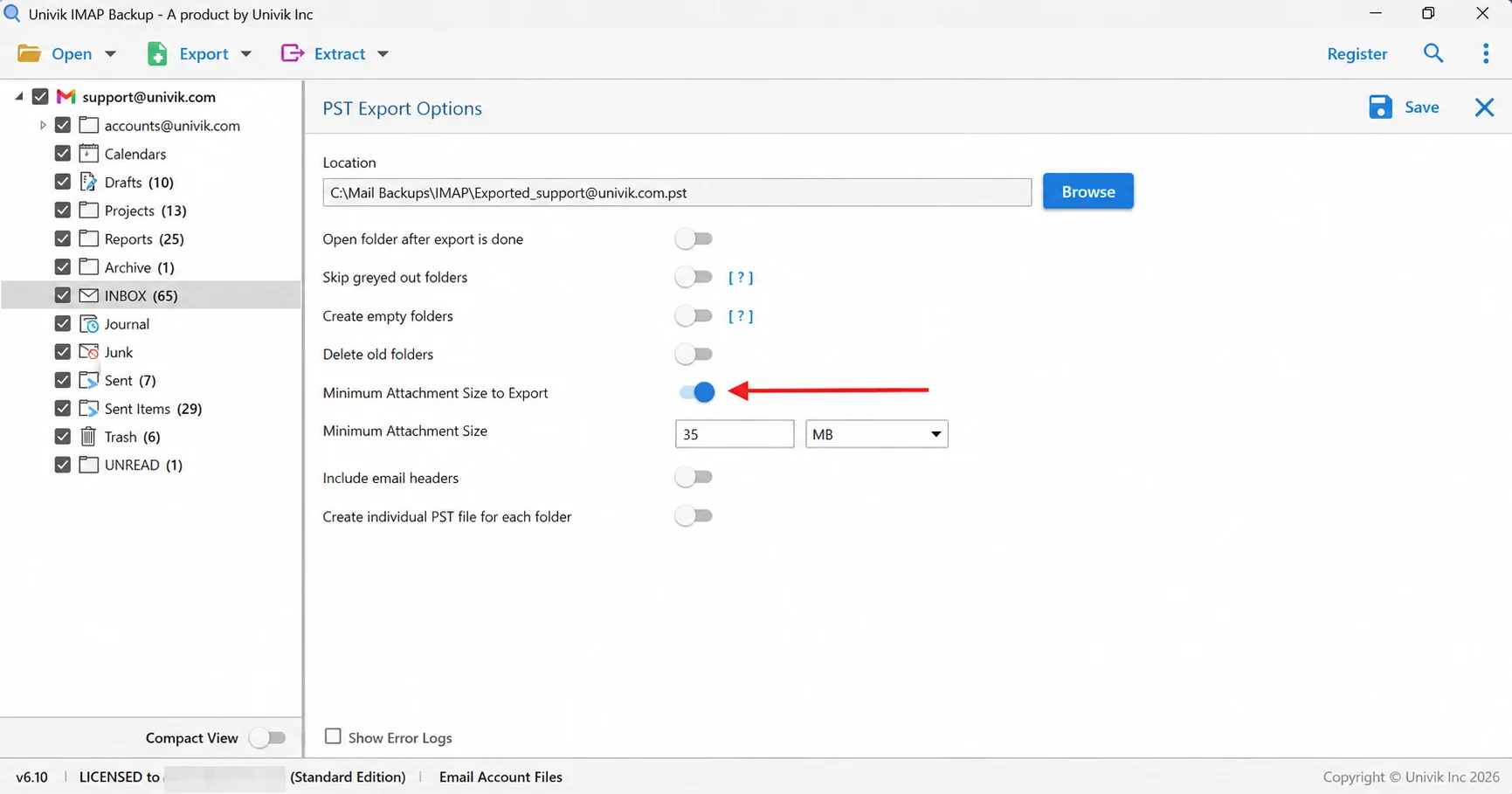
In the test mailbox, this 35 MB filter prevented the smaller messages from being saved. Turn it off before exporting all mail. - Write the files and count them. Press Save at the top right and wait for the green success bar. Then open the export folder and count the files per folder against the tree.
Which File Format Should You Keep for Alice Mail?
The Export menu offers three email file types. Each one suits a different next step.
| Format | What the export writes | Suits |
|---|---|---|
| Export IMAP to PST | PST writes one file for the whole mailbox or one file for each folder | Opening the mail in Outlook |
| Export IMAP to EML | EML saves each mail as a separate .eml file inside folders that mirror your tree | Files that open without a mail program |
| Export IMAP to MBOX | MBOX saves every mail of a ticked folder together in a single .mbox file | Moving the mail into Thunderbird later |
Choose PST when Outlook will open the copy. Choose EML when you want files that open without a mail program. Each linked guide walks through the options on its own screen.
How Do You Check That an Alice Mail Backup Is Complete?
Count the files in each folder and compare them with the message count in the folder tree. The trial shows how the check works. In my test the tree held 173 messages. The trial wrote 81 of them into 17 folders and stopped at 10 mails in every folder that held more.
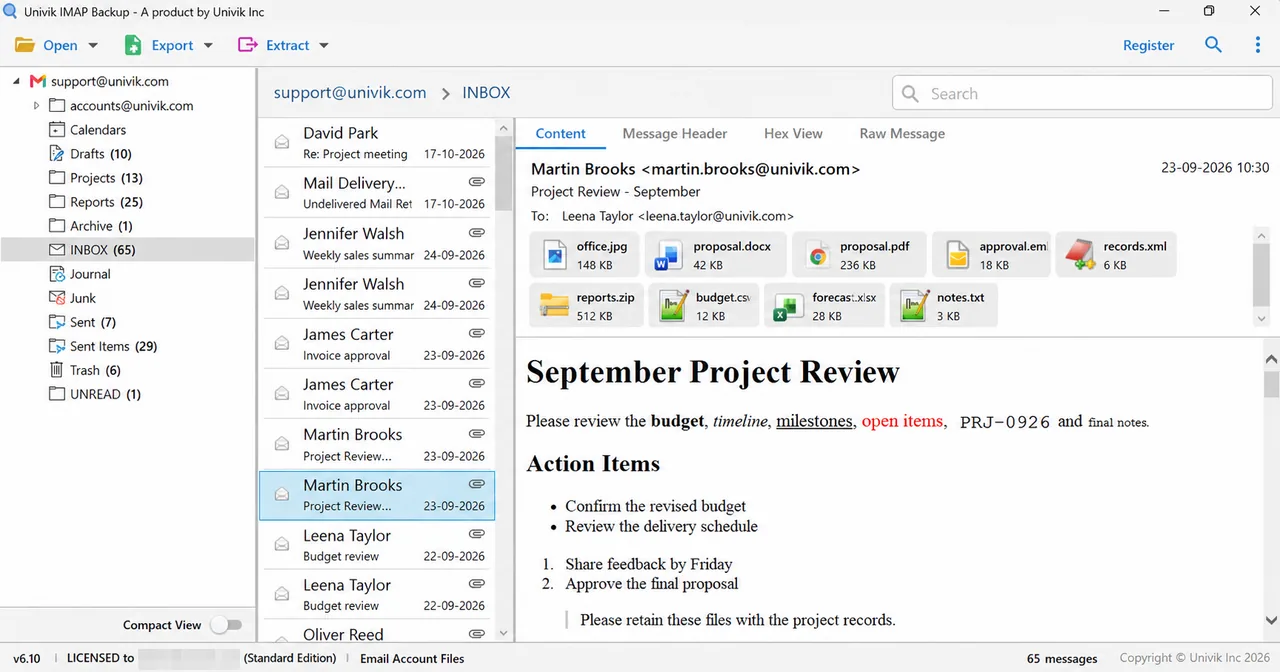
| Folder in the test mailbox | Mails in the folder | Mails the trial wrote |
|---|---|---|
| INBOX | 65 | 10 |
| Sent Items | 29 | 10 |
| Drafts | 10 | 10 |
| Sent | 7 | 7 |
| Trash | 6 | 6 |
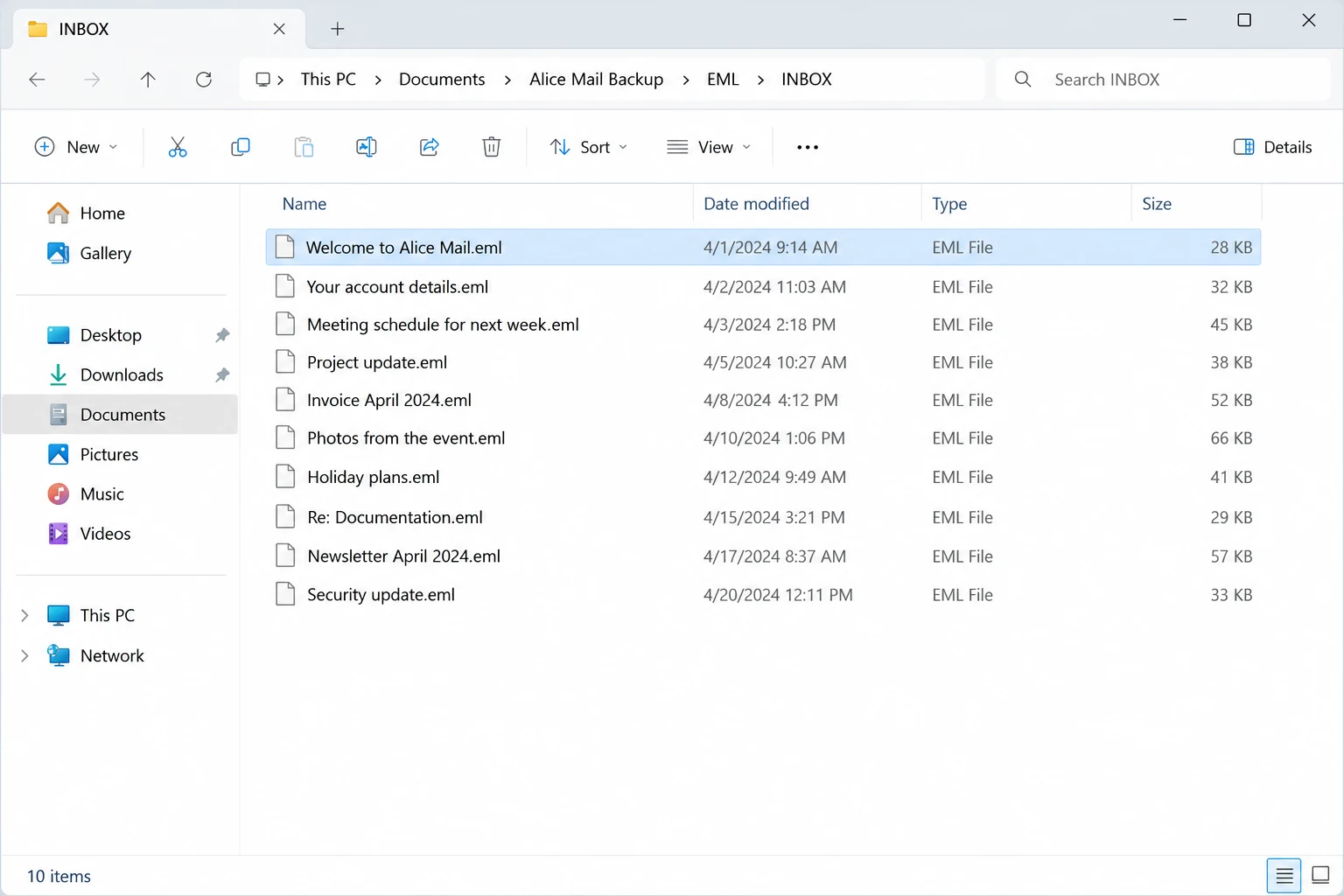
A licensed edition of Univik IMAP Backup writes every mail, so each folder's file count should match its message count in the folder tree. A folder whose count differs is the one to open first.
What If Your Alice Mail Backup Looks Like This?
Do this: Check the network first. TIM's guide limits mail clients to an active TIM line or a TIM connection, so a connection from another operator may fail. Then compare the server name with your domain.
Do this: Sign in at mail.tim.it with the same address and password. If that fails, follow the recovery steps on TIM's login page and type the new password into the app.
Do this: Open the export screen and look at Minimum Attachment Size to Export. A mailbox without large attachments is skipped completely while this filter is on, which is what happened in my PST test. Turn it off and press Save again.
Do this: The trial caps each folder at 10 items and says so in a Demo Edition dialog. A licensed edition removes that cap.
Your Alice Mail backup behaved differently from this page? Write to Univik support with what you saw.
- TIM's guide states that TIM Mail has no data backup, so a copy on your PC is your own.
- TIM's conditions let TIM empty an unused mailbox after 90 or 180 days without access and close the account 180 days after that, so a saved copy is the only one that lasts.
- TIM mail clients need an address linked to a TIM line or a PC on a TIM connection.
- An alice.it address uses in.alice.it, a tim.it address uses imap.tim.it and a tin.it address uses imaps.tin.it.
- The Export menu offers PST, EML and MBOX under Email Files.
- Look at the 35 MB attachment filter before the first run because it begins switched on.
- The trial copies 10 mails from each folder, which is enough to practise the folder check.

FAQ: Backup Alice Mail
How do I backup Alice Mail?
Add the mailbox to Univik IMAP Backup with your full address and password. Enter the server for your domain, tick your folders and choose PST, EML or MBOX in the Export menu. Press Save and compare the file counts with the folder tree.
Does TIM Mail include a backup?
No. TIM's mail guide states that TIM Mail does not include data backup and recommends saving your mail to a computer.
Can I make an Alice Mail backup from another operator's network?
TIM's guide says mail clients work when the address is linked to an active TIM line or you are connected to the TIM network. From other operators it offers webmail only. Run the backup from a TIM connection if the app cannot connect.
Which server does an alice.it address use?
TIM's mail protocol page lists in.alice.it for alice.it addresses. A tim.it address uses imap.tim.it and a tin.it address uses imaps.tin.it. Your login name is the full address.
Which format should I choose for my Alice Mail backup?
Choose PST when Outlook will open the copy. Choose EML for one file per mail that opens without a mail program. Choose MBOX when Thunderbird will read the mail later.
How do I know my Alice Mail backup is complete?
Count the files written for each folder and set that number beside the count of the same folder in the tree. In my test the trial stopped at 10 mails per folder, so only a licensed edition can match every count.
Is there a free trial for this backup?
Yes. A free trial saves 10 mails from every folder, enough to confirm names, folders and counts. A licensed edition saves every mail.
What happens to my mail if I cancel the TIM line?
TIM's general conditions for TIM Mail do not name a date when the mailbox ends after a line is cancelled. They set inactivity limits instead: 180 days without access when the mailbox is tied to a TIM broadband or mobile contract and 90 days in other cases. After that TIM may empty the mailbox and later close the account. Copy the mail before you cancel.

Written on November 1, 2026 from IMAP Backup 6.10 and TIM's own mail pages and general conditions. Counts come from a test mailbox that is not a TIM mailbox. I loaded it into the trial edition.
Pages we read: