Quick Answer
To backup Tencent Exmail, log in over IMAP with the server imap.exmail.qq.com on port 993 with SSL. The user name is your full company address. The password box takes the Exmail password or a client-specific password when secure login is on.
Next tick the folders you want and write them to your PC in the PST, EML or MBOX format. Exmail must have IMAP switched on before a login works.
Tencent Exmail keeps your company mailbox on Tencent's servers, so a copy on your own PC is a copy you control. Tencent's Chinese help pages call that mailbox service WeCom Mail (企业微信邮箱). An IMAP login to the mailbox needs five values. A card in the next section lists each value before any step.
To backup Tencent Exmail on a Windows PC I used an IMAP backup app and a test mailbox that is not an Exmail mailbox, so every file count here comes from that mailbox. Each Exmail value comes from Tencent's own help pages, read on 1 November 2026.
What Do You Type in an IMAP App to Backup Tencent Exmail?
Type imap.exmail.qq.com in the Imap Server box, keep Imap Port at 993 and leave Secure Port ticked. The yellow card lists every field of the Add Email Account window. Tencent's client setup page gives these values and the Tencent Exmail IMAP settings page on Univik lists the POP3, SMTP and Xinchuang hosts as well.
name@yourcompany.comYour whole company address, with the @ and the domain.- Password
- Your Exmail passwordWith secure login on, type the client-specific password instead.
- Imap Server
imap.exmail.qq.comThis is the value to type. Copy it exactly.- Imap Port
993The field already shows 993.- Secure Port
- Ticked (SSL)The tick box starts ticked. Leave it on.
Find is a lookup button that suggests a server name for your address. Compare any suggestion with the card before you press Save. A backup only reads mail, so no SMTP server is needed. Companies on Xinchuang mailboxes type xcimap.exmail.qq.com instead. A personal @qq.com address is a different service that follows the QQ Mail settings.
What Must Be Switched On Before the Backup Login Works?
Exmail refuses an IMAP login until two things are in place. The administrator must have set an IMAP/SMTP scope that covers your account. You must also have turned on the service in web mail. The menu paths for both sit on the settings page linked above.
The Send/receive settings screen holds two more options that decide how much mail a backup can see. The missing mail section covers both. If the login still fails, Imap Server is the first box to recheck.
Which Password Goes in the Password Box?
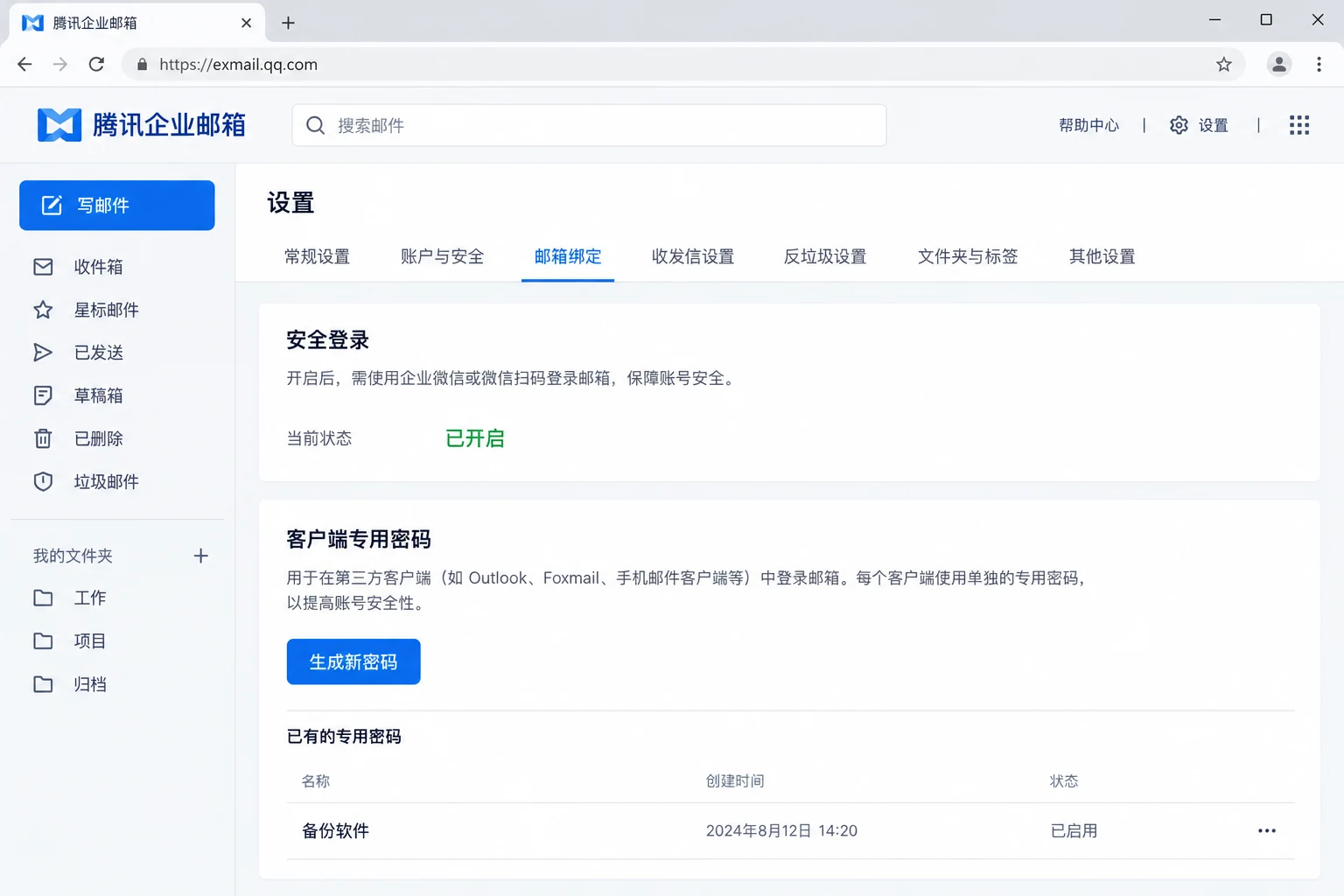
Univik IMAP Backup accepts the ordinary Exmail password only until secure login is switched on. After that the Password box needs a client-specific password (客户端专用密码).
| Exmail account state | Email box | Password box |
|---|---|---|
| Secure login off | Full company address | The Exmail mailbox password |
| Secure login on | Full company address | A client-specific password |
Web mail makes a client-specific password under Settings (设置) and then Mailbox binding (邮箱绑定). Turning secure login off makes every one of them invalid, so a login saved in the app then fails until you type your normal password.
Does an IMAP Login Keep a Second Copy of Tencent Exmail Mail?
No. Tencent's IMAP versus POP page describes a two-way mirror of the web mailbox, so a move or delete made in a mail client reaches the server too. A client on IMAP therefore shows server mail and holds no separate copy. Is IMAP a backup? explains that difference in full.
Tencent's page adds that POP covers the web inbox only and never sends client moves or deletes back to the server. IMAP is therefore the protocol for a backup that has to include every folder. A file copy on your PC is the one thing that stays put when the mailbox changes.
Who Needs a Tencent Exmail Backup?
Four situations bring most readers here.
- A mailbox owner You keep years of client mail in Exmail and want files you can search offline.
- An administrator You plan to move the company domain to another mail service and want each mailbox saved first.
- A team lead You manage a shared mailbox and want a dated copy before any change to its members.
- A records keeper You need mail stored as files in a folder that your own archive tools can read.
How Do You Backup Tencent Exmail Step by Step?
Add the mailbox with the five values from the card, tick your folders, open Export, choose PST, EML or MBOX and press Save.
I ran the test in Univik IMAP Backup, an IMAP backup software package for Windows that reads a mailbox over IMAP directly. No Foxmail or Outlook profile has to exist first. Steps 1 to 5 follow the order you see on screen.
- Add the account. In the main window go to Open > Email Accounts > Add account. Fill Email with the full company address and Password with the matching password. Expand Advance Settings and enter imap.exmail.qq.com as the Imap Server. Imap Port already shows 993 and Secure Port starts ticked, so typing the server is the easy part.
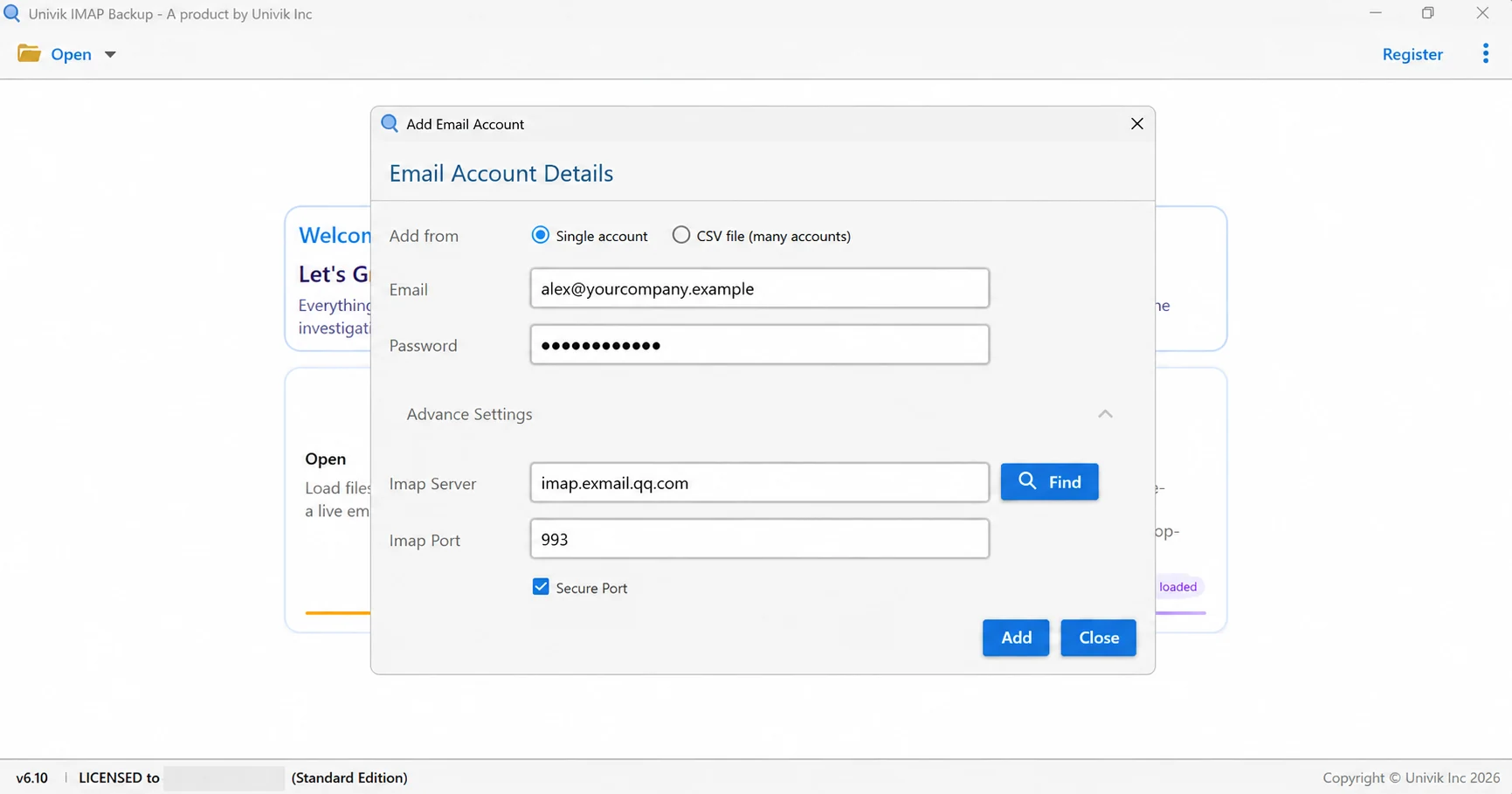
Account-entry example with a sample company address. Type your own full address and password; keep the Exmail server, 993 port and checked Secure Port as shown. - Tick the folders. Every row in the folder tree shows a tick box and the message count. Tick what you need and clear the remaining folders. Custom folders appear only when Exmail shares them over IMAP, which the missing mail section explains.
- Choose the format. Open Export and look under Email Files for EML, MBOX and PST. Document Files holds PDF, HTML, TEXT and CSV.

The open Export menu. - Check the filter. Minimum Attachment Size to Export starts switched on at 35 MB by default. In my PST test it skipped the whole mailbox because no mail carried an attachment that large. I switched it off before the real run.
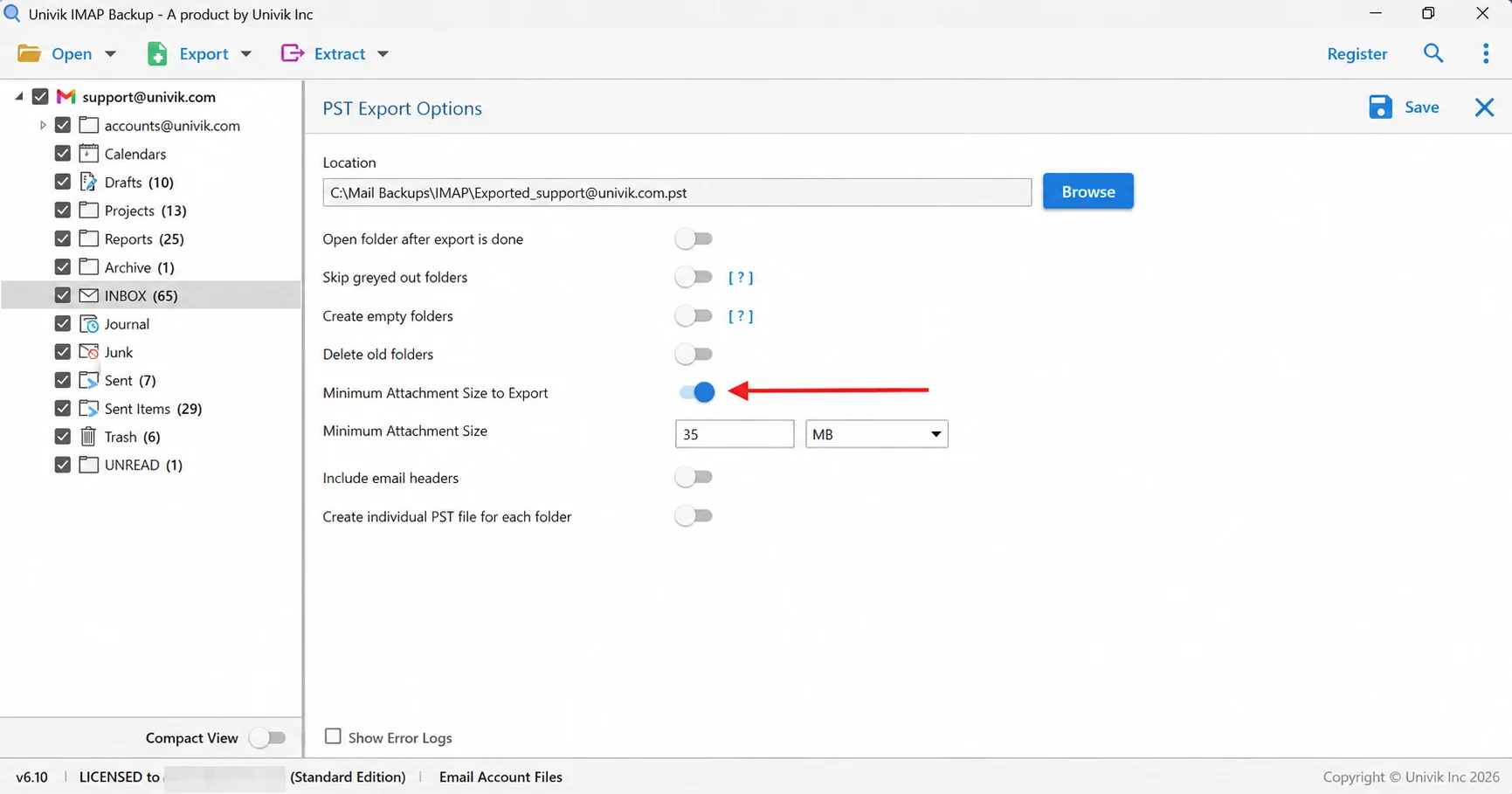
The arrow marks the 35 MB filter that skipped the smaller messages in the test mailbox. Switch it off before a full export. - Save and count. Press Save at the top right and watch for the green success bar. Afterwards open your export folder and compare each folder's file count with the tree.
Which File Format Suits a Tencent Exmail Backup?
Three email file types sit in the Export menu. Pick by what you will do with the copy next.
| Format | Output | Use it for |
|---|---|---|
| IMAP to PST guide | PST can write a single file for the mailbox or one file per folder | Reading the copy in Outlook |
| IMAP to EML guide | EML gives every message its own .eml file in a folder tree like yours | Plain files with no mail program |
| IMAP to MBOX guide | MBOX keeps all mail of a ticked folder in one .mbox file | Reading the mail in Thunderbird |
PST is the simple choice for Outlook. EML is the easy choice for plain files because each mail is its own file. Every guide in the table covers the export options screen by screen.
Why Does a Tencent Exmail Backup Show Only 30 Days or Skip Folders?
Three switches in web mail control what an IMAP backup login gets back. They sit in Send/receive settings (收发信设置) in web mail.
- Receiving range Tencent warns that an app may download only 30 days of mail until receiving is set to all mail. Set it before the first Save.
- Receive my folders IMAP reads custom folders only when this box (收取我的文件夹) is ticked.
- Locked folders Exmail skips a locked folder until web mail unlocks it.
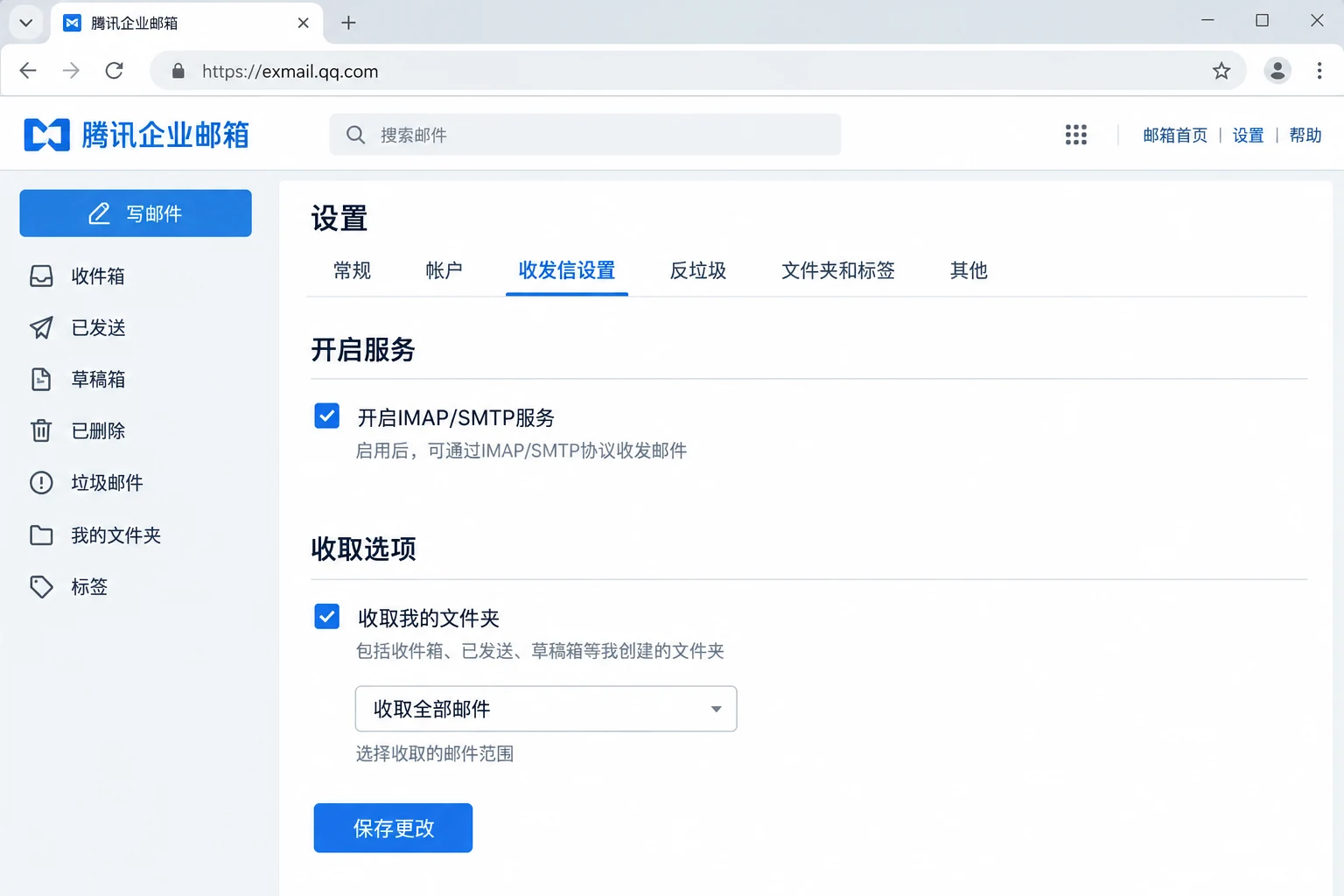
Once the options are right, count the files. The count check is quick because each folder in the tree already shows its total. In my test mailbox INBOX held 65 messages and the trial wrote 10 of them. Folders that held 10 or fewer mails, like Drafts, were written in full.
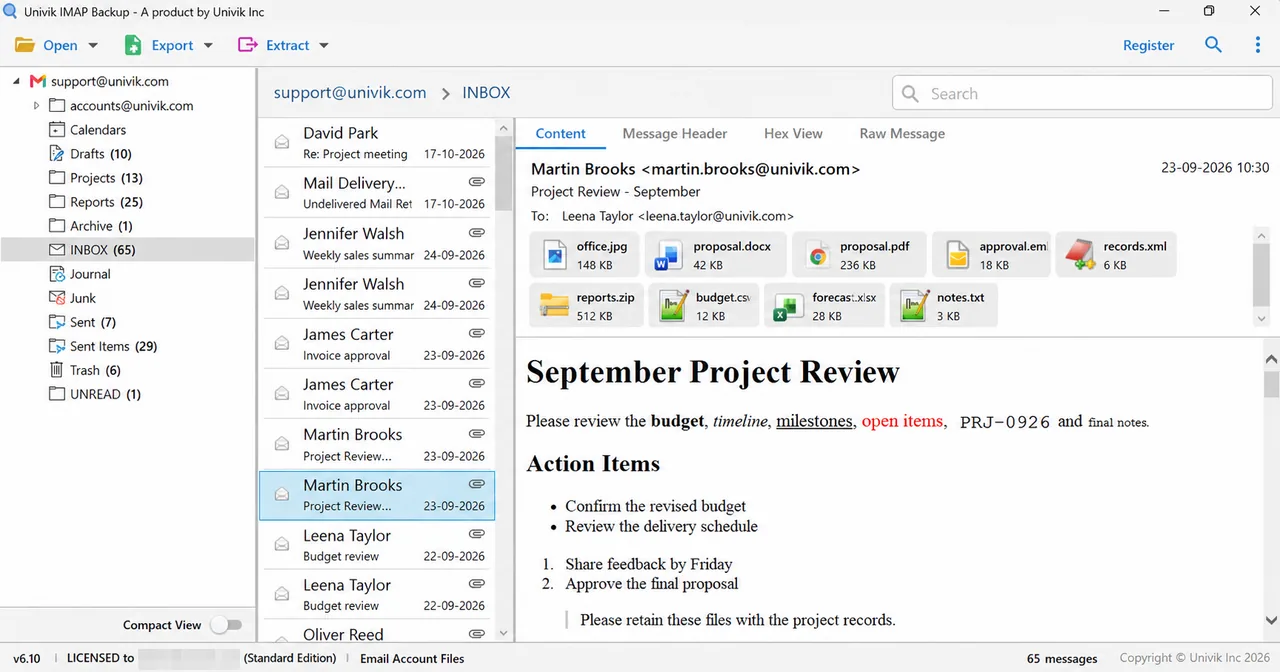
| Test folder | Messages in tree | Trial output |
|---|---|---|
| Drafts | 10 | 10 |
| Trash | 6 | 6 |
| INBOX | 65 | 10 |
| Sent Items | 29 | 10 |
A licensed copy of Univik IMAP Backup writes every mail, which makes each folder's file count equal its tree count. Open any mismatched folder first.
What If Your Tencent Exmail Backup Looks Like This?
Do this: Check the two Exmail switches first. The administrator needs an IMAP/SMTP scope that covers you and your own service switch must be on. Then compare the Imap Server with imap.exmail.qq.com letter by letter.
Do this: Ask whether secure login is on. If it is, generate a client-specific password under Mailbox binding and type it in the Password field. A disabled password stops working at once.
Do this: Ask your administrator whether the company runs Xinchuang mailboxes. If it does, change the Imap Server to xcimap.exmail.qq.com and keep port 993.
Do this: Open the export screen and read the Minimum Attachment Size to Export filter. While it is on, a mailbox with no large attachment is skipped completely. That happened in my PST test. Switch the filter off and press Save again.
Do this: Trial editions copy 10 items per folder and say so in a Demo Edition dialog. A licence lifts that cap.
Did your Exmail backup behave differently? Tell Univik support what you saw.
- A backup of Tencent Exmail reads imap.exmail.qq.com through port 993 with SSL and signs in with the full company address.
- Exmail needs an administrator scope and a member service switch before an IMAP login works.
- With secure login on, the Password field takes a client-specific password.
- Xinchuang mailboxes use xcimap.exmail.qq.com on the same port.
- Because IMAP mirrors all folders both ways, a file copy saved on your PC is the only separate copy.
- Receiving not set to all mail may limit a client to the last 30 days.
- PST, EML and MBOX are the Email Files choices in Export and the trial copies 10 mails per folder.

FAQ: Backup Tencent Exmail
How do I backup Tencent Exmail?
Switch on IMAP in Exmail first. Then connect the mailbox in Univik IMAP Backup using your full address and password, type imap.exmail.qq.com as the Imap Server and keep port 993 with Secure Port ticked. Tick the folders you need, open Export, choose PST, EML or MBOX and press Save. Compare the file counts with the tree afterwards.
Which server do I type in Univik IMAP Backup for Tencent Exmail?
Type imap.exmail.qq.com in the Imap Server box. Imap Port already shows 993 and Secure Port starts ticked. A company on Xinchuang mailboxes types xcimap.exmail.qq.com instead.
Which password goes in the Password box when I backup Tencent Exmail?
Your Exmail password works while secure login is off. With secure login on, the box needs a client-specific password that you generate in web mail.
Why does the backup login to Tencent Exmail fail?
Usually one of three switches is off. The administrator may not have set an IMAP/SMTP scope that includes you. Your own service switch in web mail may be off. Or secure login is on and the Password box holds the normal password.
Should I use IMAP or POP3 to backup Tencent Exmail?
Use IMAP. Tencent's comparison page says IMAP covers every folder of the web mailbox while POP covers the web inbox only.
Can I backup several Tencent Exmail mailboxes at once?
Yes. Univik IMAP Backup can add several mailboxes from a CSV file. Each Exmail mailbox still needs its own address and password.
Why does my Tencent Exmail backup show only 30 days of mail?
Tencent says an app may download only the last 30 days until receiving is set to all mail in Send/receive settings. Set it to all mail. Also tick Receive my folders for custom folders and unlock any locked folder.
Which format should I choose for my Tencent Exmail backup?
Choose PST to open the copy in Outlook. Choose EML for one file per mail with no mail program needed. Choose MBOX to read the mail in Thunderbird later.
How do I know my Tencent Exmail backup is complete?
Compare the number of files written for each folder with that folder's count in the tree. In my test mailbox the trial wrote 10 mails from an INBOX of 65, so a licence is needed to match every count.
Can I try the Tencent Exmail backup before buying?
Yes. Each folder yields 10 mails in the trial edition, enough to test the login and the folder list. Buying a licence removes the cap.

Prepared on November 1, 2026 with IMAP Backup 6.10 open beside Tencent's WeCom help pages. All file counts here were taken from a non-Exmail test mailbox loaded into the trial edition.
Pages we read: