Quick Answer
To export IMAP to EML, sign in to the mailbox with an IMAP backup tool, tick the folders and save them with the EML option. Each mail becomes one .eml file named from its subject. Your folder tree stays as folders on the PC.
Check the naming option before the first run. Mails that share a subject get (1) or (2) added to the file name.
A mailbox on an IMAP server keeps every mail on the server, where you cannot treat it as a folder of files. An EML file turns one mail into one file on your PC. A hand-over, a hosting move or a closing account then comes down to copying a folder.
Getting one file per mail takes a tool that logs in to the server and writes each mail itself. This guide follows the EML screen of IMAP Backup in the order you meet it. It explains the nine naming options and the numbers added to repeated subjects. You also learn what the files hold and why a first run can write nothing.
Why Export IMAP to EML Instead of One Big File?
A PST or an MBOX packs a whole mailbox into one container. An EML export does the opposite and keeps every mail as a file of its own. That helps when a single mail has to travel alone to a lawyer or a customer. It also lets you check a copy by sorting a folder by name or by date.
RFC 5322 describes the format that each mail is written in. A message consists of header fields followed by an optional body. The date and the sender are the only required header fields. The files I read follow that layout with header lines on top.
Who Needs a Folder of EML Files From an IMAP Mailbox?
Four situations usually call for one file per mail.
- A records officer A department has to keep every mail as an EML record with a name that people can search.
- A host mover Your mailboxes close with an old hosting plan and you want a copy that opens without the server.
- A case handler One mail has to reach a lawyer or a client as a single file with its attachments inside.
- An app switcher You are changing mail programs and want a file copy of each folder before the move.
How Do You Export IMAP to EML Straight From the Server?
I used Univik IMAP Backup for this guide. The IMAP backup software runs on Windows and reads the mailbox over IMAP, so no mail program has to hold the account first. The steps follow the order in which the screens appear.
- Connect the mailbox. Go to Open and Email Accounts and click Add account. Type your address and password. Under Advance Settings the Find button looks up the IMAP server name for you.
- Tick the folders. A tick box and a message count sit beside each folder in the tree. Keep the folders you want ticked and clear the others.
- Open the EML screen. The Export menu groups three file types under Email Files. Choose EML from that group.

The Export menu with EML in the Email Files group. - Review the settings. The default folder for the files is
C:\Mail Backups\IMAPand the File naming option shows Subject. Look at Minimum Attachment Size to Export as well. It starts on at 35 MB and it skipped every mail in my PST test, so I switched it off before my EML run.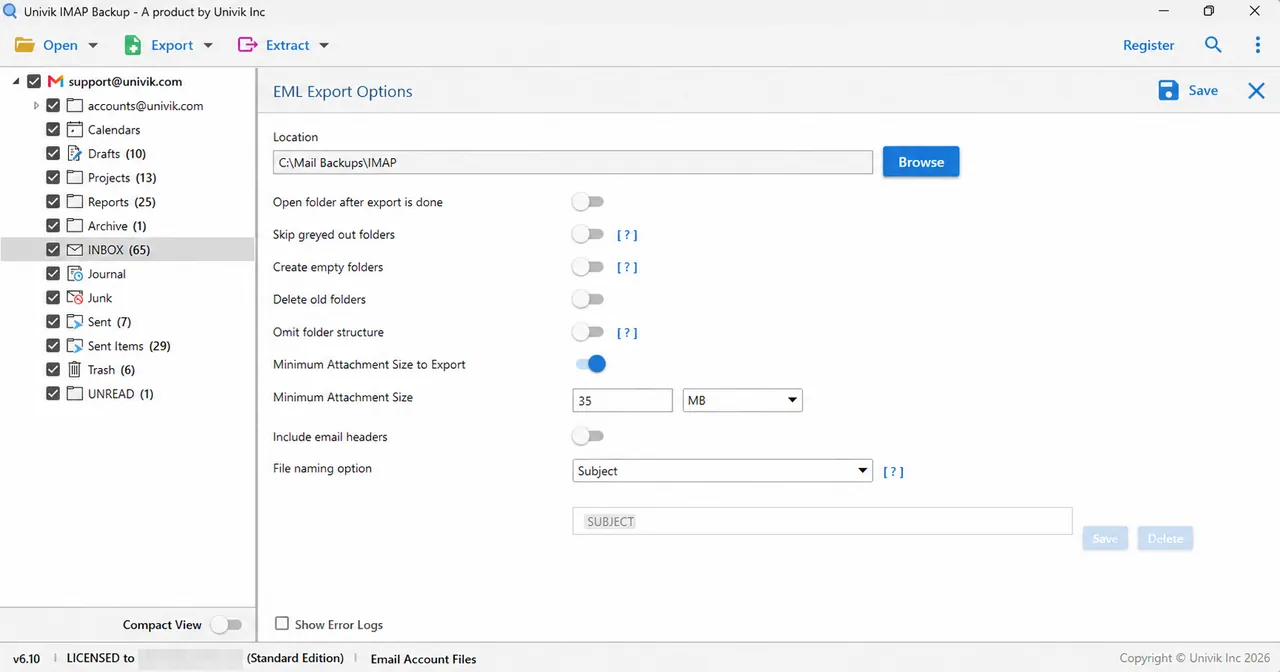
The EML Export Options screen with the naming list and the attachment size filter. - Save and check. Press Save at the top right. Then open the export folder and compare the number of files in each folder with the count beside that folder in the tree.
How Does IMAP Backup Name the EML Files?
The File naming option list holds nine entries and Subject is the one it starts on. A template box beside the list carries a SUBJECT token. Its Save and Delete buttons store a template of your own. The table repeats the label of each entry.
| Entry in the list | Parts named in the label |
|---|---|
| Subject | The subject line (the entry it starts on) |
| From-Subject | Sender then subject |
| From-To-Subject | Sender then recipient then subject |
| From-Date-Subject | Sender then date then subject |
| From-To-Date-Subject | Sender then recipient then date then subject |
| Year-Month-Day-Hour-Minute-Second-Subject | Date and time down to the second then subject |
| Message-AutoIncrement | A running message number |
| Unique-Hash-Id | A unique hash value |
| Custom Naming | A template that you build and save |
I ran the Subject entry only, so every file name in this section comes from it. A colon in a subject turned into a space: my mail Re: item 1 was saved as Re item 1.eml with two spaces. A hash sign stayed in place, as in Update #0001 0031 - English.eml.
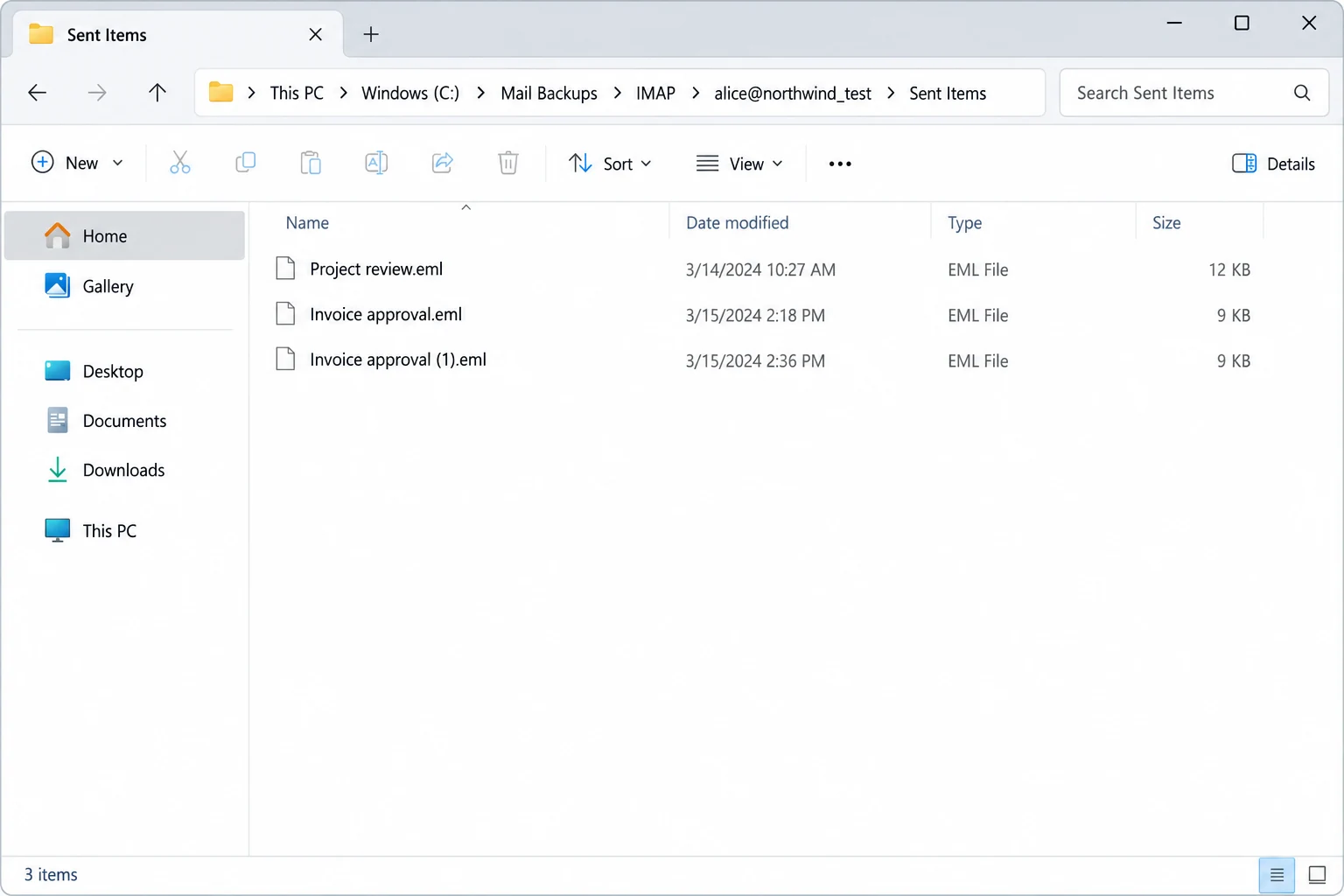
Three of my mails carried the subject TEST File. IMAP Backup saved them as TEST File.eml, TEST File (1).eml and TEST File (2).eml, so no file replaced another. The date on each file matches the mail itself and not the day of the export. TEST File.eml shows 1 May 2025 14:47:56 and its Date header reads Thu, 01 May 2025 14:47:56 +0530.

Does the EML Export Keep Your Folder Tree?
The folder tree survived my run, where every switch except the attachment filter stayed at its default. I ticked three folders and the export wrote 14 files into folders of the same names.
| Folder in the mailbox | Files written |
|---|---|
| Drafts | 10 files in a Drafts folder |
| EML_Test_new | 1 file in a folder of that name |
| alice@northwind.test then Sent Items | 3 files in alice@northwind_test\Sent Items |
The account folder alice@northwind.test was written as alice@northwind_test, so its dot became an underscore. Expect the same swap in a folder name that carries a dot. The count of 14 matched what I had ticked, which is the check that matters after every export.
What Is Inside an EML File After the Export?
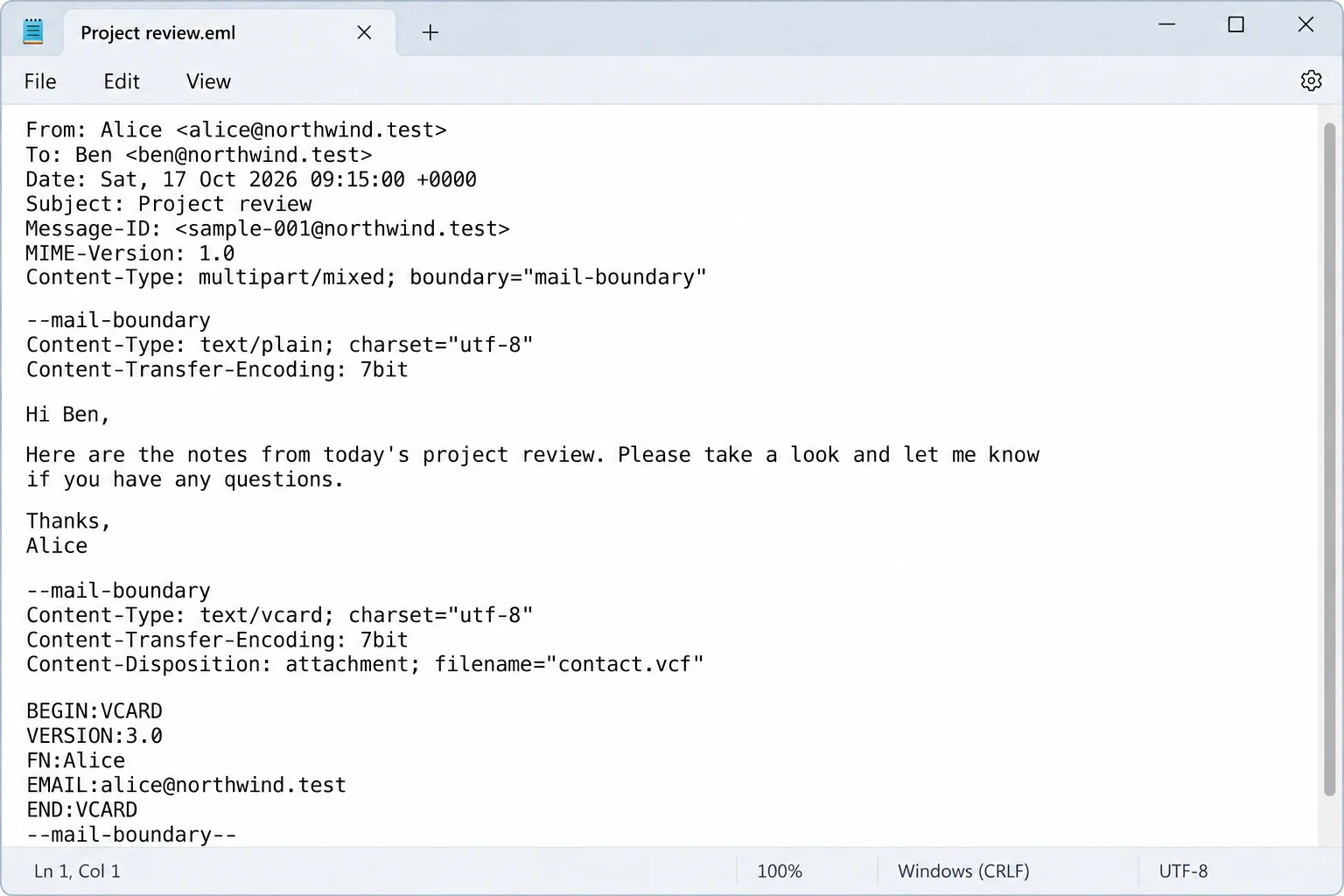
Each file starts with header lines for From, Date, Subject, Message-Id, MIME-Version and Content-Type. A To line follows when the mail has a recipient. One draft in my test had no sender and its file kept an empty From line.
Attachments stay inside the file. In my test an attached .vcf sat in the EML as a part with its own file name and a Content-Disposition of attachment. A file therefore travels with everything that came with the mail.
How Do You Open the EML Files Later?
Double-click one file to read that mail. To read a whole folder without a mail program, point EML Viewer at it. The viewer opens EML files without Outlook or another mail client.
Sign in with an address and a password and tick your folders. Every mail in them is saved as an EML file of its own.
Download Free Trial Select a Licence - From $99Run one folder first and compare its file count with the count in the tree.
What If Your EML Export Looks Like This?
Do this: Check Minimum Attachment Size to Export first. It starts on at 35 MB and it skipped every mail in my PST test. Switch it off or lower the size and press Save again.
Do this: Leave it as it is. The colon in the subject became a space and the double space marks the spot. Rename the file if the gap bothers you.
Do this: IMAP Backup adds a number when mails share a subject. Pick another entry from the File naming option list and run one folder to see the names it builds.
Do this: That is the trial. A dialog reads Demo Edition Export only 10 items from Each Folder and a licensed edition writes every mail.
Did something in your EML export go differently from this page? Send the details to Univik support.
- An IMAP to EML export writes one file for each mail and keeps your folder tree as folders.
- The File naming option holds nine entries and Subject is the one it starts on.
- Mails that share a subject get (1) or (2) added to the file name and no file replaces another.
- A colon in a subject becomes a space in the EML file name and a dot in a folder name becomes an underscore.
- Minimum Attachment Size to Export starts on at 35 MB, so check it before the first run.
- Ten items per folder in the trial are enough to check names and counts.
FAQ: Export IMAP to EML
How do I export IMAP to EML?
Add the mailbox to IMAP Backup and tick your folders. Choose EML in the Export menu. Check the Location box and the File naming option and press Save.
How are the EML files named?
The File naming option starts on Subject, so each file takes the subject of its mail. Seven other entries build the name from the sender, the recipient, the date, a message number or a hash. Custom Naming stores a template of your own.
What happens when two mails share a subject?
IMAP Backup adds a number to the repeats. In my test three mails with the subject TEST File became TEST File.eml, TEST File (1).eml and TEST File (2).eml.
Does the export keep my folder structure?
Yes. In my run every switch except the attachment filter stayed at its default. The Drafts folder and a Sent Items folder under an account folder came out as folders of the same names. A dot in an account name became an underscore.
Do attachments stay inside the EML files?
Yes. An attachment sits in the file as a part with its own file name. An attached .vcf in my test file carried a Content-Disposition of attachment.
Why did my IMAP to EML export write no files?
Minimum Attachment Size to Export starts on at 35 MB. It skipped every mail in my PST test. Switch it off or lower the size and save again.
Can I try IMAP to EML before I buy?
Yes. The trial writes 10 items per folder. That is enough to check names and counts before you decide. Licences start at $99 for 2 PCs.
Can I choose my own EML file names?
Yes. Pick Custom Naming in the File naming option list. A template box beside the list holds a SUBJECT token and its Save and Delete buttons store your own templates.

Written on October 31, 2026 from IMAP Backup 6.10 and the text of RFC 5322. File names and counts are from a mailbox that I loaded into the trial edition.
Pages we read: