Quick Answer
To export IMAP to MBOX, log in to your IMAP mailbox with a backup tool, tick the folders you want and run the MBOX export. Each ticked folder becomes one .mbox file that holds all of its mails. Every mail starts at a separator line that begins with From.
Look at the 35 MB size filter before your first run, because it starts switched on.
An MBOX file holds every mail of a folder in one file, so the whole folder becomes easy to store and to move. Getting that file from the IMAP server takes a tool that logs in and writes it for you.
IMAP Backup has an MBOX screen and a separate Thunderbird screen. This guide shows what one MBOX export wrote on my PC and what to check when a first run writes no file.
Why Export IMAP to MBOX Instead of PST or EML?
A PST packs a whole mailbox into one container for Outlook and an EML export writes one file for each mail. An MBOX export sits between the two with one file for each folder. That suits a folder you want to keep as a single file or hand to a mail program that reads MBOX.
RFC 4155 describes the MBOX layout. Mails follow each other in one file and every mail is preceded by a separator line. That line starts with From and carries the sender address and a timestamp. The memo is informational and does not set an internet standard.
Who Needs an MBOX Copy of an IMAP Folder?
Four jobs call for a file per folder.
- A plan leaver Your provider is closing the plan and you want every folder saved as a file at home.
- An archive keeper You store one file for each folder with its attachments inside it.
- A program switcher You change mail programs and need a file that a program with MBOX support can read.
- A Thunderbird user You want a copy of server folders next to your Thunderbird profile.
How Do You Export IMAP to MBOX Straight From the Server?
My test ran on Univik IMAP Backup. This IMAP backup software works on Windows and copies mail from your IMAP server, so Thunderbird or another mail program does not have to hold the account.
- Connect the mailbox. Click Open in the toolbar and pick Email Accounts, then Add account. Fill in your email address and password. When the server name is blank, Find under Advance Settings looks it up.
- Tick the folders. Each folder carries a message count in the tree. Check the ticks before you go on, because the tree can open with every folder ticked or with none.
- Open the MBOX screen. Open Export and choose MBOX from the Email Files group beside EML and PST.

The Export menu with its Email Files group. - Review the settings. Location is read only and Browse opens a folder dialog. Open folder after export is done, Skip greyed out folders, Delete old folders and Include email headers all start off. I did not test what the last three change, so I cannot tell you more about them.
- Check the size filter. The filter Minimum Attachment Size to Export is on from the first launch at 35 MB. With it on, my PST test skipped every one of its mails, so I switched it off for this export.
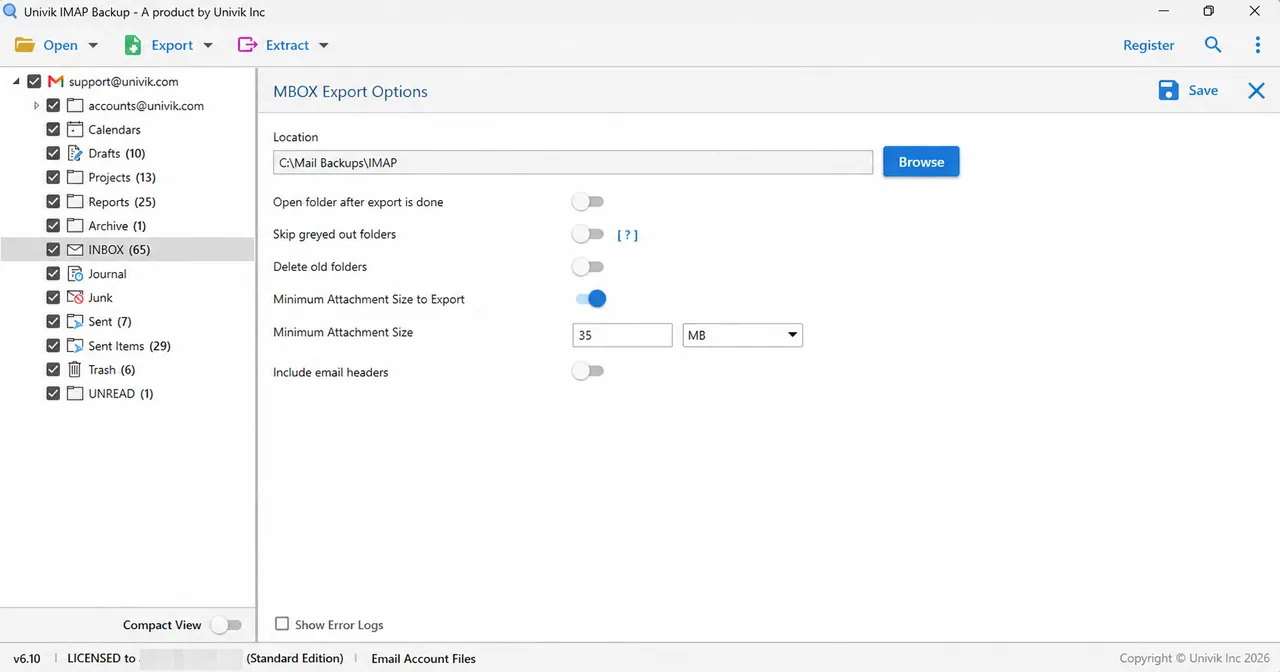
The MBOX Export Options screen with its switches and the size filter. - Save and check. Press Save. A dialog about the Demo Edition may appear first. A green banner then confirms the export and offers an Open Folder button. Compare the mails in each .mbox file with the counts in the tree.
What Does One MBOX Export Write?
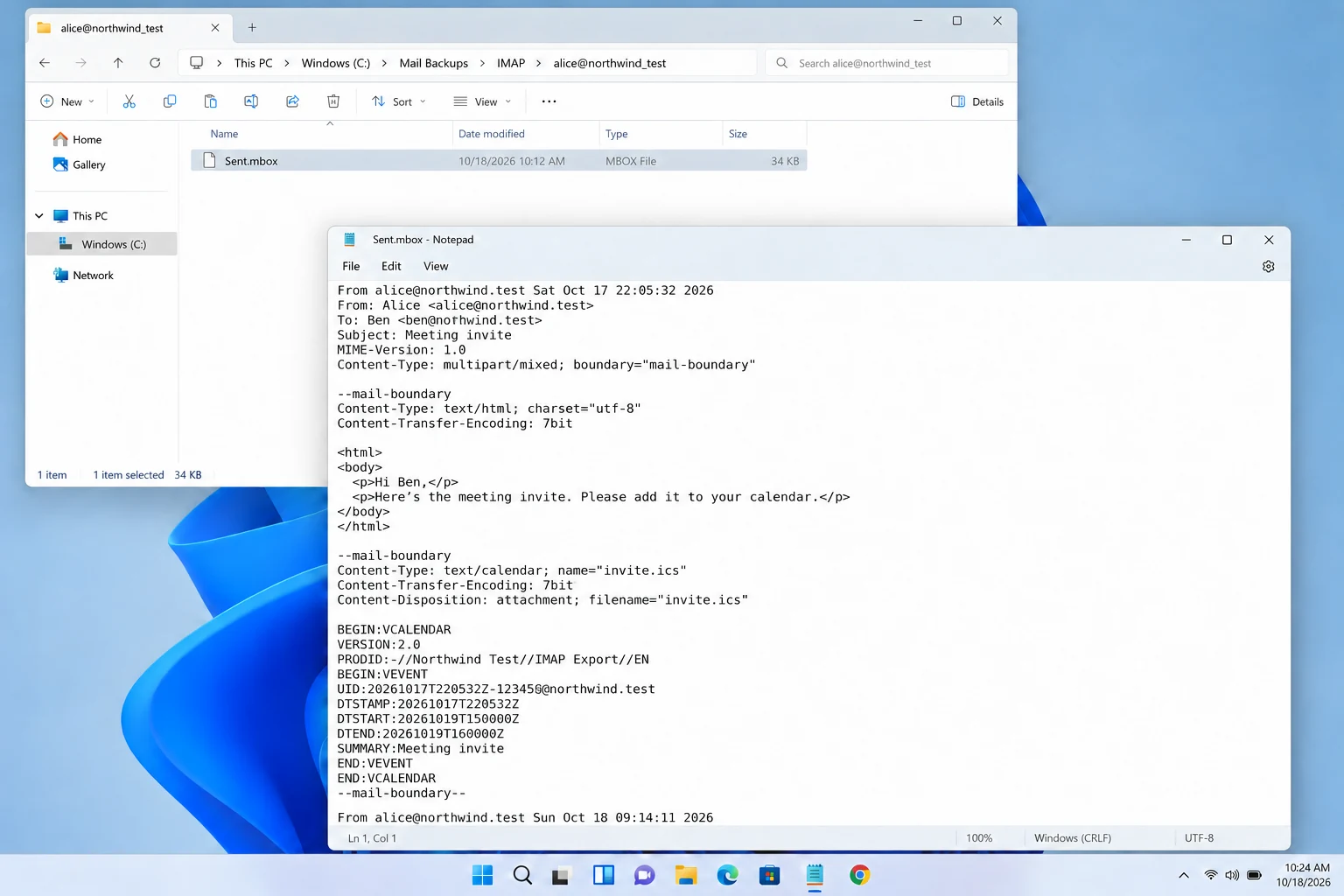
I ticked one folder, Sent with 7 mails. Every switch stayed off. The export wrote one file named Sent.mbox of 34,000 bytes. It sits in an account folder named alice@northwind_test, where the dot of the account name became an underscore as in my other runs.
| What I checked | Result in my file |
|---|---|
| Files written | One file named after the folder, Sent.mbox |
| Mails inside | 7, read back with a standard mbox reader |
| Separator line | From alice@northwind.test Sat Oct 17 22:05:32 2026 before each mail |
| Header lines | From, Date, Subject, Message-Id, MIME-Version, To when present and Content-Type |
| Line endings | Windows (CRLF) |
| Structure | Each mail is multipart with 2 parts, an HTML body and an .ics attachment |
Attachments therefore stay inside the MBOX file. The .ics part of every mail came back out of Sent.mbox when I read it.

Does IMAP Backup Write One MBOX File for Each Folder?
The MBOX screen has no Single file option and no file naming option. A ticked folder gives one file named after that folder. I ran only one folder, so I cannot tell you how several folders or nested ones come out. Run two small folders first when the mailbox has a deep tree.
What Does the IMAP to Thunderbird Screen Ask For?
The Export menu also holds a Thunderbird target under Email Clients. Its screen opens with a notice to close Thunderbird before the export starts.
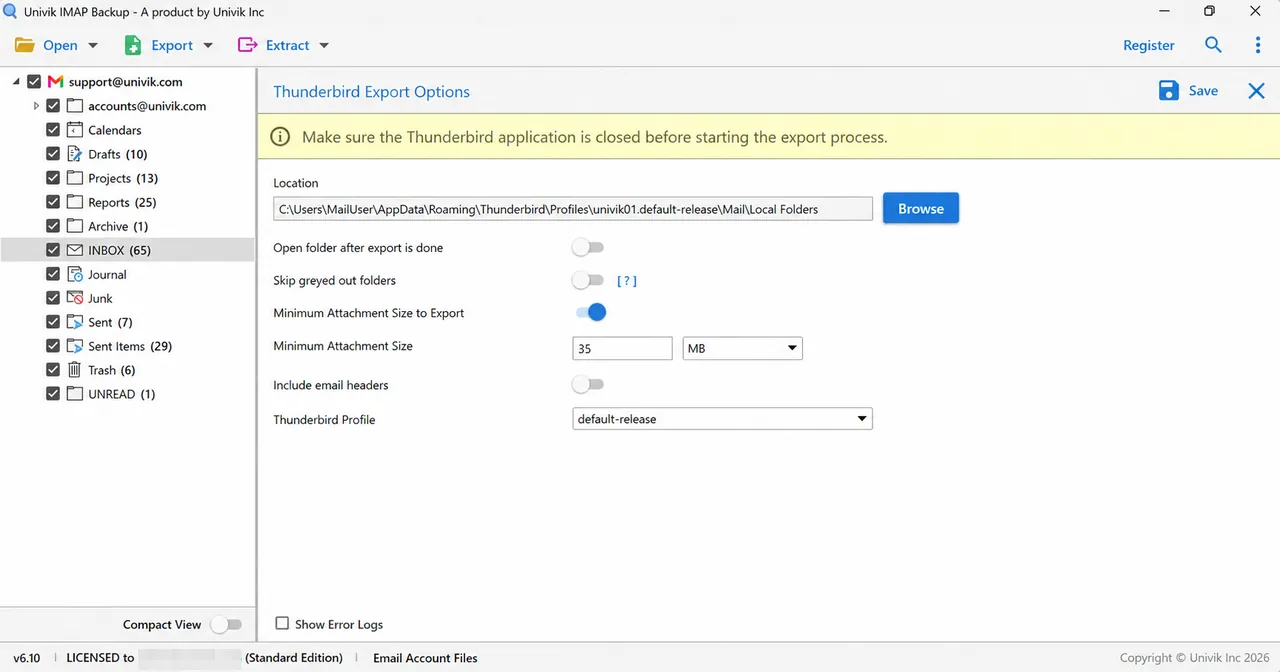
Location starts at the Local Folders folder of a Thunderbird profile, a path of the form C:\Users\<user>\AppData\Roaming\Thunderbird\Profiles\<profile>\Mail\Local Folders. A Thunderbird Profile list sits at the bottom of the screen and held one entry on my PC, default-release. The switches match those on the MBOX screen.
I read this screen and did not run an export from it, so I cannot say how folders appear in Thunderbird afterwards. Close Thunderbird and run one small folder first. Then check the result before you export a whole mailbox.
How Do You Open the MBOX Files Later?
To read a .mbox file on Windows without a mail program, open it in a Free MBOX Viewer. Its page lists Thunderbird, Apple Mail and Gmail Takeout exports with attachments.
Enter your address and password, then tick your folders. Each ticked folder comes out as one .mbox file.
Download Free Trial Select a Licence - From $99Start with one small folder and check its mail count against the tree.
What If Your MBOX Export Looks Like This?
Do this: Open Minimum Attachment Size to Export and check its value. With 35 MB set my PST run skipped every mail. Switch the filter off or set a smaller size and save again.
Do this: Check the ticks in the tree before you press Save. The tree can open with every folder ticked or with none. I met both in one session.
Do this: An MBOX export gives one file for each folder. Run the EML export when you want a file for every mail.
Do this: The trial exports 10 items from each folder. A Demo Edition dialog says so when you press Save and points to the licensed edition.
Does your MBOX file differ from what you expected? Describe it to Univik support.
- Exporting IMAP to MBOX writes one .mbox file for each ticked folder.
- Each mail in the file follows a separator line made of From, a sender address and a timestamp.
- Attachments stay inside the file as parts of the mail they came with.
- The MBOX screen has no file naming option and no single-file option.
- The 35 MB size filter starts on, so check its value before your first run.
- Close Thunderbird before an export from the Thunderbird screen.
FAQ: Export IMAP to MBOX
How do I export IMAP to MBOX?
Add the mailbox to IMAP Backup and select the folders you want. Choose MBOX under Email Files in the Export menu, check Location and press Save.
Does the export write one file for each folder or for each mail?
One file for each folder. In my run the Sent folder with 7 mails became the single file Sent.mbox.
How does a mail start inside an MBOX file?
Each mail follows a separator line that begins with From and carries the sender address and a timestamp. RFC 4155 describes the layout.
Do attachments stay inside the MBOX file?
Yes. Each of my 7 mails was multipart with an HTML part and an .ics attachment. A standard reader found both parts after the export.
Can I name the MBOX files or put every folder in one file?
The MBOX screen has no file naming option and no Single file option. A ticked folder is written as one file named after the folder.
Why does my IMAP to MBOX export come out empty?
Minimum Attachment Size to Export is on at 35 MB from the start. In my PST run it skipped each mail, so switch it off or set a smaller size. Also check that at least one folder is ticked in the tree.
What does the Thunderbird export screen ask me to do?
A notice asks you to close Thunderbird first. Location starts at the Local Folders folder of the chosen profile. I did not run an export from this screen.
Can I try IMAP to MBOX before I buy?
Yes. The trial exports 10 items per folder, so one small folder is enough to check from start to end. A licence starts at $99 for 2 PCs.

Sources: IMAP Backup 6.10 and RFC 4155, read on October 31, 2026. File details come from one export that I ran in the trial edition and read back from disk.
Pages we read: