Quick Answer
To export IMAP to PST, add the account to classic Outlook and run its Import/Export wizard. You can also use an IMAP backup tool that signs in to the server and writes the PST file for you. Both routes need the mailbox address and password.
One PST holds every ticked folder in a single file. An individual PST option writes one file for each folder instead.
An IMAP mailbox lives on a server, so your mail is only as safe as that account. A PST file turns the same mail into one file on your PC that Outlook can open. One file is a handy format for a hand-over, a hosting move or an account that is about to close, because it's quick to copy and easy to check.
You can export IMAP to PST in two ways. Classic Outlook adds the account first and then runs its own export wizard. IMAP Backup signs in to the IMAP server itself and writes the file for the folders you tick. This guide compares both routes and covers the three settings that change the result: Minimum Attachment Size to Export, Create individual PST file for each folder and the Location box.
Why Export IMAP to PST When the Mail Already Opens in Outlook?
An IMAP account in Outlook is a view of the server. When your provider closes the account or your hosting plan ends, the mail on the server usually goes with it. The file you save sits on your PC and keeps working after that, so it fits a mailbox you are about to lose or hand over.
Another Outlook profile is a second reason to export. You copy one file and import it. Folders reach the PST with their names and nesting, which saves a sorting job on the other side.

Which Route Fits Your IMAP to PST Export?
Three routes lead to a file that Outlook can open. The table lists what each route asks of you.
| Route | What it asks of you | Limit to expect |
|---|---|---|
| Outlook export | Classic Outlook loads the IMAP account and exports the folders you pick through its Import/Export wizard | Microsoft says to wait until all of your email appears before you export |
| Webmail download | Your host webmail saves one message per click | A folder with hundreds of messages needs hundreds of saves |
| IMAP Backup | IMAP Backup signs in to the mailbox and saves the ticked folders as one PST or one PST per folder | The trial saves 10 items from each folder |
I'd use the Outlook wizard when the account already sits in Outlook and the mailbox is small. However, for a mailbox that Outlook has not loaded yet I'd go straight to the last row, because IMAP Backup shows the folder counts before you save a single file.
Who Needs a PST File of Their IMAP Mail?
Four situations usually call for a PST file.
- A host mover Your mailboxes close with the old hosting plan and Outlook is your next mail app.
- A team lead A colleague is leaving and their mailbox has to be handed over as a PST file.
- A records officer Each department needs its own folders as a separate file.
- An account closer Your provider is shutting a mailbox and you want an offline copy first.
How Do You Export an IMAP Account to PST in Outlook?
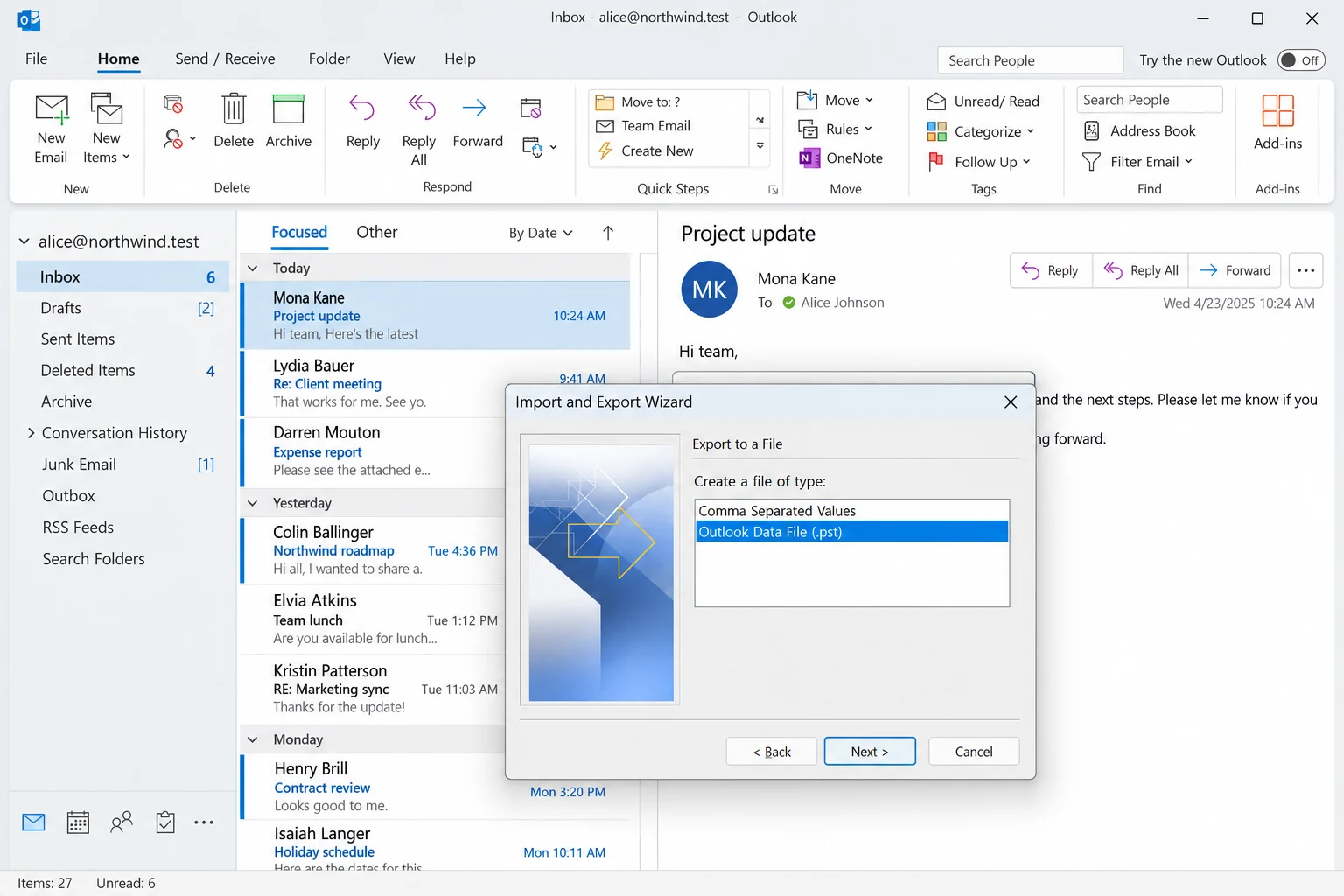
Microsoft's page on exporting Outlook items to a .pst file tells you to add the account to desktop Outlook and wait for all of your email to appear before you export. These menus belong to classic Outlook.
- Add the account. Add the IMAP account to Outlook and let every folder finish loading.
- Open the wizard. Click File, then Open & Export and then Import/Export.
- Choose the file type. Pick Export to a file and then Outlook Data File (.pst).
- Pick folders and a place. Select the folder to export, choose where the file should go and click Finish.
Note: Microsoft puts the wait first for a reason. A large IMAP mailbox that is still syncing may not have shown every folder yet, so give Outlook time before you press Finish.
How Do You Export IMAP to PST Straight From the Server?
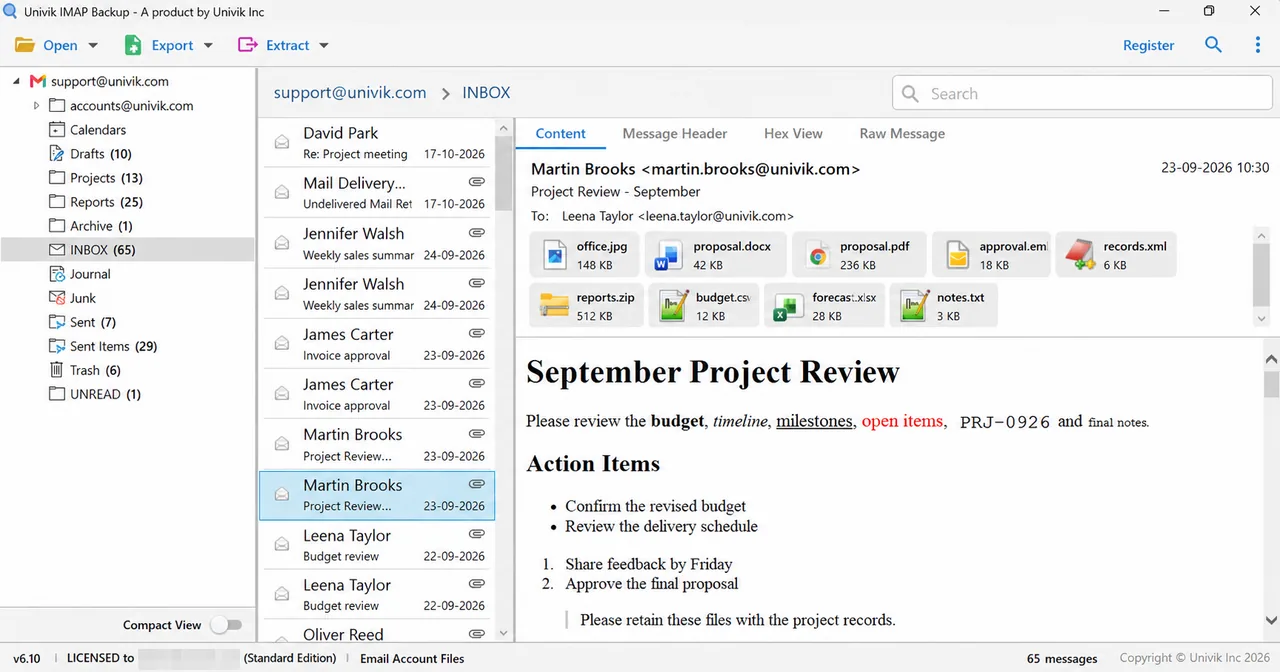
Univik IMAP Backup is IMAP backup software for Windows. It reads the mailbox over IMAP and writes the file itself, so the account does not have to sit in Outlook first. Each step names a screen that you can match against your own mailbox.
- Add the mailbox. Start at the Open menu and pick Email Accounts. Choose Add account and type the mailbox address with its password. Find sits under Advance Settings and fills in the IMAP server name from the address.
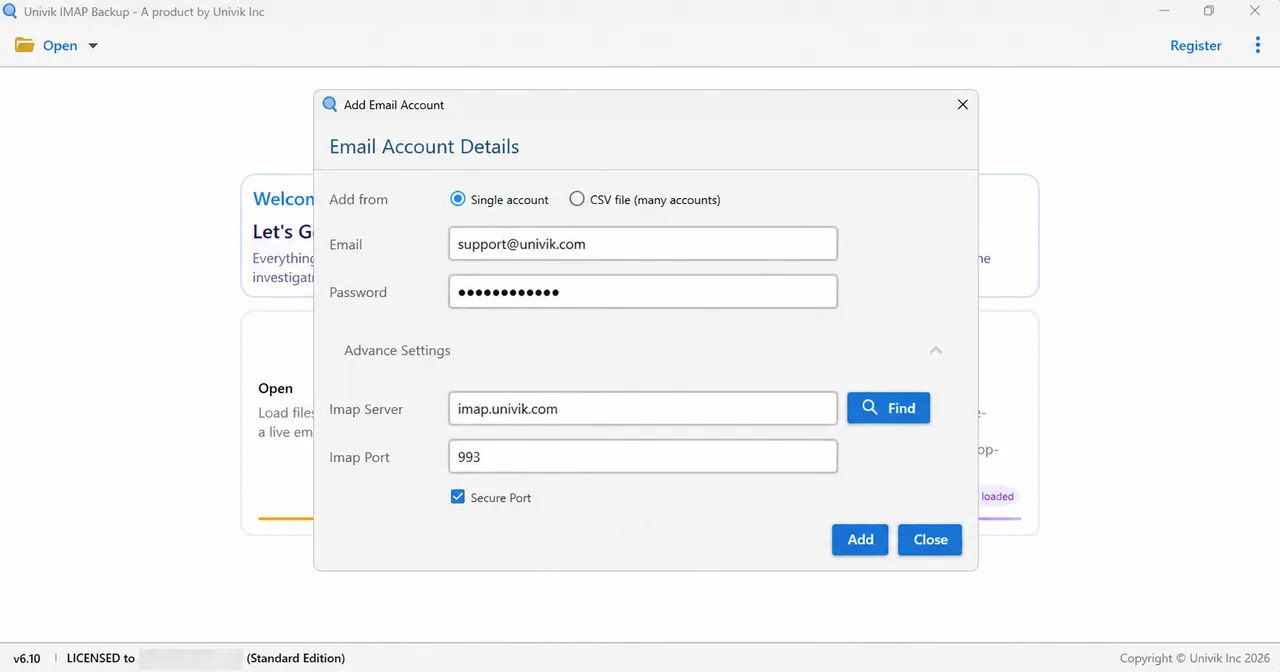
The Add account window after Find has filled in the IMAP server. - Tick the folders. Every folder in the tree has a tick box and a message count. Tick the folders you want and clear the rest.
- Open the PST screen. Open the Export menu. PST sits under Email Files next to EML and MBOX.

The Export menu with PST listed under Email Files. - Check the settings. The Location box starts at
C:\Mail Backups\IMAPand ends with a file name that beginsExported_and carries the mailbox address. Look at Minimum Attachment Size to Export before you go on, because it decides which mails are written.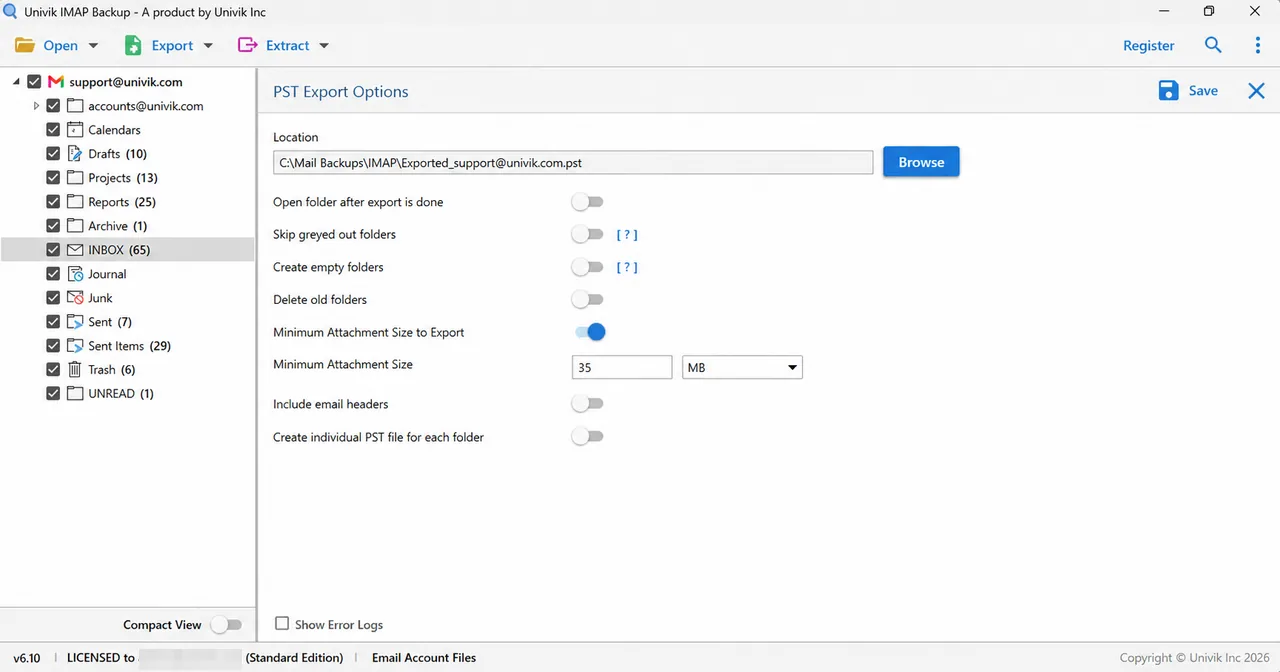
The PST Export Options screen with the Location box and the attachment size filter. - Save and open the file. Click Save in the top right corner. Then open the new file in Outlook or in PST Viewer and compare its folders with the tree counts.
Why Does a PST Export Write 0 Messages?
The PST screen has an option named Minimum Attachment Size to Export and it starts at 35 MB. The option works as a filter. When it is on, IMAP Backup exports only the mails that carry an attachment of that size or larger. A mailbox without such an attachment therefore gets 0 messages.
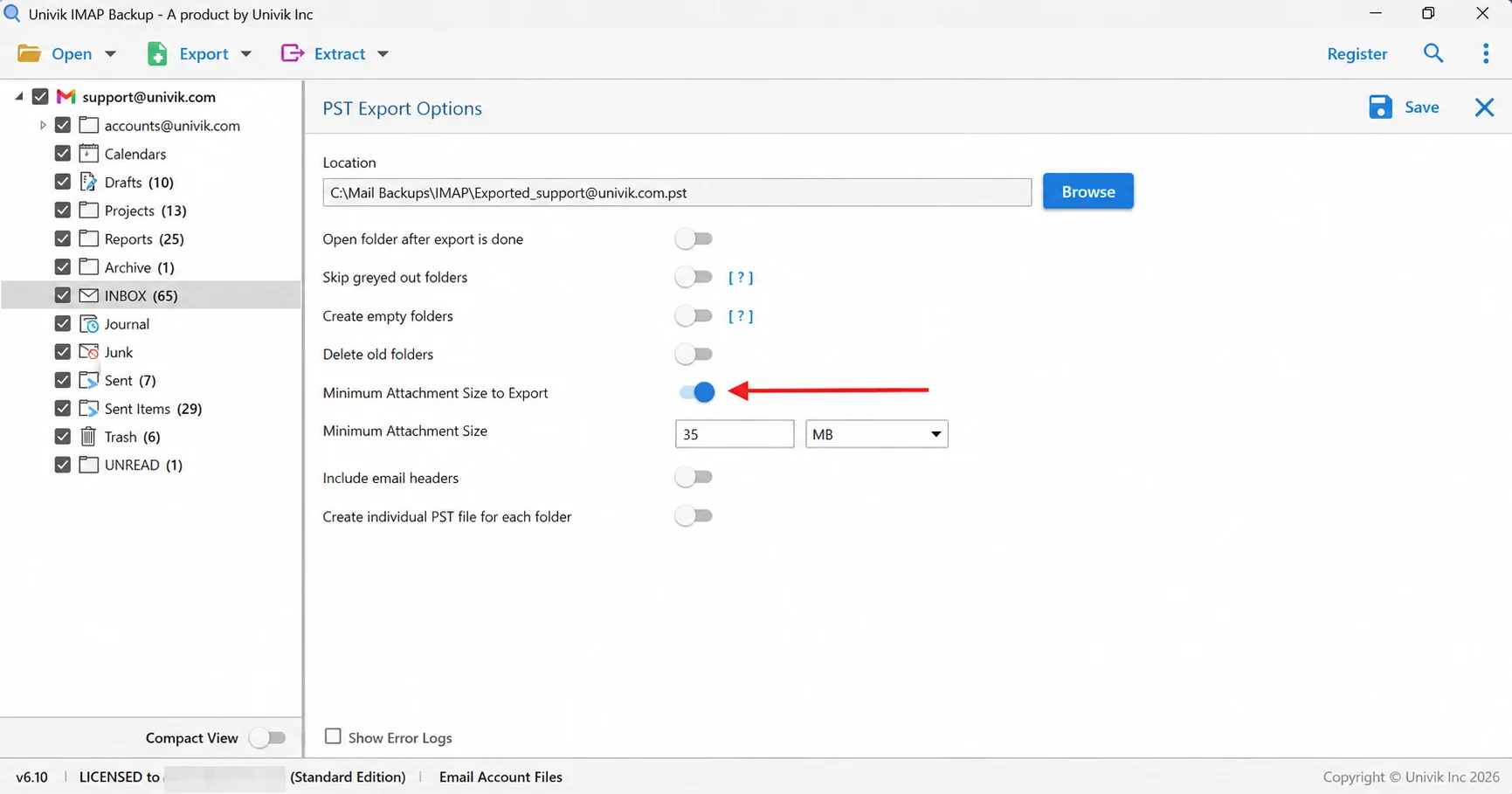
My test mailbox shows how this plays out. None of my mails carried an attachment of 35 MB or more (the largest in my 81-message sample was 5 MB). The 35 MB setting skipped all 173 messages and the first export wrote 0 messages. Then I cleared the option and the next export finished. Leave the option off for a normal backup and turn it on only when you want to pull mails with big attachments out of a mailbox.
When Should Each Folder Get Its Own PST?
The option Create individual PST file for each folder changes the Location box from a file path to a folder path. IMAP Backup then writes one file for every folder that holds mail. A folder without mail gets no file.
| Setting | Location box | Result in my test |
|---|---|---|
| One PST | A file path that ends with .pst | One file of 38.8 MB with 81 messages and 160 attachments in 17 folders |
| Individual PST | A folder path | 17 files with one file for each folder that holds mail |
Sub-folders do not travel inside their parent file. Projects.pst holds Projects mail only, while Apollo.pst and 2025.pst are files of their own. The eight files of my sub-account sit in a sub-folder named alice@northwind_test, which is the address alice@northwind.test with its dot swapped for a _ character.
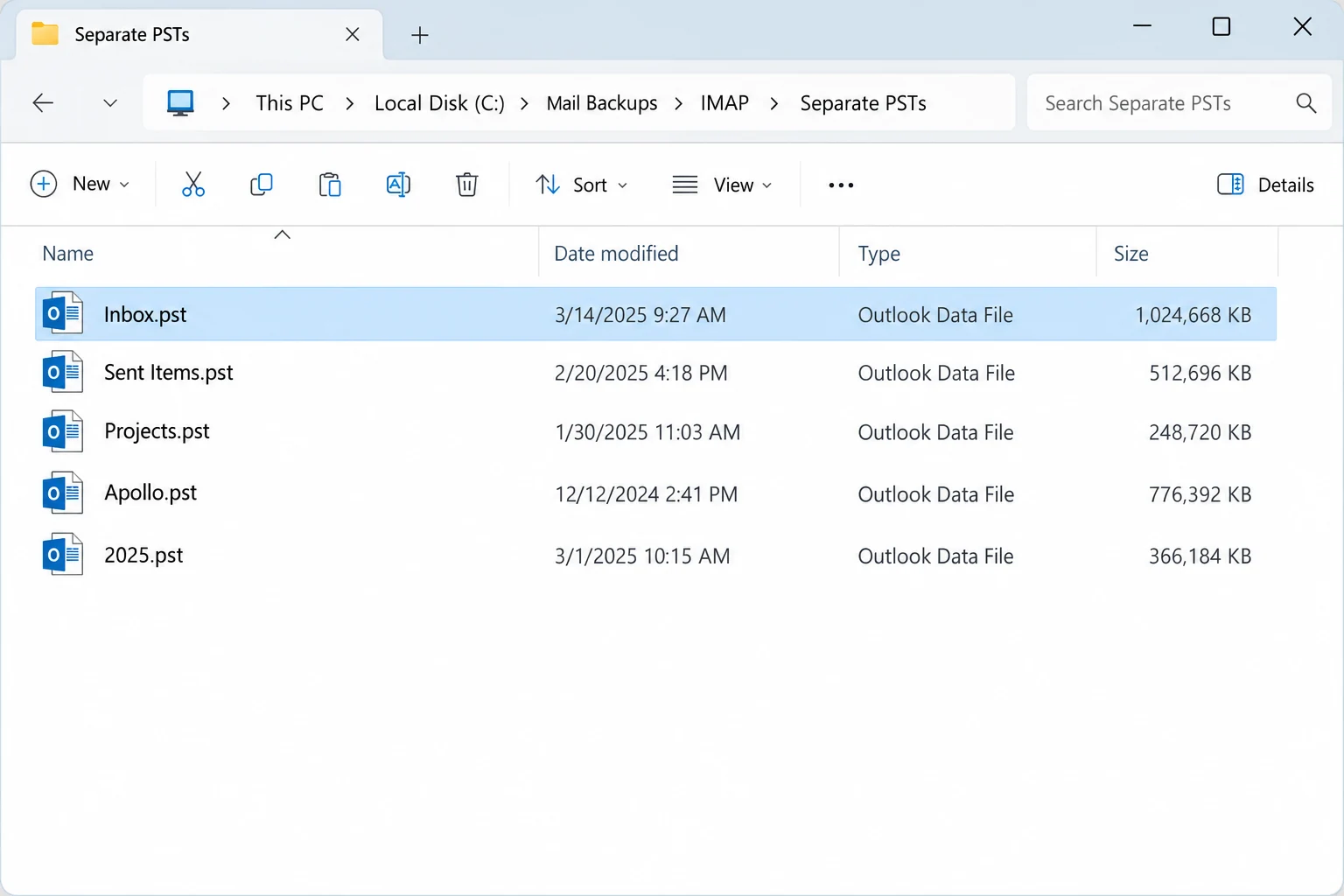
Choose one PST when you want a single file to import. Choose separate files when different people need different folders. Also, file size can decide it, because Sent Items.pst came to 36.6 MB and held almost all of the 38.8 MB of the single PST. That one folder can then travel on its own.
IMAP Backup signs in with the mailbox address and password. The folders you tick are saved as one PST or as one PST for each folder.
Download Free Trial Select a Licence - From $99Run one folder first and open its PST to compare it with the tree count.
What If Your PST Export Looks Like This?
Do this: Clear Minimum Attachment Size to Export or lower its size and press Save again. A mailbox that doesn't hold a 35 MB attachment has nothing to pass that filter.
Do this: That change is normal while Create individual PST file for each folder is on. Turn the option off when you want one file.
Do this: Give Outlook time to load the whole account. Microsoft's page says to wait until all of your email appears before you export.
Do this: IMAP Backup remembers the options you left behind. Check Minimum Attachment Size to Export and the individual PST option before every export.
If a PST export behaves in a way this guide doesn't cover, write to Univik support.
- Classic Outlook exports an IMAP account to PST through File, Open & Export and Import/Export after all of the mail has appeared.
- IMAP Backup signs in to the IMAP server itself and writes the PST for the folders you tick.
- Minimum Attachment Size to Export starts at 35 MB and a mailbox without such an attachment exports 0 messages.
- A single PST keeps the nesting of your folders while the individual option writes one file for each folder that holds mail.
- The trial saves 10 items from each folder, which is enough to open the file and check it.
FAQ: Export IMAP to PST
How do I export IMAP to PST?
Add the IMAP account to classic Outlook and use File, Open & Export, then Import/Export. You can also sign in to the mailbox with IMAP Backup, tick the folders, open the Export menu, choose PST and press Save.
Can I export an IMAP account to PST in Outlook?
Yes, classic Outlook exports to an Outlook Data File (.pst) through its Import/Export wizard. Microsoft advises adding the account to desktop Outlook and waiting for all of your email to appear first.
Can each IMAP folder get its own PST file?
Yes, turn on Create individual PST file for each folder. IMAP Backup then asks for a folder path and writes one file for every folder that holds mail.
What is the PST file name and where is it saved?
The Location box starts at C:\Mail Backups\IMAP and ends with a name that begins Exported_ and carries the mailbox address. The file ends with .pst.
Why did my IMAP to PST export write 0 messages?
Minimum Attachment Size to Export starts at 35 MB. With the option on, only mails that carry an attachment of that size are exported. Clear the option or lower the size and save again.
Does the PST keep my folders and attachments?
Yes, a single PST keeps the nesting of the mailbox and attachments stay inside their messages. In my test the Projects, Apollo and 2025 folders stayed three levels deep and the file of 81 messages held 160 attachments.
Can I try IMAP to PST before I buy?
Yes, the trial saves 10 items from each folder, which is enough to open the file and compare it with the mailbox. Licences start at $99 for 2 PCs.
Which other formats can IMAP Backup save?
IMAP Backup also writes EML and MBOX mail files. PDF, HTML and TEXT cover reading copies while CSV makes a sheet and SQL Script feeds a database. Four live targets share that menu with the formats: Gmail, Office 365, IMAP and a Thunderbird profile.

Written on October 27, 2026 from the PST Export Options screen of IMAP Backup 6.10 and the Microsoft Support pages on Outlook export. The counts come from a test mailbox loaded into the trial build.
Pages we read: