Quick Answer
To backup Yahoo Mail, connect over IMAP to imap.mail.yahoo.com on port 993 with SSL. Use your complete Yahoo address plus an app password, which Yahoo makes for you in place of the normal one.
Then tick your folders and save each one as a PST, EML or MBOX file on your PC. Do it before the mailbox goes 12 months without being opened, because Yahoo then deletes its emails, folders and contacts for good.
Yahoo keeps your mail on its own servers and clears some of the mail on a schedule. The Trash folder is emptied after 7 days and the Spam folder after 30 days. A mailbox that nobody opens for 12 months loses all of the content. A copy on your PC is a copy that those rules cannot reach.
To backup Yahoo Mail on a Windows PC I used an app that reads IMAP mailboxes and a test mailbox that is not a Yahoo mailbox, so the counts you read here were taken from it. I took each Yahoo value from Yahoo's help pages on 2 November 2026.
Which Server and App Password Do You Type to Backup Yahoo Mail?
Enter imap.mail.yahoo.com as Imap Server. Imap Port stays at 993 and Secure Port stays ticked. Yahoo's help page on downloading mail over IMAP gives the same host and port and states that SSL is required. That is the implicit TLS that RFC 8314 prefers. The Yahoo Mail IMAP settings page on Univik adds the POP3 and SMTP hosts, which the mailbox copy does not need.
yourname@yahoo.comThe whole Yahoo address, including @ and the domain.- Password
- An app password from YahooNot your usual Yahoo password. The next section explains where it comes from.
- Imap Server
imap.mail.yahoo.comPaste it with no spaces before or after.- Imap Port
993Leave the default of 993 in place.- Secure Port
- Ticked (SSL)Keep this box ticked because Yahoo requires SSL.
Select Find if you want the app to suggest a server from the address. Match any suggestion from Find to the card, then select Add.
Why Does Yahoo Want an App Password Instead of Your Normal One?
Yahoo describes an app password as a random code for email apps that do not use the Yahoo sign-in page. A desktop IMAP app has no such page, so the Password box takes the code. Yahoo adds that people who sign in with the Yahoo Account Key should make an app password too.
You make the code on the Account Security page. Under External connections select Create app password, name it and select Generate password. Yahoo's app password page lists all the steps.
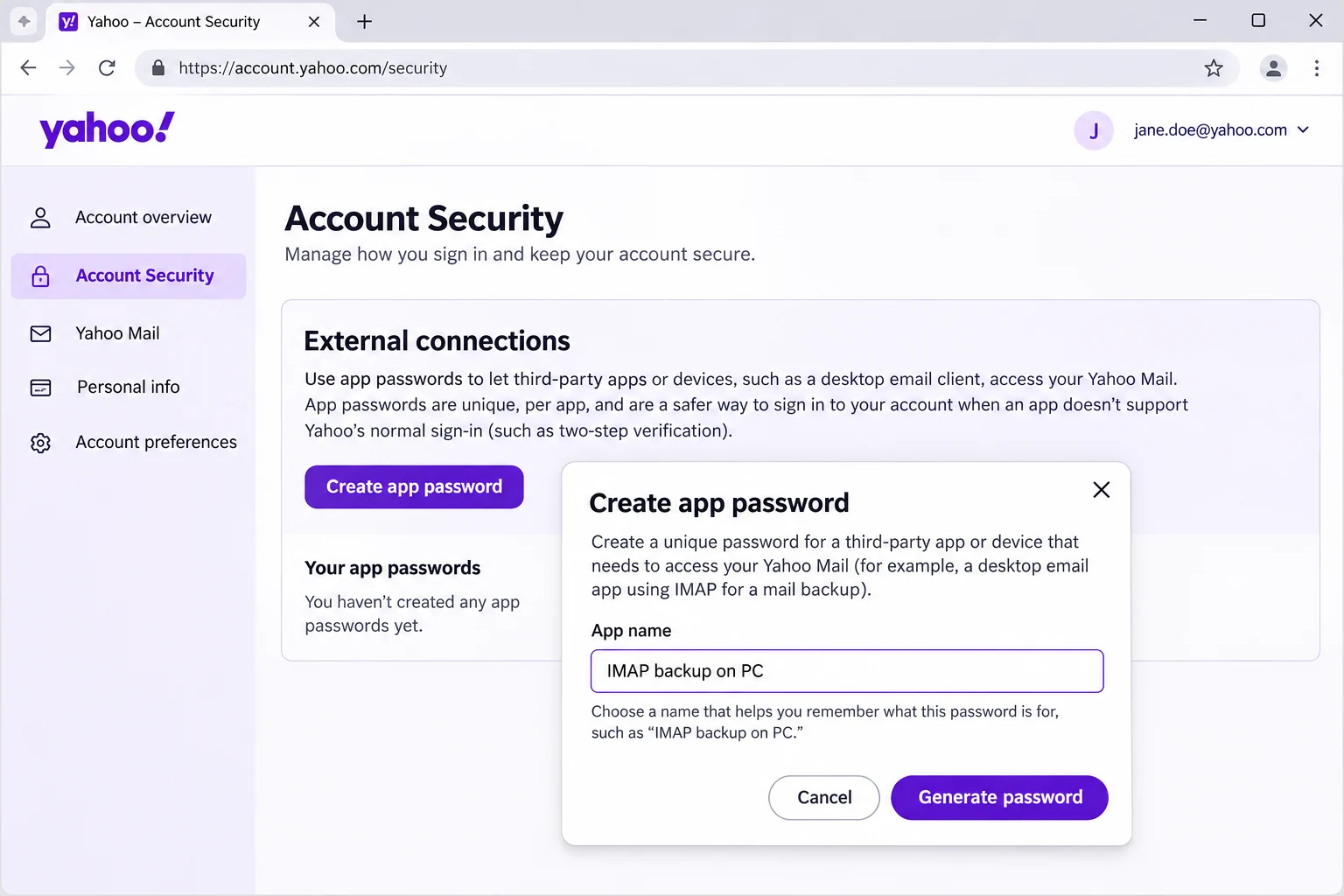
- A password change does not cancel it Yahoo says an app password stays active after you change your main password. Delete the code on the same page once the backup is checked.
- Making one can fail Yahoo advises the browser you have used to sign in for several days in a row and no Incognito window. Yahoo adds that customer care cannot override the check.
What Does Yahoo Delete by Itself While You Wait?
Three Yahoo rules decide how soon the copy on your PC matters.
- Inactive mailbox A mailbox turns inactive after 12 months without access. Signing in to your Yahoo account alone does not count, so you must open the mailbox itself. Its emails, folders, contacts and settings are then permanently deleted, with a reminder 90 days before. Signing back in restores access but not the deleted content. Yahoo's inactive mailbox page adds that a Mail Plus subscription prevents the deletion.
- Trash and Spam The Trash folder is emptied after 7 days and the Spam folder after 30 days. Yahoo says you cannot change either period, so a backup holds only what is still in those folders on the day of the run.
- A full mailbox The free storage is 20 GB. A full mailbox cannot send or receive. The mail sent to you in the meantime is not stored.
IMAP does not protect against any of these. Yahoo describes IMAP as two-way syncing, so a delete made in a desktop app reaches your Yahoo account too. A client on IMAP shows the mail on the server and keeps no separate copy. Is IMAP a backup? goes through the difference step by step.
Yahoo's IMAP page also warns that an app told not to keep mail on the server can remove it from your account after the download. Choose yes whenever the app asks. On the EML export screen of the app, the Delete old folders switch starts off. Leave it off for the first run.
Can Yahoo Itself Export Yahoo Mail to a File?
Yahoo has a data request for the job. Its help on viewing your account data says you can download a copy of your emails and contacts from the Get my data page. The download can take up to 30 days to become available and then stays available for 30 days. Yahoo's page does not name the file type for mail, so open a sample before you rely on the download.
The IMAP route starts from your own PC and writes the formats that you pick. Contacts are not messages, so the IMAP login does not return them. Ask Yahoo for them through the data request. If you need only the addresses of people who wrote to you, extract email addresses from IMAP reads them from the message fields.
Who Needs to Backup Yahoo Mail Before the 12-Month Rule Applies?
- An old address You last opened the Yahoo address a year ago and may never open it again.
- A mailbox near 20 GB You plan to delete the old years and want them saved first.
- A move to another provider You want every Yahoo folder stored before you stop using the address.
How Do You Backup Yahoo Mail Step by Step?
Sign in with the values on the card, tick the folders, pick a file format under Export and select Save at the end. To download all Yahoo emails, tick every folder in step 2.
The screens come from Univik IMAP Backup, which is IMAP backup software that runs on Windows. They show a test mailbox and not a Yahoo account.
- Sign in. Select Open in the main window, then Email Accounts and Add account. Type your whole Yahoo address into Email and the app password into Password. Then open Advance Settings and put imap.mail.yahoo.com in Imap Server. The 993 in Imap Port is already right and Secure Port is ticked for you.
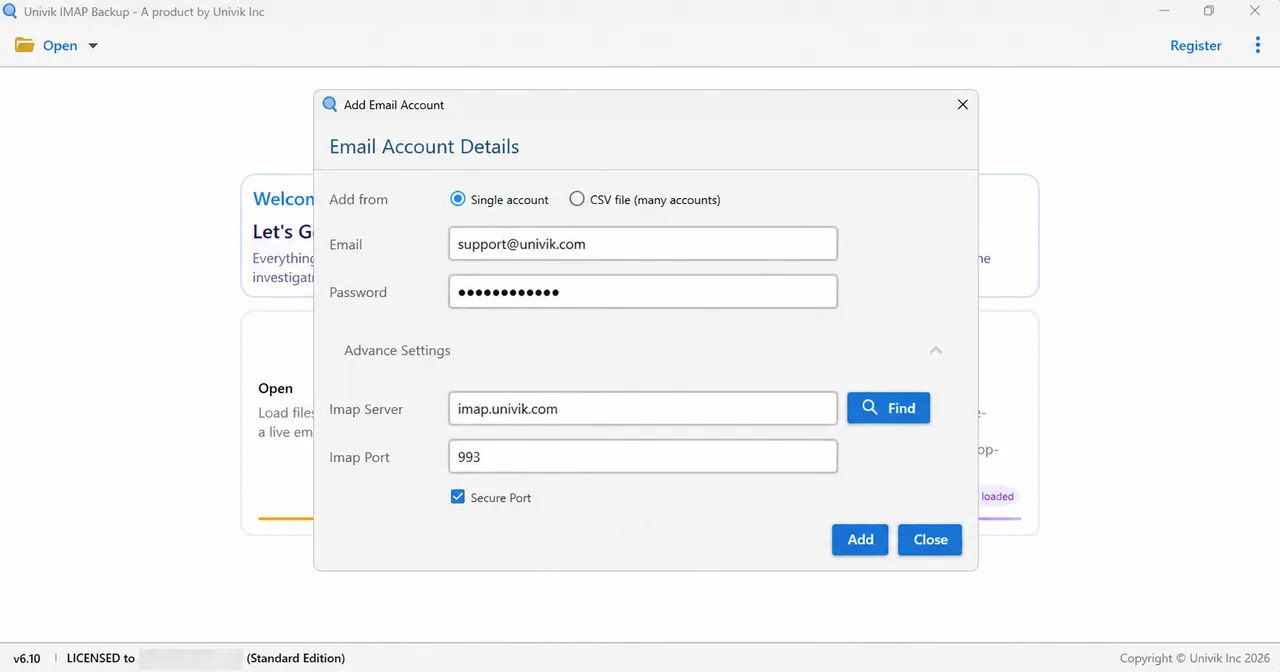
Advance Settings expanded to show Imap Server, Imap Port and Secure Port. - Pick the folders. Each node in the folder tree carries a tick box, with the message count beside it. Tick whatever you want to keep. Add the Trash and Spam folders too if Yahoo has not emptied them yet. Later, set the folder names against those in your Yahoo webmail.
- Pick a format. Select Export and choose one of EML, MBOX or PST in the Email Files group. Document Files lists PDF, HTML, TEXT and CSV for other uses.

Export menu, Email Files group at the top. - Look at the size filter. On the PST screen, Minimum Attachment Size to Export comes with its switch on and 35 MB filled in. Left at that default, the filter made my first test export on the mailbox come out empty, so check it before you select Save.
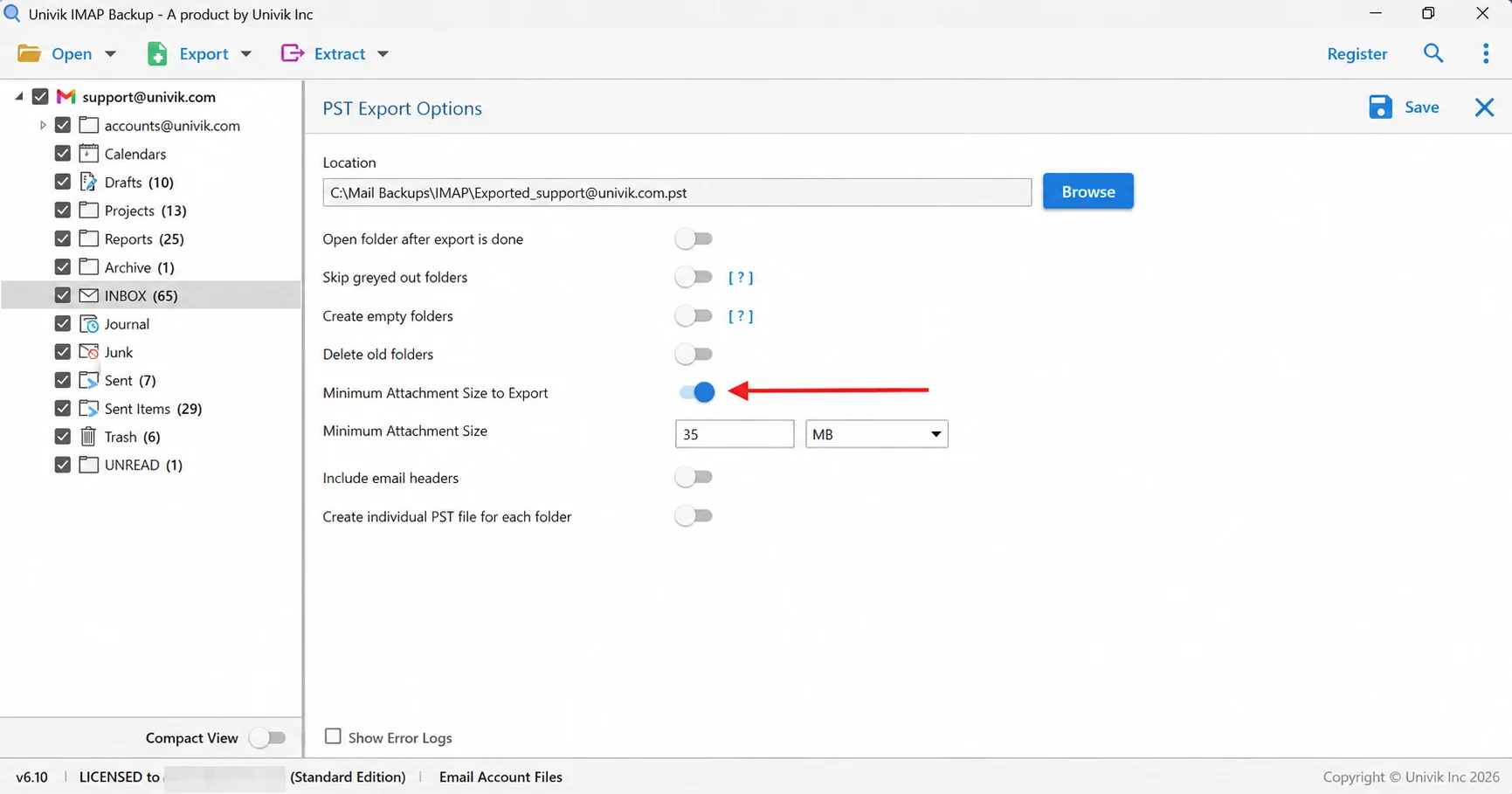
Arrow on the 35 MB attachment filter, which is on by default. - Save and verify. Select Save from the toolbar row at the top right. A green bar shows when the export ends. Next open the export folder and set the files of each folder against the number beside it in the tree.
Which File Format Keeps a Yahoo Mailbox Usable After Yahoo Deletes It?
Any of the three Email Files formats outlives your Yahoo account, because each one opens without Yahoo. Pick by where you will read the copy.
| Format | What gets written | Where to read it |
|---|---|---|
| IMAP to PST guide | One .pst file for the account or one for each folder | Outlook on Windows |
| IMAP to EML guide | One .eml file for each message, in folders that copy your Yahoo folder names | A plain folder on your drive |
| IMAP to MBOX guide | A single .mbox holds each ticked folder | Importing into Thunderbird |
Choose PST if Outlook is your next mail program. A PST can also be opened without Outlook in the browser-based Online PST Viewer. For a spreadsheet list of senders and dates, export IMAP emails to CSV from the Document Files group.
Why Does a Yahoo Mail Backup Come Back Short or Take Days?
Yahoo's IMAP help names two limits for a large account.
- Time Yahoo says the download of an account with a lot of content can take several days or longer.
- Folders near 100,000 emails Yahoo says the download of such a folder may be incomplete. Yahoo suggests moving part of the mail into a new folder.
Counting files is the quickest check, because the tree already lists a total for every folder. In my non-Yahoo test mailbox INBOX lists 65 messages. The trial saved 10 of them, while Drafts, with 10 messages, came out whole.
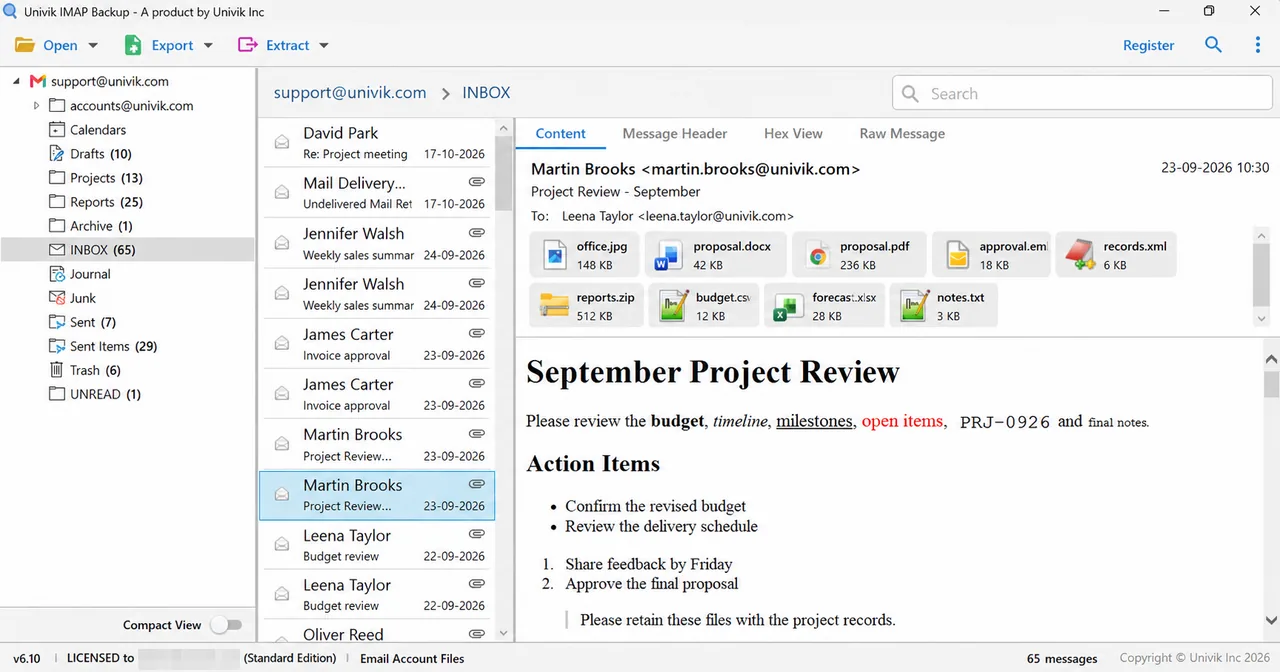
| Test folder | Messages listed | Files saved by trial |
|---|---|---|
| INBOX | 65 messages | 10 files |
| Sent Items | 29 messages | 10 files |
| Drafts | 10 messages | 10 files |
| Trash | 6 messages | 6 files |
With a licence the app saves every message, which makes the files of each folder match its tree number. Attachments stay inside the saved mail. To pull them out as separate files, extract attachments from IMAP email after the backup.
What If Your Yahoo Mail Backup Looks Like This?
Try this: Open the Password box and swap in the app password, because Yahoo does not want your usual one there. After that, check Imap Server against imap.mail.yahoo.com one letter at a time.
Try this: Switch to the browser that you have signed in with for several days and leave Incognito mode.
Try this: Turn Minimum Attachment Size to Export off on the export screen and select Save once more. With that filter at its default my first PST run saved nothing.
Try this: In the trial edition every folder gives up at most 10 items. A Demo Edition dialog says so. A licence lifts that limit.
Something else went wrong? Describe it to Univik support. Keeping an AOL address as well? Download AOL emails covers that mailbox.

Yahoo Mail Backup Questions
How do I backup Yahoo Mail?
Make an app password on the Yahoo Account Security page first. Then sign in through Univik IMAP Backup using your whole address and that app password. Type imap.mail.yahoo.com into Imap Server. Port 993 and a ticked Secure Port stay as they are. Finally tick the folders you need, choose a format in Export (PST, EML or MBOX) and select Save.
What password does Yahoo accept when an app signs in?
An app password from Yahoo goes in the Password box. Yahoo describes it as a random code for the email apps that do not use its own sign-in page. The normal Yahoo password is not what Yahoo asks an app to use.
What should a Yahoo Mail backup tool do?
A good one connects over IMAP through port 993, accepts an app password and shows the folder list with message counts. It also writes formats that open without the tool, like PST, EML or MBOX. The counts let you check the saved copy against your account.
How do I download all Yahoo emails?
Tick every folder in the folder tree before you export, including Trash and Spam if they still hold mail. Yahoo says the download of a large account can take several days or longer and a folder near 100,000 emails may be incomplete.
Can I export Yahoo Mail without installing an app?
Yes. Yahoo lets you request a copy of your emails and contacts from the Get my data page. The download can take up to 30 days to become available and then stays available for 30 days. The Yahoo page does not name the file type for mail.
When does Yahoo delete mail from an unused mailbox?
The mailbox turns inactive after 12 months without access and Yahoo then deletes its emails, folders, contacts and settings. Signing in to your Yahoo account alone does not count as access. Yahoo sends a reminder 90 days before the deletion and does not restore the deleted content when you sign back in.
Will my Yahoo app password survive a password change?
No. Yahoo says an app password stays active after you change your main password. Delete the code on the Account Security page when you no longer need it.
How do I know my Yahoo Mail backup is complete?
Open each exported folder, count its files and compare that number with the tree. In my test mailbox INBOX listed 65 messages and the trial saved 10, so only a licence makes every pair match.
Can I backup several Yahoo Mail accounts at once?
Yes. The app adds several accounts from a CSV file with one email and password on each line. Each Yahoo account needs its own app password.

Checked on 2 November 2026 against Yahoo's help pages. The file counts come from a non-Yahoo test mailbox run through IMAP Backup 6.10 in the trial edition.
Yahoo help pages we read:
- Download your email from Yahoo Mail with IMAP
- Generate and manage 3rd-party app passwords
- Inactive mailboxes in Yahoo Mail
- View and manage data associated with your account