Quick Answer
To backup iCloud Mail, generate an app-specific password at account.apple.com and sign in to an IMAP app with your iCloud address and that password. Your Apple Account password does not go in the Password box. Apple creates app-specific passwords only after two-factor authentication is on.
Then tick folders in the tree and export them as PST, EML or MBOX files. Mail counts against iCloud storage, so copy it before the quota fills.
iCloud Mail is the mailbox tied to an Apple Account. Its messages share the storage pool used by your photos, iCloud Drive files and device backups, so a full account can stop new mail from arriving. A copy on your own PC does not depend on that quota or on the account staying open.
To backup iCloud Mail I loaded a test mailbox into an IMAP backup app on Windows. That mailbox is not an iCloud one, so each file count on this page belongs to it. Apple's values come from the support pages Apple publishes, which I read on 2 November 2026.
What Does an Apple Mailbox Ask For Before You Backup iCloud Mail?
Apple accepts a third-party app only with an app-specific password, so the Password box is where an iCloud login differs from most others. The yellow card holds each field you fill in. The server name and the port come from Apple's setup page and are repeated on Univik's iCloud Mail IMAP settings page.
name@icloud.comYour primary Apple address. It can end in @icloud.com, @me.com or @mac.com.- Password
- An app-specific passwordGenerated for this app at account.apple.com. Not your Apple Account password.
- Imap Server
imap.mail.me.comCopy this exact name into the box.- Imap Port
993993 is already in the box.- Secure Port
- Ticked (SSL)Apple requires SSL, so keep the tick.
Find can fill a server name from your address, but Apple's value is the one on the card, so compare the two before you press Add. The setup page from Apple calls the part of your address before the @ the usual incoming user name and the full address the fallback. Type the full address first and read the problems section if the login is refused.
Why Does iCloud Mail Need Two-Factor Authentication Before a Backup Login?
Apple creates app-specific passwords only for an Apple Account that uses two-factor authentication. Without it the Password box has nothing to accept. The mailbox must also be on. The troubleshooting page from Apple asks you to confirm that iCloud Mail is turned on and suggests a test at icloud.com/mail. If your inbox loads there, check the sign-in values next.
Which Apple Password Goes in the Password Box?
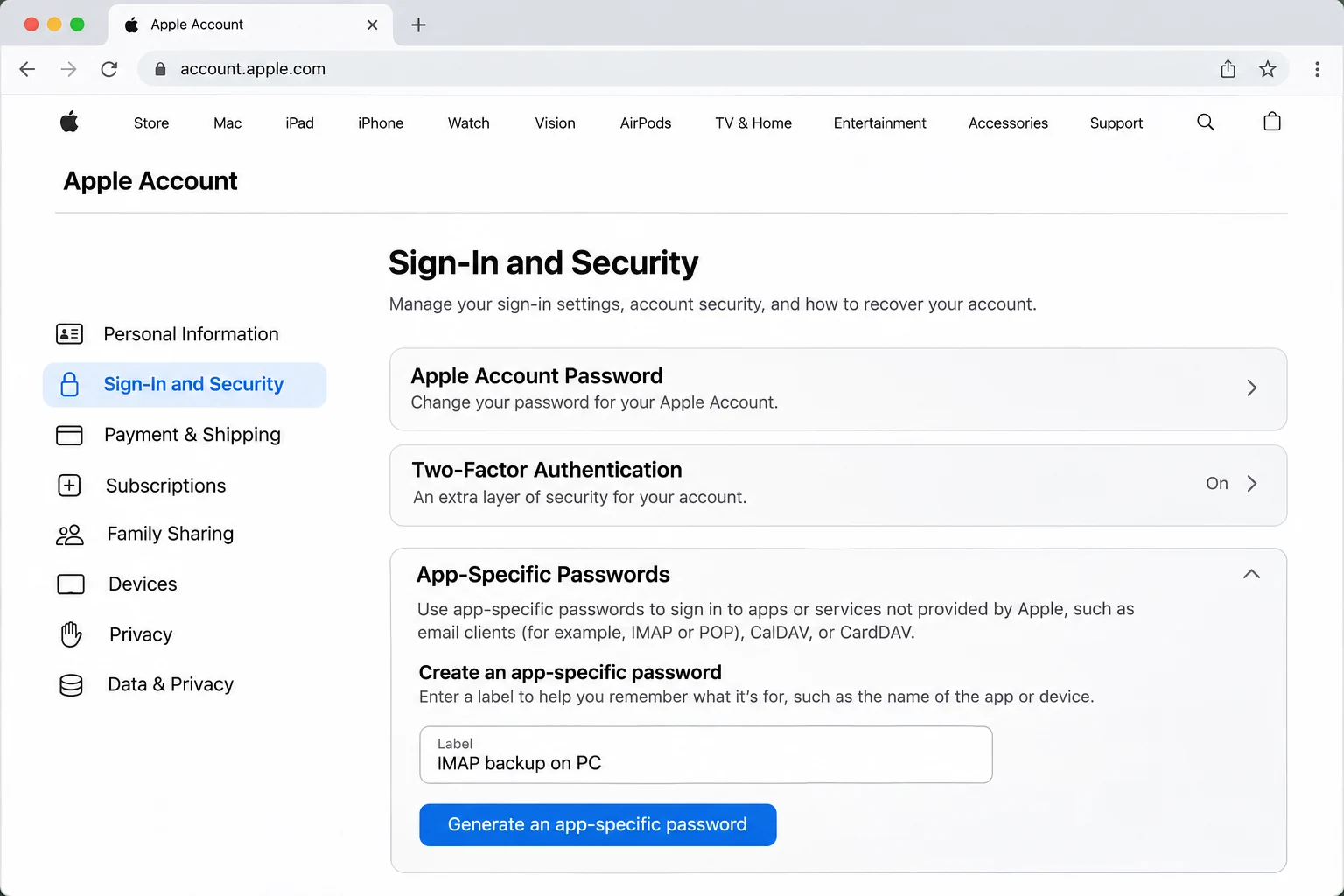
The Add Email Account window has a plain Email field and a Password field. It has no Apple sign-in button. Apple's route for a third-party app is the app-specific password, so paste that into the Password box.
| Where you sign in | What Apple wants there |
|---|---|
| iPhone, iPad or Mac system settings | Your Apple Account sign-in on the device |
| Outlook 2021 or later on Windows | Apple says you can authorize the app with your Apple Account |
| An IMAP app that asks for a password | An app-specific password from the account.apple.com site |
Open the sign-in and security section of your Apple Account page, choose app-specific passwords and follow the steps. Apple sets the limit at 25 active ones per account. The Apple page on app-specific passwords adds a rule that matters here. Changing or resetting your Apple Account password revokes all of them. A revoked password signs its app out until you create a new one.
Which Address Do You Sign In With: @icloud.com, @me.com or @mac.com?
The ending depends on when the account was created. Accounts made on or after 19 September 2012 end in @icloud.com. Older MobileMe accounts can also hold @me.com addresses and a few keep @mac.com too. Aliases are separate. Apple lets you create up to three @icloud.com aliases and delivers their mail to your primary inbox by default. It also says you cannot sign in to iCloud.com with an alias, so put your primary address in the Email box.
Does an IMAP Sign-In Give You a Separate Copy of iCloud Mail?
No. iCloud Mail supports IMAP and SMTP only. The setup page from Apple says it does not support POP, the protocol that downloads mail to a computer. An IMAP app mirrors the mailbox, so a delete made in any app reaches the server too. Is IMAP a backup? gives the longer answer on that point.
What Happens to iCloud Mail When Your iCloud Storage Is Full?
New iCloud accounts get 5 GB of free storage, shared by backups, Mail, iCloud Photos and iCloud Drive. Once the quota runs out, the page on mailbox size and sending limits says you cannot send or receive email with your iCloud Mail address. The terms add that Apple may delete stored data above the limit after 30 days of notice. Copy your mail to your PC before the quota fills.
Which iCloud Mail Folders Empty Themselves After 30 Days?
The guide for Mail on iCloud.com says a deleted email stays in the Trash folder for 30 days and is then permanently erased. Apple says mail viewed in another app may go sooner, depending on the settings of that app. A separate guide says emails in the Junk folder are deleted after 30 days. Tick Trash and Junk in the folder tree if you want them in your copy.
Who Needs to Save iCloud Emails to Computer Files?
- A leaver from Apple devices You are moving to Android or Windows and need your old mail.
- A user near the quota Your 5 GB of free storage is nearly full.
- An old address holder You keep a @me.com or @mac.com address from the MobileMe era.
- Someone closing an account You plan to close an Apple Account.
How Do You Backup iCloud Mail Step by Step?
My tests used Univik IMAP Backup, IMAP backup software for Windows that takes an address plus a password. Steps run in screen order.
- Add the account. In the main window choose Open and then Email Accounts and then Add account from the menu. Put your iCloud address in Email and paste the app-specific password into Password next. Open Advance Settings and enter the host from the card in Imap Server next. Imap Port already reads 993 and Secure Port is ticked. Press Add to test the sign-in.
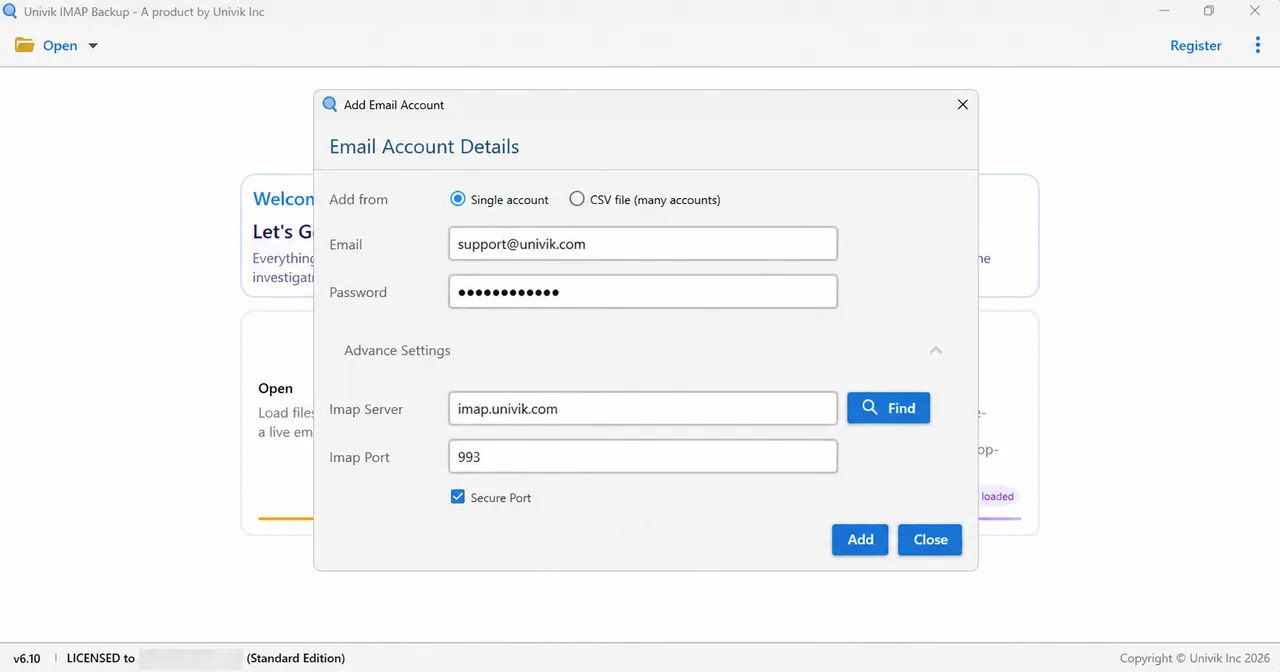
Add Email Account with its Email and Password fields. Advance Settings opens the server fields. - Tick the folders. The folder tree shows a tick box and a message total beside each row. Tick INBOX plus all the other folders you need. Trash and Junk belong here if you want them.
- Choose the format. Select Export on the toolbar. Under Email Files you will find EML, MBOX and PST. This page covers all three.

The Export menu with its Email Files group on top. - Check the filter. Next comes Minimum Attachment Size to Export, a switch that is on at 35 MB from the start. Apple's own iCloud message cap is 20 MB, which is lower. My PST run on a non-iCloud test mailbox wrote nothing until I turned that switch off, so turn it off for a full copy.
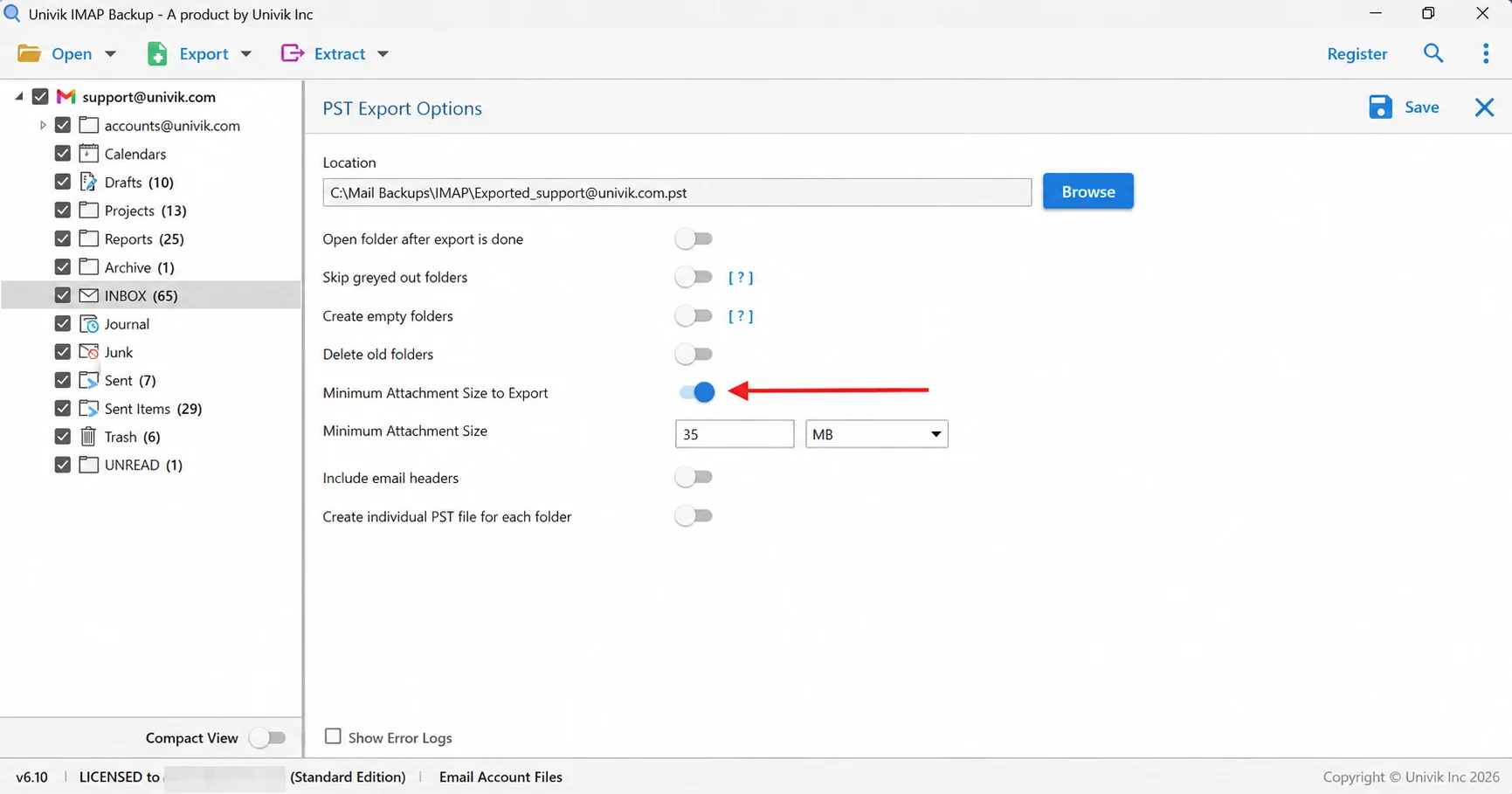
The arrow points to the 35 MB filter. Apple caps iCloud messages at 20 MB, so switch it off before a full copy. - Save and count. Press Save in the top right corner of the export screen. After the green success bar shows, compare each folder's file total with its total in the tree.
Which File Format Suits an iCloud Mail Export?
To export iCloud Mail, pick the file type by what happens to the copy next.
| Format | What you get | Pick it when |
|---|---|---|
| IMAP to PST | One PST for the whole mailbox or one per folder | You will open the copy in Outlook |
| IMAP to EML | Individual .eml files, one per message, inside folders that follow your mailbox | You want ordinary files that open without a mail program |
| IMAP to MBOX | One .mbox file for each ticked folder | You plan to read the mail in Thunderbird |
Does Apple Offer Its Own Download of iCloud Mail?
Apple has a data copy request on the privacy.apple.com site. The support page on that copy lists email among the iCloud data and says mail comes in formats that include .eml. It also says some data is masked or left out and that you have 14 days to download the files. An older Mac Mail article from Apple covers Mailbox > Export Mailbox for an mbox archive but is marked as archived.
What Happens to iCloud Mail When the Apple Account Closes?
Apple's iCloud terms let Apple end an account after one year of inactivity, with 30 days of notice by email to the address on the account. They say Apple will delete the data stored in a terminated account after a period of time but name no period. Closing an account yourself may be non-reversible. The terms also make you responsible for your own backup.
Why Does a Backup of iCloud Mail Skip Messages or Large Attachments?
The message size limit is 20 MB for incoming and outgoing mail, with up to 5 GB for a sender who turns on Mail Drop. The Mail Drop page from Apple says the recipient gets a shared link and that the attachment expires after 30 days. A message sent that way may carry a link where you expect a file. Apple does not say how that looks to an IMAP app, so open one old message with a large attachment in your copy and check.
Counts are the second check. INBOX listed 65 messages in my non-iCloud test mailbox. The trial edition wrote 10 of those. Sent Items listed 29 and gave 10 as well. Drafts listed 10 and Trash listed 6, so both came out whole.
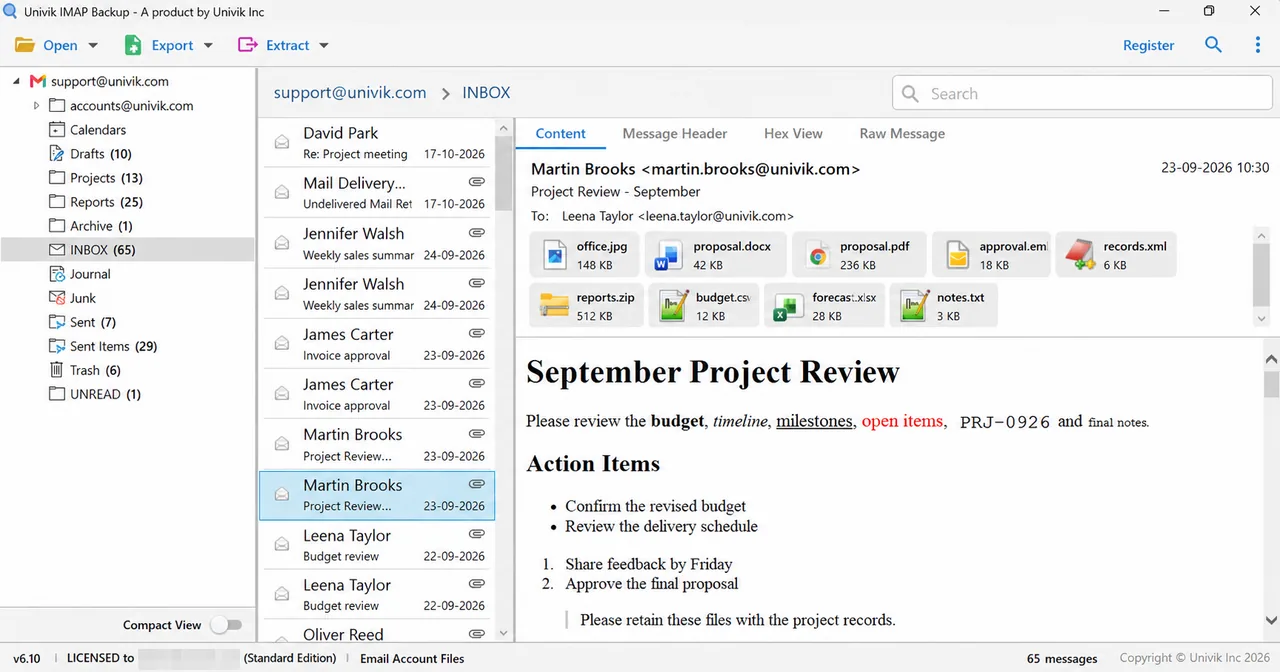
A licence removes the 10-item cap, so the file count of a folder should then equal its tree count. Begin with any folder where the two numbers differ.
Which iCloud Sign-In or Storage Problem Matches Yours?
Do this: Generate a fresh app-specific password and paste it again. A reset of your Apple Account password revokes every older one.
Do this: Open the sign-in and security section of your Apple Account page and check that two-factor authentication is on.
Do this: Sign in at icloud.com/mail to prove the mailbox exists. After that read Imap Server against the card one letter at a time. Tell Univik support which address form you typed if the login still fails.
Do this: Look at the Minimum Attachment Size to Export switch on the export screen. Turn it off and press Save again.
Do this: A trial export holds 10 items per folder by design. Buy a licence to lift it.

FAQ: Backup iCloud Mail
How do I backup iCloud Mail?
Turn on two-factor authentication for your Apple Account and create an app-specific password at account.apple.com. Next add your iCloud address and that password in the app and fill Imap Server and Imap Port from the card. Finally tick your folders and export them as PST, EML or MBOX.
Which password goes in the Password box for an iCloud Mail backup?
Use an app-specific password. The setup page from Apple names it as the password for third-party apps. Apple says your account needs two-factor authentication before it creates one. Your normal Apple Account password does not go in the Password box.
Do I need a separate login for my @me.com or @mac.com address?
Usually no. Sign in with your primary Apple address. Apple says mail sent to an alias lands in the primary inbox by default and that you cannot sign in to the iCloud.com site with an alias.
What happens to iCloud Mail when my iCloud storage is full?
Apple says that if you run out of iCloud storage you cannot send or receive email with your iCloud Mail address. The terms add that Apple may delete stored data above the limit after 30 days of notice.
How long does iCloud Mail keep deleted messages and junk?
The guide for Mail on iCloud.com says a deleted email stays in the Trash folder for 30 days and is then permanently erased. A separate guide says emails in the Junk folder are deleted after 30 days.
Why does my iCloud Mail export write no messages?
Check the Minimum Attachment Size to Export switch. It starts switched on at 35 MB and Apple caps iCloud messages at 20 MB. In my PST test on a non-iCloud mailbox it skipped every message until I switched it off.
How can I save iCloud emails to computer storage as files?
Sign in over IMAP with an app-specific password and write the folders you tick as PST, EML or MBOX files. EML gives one file per message. MBOX gives one file per folder. PST suits Outlook.
Can I export iCloud Mail from Apple without an app?
Apple has a data copy request at privacy.apple.com. The support page lists email among the iCloud data and says mail comes in formats that include .eml. Some data is masked or left out.
Can I try the iCloud Mail backup before buying?
Yes. A trial run exports 10 items per folder, which lets you confirm your app-specific password first. A licence lifts that limit.

Apple's support pages were the check on November 2, 2026 with IMAP Backup 6.10 open. The folder counts come from a test mailbox outside iCloud.
Apple sources read:
- Apple Support: iCloud Mail server settings for other email apps
- Apple Support: app-specific passwords
- Apple Support: mailbox size and message sending limits
- Apple: iCloud terms and conditions