Quick Answer
To backup Office 365 email, let Microsoft handle the sign-in on its own page, because Exchange Online no longer accepts a password typed into a mail app.
Pick your folders and keep them on your own PC as files in PST, EML or MBOX format before a licence change starts Microsoft's 30-day deletion clock.
Your Office 365 mailbox lives in the Microsoft tenant of your employer or school, not in an account you own. When the admin removes your licence, Microsoft disconnects a regular mailbox at once and deletes it for good after 30 days. A copy on your own PC sits outside that rule. Microsoft now sells the service as Microsoft 365. Both names point to an Exchange Online mailbox.
I used a Windows app that opens IMAP mailboxes to backup Office 365 email. I signed in to a live Microsoft 365 work mailbox on 2 November 2026. Typing the address into Add account opened Microsoft's sign-in in my browser and the folder tree loaded. A personal Outlook.com address, a guest account and a shared mailbox address signed in the same way. I exported EML, MBOX and PST from the work mailbox. The 35 MB filter and the 10-item trial cap behaved as on my other test mailbox. The counts in this guide were taken on a test mailbox outside Microsoft. Each Microsoft value comes from the Microsoft pages I read on 2 November 2026. The sign-in screen belongs to Microsoft, so this guide shows no picture of it. Mail in a work mailbox belongs to your organisation, so ask before you copy it.
Which Sign-In Replaces the Password When You Backup Office 365 Email?
Type your whole work or school address and finish the sign-in on Microsoft's page, so no password goes into the app. The Microsoft help article on IMAP4 and POP3 for Exchange Online publishes the endpoint in the last two rows of the card. Univik keeps a page of Microsoft 365 email settings with the POP3 and SMTP hosts, which a mailbox copy does not need.
yourname@yourcompany.comYour whole work or school address, the one you use to open Outlook on the web.- Sign-in
- Microsoft opens its own pageNo password is typed into the app. You finish the sign-in on Microsoft's page.
- Imap Server
outlook.office365.comThe IMAP endpoint that Microsoft publishes, listed for reference. The app hides this field for a Microsoft 365 address, so you type nothing there.- Imap Port
993The port that Microsoft publishes, used with SSL/TLS.
Why Does Exchange Online Reject a Password Typed Into a Mail App?
Exchange Online stopped accepting Basic authentication, the plain username and password sign-in, for IMAP. Its deprecation page says nobody can turn it back on in the tenant, not even Microsoft support. A mail app has to use OAuth 2.0 instead, which means the Microsoft sign-in page.
- April 2020 OAuth 2.0 support for IMAP started rolling out.
- 1 October 2022 This was the date for disabling Basic authentication in most Microsoft clouds. The 21Vianet cloud followed on 31 March 2023.
- 31 December 2022 Until this date an admin could re-enable the broken protocols. After it, nobody could.
Microsoft adds that the same change blocks app passwords for apps without two-step verification support. A generated code is therefore not a way around the sign-in page.
Which Three Admin Settings Can Stop a Microsoft 365 Mailbox From Being Copied?
A work mailbox answers to a tenant. The person who runs the tenant owns three settings that sit between you and your mail.
- The IMAP switch on your mailbox Microsoft says the default state of IMAP4 is enabled for all users in Exchange Online. An admin can turn it off for one mailbox in the Exchange admin center under Manage email apps settings.
- Security defaults The Microsoft IMAP page says the setting disables IMAP4 automatically when security defaults are on. A tenant created on or after 22 October 2019 can have them on. Tenants with Entra ID P1 or P2 licences often use Conditional Access policies instead, so ask which one applies.
- App approval By default, users can approve apps that do not need admin consent. An admin can narrow that in the Microsoft Entra user consent settings.
Ask your admin two plain questions before the first run. Is IMAP switched on for my mailbox? May staff approve a new app for their own mail? A yes to both leaves the Microsoft sign-in page as the only step.
What Does Microsoft Delete When a Licence Ends or an Account Is Removed?
- Licence removed A regular mailbox with no hold is disconnected at once. Reassign a licence within 30 days to reconnect the mailbox. After 30 days Exchange Online deletes the mailbox for good, as the Microsoft page on licence removal explains.
- Account deleted An admin can restore a deleted user and the mailbox within 30 days.
- Subscription ended Microsoft keeps the data of an ended paid subscription in the limited-function account for 90 days so the subscriber can extract it. It then disables the account and deletes the data within 180 days of the end. See the Microsoft data retention page for the terms.
- Deleted Items and Junk Items removed from Deleted Items stay recoverable for 14 days by default and an admin can raise that to 30. Junk Email holds items for 30 days.
Holds change the picture. Microsoft words these rules for mailboxes without a hold. A mailbox under a hold follows other rules that only your admin knows.
IMAP does not protect against any of this. A sign-in reads what the server holds today, so a mailbox that Microsoft deletes is gone from every IMAP app too. Is IMAP a backup? walks through the difference.
Do Shared and Archive Mailboxes Need a Copy of Their Own?
Both have their own storage, so a copy of your main mailbox does not hold them. A shared mailbox address that I added as its own account signed in like any other.
- User mailbox 100 GB on Microsoft 365 E3 and E5. Office 365 E1 gets 50 GB.
- Archive mailbox It starts at 100 GB and can grow to 1.5 TB when auto-expanding archiving is on. Office 365 E1 gets 50 GB.
- Shared mailbox 50 GB without a licence. A licence of E3, E5 or Exchange Online Plan 2 raises it to 100 GB.
Start with your own mailbox. After the sign-in, compare the folder tree with Outlook on the web. A folder that shows in Outlook but not in the tree was not copied.
Who Needs a Personal Copy of a Work Mailbox Before the 30-Day Clock Starts?
- A leaver Your licence will go on your last day.
- A small business owner You plan to end a subscription and want the mail saved inside the 90 days.
How Do You Backup Office 365 Email Step by Step?
Add the account, finish the Microsoft sign-in, tick the folders, pick a format and check the counts after you save.
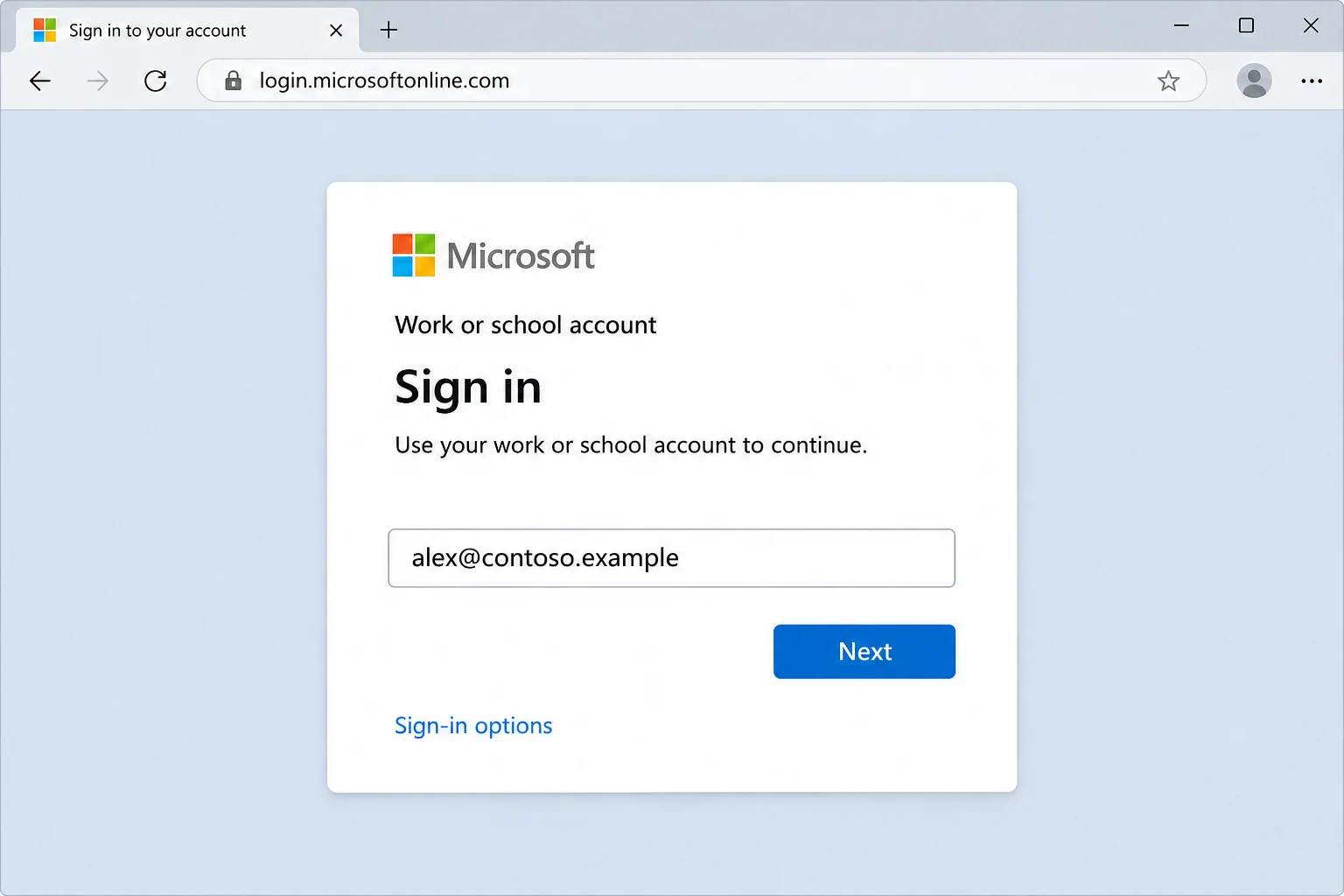
IMAP backup software from Univik runs on Windows. Its product screens here show a test mailbox, not a Microsoft account. The Microsoft sign-in screen above is a separate example of the browser step.
- Add the account. Go to Open, then Email Accounts, then Add account. Enter your whole work or school address in the Email box. Microsoft's sign-in opens in your browser as soon as you type the address, so you do not type a Microsoft password into the app.
- Finish the sign-in. Sign in with your work or school account on Microsoft's page. Microsoft decides what it asks next. Any second step you registered belongs to that page. If the page stops you, the cause usually sits with your admin.
- Pick the folders. Each node of the tree carries a tick box plus a count of messages. Choose the folders to keep, then compare their names with Outlook on the web.
- Pick a format. In Export, EML, MBOX and PST sit together under the Email Files heading.

The Export menu lists Email Files first. - Check the filter and save. Check the Minimum Attachment Size to Export switch, because it starts on at 35 MB. On my test mailbox the first PST run with that default wrote nothing. Then select Save. When the green bar appears, open the export folder and match the files of each folder to the count in the tree.
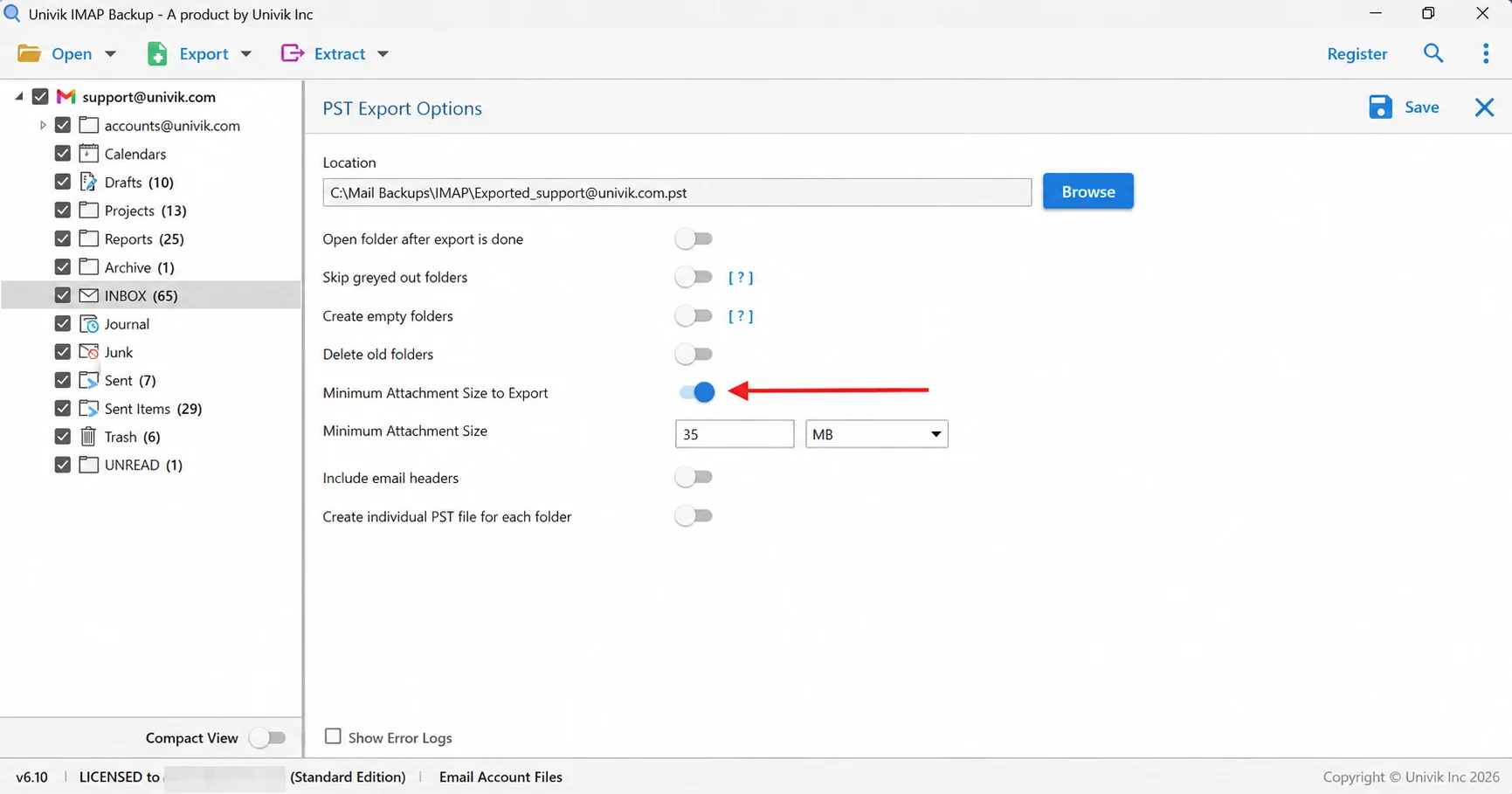
The 35 MB attachment filter, marked with an arrow, is on by default.
Where Do Microsoft's Own Export Routes Stop for One Mailbox Owner?
Outlook can write a PST from your mailbox. The Microsoft page on exporting to a PST places the export in new Outlook under Settings, then Files, then Export. It adds that Outlook has no automated way to repeat the backup on a schedule.
Admins have Purview eDiscovery for mailbox exports. The Univik guide on how to export an Office 365 mailbox to PST covers that route.
Which File Format Outlasts a Deleted Microsoft 365 Mailbox?
All three Email Files formats open without Microsoft, so each one outlives the tenant.
| File type | What you get | Opens in |
|---|---|---|
| IMAP to PST guide | A .pst file for the whole account or a separate one per folder | Classic Outlook for Windows desktop |
| IMAP to EML guide | One .eml per message, placed in folders named after your mailbox folders | Any local folder on your PC |
| IMAP to MBOX guide | One .mbox for every ticked folder | Mozilla Thunderbird after an import |
Choose PST if Outlook is where the mail goes next. You can also read a PST without Outlook in the Online PST Viewer.
Why Can an Office 365 Copy Come Back Short After a Clean Sign-In?
A finished sign-in does not mean every folder was copied. Three things leave gaps.
- Archive and shared mailboxes They have their own quotas, so compare the folder tree with Outlook on the web.
- The size filter It is on when you first open the export screen, so check it before you save.
- The trial edition It writes at most 10 items from each folder.
To check a copy, count files folder by folder against the totals in the tree. INBOX in the non-Microsoft test mailbox shows 65 messages. The trial produced only 10 files from them. Drafts shows 10 messages and all 10 reached the disk.
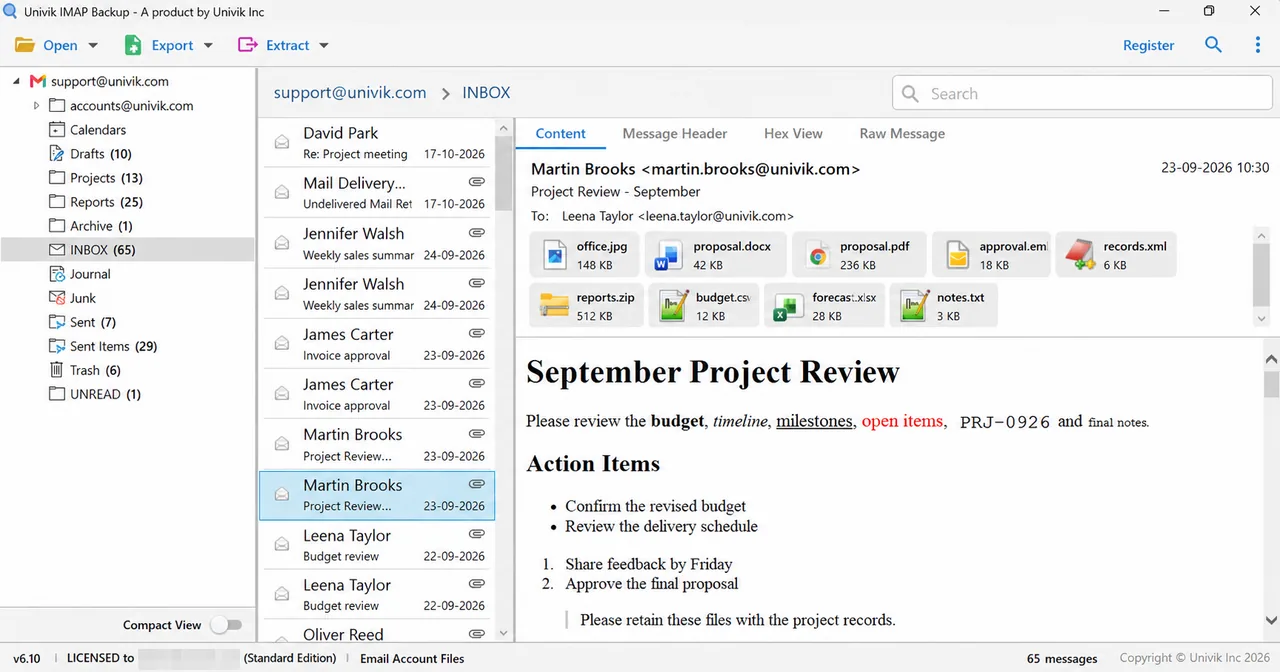
| Test folder | Tree total | Files from trial |
|---|---|---|
| Drafts | 10 | 10 |
| Trash | 6 | 6 |
| Sent Items | 29 | 10 |
| INBOX | 65 | 10 |
A licence lifts the trial cap, so the files of each folder can then match its tree count. Attachments you want as separate files can be pulled out later, as this guide to extract attachments from IMAP email shows.
What If Your Office 365 Backup Stops Like This?
Try this: Ask your admin whether IMAP is on for your mailbox. Microsoft says it disables IMAP4 automatically in a tenant with security defaults on.
Try this: An admin can limit which apps staff may approve. Ask whether staff may approve a new app for their own mailbox.
Try this: Turn off the Minimum Attachment Size to Export switch on that screen. Then press Save a second time.
Try this: Each folder gives up 10 items at most in the trial edition. A licence removes that cap.
Stuck on something not listed here? Write to Univik support.

Office 365 Email Backup Questions
How do I backup Office 365 email?
Open Add account in Univik IMAP Backup and type your whole work or school address into Email. Microsoft's sign-in opens in your browser, so complete it there. Nothing is typed into the app as a password. Then tick the folders you need, choose EML, MBOX or PST in Export and select Save.
Does Microsoft 365 accept an app password for a mail app?
No. Exchange Online no longer takes Basic authentication for IMAP. Microsoft says nobody can re-enable it in a tenant. The same change blocks app passwords for apps without two-step verification support, so the sign-in happens on the Microsoft page.
Can I backup a Microsoft 365 mailbox without asking my admin?
Ask first, because the mail belongs to your organisation. Microsoft enables IMAP4 by default but an admin can switch it off per mailbox and can limit which apps staff approve for their own mail. I did not test either of those two settings.
How long does Microsoft keep a mailbox after a licence is removed?
Microsoft disconnects a regular mailbox with no hold at once. Reassigning a licence inside the 30 days reconnects it. After the 30 days Exchange Online deletes the mailbox for good.
What happens to my mail when a Microsoft 365 subscription ends?
For a paid subscription, Microsoft keeps the data in a limited-function account for 90 days so the subscriber can extract it. It then disables the account and deletes the data within 180 days of the end.
How much can an Office 365 mailbox hold?
Microsoft lists 100 GB for a user mailbox on Microsoft 365 E3 and E5 and 50 GB on Office 365 E1. An archive mailbox has its own quota.
Are the archive and shared mailboxes copied with my own mailbox?
Treat them as separate, because each has its own quota in Exchange Online. After the sign-in, compare the folder tree with Outlook on the web. A folder that shows in Outlook but not in the tree was not copied.
How do I know my Office 365 copy is complete?
Go through the exported folders one by one and match each file count to its number in the tree. In my non-Microsoft test mailbox the tree lists 65 messages for INBOX but the trial wrote 10 files, so only a licence makes the pairs match.

Reviewed on 2 November 2026 with Microsoft's own documentation open. Counts in this guide were taken in the IMAP Backup 6.10 trial edition on a test mailbox that Microsoft does not host.
Microsoft pages we read:
- POP3 and IMAP4 in Exchange Online
- Deprecation of Basic authentication in Exchange Online
- Security defaults in Microsoft Entra ID
- Exchange Online limits
- Data retention, deletion and destruction in Microsoft 365