Quick Answer
To backup GoDaddy email, first find out which GoDaddy product holds your mailbox. Workspace Email on a paid plan and Professional Email both accept an IMAP login made of the complete mailbox address plus its own password on a secureserver.net server. Microsoft 365 from GoDaddy does not, because Microsoft ended password sign-in for IMAP.
Next, mark the folders worth keeping and store copies on your computer as PST, EML or MBOX files.
GoDaddy sells mailboxes under three names. Workspace Email is the older product and GoDaddy says it is being retired. Professional Email, also listed as Professional Email powered by Titan, is the current GoDaddy-hosted product. Microsoft 365 from GoDaddy sits on servers that Microsoft operates. A login that works on one fails on the others, so the platform check comes before the server value.
Every GoDaddy value here comes from GoDaddy Help Center pages and Microsoft Learn, read on 2 November 2026. The counts come from a trial run on a test mailbox that GoDaddy does not host, so they only show how the folder check works.
Which of GoDaddy's Three Mail Products Signs In to a Backup App?
The help pages of GoDaddy sort mail into three products with three sign-in rules. Find your row in the list before you type anything in the app.
- Workspace Email, paid plan IMAP and POP are both listed and a mailbox password signs in. This page covers it.
- Workspace Email, Free plan GoDaddy lists POP only, so the IMAP login has nothing to connect to.
- Professional Email The name includes Professional Email powered by Titan. Your mailbox address and password sign in over IMAP. This page covers it.
- Microsoft 365 from GoDaddy The mailbox sits on servers that Microsoft operates and wants modern sign-in. This page does not cover it.
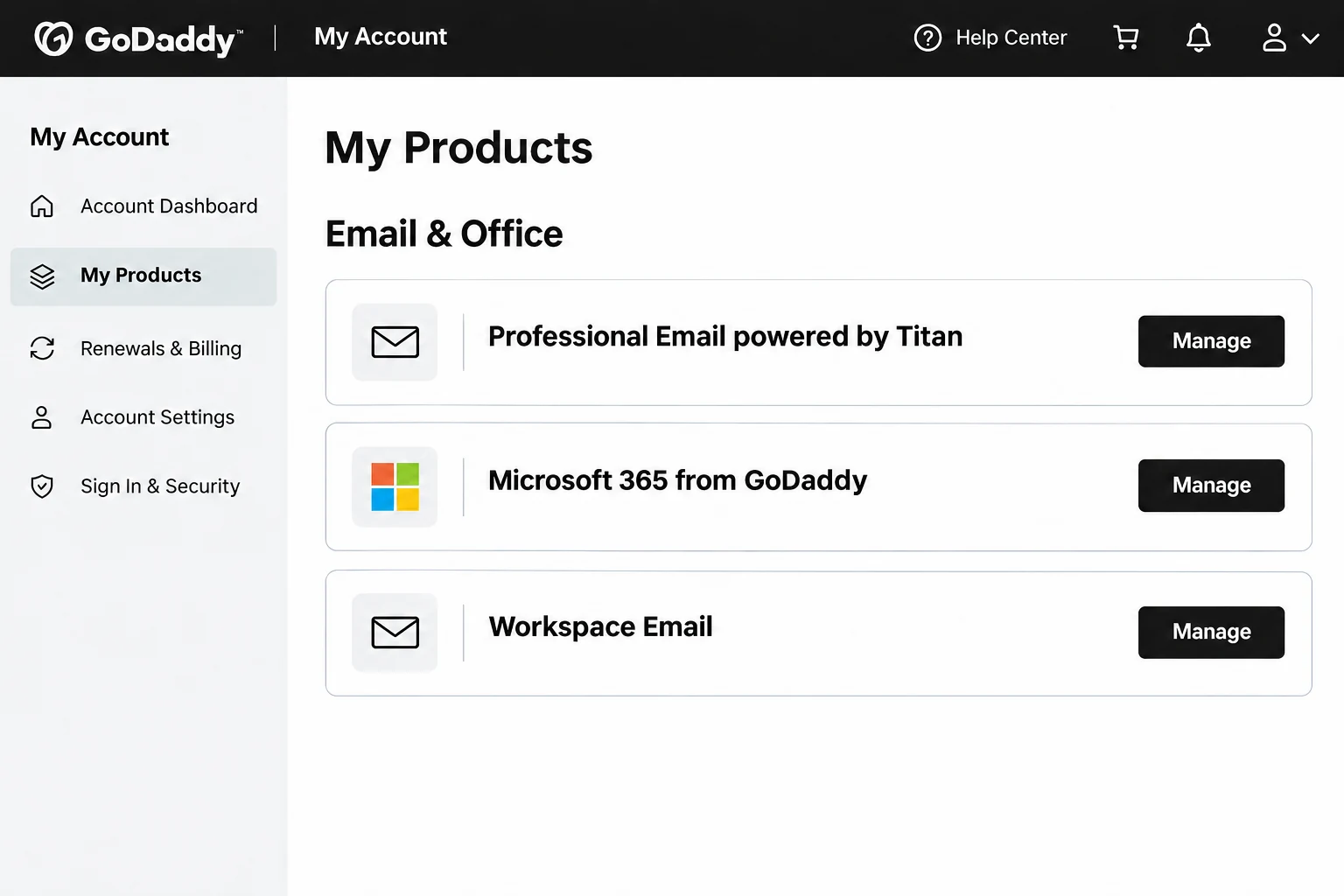
To read the plan of Workspace Email, open My Products in your GoDaddy account and expand Workspace Email. A mailbox that opens in a Microsoft sign-in window belongs to Microsoft 365 from GoDaddy.
What Do You Type When Two GoDaddy Products Share One Incoming Server?
Workspace Email and Professional Email share one incoming server, so the yellow card covers both. GoDaddy publishes the same values on its client setup page and Univik lists the sending and POP3 hosts on its GoDaddy Email IMAP settings page.
you@yourdomain.comYour full GoDaddy mailbox address, with your own domain.- Password
- Your mailbox passwordThe password of this mailbox, not your GoDaddy account login.
- Imap Server
imap.secureserver.netCopy it exactly. Your own domain name does not go here.- Imap Port
993Already filled in when you open the box.- Secure Port
- Ticked (SSL)Already ticked. GoDaddy serves this host over SSL.
Find looks up a server from your address. Your address ends in your own domain, so the guess can be wrong. A suggestion from Find deserves a look against the card before you select Add. Saving mail needs no sending server, so the SMTP host and port stay unused.
What Must Be Switched On When a Free Workspace Plan Offers Only POP?
Workspace Email decides by plan. The help pages of GoDaddy list IMAP and POP for the paid plans and POP only for Free. The server page adds a hint: when the control center shows only a POP3 incoming server, the plan has no IMAP. The app signs in to IMAP mailboxes, so a POP-only mailbox cannot be added until the plan changes.
The IMAP page for Professional Email lists no switch to turn on and no app password to create. If the login fails, recheck Imap Server first and look for a require sign-in option in your mail program.
Why Does Microsoft 365 from GoDaddy Reject the Password a Backup App Sends?
Microsoft removed Basic authentication for IMAP in Exchange Online and named OAuth 2.0 as the replacement. The same Microsoft page says the change also stops app passwords from working with apps that lack two-step verification. GoDaddy states that Microsoft 365 no longer supports POP and IMAP settings in most of the email clients.
GoDaddy does publish an app password guide for Microsoft 365. The Add Email Account window takes an email and a password with no Microsoft sign-in step, so those mailboxes stay outside this page. Their server values sit on the Microsoft 365 email settings page of Univik.
For the other two products the rule is short. GoDaddy's webmail help says the mailbox address with its own password signs in and a GoDaddy username does not, so type that pair into the Email and Password boxes of the window.
What Does GoDaddy Keep and Delete When a Mailbox Changes?
An IMAP login shows the server mail and holds no second copy, so a deletion in webmail reaches every device that signs in to the mailbox. Is IMAP a backup? explains the difference in full. Four rules from GoDaddy make a local copy worth having.
- Trash Professional Email removes Trash messages after 30 days and GoDaddy states that a purged message cannot be recovered.
- Restores GoDaddy does not restore permanently deleted Professional Email messages to an earlier backup.
- Deleted users The contents of a deleted Professional Email user are no longer accessible. GoDaddy allows 14 days to restore the user.
- Retirement For Workspace Email accounts that block the move, GoDaddy describes deleting the account and recreating it in Microsoft 365. It tells users to export the messages before any deletion.
Who Needs a GoDaddy Email Backup Before a Plan Is Retired or Deleted?
- A Workspace Email user You read that the product is being retired and want files first.
- A Professional Email administrator You plan to delete a user and only 14 days of restore time follow.
- A domain owner You are changing mail host and want each mailbox saved.
The planning side of many domain mailboxes sits in Back Up Hosting Email Accounts.
How Do You Backup GoDaddy Email Once Your Platform Is Confirmed?
Add the mailbox with the values from the card, tick the folders you need, open the Export menu, choose a format and select Save.
The test used Univik IMAP Backup, a Windows program and IMAP backup software that needs no Outlook profile.
- Add the account. From Open choose the Email Accounts entry and then Add account. Type your full GoDaddy address in Email and the mailbox password in Password. Expand Advance Settings and copy the host from the card into Imap Server. The port is filled with 993 and Secure Port is ticked by default. Select Add to sign in to the mailbox.
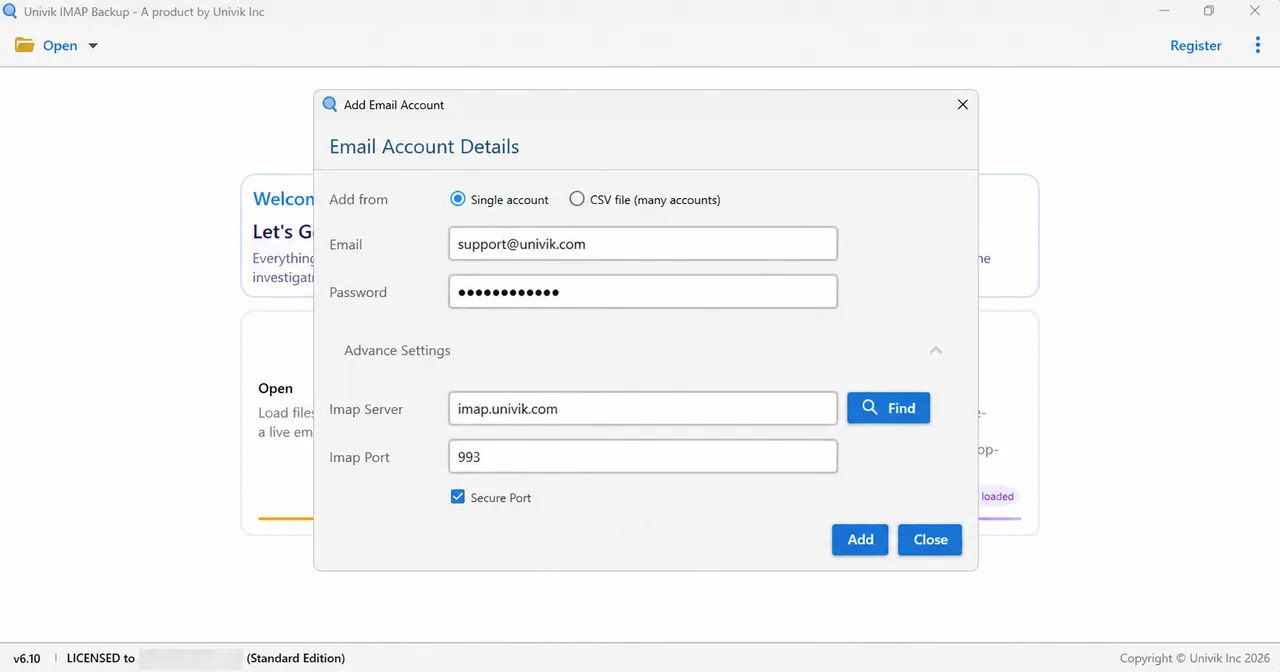
The Advance Settings expanded in the account window, with the host and port boxes in view. - Tick the folders. Folders appear in a tree with a count beside each name. Tick the ones you want to keep, including Archive when it appears and any folder you made in webmail.
- Choose the format. The formats sit in the Export menu under Email Files: EML, MBOX and PST. PDF, HTML, TEXT and CSV sit one group lower.

The open Export menu. - Review the 35 MB option. Minimum Attachment Size to Export comes switched on with 35 MB in its value box. Switch the filter off or check its value before the real run. GoDaddy lists 30 MB as the largest Professional Email message, which is lower than that value. On another mailbox my PST test skipped every message because none carried an attachment of 35 MB or more.
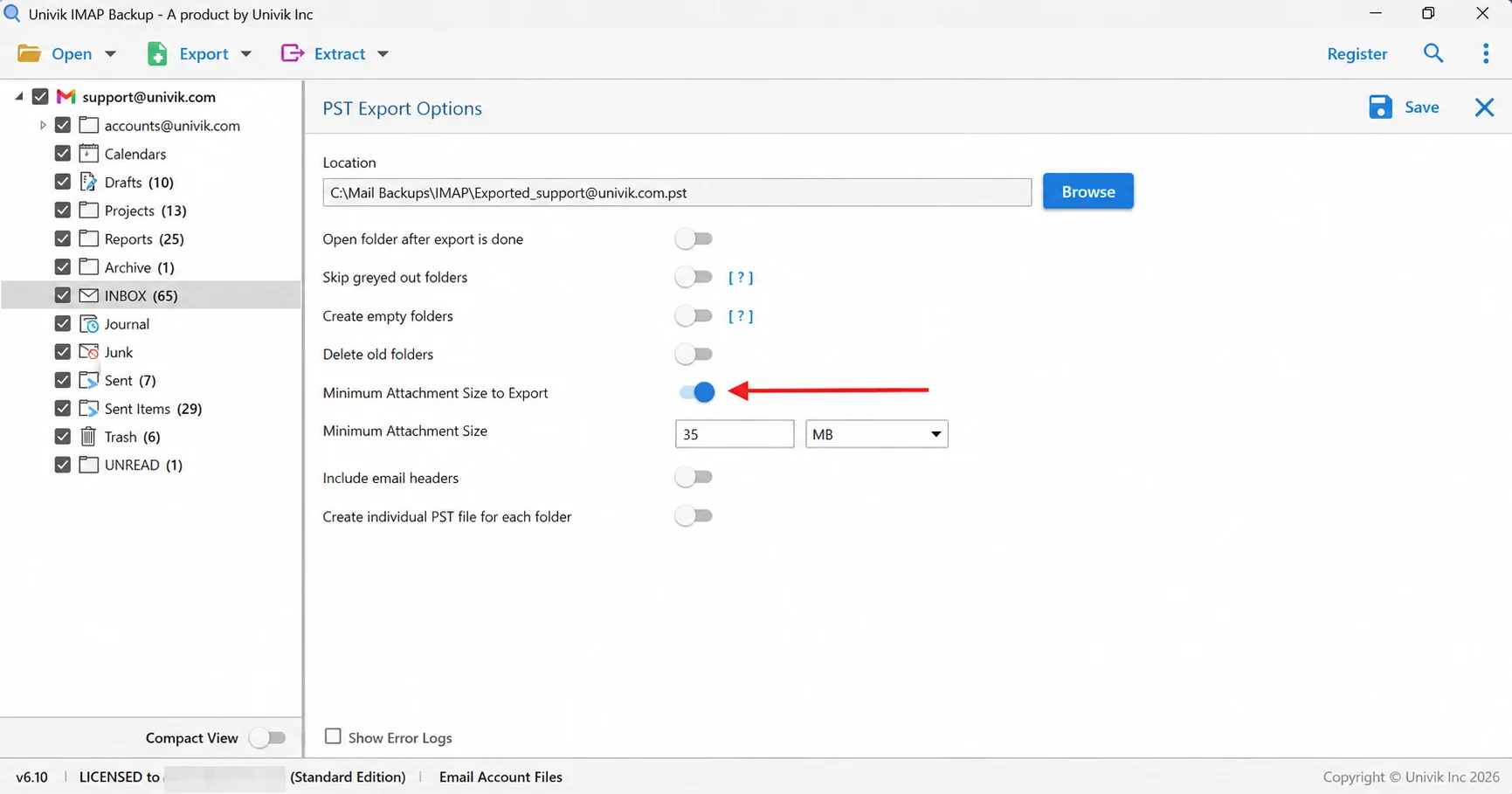
The arrow points at the 35 MB attachment filter, which emptied a whole test export. - Save and count. Select Save near the top edge of the export screen and watch for the green banner. Afterwards open the export folder and check the files of every folder against its tree count.
Which File Format Fits a GoDaddy Mailbox You Plan to Move?
GoDaddy publishes an Outlook export guide for Microsoft 365 only. Its support statement for Professional Email lists importing and exporting .pst and .olm files among the tasks that its support team does not cover. To export GoDaddy email from the other two products, the file copy comes from your own tool.
| Format | What you get | Good for |
|---|---|---|
| IMAP to PST guide | One file for the whole mailbox or a file for every folder | Outlook |
| IMAP to EML guide | A separate .eml file for every message, kept in folders | Reading without a mail program |
| IMAP to MBOX guide | Each ticked folder becomes one .mbox file | Thunderbird |
PST suits a move to Outlook and a PST viewer opens it on a PC without Outlook.
Why Does a GoDaddy Backup List Fewer Messages Than Webmail?
Professional Email sets hard limits on what a folder can hold, so run through this list before you select Save.
- Archive GoDaddy says messages in Archive are never deleted, so tick that folder when the tree lists it.
- Trash GoDaddy empties Trash after 30 days, so tick it when you want mail that is close to that date.
- Folder size A mailbox holds up to 700,000 messages and a folder up to 200,000. Compare the count in the tree with the count in webmail for your largest folder.
- Message size GoDaddy caps a message at 30 MB with its attachments, which is why the 35 MB filter deserves a look.
A test mailbox that GoDaddy does not host shows how the count check works. The test INBOX counted 65 messages in the tree and the trial saved 10 of that total. Drafts held 10 and Trash held 6, with both saved whole. Sent Items counted 29 and produced 10.
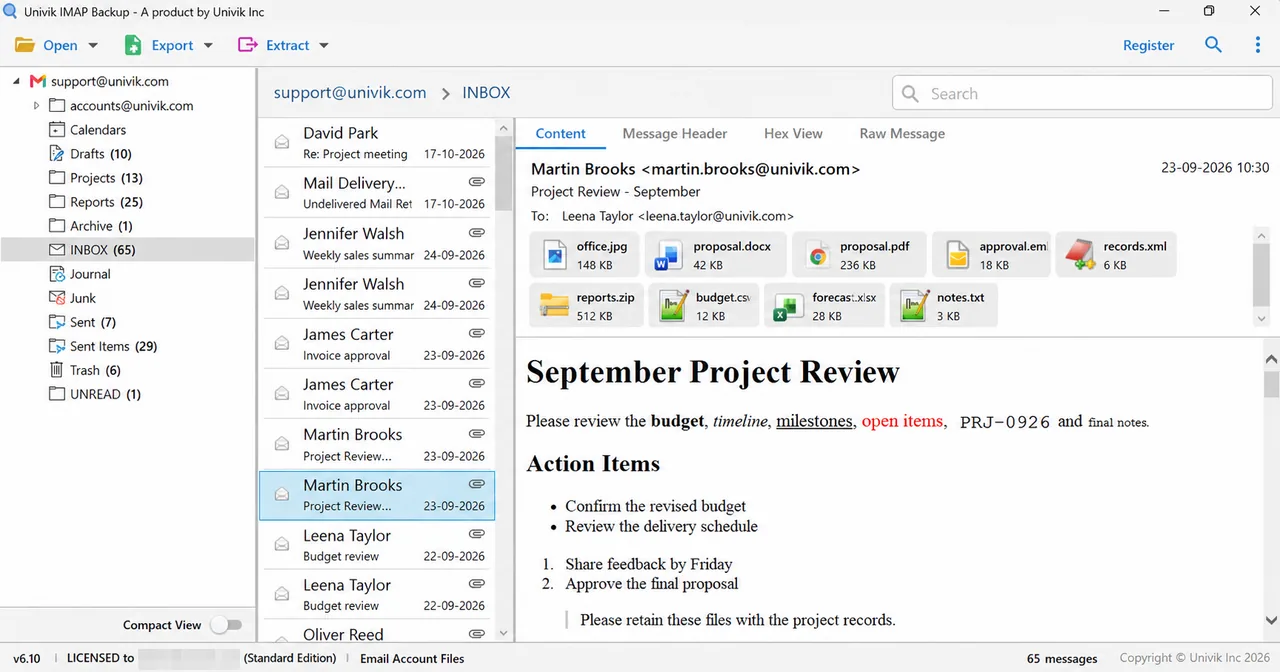
The trial dialog asks for a licence to export all items, so each folder should match its tree count only in a licensed run.
Which Problems Can a GoDaddy Backup Run Into?
Do this: Watch for a Microsoft sign-in window in webmail, because that mailbox is outside this page. Otherwise read the plan in My Products, where Free means POP only.
Do this: Type the password of the mailbox itself and not the login of your GoDaddy account. Then compare Imap Server with the card letter by letter.
Do this: Find Minimum Attachment Size to Export on the format screen. With it on, a mailbox that has no attachment of that size is skipped, as happened in my PST test. Switch it off and select Save again.
Do this: Restore the Professional Email user in GoDaddy within 14 days of the deletion and run the backup after that. GoDaddy states that the account cannot be restored later.
Did your GoDaddy backup turn out differently? Send Univik support the details.
- Only the two secureserver.net products sign in with the password of a mailbox.
- Microsoft 365 from GoDaddy is outside this page because Microsoft ended Basic authentication for IMAP.
- Professional Email empties the Trash folder after 30 days and allows 14 days to restore a deleted user.
- The 30 MB message cap of GoDaddy is lower than the 35 MB filter that starts switched on.

FAQ: Backup GoDaddy Email
How do I backup GoDaddy email?
Check which GoDaddy product holds your mailbox. Workspace Email on a paid plan and Professional Email accept the complete mailbox address plus its own password. Add the mailbox with the secureserver.net host and port 993, tick the folders you need, pick a format under Export and select Save. Afterwards match the files of every folder against its tree count.
Which GoDaddy email platforms work with an email and password in a backup app?
Workspace Email on a paid plan works and so does Professional Email. Workspace Email on the Free plan offers POP only. Microsoft 365 from GoDaddy needs modern sign-in and this page does not cover it.
Which server and port do I type to backup GoDaddy email?
Type imap.secureserver.net in the Imap Server box. Imap Port is 993 and Secure Port stays ticked. GoDaddy lists the same incoming host for Workspace Email and Professional Email.
Which password does the Password box need for GoDaddy email?
The password of the mailbox itself. GoDaddy's webmail help says the mailbox address with its own password signs in and a GoDaddy username does not.
Can I backup Microsoft 365 from GoDaddy with an email and password?
Not with this method. Microsoft ended Basic authentication for IMAP in Exchange Online. The export route that GoDaddy documents for those mailboxes is Outlook with Import/Export to a PST file.
Can I export GoDaddy email to a PST file?
Yes for Workspace Email on a paid plan and for Professional Email. Choose PST under Email Files in the Export menu and pick a single file or a file for every folder. GoDaddy support does not cover PST export for Professional Email, so the file comes from your own tool.
Does GoDaddy keep a backup of my email?
For Professional Email GoDaddy says it does not restore permanently deleted messages to an earlier backup. Trash is emptied after 30 days. A set of files saved on your computer sits outside all of these rules.
How do I know my GoDaddy email backup is complete?
Match the files written for every folder against the count of that folder in the tree. The trial saves 10 messages per folder, so a licence is needed before the counts can match on a large mailbox.

Checked against GoDaddy Help Center pages and Microsoft Learn on November 2, 2026. The folder counts come from build 6.10 of the trial edition, run against a test mailbox that GoDaddy does not host.