Quick Answer
To backup Zoho Mail, tick IMAP Access in your Zoho settings, then sign in from a desktop IMAP app with your full address on port 993 with SSL. Use the host that matches the type of your account and the data centre.
With two-factor sign-in on, type an app-specific password. A newly signed-up Free plan account does not include IMAP, so it cannot use this route.
Zoho Mail from Zoho Corporation stores your mailbox on Zoho's servers in one of several data centres. Files on your own PC stay under your control. A backup over IMAP needs a plan that includes IMAP, a host that matches the data centre and the right kind of password for the login.
To backup Zoho Mail on a Windows PC I used a test mailbox that is not hosted by Zoho, which means each file count below belongs to that mailbox. Every Zoho rule comes from the help pages of Zoho, read on 2 November 2026.
Which Host Matches Your Zoho Data Centre When You Backup Zoho Mail?
Zoho runs separate data centres. The ending of your webmail address shows which one holds your mailbox (zoho.com, zoho.eu, zoho.in, zoho.com.au, zoho.jp or zohocloud.ca). The IMAP help page of Zoho gives personal accounts one host and paid organization accounts on a custom domain another. For the exact server it points to Server Configuration Details in your account. The yellow card shows a paid domain mailbox on the US data centre. The Zoho Mail IMAP settings page on Univik lists the hosts of the other data centres.
name@yourdomain.comYour full Zoho address. A personal address ends in @zoho.com or @zohomail.com.- Password
- Your Zoho passwordWith two-factor sign-in on, type an app-specific password instead.
- Imap Server
imappro.zoho.comPaid domain mailbox on the US data centre. A personal address uses imap.zoho.com. Another data centre changes the ending, so copy the one shown in Server Configuration Details.- Imap Port
993The box is pre-filled with 993.- Secure Port
- Ticked (SSL)Zoho requires SSL, so keep this box ticked as it arrives.
The Find button proposes a server name for your address. Check its proposal against the card and against your own Server Configuration Details before you press Add.
Does the Free Zoho Mail Plan Let a Backup App Sign In?
Not for newly signed-up users. The IMAP help page of Zoho says IMAP Access is not available to newly signed-up users on the Free plan. The pricing page lists IMAP, POP and ActiveSync as not included in Forever Free. That plan is also offered only in selected data centres.
On Free, an app has no IMAP service to reach. You can move to a paid plan that lists IMAP access or use the EML export in webmail. Organization users also depend on the email policies of their administrator, so ask when the box is missing.
Where Does Zoho Switch IMAP Access On Before a Backup?
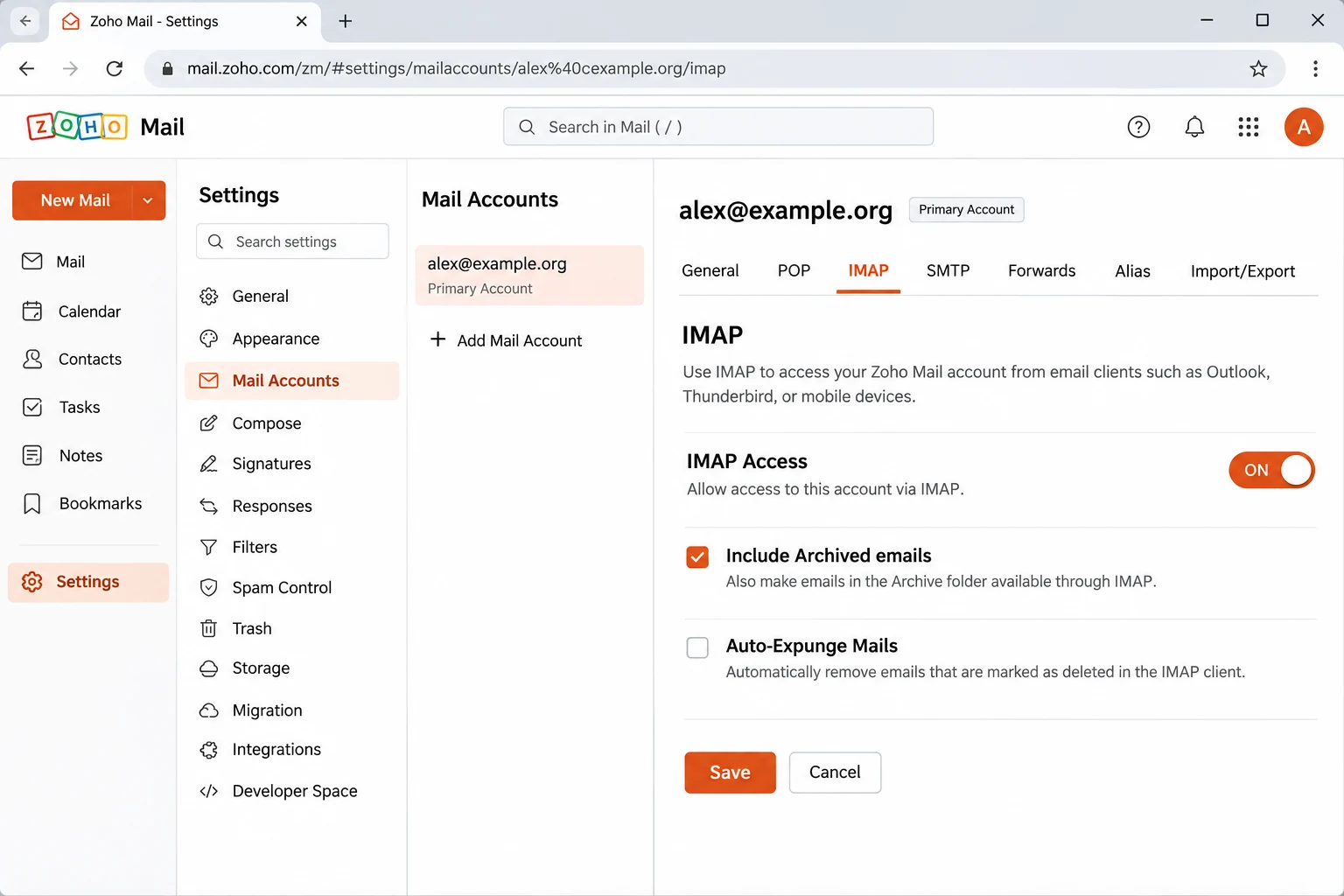
Open Settings, go to Mail Accounts, select your primary address and tick the IMAP Access box in the IMAP section. Press Save before the first login. The same section holds Auto-Expunge, Include Archived emails and Folder Settings.
What Do You Type as the Password for a Zoho Mail Backup?
Zoho accepts your account password until two-factor sign-in is turned on. From then on the Password box wants an application-specific password, called an app password.
| How you sign in to Zoho | Email box | Password box |
|---|---|---|
| Password only | Full Zoho address | Your Zoho account password |
| Two-factor on | Full Zoho address | An app password from Zoho Accounts |
| SAML sign-in | Full work address | An app password from Zoho Accounts |
| Google or Facebook sign-in | Full Zoho address | A Zoho password you create first |
On the two-factor page of Zoho, app passwords sit under Zoho Accounts, then Security, then App passwords. Select Generate New Password and copy the result at once, because Zoho shows the password one time. Type it without spaces and delete it from the same page after the backup is done.
What Happens on Zoho's Server When an IMAP Client Deletes Mail?
The answer depends on the Auto-Expunge box. When it is ticked, a delete or move in the IMAP client removes the message from the server of Zoho. When it is cleared, the mail leaves the server only after the client expunges it. Either way a client shows the server mail and keeps no second copy. Is IMAP a backup? explains that difference. A later delete in webmail never touches the files already saved on your PC.
What Does Zoho Delete When an Account Goes Quiet or a Plan Ends?
- Inactivity A personal account unused for 180 consecutive days becomes inactive. Zoho clears the mailbox for good if no sign-in follows. The inactive accounts page gives the grace period.
- Plan expiry An expired subscription moves the account to Free where Free exists or locks it. A locked account stops sending and receiving mail 15 days after the expiry date.
Free carries no IMAP, so the plan expiry rule matters most. Run the backup while the paid plan is still active.
Who Needs a Zoho Mail Backup?
- A domain owner You plan to move the domain to another host and want each mailbox saved first.
- A paid-plan customer You are about to cancel and know that Free has no IMAP.
- A personal address holder You open your mailbox rarely and want files before the 180 days pass.
- An administrator You load a CSV list of staff addresses. Each mailbox keeps its own password.
A business with staff mail at a host can read Back up hosting email accounts for a wider checklist.
How Do You Backup Zoho Mail Step by Step?
I tested the export screens in Univik IMAP Backup, a Windows IMAP backup software program that signs in to a mailbox over IMAP by itself.
- Sign in to the mailbox. In the toolbar select Open. The Email Accounts entry leads to Add account. Fill the Email box with your full Zoho address and the Password box with your password or app password. Expand the Advance Settings section and type the host from the card as the Imap Server. Imap Port arrives as 993 and the Secure Port box arrives ticked.
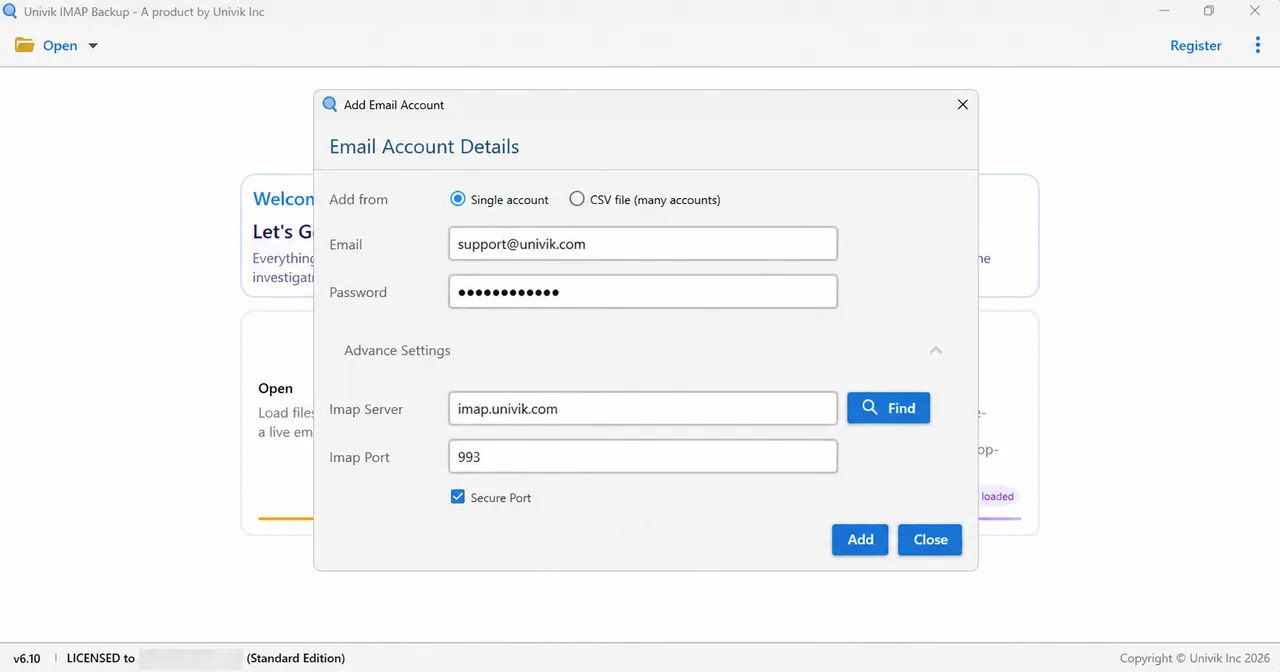
Add Email Account holds the Email and Password boxes. Advance Settings opens Imap Server, Imap Port and Secure Port. - Choose what to save. Message totals and tick boxes line up beside each folder name in the tree. The default folders of Zoho are Inbox, Drafts, Sent, Spam and Trash. Custom folders show up only when Zoho shares them over IMAP.
- Choose the format. Open the Export menu. The Email Files group offers EML, MBOX and PST.

The Export menu lists EML, MBOX and PST under Email Files. - Check the filter. Read Minimum Attachment Size to Export before saving. It arrives switched on and set to 35 MB. My first PST run on a non-Zoho test mailbox wrote nothing, because all 173 emails were skipped and none carried an attachment of 35 MB. I switched the filter off and ran the export again.
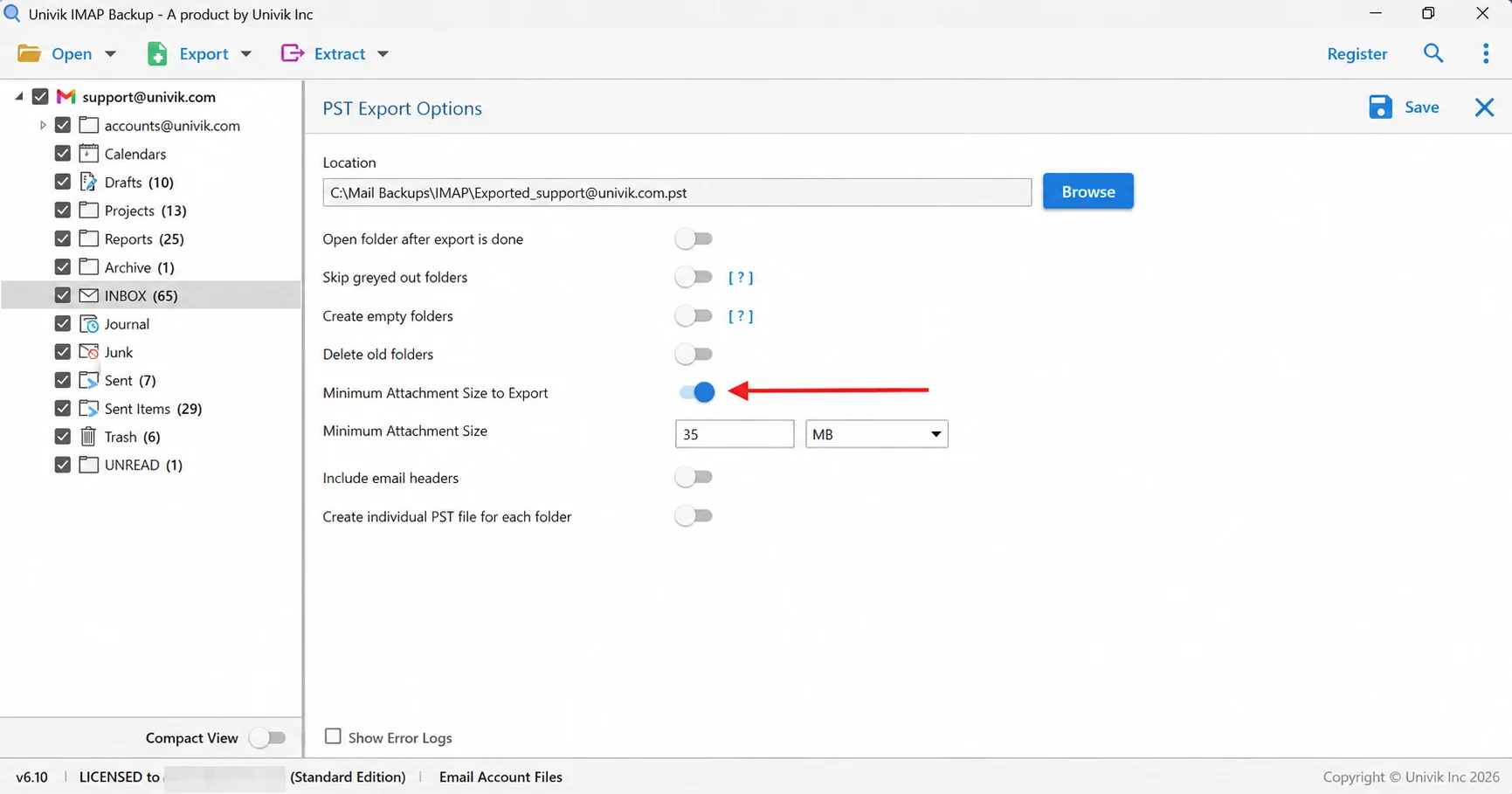
The arrow points at Minimum Attachment Size to Export, which starts switched on at 35 MB. Look at it before each export. - Write the files. Select Save in the upper right corner of the screen. A green banner appears once files are written. Then compare the files in each export folder with the count shown in the tree.
Which File Format Suits a Zoho Mail Backup?
| File type | What you get | Pick it when |
|---|---|---|
| Export IMAP to PST | A combined PST for all folders or a separate PST for every folder | You will open the mailbox copy inside Outlook |
| Export IMAP to EML | Each message becomes an .eml file, filed in folders that mirror your mailbox | You want plain files that need no mail program |
| Export IMAP to MBOX | Mail of one ticked folder lands in a single .mbox file | You will read the mail later in Thunderbird |
What Does a Zoho Mail Export Cover Before You Need a Separate Backup?
Zoho has two export routes of its own. Each one has limits that the help pages of Zoho state.
| Route | Who runs it | Output | Limit Zoho states |
|---|---|---|---|
| Your own webmail | The mailbox owner unless an administrator restricts it | EML files in a ZIP, one folder per run | A download link arrives by email and opens from signed-in webmail |
| Administrator export | A super administrator or an administrator | ZIP files (PST files on paid plans) | Spam and Trash left out by default, files kept 30 days, 500 MB parts for ZIP and 2 GB for PST |
The import and export page of Zoho describes the webmail route. A backup over IMAP adds a choice of PST, EML or MBOX for the folders you tick on screen. It writes the files into a folder on your PC.
Why Does a Zoho Mail Backup Skip Folders or Archived Mail?
Three Zoho choices decide which mail an IMAP login can see.
- Folder Settings Zoho says the folders selected under Launch folder settings are the only ones that reach the IMAP clients. Each folder has a View in IMAP client box.
- Include Archived emails Ticking this box adds the archived mail to IMAP access. The archived mail then shows in the folder it came from.
- Shared folders Folders shared with you can also appear in the IMAP client.
Once those boxes are right, counting the output is quick, because each folder row shows its own total. To show the check I loaded a test mailbox that is not hosted by Zoho. Its Inbox listed 65 messages and the trial edition wrote 10 of them to disk. Sent Items listed 29 and also produced 10. Drafts with 10 messages and Trash with 6 came out complete because both sit within the 10-item cap.
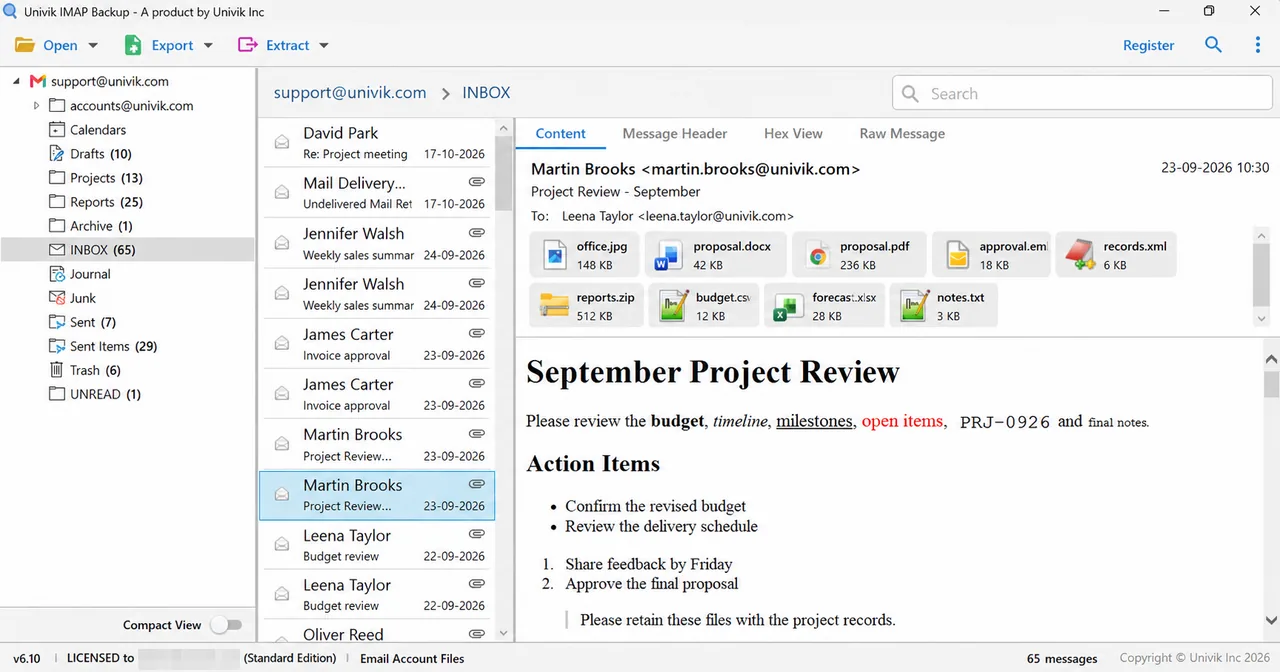
| Folder in test mailbox | Count in tree | Written by trial |
|---|---|---|
| Trash | 6 | 6 |
| Sent Items | 29 | 10 |
| Drafts | 10 | 10 |
| INBOX | 65 | 10 |
The trial dialog says a licensed edition exports all items. With a licence the file count of each folder should then match the tree count.
What Do You Check When a Zoho Mail Backup Goes Wrong?
Do this: Check the plan first, because a newly signed-up Free account has no IMAP Access. On a paid account confirm that the IMAP Access box is saved and that your administrator allows it.
Do this: Compare the Imap Server box with the Server Configuration Details in Zoho. A personal address and a paid domain mailbox use different hosts.
Do this: Zoho blocks a personal account after several suspicious logins. Use the UnblockMe page and change the password.
Do this: Open the filter named Minimum Attachment Size to Export. While it is on, a mailbox without a large attachment is skipped. The trial edition also stops at 10 items per folder.
Something else happened with your Zoho copy? Describe it to Univik support.

FAQ: Backup Zoho Mail
How do I backup Zoho Mail to my PC?
Tick the IMAP Access box under Settings and Mail Accounts in Zoho. Then add the mailbox in Univik IMAP Backup using the host of your data centre, port 993 and a ticked Secure Port box. Select the folders you want, open Export, pick PST, EML or MBOX and save.
Can I backup Zoho Mail on the Free plan?
Not over IMAP if the account is newly signed up. Zoho's own help says IMAP Access is not available to newly signed-up users on the Free plan. Use the EML export in webmail or move to a paid plan that includes IMAP.
What do I type as the password when I backup Zoho Mail?
Use your Zoho account password while two-factor sign-in is off. With two-factor on or a SAML sign-in, generate an app password under Zoho Accounts, then Security, then App passwords. Type it without spaces.
Why does my Zoho Mail backup fail to connect?
Usually the plan, the host or the password is wrong. A Free plan account has no IMAP Access. A personal address and a paid domain mailbox use different hosts. With two-factor sign-in on, the normal password is refused.
Why are some Zoho Mail folders missing from the backup?
Zoho shows an IMAP client only the folders selected under Folder Settings. The archived mail appears only when Include Archived emails is ticked.
What does a Zoho Mail export give me and when do I still need a backup?
A mailbox owner can export a folder as EML files in a ZIP from webmail. An administrator can export a ZIP or, on paid plans, a PST. A backup over IMAP writes the ticked folders as PST, EML or MBOX.
How long does Zoho keep my mail if I stop signing in?
Zoho marks a personal account inactive after 180 consecutive days without use. It clears the mailbox for good if no sign-in follows in the grace period, so take your backup well before that date.
Can I try the Zoho Mail backup before buying?
Yes. The trial edition writes 10 messages per folder, so it can confirm that sign-in works and that the folders list correctly.

Zoho facts were checked on November 2, 2026 and IMAP Backup 6.10 supplied the screens. The file counts on this page belong to a mailbox that Zoho does not host.
Pages we read: