Quick Answer
IMAP port 993 is the secure choice and port 143 is the plain one. Port 993 encrypts the whole session from the first byte, so mail apps often call it the SSL port.
Port 143 starts in cleartext and can switch to encryption with the STARTTLS command. Pick 993 whenever your provider lists it and keep 143 for servers that document no other option.
Every mail app asks for a port number, yet a wrong port number fails in ways that look like a wrong password, so you can lose an hour fixing the wrong setting. This page lists the numbers, says which one is secure and shows you how to test a port from your own PC.
I read RFC 9051, RFC 8314 and the IANA port registry on 2 November 2026, along with help pages from Microsoft, Google and Mozilla. Every number on this page comes from those pages. You can open the same pages from the list at the end.
What Is the Default IMAP Port Number?
The default IMAP port number is 143 for a plain connection and 993 for a connection that is encrypted from the start. IMAP (Internet Message Access Protocol) lets a mail app read and manage mail that stays on a server. A port is the numbered door on the server where your app connects over TCP, so every app needs the right number before you can sign in.
RFC 9051 is the current standard for IMAP, called IMAP4rev2 and published in August 2021. It says that a server listens on port 143 (the cleartext port) or on port 993 (the Implicit TLS port), while the older RFC 3501 from March 2003 names only port 143. IANA keeps the registry of port numbers, which lists both ports and points each one to RFC 9051.
Which IMAP Ports Does IANA List?
| Port | IANA entry | Encryption | When to use it |
|---|---|---|---|
| Port 993 | imaps, listed as IMAP over TLS protocol | Implicit TLS, so the handshake starts as soon as the connection opens | The provider lists it, which is the usual case |
| Port 143 | imap, listed as Internet Message Access Protocol | Cleartext at first, then TLS if the app sends STARTTLS | The provider documents 143 with STARTTLS and offers nothing else |
| Port 585 | De-registered, with a note that its use is not recommended | None to rely on | Never, because IANA says to use 993 instead |
| Port 220 | imap3, listed as Interactive Mail Access Protocol v3 | Not part of the IMAP4 standard in RFC 9051 | Never, because RFC 9051 puts IMAP4 on 143 and 993 |
Where Do You Find the Port Your Provider Uses?
Providers usually print one number for their service and stick with it, so you rarely have to guess. Gmail's help gives imap.gmail.com on port 993 with SSL, while Microsoft lists outlook.office365.com on port 993 with SSL/TLS for both Outlook.com and Exchange Online. You'll find those values on our pages for Gmail email settings, Outlook.com email settings and Microsoft 365 email settings. For any other provider, look in the email settings index before you type a number.
POP3 has its own pair of ports, with 110 in RFC 1939 and 995 for implicit TLS in RFC 8314. Sending mail uses SMTP submission on 587 (RFC 6409) or on 465 (RFC 8314), so none of those ports carry IMAP traffic. If you can read mail but can't send it, IMAP vs SMTP is the page to open.
Is IMAP Port 993 or 143 the Secure Choice?
Port 993 is the IMAP secure port, because TLS starts before your app sends a username or a password. RFC 9051 calls this Implicit TLS, which means that TLS is negotiated automatically whenever a connection is made on that port. Your password has TLS around it from the first byte, so 993 is the safe choice for a mailbox that holds real mail.
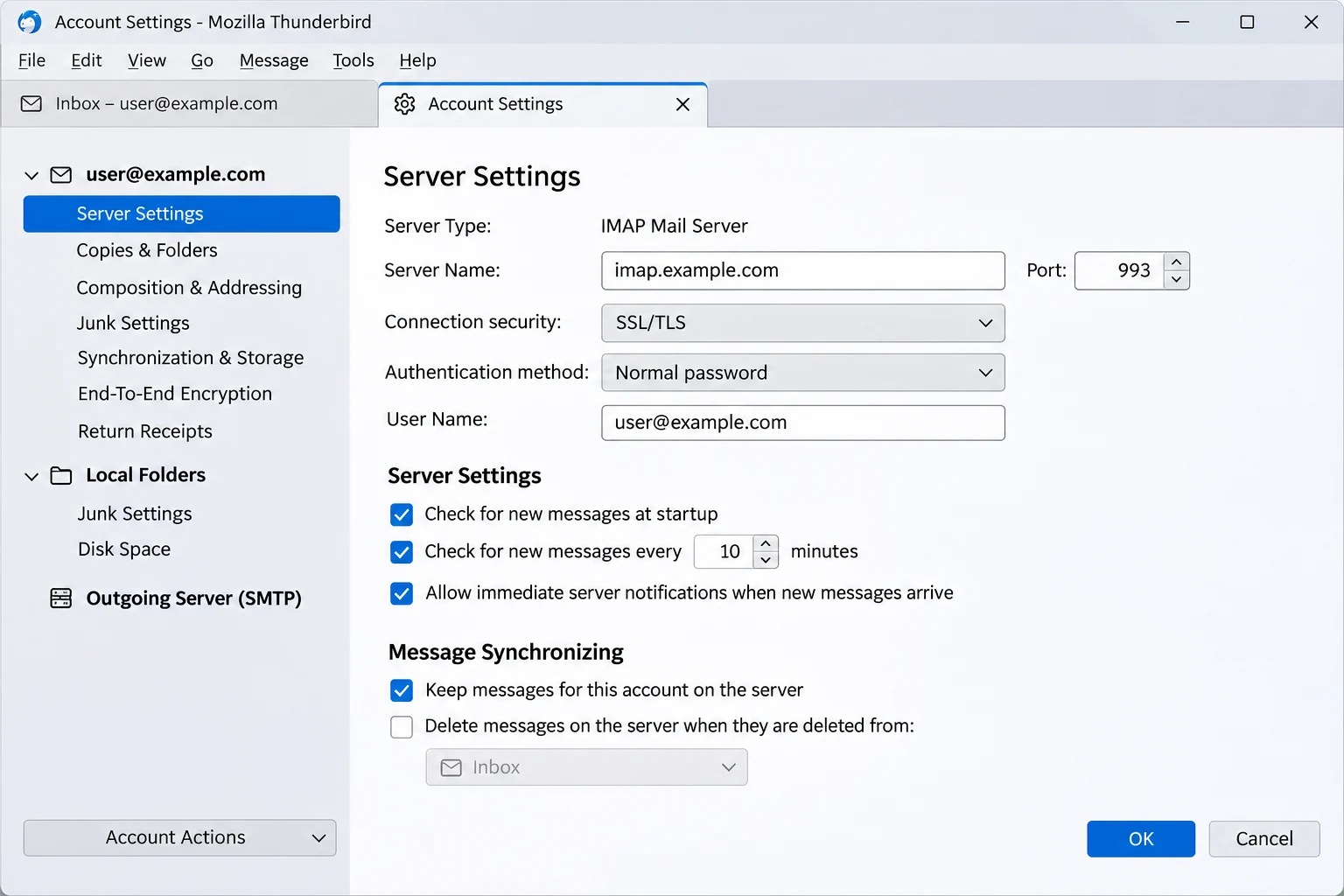
Port 143 works the other way round, because the session opens in cleartext. After that, your app can send the STARTTLS command to upgrade the session. RFC 9051 requires the server on a cleartext port to support STARTTLS and a capability called LOGINDISABLED. It also tells a client not to send LOGIN while that capability is advertised, so a well-behaved app keeps your password back until the TLS layer is in place.
What Do RFC 8314 and Dovecot Say About TLS?
RFC 8314, titled Cleartext Considered Obsolete, came out in January 2018. It asks that the mail apps connect with Implicit TLS in preference to connecting to the cleartext port and negotiating TLS afterward.
The design notes in RFC 8314 call STARTTLS a less secure architecture than Implicit TLS and describe the separate-port model as simpler to implement, debug and deploy. The same RFC says that access servers must support TLS 1.2 or later. It adds that providers should retire cleartext servers as soon as practicable, so the direction of travel is toward 993.
Servers can enforce the same rule, because Dovecot, a common open source IMAP server, has an ssl = required setting that makes TLS compulsory for every login. However, you can't change a server that you don't run, so the choice in your app is the part you control.
Which IMAP Port Should You Choose?
- Provider lists 993 Choose the SSL/TLS option and type 993.
- Provider lists 143 with STARTTLS Choose the STARTTLS option and type 143. Skip the None option.
- Provider lists 143 with no encryption Ask the provider for a secure port before you put your real mailbox on it.
My verdict: use port 993 with SSL/TLS whenever your provider lists it, because the handshake happens before any password is sent. Try 993 first. Choose 143 with STARTTLS only if the provider documents it that way and the app you use has no 993 option.
What Is the IMAP SSL Port and Why Do Mail Apps Still Say SSL?
The IMAP SSL port is 993, the same port that IANA registers as imaps. You will still see the word SSL in mail apps out of habit, because the connection on a current server is TLS. RFC 7568 from June 2015 says that SSLv3 must not be used. RFC 8996 from March 2021 formally deprecates TLS 1.0 and TLS 1.1, so an app that says SSL on port 993 is usually speaking TLS 1.2 or later.
Which Port Goes With Each SSL Label?
The label changes from app to app while the port stays the same. Check the label that your app uses. The table pairs each label with the port that RFC 9051 assigns to it, so you can match the setting in the app you use. The easy mistake is to pair SSL/TLS with 143, because 143 belongs to STARTTLS.
| Where the label appears | Label shown | Port that goes with it |
|---|---|---|
| Gmail's help page | SSL | 993 |
| Microsoft's Outlook.com page | SSL/TLS | 993 |
| Thunderbird manual setup, Connection security | SSL/TLS | 993 |
| Thunderbird manual setup, Connection security | STARTTLS | 143 |
You may see older guides list port 585 as a second SSL port. IANA shows 585 as de-registered and says to use 993 instead. IANA also lists port 220 for Interactive Mail Access Protocol v3. Port 220 isn't the IMAP4 of RFC 9051, so leave it alone.
Why Does an IMAP Port Refuse to Connect?
A mail app usually fails on a port for one of four reasons. The app and the port disagree about encryption, a firewall blocks the port, IMAP is turned off for the mailbox or the host name is wrong. Still, the fix is short once you know the cause. The table matches each error to its usual cause, so you can start with the row that looks like your message.
Which Cause Matches Your Error Message?
| What the app shows | Usual cause | What to do |
|---|---|---|
| Timed out on 993 | A firewall, proxy or network filter blocks outbound port 993 | Run the PowerShell test from the same PC, then try the network at another place |
| Connection refused | Nothing listens there or IMAP is turned off for the mailbox | Open the help page of your provider. Microsoft says POP and IMAP are off by default for Outlook.com and that Exchange Online turns IMAP4 off when security defaults are on |
| Secure connection or certificate error | SSL/TLS was chosen on 143 or STARTTLS was chosen on 993 | Pair 993 with SSL/TLS and 143 with STARTTLS. RFC 9051 says a server must answer STARTTLS on an Implicit TLS port with a tagged BAD |
| Login failed on the right port | The port is fine and the password type or sign-in method is wrong | Read IMAP app password vs OAuth |
| Host not found | The server name has a typo or belongs to another provider | Check how to find IMAP server details for your address |
How Do You Test an IMAP Port From PowerShell?
You can test a port in three steps that are each quick, because every step opens one connection and reads the greeting without changing anything in your mailbox. The check is also reliable, because it reports what your own PC can reach.
- Open PowerShell. Use the PC that shows you the error.
- Check the port. Type the command
Test-NetConnection -ComputerName imap.example.com -Port 993with your own host name. Microsoft documents this cmdlet as a confirmation of connection establishment, soTcpTestSucceeded : Truemeans the port opened. - Check the encryption. Next, if OpenSSL is installed, type
openssl s_client -connect imap.example.com:993. For port 143 typeopenssl s_client -starttls imap -connect imap.example.com:143. A healthy server answers with an OK greeting.
If your Test-NetConnection fails, the network or the host name is the likely cause. If it passes while your openssl check fails, the encryption choice is the likely cause, so you can fix the right setting first. Change one setting at a time.
Port 993 Gets You In: How Do You Save a Copy of the Mail Behind It?
A correct port only gets you into the mailbox. IMAP leaves a single copy of your mail on the server, so if you close the account or the server fails, you lose the mail with it, a gap that Is IMAP a backup? walks through.
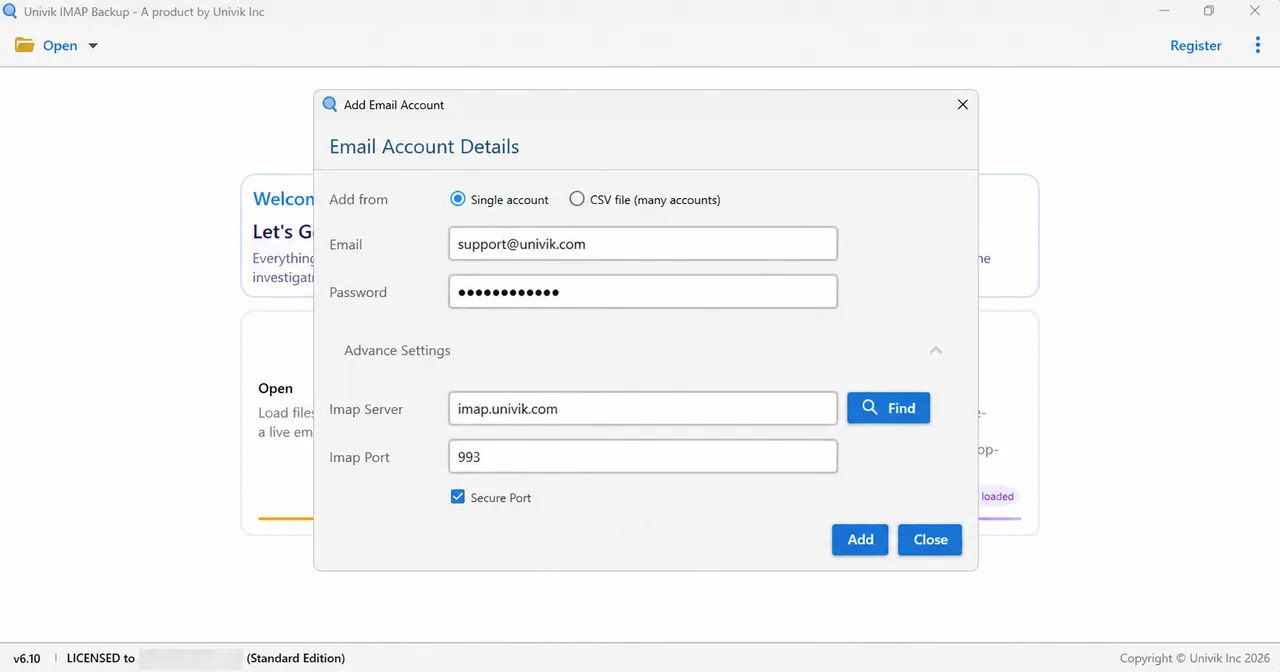
Univik IMAP Backup, our IMAP backup software for Windows, saves that copy on your PC. To add your mailbox, go to Open, pick Email Accounts and choose Add account. In the window that appears, fill in Email and Password, then expand Advance Settings, which holds Imap Server, Imap Port, the Secure Port box and a Find button. The port field opens at 993 and Secure Port opens ticked. Leave both alone, since 993 is the Implicit TLS port.
What Port Does Add Email Account Start With?
Add Email Account opens with a port already filled in. The table lists what Univik IMAP Backup Trial Edition 6.10 holds before you change anything.
| Field or address | Starting state |
|---|---|
| Imap Port | 993 |
| Secure Port | Ticked |
| Microsoft address (2 November 2026) | Browser sign-in at once, with the server and port fields hidden |
Hotmail and Microsoft 365 Have No Port to Set
A Hotmail, Outlook.com or Microsoft 365 address works differently. When I typed one into Add account in Univik IMAP Backup Trial Edition 6.10 on 2 November 2026, Microsoft's own sign-in opened in my browser at once. The server fields stayed hidden, so there was no port to set.
Export Formats and the Attachment Size Switch
Next, select Export to see the Email Files group, which lists EML, MBOX and PST. Before you select Save, check Minimum Attachment Size to Export, because it starts switched on at 35 MB. On a test mailbox, my first PST export wrote no messages while that filter was on. A trial run stops at 10 items per folder, so a short result is expected.

- IANA lists port 585 as de-registered and says to use port 993 instead.
- RFC 8314, published in January 2018, prefers Implicit TLS over a cleartext port and requires access servers to support TLS 1.2 or later.
- Gmail uses imap.gmail.com on port 993 with SSL, while Outlook.com and Exchange Online use outlook.office365.com on port 993 with SSL/TLS.
- POP3 uses ports 110 and 995, while SMTP submission uses ports 587 and 465, so none of them carry IMAP.
- Test-NetConnection reports TcpTestSucceeded : True when port 993 opens and changes nothing in your mailbox.
- Add Email Account opens with Imap Port at 993 and Secure Port ticked, while Microsoft addresses hide both fields.
Questions and Answers
What is the IMAP port number?
Port 993 is the number for an encrypted connection and port 143 is the number for a cleartext connection that can upgrade with STARTTLS. RFC 9051 names both ports, so use 993 with SSL/TLS whenever your provider lists it.
Which port is the IMAP secure port?
Port 993 is the secure choice, because it uses Implicit TLS and encryption starts before your app sends a username or password. Port 143 can also be secure when the app sends STARTTLS and the server accepts it, but RFC 8314 prefers Implicit TLS.
What is the IMAP SSL port?
The IMAP SSL port is 993, which IANA registers as imaps and describes as IMAP over TLS protocol. Current servers use TLS on it, so the word SSL stays in many mail apps only as a label.
What is the difference between port 143 and port 993?
Port 143 starts a session in cleartext and relies on the STARTTLS command to add encryption. Port 993 starts with a TLS handshake, so nothing travels unencrypted. A mail app has to match its security setting to the port it uses.
Can I use STARTTLS on port 993?
No, because RFC 9051 says STARTTLS is available only on cleartext ports and that a server must answer it on an Implicit TLS port with a tagged BAD. Choose SSL/TLS for 993 and STARTTLS for 143.
Which port do Gmail and Microsoft use for IMAP?
Both use port 993. Gmail's help gives imap.gmail.com with SSL, while Microsoft lists outlook.office365.com with SSL/TLS for Outlook.com and for Exchange Online.
Do POP3 and SMTP use the same ports as IMAP?
No, because each protocol has its own ports. POP3 uses port 110 (RFC 1939) or 995 for implicit TLS (RFC 8314), while SMTP submission uses 587 (RFC 6409) or 465 (RFC 8314).
Why does my mail app time out on port 993?
A timeout usually means a firewall, proxy or network filter blocks outbound port 993, although a wrong host name can cause it too. Run Test-NetConnection with your host and port 993 from the same PC. If TcpTestSucceeded shows False, the problem sits on the network side.
How do I test a port from Windows?
Open PowerShell and run Test-NetConnection -ComputerName your-host -Port 993, where a result of True means the port opened. To check the encryption, run openssl s_client -connect your-host:993 if OpenSSL is installed.


Each port number on this page was checked on 2 November 2026 against the sources in this list. The 35 MB result was seen on a test mailbox that belongs to no particular provider.
Pages I read:
- RFC 8314 on implicit TLS for mail access and submission
- IMAP4rev2 specification, RFC 9051
- IANA Service Name and Transport Protocol Port Number Registry
- POP, IMAP and SMTP settings for Outlook.com
- Also read: Gmail setup help for third-party email clients, Mozilla Thunderbird manual account configuration, Microsoft Learn on Test-NetConnection and POP3 and IMAP4 in Exchange Online, OpenSSL s_client manual, Dovecot SSL documentation