Quick Answer
How to find IMAP server details: read the host name from a mail app that already works or from your provider's help page.
Your IMAP server is a host name like imap.example.com or mail.example.com, paired with port 993 in most cases. When no app or help page has it, the MX record of your domain shows which company hosts your mail and where to look next.
The email address you use doesn't name your IMAP server. A company can host its mail with any provider. The part after the @ sign stays the same when it moves. So the server name has to come from a lookup and not from your address.
I read RFC 9051, RFC 8314 and RFC 6186 on 2 November 2026. I also read the help pages that Microsoft, Apple, Mozilla, Google and cPanel publish for mail settings. Every host name, menu path and port in this guide comes from those pages. What I tested myself sits in the last section.
What Is My IMAP Server and What Does the Name Look Like?
Your IMAP server is the host name that your mail app connects to when it reads incoming mail. It's written as a domain name and paired with the port number that the server listens on. Most IMAP servers listen on port 993, which starts TLS from the first byte. Others use port 143, which starts in plain text and upgrades through STARTTLS. RFC 9051 defines both ports and RFC 8314 recommends the 993 route.
The same three kinds of name turn up again and again. A name on your own domain (imap.example.com or mail.example.com) usually belongs to a business mailbox or a hosting plan. A name on your provider's domain, like outlook.office365.com in the help page from Microsoft, belongs to a large hosted service. A name you made up from a pattern is only a guess. Mozilla's autoconfiguration notes show that Thunderbird tries the prefixes imap, pop, pop3, smtp and mail in front of the domain as its last resort.
The definition of an IMAP server has its own guide, so this page stays with lookups. Read what is an IMAP server for the server side. A full list of ports and their TLS rules sits in IMAP port numbers.
How to Find IMAP Server Details in Five Steps
Five lookups find your IMAP server. You can stop at the first one that returns a host name.
- Check a mail app that already works. Open the Server Settings screen in Outlook, Apple Mail or Thunderbird and read the incoming server name.
- Read your provider's help page. Your email provider, hosting company or administrator publishes the incoming server and port for your plan.
- Look up your domain in DNS. An MX record shows who receives the mail for your domain. An SRV record or an autoconfig file can name the IMAP server itself.
- Test the host name on port 993. A working IMAP server answers with a greeting that starts with * OK.
- Type the values into your mail app. Put the host name in the server box and keep 993 as the port with TLS switched on.
How to Find IMAP Server Details in an Account You Already Use?
A mail app that already receives your mail stores the server name, so reading it there is the quickest of all the lookups. These three apps show it on their account screens.
- Outlook for Windows Select File, pick your account under the Account Information heading and select Account Settings. Then choose Server Settings and open Incoming mail to read the name.
- Apple Mail on a Mac Open the account's preferences and select Server Settings. The server name sits in Host Name under the incoming mail server settings. Port and TLS stay hidden until you untick Automatically manage connection settings.
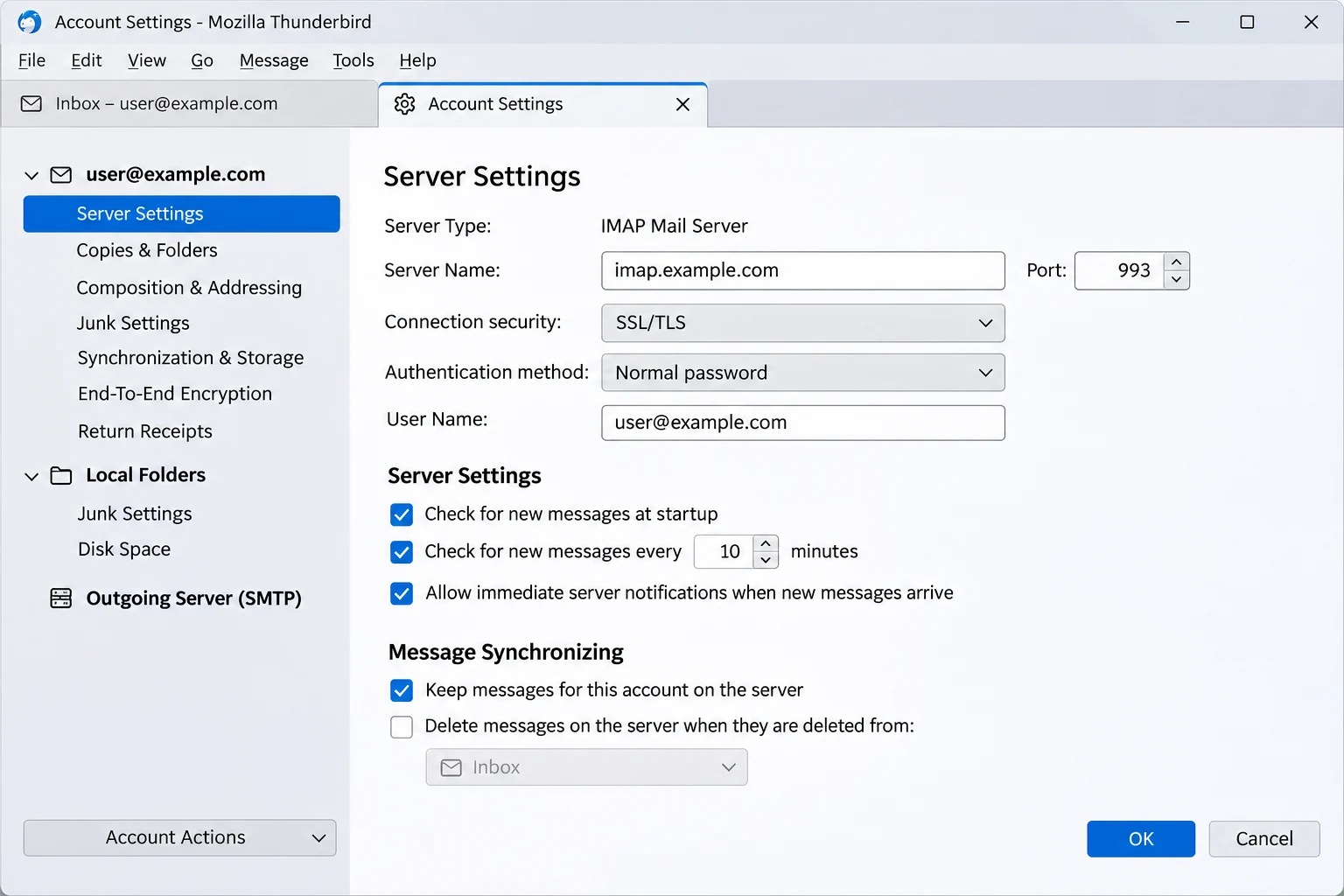
- Thunderbird Open Account Settings and select Server Settings under the name of your account. Server Name, Port and Connection Security sit on that screen.
Look at the account type before you copy the name. A name from these screens helps only when the account is set up as IMAP, because the screen of a POP account lists a POP server instead. On a phone or tablet, your provider's help page is the safer lookup.
Where Does Your Provider Publish the IMAP Server Name?
Your provider publishes the incoming server on a help page, on the settings screen of your webmail or in a control panel. That source beats a guess, so pick the line that matches where your mailbox lives.
- Free webmail The provider's own help page names the host. Univik keeps checked pages for iCloud Mail settings and Outlook email settings, plus an email settings index for other services.
- Exchange and Microsoft 365 Microsoft's help page says an Exchange mailbox lists its server names in Outlook on the web under Settings, then Mail, then POP and IMAP. The same page tells work and school users to ask their Microsoft 365 administrator.
- Web hosting The cPanel screen named Set Up Mail Client, which opens from Connect Devices on an email account, lists IMAP on port 993 under Secure SSL/TLS. cPanel writes your own domain into the host name when the account has a valid SSL certificate. Without one, it writes the server's host name. Bluehost email settings shows how that looks on one host.
- Company mail Your administrator knows the host name, so ask there first. Microsoft Learn says IMAP4 client access is off by default on an Exchange Server that a company runs itself, so ask whether it was switched on.
Does Finding the Server Settle the Sign-In?
Finding the server solves half of a sign-in. The other half is the kind of password your provider accepts, which the IMAP app password vs OAuth guide covers.
How to Find IMAP Server Details From Only a Domain Name?
Three DNS-based lookups work from a domain alone: the MX record, the SRV records from RFC 6186 and an autoconfig file. Only the last two can name the IMAP server itself.
| Lookup | What you type | What comes back | Where it falls short |
|---|---|---|---|
| MX record | nslookup -type=MX example.com | Host names that receive mail for the domain | An MX host receives mail, so it may differ from your IMAP host |
| SRV record | nslookup -type=SRV _imaps._tcp.example.com | IMAP host, port and priority as RFC 6186 describes | An SRV record exists only when the domain owner published one |
| Autoconfig file | autoconfig.example.com/mail/config-v1.1.xml | Server settings in an XML file that Thunderbird reads first | An autoconfig file exists only when the provider hosts it |
| Name guess | imap.example.com or mail.example.com | A host name that may or may not answer | A name guess proves nothing until a port 993 test passes |
What Does an MX Record Tell You About Your Mail Host?
An MX record tells other mail systems where to send mail for a domain, in Microsoft's words. Read the result as a clue about your host and not as the IMAP name, because a filtering service can receive mail while the mailboxes sit elsewhere. A target that ends in mail.protection.outlook.com points to Exchange Online. Microsoft's example incoming host is outlook.office365.com. The Microsoft 365 email settings page lists the rest of that set. Google names smtp.google.com as its Workspace MX value and says older aspmx names still work. The Gmail email settings page covers the Google side.
How Do SRV Records and Autoconfig Files Name the Server?
RFC 6186 lets the owner of a domain publish an IMAP server in DNS. A client takes the domain part of your address and asks for _imaps._tcp in front of it. That label names an IMAP service that starts TLS at once, while _imap._tcp names one that may need STARTTLS first. When several records come back, the lowest priority number wins. A target of a single dot means the service isn't offered. RFC 8314 adds that mail apps should be able to use SRV records. An empty answer only means that the domain publishes none.
Thunderbird's documented order shows where an autoconfig file would sit. It asks autoconfig.example.com for /mail/config-v1.1.xml first and then tries example.com/.well-known/autoconfig/mail/config-v1.1.xml. Mozilla's own provider database comes next and a guess at common names comes last. Open either address in a browser to read the file if your domain has one.
How to Check That the IMAP Server You Found Really Answers?
A working IMAP server answers on port 993 with a greeting that starts with * OK. RFC 9051 lists three greetings: OK for a normal connection, PREAUTH for one that is already signed in and BYE for a refused one. Its own example reads * OK [CAPABILITY IMAP4rev2 STARTTLS AUTH=GSSAPI LOGINDISABLED] Server ready.
Windows PowerShell can test the port without extra software. Run Test-NetConnection -ComputerName imap.example.com -Port 993 and look for TcpTestSucceeded : True. That result shows that something listens on the port. It doesn't prove that the name belongs to your mailbox. If openssl is installed, openssl s_client -connect imap.example.com:993 should print the greeting once the TLS handshake finishes. Add -starttls imap and use port 143 for a server that offers only the plain port.
A certificate warning means the name connected but doesn't match the certificate. Use the name from the screen of your provider in that case, because a cPanel host name depends on the certificate that the account holds.
My verdict: read the name from a mail app or a help page whenever you can. Use DNS only when neither has it. Treat every DNS result as a candidate until the port test passes.
How Do You Save a Copy of Your Mailbox After You Find the IMAP Host?
An IMAP server holds the one live copy of your mail, so a mailbox that closes or gets cleaned out takes that copy along. With the host name in hand, IMAP backup software can copy your folders to your PC. Univik IMAP Backup is a Windows program of that kind. Run the port 993 test first, because a DNS result stays a candidate until that test passes.
Fill In Add Account and Press Find in Univik IMAP Backup
Start in the main window with Open, then pick Email Accounts and press Add account. Type your address in the Email field and your password in the Password field. Open the Advance Settings section to reach four more controls: Imap Server, Imap Port (set to 993 until you change it), Secure Port (ticked from the start) and Find.
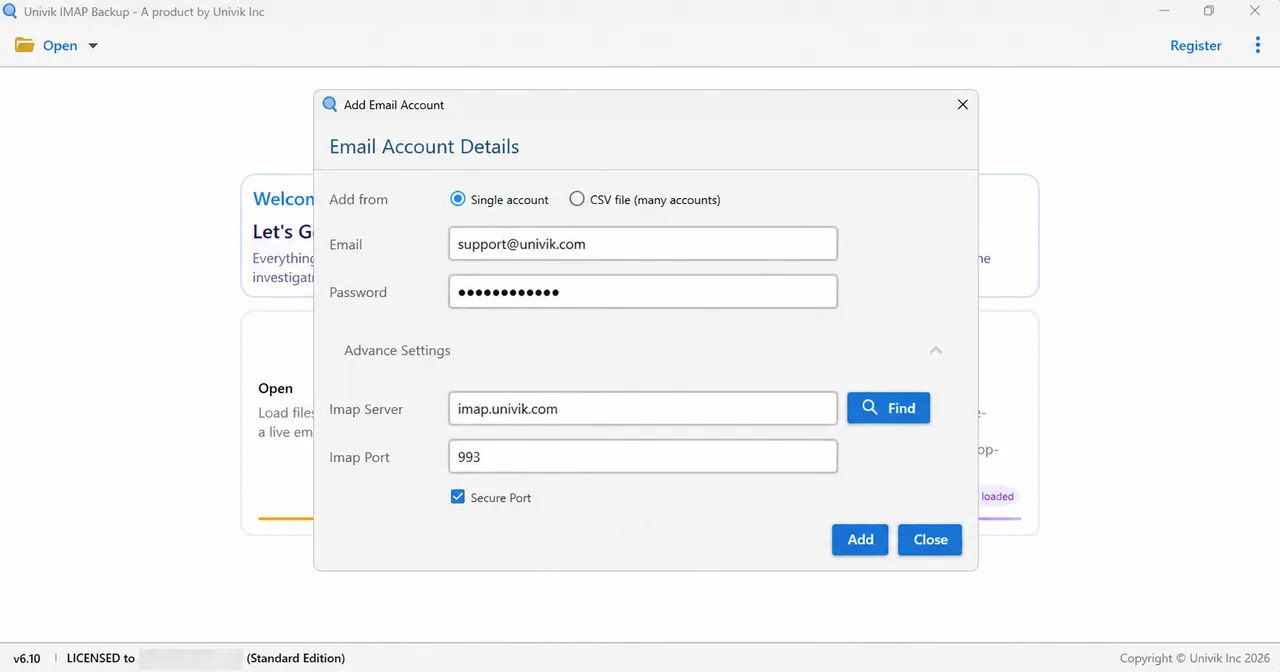
Find searches for the server that belongs to your address. On a hosted business mailbox that I tried, it filled in the Imap Server box for me. Hotmail, Outlook.com and Microsoft 365 addresses behave differently, as the next table shows.
What Does a Microsoft Address Do Instead of a Server Lookup?
A Microsoft address needs no host lookup. Univik IMAP Backup Trial Edition 6.10 skipped the server step for it on 2 November 2026.
| Check | Result |
|---|---|
| Addresses typed | Hotmail, Outlook.com and Microsoft 365 |
| What opened | A Microsoft sign-in page in the browser, straight away |
| Imap Server and port boxes | Hidden |
| Folder tree | Loaded after the sign-in |
Export Your Mail and Watch the Trial Limits
Tick your folders and open the Export menu, where Email Files offers EML, MBOX and PST. Before you select Save, check the Minimum Attachment Size to Export box, which opens with 35 MB already typed in. My first PST export from a test mailbox outside any provider wrote zero messages with that default and ran once I switched the option off. Trial exports stop at 10 items per folder. Mail on a web hosting plan needs a copy before the plan ends, which the guide to back up hosting email accounts walks through.

- Port 993 starts TLS from the first byte, while port 143 starts in plain text and upgrades through STARTTLS.
- An MX target ending in mail.protection.outlook.com points to Exchange Online, so an MX host is a clue to your provider and not an IMAP name.
- RFC 6186 SRV records such as _imaps._tcp let a domain owner publish its IMAP host and port in DNS.
- Test-NetConnection returns TcpTestSucceeded : True when something listens on port 993, and a working IMAP server then greets with * OK.
- Univik IMAP Backup has a Find button inside Advance Settings that looks up the server from your email address.
- Microsoft addresses open a browser sign-in in Add account and hide the Imap Server box, so a Hotmail or Microsoft 365 mailbox needs no host lookup.
IMAP Server Lookup Questions
How to find IMAP server details for an email address?
Read the incoming server name from a mail app that already works or from the help page of your provider. If neither has it, check the MX and SRV records of your domain and test the name on port 993. Stop at the first host that answers with * OK.
What is my IMAP server?
Your IMAP server is the host name that your mail app uses for incoming mail, like imap.example.com or outlook.office365.com. Whoever hosts your mailbox sets it. The address doesn't name it, so look it up in a mail app or on the help page of your provider.
Is imap.yourdomain.com always the right name?
No. It's a common pattern, but a pattern is a guess. Confirm the name on the help page of your provider or with a port 993 test.
How do I find my IMAP server in Outlook?
Select File, pick your account under Account Information and select Account Settings. Then choose Server Settings and open Incoming mail. If the account type isn't IMAP, that screen lists a different kind of server.
Can an MX record tell me my IMAP server?
An MX record gives a clue and not the answer. It names the host that receives mail for your domain. A target ending in mail.protection.outlook.com points to Exchange Online and smtp.google.com points to Google Workspace. Read the IMAP host from the help page of that provider.
How do I check that an IMAP server is working?
In Windows PowerShell run Test-NetConnection with the host name and port 993 and look for TcpTestSucceeded : True. A ready server sends a greeting that starts with * OK, which openssl s_client can print. A refused connection gets BYE.
Who do I ask when no lookup gives a server name?
Ask your email provider or hosting company for the incoming server name, port and security type. Microsoft's help page sends work and school users to their Microsoft 365 administrator.
Does Univik IMAP Backup find the IMAP server for me?
The Add Email Account window has a Find button inside Advance Settings that looks the server up from your address. On one hosted business mailbox it filled in Imap Server. A Hotmail, Outlook.com or Microsoft 365 address opens Microsoft's own sign-in in your browser instead.


I checked every fact here against the sources in this box on 2 November 2026. My own test notes cover the Add account window of IMAP Backup 6.10 in its trial edition.
Pages I read: