Quick Answer
An IMAP app password is a random code that your mail provider creates for one mail app. IMAP OAuth is a sign-in through your provider's own page that gives the app a token instead of a password.
Microsoft mailboxes accept OAuth only and Gmail takes OAuth or an app password. Yahoo and iCloud use app passwords. A self-run Dovecot server takes the mailbox password until its administrator switches on more methods.
Every IMAP mail app has to prove who you are before the server shows a single folder. Providers now offer three IMAP sign-in methods: the mailbox password, an app password or an OAuth token. But a wrong pick is the usual reason an IMAP login fails when the address and the server are both right.
I read RFC 9051, RFC 7628 and the help pages of Google, Microsoft, Yahoo and Apple on 2 November 2026. The last section shows what to type in the Add Email Account window to keep a local copy of your mail.
What Are the IMAP Sign-In Methods?
IMAP has two commands for signing in. LOGIN sends a user name and a password as plain text inside the connection. AUTHENTICATE runs a named SASL (Simple Authentication and Security Layer) mechanism, for example PLAIN, XOAUTH2 or OAUTHBEARER. RFC 9051 says LOGIN should not be used except as a last resort after the AUTHENTICATE command has failed.
Port 993 is the Implicit TLS port, so a password sent there travels inside an encrypted session. A server without TLS protection must have a configuration that advertises LOGINDISABLED and refuses the LOGIN command. Details on 993 and 143 sit in the guide to IMAP port numbers.
| Method | What the mail app sends | Where it is defined |
|---|---|---|
| Mailbox password | The webmail password you use in a browser, sent with LOGIN or AUTHENTICATE PLAIN | RFC 9051 |
| App password | An app password is a random code made for one app and sent exactly like a password | Help pages of Google, Yahoo and Apple |
| OAuth token | An OAuth token is a bearer token with a limited life, sent with AUTHENTICATE XOAUTH2 or OAUTHBEARER | RFC 7628 and the Google and Microsoft developer pages |
A mail client can send CAPABILITY right after the connection opens, which gives a quick check of what the server accepts. Every name in the reply that starts with AUTH= is a mechanism the server accepts. So AUTH=OAUTHBEARER in that list tells the client that the server takes OAuth tokens.
What Is an IMAP App Password?
An IMAP app password is a random code that your mail provider makes for one app. You type it into the Password box where your normal password would go. Providers use these codes for apps that don't open the provider's own sign-in page. The rules differ by provider.
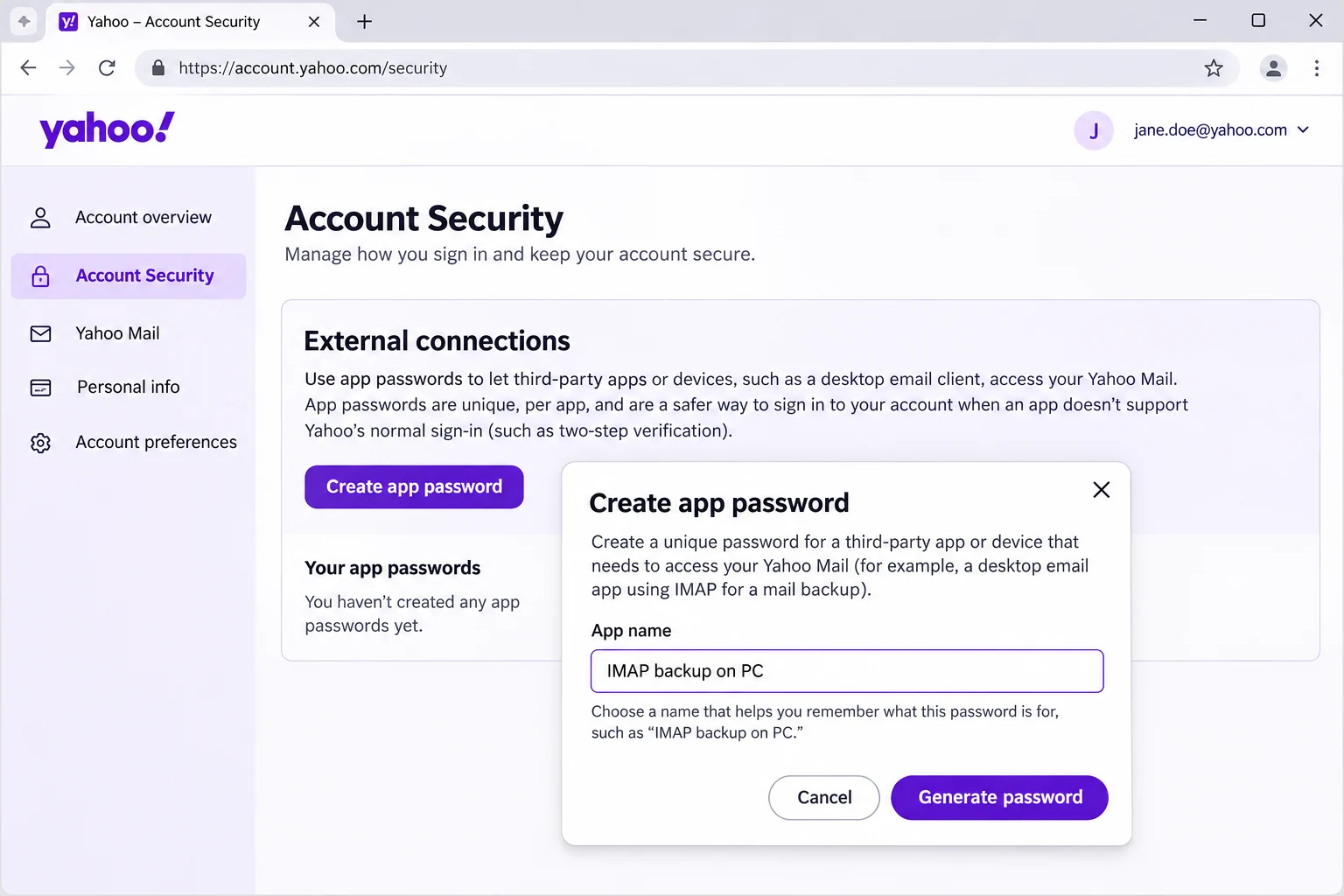
- Google calls the code a 16-digit passcode and creates it only for accounts with 2-Step Verification. Work or school accounts can't create one. Accounts with security-key-only 2-Step Verification can't either. Google also revokes your app passwords when you change the password of your Google Account.
- Yahoo makes the code under External connections on the Account Security page. A Yahoo app password stays active after you change the main password, so you delete it to revoke it.
- Apple asks for two-factor authentication first. An Apple Account holds up to 25 active app-specific passwords. A change or reset of the account password revokes all of them.
Still, an app password opens the mailbox the same way a password does, so store the code as carefully as the password itself and delete it when you retire the app.
How Does IMAP OAuth Work?
IMAP OAuth signs a mail app in with an access token that your provider issues after you approve the app on the provider's own sign-in page. You type your password on that page and never in the app. The app then holds a token where it would otherwise hold a password.
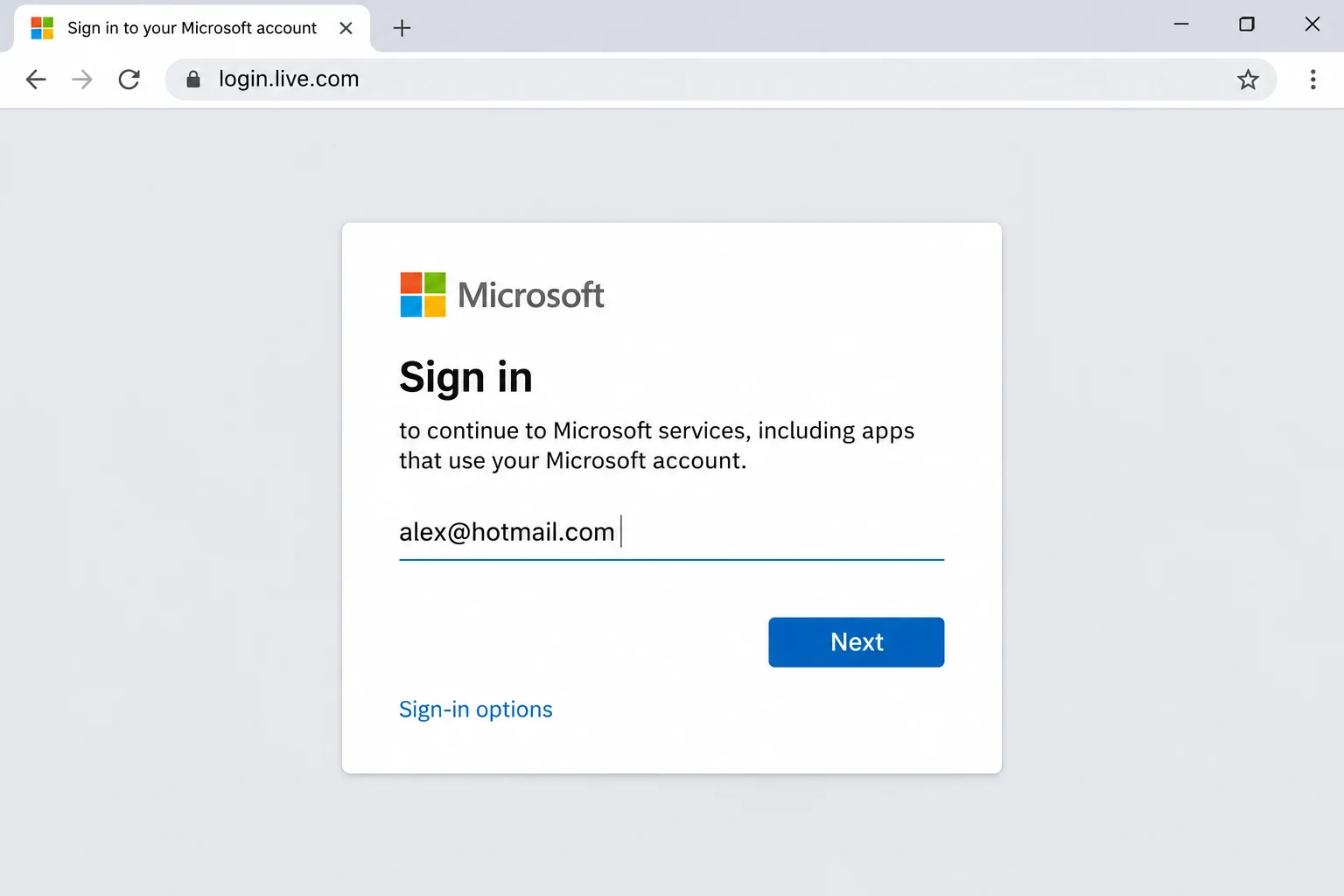
Then a mail app sends the token to the server with AUTHENTICATE XOAUTH2 or AUTHENTICATE OAUTHBEARER. Google and Microsoft both document XOAUTH2, which packs the user name and the bearer token into one base64 string. RFC 7628 defines OAUTHBEARER, where the client response carries an auth=Bearer value followed by the token.
Tokens have a limited life. RFC 7628 says shorter lifetimes improve security, notes that a refresh token can fetch a new access token without a new prompt and adds that a token may be revoked at any time. I read that RFC on 2 November 2026 and it also says TLS must protect the token.
Microsoft Learn states that OAuth for IMAP, POP and SMTP is available to both Microsoft 365 and Outlook.com users. On a server you run yourself, the Dovecot documentation lists OAUTHBEARER and XOAUTH2 among its mechanisms.
IMAP App Password vs OAuth: How Do They Differ?
An app password stays valid until you delete it or your provider revokes it. An OAuth access token expires on its own and can be renewed. The table sets the two side by side. Also, software written before the arrival of OAuth has only a Password box, which is why a mailbox can work in a new app and fail in an old one.
| Question | App password | OAuth |
|---|---|---|
| What you do at sign-in | Create a code in the security settings of your account and enter it in the Password field of your mail app | Approve the app on the sign-in page of your provider |
| What the server receives | The code, in the same form as a password | OAuth sends a bearer token tied to what you approved on the sign-in page |
| How long it lasts | Until you delete it or the provider revokes it | An access token expires on its own and a refresh token can fetch a new one |
| How you cancel it | Delete the code in the settings of your account | Revoke the access of the app, which RFC 7628 says works separately from your password |
Which Provider Needs an IMAP App Password and Which Needs OAuth?
Microsoft needs OAuth and Yahoo and iCloud need an app password, while Gmail accepts either one. The table lists the sign-in that each provider documents for mail apps.
| Provider | Sign-in for IMAP | What the provider says |
|---|---|---|
| Gmail and Google Workspace | OAuth through Sign in with Google or an app password | Google calls app passwords unnecessary in most cases. Workspace stopped supporting apps that sign in with only a username and password from January 2025. See Gmail email settings for the steps. |
| Outlook.com and Hotmail | OAuth only | Microsoft Support gives 16 September 2024 as the date Basic Authentication stopped working for any Outlook account. |
| Microsoft 365 | OAuth only | Microsoft Learn says Basic authentication is now disabled in all Exchange Online tenants. See Microsoft 365 email settings for the timeline. |
| Yahoo Mail | App password | Yahoo says apps that don't use its sign-in page need a code. See Yahoo Mail settings for the steps. |
| iCloud Mail | App-specific password | Apple requires two-factor authentication and allows 25 active codes. See iCloud Mail settings for the steps. |
| Dovecot server | Mailbox password or OAuth once an administrator adds it | Dovecot enables only PLAIN by default and lists OAUTHBEARER and XOAUTH2 as extra mechanisms. |
My verdict: pick OAuth when your provider shows its own sign-in page for the app, because a token expires on its own and you can revoke it without a password change. Pick an app password when the provider only hands out codes for the mail apps of its users. Keep the plain mailbox password for servers that you or your web host run. Use it only over TLS.
How Do You Save a Local Copy of IMAP Mail With an App Password or OAuth?
IMAP keeps the only copy of your mail on the provider's server, so a closed or locked mailbox takes the mail with it. The reasoning sits in is IMAP a backup.
Univik IMAP Backup is a Windows program and counts as IMAP backup software. It logs in to a mailbox and writes the folders you tick to files on your PC. In the Add Email Account window you fill Email and Password, then open Advance Settings for three more controls. Imap Server takes the name of your host. Imap Port comes prefilled with 993. Secure Port arrives ticked. A Find button fills the server from your address. Other lookup routes sit in how to find IMAP server details.
What Happens When You Type a Microsoft Address?
On 2 November 2026 I typed a Hotmail address into the Add Email Account window of Univik IMAP Backup Trial Edition 6.10. The table lists what happened.
| What I tried | Result |
|---|---|
| Hotmail address | A Microsoft login page opened in the browser as soon as the address was in |
| Imap Server fields | Hidden |
| Folder tree | Appeared once the sign-in finished |
| Two-step account | Needed no app password |
| Microsoft 365 address | Took the same route as Hotmail |
The same route also worked for a two-step account that had no app password, a personal address, a guest account, a shared mailbox address and an Outlook.com mailbox with its IMAP switch on or off. Microsoft 365 mailboxes are covered in backup office 365 email.
How to Sign In and Add the Account
- Get the sign-in your provider wants. For Gmail, Yahoo or iCloud, create an app password in the security settings of your account. For a Hotmail, Outlook.com or Microsoft 365 address, create nothing because the Microsoft sign-in page handles the approval.
- Add the account. Go to Open > Email Accounts > Add account and type your address in the Email box. Paste the app password into the Password box. A Microsoft address opens the Microsoft sign-in in your browser and needs no password in the app.
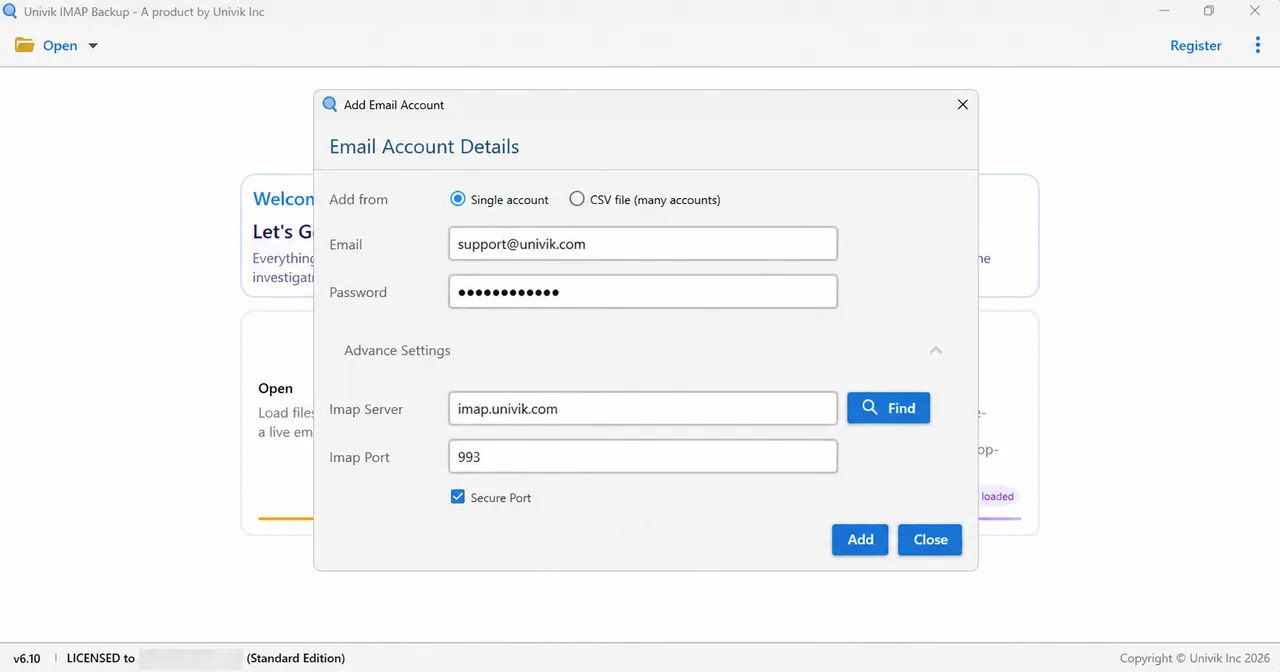
Email and Password sit at the top of Add Email Account, with Find inside Advance Settings. - Check Advance Settings. Open the Advance Settings section on any non-Microsoft mailbox. The Imap Port box is prefilled with 993 and the Secure Port tick is set. Enter your host under Imap Server or press Find to look it up. Microsoft addresses keep these boxes hidden.
How to Pick a Format and Save the Copy
- Pick the format. Tick the folders you want, then pick the Export menu and look in the Email Files group. EML gives one file per mail. MBOX gives one file per folder and PST opens in Outlook.

Email Files, the first Export group, lists EML, MBOX and PST. - Save the copy. Next, review the Minimum Attachment Size to Export filter. The filter starts on at 35 MB. Press Save when the folders are ticked. My first PST export from a non-provider test mailbox wrote 0 messages while that filter stayed on.
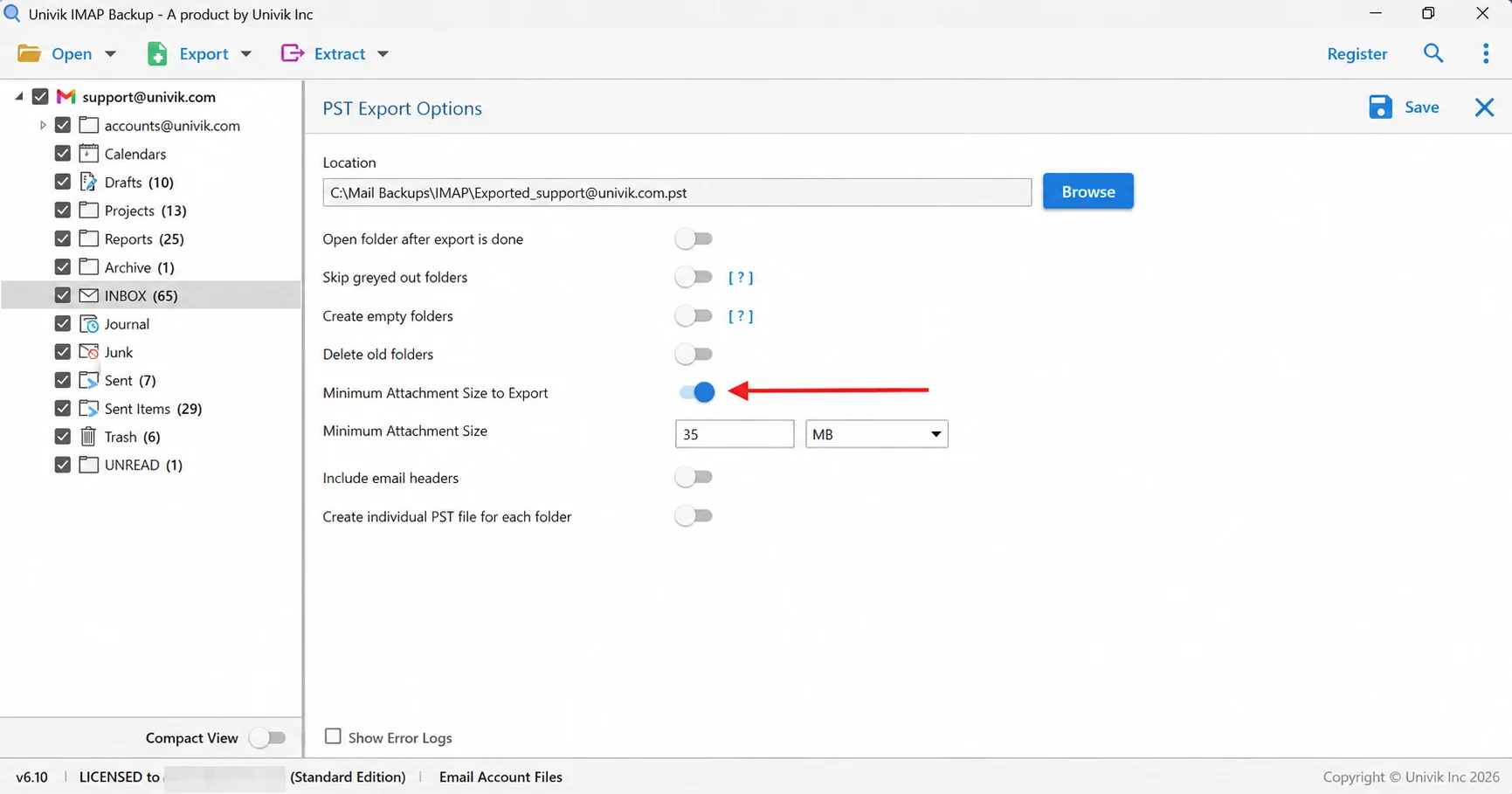
An arrow points to Minimum Attachment Size to Export, switched on at 35 MB.
Each format has its own guide: export IMAP to PST, export IMAP to EML and export IMAP to MBOX. Until you license the app, each folder exports 10 items.

- Microsoft Support gives 16 September 2024 as the date Basic Authentication stopped working for Outlook accounts, so those mailboxes sign in with OAuth only.
- Google creates app passwords only for accounts with 2-Step Verification and revokes them when you change your Google Account password.
- Yahoo makes an app password under External connections on the Account Security page, and the code stays active after a main password change.
- Apple allows up to 25 active app-specific passwords per Apple Account, and a password change or reset revokes all of them.
- RFC 7628 defines OAUTHBEARER, while Google and Microsoft document XOAUTH2 for passing an OAuth token with the AUTHENTICATE command.
- A Hotmail address typed into Add Email Account opened Microsoft's sign-in page at once, hid the Imap Server fields and needed no app password.
FAQ: App Passwords and OAuth for IMAP
What is an IMAP app password?
An app password is a random code that a mail provider creates for one app. The app types it into the Password box in place of your normal password. Google, Yahoo and Apple all issue these codes. Each provider sets its own rules for creating and revoking them.
What is IMAP OAuth?
IMAP OAuth is a sign-in where your provider's own page approves the app and issues a token. The app sends that token to the server with AUTHENTICATE XOAUTH2 or OAUTHBEARER, so no password goes into the app. Tokens expire and can be revoked separately from your password.
Should I use an app password or OAuth for IMAP?
Use OAuth when your provider shows a sign-in page for the app. Use an app password when the provider only issues codes, as Yahoo and iCloud do. Microsoft accepts OAuth only for IMAP and Google calls app passwords unnecessary in most cases.
Why does my IMAP login fail when the password is right?
Four causes explain most of the failures. Your provider may need an app password or OAuth instead of your normal password. Google and Apple create app passwords only with two-step sign-in on. A provider may have revoked the code after a password change. Microsoft ended Basic authentication, so a typed password can't work.
Do I need 2-Step Verification to create an app password?
Google creates app passwords only for accounts with 2-Step Verification. Apple requires two-factor authentication. Yahoo's help page does not state a requirement, so follow the steps it lists under External connections on the Account Security page.
Does Outlook.com or Microsoft 365 take an app password for IMAP?
No. A code typed into a password box counts as Basic authentication. Microsoft Support gives 16 September 2024 as the date it stopped working for Outlook accounts. Microsoft Learn says it is disabled in all Exchange Online tenants. IMAP on those mailboxes needs OAuth through the Microsoft sign-in page.
Where do I type an app password in a mail app?
Type it in the Password box of the account form, where your normal password would go. In the Add Email Account window that is the Password box, with your full address in the Email box.
Does an app password stop working?
Google revokes app passwords when you change the password of your Google Account. Apple revokes all app-specific passwords when you change or reset the password of your Apple Account. Yahoo keeps the codes active after a password change until you delete them.
How does Univik IMAP Backup sign in to my mailbox?
A Hotmail, Outlook.com or Microsoft 365 address starts a Microsoft sign-in page in your browser right after you type it. For other mailboxes you type the password that your provider accepts for IMAP in the Password box. Select folders, pick one of EML, MBOX or PST and press Save.

Sources for this page were read on November 2, 2026 next to IMAP Backup 6.10. They are RFC 9051, RFC 7628 and help pages from Google, Microsoft, Yahoo and Apple. The Microsoft sign-in lines come from a test run on the same day.
Pages I read: