Quick Answer
IMAP vs SMTP comes down to direction: SMTP sends mail and IMAP reads the mail that waits in your mailbox.
A mail app needs both, because the two run on different servers with separate logins. SMTP (RFC 5321) hands your message on for delivery. IMAP (RFC 9051) lets you list, open and sort the copy that stays on the server.
Your email address depends on two systems that most people never see. One carries the mail out and the other shows you what has arrived. Mail apps like Outlook, Thunderbird and Apple Mail ask you to fill in both, which is why IMAP and SMTP sit side by side on almost every settings screen.
I read RFC 9051, RFC 5321, RFC 6409, RFC 1939 and RFC 8314 on 2 November 2026 to write this guide, so each rule on this page comes from those documents. The counts come from a test mailbox I keep for IMAP checks and not from the mailbox of a big provider.
IMAP vs SMTP: Which One Sends and Which One Receives?
SMTP sends and IMAP reads. SMTP (Simple Mail Transfer Protocol) moves a message from one server to the next until the message reaches the recipient's mailbox. RFC 5321 gives the aim of SMTP as transferring mail reliably and efficiently. IMAP (Internet Message Access Protocol) starts after the delivery is done. It lets you sign in to the mailbox, list the folders and fetch messages from the server through your app. RFC 9051 describes IMAP4rev2 as a way to access and manipulate the mail on a server.
| Point | IMAP | SMTP |
|---|---|---|
| Job | IMAP reads, searches and organizes the mail that is already in your mailbox. | SMTP sends the mail and passes it between servers. |
| Direction | IMAP pulls a message down to your app when you open the folder. | SMTP pushes a message out toward the recipient. |
| Where mail sits | IMAP leaves your mail on the server in folders. | SMTP carries the message and the receiving server files it in a mailbox. |
| Commands | IMAP signs in with LOGIN or AUTHENTICATE, then runs the SELECT and FETCH commands. | SMTP greets with EHLO, then runs the MAIL FROM, RCPT TO and DATA commands. |
| Standard | IMAP4rev2 is RFC 9051 from August 2021. | SMTP is RFC 5321 from October 2008 and the mail apps on your devices submit through RFC 6409 from November 2011. |
| Login | IMAP asks for the credentials before most commands work (RFC 9051, section 3.1). | SMTP submission refuses mail from an unauthenticated session by default (RFC 6409, section 4.3). |
The machine that answers IMAP is the mail store that holds your folders. Our guide on what is an IMAP server covers that side in detail.
Why Does Your Mail App Ask for Two Servers Instead of One?
If you want to read and send mail from one app you need both IMAP and SMTP, because IMAP has no way to send. In the abstract of RFC 9051 you can read that IMAP4rev2 does not specify a means of posting mail and points to a mail submission protocol like RFC 6409. RFC 3501, the older IMAP4rev1 text, makes the same point, so no version of the IMAP standard sends a message.
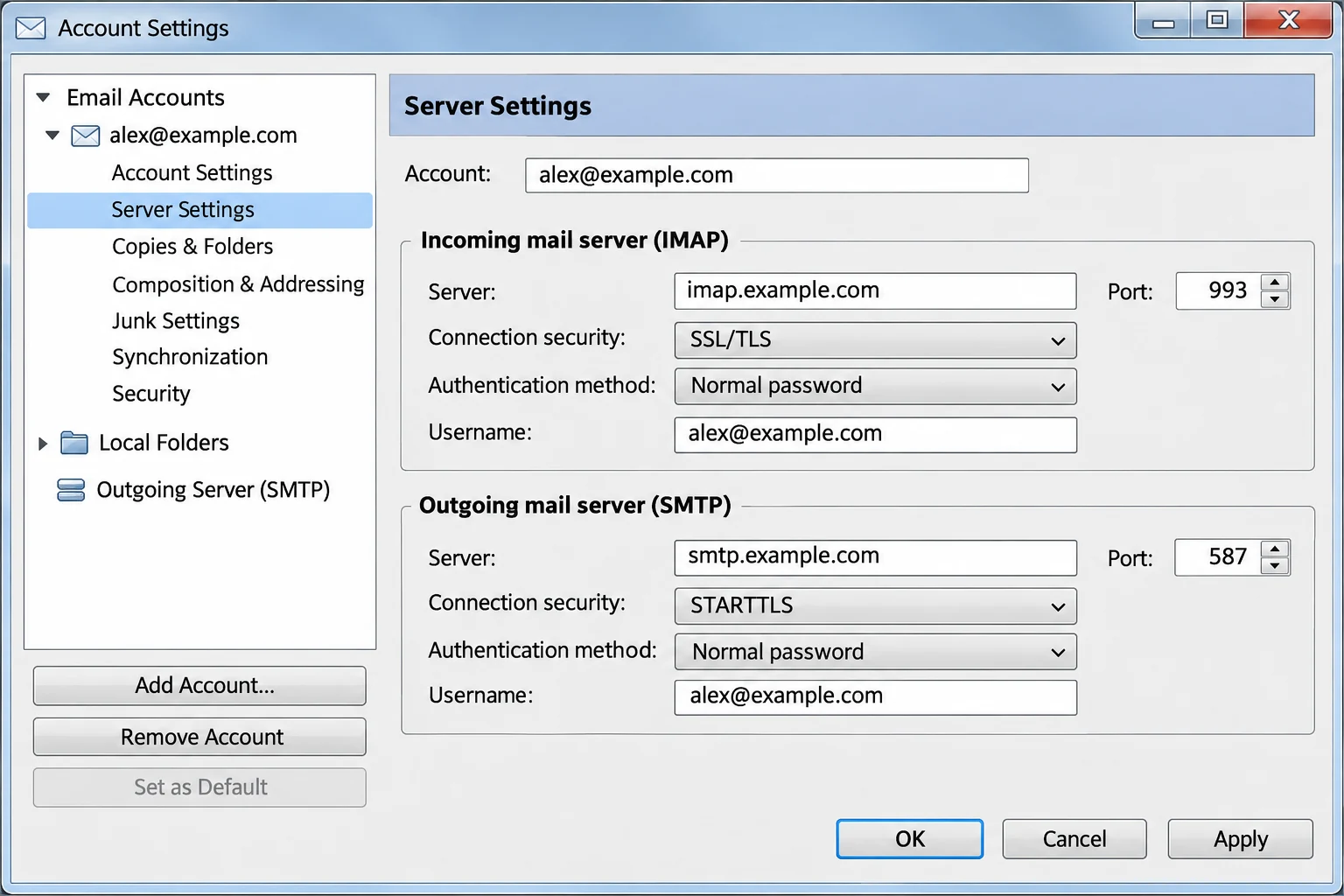
The split between reading and sending is why a settings screen asks for two servers. Apple's iPhone setup labels them Incoming Mail Server and Outgoing Mail Server. The two hostnames often differ. The help page from Yahoo for third-party apps lists imap.mail.yahoo.com for incoming mail and smtp.mail.yahoo.com for outgoing mail. It also says that outgoing mail requires authentication, so the outgoing line needs a login of its own. Values for other providers sit in our email settings directory, which makes the lookup easy because every provider has its own page, while Yahoo has its own Yahoo Mail settings page.
Do the Reading and Sending Servers Use One Login?
Also, many accounts use one username and one password for both lines, but your provider decides that, so check each of the two lines on its own when the sign-in fails. A third protocol, POP3, also fetches mail but works differently, as our guide to IMAP vs POP3 shows. RFC 1939 says POP3 is not intended for extensive manipulation of mail on the server and does not specify how a client host enters mail into the transport system. Sending stays with SMTP either way.
What Happens Between Pressing Send and Reading a Reply?
SMTP vs IMAP is easiest to see if you follow one message from your outbox to the screen of its reader. The stages in the table use different parts of the system.
| Stage | Protocol | What happens |
|---|---|---|
| 1. You press Send | SMTP submission | Your mail app signs in to your provider's submission server and hands over the message (RFC 6409). |
| 2. Between servers | SMTP relay | Your provider's server passes the message to the recipient's mail server. RFC 6409 says that the relay step keeps using SMTP on port 25. |
| 3. Delivery | Receiving server | The recipient's server files the message in the mailbox, which turns it into stored mail. |
| 4. They read it | IMAP | The recipient's app signs in, selects INBOX and fetches the message (RFC 9051). |
SMTP appears in the first two stages and IMAP only in the last. Once a message sits in a mailbox it becomes a stored item, which is where IMAP takes over. A flag like \Seen or \Deleted changes on the server through IMAP and never travels back over SMTP. RFC 9051 describes \Deleted as a message marked for removal by a later EXPUNGE.
Your Sent folder lives on the IMAP side too. IMAP has an APPEND command that adds a message to a folder (RFC 3501, section 6.3.11). Depending on your app and your provider, either the app or the server files the copy in Sent because the SMTP transfer itself doesn't do it, so check Sent in webmail if an outgoing message seems missing.
Why Do Sending and Reading Use Different Ports and Encryption?
SMTP and IMAP listen on different ports because the two are separate services with separate jobs. IANA registers Simple Mail Transfer on port 25 and IMAP over TLS on port 993. When you send from a mail app on your devices, three SMTP ports matter.
- Port 25 RFC 6409 keeps this port for the relay between servers. However, a mail app doesn't normally use it. Some access providers block outbound port 25 on the networks they run, which RFC 5068 notes without taking a side. RFC 5068 does tell access providers not to block port 587 for the mail apps of their users.
- Port 587 RFC 6409 reserves it for message submission from the mail apps. Encryption starts with STARTTLS, which RFC 8314 calls relatively widely deployed.
- Port 465 RFC 8314 registers it for the submissions service, where the TLS handshake begins at once.
IMAP uses port 143 as the cleartext port and port 993 as the Implicit TLS port, per RFC 9051 section 2.1. RFC 8314 prefers Implicit TLS for both submission and mail access and asks for TLS 1.2 or later. When a provider offers 465 and 993, those two give you encryption from the first byte of the connection. Our guide to IMAP port numbers lists the receiving side in full.
IMAP vs SMTP Problems: Why Does Receiving Work but Sending Fail?
Receiving and sending use two separate connections, so one can work while the other fails. Checking one line at a time is quick, because the setup holds only two connections to compare. Instead of changing everything, you can check the failing line on its own first.
Try this: Open the outgoing server settings and read the hostname you entered, because this problem usually comes from an IMAP hostname in the SMTP field. A host like imap.mail.yahoo.com will not carry outgoing mail, since the SMTP host is a different machine.
Try this: Turn on authentication for the outgoing server and enter your full address and password, since authentication is often the missing piece. RFC 6409 says a submission server refuses mail from an unauthenticated session by default.
Try this: Match the port you chose to the security type it expects. Port 465 expects TLS from the first byte while port 587 expects STARTTLS, so a mismatch can leave you waiting on a connection that never finishes.
Try this: Find out if your provider wants an app password on both lines. Then look your provider up in the email settings directory before you reset anything.
Why Does a Mailbox Backup Need Only IMAP Settings and No SMTP?
Your IMAP mailbox holds one copy of your mail on a server, which makes a copy on your PC the one that survives when the account closes. Is IMAP a backup? explains why a synced mailbox doesn't count as a backup. A backup reads mail and never sends it, so SMTP plays no part in the job.
Univik IMAP Backup is IMAP backup software built for Windows PCs. Its Add Email Account window holds the Email and Password boxes with no SMTP field at all.
Which Fields Does the Add Email Account Window Show?
Open Advance Settings in that window to reach Secure Port (ticked for you) and Imap Port (set to 993) above the Imap Server box. Select Find to look the server up from the address you typed.
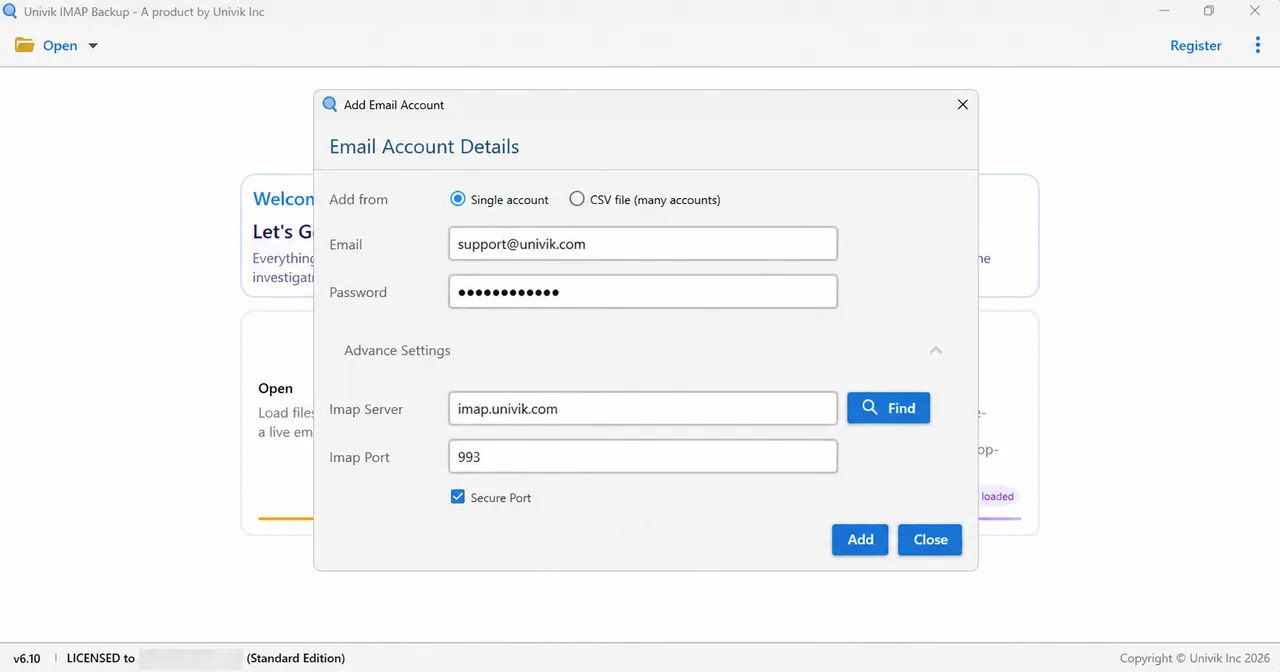
Univik IMAP Backup Trial Edition 6.10 asks for IMAP values only. The table lists the fields of its Add Email Account window.
| Field in Add Email Account | Starting state |
|---|---|
| Your full address | |
| Password | Typed by you |
| Imap Server | Under Advance Settings |
| Imap Port | 993 |
| Secure Port | Ticked |
| SMTP fields | None |
Microsoft addresses take another route. Typing a Hotmail, Outlook.com or Microsoft 365 address in Add account on 2 November 2026 made Microsoft's sign-in page open in my browser straight away, with no server fields on screen.
Export Formats, Trial Cap and the 35 MB Filter
Next, select Export and pick a file type from the Email Files group. Pick PST if Outlook is your next stop (export IMAP to PST) or EML for a file per message (export IMAP to EML) or MBOX for Thunderbird (export IMAP to MBOX).
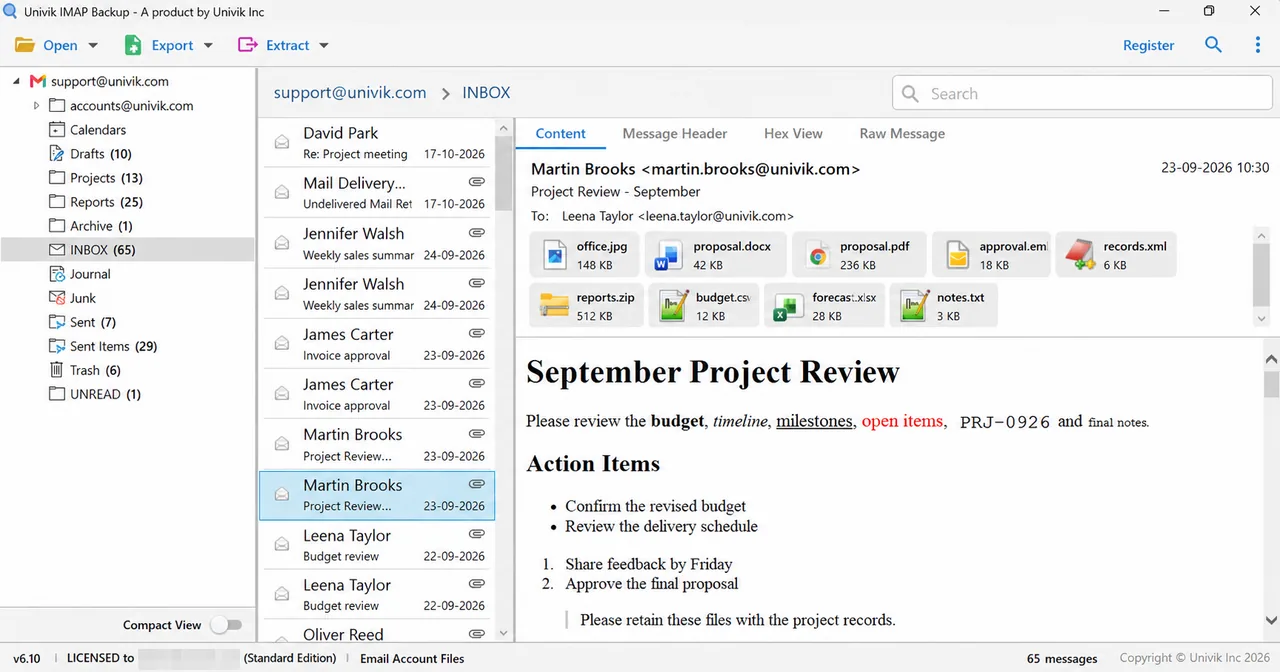
A trial copy caps every folder at 10 items, so in my test mailbox INBOX showed 65 and Sent Items showed 29 while only ten from each were written. Last, open Minimum Attachment Size to Export on the save screen, where the switch is already on at 35 MB when the screen first appears.
My verdict: if mail arrives but replies don't leave, fix the SMTP line first. Finally, if your goal is a copy of the mail you've received, ignore SMTP and work only with IMAP.
- IMAP listens on port 143 in cleartext and on port 993 with Implicit TLS, as RFC 9051 section 2.1 sets out.
- SMTP submission from a mail app uses port 587 with STARTTLS or port 465 with TLS from the first byte.
- RFC 9051 leaves IMAP4rev2 without any way to post mail and points to a submission protocol such as RFC 6409 for sending.
- Yahoo lists imap.mail.yahoo.com for incoming mail and smtp.mail.yahoo.com for outgoing mail, so an IMAP name in the SMTP field stops replies from leaving.
- Univik IMAP Backup shows no SMTP field in its Add Email Account window and stops trial exports at 10 items per folder.
IMAP vs SMTP Questions
What is the difference between IMAP vs SMTP?
SMTP sends mail and IMAP reads the mail that is already in your mailbox. SMTP moves a message between servers until the message is delivered while IMAP lets you open the mailbox through your app, list the folders and fetch messages from the server. A mail app uses both.
Is SMTP used to receive email?
A receiving mail server accepts incoming messages from other servers over SMTP, yet your mail app doesn't read mail with it because the app fetches each message over IMAP or POP3 once it is in the mailbox.
Can IMAP send email?
No. RFC 9051 says IMAP4rev2 does not specify a means of posting mail and points to a mail submission protocol like the one in RFC 6409, so sending always goes through the SMTP submission service.
Why does an email account need both IMAP and SMTP settings?
Reading and sending are separate services that the standards keep apart, with IMAP covering the mailbox on the server and SMTP covering the outgoing mail. Your app therefore asks you for an incoming server and an outgoing server, which are often two different hostnames.
Are the IMAP and SMTP servers the same machine?
They usually run on different machines. Yahoo's help page for third-party apps lists imap.mail.yahoo.com for incoming mail and smtp.mail.yahoo.com for outgoing mail. Check the page of your provider for both hostnames and enter each one in its own field.
Which port does SMTP use to send from a mail app?
The mail apps on your devices send through port 587 with STARTTLS or port 465 with Implicit TLS, both of which RFC 8314 describes. Port 25 is kept for the relay between servers. Your provider tells you which of the submission ports it offers.
Do IMAP and SMTP use the same password?
Your provider decides whether one password covers both lines, although many accounts use a single password for both. RFC 6409 says a submission server refuses mail from an unauthenticated session by default, so the outgoing server needs a login entry of its own.
Does a mailbox backup need SMTP settings?
No. A backup reads mail and reading is the job of IMAP, so the Add Email Account window in Univik IMAP Backup has Email, Password and the IMAP fields only.
Does POP3 send email too?
No. POP3 retrieves mail from a server and RFC 1939 says it does not specify how a client host enters mail into the transport system, so outgoing mail from a POP3 account still goes through the SMTP server.


Facts verified on 2 November 2026 against RFC texts and one Yahoo help page. Folder counts here were taken from a test mailbox opened in a trial copy of the app.
Pages I read: