Quick Answer
What is an IMAP server? It is the mail server that keeps your messages and folders online, so every app you sign in with reads one shared mailbox.
The server speaks the Internet Message Access Protocol. Your phone, laptop and webmail ask it for messages and it answers from the original copy. A program like Dovecot or a cloud service like Exchange Online runs it.
Your phone, your laptop and your webmail show the same inbox because none of them owns it. A server somewhere else does. That's the machine this guide explains in plain words, from the commands it understands to the programs behind it. The guide ends with a way to keep a copy of your mail outside that server.
I read RFC 9051, RFC 8314, RFC 2177 and the Microsoft page on IMAP4 in Exchange Online on 2 November 2026 for this guide. Folder counts quoted here were read from my own test mailbox, which does not sit with a large mail provider.
What Is an IMAP Server and What Does It Do?
An IMAP server, which some people call an IMAP mail server, is a program on your mail provider's computers that holds mailboxes and answers requests from mail apps. RFC 9051 says its protocol "allows a client to access and manipulate electronic mail messages on a server". The client is the app you run. The server is the other end of the connection, which keeps the messages.
Providers give that server a host name on the internet. You type the name into the mail app. Microsoft Learn lists outlook.office365.com as the IMAP4 name for Exchange Online. The name for your own mailbox depends on your provider. The lookup routes for your mailbox are covered in this guide on how to find IMAP server names.
RFC 9051 appeared in August 2021 and describes IMAP4rev2. It obsoletes RFC 3501, which defined the older IMAP4rev1 in March 2003. Its text says IMAP4rev2 is designed to be upwards compatible from IMAP4rev1.
| Term | What it means |
|---|---|
| IMAP server | A program and the machine it runs on, which hold mailboxes and answer IMAP commands |
| IMAP client | Outlook, Thunderbird or any other app that you run to read mail |
| Mailbox | A named folder on the server, with INBOX as the reserved name of your primary one |
| Mail access server | The wording RFC 8314 uses for a server that gives mail apps access to stored mail |
How Does an IMAP Server Work When Your Mail App Connects?
An IMAP server works through a short conversation in which your app opens a connection and sends commands while the server answers each one until the app signs out. RFC 9051 puts every connection into one of four states.
| State | What your app can do | Commands RFC 9051 lists |
|---|---|---|
| Not Authenticated | Prove who you are before anything else | STARTTLS, AUTHENTICATE, LOGIN |
| Authenticated | Choose a mailbox or manage the folder list | SELECT, EXAMINE, CREATE, RENAME, LIST, STATUS, IDLE |
| Selected | Read and change messages in the open mailbox | FETCH, SEARCH, STORE, COPY, MOVE, EXPUNGE |
| Logout | End the connection | LOGOUT |
RFC 3501 defines three greetings that the server can send first. OK means a normal connection while PREAUTH means the connection is already authenticated. BYE means the server refuses the connection. After a normal OK greeting your app signs in with LOGIN or AUTHENTICATE.
Encryption comes before the password, because a cleartext connection can switch on TLS with the STARTTLS command. RFC 8314 prefers Implicit TLS, which starts encryption as soon as the connection opens. It also recommends TLS 1.2 or later. The IMAP port numbers guide lists the numbers for both styles.
The server can also push news to your app. With the IDLE command from RFC 2177 the app waits and the server announces new messages as they arrive. RFC 2177 advises clients to end and restart IDLE at least every 29 minutes. Microsoft adds that an IDLE-capable client can see the changes in an Exchange Online mailbox in nearly real time.
What Is an IMAP Server Keeping When You Read Mail on Your Phone?
An IMAP server keeps your messages, your folder tree and the flags that mark each message. Your phone only displays them. Your phone may cache some of it but the server holds the original.
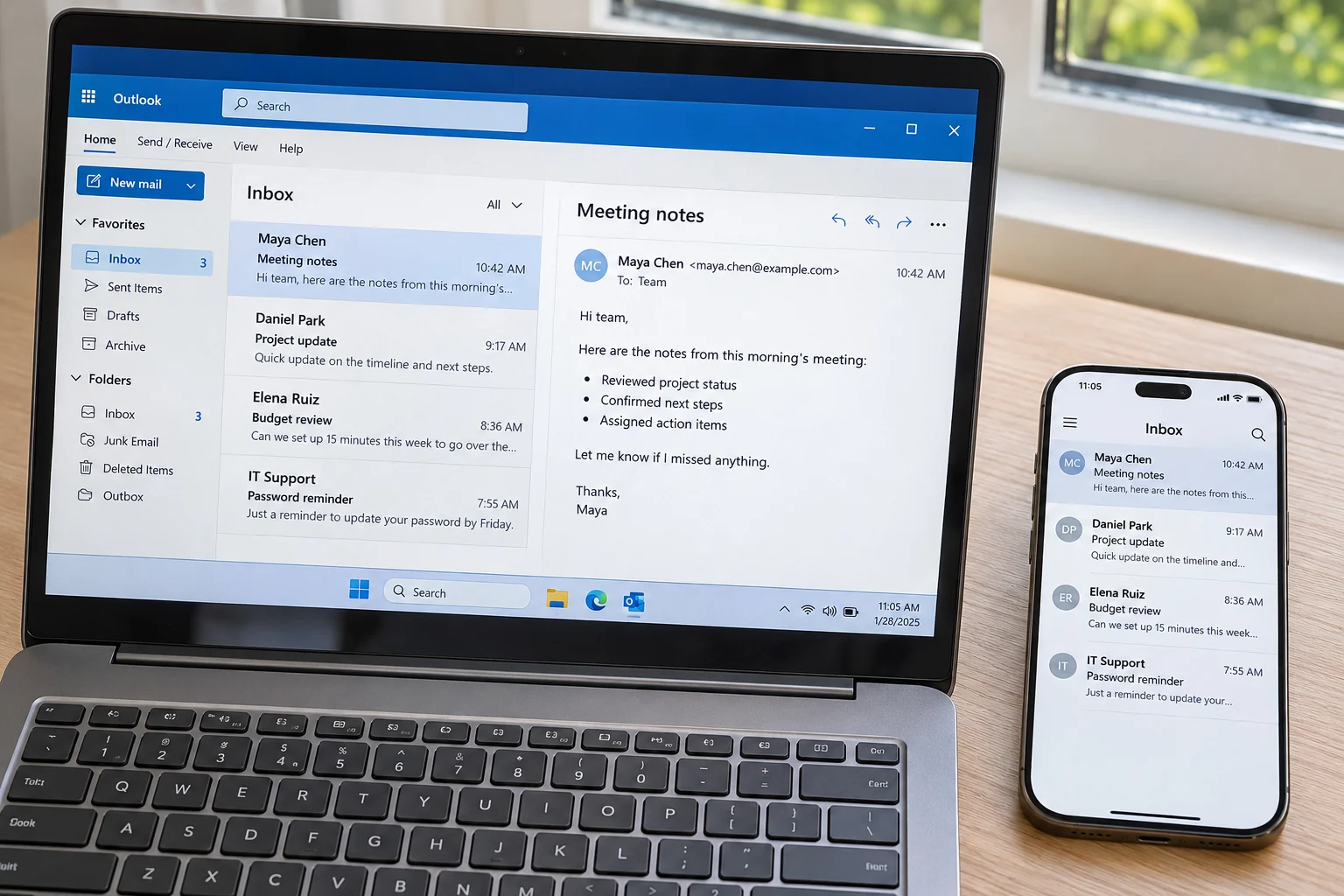
- Messages and folders Each folder is a mailbox with its own name. RFC 9051 treats INBOX as a special, case-insensitive name for your primary mailbox on that server.
- Flags The system flags start with a backslash. \Seen means a message was read. \Deleted only marks a message. The EXPUNGE command later clears marked messages from the mailbox.
- Message numbers A UID is an unsigned non-zero 32-bit value that the server gives to each message. A UIDVALIDITY value arrives in the reply when the app selects a mailbox.
- Basic mail only Microsoft says IMAP4 gives basic email features and does not offer the calendaring and contact management that Outlook offers.
The folder counts show this plainly. In my test mailbox the app lists INBOX with 65 messages, Sent Items with 29, Drafts with 10 and Trash with 6. Each count is the number to compare a saved copy against later.
What Is an IMAP Server Running On? Dovecot, Cyrus and Exchange Online
Your mailbox sits on one of the few well-known programs or hosted services. The table lists six that publish their own documentation.
| Name | What it is | Documented detail |
|---|---|---|
| Dovecot | An open source email server for Linux and UNIX-like systems | Supports IMAP, POP3, LMTP and ManageSieve |
| Cyrus IMAP | A free and open source email, contacts and calendar server | Lists JMAP, CardDAV and CalDAV among its features |
| Courier-IMAP | An IMAP server that stores mail in Maildirs | Can run standalone beside other mail servers under the GNU General Public License |
| Exchange Online | Microsoft's hosted mailbox service | IMAP4 is on for all users by default and switches off when security defaults are enabled |
| hMailServer | A free open source email server for Windows | Supports IMAP, SMTP and POP3 |
| Exchange Server | Microsoft's mail server that a company runs on its own machines | IMAP4 client access is off by default and uses ports 993 and 143 once an administrator turns it on |
Who Installs These Programs and What Does RFC 8314 Ask of Them?
A hosting company or a business with its own domain can install one of the open source programs on its own machine. Large providers run hosted services that you see only as a host name in the settings. Mailboxes on a web hosting plan are IMAP mailboxes too, so back up hosting email accounts before you change host.
RFC 8314 says mail service providers must support TLS on their IMAP servers. It adds that they should offer Implicit TLS and advertise those servers in DNS. RFC 6186 defines the SRV labels _imap._tcp and _imaps._tcp for that job, so an app can find the server from your address. The values for Microsoft's service are on Microsoft 365 email settings.
Is an IMAP Server the Same as Your Mail Server?
No. An IMAP server hands stored mail to your app, while SMTP servers send and route the mail. RFC 5321, published in October 2008, states that the objective of SMTP is to transfer mail reliably and efficiently.
Microsoft says IMAP4 programs do not use IMAP4 to send messages. For sending, Exchange Online uses smtp.office365.com on port 587 with STARTTLS. Many providers run both services behind one name. That's why people say IMAP mail server or plain mail server for the whole bundle. Your outgoing settings still sit in separate fields from the incoming ones.
POP3 is the other protocol that mail apps use to read stored mail. Microsoft notes that IMAP4 apps do not remove downloaded messages from the server by default. The IMAP vs POP3 guide compares how each protocol treats the original message.
How Do You Back Up the Mailbox on Your IMAP Server?
Your IMAP mailbox exists once, on the provider's server. Close the account or empty Trash and that one copy goes with it. A synced mailbox is one copy seen on many screens, as the answer to is IMAP a backup spells out.
Windows users can run Univik IMAP Backup, IMAP backup software that logs in with an address and password, lists every folder with its count and writes the ticked ones to a folder on your PC. Open the Add Email Account window and fill in the rows of the card.
Add Your Server Details in Univik IMAP Backup
you@yourdomain.comThe whole address of the mailbox.- Password
- Your mailbox password or an app passwordYour provider decides which one it accepts.
- Imap Server
imap.yourdomain.comUse the host name that your provider gave you.- Imap Port
993The default already sits in the box.- Secure Port
- TickedKeep this box ticked.
Select Find to let the app look up a server from your address. Then select Add.
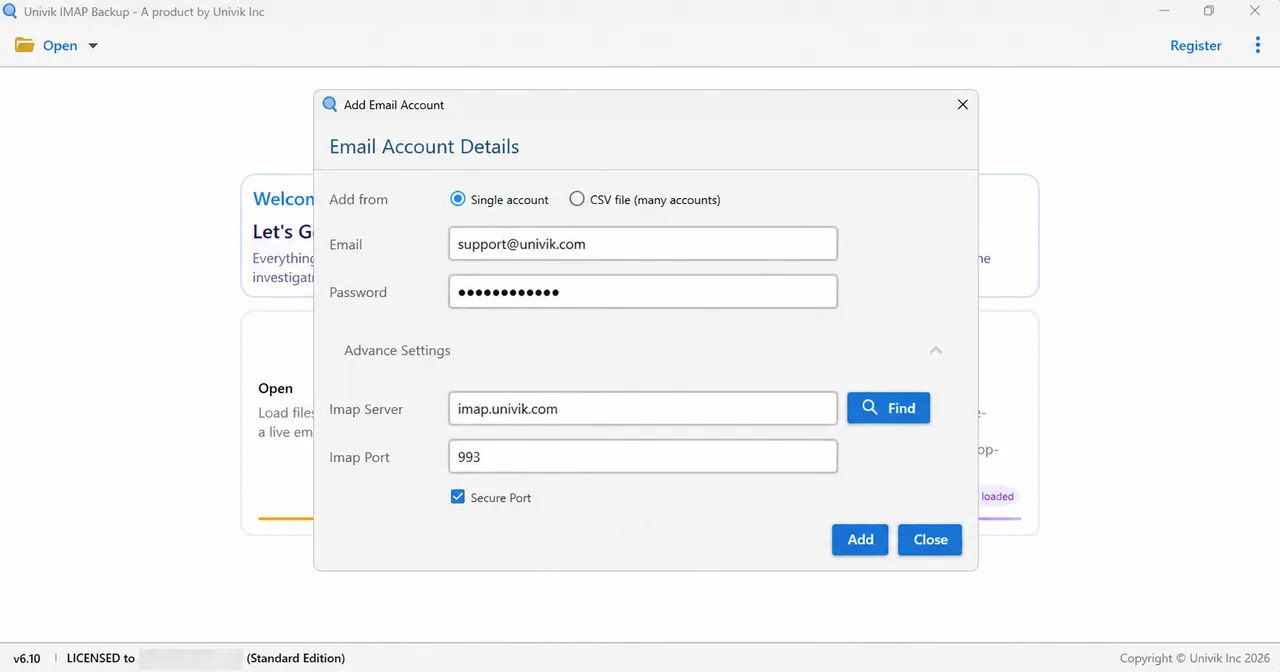
On 2 November 2026 I typed Microsoft addresses (Hotmail, Outlook.com and Microsoft 365) into Add account. Every address I tried opened a Microsoft sign-in page in my browser right away and no server fields appeared.
Choose a Format From Email Files
Tick the folders you want to keep and choose Export. Email Files lists EML, MBOX and PST. Pick a format by where the mail goes next. Outlook reads the PST files (export IMAP to PST). EML gives you one file for each message in the folder (export IMAP to EML). Thunderbird imports the MBOX files (export IMAP to MBOX).

Why Can the First Export Come Out Empty?
One switch decides whether anything gets written: the Minimum Attachment Size to Export box already has 35 MB typed in when the window opens. That filter left the output empty on my first PST run, so check it before you select Save. After I switched it off, a trial run produced 10 files for an INBOX of 65 and all 6 messages of Trash.
What Did the Default Filter Skip in a Test Mailbox of 173 Messages?
Univik IMAP Backup Trial Edition 6.10 wrote nothing on its first PST run of a test mailbox on no provider's server (27 October 2026). The table holds what the screen and the files reported.
| Check | Result |
|---|---|
| Filter at the start | Minimum Attachment Size to Export on at 35 MB, which is the default |
| Messages written | 0 |
| Message on screen | "173 emails were skipped because the Minimum Attachment Size Filter is on and none of them has an attachment of 35 MB or more." |
| Largest attachment in the sample | 5 MB (5,242,880 bytes) |
| After the option went off | The run finished with a success banner and the trial notice about 10 items from each folder |
My verdict: If you only read mail, you don't need to care what runs behind the host name. If the mailbox belongs to your domain, your hosting plan or an account you may leave, save a copy before the server's owner changes anything.
- Dovecot, Cyrus IMAP, Courier-IMAP, hMailServer, Exchange Server and Exchange Online are six server programs and services that publish their own documentation.
- Exchange Online uses outlook.office365.com for IMAP4 and smtp.office365.com on port 587 with STARTTLS for sending.
- RFC 9051 puts every IMAP connection into one of four states: Not Authenticated, Authenticated, Selected and Logout.
- IDLE from RFC 2177 lets a server announce new mail, with clients restarting the command at least every 29 minutes.
- An IMAP mailbox exists once on the provider's server, so closing the account or emptying Trash removes that single copy.
- A 35 MB default attachment filter skipped all 173 messages of a test mailbox on its first PST run, because the largest attachment there was 5 MB.
IMAP Server Questions
What is an IMAP server?
An IMAP server is a mail server that stores your messages, folders and flags and answers requests from mail apps over the IMAP protocol. Your app displays what the server holds, so a phone, a laptop and webmail all show one mailbox. RFC 9051 defines the current version, IMAP4rev2.
Does an IMAP server send my email?
No. An IMAP server hands stored mail to the app on your device. Sending goes through an SMTP server. RFC 5321 states that the objective of SMTP is to transfer mail reliably and efficiently. Microsoft says IMAP4 programs do not use IMAP4 to send messages.
Where does an IMAP server keep my emails?
The server's owner controls the storage that holds them. The format depends on the program. Courier-IMAP uses Maildirs and Dovecot lists dbox, Maildir and mbox among its mailbox formats. Your app only sees folders and messages.
Which programs work as an IMAP server?
Dovecot, Cyrus IMAP and Courier-IMAP are open source programs that serve the IMAP protocol. Exchange Online is Microsoft's hosted service and has IMAP4 on for all users by default. Other providers run their own software behind the host name you type.
Do I need to run my own IMAP server?
No. Your mail provider or hosting company already runs the server for your address. You only need the host name and a sign-in that your provider accepts. Running your own server means you'd also look after TLS and DNS yourself.
How does an IMAP server tell my app about new mail?
The IDLE command from RFC 2177 does that. The app waits and the server announces new messages as they arrive, so the app does not poll. RFC 2177 advises clients to restart IDLE at least every 29 minutes.
Is mail encrypted on its way to an IMAP server?
Yes, when TLS is in use. RFC 8314 prefers Implicit TLS, which starts encryption as soon as the connection opens. It also recommends TLS 1.2 or later. A cleartext connection can switch to TLS with STARTTLS. Check that the Secure Port box is ticked in your app.
Does an IMAP server hold my contacts and calendar?
Not through IMAP. Microsoft says IMAP4 gives basic email features and does not offer the calendaring and contact management of Outlook. Cyrus IMAP lists CardDAV and CalDAV as separate features of the server.
Can I copy mail off an IMAP server to my PC?
Yes. Add the mailbox with its address and password. Then tick the folders and write them out as EML, MBOX or PST files. Compare the count of each folder with the files you saved. The trial edition of the app writes 10 items per folder.


Each source in this list was opened and read on 2 November 2026. Folder counts come from a trial run of IMAP Backup 6.10 on my own test mailbox.
Pages I read: