Quick Answer
To backup Namecheap email, connect your Private Email mailbox over IMAP with your full address and an app password, then save the ticked folders as PST, EML or MBOX files.
Do it while the plan is active. Namecheap locks every mailbox for 30 days after expiry and removes the data 30 days later if nobody reinstates the plan.
Namecheap Private Email is paid mailbox hosting on your own domain, so every message sits on the servers of Namecheap and nowhere on your PC. A copy on your own disk is the only one that does not depend on a renewal date. This guide covers the Private Email product and shows how to save Namecheap emails as files.
My test mailbox is not a Namecheap mailbox, so the file counts in this guide say nothing about Namecheap itself. Every Namecheap fact comes from the help pages of Namecheap, read on 2 November 2026.
Which Host Does Every Namecheap Private Email Mailbox Use?
One host serves all of them, whatever domain a mailbox belongs to. Your domain changes only the user name, which is your full address. The Thunderbird setup page from Namecheap gives the host with port 993 and SSL/TLS. Univik's Namecheap Private Email IMAP settings page adds the POP3 and SMTP values.
name@yourdomain.comYour complete Private Email address, including your own domain.- Password
- An app passwordIt keeps working after you change your webmail password.
- Imap Server
mail.privateemail.comType this host exactly as written.- Imap Port
993993 is the default in the field.- Secure Port
- Ticked (SSL/TLS)Leave the box ticked.
Find fills in a server guessed from your address. Check its guess against the card before pressing Add. A backup sends no mail, so no SMTP server is needed.
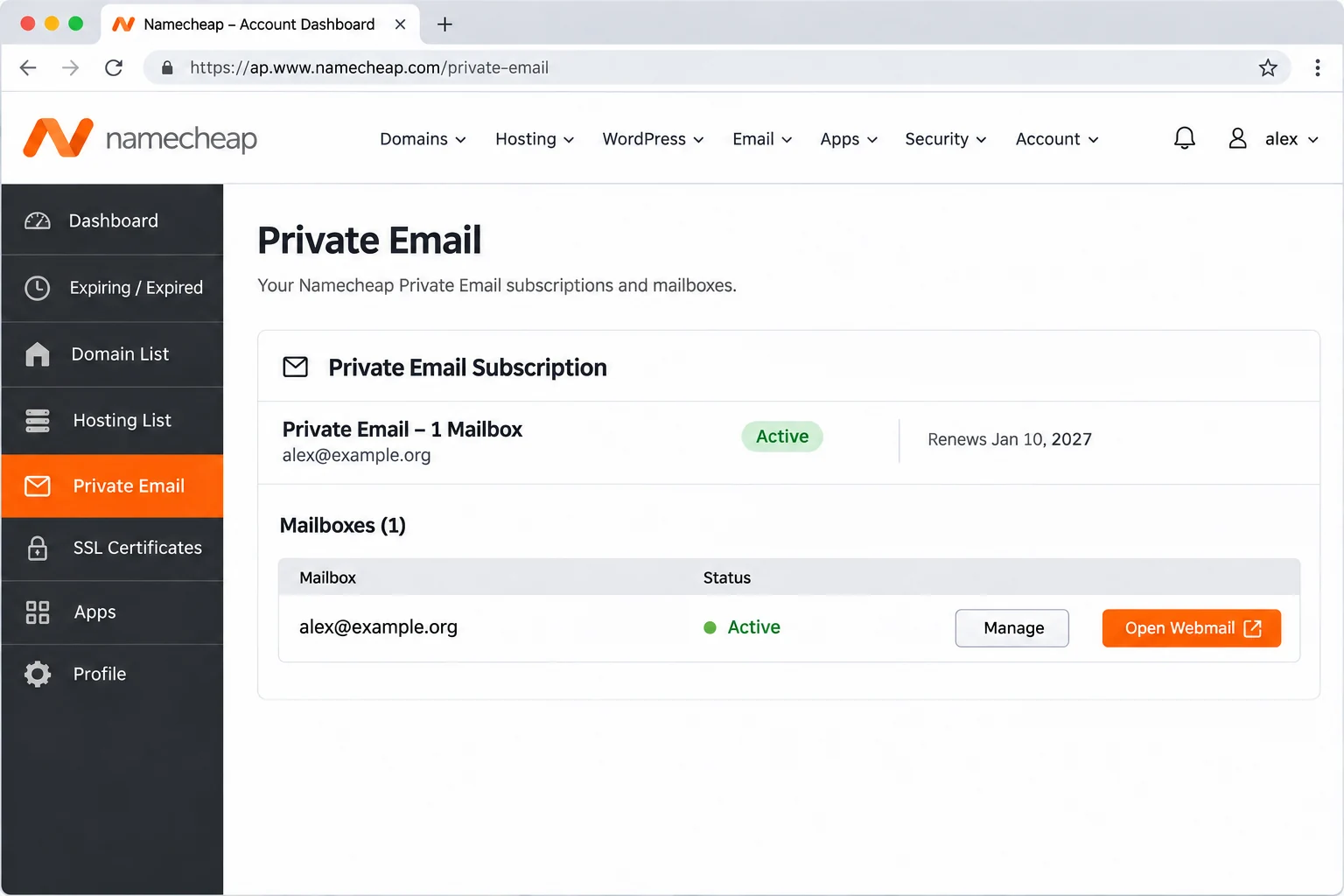
Is Your Namecheap Mail Private Email, Hosting Mail or Free Forwarding?
Namecheap sells three kinds of email under one brand. Only Private Email uses the values from the card above, so a backup app signs in to that type alone. Namecheap says that protocol access is on by default for every mailbox, but the owner can switch IMAP off in webmail under Connect third-party apps.
| Namecheap email type | Where the mail lives | IMAP backup |
|---|---|---|
| Private Email | A mailbox on Namecheap's Private Email servers | Yes, this guide |
| Free email forwarding | Nowhere. The address is virtual and mail goes on to another inbox | Back up the inbox that receives the forwarded mail |
| cPanel email on hosting | Your shared hosting account | A separate service, covered by a hosting email backup guide |
Free forwarding cannot run beside Private Email on one domain. If your domain used forwarding first, older mail sits in the inbox that received the forwarded copies.
What Happens to Namecheap Mail When a Private Email Plan Expires?
A lapse works in stages. The billing article from Namecheap sets out the clock. Each stage changes what a backup can reach.
| Stage | Length | Your mail |
|---|---|---|
| Grace | 30 days | Mailboxes cannot be opened and nothing is sent or received. No data is lost and a normal renewal restores the access |
| Redemption | 30 days | Support can reinstate the plan at the regular renewal rate. Only mailbox content comes back, so calendar and contact data may be lost |
| Canceled | After redemption | The subscription is removed from the server and all data is lost |
A backup login fails while the mailboxes are locked, so renew first if the date has passed. Then save your files before the next renewal date. The Expiring Soon section of your Namecheap account lists plans near the end.
Does Moving Your Domain Away from Namecheap Move the Mailbox?
Not by itself. Namecheap's DNS records article covers domains registered elsewhere. Such a domain still needs the Private Email records added at its DNS provider. A change of the nameservers can take up to 48 hours, so new mail may land in two places during the move.
The pages read for this guide do not say what happens to stored mail when a domain leaves, so save a copy first.
Why Does Your Webmail Password Fail in a Backup App?
Private Email can hold two passwords. A new mailbox starts with one password for both the webmail and the apps. Once the webmail password changes, the link breaks and only an app password signs in to IMAP.
| Mailbox history | What the Password box takes |
|---|---|
| Webmail password never changed | The same password you use in webmail |
| Webmail password changed later | An app password. The new webmail password now works in webmail only |
| All app passwords deleted | Nothing signs in until you make a new app password in webmail |
An app password has six groups of four characters joined by hyphens, 29 characters in all. Webmail shows it only once, so copy it before you close the window. Make it under Settings and Security Center on the App passwords tab. The app password guide from Namecheap lists each click. Deleting an app password disconnects every app that uses it.
Does Namecheap's Daily Server Backup Replace a Copy on Your PC?
Namecheap states that the Private Email backups run daily and are kept for up to 4 weeks. That is a safety net held on the Namecheap side and not a file you can open. Two Namecheap pages set limits on it. Mail removed by a filter rule is not in the server backups. A mailbox you delete takes its emails, contacts and calendars off the server with no way back.
An IMAP app adds no second copy of its own, because a folder change made in any app reaches the server. Our guide on is IMAP a backup shows what that means for a login on its own. Saved files are the copy that stays put when the mailbox changes.
How Much Mail Can a Namecheap Private Email Plan Hold?
Namecheap's plan comparison lists a default quota of 5 GB per mailbox on Launch, 10 GB on Expand and 15 GB on Scale. Space can move between the mailboxes with Edit Storage, while the plan total stays fixed. The Mailboxes section of your Namecheap account shows usage per mailbox, which tells you how much of the free disk space to set aside.
Who Needs a Namecheap Private Email Backup?
- Domain owner Your plan may lapse or you may switch to cheaper hosting. Keep your mail as files before the move.
- Small business owner A staff member leaves and you plan to delete the mailbox, which Namecheap cannot restore.
- Administrator You are moving the domain to another mail host and want a clean copy before email migration software carries the mail across.
- Records keeper You need years of client mail stored as files that your own archive tools read.
How Do You Backup Namecheap Email Step by Step?
Enter the card values, tick the folders you want, pick a format under Export and press Save.
I tested with Univik IMAP Backup, IMAP backup software that runs on Windows and logs in to a live mailbox with only an address and a password.
- Add the account. Add account sits under Email Accounts in the Open menu. Put your complete address in Email and the app password in Password. Under Advance Settings, type the Private Email host from the card into the Imap Server box. The default 993 in Imap Port and the ticked Secure Port can stay as they are. Finish with Add.
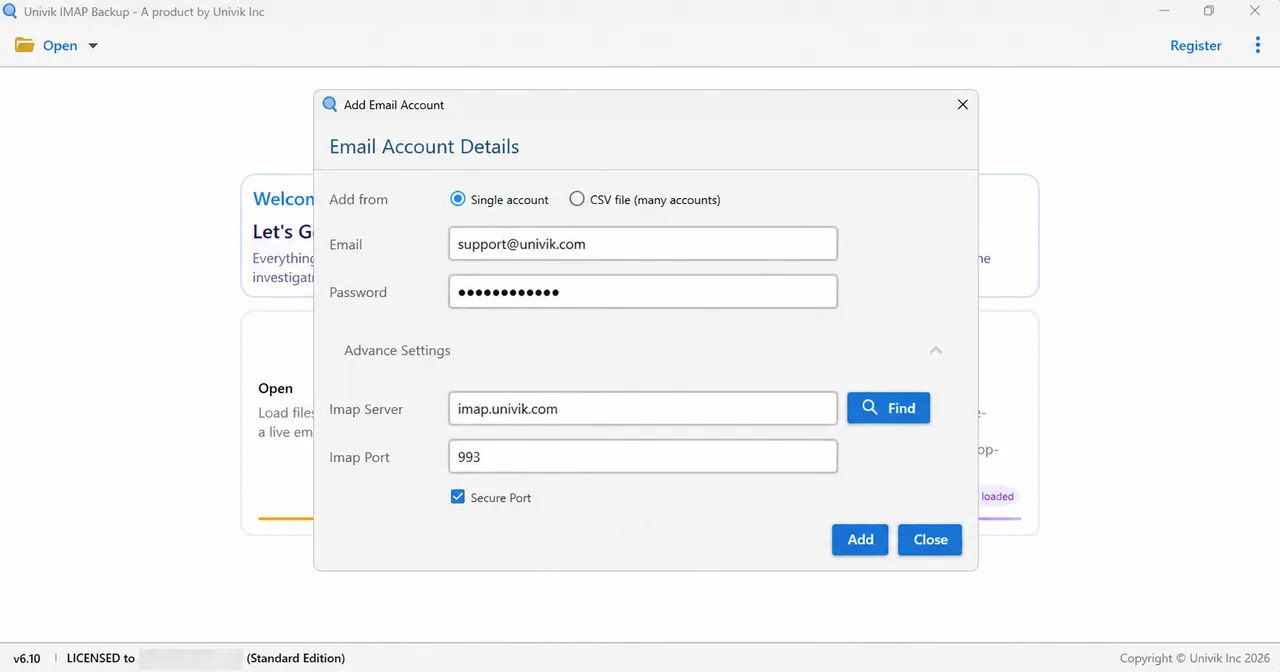
Advance Settings holds Imap Server and Imap Port. - Choose your folders. The tree gives every folder a count and a tick box. Tick Inbox, Sent, Archive and any of the folders you made yourself. Clear Trash and the spam folder if the copy does not need them.
- Pick a format. Open the Export menu. EML, MBOX and PST sit together under Email Files, so select the one that suits your next step.

Export menu, Email Files group. - Read the size switch. Minimum Attachment Size to Export is already on when the screen opens, with 35 MB in its box. In my first PST test no file came out. The screen reported 173 skipped emails and pointed at this filter. Read its value before a real run and switch it off if it hides your mail.
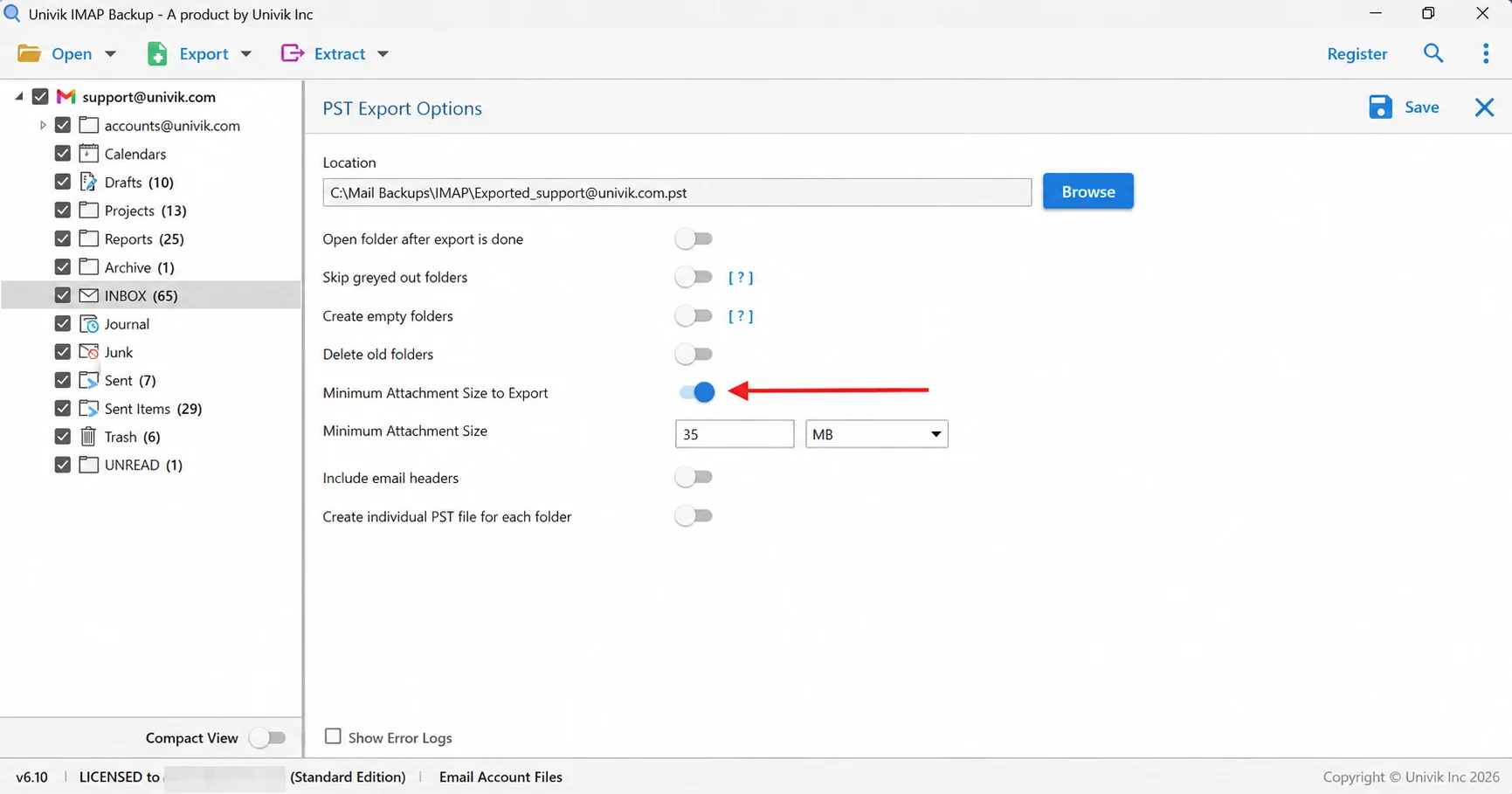
Arrow on the 35 MB filter that emptied my first export. - Run the export. Select Save in the top right corner and wait for the green bar. Next open your output folder and check how many files each folder produced against the tree. A trial copy writes at most 10 items from any one folder.
Which File Format Suits a Namecheap Email Backup?
Match the format to the program that will open the copy.
| Format | What you get | Pick it for |
|---|---|---|
| Export IMAP to PST | A single Outlook data file or one PST per folder | Outlook users |
| Export IMAP to EML | A separate .eml file for every message, placed in folders that copy your tree | Plain files with no mail program needed |
| Export IMAP to MBOX | Each ticked folder becomes a single .mbox file | Thunderbird users |
To look inside a finished PST without Outlook, open it in a PST viewer.
Why Does a Namecheap Backup Lack Mail You Remember Receiving?
Four Namecheap behaviours can leave mail out of the mailbox before a backup starts.
- Filter rules Mail that a webmail filter deleted never reaches a backup. Namecheap cannot recover it from the server.
- Forwarding A forwarding rule can send mail on without leaving a copy in the mailbox.
- POP3 devices A POP3 client may delete the server copies after a download, so older mail can sit only in the local folders of that client.
- A full mailbox A full Private Email mailbox can stop the arrival of new mail.
Once those are clear, count the files. The tree shows a total beside each folder. In the test mailbox the tree showed Inbox at 65 and Sent Items at 29, yet each gave only 10 files in the trial run. A folder holding 10 gave 10 files and a folder holding 6 gave 6. That mailbox lives on another service, so use the numbers only to learn how the check works.
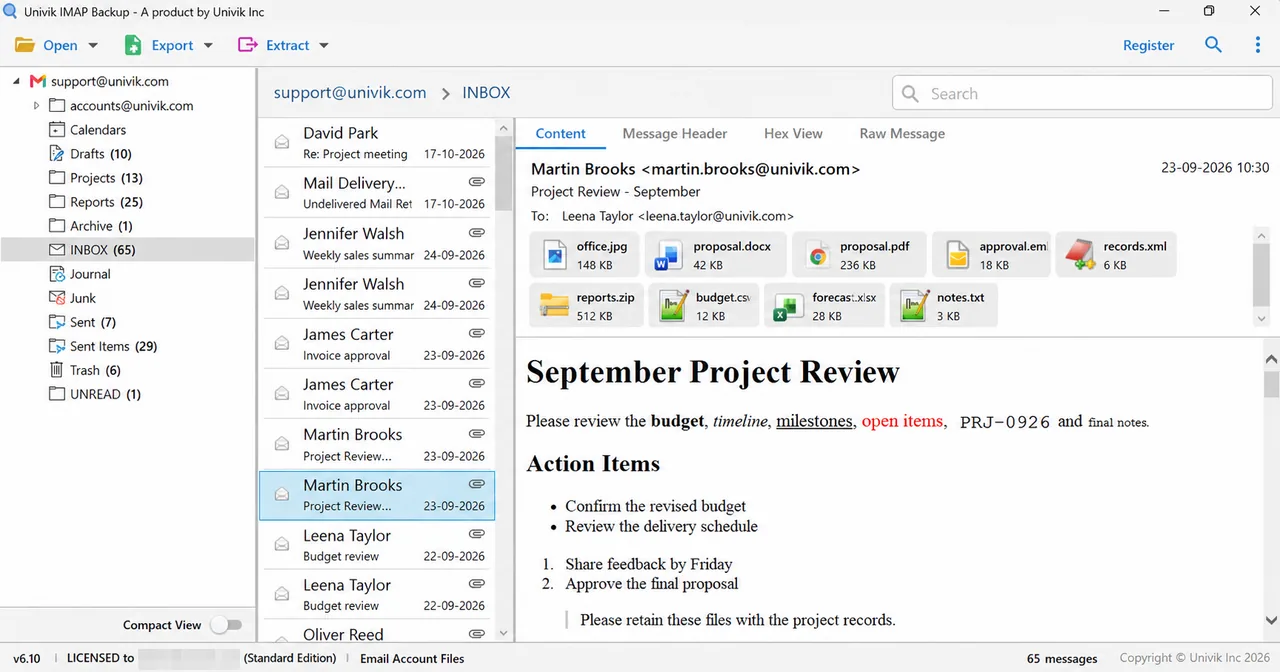
According to the trial dialog, a licensed edition exports every mail, so the file counts then match the tree. Open any folder that still differs first.
What If Your Namecheap Email Backup Looks Like This?
Do this: Make an app password in the webmail and type it in the Password box. A webmail password changed after the mailbox was created no longer signs in to IMAP.
Do this: Check two points. IMAP may be switched off under Connect third-party apps. The plan may also sit inside the 30-day grace period.
Do this: Open the App passwords tab in Security Center and see whether one was deleted. Namecheap says mail app settings stay valid while it moves existing mailboxes to its new platform later in 2026.
Do this: With Minimum Attachment Size to Export switched on, my PST test produced nothing. Turn it off, then press Save again.
Did your Namecheap export turn out differently? Write to Univik support and describe it.

FAQ: Backup Namecheap Email
How do I backup Namecheap email?
Make an app password in Private Email webmail first. Open Add account in the app, enter your full address with the new app password and put the Private Email host in Imap Server. Leave 993 and the ticked Secure Port alone. Tick your folders, pick PST, EML or MBOX and select Save.
How long does Namecheap keep my mail after Private Email expires?
The mailboxes are locked for a 30-day grace period and no data is lost. A 30-day redemption period follows, when only support can reinstate the plan. After that Namecheap removes the subscription and all of the data in it.
What do I type as the password for a Namecheap Private Email mailbox?
A new mailbox uses one password for both the webmail and the apps. After you change the webmail password, the box needs an app password, because the new webmail password works in webmail only. Make an app password under Settings and Security Center in webmail.
Can I backup Namecheap email forwarding addresses?
No. Free email forwarding creates a virtual address and passes the mail on to another inbox, so no Namecheap mailbox exists for the app to sign in to. Back up the inbox that receives the forwarded mail instead.
Does Namecheap keep its own backup of my mailbox?
Namecheap says the Private Email backups run daily and are kept for up to 4 weeks. They sit on its side and are not a file you hold. Mail removed by a filter rule is not in them.
Which format suits a Namecheap Private Email backup?
PST suits Outlook. EML gives each mail its own file and needs no mail program. MBOX suits the Thunderbird client.
How do I know my Namecheap email backup is complete?
Open each output folder and count its files against the tree. My trial run wrote 10 files from a folder of 65, so equal counts need a licensed edition.
Can I try a Namecheap email backup before buying?
Yes. A trial copy saves 10 mails from each folder, enough to check that the login works and the folders appear in the tree. A purchased licence writes every mail.

Checked against Namecheap's own help pages on November 2, 2026. IMAP Backup 6.10 ran the test exports. Each file count here comes from a test mailbox on another service.
Pages we read: