Quick Answer
To backup Comcast email, tick Third Party Access Security in Xfinity Email, then sign in over IMAP to imap.comcast.net using port 993 with SSL. Type your whole comcast.net address as the user name and your Xfinity ID password as the password.
Xfinity names no app password for this login. Next tick the folders you want and save them on your PC as PST, EML or MBOX files before service ends or your mailbox moves to Yahoo Mail.
Comcast keeps your @comcast.net mailbox on Xfinity servers. Xfinity also decides when the mailbox closes. A copy on your own PC outlives the plan you cancel, a quiet account and a move to Yahoo Mail. Some people search this job as backup comcast email and others as xfinity email save, yet both need the same copy of the same mailbox.
I tested the steps in an IMAP backup app with a mailbox that is not a Comcast one, so every file count comes from that mailbox. Each Xfinity rule comes from the support pages of Xfinity, read on 2 November 2026.
What Does an @comcast.net Mailbox Need in the Add Email Account Window?
Put imap.comcast.net into Imap Server, leave 993 in Imap Port and keep Secure Port ticked. Each field of the window appears in the yellow card. Xfinity's own email program setup page gives the same server and port and asks for your full comcast.net address as the user name.
name@comcast.netWhole address, ending in @comcast.net.- Password
- Your Xfinity ID passwordThe password from connect.xfinity.com.
- Imap Server
imap.comcast.netType this exact name.- Imap Port
993Default value is 993.- Secure Port
- Ticked (SSL)Ticked from the start. Keep it that way.
Find fills in a server name from your address. Check any suggestion against the card before pressing Add. No SMTP server is needed because nothing is sent. Use these values only while your mailbox still runs on Xfinity Email.
Why Does a Correct Password Still Fail Until Third Party Access Security Is Ticked?
Xfinity keeps one box on the account that decides whether any program outside its website may open the mailbox. With the box clear, Xfinity says setup in a third-party program ends in an error message even when the password is right. In Xfinity Email on the web, select the gear icon, then Settings, then the Security tab and tick Third Party Access Security. The full click path sits on Comcast Email IMAP settings beside the SMTP and POP3 values.
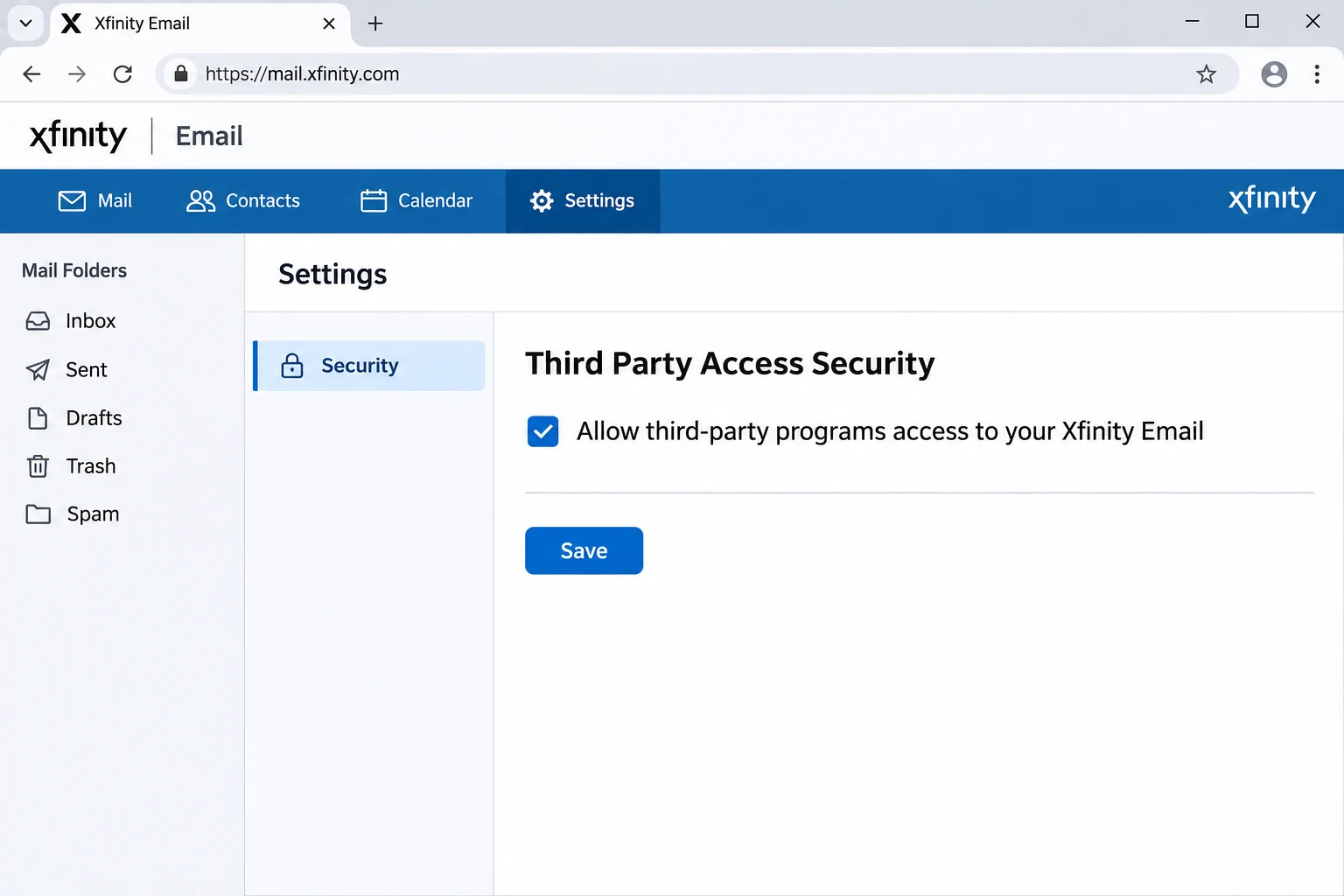
Xfinity warns that outside programs can expose your Xfinity ID and password to fraud. Untick the box after the backup unless another mail program needs it.
Does Xfinity Give You an App Password for a Backup Login?
Not on the email program pages of Xfinity. Those pages name an Xfinity ID and password and mention no app password or secure code. With Third Party Access Security ticked, the Password box takes the password you use at connect.xfinity.com. After a reset, type the new one in the app. An upgraded mailbox uses Yahoo sign-in details instead.
Is a Mail App Signed In to imap.comcast.net a Backup of Your Xfinity Mail?
No. Xfinity recommends IMAP because your folders and mail stay on its server and changes sync across devices. A mail program on IMAP therefore mirrors the mailbox and holds no archive of its own. Is IMAP a backup? explains the gap. Files on your PC are the part that stays put when the account closes.
What Happens to imap.comcast.net If You Accept the Yahoo Mail Upgrade?
Xfinity is inviting comcast.net users to move to Yahoo Mail at no cost, with invitations arriving gradually through 2026. The upgrade is optional and your address stays the same. After you accept, you reach your mail through Yahoo Mail and re-add the account in Outlook or iOS Mail with Yahoo Mail information. The Xfinity Email service stops working for that account. The values for an upgraded mailbox are on Yahoo Mail IMAP settings.
- Forwarding Forwarding settings are not moved, so you set them up again.
- Folders Only up to 4,100 folders move. Extra folders are combined into one and folders named like Yahoo system folders are renamed.
- Large mail Messages with attachments totalling more than 25 MB go to a separate folder and you get 30 days to download them.
A copy made over IMAP before you accept keeps the folder names and large messages as they stand today.
What Does Xfinity Delete When Service Ends or Sign-Ins Stop?
Xfinity lets a former customer keep a comcast.net address only after a sign-in on the Xfinity Email website before service ended. Its pages then give two different activity windows, so the table lists each rule.
| Rule | What Xfinity states |
|---|---|
| Keeping the address after cancelling | Sign in on the Xfinity Email site during the 90 days before service is disconnected |
| Cancellation pages | The account stays active if you sign in at least once every nine months |
| Activity policy | Access at least once every 24 months, by website or third-party client |
| After an inactive flag | Xfinity closes the address after a 90-day notice window and the contents are not recoverable |
| Mailbox size | 10 GB of email storage per account |
The two windows disagree, so plan around the shorter one. Xfinity also runs an export portal at export.xfinity.com, where download links last 14 days after the export finishes. Files on your PC carry no such clock.
Who Should Save Xfinity Emails Before Service Ends?
- A former customer You kept the comcast.net address and want the mail saved before the account goes quiet.
- A customer about to cancel You are changing provider and want the folders stored as files first.
- An invited user Xfinity offered the Yahoo Mail upgrade and you want today's folder tree on disk first.
- A long-time POP user An old program pulled your mail down and you want to see what still sits on the server.
How Do You Backup Comcast Email Once Third Party Access Is On?
I ran my test in the Univik IMAP Backup app. It is IMAP backup software for Windows and it signs in to a mailbox over IMAP directly. No Outlook profile has to exist first.
- Connect the mailbox. From the main window select Open > Email Accounts > Add account. Type the full comcast.net address into Email and the Xfinity ID password into Password. Expand Advance Settings and type imap.comcast.net as the Imap Server. The Imap Port field already shows 993 and the Secure Port box starts ticked, so press Add.
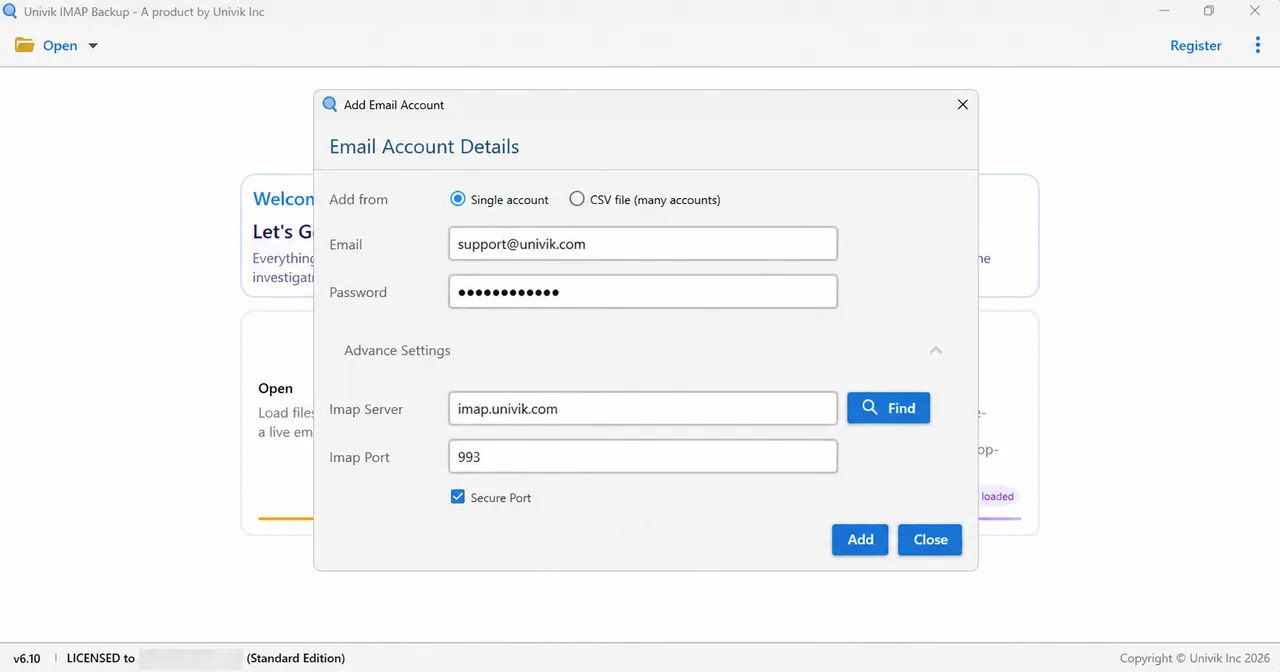
Advance Settings in the Add Email Account window holds the Imap Server and Imap Port fields. - Tick the folders. Each folder row carries a tick box plus its mail count. Tick what you want to keep and write down the counts of the biggest folders for the final check.
- Choose the format. Select Export. The Email Files group holds EML, MBOX and PST.

Email Files in the Export menu lists EML, MBOX and PST. - Review the size switch. Minimum Attachment Size to Export is on from the start with 35 MB set. On my test mailbox the first PST export wrote 0 messages with this switch on. Switching it off fixed that, so check it before every export.
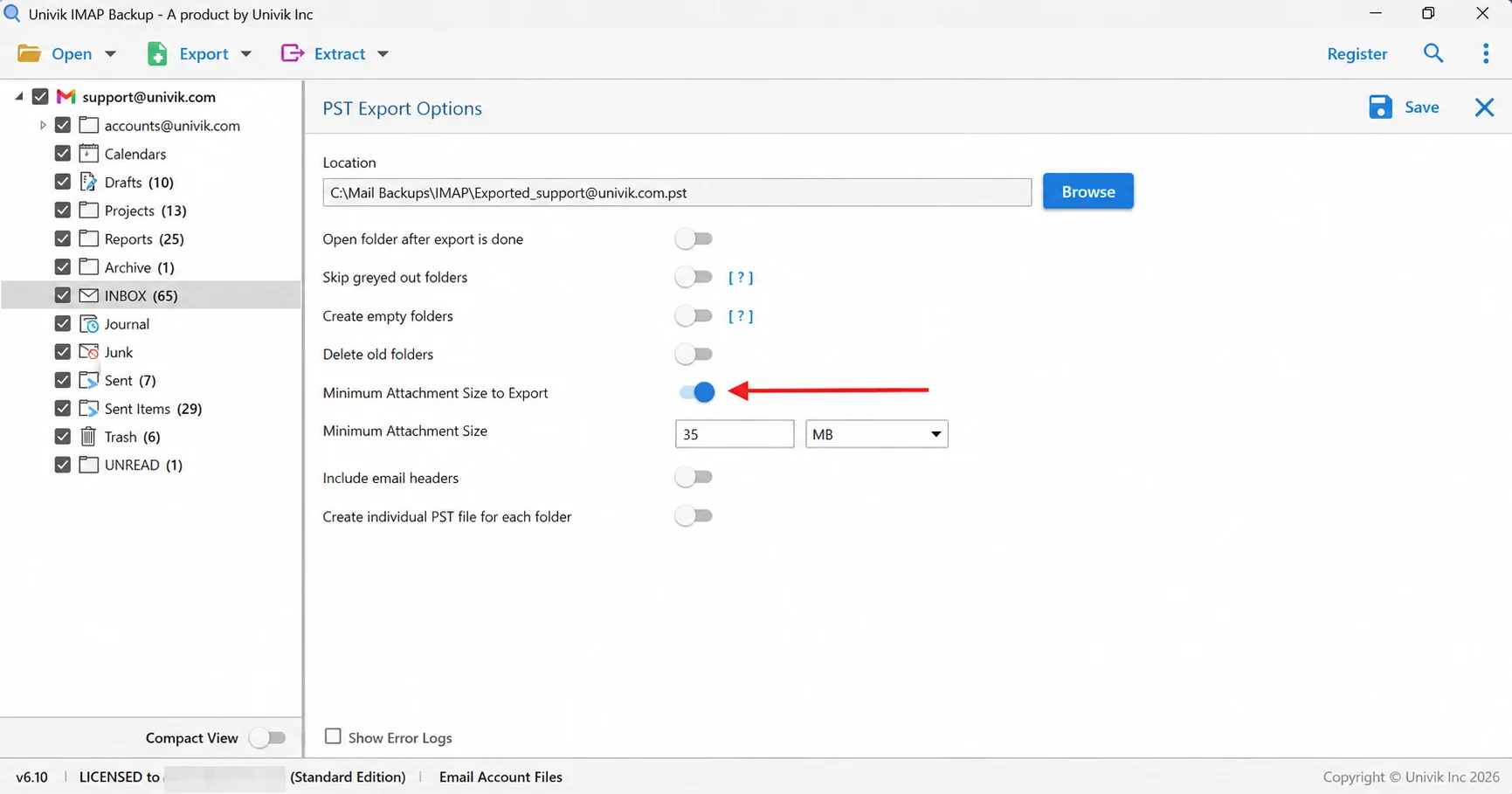
The arrow marks the switch that starts on at 35 MB. Check it before each export. - Save and count. Press the Save button in the top right corner and watch for the success banner. Open your export folder afterwards and compare the file count of each folder with your notes.
Which File Format Suits a Comcast Mailbox You Plan to Keep?
Export offers three email file types. Match the type to your next use of the copy.
| Format | What you get | Fits |
|---|---|---|
| IMAP to PST guide | One PST file or one file per folder | Reading the file in Outlook |
| IMAP to EML guide | One .eml file per message in a folder tree | Plain files that need no mail program |
| IMAP to MBOX guide | One .mbox file per ticked folder | Reading the mail in Thunderbird |
A finished PST opens in an Online PST Viewer and a finished MBOX opens in an Online MBOX Viewer.
Why Is Mail Missing from a Comcast Backup When Outlook Used POP?
The FAQ of Xfinity names the most common cause of missing Inbox or Sent mail. A third-party program uses POP access to fetch mail and does not leave a copy on the server. An IMAP backup can only copy what still sits on the server, so mail that an old POP program pulled down and removed lives in the data file of that program. Check the old files before you assume anything was lost.
Size is the second limit. Xfinity gives each mailbox 10 GB and warns that a full mailbox may stop sending or receiving. Check the free space on the target drive before you press Save.
My test mailbox is not a Comcast mailbox. Its tree listed 65 mails in INBOX and 29 in Sent Items. The trial copied 10 from each, while Drafts with 10 and Trash with 6 came across in full.
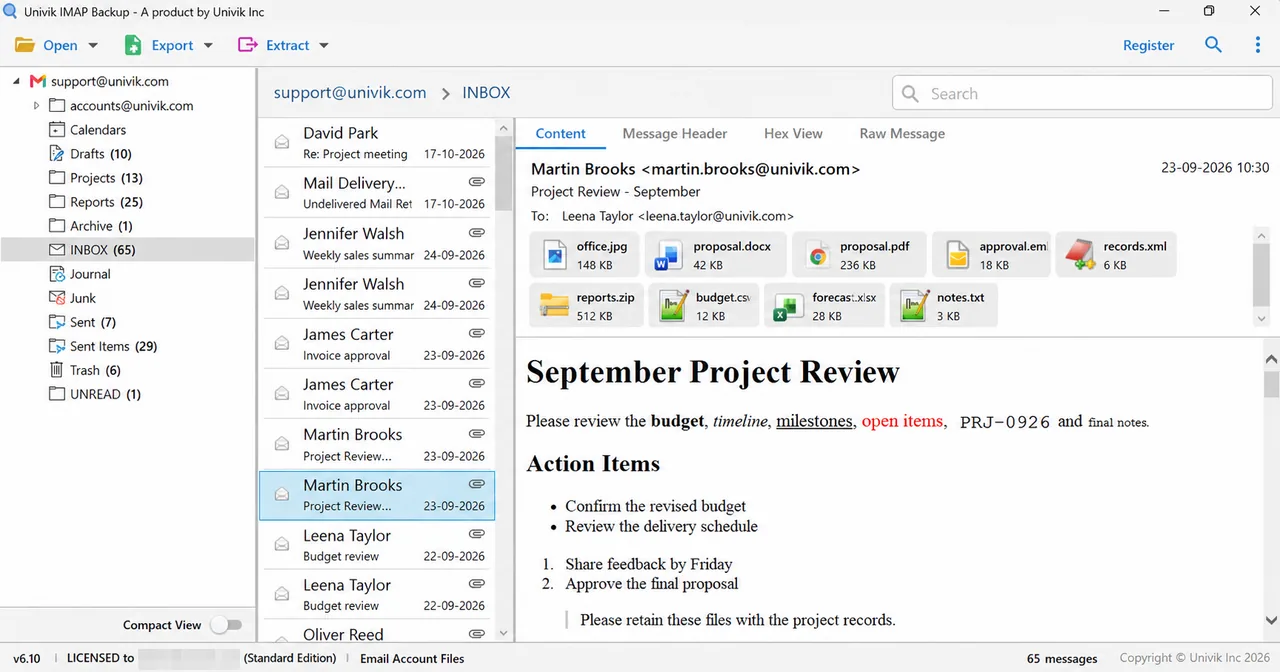
| Folder in test mailbox | Mails listed | Mails written |
|---|---|---|
| Sent Items | 29 | 10 |
| INBOX | 65 | 10 |
| Trash | 6 | 6 |
| Drafts | 10 | 10 |
With a licensed edition of Univik IMAP Backup every mail is exported and the file totals should equal the tree counts. Open any folder that differs first.
What Should You Do If a Comcast Backup Behaves Like One of These?
Do this: Tick Third Party Access Security under Settings and Security in Xfinity Email. Then compare the Imap Server box with imap.comcast.net letter by letter.
Do this: Sign in at connect.xfinity.com rather than an account page. If the setting is still missing, ask Xfinity support about third-party access for your account type.
Do this: Stop using the card values. Xfinity says to re-add the account with Yahoo Mail information, so use the Yahoo values for the Imap Server and Password.
Do this: Read Minimum Attachment Size to Export on the export screen. It starts switched on at 35 MB. Turn it off, then run the export once more.
Do this: A Demo Edition dialog announces the 10-item trial cap. A licence removes it.
Did something else happen on your Comcast mailbox? Send a note to Univik support.
- Backing up Comcast email means signing in to imap.comcast.net on port 993 with SSL and your full comcast.net address.
- Xfinity refuses third-party programs until Third Party Access Security is ticked.
- Accepting the Yahoo Mail upgrade ends Xfinity Email for that account.
- A closed mailbox is not recoverable, so a copy on your PC is the safe one.

FAQ: Backup Comcast Email
How do I backup Comcast email?
Tick Third Party Access Security in Xfinity Email first. Then connect the mailbox in an IMAP backup app with your full comcast.net address and Xfinity ID password. Enter imap.comcast.net under Imap Server with port 993 and Secure Port ticked. Then choose the folders, pick PST, EML or MBOX under Export and press Save.
Which server do I type to save Xfinity emails to my PC?
Enter imap.comcast.net under Imap Server. Imap Port holds 993 by default and Secure Port is ticked by default. This applies while your mailbox still runs on Xfinity Email.
Which password do I type when I backup Comcast email?
Your Xfinity ID password, once Third Party Access Security is ticked. The email program pages of Xfinity name no app password or secure code for this login.
Why does my Comcast email login fail when webmail works?
Usually the Third Party Access Security box is clear. Xfinity says setup in a third-party program then ends in an error message even with the right password. Tick the box under Settings and Security in Xfinity Email.
What happens to my comcast.net mailbox when I cancel Xfinity service?
You keep the address if you signed in on the Xfinity Email website in the 90 days before disconnecting. After that Xfinity states nine months on its cancellation pages and 24 months in its activity policy. An address flagged inactive closes after a 90-day notice window and the contents are not recoverable.
Should I backup Comcast email before I accept the Yahoo Mail upgrade?
Yes. Once you accept, Xfinity Email stops working for that account and forwarding settings are not moved. Messages with attachments totalling over 25 MB go to a separate folder with 30 days to download. A copy made first keeps your folders as they are today.
Is IMAP or POP3 the right way to backup Comcast email?
Use IMAP. Xfinity strongly recommends it and names POP programs that leave no server copy as the most common cause of missing Inbox or Sent mail.
How can I tell that my Comcast email backup is complete?
Count the files in each exported folder and set that against the number beside the folder in the tree. In my test mailbox (not a Comcast one) the trial saved 10 of 65 INBOX mails, so only a licensed copy matches every count.
Can I try the Comcast email backup before buying?
Yes. The trial yields 10 mails per folder, enough to test the login.

Prepared on November 2, 2026 with IMAP Backup 6.10 open beside Xfinity's support pages. Every count on this page comes from a mailbox that is not a Comcast one, opened in the trial edition.
Pages we read: