 Email Settings Guide
Quick answer: Cox handed its email to Yahoo, so a @cox.net address now uses Yahoo servers. Incoming is imap.mail.yahoo.com on port 993 (or POP pop.mail.yahoo.com on 995), outgoing is smtp.mail.yahoo.com on port 465, all SSL. The username is your full cox.net address. The password must be a Yahoo app password, not your old Cox password. The old imap.cox.net and smtp.cox.net servers no longer work.
What Changed Recently#
Related email providers: Spectrum email settings, CenturyLink IMAP settings, Frontier email settings, EarthLink IMAP settings, Mediacom email settings, Optimum IMAP settings
Email providers change login rules more often than server addresses. The whole story here is one big change: Cox stopped running email. Here is what that means for a cox.net address in 2026.
Latest update
Cox email moved to Yahoo, finished in early 2025. Cox exited the email business and handed every cox.net mailbox to Yahoo. You keep your address, messages, folders and contacts, but the mail now lives on Yahoo's servers. Yahoo, not Cox, provides all email support. Any setup still pointing at imap.cox.net or smtp.cox.net stopped working when your account moved.
Earlier change
Third-party apps need a Yahoo app password now. Because it is a Yahoo mailbox, Outlook, Apple Mail and Thunderbird will not accept your regular password. You generate a Yahoo app password once and paste that in the app instead. This is the single most common reason a migrated cox.net account stops sending or receiving.
Earlier change
Scam emails spiked during the switch. Fraudsters used the confusion to send fake Cox and Yahoo messages asking for your password. The real move only ever asks you to sign in at the official transition page and accept Yahoo's terms. Treat any other Cox email alert, especially one with a link and a deadline, as a scam.
Before You Begin#
Two things decide whether a cox.net account will connect at all. Neither is a server value. Miss either one and every other setting is pointless.
1. Your account must be migrated to Yahoo
Until Cox moved your address to Yahoo and you accepted Yahoo's terms, nothing connects. If webmail still looks like old Cox mail, the move has not finished. Sign in at the transition page first to complete it.
Where: The Cox to Yahoo sign-in →
2. Generate a Yahoo app password
Your regular password does not work in Outlook, Apple Mail or any third-party app on a Yahoo mailbox. You need a Yahoo app password, a one-time generated code you paste in place of your password.
Where: App password steps below →
About Cox Email#
Cox email is the cox.net service that came with Cox Communications internet, now hosted and run entirely by Yahoo.
Cox ran its own email for decades, then decided to leave the business and move every cox.net mailbox to Yahoo, a transition it finished in early 2025. The practical effect is that cox.net is now a Yahoo account wearing a Cox address. That is why the servers on this page are Yahoo servers and why third-party apps need a Yahoo app password rather than your old Cox password.
| Service Name | Cox Email (cox.net), hosted by Yahoo |
| Run By | Yahoo, since the early 2025 transition |
| Moved to Yahoo | Completed early 2025 |
| Email Domain | @cox.net |
| Webmail | mail.yahoo.com (signs in with your cox.net address) |
| Servers | Yahoo (imap.mail.yahoo.com, smtp.mail.yahoo.com) |
| App Password Needed | Yes, for every third-party email app |
| Storage | 20 GB (Yahoo free tier, reduced from 1 TB in 2025) |
Cox Webmail Login#
After the move, cox.net mail opens inside Yahoo Mail. Sign in with your full cox.net address and your Cox password to accept the transition, then read mail at Yahoo:
Cox Email Is Now Yahoo#
This is the piece that trips everyone up. If your cox.net setup broke on its own, nothing is wrong with your app or password. Cox switched off its mail servers and moved your mailbox to Yahoo, so the old hostnames simply stopped answering. The fix is to swap the Cox servers for the Yahoo ones and sign in with an app password:
Cox (Yahoo) IMAP Settings#
IMAP is the right incoming choice for anyone reading cox.net mail on more than one device, since it keeps everything on the Yahoo server. These are the current values:
| IMAP Server | imap.mail.yahoo.com | |
| Port | 993 | |
| Encryption | SSL/TLS (required) | |
| Username | Your full cox.net address | |
| Password | Yahoo app password, not your Cox password | |
| Authentication | Required |
Cox (Yahoo) POP3 Settings#
POP3 downloads mail to one device and is worth considering here for a specific reason: it pulls a copy onto your own disk, which is a sensible hedge whenever your mail sits with a host that keeps changing hands. Not sure? See the comparison below.
| POP3 Server | pop.mail.yahoo.com | |
| Port | 995 | |
| Encryption | SSL/TLS (required) | |
| Username | Your full cox.net address | |
| Password | Yahoo app password |
Cox (Yahoo) SMTP Settings#
smtp.mail.yahoo.com on port 465 with SSL. Some apps also accept 587 with STARTTLS, but 465 is the value Yahoo lists. The unencrypted ports 25, 143 and 110 do not connect. If your app auto-filled an old cox.net server, replace it with the Yahoo one.
SMTP handles outgoing mail. If you can read but not send, the outgoing server or the app password is the suspect:
| SMTP Server | smtp.mail.yahoo.com | |
| Port | 465 with SSL (or 587 with STARTTLS) | |
| Encryption | SSL (required) | |
| Username | Your full cox.net address | |
| Password | The same Yahoo app password as incoming | |
| Authentication | Required. Tick "My outgoing server requires authentication" and use the same app password as incoming. This is the top reason a migrated account receives but will not send. |
Check Cox IMAP Settings Online#
You don't need to download anything to check Cox IMAP settings online. This page is the lookup. It also confirms the thing that confuses people most: a cox.net address routes to Yahoo servers now. Type your address to see it:
Does my email address use these settings?
Runs in your browser only. Your address is never sent anywhere or stored.
Want to verify the account itself before configuring an app? Sign in at Yahoo Mail with your cox.net address. A working webmail login proves the mailbox has migrated, then all you need is a Yahoo app password and the tables above.
Look Up IMAP Settings for Any Email Domain#
This page covers cox.net. For any other address, our free lookup database imapsettings.com returns the incoming and outgoing servers for any domain in one step.
imapsettings.com
Complete email settings database, by Univik
Enter any email address and get the incoming and outgoing server settings for that domain in 1 step:
Your address is used only to find the settings for that domain. Nothing is stored or shared.
Cox (Yahoo) App Password Setup#
Since cox.net is a Yahoo mailbox, the most common setup failure is using your Cox password where Yahoo wants an app password. Here is which password works where:
| Where you sign in | Regular password | App password |
|---|---|---|
| Yahoo Mail website and Yahoo app | ✓ Works | ✗ Not needed |
| Outlook, Apple Mail, Thunderbird | ✗ Rejected | ✓ Required |
| Phone mail apps (manual IMAP setup) | ✗ Rejected | ✓ Required |
| Clients with a Yahoo sign-in window (OAuth) | ✓ Works | Not needed |
How to Generate a Yahoo App Password for cox.net
- Sign in to your Yahoo Account Security page at login.yahoo.com using your cox.net address and Cox password.
- Open the App Passwords section and select Generate app password (some accounts label it Generate and manage app passwords).
- Select Get started and type a name for the app, for example "Outlook" or "iPhone Mail".
- Select Generate password. Yahoo shows a code once, so copy it now.
- Paste it as the password in your email app, in both the incoming and outgoing sections. Spaces do not matter.
Set Up Cox (Yahoo) in Email Clients#
Generate your Yahoo app password first, then use the Yahoo servers below. One quirk: if the app tries the old cox.net server it will time out. That is expected, just switch the server to the Yahoo one. Jump to your app:
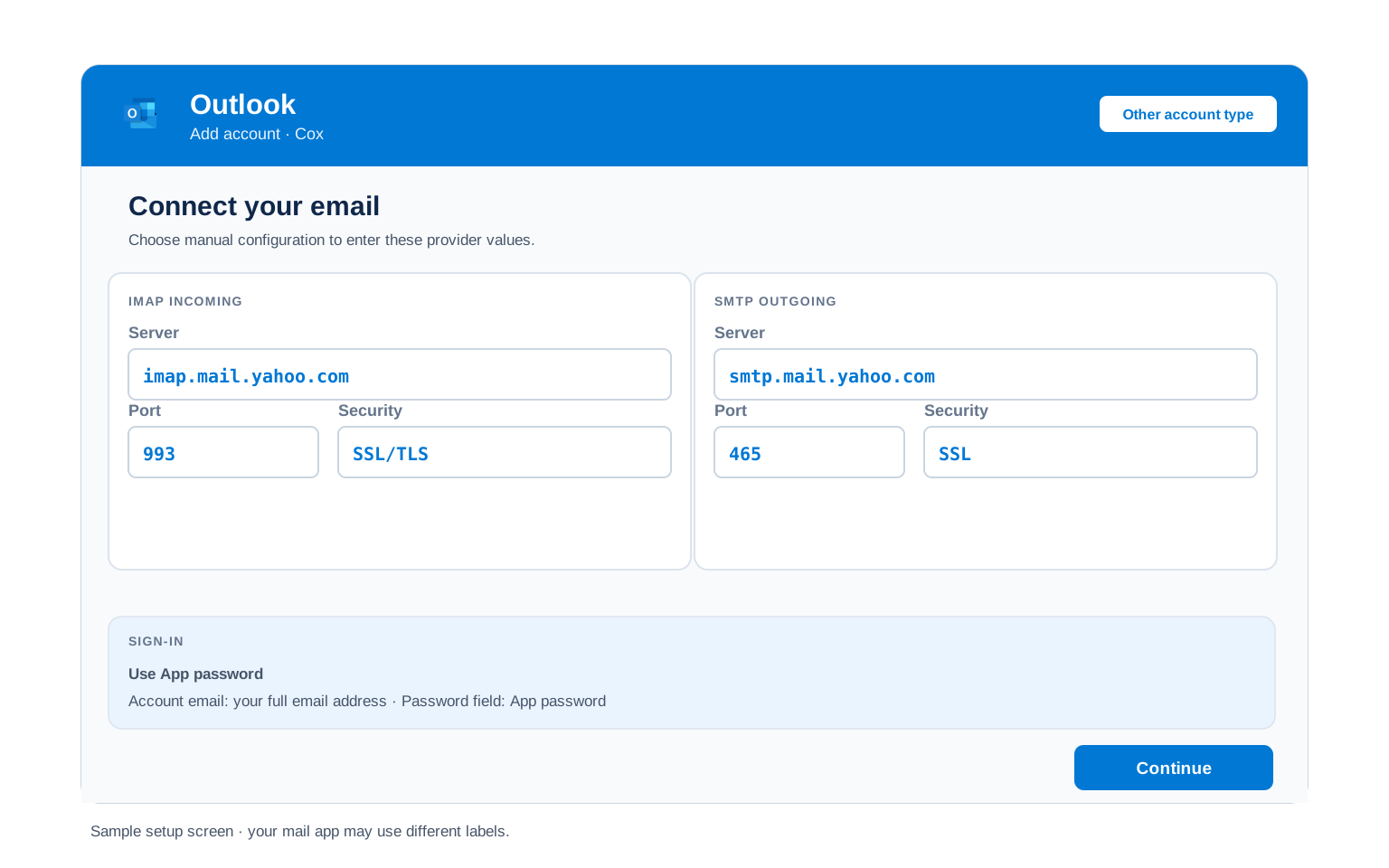
Outlook (Windows and Mac)
- If the account existed before the move, do not re-add it. Open File → Account Settings → Account Settings, select the cox.net account and choose Repair, then Advanced options and "Let me repair my account manually". For a brand new setup, use File → Add Account with "Let me set up my account manually".
- Choose IMAP and enter
imap.mail.yahoo.comport993(SSL) for incoming andsmtp.mail.yahoo.comport465(SSL) for outgoing. - Paste your Yahoo app password when Outlook asks, not your Cox password.
- Open More Settings → Outgoing Server and tick "My outgoing server requires authentication", reusing the same app password.
- Finish and send yourself a test to confirm both directions work.
Apple Mail (macOS)
- Open Mail → Settings → Accounts → Add Account and choose Other Mail Account.
- Enter your name, full cox.net address and Yahoo app password, then continue.
- When the server fields appear, enter
imap.mail.yahoo.comfor incoming andsmtp.mail.yahoo.comfor outgoing. - Set incoming to 993 and outgoing to 465, both SSL, with your full address as the username.
- Enable Mail and finish.
iPhone and iPad
- Open Settings → Apps → Mail → Mail Accounts → Add Account. On newer iPhones you can tap Yahoo and sign in directly.
- For manual setup, tap Other → Add Mail Account and enter your name, cox.net address and Yahoo app password.
- Keep IMAP selected and enter
imap.mail.yahoo.comincoming andsmtp.mail.yahoo.comoutgoing. - Use your full cox.net address as the username in both host fields, even where iOS marks the outgoing one optional.
- Tap Save and wait for iOS to verify.
Android
- Open your mail app (Gmail app, Samsung Email or another) → Add account, then pick Yahoo or choose Other for manual setup.
- Enter your cox.net address and Yahoo app password, then pick Manual setup and choose IMAP if prompted.
- Enter the servers:
imap.mail.yahoo.com993 SSL incoming,smtp.mail.yahoo.com465 SSL outgoing. - Use your full cox.net address as the username on both.
- Finish setup and pull down to sync your inbox.
Thunderbird
- Open Thunderbird → Account Settings → Account Actions → Add Mail Account.
- Enter your name, cox.net address and Yahoo app password, then select Continue.
- Choose Configure manually, since Thunderbird may still guess the dead cox.net servers.
- Enter
imap.mail.yahoo.com(993, SSL) for incoming andsmtp.mail.yahoo.com(465, SSL) for outgoing, authentication set to normal password. - Select Done. Folders sync on first open.
Cox (Yahoo) Webmail Settings#
Server settings connect your apps. These control how the mailbox behaves and, because cox.net is a Yahoo mailbox now, they live in Yahoo Mail under Settings → More Settings.
Signature
Settings → More Settings → Writing email → Signature. A signature set here shows in Yahoo webmail only. Outlook and phone apps keep their own.
Vacation Auto Reply
Settings → More Settings → Vacation response. Give it an end date so Yahoo turns it off for you. It runs from the server, so your computer can be off.
Filters and Folders
Settings → More Settings → Filters. Filters made here run on Yahoo's server, so mail is already sorted before any device syncs. A rule built inside a desktop client only fires while that app is running.
Spam and Blocked Senders
Settings → More Settings → Security and privacy → Blocked addresses. Blocked senders go to Spam. Check the Spam folder before assuming a message never arrived.
Cox POP3 vs IMAP#
The usual trade-off applies, now against a Yahoo server rather than a Cox one.
| Feature | IMAP | POP3 |
|---|---|---|
| Where mail lives | On the Yahoo server | Downloaded to 1 device |
| Multiple devices | ✅ Everything stays in sync | ❌ Each device sees different mail |
| Sent and deleted mail | ✅ Synced everywhere | ⚠️ Stays only on that device |
| Offline reading | ⚠️ Cached mail only | ✅ Full local copy |
| Server storage used | Yes, counts against your quota | Can be freed after download |
| Best for | Phone + computer, everyday use | Single PC, local archives |
Cox (Yahoo) Sending and Storage Limits#
Cox mailboxes now run under Yahoo's limits. One of them changed sharply in 2025. The numbers that matter:
| Mailbox storage | 20 GB free, cut from 1 TB in 2025 |
| Attachment size limit | 25 MB total per message |
| When storage is full | New mail bounces back to the sender until you free space or upgrade |
| Daily send limit | Yahoo sets it, in the range of a few hundred recipients a day for a personal mailbox |
| Paid upgrade | Yahoo Mail Plus adds storage and removes ads, but keeps the 25 MB attachment cap |
Cox Email Not Working After the Yahoo Move#
Find the exact error your email app shows, then apply the fix:
| Error you see | What it means | Fix |
|---|---|---|
| Cannot connect, connection timed out | The app is still pointing at the old cox.net server | Replace it with the Yahoo server. A timeout on imap.cox.net or smtp.cox.net is the classic sign the account has moved. |
| Invalid password, password keeps being asked | The app has your Cox password, not a Yahoo app password | Generate a Yahoo app password and paste it in both the incoming and outgoing fields. |
| Webmail still shows the old Cox inbox | Your account has not migrated yet, so the move is incomplete | Sign in at the Yahoo transition page with your cox.net address and accept the terms to finish the move. |
| Not receiving mail, senders get a bounce | The 20 GB Yahoo mailbox is full | Empty Trash and Spam, delete large attachments, then confirm free space in Yahoo Mail. A full mailbox bounces incoming mail. |
| My folders are missing after switching to Yahoo | Yahoo shows custom folders at the account root, not nested under Inbox | The folders are safe. In your client, subscribe to all IMAP folders and look for them beside the Inbox rather than inside it. In Yahoo webmail they appear in the left menu under your saved folders. |
| Messages stuck in Outbox | SMTP authentication is off or the outgoing server is wrong | Use smtp.mail.yahoo.com on 465 and tick outgoing-server authentication with the same app password. |
Reader Reported Fixes
Delete the account and re-add it after the migration. Many readers report the cleanest fix is to remove the old cox.net account from the app entirely, then add it fresh with the Yahoo servers and a new app password. Editing an old profile in place often leaves a stale cox.net server behind.
On newer phones, use the Yahoo option instead of manual setup. Recent iPhone and Android mail apps let you pick Yahoo and sign in through Yahoo's own window, which skips the app password and server typing. If your device offers it, that is the easiest route for a cox.net address.
Leaving Yahoo or Coming from AT&T?#
Cox is not the only provider that handed its email to Yahoo. AT&T addresses ending in @att.net, @sbcglobal.net and @bellsouth.net run on the same Yahoo servers with the same app password rule, so the values on this page apply to them too.
Want off Yahoo entirely? Plenty of former Cox users would rather move to Gmail, Outlook.com or a private provider. You can keep receiving at your cox.net address while reading and sending from somewhere new. You can also move the mail across completely.
Back up before you change anything. Whatever you decide, save a copy of the mailbox first. Yahoo has changed ownership several times and free-tier terms can shift, so a local copy is cheap insurance.
Moving the mail to a new account? The Univik Email Migration Tool signs in to both mailboxes and moves everything folder by folder. Use the Yahoo settings from this page for the cox.net side and your new provider's for the other.
Rather not do it yourself? Our Email Migration Services team plans and runs the whole transfer and verifies every folder arrived.
Use These Settings in Univik Email Backup#
The Yahoo IMAP settings above let you download your complete cox.net mailbox to your computer. Univik Email Backup saves everything as PST, MBOX, EML or PDF files that outlive any host change, whichever company owns your mail next.
- Download Univik Email Backup and install it on Windows.
- Choose IMAP as the source and enter
imap.mail.yahoo.comon port993with SSL. - Sign in with your full cox.net address and your Yahoo app password, not your Cox password.
- Include every folder, so Sent and saved mail come along, not just the Inbox.
- Pick PST, MBOX, EML or PDF and a folder, then start the backup. Large mailboxes download in the background.
Univik Tools That Use These Settings#
Many people land here while migrating or archiving a mailbox. All 3 tools use the same IMAP settings from this page:

Email Backup
Save a complete cox.net mailbox to PST, MBOX, EML or PDF, a copy that survives any future host change.
Email Backup Tool →
Email Migration Tool
Copy every folder from your cox.net mailbox straight into Gmail, Microsoft 365 or any IMAP account if you want off Yahoo.
Email Migration Tool →
Email Converter Tool
Sitting on old MBOX, EML or PST exports? Turn them into the format your next email app expects.
Email Converter Tool →Prefer to hand the whole migration to experts?
If the Yahoo move and app passwords feel like too much, you don't have to sort it out alone. Univik's migration team handles the complete project: planning, transfer, verification and a report showing every folder made it. Since 2013, for single mailboxes up to full company moves.
Email Settings Glossary#
IMAP
Internet Message Access Protocol, the imap.mail.yahoo.com route on port 993. Mail stays on the Yahoo server so every device shows the same inbox, folders and read status.
POP3
Post Office Protocol version 3, served from pop.mail.yahoo.com on port 995. Downloads mail to one device. A real backup is a safer local copy.
SMTP
Simple Mail Transfer Protocol, the sending half. For cox.net it runs through smtp.mail.yahoo.com on port 465 with SSL and needs your app password.
SSL / TLS / STARTTLS
Encryption for the connection. SSL/TLS encrypts from the start on ports 993, 995 and 465. Yahoo refuses unencrypted connections for cox.net mail.
App Password
A generated code that replaces your real password inside email apps. Yahoo requires one for every cox.net third-party app. You can revoke a single app without changing your main password.
OAuth
A Yahoo sign-in window some newer apps offer instead of a typed password. Where a device supports "sign in with Yahoo" for cox.net, it skips the app password entirely.
How We Verify These Settings#
Univik has built email backup, migration and converter software since 2013. The Cox move to Yahoo is exactly the kind of change our tools catch early. When cox.net mailboxes started answering on Yahoo servers instead of Cox ones, it showed up in our connection logs, which is why this page carries the Yahoo values while many guides still list the dead cox.net hosts.
Every value here is confirmed with three checks: a live IMAP and SMTP connection from Univik Email Backup against the Yahoo servers, a comparison with Yahoo's official cox.net settings page and a real app password generated through the current Yahoo Account Security flow. We re-check after any change and at least once a quarter.
Found a value that no longer matches what Yahoo shows you? Tell us and we will retest and update the page, with the change logged in what changed recently.
 Help & Support
Frequently Asked Questions
Since Cox moved to Yahoo, use imap.mail.yahoo.com on port 993 with SSL, your full cox.net address and a Yahoo app password. The old imap.cox.net no longer works. The complete table is in the IMAP settings section.
Cox switched off its mail servers and moved your mailbox to Yahoo, so an app still pointing at imap.cox.net or smtp.cox.net times out. Swap in the Yahoo servers and a Yahoo app password and it works again. Nothing is wrong with your account.
IMAP for daily use across devices. POP3 downloads to one machine for a local copy, but given how often cox.net mail has changed hands, a proper backup to files is the better safety net. Full comparison here.
You can reuse one app password across devices, but generating one per device is cleaner. That way, if you lose a phone, you delete only its password in Yahoo Account Security and leave the others working. The servers and ports are identical on every device either way.
Yes. Once your address moved to Yahoo and you accepted Yahoo's terms, the mailbox is a Yahoo account. It stays accessible even if you cancel Cox internet, unlike most ISP email that dies when service ends. You will keep using the Yahoo servers on this page.
Yes, when you use a Yahoo app password rather than your main password. That way the app never holds your real credentials. You can revoke a single device in Yahoo Account Security without changing your password. Review the app password list occasionally and delete ones you no longer use.
Point a backup tool at the Yahoo server and save the whole mailbox to files. See how to back up a cox.net mailbox. Already have exported files? An email converter turns them into PST, PDF or whatever your new app opens.
For cox.net the usual cause is the Yahoo migration: the old Cox servers went dark and the app was never updated. Check what changed recently, then set the Yahoo servers and a fresh app password.
An email migration tool copies mail between the two accounts over IMAP. Use the Yahoo settings and an app password for the cox.net side, plus the destination account's settings. Every folder and date stays intact.
If that feels like too much, our managed email migration service can run the whole move for you.
Other Email Provider Settings
Summary: Cox (Yahoo) Settings at a Glance
- IMAP: imap.mail.yahoo.com, port 993, SSL
- POP3: pop.mail.yahoo.com, port 995, SSL
- SMTP: smtp.mail.yahoo.com, port 465, SSL
- Username is your full cox.net address
- Yahoo app password required, not your Cox password
- Old imap.cox.net / smtp.cox.net no longer work
- Storage: 20 GB, attachments up to 25 MB
- The address stays yours through Yahoo if you leave Cox