 Email Settings Guide
Quick answer: for a @charter.net or @spectrum.net address, the incoming and outgoing server is mobile.charter.net. IMAP is port 993, POP3 is port 995 and SMTP is port 587, all with SSL/TLS. Sign in with your full email address and your regular Spectrum email password, no app password needed. Older @twc.com, @rr.com and @brighthouse.com addresses use a different server for the same ports.
What Changed Recently#
Related email providers: CenturyLink email settings, Frontier IMAP settings, EarthLink email settings, Mediacom IMAP settings, Optimum email settings, Windstream IMAP settings
Email providers change login rules more often than server addresses. Spectrum's servers barely change. What changes is who is allowed to keep an account at all. Here is where Spectrum email stands in 2026 and what it means for your setup.
Latest update
Spectrum email ends 60 days after you cancel internet. A Spectrum mailbox is tied to active internet service. Cancel or switch providers and you keep webmail access for 60 days from the disconnect date, then the mailbox and everything in it is deleted. Unlike some cable providers, Spectrum does not let you keep the address after you leave, so anyone planning a switch should back the mailbox up first.
Earlier change
No new Spectrum email accounts. Spectrum stopped handing out email addresses to new customers. You can still open any address you already have in an email app, including the legacy Road Runner and Time Warner ones, but you cannot create a fresh one. Treat the mailbox you have as the only one you will get.
Earlier change
Older legacy mailboxes are being retired. Some long-idle @twc.com and @rr.com accounts have been deactivated. If yours has sat unused, confirm it still opens at webmail.spectrum.net before spending time on client settings, because no server value fixes a closed mailbox.
Before You Begin#
Two checks come before any server value. Miss either one and the connection fails no matter how carefully you typed the rest.
1. Know which server your domain uses
Spectrum did not merge its acquired email systems onto one server. A charter.net address, a twc.com address and a brighthouse.com address use three different hostnames on the same ports. Put the wrong one in and the connection fails no matter how correct everything else looks.
2. Confirm the mailbox is still active
Spectrum email lives and dies with the account. A cancelled service or a retired legacy address rejects every login. That is not a settings problem. Sign in to webmail once to prove the account is alive before touching an email app.
Where: webmail.spectrum.net →
About Spectrum Email#
Spectrum is the internet and email service from Charter Communications, one of the largest cable providers in the United States.
What makes Spectrum email unusual is its history. Charter grew by acquiring Time Warner Cable, Bright House Networks and, through them, Road Runner, then kept all of their email domains running rather than forcing everyone onto one address. The result is a single service that answers to many domains and, importantly, more than one mail server. Your domain decides your server, which is the single most common reason a Spectrum setup fails.
| Service Name | Spectrum Email (Charter Communications) |
| Owned By | Charter Communications |
| Email Domains | charter.net, spectrum.net, twc.com, rr.com, roadrunner.com, brighthouse.com and many .rr.com variants |
| Incoming and Outgoing | IMAP, POP3 and SMTP, server set by your domain |
| Webmail URL | webmail.spectrum.net |
| Sign-In | Full email address plus your regular password over SSL. No app password, no OAuth |
| New Accounts | No longer offered. Existing addresses only |
| Storage | 5 GB per mailbox, up to 5 mailboxes per account |
Spectrum Webmail Login#
Webmail is also the fastest way to prove your account is still active before setting up an app. The official Spectrum pages are:
Which Server for Your Spectrum Domain#
This is the part every Spectrum guide gets wrong by pretending one server fits all. The ports never change: IMAP 993, POP3 995, SMTP 587, all SSL/TLS. The hostname does. Find your domain in the left column and use the server on the right for both incoming and outgoing mail:
| Your email domain | Incoming and outgoing server |
|---|---|
charter.net, spectrum.net | mobile.charter.net |
brighthouse.com plus bak.rr.com, bham.rr.com, cfl.rr.com, emore.rr.com, eufala.rr.com, indy.rr.com, mi.rr.com, panhandle.rr.com, tampabay.rr.com | mail.brighthouse.com |
twc.com, roadrunner.com and any other .rr.com | mail.twc.com |
Some accounts pair two domains, such as roadrunner.com with adelphia.net or mi.rr.com with twmi.rr.com. In that case sign in with the roadrunner.com or primary .rr.com address. Business accounts run on a separate platform at spectrumbusiness.net and do not use these residential servers.
Spectrum IMAP Settings#
IMAP is the right choice for anyone reading Spectrum mail on more than one device, since it keeps everything on the server. Use the hostname for your domain and these values:
| IMAP Server | mobile.charter.net (charter.net or spectrum.net, others differ) | |
| Port | 993 | |
| Encryption | SSL/TLS (required) | |
| Username | Your full email address, including the part after the @ | |
| Password | Your regular Spectrum email password | |
| Authentication | Required |
Spectrum POP3 Settings#
POP3 downloads mail to one device and is worth a serious look on Spectrum for a reason other providers do not share: it puts a copy on your own disk before the mailbox can be deleted. Not sure? See the comparison below.
| POP3 Server | mobile.charter.net (or your domain's server) | |
| Port | 995 | |
| Encryption | SSL/TLS (required) | |
| Username | Your full email address | |
| Password | Your regular Spectrum email password |
Spectrum SMTP Settings#
SMTP handles outgoing mail. If you can read mail but not send it, the outgoing server or its authentication is the suspect. The SMTP server is the same hostname as your incoming server, set by your domain:
| SMTP Server | mobile.charter.net (or your domain's server) | |
| Port | 587 with STARTTLS | |
| Encryption | STARTTLS or SSL (required) | |
| Username | Your full email address | |
| Password | Your regular Spectrum email password, same as incoming | |
| Authentication | Required. Tick "My outgoing server requires authentication" and "Use same settings as my incoming mail server" in Outlook. This is the top reason Spectrum mail receives but will not send. |
Check Spectrum IMAP Settings Online#
You don't need to download anything to check Spectrum IMAP settings online. This page is the lookup. For Spectrum it does something extra: type your address and it tells you which of the three Spectrum servers your domain uses. Try it:
Does my email address use these settings?
Runs in your browser only. Your address is never sent anywhere or stored.
Want to verify the account itself before configuring an app? Sign in at webmail.spectrum.net. On Spectrum this step matters more than anywhere else, because a working webmail login is the only proof the mailbox has not been deactivated. If webmail opens, the tables above will connect.
Look Up IMAP Settings for Any Email Domain#
This page covers every Spectrum domain. For any non-Spectrum address, our free lookup database imapsettings.com returns the incoming and outgoing servers for any domain in one step.
imapsettings.com
Complete email settings database, by Univik
Enter any email address and get the incoming and outgoing server settings for that domain in 1 step:
Your address is used only to find the settings for that domain. Nothing is stored or shared.
Spectrum Password: No App Password Needed#
Good news if you came here looking for a Spectrum app password: there is no such thing. Spectrum still uses your one regular email password everywhere, protected by SSL rather than by app passwords or a Microsoft-style sign-in window. Here is where that single password works:
| Where you sign in | Your Spectrum password | App password |
|---|---|---|
| webmail.spectrum.net and the My Spectrum app | ✓ Works | ✗ Does not exist |
| Outlook, Apple Mail, Thunderbird | ✓ Works, over SSL | ✗ Does not exist |
| Phone mail apps (manual IMAP setup) | ✓ Works, over SSL | ✗ Does not exist |
If the Password Is Rejected
- Prove the password first at webmail.spectrum.net. If it fails there too, the password is wrong or the account is deactivated. No app setting will help.
- Reset it at spectrum.net if webmail rejects it, then use the new password in both webmail and your email app.
- Re-enter it in the app after any reset. Spectrum revokes the old password everywhere the moment you change it, so every device needs the new one.
- Watch for a cached old password. Repeated prompts after a correct reset usually mean the app saved the old one. Remove the account and add it again.
- Confirm SMTP authentication is on. A password that reads mail but cannot send almost always means outgoing authentication is unticked, not a wrong password.
Set Up Spectrum in Email Clients#
The ports are always the same. The one value you must get right is the server for your domain. Jump to your app:
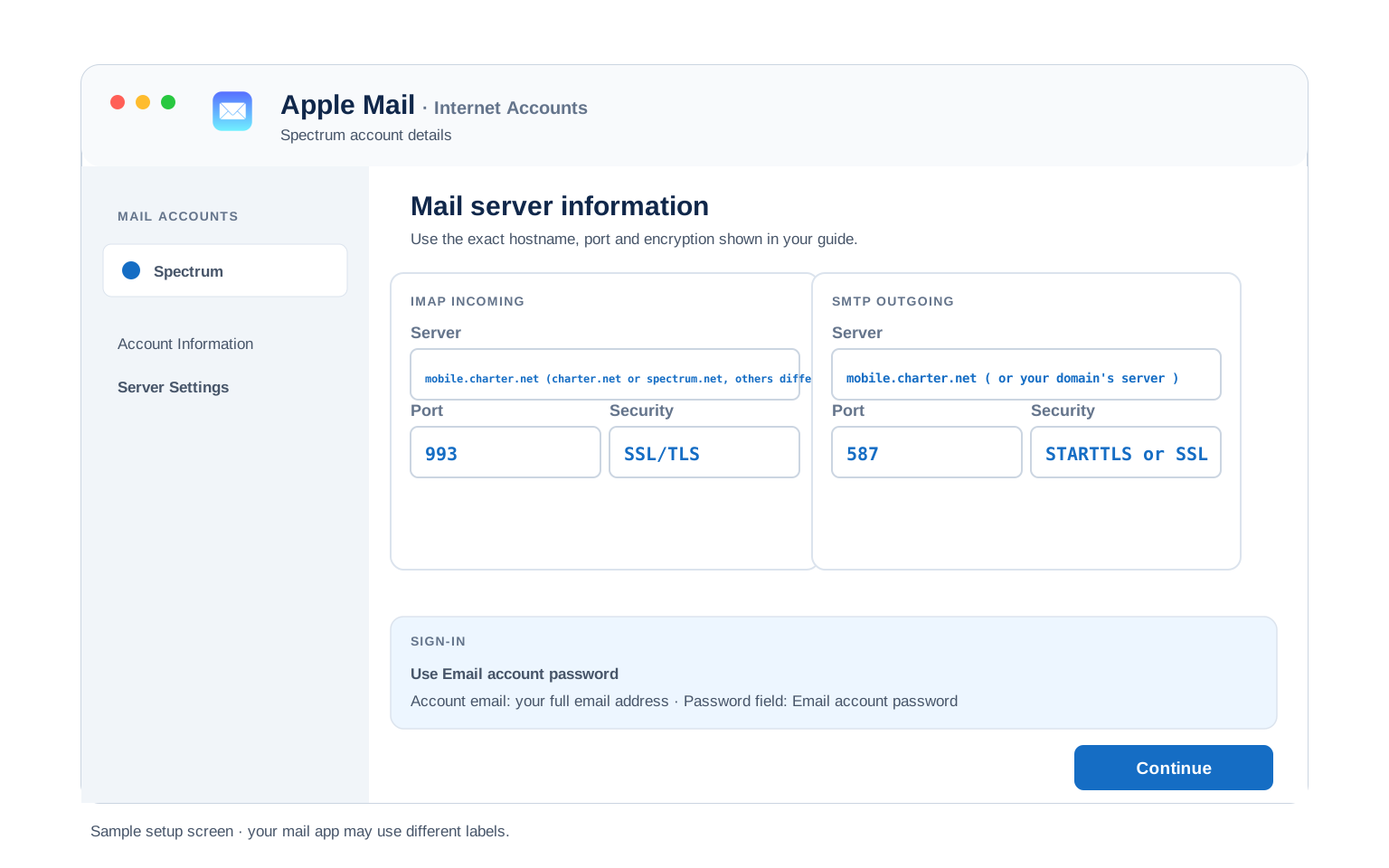
Outlook (Windows and Mac)
- Open Outlook → File → Add Account, then open Advanced options and tick "Let me set up my account manually". Spectrum autodiscovery is unreliable, so manual is the safe path.
- Choose IMAP and enter your domain's server from the table above for both incoming and outgoing, for example
mobile.charter.neton993incoming and587outgoing. - Use your regular Spectrum password when Outlook asks.
- Open More Settings → Outgoing Server and tick "My outgoing server requires authentication" with the same login. Skipping this is the number one Spectrum sending failure.
- Finish and send yourself a test to prove both directions work.
Apple Mail (macOS)
- Open Mail → Settings → Accounts → Add Account and choose Other Mail Account, since Spectrum is not in Apple's built-in list.
- Enter your name, full address and Spectrum password, then continue.
- When the server fields appear, enter your domain's server from the table above for both incoming and outgoing.
- Set incoming to port 993 and outgoing to 587, both with SSL. Use your full address as the username on both.
- Enable Mail and finish. Mail verifies against Spectrum directly.
iPhone and iPad
- Open Settings → Apps → Mail → Mail Accounts → Add Account → Other → Add Mail Account.
- Enter your name, full address and Spectrum password, then tap Next.
- Keep IMAP selected and enter your domain's server from the table above in both the incoming and outgoing host fields.
- Enter your full address as the username in both places, even where iOS marks the outgoing one optional. Spectrum requires it to send.
- Tap Save and wait for iOS to verify.
Android
- Open your mail app (Gmail app, Samsung Email or another) → Add account → Other.
- Enter your address and Spectrum password, then pick Manual setup and choose IMAP.
- Enter your domain's server from the table above as both the incoming and outgoing host.
- Set incoming 993 SSL and outgoing 587 STARTTLS, with your full address as the username on both.
- Finish setup and pull down to sync your inbox.
Thunderbird
- Open Thunderbird → Account Settings → Account Actions → Add Mail Account.
- Enter your name, address and Spectrum password, then select Continue.
- Thunderbird's guess is usually wrong for Spectrum, so choose Configure manually rather than accepting what it finds.
- Enter your domain's server from the table above for incoming (IMAP, 993, SSL) and outgoing (587, STARTTLS), authentication set to normal password.
- Select Done. Folders sync on first open.
Spectrum Webmail Settings#
Server settings connect your apps. These settings control how the mailbox itself behaves and all of them live at webmail.spectrum.net under the Settings gear.
Signature
Settings → Signature. A signature set here shows only in Spectrum webmail. Outlook and phone apps keep their own, so set it in both if you want it everywhere.
Vacation Auto Reply
Settings → Vacation Reply. Set an end date so it switches off by itself. Spectrum sends it from the server, so it runs with your computer off.
Filters and Folders
Settings → Filter Rules. Rules made here run on Spectrum's server, so mail is sorted before your phone or Outlook syncs. Rules built inside a desktop client only run while that app is open.
Spam and Blocked Senders
Settings → Blocked Addresses and the Spam folder. Add senders or whole domains to the block list. Check the Spam folder before assuming a message never arrived, since Spectrum filtering can be aggressive.
POP3 vs IMAP#
The usual trade-off applies, with one Spectrum wrinkle: neither protocol saves you if the mailbox is deleted, so treat this as a daily-use choice and keep a real backup separately.
| Feature | IMAP | POP3 |
|---|---|---|
| Where mail lives | On the Spectrum server for your domain | Downloaded to 1 device |
| Multiple devices | ✅ Everything stays in sync | ❌ Each device sees different mail |
| Sent and deleted mail | ✅ Synced everywhere | ⚠️ Stays only on that device |
| Offline reading | ⚠️ Cached mail only | ✅ Full local copy |
| Server storage used | Yes, counts against your quota | Can be freed after download |
| Best for | Phone + computer, everyday use | Single PC, local archives |
Spectrum Sending and Storage Limits#
Spectrum keeps its limits modest, which suits an ISP mailbox but bites during a bulk move. The numbers that matter:
| Mailboxes per account | Up to 5 |
| Storage per mailbox | 5 GB |
| Outgoing port 25 | Blocked. Use 587 with STARTTLS |
| Old mail on the server | Some accounts clear server messages after about 30 days to stay under 5 GB |
| Access after you leave | 60 days from your internet disconnect date, then the mailbox is deleted |
| Daily send limit | Spectrum does not publish an exact figure. Treat it as a personal mailbox rather than a bulk sender and pace large forwards |
Troubleshooting Spectrum Connections#
Nearly every Spectrum connection failure is one of three things. The first is the one other guides miss. Read the picture, then match your exact error in the table:
Match the exact wording your app reports to the rows below:
| Error you see | What it means | Fix |
|---|---|---|
| Cannot connect to server | The hostname is wrong for your domain, the usual Spectrum mistake | Check your domain against the server table. A charter.net address on mail.twc.com fails even though both are Spectrum. |
| Username or password is incorrect | Wrong password or a deactivated mailbox | Sign in at webmail.spectrum.net. If webmail also rejects you, reset the password or accept that a cancelled or retired account will not return. |
| Outlook keeps asking for your password | A cached old password after a reset, not a wrong one | Remove the account in Outlook (File → Account Settings → Remove) and add it again with the current password. |
| Not receiving new mail, senders get a bounce | The 5 GB mailbox is full, so Spectrum refuses new messages | Empty Trash and Junk, delete large attachments, then confirm space in webmail. A full mailbox bounces incoming mail with nothing wrong in your app. |
| Messages stuck in Outbox | SMTP authentication is off or the app is using blocked port 25 | Tick outgoing-server authentication with the same login and set the outgoing port to 587. Spectrum blocks port 25. |
Reader Reported Fixes
A working address suddenly stopped after years: check whether the internet service is still active. Spectrum email is tied to the account, so a cancelled or lapsed service takes the mailbox with it after the 60-day window. If service is fine, a long-idle legacy address may have been retired instead. Webmail is the fastest test.
New mail on one device but not the other: someone is running POP. POP with the leave-a-copy box unticked pulls mail off the server so the other device never sees it. Switch both devices to IMAP or at least tick leave-a-copy. The split stops.
Road Runner, Time Warner or Bright House?#
Road Runner, Time Warner Cable and Bright House email all became Spectrum email when Charter absorbed those companies. Your old @rr.com, @twc.com, @roadrunner.com or @brighthouse.com address still works. It uses one of the Spectrum servers on this page rather than any original hostname.
Setting up one of these legacy addresses? Match it to its server in the domain table above, then use the same ports as everyone else. A twc.com or rr.com address is on mail.twc.com, a brighthouse.com address on mail.brighthouse.com.
Planning to leave Spectrum? This is the important part. Spectrum deletes the mailbox 60 days after your internet is disconnected. It will not release the address to another provider. Back up the mailbox first, because there is no recovery once that window closes.
Moving your mail to Gmail, Outlook or another account? The Univik Email Migration Tool copies every folder over IMAP. Enter your Spectrum server and password for this side and the new provider's settings for the other.
Rather not do it yourself? Our Email Migration Services team runs the whole transfer and verifies every folder arrived, which matters when a deadline is deleting the source.
Use These Settings in Univik Email Backup#
On Spectrum this is not optional housekeeping, it is the only way to keep your mail once you leave. Univik Email Backup points at your Spectrum server and saves the whole mailbox as PST, MBOX, EML or PDF files that survive the 60-day deletion, a cancelled account and a retired legacy address alike.
- Download Univik Email Backup and install it on Windows.
- Choose IMAP as the source and enter your domain's Spectrum server from the table above, for example
mobile.charter.neton port993with SSL. - Sign in with your full address and your regular Spectrum email password.
- Include every folder, not just the Inbox, so Sent and saved mail come along.
- Pick PST, MBOX, EML or PDF and a folder, then start. The 5 GB mailbox limit keeps most Spectrum backups quick.
Univik Tools That Use These Settings#
Many people land here while migrating or archiving a mailbox. All 3 tools use the same IMAP settings from this page:

Email Backup
Save a complete Spectrum mailbox to PST, MBOX, EML or PDF before the 60-day deletion window closes.
Email Backup Tool →
Email Migration Tool
Copy every folder from a Spectrum, Road Runner or Time Warner address straight into Gmail, Microsoft 365 or any IMAP account.
Email Migration Tool →
Email Converter Tool
Already saved MBOX, EML or PST files? Convert them to whatever format your new email app opens.
Email Converter Tool →Prefer to hand the whole migration to experts?
If the 60-day clock and three-server maze feel like too much, you don't have to sort it out alone. Univik's migration team handles the complete project: planning, transfer, verification and a report showing every folder made it. Since 2013, for single mailboxes up to full company moves.
Email Settings Glossary#
IMAP
Internet Message Access Protocol, port 993 on your Spectrum server. Mail stays on the server so every device shows the same inbox, folders and read status.
POP3
Post Office Protocol version 3, port 995 on your Spectrum server. Downloads mail to one device and can remove it from the server. On Spectrum a real backup is a safer local copy.
SMTP
Simple Mail Transfer Protocol, the sending half. On Spectrum it uses port 587 with STARTTLS, since port 25 is blocked. It also needs outgoing authentication turned on.
SSL / TLS / STARTTLS
Encryption for the connection. Spectrum uses SSL/TLS on 993 and 995 for incoming mail and STARTTLS on 587 for outgoing. Nothing unencrypted is a safe choice.
Password
A generated code some providers require in place of the real password. Spectrum does not use them at all, so your one email password works everywhere.
OAuth
A browser sign-in window some providers use instead of a typed password. Spectrum does not offer it, so a tutorial telling you to use OAuth for Spectrum is about a different provider.
How We Verify These Settings#
Univik has built email backup, migration and converter software since 2013. Spectrum, with all its legacy domains, is one of the most common ISP mailboxes our tools move. We sign in to mobile.charter.net, mail.twc.com and mail.brighthouse.com every day, which is how we keep the domain-to-server table right when other guides flatten it to one wrong hostname.
Every value here is confirmed with three checks: a live IMAP and SMTP connection from Univik Email Backup against each domain group, a comparison with Spectrum's own published server settings and a real sign-in with a regular Spectrum password. We re-check after any Spectrum change and at least once a quarter.
Found a server that no longer matches what Spectrum shows you? Tell us and we will retest and update the page, with the change logged in what changed recently.
 Help & Support
Frequently Asked Questions
For a charter.net or spectrum.net address, use mobile.charter.net on port 993 with SSL/TLS, your full address and your regular password. A twc.com, rr.com or brighthouse.com address uses a different server on the same port. The full breakdown is in the IMAP settings section.
Nine times out of ten the server is wrong for your domain. Spectrum runs three of them, so a charter.net address pointed at mail.twc.com fails even with a correct password. Check the domain-to-server table first. If the password itself is rejected, sign in at webmail.spectrum.net to tell a wrong password apart from a deactivated account.
IMAP for daily use across devices. POP3 downloads to one machine, which some people still use for a local copy, but on Spectrum a proper backup to files is the better safety net because the mailbox is deleted after you leave. Full comparison here.
Same ports, different server. Both use IMAP 993, POP3 995 and SMTP 587 with SSL, but charter.net connects through mobile.charter.net while rr.com uses mail.twc.com or mail.brighthouse.com depending on the region. The domain table shows which is yours. The device only changes the menus.
No. Spectrum has no app passwords and no OAuth sign-in window. Your one regular email password works in webmail and in every email app, protected by SSL. Any guide telling you to generate a Spectrum app password is describing a different provider.
Yes, as long as you keep SSL on so the password travels encrypted. Spectrum has no per-app password to revoke, so the one caution is that your email password is your account password. If a device is lost, change the Spectrum password and update your other apps.
Point a backup tool at your Spectrum server and save the whole mailbox to files before the 60-day deletion window closes. See how to back up a Spectrum mailbox. Already have exported files? An email converter turns them into PST, PDF or whatever your new app opens.
On Spectrum a setup that dies is usually the account, not the settings. A cancelled internet service deletes the mailbox after 60 days. Long-idle legacy addresses are being retired too. Check what changed recently and confirm the account still opens at webmail.
An email migration tool copies mail between the two accounts over IMAP. You need your Spectrum server and password for this side plus the destination account's settings. Every folder and date stays intact, which matters when the source is on a deletion clock.
With a deadline deleting the source, our managed email migration service can run the whole move for you before the window closes.
Other Email Provider Settings
Summary: Spectrum Settings at a Glance
- charter.net / spectrum.net: mobile.charter.net
- twc.com / rr.com / roadrunner.com: mail.twc.com
- brighthouse.com + listed rr.com: mail.brighthouse.com
- IMAP 993, POP3 995, SMTP 587, all SSL
- Sign in with your regular email password, no app password
- Port 25 is blocked, use 587 for sending
- Storage: 5 GB per mailbox, up to 5 mailboxes
- Email is deleted 60 days after you cancel service