 Email Settings Guide
Quick answer: incoming IMAP for a verizon.net address is imap.aol.com, port 993, SSL. Outgoing is smtp.verizon.net, port 465, SSL. POP users take pop.verizon.net on 995. Yes, incoming says aol and outgoing says verizon and that is correct. AOL has run this mailbox since Verizon left the email business.
What Changed Recently#
Related email providers: Comcast email settings, Cox IMAP settings, Spectrum email settings, CenturyLink IMAP settings, Frontier email settings, EarthLink IMAP settings
Almost everything written about verizon.net email predates the moment it stopped being Verizon's to run. That is the root of most connection failures on this domain.
The change that broke every old guide
Verizon left the email business and handed these mailboxes to AOL. The address kept working, so plenty of people never noticed. The servers did not stay the same though and imap.verizon.net stopped answering while smtp.verizon.net carried on. Any guide still printing an incoming server on verizon.net was written before the handover and cannot work now.
Your password moved companies too
The password your email app needs now comes from AOL, not Verizon. Because AOL runs the mailbox, an app password from AOL's security page is what a client will accept. Your old Verizon password has nothing to do with it. Verizon support cannot help with email at all any more, which surprises people who call them first.
The Gmail change
Gmail no longer pulls verizon.net mail across. Google removed the POP fetching that pulled outside accounts into Gmail, so anyone reading a Verizon address inside a Gmail inbox lost that feed. Mail already imported stays. Connect directly using the settings below or move the mailbox properly if Gmail is where you now live.
Before You Begin#
Two things to accept before you start, both of which feel wrong and are correct.
1. Your incoming server says aol
A verizon.net address collects mail from imap.aol.com. It looks like a mistake and it is not. Typing imap.verizon.net instead is the most common cause of a Verizon setup that will not connect.
Where: The 3 hostname map →
2. Your password comes from AOL
Sign in at AOL to generate an app password, using your full verizon.net address as the username, exactly as Verizon itself instructs. Nothing on verizon.com will produce the code your email client wants.
Where: App password steps →
About Verizon.net Email#
A verizon.net address is now an AOL mailbox wearing a Verizon name, which explains every odd thing on this page.
Verizon decided in 2017 to stop running email and to concentrate on internet and television instead. Rather than close the addresses, it moved them onto AOL's platform, which was a sister company by then. Customers who acted kept their address. Mailboxes nobody migrated before the deadline were deleted along with their contents and Verizon states that those addresses cannot be recovered. If your address still works today, you are on the AOL platform and everything below applies.
| Email Domain | @verizon.net |
| Who Runs It | AOL, on behalf of the address you already had |
| Who Does Not | Verizon, which exited email in 2017 and cannot support it |
| Webmail URL | mail.aol.com, signing in with your verizon.net address |
| Incoming Servers | imap.aol.com for IMAP, pop.verizon.net for POP |
| Outgoing Server | smtp.verizon.net |
| Password for Email Apps | An app password generated on AOL's account security page |
| Username Format | Your full address including @verizon.net, as Verizon itself instructs |
Verizon.net Webmail Login#
Both places you need are AOL properties, which is the part people find hardest to believe:
Webmail
mail.aol.com, using your full verizon.net address
Account Security
login.aol.com → Account Security
Three Servers, Two Company Names#
Nearly every provider gives you matching hostnames. Verizon gives you 3 that disagree with each other, because the mailbox changed hands while the address stayed put. Here is the whole picture in 1 view and it is worth a look even if you only came for a copy button.
If you take 1 thing from this page, make it that shape. IMAP incoming goes to AOL. POP incoming and all outgoing mail stay on verizon.net. Guides that predate the handover print imap.verizon.net for incoming. They are wrong in a way that produces a timeout rather than a helpful error, which is why the hunt usually turns to passwords and ports instead.
Verizon.net IMAP Settings#
Your mail stays server side, so each device you connect shows the same folders. This is the table where the hostname says aol rather than verizon and that is deliberate.
| IMAP Server | imap.aol.com | |
| Port | 993 | |
| Encryption | SSL/TLS (required) | |
| Username | Your full address, including @verizon.net | |
| Password | App password from AOL | |
| Authentication | Required |
Verizon.net POP3 Settings#
POP3 downloads mail to 1 device and it is the 1 incoming route that kept a verizon.net hostname. If you inherited an old profile that still works, this is probably why. Not sure which to use? See the comparison below.
| POP3 Server | pop.verizon.net | |
| Port | 995 | |
| Encryption | SSL/TLS (required) | |
| Username | Your full @verizon.net address, not the name part alone | |
| Password | App password from AOL |
Verizon.net SMTP Settings#
SMTP handles outgoing mail and stayed on smtp.verizon.net through the handover. AOL documents port 465 with SSL for this domain. Where a network blocks 465, people commonly fall back to 587 with STARTTLS. Start with the documented pairing. Set this to an AOL hostname, as some guides suggest and you get the reverse of the usual failure: mail sends nowhere while your inbox fills perfectly.
| SMTP Server | smtp.verizon.net | |
| Port | 465 with SSL, the pairing AOL documents for verizon.net | |
| Encryption | SSL or STARTTLS (required) | |
| Username | Your full @verizon.net address, not the name part alone | |
| Password | Same as incoming mail | |
| Authentication | Required. Outgoing authentication has to stay ticked or smtp.verizon.net refuses you. |
Check Verizon.net IMAP Settings Online#
You will find all 3 hostnames laid out above, where every value is verified and copies in 1 tap. Wondering whether an address is still on this platform? Check it below.
Does my email address use these settings?
Runs in your browser only. Your address is never sent anywhere or stored.
Two checks tell you where you stand. Sign in at mail.aol.com with your verizon.net address, then confirm you can reach the app password screen. Both working means the mailbox migrated and every table above applies.
Look Up IMAP Settings for Any Email Domain#
Everything printed above is specific to addresses ending @verizon.net. Setting up a different address at the same time? Our free lookup at imapsettings.com handles any domain.
imapsettings.com
Complete email settings database, by Univik
Enter any email address and get the incoming and outgoing server settings for that domain in 1 step:
Your address is used only to find the settings for that domain. Nothing is stored or shared.
Getting an App Password From AOL#
Since AOL runs the mailbox, AOL issues the credential. Your email client needs an app password and your ordinary password is refused unless the client can open AOL's own sign in window.
- Go to AOL Account Security and sign in with your full verizon.net address as the username, which is what Verizon itself tells customers to use.
- Choose Generate app password, then Get Started.
- Name it for the app that will use it, so you can tell your codes apart later.
- Copy the generated code into your client, using it for both server passwords since they share the credential.
Set Up Verizon.net in Email Clients#
No client offers Verizon by name any more, so every setup below is manual. Watch the incoming hostname in each one. Choose your client:
Outlook (Windows and Mac)
- Outlook: File → Add Account or Settings → Accounts → Add account in new Outlook.
- Type the address, then open Advanced options and take the manual setup path with IMAP selected.
- Set the account type to IMAP, with
imap.aol.comon993incoming andsmtp.verizon.neton465outgoing. - Incoming imap.aol.com, outgoing smtp.verizon.net, then paste the AOL app password and tick outgoing authentication.
- Mail yourself a test. With mismatched hostnames, 1 direction working proves nothing about the other.
Apple Mail (macOS)
- On a Mac, open Mail then Settings → Accounts.
- Choose Other Mail Account on a Mac, because Verizon has not been in Apple's provider list for years.
- Expect automatic setup to fail and to reach the server screens, which is where the aol hostname goes.
- When server fields appear, remember they take 2 different hostnames.
- Enable Mail in the checkbox list and finish.
iPhone and iPad
- iPhone owners start in Settings → Apps → Mail → Mail Accounts.
- Tap Other → Add Mail Account on an iPhone, since no Verizon option exists.
- Fill both server screens separately. iOS asks for incoming first, then outgoing and they take different hostnames.
- Leave IMAP chosen and give each server screen its own hostname.
- Tap Save and watch which of the 2 servers it complains about.
Android
- On Android, add an account in your mail app and choose Other or Personal (IMAP).
- Skip any automatic detection, which tends to guess verizon.net for incoming and fail.
- Type the servers yourself, imap.aol.com in and smtp.verizon.net out.
- Two hostnames, not one:
imap.aol.comon 993 in,smtp.verizon.neton 465 out. - Finish and swipe down once to pull the folders in.
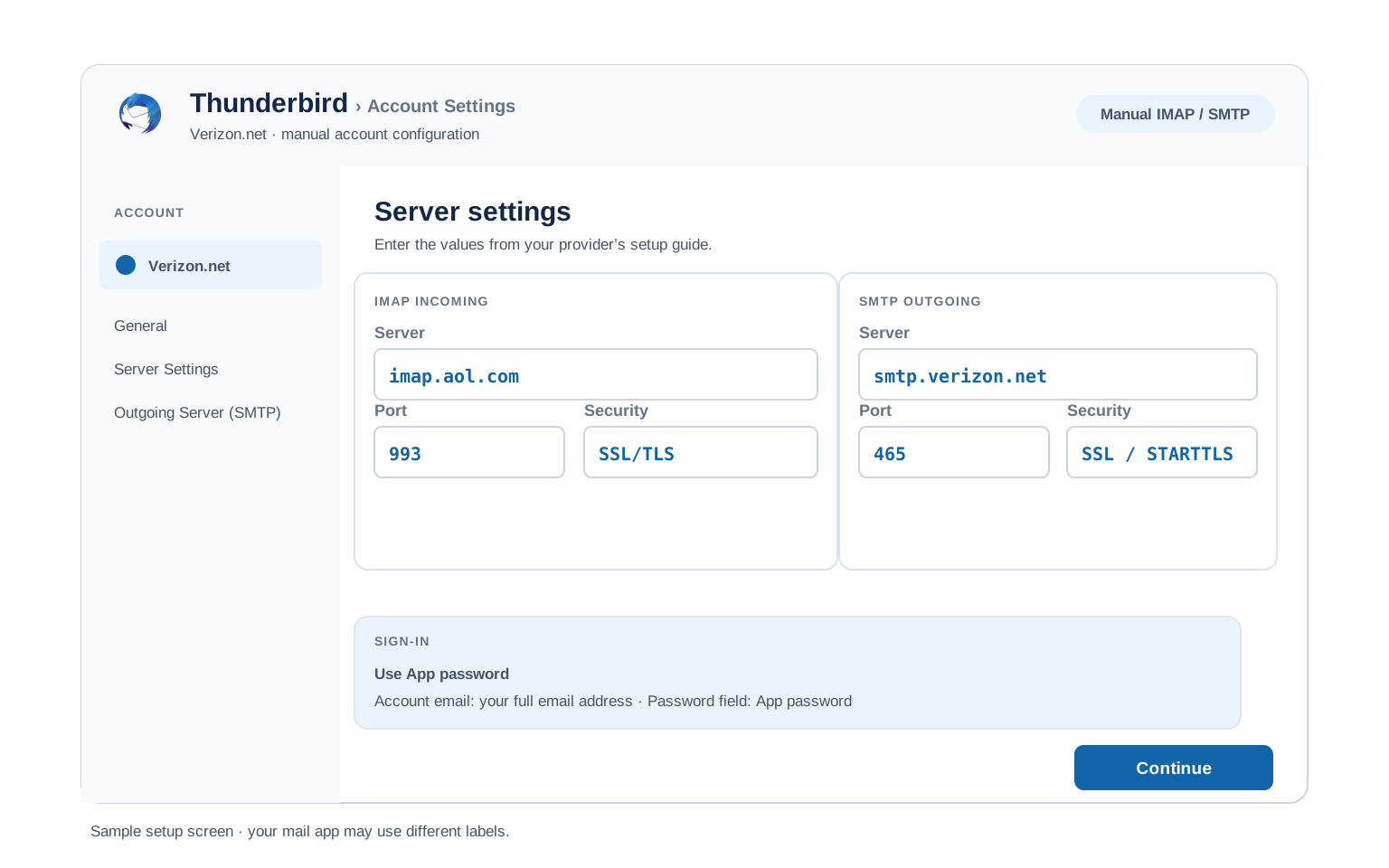
Thunderbird
- Thunderbird keeps it behind Account Settings and Account Actions.
- Give it your name, address and the AOL app password and continue.
- Do not trust the detection here. Thunderbird has no reliable profile for this domain, so open Configure manually.
- Enter both hostnames by hand and confirm the outgoing one still reads verizon.net before saving.
- Select Done. Folders sync on first open.
Verizon.net Webmail Settings#
Servers connect your apps. These settings shape the mailbox itself and they live at mail.aol.com because that is where the mailbox lives now.
Signature
Settings → Compose. Applies to AOL webmail only, so your desktop client keeps whatever signature you set there.
Vacation Auto Reply
Under Settings → Auto Reply. Sent from the server, so it runs with everything switched off. Give it an end date.
Filters and Folders
Under Settings → Filter Settings. Applied before any device syncs, unlike rules you build inside a desktop client.
Spam and Blocked Senders
Under Settings → Blocked Addresses. Suspected spam is filed automatically, so look there before deciding a message never arrived.
POP3 vs IMAP#
| Feature | IMAP | POP3 |
|---|---|---|
| Where mail lives | On AOL servers (imap.aol.com) | Downloaded to 1 device (pop.verizon.net) |
| Multiple devices | ✅ Everything stays in sync | ❌ Each device sees different mail |
| Sent and deleted mail | ✅ Synced everywhere | ⚠️ Stays only on that device |
| Offline reading | ⚠️ Cached mail only | ✅ Full local copy |
| Server storage used | Yes, counts against your quota | Can be freed after download |
| Best for | Phone + computer, everyday use | Single PC, local archives |
Verizon.net Size and Sending Limits#
These are AOL's limits now, because that is whose platform your mail sits on. Verizon publishes nothing about them any more:
| Message size | 25 MB for the whole message, counting attachments, formatting and signature together |
| Mailbox storage | Set by AOL rather than Verizon and it varies by account. The quota shown inside your own mailbox is the figure to trust |
| What counts toward it | Everything, Sent and Trash included. Emptying Trash is the fastest space you will find |
| POP coverage | The Inbox alone. Folders never come down over POP, which matters if an old profile is all you have |
| Encryption | SSL on all 3 servers, on ports 993, 995 and 465 |
Troubleshooting Verizon.net Connections#
Find the exact error your email app shows, then apply the fix:
| Error you see | What it means | Fix |
|---|---|---|
| Cannot find server or a connection timeout on incoming | The incoming hostname is set to imap.verizon.net, which no longer exists | The signature verizon.net failure and it comes straight from an outdated guide. Change incoming to imap.aol.com on 993 with SSL and leave outgoing alone. See the server split. |
| Password rejected everywhere you try it | You are using a Verizon password rather than an AOL app password | AOL runs the mailbox, so AOL issues the credential. Generate an app password signing in with your full verizon.net address as the username. |
| Receives fine, sending fails | Someone changed the outgoing server to an AOL hostname to match the incoming one | Understandable and wrong. Outgoing stays smtp.verizon.net on 465 with SSL, with authentication ticked. Only IMAP moved to AOL. |
| Outlook sets the account up as Yahoo on its own | Auto detect follows the DNS records behind the domain and lands on Yahoo infrastructure | Not wrong exactly, just not what AOL documents for this domain. Cancel the automatic setup, choose manual configuration and enter the 3 servers yourself. The server split shows what they should read. |
| Only the last few weeks of mail appeared | A sync window rather than a connection fault | Many clients default to syncing 30 days. Look for a setting named something like mail days to sync and change it to all or unlimited. Your older mail is safe on the server. |
| Only the Inbox downloaded | The account is running over POP, which is common on profiles that survived the handover | POP fetches the Inbox alone. Rebuild the account over IMAP with the AOL incoming hostname and every folder arrives. |
| Verizon support says they cannot help | They genuinely cannot. Verizon exited email years ago | Not a brush off. Support for this mailbox lives at AOL and our AOL settings page covers the account side that applies to you too. |
| The address stopped working entirely | The mailbox may never have been migrated in the first place | Accounts not moved to AOL before the deadline were deleted with their contents and Verizon states they cannot be recovered. If webmail at mail.aol.com refuses the address, that is the likely answer. |
Reader Reported Fixes
Two fixes that come up constantly on this domain, both from real verizon.net cases.
Rebuild the account rather than editing the old one. Profiles that predate the handover carry stale hostnames in places the settings screen does not show you and correcting the visible field often leaves the rest cached. Deleting the account and adding it fresh with all 3 correct servers is quicker than hunting.
Search for AOL answers, not Verizon ones. Once you know AOL runs the mailbox, the whole troubleshooting landscape changes. Problems that look unsolvable under a Verizon search are documented under AOL, including the app password rules that decide whether you can generate a code at all.
Why a Verizon Address Lives at AOL#
The short version explains every strange thing on this page and it is worth knowing because it also tells you where to ask for help.
Verizon's own pages put it plainly. It no longer offers verizon.net email, customers had to move to the AOL platform to keep their address. Whatever was left behind got deleted. Verizon adds 1 instruction that matters here, which is to sign in using the full verizon.net address as your username on AOL. That is why the app password steps send you to an AOL page with a Verizon address in the username box.
Thinking of moving off this address entirely? Plenty of people do once they learn it runs on a platform they never chose. The Univik Email Migration Tool reads from all 3 hostnames above and writes your folders into whichever account you are moving to. Our Email Migration Services team will run the whole move and confirm what arrived.
Use These Settings in Univik Email Backup#
A verizon.net mailbox has already survived 1 company deciding it was no longer their problem. That is reason enough to hold your own copy and the IMAP values above are what a backup tool signs in with. Univik Email Backup writes the mailbox to PST, MBOX, EML or PDF on your own disk, which no corporate decision can reach.
- Launch Univik Email Backup on Windows.
- Choose IMAP in the source list, since Verizon rarely appears by name and paste imap.aol.com as the server.
- Use your full @verizon.net address with the AOL app password, which is what the mailbox actually answers to.
- Typing servers by hand?
imap.aol.comon993with SSL, which is the aol hostname the table explains. - Pick an output format and a destination, then run it. Large mailboxes download in the background.
Univik Tools That Use These Settings#
Most people reaching this page are either fixing an old profile or planning to leave. All 3 tools use the settings above:

Email Backup
Save the whole verizon.net mailbox as PST, MBOX, EML or PDF while the address is still working.
Email Backup Tool →
Email Migration Tool
Move every folder from verizon.net into Gmail, Microsoft 365 or another IMAP mailbox, structure intact.
Email Migration Tool →
Email Converter Tool
Kept an old export from before the handover? Convert those files into whatever opens today.
Email Converter Tool →Rather this was taken off your hands?
Not interested in learning which company owns which hostname? Fair enough. They plan the move, run it, count what arrived and send the report. Running since 2013, from single legacy mailboxes upward.
Email Settings Glossary#
IMAP
Internet Message Access Protocol. The protocol behind imap.aol.com, which is where verizon.net incoming mail actually lives. Every device mirrors the same folders.
POP3
Post Office Protocol version 3. The pop.verizon.net route, which fetches the Inbox and leaves your folders behind on the server. Kept a verizon.net hostname when IMAP did not.
SMTP
Simple Mail Transfer Protocol. Sends your outgoing mail. The outgoing half and the server that kept its verizon.net name through the handover.
SSL / TLS / STARTTLS
The encryption layer, required on all 3 hosts. How the connection is secured. All 3 verizon.net servers use SSL, on 993, 995 and 465 respectively.
App Password
A generated code that replaces your password inside an email app. For this domain it comes from AOL, not Verizon, which is the detail that trips everyone.
OAuth
A sign in window run by the provider, which for a verizon.net address means an AOL one. A client offering it skips the app password entirely.
How We Verify These Settings#
Univik has built email backup and migration software since 2013, spanning the whole period this domain changed hands. Legacy addresses like these are a steady part of that work, which is where mismatched hostnames get spotted.
Three checks stand behind these values. A working session from Univik Email Backup against all 3 hostnames. A line by line match with AOL's published table for verizon.net accounts, which is the authoritative source now. And Verizon's own statements about what it does and no longer does.
Spotted a value that has moved again? Tell us and the value gets rechecked, with whatever we find recorded in what changed recently.
 Help & Support
Verizon.net Email Settings: FAQ
Incoming IMAP is imap.aol.com on port 993 with SSL. Outgoing is smtp.verizon.net on port 465 with SSL. POP users take pop.verizon.net on 995. Sign in with the whole @verizon.net address, using an AOL app password as the password.
Because AOL runs the mailbox. Verizon left the email business and moved these accounts onto AOL's platform, keeping the addresses intact. IMAP moved with them while the outgoing and POP hostnames stayed on verizon.net, which is why the 3 servers disagree.
It stopped answering when the mailboxes moved. Guides written before the handover still print it and typing it in produces a timeout rather than a useful error, which sends people looking at passwords and ports instead of the hostname.
Because they genuinely cannot. Verizon exited email entirely and no longer runs this service. Everything about the account, including passwords and recovery, sits with AOL now.
An app password generated on AOL's account security page, signing in with your full verizon.net address as the username. Verizon passwords have no role here and your ordinary AOL password is refused by clients that cannot open AOL's sign in window.
Probably not and it is worth knowing why. Accounts that were never migrated to AOL before the deadline were deleted along with their mail and Verizon states those addresses cannot be recovered. If mail.aol.com refuses the address, that is usually the explanation.
IMAP, which keeps every device in sync and brings all your folders. POP is worth knowing about only because it kept a verizon.net hostname, so a very old working profile is likely POP and likely fetching your Inbox alone.
No and this catches people twice. Incoming and outgoing are separate hostnames on this domain, so correcting one leaves the other broken. Test both directions before assuming a fix worked.
Sign a backup tool in over IMAP and keep the output as PST, MBOX, EML or PDF. Moving instead of copying? An email migration tool connects to both mailboxes and recreates the structure at the destination. See the walkthrough.
No. Verizon stopped issuing these addresses when it left the email business, so only accounts that already existed and made the move to AOL are still running. If you need a new address you are choosing a different provider. The migration tool can carry your old mail into it.
Other Email Provider Settings
Summary: Verizon.net Settings at a Glance
- IMAP: imap.aol.com, port 993, SSL/TLS
- POP3: pop.verizon.net, port 995, SSL/TLS
- SMTP: smtp.verizon.net, port 465 or 587
- Username is always your full email address
- App password required for third party apps
- Pick IMAP for phone + computer sync
- Message limit: 25 MB including signature
- Username is always the full email address