 Email Settings Guide
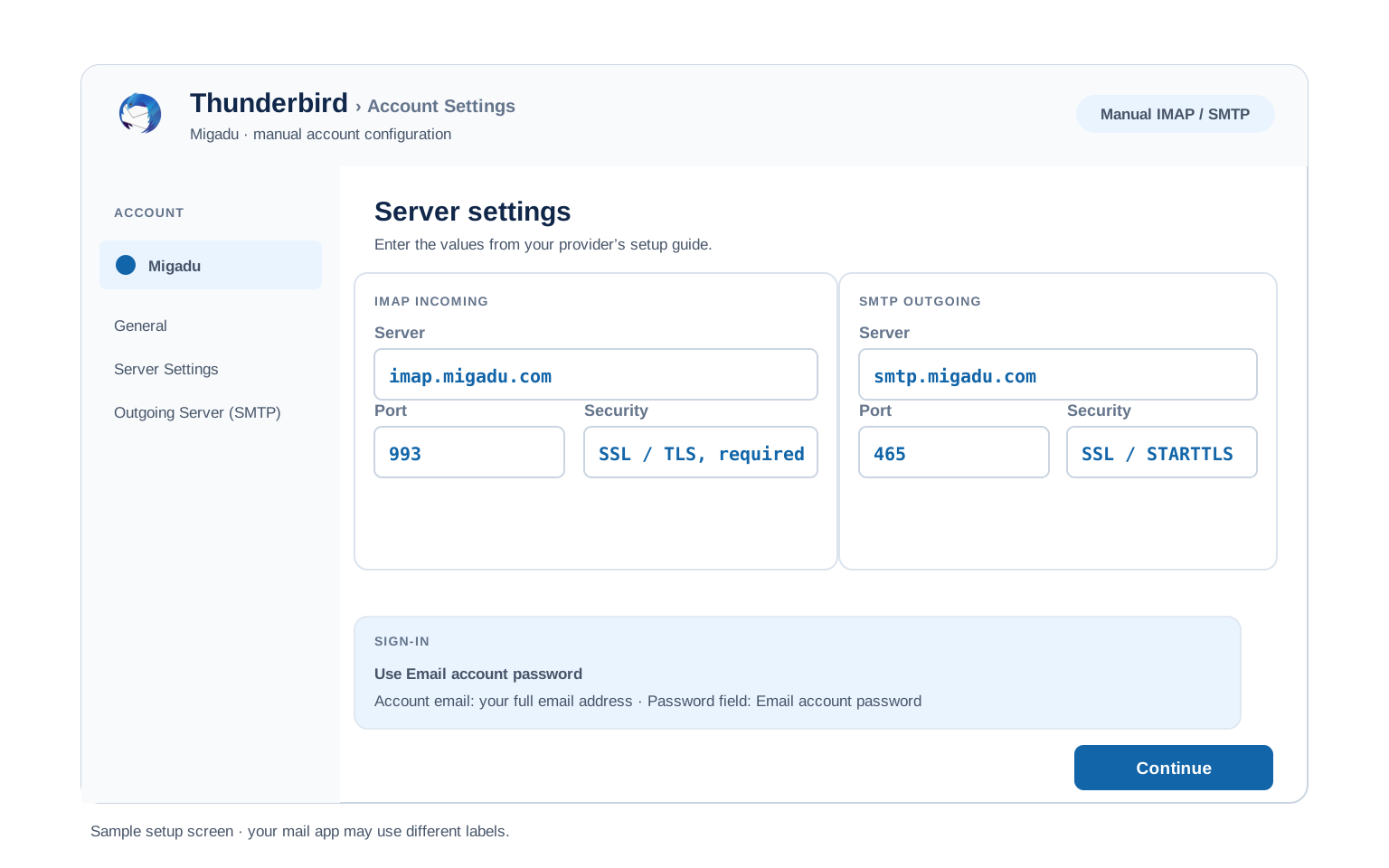
Quick answer: the Migadu IMAP server is imap.migadu.com on port 993 with SSL. The SMTP server is smtp.migadu.com on port 465 SSL or 587 STARTTLS. The POP server is pop.migadu.com on port 995 SSL. These are the same for every domain Migadu hosts. Sign in with your full email address and your mailbox password.
What Changed Recently#
Related email providers: Vivaldi email settings, Posteo IMAP settings, Mailbox.org email settings, KolabNow IMAP settings, Mailo email settings, Proton Mail IMAP settings
Migadu is one of the simpler providers to set up, once you know how it names things. Here is the current picture before you open a mail client.
Latest update
One set of servers for every domain. Migadu hosts many domains on shared servers, so the host is always imap.migadu.com or smtp.migadu.com. Your own domain never appears in the server field.
Earlier change
No app password, only the mailbox password. Every client uses the mailbox password set in the Migadu Admin. There is no token to generate and nothing extra to switch on.
Earlier change
Open standards, no lock in. Migadu is built on plain IMAP, POP and SMTP, so any standards based client works and your mail moves out cleanly if you ever leave.
Before You Begin#
Get these two right and the rest is quick. Miss either and the client fails even with the correct ports.
1. Use the migadu.com hosts
The server is never your own domain. Type imap.migadu.com and smtp.migadu.com, whatever your address ends in.
Where: The server names below →
2. Set a mailbox password
A mail client needs the mailbox password, set in the Admin, not your account login. They are two different passwords.
About Migadu#
Migadu is a Swiss privacy focused email host aimed at developers and small teams, known for pricing by usage rather than by the number of mailboxes.
One Migadu plan lets you host unlimited domains, mailboxes and aliases, with the bill tracking how much mail you send and receive plus storage used. It runs on plain open standards, so there is no vendor lock in and your mail moves out cleanly whenever you want. Migadu offers a light webmail at webmail.migadu.com, though it steers you toward a proper mail client such as Thunderbird. The quirk that catches newcomers is the server name. Because many domains share the same servers, you always use the migadu.com hosts, never a host built from your own domain.
| Service | Migadu email hosting |
| Based In | Switzerland |
| Pricing Model | By usage, not by mailbox count |
| Server Hosts | imap, pop and smtp dot migadu.com |
| Webmail | webmail.migadu.com |
| Protocols Supported | IMAP, POP, SMTP |
| Password | Mailbox password, no app password |
| Admin | admin.migadu.com sets mailbox passwords |
imap.migadu.com and smtp.migadu.com. Your domain changes only the username, never the server.
Migadu Webmail Login#
You can always read your mail in a browser. The official sign in pages are:
One Set of Servers for Every Domain#
The one thing that trips people up on Migadu is the server name. You do not use your own domain in the host field. Migadu runs shared servers. The same three names cover every domain it hosts:
- Incoming, IMAP. Always
imap.migadu.comon port 993 with SSL. - Incoming, POP. Always
pop.migadu.comon port 995 with SSL, if you prefer POP. - Outgoing, SMTP. Always
smtp.migadu.comon port 465 with SSL (or 587 with STARTTLS). - Your address stays in the username. Type your full address, such as you@yourdomain.com, as the username. Only the host uses migadu.com.
Migadu IMAP Settings#
IMAP is the incoming choice Migadu recommends. Mail stays on the server, so a phone and a laptop show one inbox. The host is the same for every Migadu domain.
| IMAP Server | imap.migadu.com | |
| Port | 993 with SSL | |
| Encryption | SSL or TLS, required | |
| Username | Your full email address, including @yourdomain.com | |
| Password | Your mailbox password | |
| Authentication | Required |
Migadu POP3 Settings#
POP downloads mail to one machine. Migadu treats it as the older option and steers you to IMAP. Choose it only for a single local copy. The comparison weighs both.
| POP Server | pop.migadu.com | |
| Port | 995 with SSL | |
| Encryption | SSL or TLS, required | |
| Username | Your full email address | |
| Password | Your mailbox password |
Migadu SMTP Settings#
SMTP handles outgoing mail. If you can read mail but not send it, the problem is here.
| SMTP Server | smtp.migadu.com | |
| Port (SSL) | 465 recommended | |
| Port (STARTTLS) | 587 alternative | |
| Encryption | SSL or STARTTLS (required) | |
| Username | Your full email address | |
| Password | Your mailbox password, same as incoming | |
| Authentication | Required. Check "My outgoing server requires authentication" in Outlook. |
smtp.migadu.com with your mailbox address and mailbox password, while the From shows the alias. Or create an identity for that address in the Admin and give it its own password, then authenticate as the identity. Plain aliases with no identity and no wildcard cannot authenticate on their own.
Check Migadu IMAP Settings Online#
You don't need to download anything to check Migadu IMAP settings online. This page is the lookup: every value is verified, current and copyable straight from your browser. Not sure your address uses Migadu servers? Type it below and find out instantly.
Does my email address use these settings?
Runs in your browser only. Your address is never sent anywhere or stored.
Prefer to check the mailbox before wiring up a client? Sign in at webmail.migadu.com with your address and mailbox password. If webmail opens, the same address and password work in any client with the servers above. If it does not, reset the mailbox password in the Admin.
Look Up IMAP Settings for Any Email Domain#
This page covers Migadu. For every other address, work email on a company domain included, we run a free online lookup database: imapsettings.com.
imapsettings.com
Complete email settings database, by Univik
Enter any email address and get the incoming and outgoing server settings for that domain in 1 step:
Your address is used only to find the settings for that domain. Nothing is stored or shared.
Your Migadu Mailbox Password#
Migadu keeps this refreshingly plain. There is no app password and no separate token. Every client signs in with the same mailbox password you use for webmail. The one catch is that a mailbox password is set in the Migadu Admin. It differs from your Migadu account login:
| Which password | What it is for |
|---|---|
| Account login | Signs in to admin.migadu.com to manage domains, mailboxes and billing. Not used in mail clients. |
| Mailbox password | Set per mailbox in the Admin. This is the one you type in Outlook, Apple Mail, Thunderbird and on your phone. |
How to Set or Reset a Mailbox Password
- Sign in to the Migadu Admin at admin.migadu.com with your account login.
- Open Mailboxes and pick the address you are setting up.
- Find the password field and set a new mailbox password. Plain letters and numbers avoid client quirks.
- Save, then type that password into your mail client alongside your full address.
Set Up Migadu in Email Clients#
The migadu.com hosts and your mailbox password stay the same in every app. Only the menus differ. Jump to yours:
Outlook (Windows and Mac)
- Open Outlook and go to File, then Add Account. In the new Outlook it lives under Settings, then Accounts.
- Type your address. Expand Advanced options and enable the manual setup checkbox.
- Pick IMAP. Enter
imap.migadu.comon993SSL andsmtp.migadu.comon465SSL or587STARTTLS. - Use your full address with the mailbox password. Turn on the setting that your outgoing server needs authentication.
- Finish and send a test email to yourself to confirm both directions work.
Apple Mail (macOS)
- Open Mail → Settings → Accounts → Add Account.
- Migadu is not a preset, so choose Other Mail Account.
- Enter your name, the full address and the mailbox password, then continue.
- If asked for servers, enter the IMAP and SMTP values from the tables above.
- Enable Mail in the checkbox list and finish.
iPhone and iPad
- Open Settings → Apps → Mail → Mail Accounts → Add Account.
- Tap Other, then Add Mail Account. iOS has no Migadu preset.
- Fill your details with the mailbox password, then tap Next.
- Keep IMAP selected and type the migadu.com hosts for incoming and outgoing when iOS asks.
- Tap Save and wait for iOS to verify the account.
Android
- Open your mail app (Gmail app, Samsung Email or another) → Add account.
- Choose Other or IMAP since Migadu is not in the preset list.
- Enter your address with the mailbox password. When detection misses, pick Manual setup.
- Enter the servers:
imap.migadu.comon 993 SSL incoming,smtp.migadu.comon 465 SSL outgoing. - Finish setup and pull down to sync your inbox.
Thunderbird
- Open Thunderbird → Account Settings → Account Actions → Add Mail Account.
- Give your name, address and the mailbox password, then click Continue.
- Thunderbird often finds Migadu from the address. Confirm it chose IMAP over SSL.
- If detection fails, choose Configure manually and enter the table values above.
- Select Done. Folders sync on first open.
Migadu Webmail Settings#
The hosts wire up a client. The controls here decide how the mailbox behaves. You reach most of them in the Migadu Admin, plus a few in webmail.
Signature
Migadu webmail carries a basic signature under its settings. A signature saved there rides on webmail messages only. Every client stores a separate signature, so the one that shows tracks the app that sent the mail.
Vacation Auto Reply
Set an autoresponder per mailbox in the Migadu Admin, with a start and an end date so it stops by itself. Migadu sends it from the server, so it keeps replying while your devices are off.
Filters and Folders
Migadu supports server side rules through Sieve, set in the Admin. A Sieve rule sorts mail on the server before any device fetches it. A rule made inside Outlook works only while Outlook runs, letting two apps file the same message in different places.
Spam and Blocked Senders
Migadu filters spam and files caught mail in the Junk folder. You can tune allow and block lists in the Admin. Check Junk first when a message goes missing, since a server rule outranks a client one.
POP3 vs IMAP#
| Feature | IMAP | POP3 |
|---|---|---|
| Where mail lives | On the Migadu server | Downloaded to 1 device |
| Multiple devices | ✅ Everything stays in sync | ❌ Each device sees different mail |
| Sent and deleted mail | ✅ Synced everywhere | ⚠️ Stays only on that device |
| Offline reading | ⚠️ Cached mail only | ✅ Full local copy |
| Server storage used | Yes, counts against your quota | Can be freed after download |
| Best for | Phone + computer, everyday use | Single PC, local archives |
Migadu Settings Worth Knowing#
These are the points that decide a Migadu client setup:
| IMAP server | imap.migadu.com, 993 SSL |
| POP server | pop.migadu.com, 995 SSL |
| SMTP server | smtp.migadu.com, 465 SSL or 587 STARTTLS |
| Username | Your full email address |
| Password | Mailbox password from the Admin |
| Same for every domain | Yes, the hosts never change |
Troubleshooting Migadu Connections#
Find the exact error your email app shows, then apply the fix:
| Error you see | What it means | Fix |
|---|---|---|
| Server not found | Your own domain was typed as the host | The host is never your domain. Use imap.migadu.com and smtp.migadu.com for every Migadu address. |
| Authentication failed | The account login was used, not the mailbox password | A client needs the mailbox password set in the Admin, which differs from your account login. |
| SMTP asks for an alias password | You set the client to send as an alias | An alias has no password. Turn on Wildcard Sender and authenticate as the mailbox. The other route is an identity with its own password. |
| Cannot connect to server | Wrong port or encryption | Confirm IMAP 993 SSL and SMTP 465 or 587. A firewall or VPN can block them. If 465 is blocked, use 587 with STARTTLS. |
| Password keeps being asked | Username is not the full address | Migadu authenticates on the complete address. Type you@yourdomain.com in full, not the name before the at sign. |
| Messages stuck in Outbox | SMTP authentication is off | Enable "outgoing server requires authentication" with the same login as incoming mail. |
Reader Reported Fixes
The client kept failing on a domain host. The reader had typed mail plus their own domain as the server. Swapping in imap.migadu.com and smtp.migadu.com fixed both directions at once.
Authentication was refused with the account password. The reader was using the admin.migadu.com login. Setting a mailbox password in the Admin, then using that, let the client connect.
Keeping a Copy of Your Migadu Mail#
Migadu is built on open standards, so your mail is never trapped. Even so, a local backup is worth keeping. If you pause a plan or move on, a copy on your own machine means nothing is lost.
Moving in from another host? Because Migadu speaks plain IMAP, a migration tool copies your old mail straight across using the migadu.com servers on this page.
Planning to pause or leave? Back up the mailbox first. A hosted mailbox can be closed once a plan lapses, with no recovery afterward.
Taking your mail to a new account? The Univik Email Migration Tool copies every folder from the old account to the new one. Enter imap.migadu.com and your mailbox password for the Migadu side and your new provider's settings for the other.
Rather not do it yourself? Our Email Migration Services team plans and runs the whole transfer for you and verifies every folder arrived.
Use These Settings in Univik Email Backup#
The same imap.migadu.com login lets you download your whole Migadu mailbox to your computer. Univik Email Backup writes the whole mailbox to PST, MBOX, EML or PDF files that stay yours even after the account closes.
- Download Univik Email Backup and install it on Windows.
- Choose IMAP from the source list. Migadu rarely appears by name. IMAP is the right pick.
- Enter your full email address with the mailbox password, the one set in the Migadu Admin.
- If the tool asks for server details, use
imap.migadu.comon port993with SSL from the IMAP table above. - Pick a saving format and folder, then start the backup. Large mailboxes download in the background.
Univik Tools That Use These Settings#
Many people land here while migrating or archiving a mailbox. All 3 tools use the same IMAP settings from this page:

Email Backup
Download your complete Migadu mailbox to PST, MBOX, EML or PDF before switching or closing the account.
Email Backup Tool →
Email Migration Tool
Copy every folder from Migadu straight into Gmail, Microsoft 365 or any other account. No manual export needed.
Email Migration Tool →
Email Converter Tool
Already have MBOX, EML or OST files from an old export? Convert them to PST, PDF or any format your new app opens.
Email Converter Tool →Prefer to hand the whole migration to experts?
If server settings and app passwords feel like too much, you don't have to learn them. Univik's migration team handles the complete project: planning, transfer, verification and a report showing every folder made it. Since 2013, for single mailboxes up to full company moves.
Email Settings Glossary#
IMAP
Internet Message Access Protocol. Reads mail that stays on the server, so all your devices see the same inbox, folders and read status.
POP3
Post Office Protocol version 3. Downloads mail to 1 device and can remove it from the server. Older method, still useful for local archives.
SMTP
Simple Mail Transfer Protocol. Sends your outgoing mail. Every account needs it next to IMAP or POP3, which only receive.
SSL / TLS / STARTTLS
Encryption for the connection. SSL/TLS encrypts from the start (ports 993, 995, 465). STARTTLS upgrades a plain connection (port 587).
Shared servers
Migadu hosts many domains on one set of servers, so imap.migadu.com and smtp.migadu.com serve every customer. Your own domain never appears in the host field.
Mailbox password
The password set per mailbox in the Migadu Admin. It is what a mail client uses. It differs from your account login for domains and billing.
Alias
An extra address that delivers into a mailbox, at no extra cost on Migadu. It receives mail on its own, but has no password, so sending as one needs a mailbox or identity.
Identity
An address a mailbox may send from, created in the Admin with its own password. A client can authenticate as the identity to send from that address.
Wildcard Sender
A mailbox setting that lets a client send from any of its aliases using the mailbox login. It saves making an identity for every address you reply from.
How We Verify These Settings#
Univik builds email backup, migration and converter software since 2013. Our tools sign in to Migadu over IMAP and SMTP every day for thousands of users, so a changed server, port or login rule shows up in our connection logs before most guides notice it.
Every value on this page is confirmed with three checks: a live IMAP and SMTP connection from Univik Email Backup to the migadu.com servers, a comparison with Migadu's own autoconfig and help pages, then a fresh mailbox password set through the Migadu Admin. We re verify after any Migadu change and at least once a quarter.
Found something that no longer matches what Migadu shows you? Tell us and we will retest and update the page, with the change logged in what changed recently.
 Help & Support
Frequently Asked Questions
Use imap.migadu.com on port 993 with SSL, the same for every Migadu domain. Use your full email address with your mailbox password. The full table sits in the IMAP settings section.
The usual slip is typing your own domain as the host. Migadu runs shared servers, so the address is always imap.migadu.com or smtp.migadu.com, whatever your email ends in. Your custom domain belongs in the username, never the server field.
IMAP, which Migadu itself recommends. It keeps your phone, computer and webmail in sync. POP fits the rare case where one computer keeps the only copy. Full comparison here.
Yes. The migadu.com hosts, ports and encryption are identical on every device. Only the menus differ, which is what the client setup guides cover.
You use the mailbox password, set per mailbox in the Migadu Admin at admin.migadu.com. It differs from your account login, which only manages domains and billing. If a client is refused, reset the mailbox password in the Admin and type that.
No. Migadu keeps it plain, so the mailbox password works in every client over SSL. There is no token to generate and nothing extra to switch on. Keep the client updated and use a strong mailbox password.
An email client with IMAP downloads mail as it syncs, but a dedicated backup tool is faster and saves standard files you can open anywhere. See how to back up your Migadu mailbox. If you already exported files in another format, an email converter changes them to PST, PDF or whatever your new app opens.
The likeliest cause is a changed mailbox password, since the client still sends the old one. Reset it in the Migadu Admin and update the client. A blocked port can also stall sending, so move SMTP to 587 if 465 is refused.
An email migration tool copies mail directly between the 2 accounts over IMAP. You need the Migadu IMAP settings and your mailbox password for this side, plus the same details for the destination account. Every folder, label and date stays intact.
If setting this up feels risky or you have many accounts to move, our managed email migration service does the entire job for you.
Other Email Provider Settings
Summary: Migadu Settings at a Glance
- IMAP: imap.migadu.com, port 993, SSL/TLS
- POP3: pop.migadu.com, port 995, SSL/TLS
- SMTP: smtp.migadu.com, port 465 or 587
- Username is always your full email address
- Same servers for every domain, always migadu.com
- Pick IMAP for phone + computer sync
- Mailbox password is set in the Admin
- Username is always the full email address