Quick Answer
The message this file came from another computer means Windows holds source information that marks the file as blocked. Open Properties, check where the file came from and select Unblock on the General tab only for a source you trust.
Select Apply and then OK to save the change. Unblock clears the mark for that one file and the other files keep theirs.
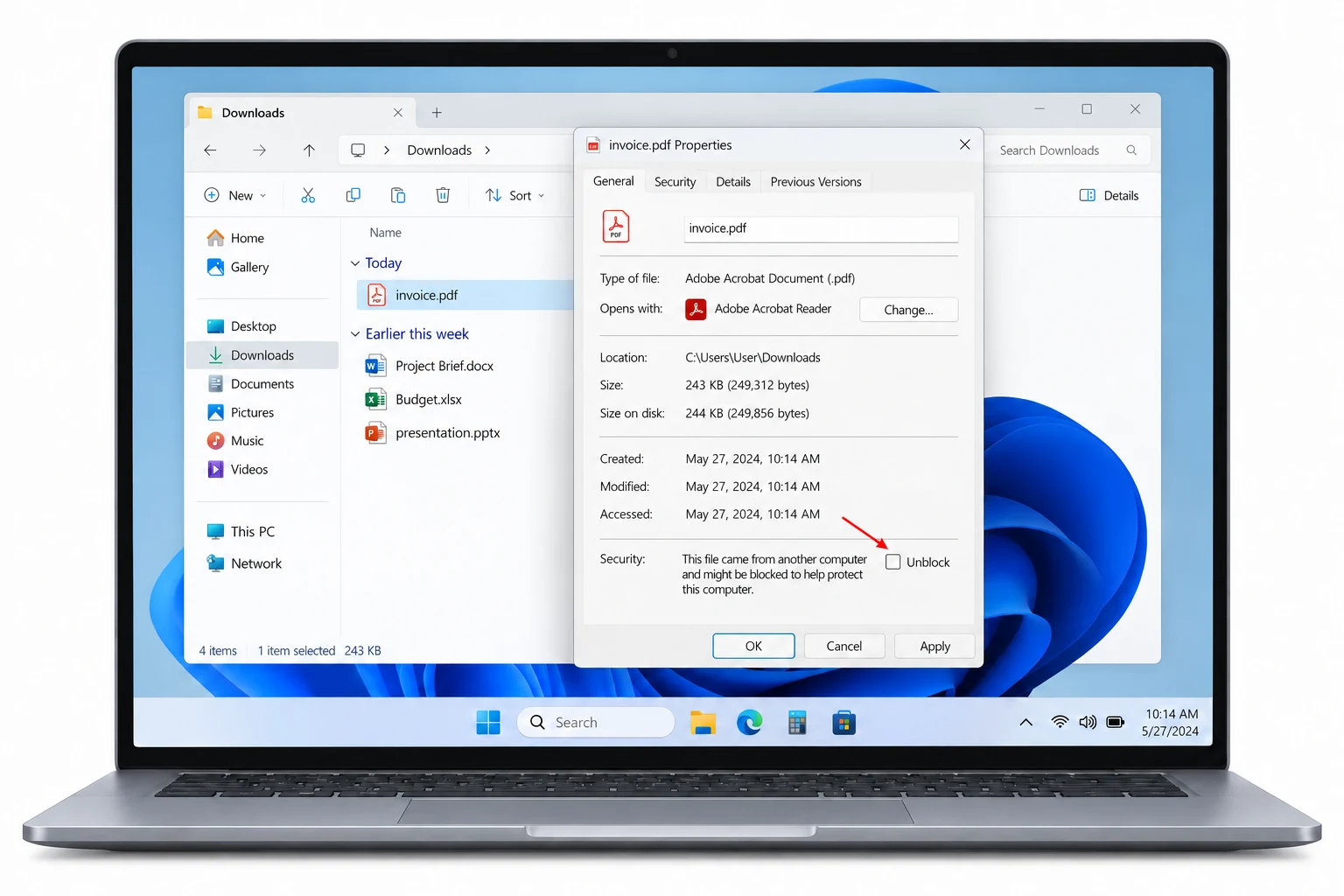
A downloaded item can open with a warning or refuse to run. Its Properties window then carries a short security note about another computer. Microsoft's Attachment Manager article gives that note as the sign of a blocked item.
Blocked-file notes in Windows raise three questions: what the note means, where Unblock sits and what to confirm before you select it. Steps in the guide cover one file, because Properties works on a single file at a time.
What Does the Message "This File Came From Another Computer" Mean?
The full note reads This file came from another computer and might be blocked to help protect this computer.
Windows adds source information to a download that came from the internet or from another computer or from a restricted or untrusted location. Microsoft names websites, email and messaging apps as common routes. The note appears in Properties when Windows holds that source information and treats it as blocked.
The source information is a small NTFS stream named Zone.Identifier, also called Mark of the Web. To read it directly, follow the guide to check if a file has Mark of the Web.
Should You Unblock a File That Came From Another Computer?
Microsoft's advice is to unblock files from trusted sources only. The note exists to slow you down, so confirm four things before you touch the box.
- Source: Verify where the file came from.
- Scan: Scan it with Microsoft Defender Antivirus or your own antivirus software.
- Type: Confirm that the file type matches what you expected.
- Sender: Avoid unexpected email attachments and files from unknown senders.
| Where the item arrived from | What to confirm first |
|---|---|
| Website download | The site belongs to the publisher you meant to use |
| Email attachment | You expected the attachment and you know the sender |
| Messaging app | The sender shared it on purpose and the type matches |
| Another PC | You trust that PC and the person who uses it |

How Do You Unblock a File That Says "This File Came From Another Computer"?
Run the checks above first. Microsoft's steps for one file follow.
- Open File Explorer. Browse to your download.
- Open Properties. Right-click the item and select Properties.
- Find the security message. Look near the bottom of the General tab. The note about another computer sits there.
- Select Unblock. Select Unblock beside the note.
- Confirm. Select Apply and then OK.
Windows stops showing its download warnings for that item once the mark is cleared. Other items keep their marks, so each blocked download needs its own visit. When Properties shows no note and no option, read the guide on an unblock checkbox missing in Properties.
How Do You Handle Many Files With the Same Message?
A package with dozens of blocked files turns those steps into a long afternoon. Three routes cover that case.
| Route | Effort | Limit |
|---|---|---|
| Properties | Repeat the steps for each item | One item for each visit |
| PowerShell | Type a command with a path, as in the guide to unblock all files in a folder | No output after the run |
| Folder scan app | Choose a path and click Unblock | Needs an install |
Folder scan app
Univik Mark of the Web Remover finds every blocked file under a path you choose. I scanned a test folder with the Univik app and every blocked row carried the origin label From the internet. The app runs on Windows 11 or 10 and needs .NET Framework 4.8.
- Choose the path. Select Choose a Folder and browse to your package. Subfolders are included.
- Read the rows. Here is what we found lists each item with its origin and a Blocked badge.
- Unblock and review. Click Unblock to clear the marks in place. All done! then offers View Log.
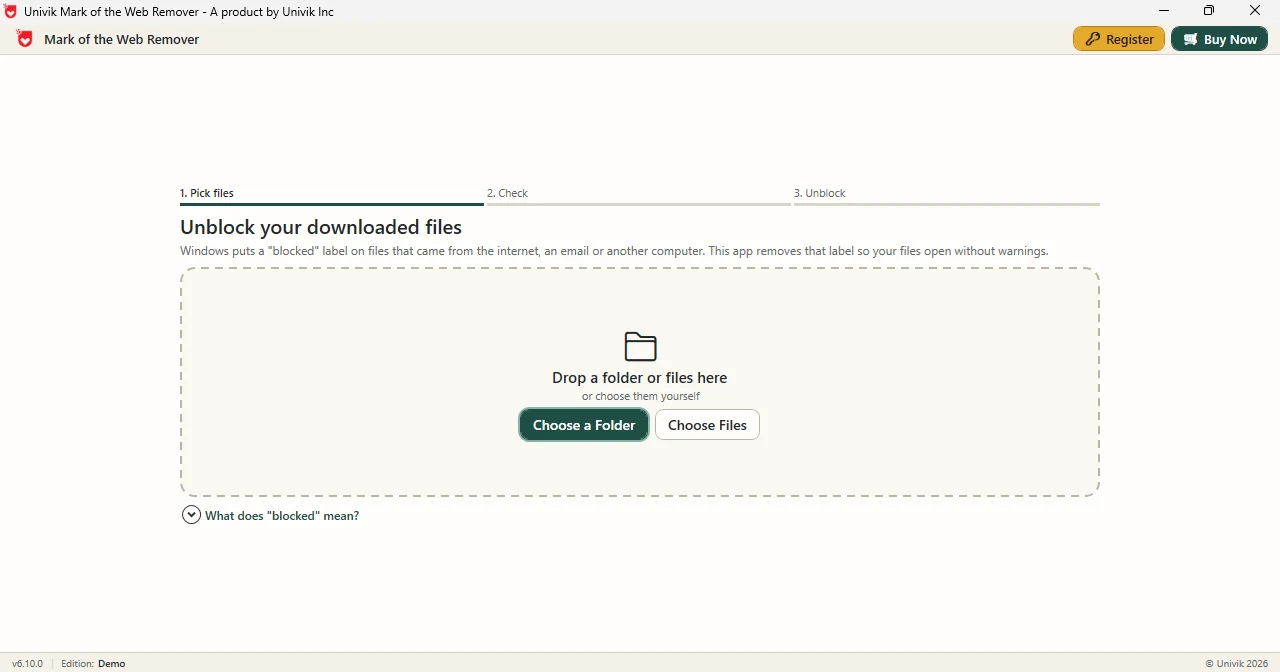
Limitations: the Demo Edition handles one file for each Unblock click. The full edition clears every listed file in one run. The app clears marks and does not scan for malware, so Microsoft's checks come first.
The Univik app lists every blocked file in a package with its origin label and clears the marks in place.
Download Free Demo Select a Licence - From $39Demo Edition: try one file first and open View Log to see the record.
What If Unblock Does Not Seem to Work?
Do this: Reopen Properties and select Apply and then OK. Microsoft lists both clicks as the last step.
Do this: Properties covers one item for each visit. Repeat the steps for each download or use a bulk route.
Do this: Stop and leave the box alone. Microsoft asks you to avoid unexpected email attachments and files from unknown senders.
Do this: Scan it with Microsoft Defender Antivirus or your antivirus software. Unblock clears a mark and does not judge content.
If the note stays after you try these fixes, contact Univik support.
- The message means Windows holds source information that marks a file as blocked.
- Microsoft asks you to unblock files from trusted sources only and to scan them first.
- Unblock sits on the General tab of Properties and needs Apply and then OK.
- Each visit to Properties clears one download. Other downloads keep their marks.
- The Univik folder scan app lists blocked files with origin labels when a package holds many.
FAQ: Blocked File Message in Windows
What does "this file came from another computer" mean?
Windows holds source information for the download and treats it as blocked. The note appears on the General tab of Properties and ends with the words help protect this computer.
What does Microsoft say to check before I select Unblock?
Microsoft asks you to verify where the file came from and scan it with Microsoft Defender Antivirus or your antivirus software. Confirm the file type matches what you expected and avoid unexpected email attachments.
Where is the Unblock option for one file?
Right-click the file in File Explorer and select Properties. The Unblock option sits near the bottom of the General tab beside the security message.
Why do I select Apply and then OK?
Microsoft's steps end with Apply and then OK to confirm the change, so complete both clicks.
Does unblocking one file unblock the others?
No. Properties acts on a single item for each visit. Every other item keeps its own mark until you clear it.
Which files get this message?
Microsoft says Windows adds source information to files downloaded from the internet or received from another computer. It also covers files from a restricted or untrusted location. Websites, email and messaging apps are common routes.
How do I unblock many files at once?
A PowerShell command with Unblock-File can clear many files from a path. A scan app can show the blocked rows first and clear them in one run.
Can an app list the files that carry this message?
Yes. The Univik app reads a path on Windows 11 and Windows 10 and labels each blocked file with its origin. A Demo Edition run handles one file for each Unblock click.

Steps and checks follow the Microsoft Support article on the Attachment Manager, read on October 29, 2026. The file list description comes from Univik app version 6.10.