Quick Answer
Mark of the Web on a network share depends on the zone that Windows assigns to the share. Files from the Internet or Restricted sites zone receive a mark by default. OneDrive sync downloads carry none and a FAT32 or exFAT drive cannot hold one.
Check the location first. A share needs a zone fix from your administrator while a synced file or a USB copy needs a check of its source.
A file keeps its mark only when the place it lands can hold one. A server share, a OneDrive folder and a USB drive each follow different rules. This guide takes the three locations one by one and uses Microsoft's own documentation for every rule.
Zones decide the result on a share while the sync client and the file system decide it for OneDrive and USB. Read the section that matches your location.
How Does Mark of the Web on a Network Share Work?
Microsoft's article on macros from the internet states that Windows adds a mark by default only to files from the Internet or Restricted sites zone. A share on a server receives a zone like any other location and the ZoneId inside a mark records that zone. The five zone names in the table follow the SecurityZone reference.
| Zone | ZoneId | Mark added by default |
|---|---|---|
| My Computer | 0 | No |
| Local intranet | 1 | No |
| Trusted sites | 2 | No |
| Internet | 3 | Yes |
| Restricted sites | 4 | Yes |
Office blocks macros in a file marked ZoneId 3 by default and leaves a ZoneId 2 file alone. Macros also stay blocked when a share is neither in the Local intranet zone nor listed as a trusted site. Microsoft's example is a share that people open by its IP address.
Can You Unblock Mark of the Web on a Network Share?
Microsoft states that the Unblock check box may be available for a file on a share and still have no effect when Windows treats the share as part of the Internet zone. The problem then sits with the zone and the file is not the cause. Clearing one file does not move the share into another zone.
Your administrator can place the share in the Local intranet zone or the Trusted sites zone. Microsoft recommends Trusted sites in general because that zone adds some security compared with Local intranet. Microsoft also warns that a trusted site gives the entire site elevated permissions outside Office.
Microsoft says a network location can serve as a Trusted Location and does not recommend it. Open a file from a share only after you know who put it there.
Properties may show no Unblock option at all for a file on a share. The guide on unblock checkbox missing lists the other causes and how to test each one.

Does OneDrive Add Mark of the Web to Synced Files?
Microsoft names three OneDrive and SharePoint cases in which a file arrives without a mark.
- Sync client download: A file that the OneDrive sync client downloads carries no mark.
- Known folders: A file in the Desktop, Documents, Pictures, Screenshots or Camera Roll folder that syncs to OneDrive carries no mark.
- Open in Desktop App: A file opened in the desktop app from the OneDrive website or from a SharePoint site carries no mark.
A file without a mark is not a checked file. Microsoft points out that anyone with permission to add files to SharePoint can add files with active content, for example macros. Ask who uploaded a file before you enable anything in it.
Can a FAT32 or exFAT USB Drive Hold Mark of the Web?
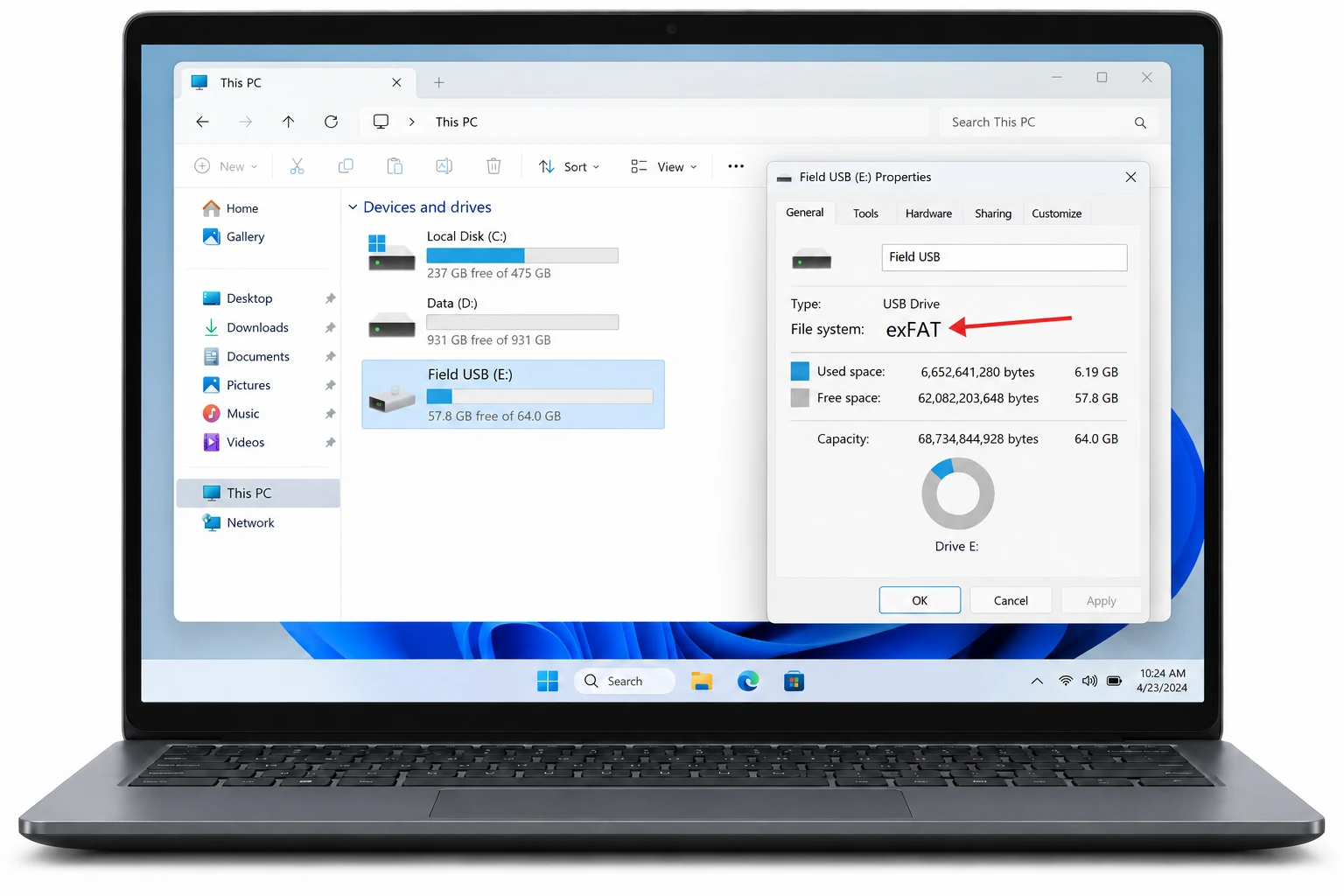
Microsoft states that a mark applies only to files saved on an NTFS file system and not to files saved on FAT32 devices. The mark is stored as a stream named Zone.Identifier. Microsoft's file system comparison lists alternate data streams for NTFS and UDF and lists none for exFAT and FAT32.
| File system | Alternate data streams | Zone.Identifier stream |
|---|---|---|
| NTFS | Yes | Has a place to live |
| exFAT | No | Has no place to live |
| FAT32 | No | Has no place to live |
The fsutil fsinfo command reports the file system of a drive. Replace E: with the letter of your USB drive.
fsutil fsinfo volumeinfo E:Read the line File System Name in the result. Microsoft's example output for an NTFS volume also lists the line Supports Named Streams. A file on a FAT32 or exFAT drive shows no Unblock option because no mark can sit there. The file itself still deserves a check of its source.
Type dir /r next to one file to list its streams. A Zone.Identifier entry means a mark exists. The guide to check if a file has Mark of the Web shows the output.
Which Files in a Folder on Your PC Carry a Mark?
Checking Properties file by file is slow for a folder with many downloads. Univik Mark of the Web Remover reads a folder on your PC and lists only the files that hold a mark. I opened the Univik app on a folder with marked files and read the count line before I pressed Unblock. The Univik app runs on Windows 11 and Windows 10 once .NET Framework 4.8 is installed.
- Open the folder. Press Choose a Folder and select the directory that holds your downloads.
- Review the result. The screen Here is what we found opens with every marked file and a count line. A file absent from the list holds no mark.
- Clear what you trust. Press Unblock for files you know. Open View Log on All done! to read the result.
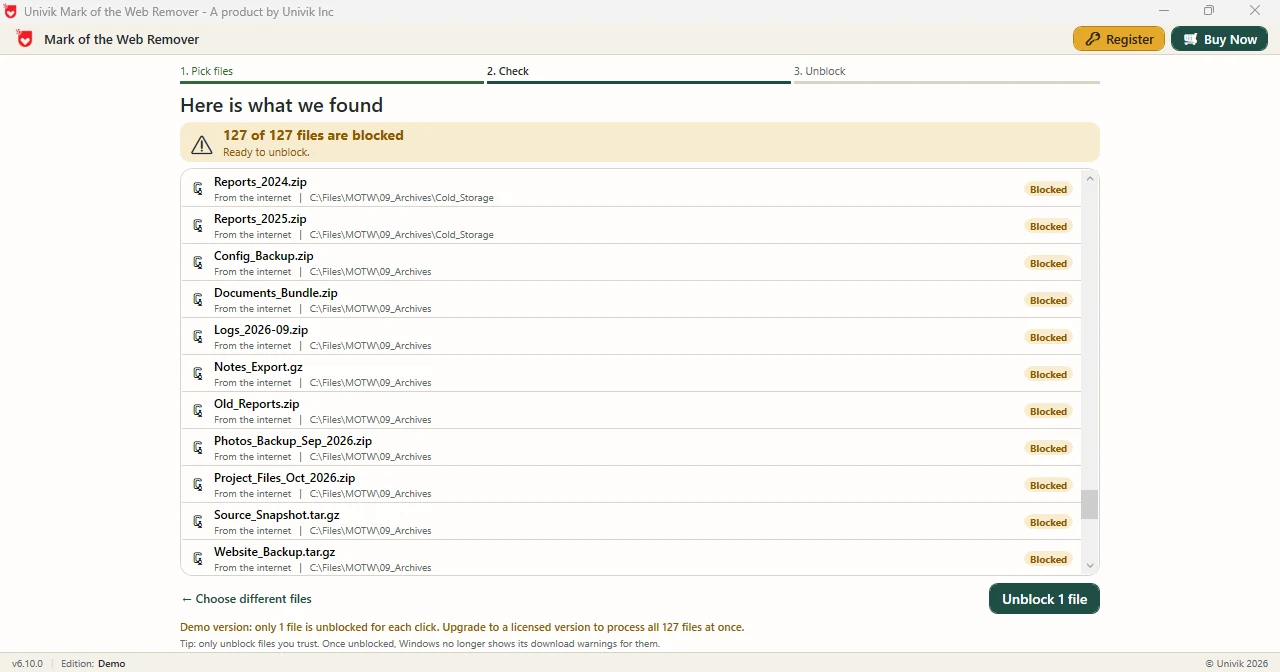
Limitations: Demo Edition lets each press of Unblock clear one file. Full edition works through every row in the list. This section describes folders on your PC. Use dir /r first for a file on a share or a USB drive.
Point the Univik app at a folder on your PC to see which downloads hold a mark.
Download Free Demo Select a Licence - From $39Demo Edition scans the whole folder and clears one file as a trial.
What If a File on a Share or Drive Still Shows a Warning?
Do this: Microsoft blocks macros in a file on a share outside the Local intranet and Trusted sites zones. Ask your administrator about the zone. The guide to Excel macros blocked covers the other fixes.
Do this: A missing warning means Windows holds no mark. It does not mean anyone checked the file. Ask the uploader before you enable content.
Do this: FAT32 and exFAT drives hold no Zone.Identifier stream. Verify the source of the file because Windows cannot warn you there.
Do this: Microsoft does not recommend a network folder as a Trusted Location. Clear one file you checked instead of trusting a whole folder.
Question about a location? Email the path type and the file system to Univik support.
- Windows adds a mark by default only to files from the Internet or Restricted sites zone.
- The Unblock check box has no effect on a file on a share that Windows treats as the Internet zone.
- OneDrive sync client downloads and synced known folders carry no mark.
- A FAT32 or exFAT drive has no alternate data streams so it holds no Zone.Identifier mark.
- Microsoft does not recommend a network location as a Trusted Location.
FAQ: Marks on Shares, OneDrive and USB
How does Mark of the Web on a network share work?
Windows adds a mark by default only to files from the Internet or Restricted sites zone. A share receives a zone like any other location and the ZoneId in the mark records it.
Why do macros fail to run in a file on a network share?
Microsoft states that macros are blocked in a file on a share that is not in the Local intranet zone or not a trusted site. A share reached through an IP address is its own example.
Does Unblock work on a file on a network share?
The check box may be available and still have no effect when Windows treats the share as the Internet zone. Your administrator can place the share in another zone.
Do files synced by OneDrive carry Mark of the Web?
A file that the OneDrive sync client downloads carries no mark. A file in a known folder that syncs to OneDrive carries none either.
Does Open in Desktop App add a mark to a OneDrive file?
No. Microsoft states that a file opened in the desktop app from the OneDrive website or a SharePoint site carries no mark.
Can a FAT32 or exFAT USB drive hold Mark of the Web?
FAT32 and exFAT cannot hold a mark. Microsoft says a mark applies only to NTFS and lists no alternate data streams for either format, so Zone.Identifier has no place to live.
Is a network folder a good Trusted Location?
Microsoft says a network location can be set as a Trusted Location and does not recommend it. A trusted site also gives the entire site elevated permissions outside Office.
Does a missing mark mean a file is safe?
No. A missing mark only means Windows holds no zone record for the file. Anyone with permission to add files to SharePoint can add files with active content.

Zone and file system rules come from three Microsoft Learn pages. The app lines rest on Univik app 6.10.