Quick Answer
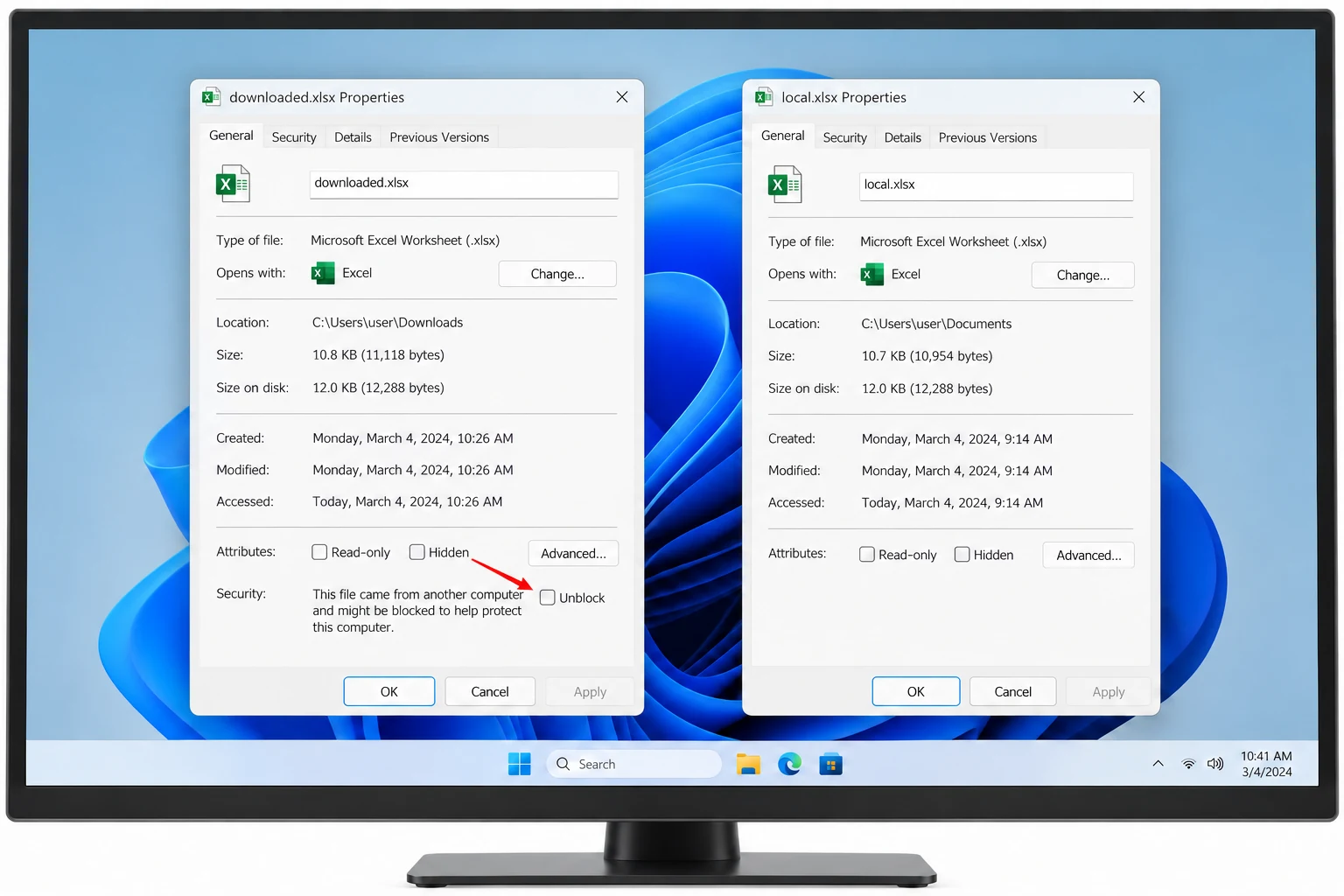
An unblock checkbox missing in Properties usually means the file carries no mark. Windows shows the option only for a file with Mark of the Web. A drive without NTFS or a policy that hides the button can leave it out too.
Test the file for a mark first. If it has one and the option is still gone, ask your administrator about the Attachment Manager policies.
A downloaded file can look suspicious in Explorer while its Properties window offers nothing to click. The General tab ends after Attributes and the Unblock option you read about is absent. That gap has a short list of causes. Each one takes about a minute to test.
Four reasons follow with a way to check each. Two of them mean there is nothing left to unblock.
Unblock Checkbox Missing: Why Does Properties Not Show It?
Microsoft's support article on blocked downloads tells you to look for a security message near the bottom of the General tab and to select Unblock if the file is blocked. The option belongs to that message. A file without the message has no mark to clear.
| Reason | What it means | Next step |
|---|---|---|
| No mark on the file | Windows never marked it or a tool skipped the mark | Nothing to unblock |
| Drive without NTFS | The drive cannot store a mark | Nothing to unblock |
| Hidden button | A policy hides the check box and the button | Ask your administrator |
| Marking turned off | A policy stops Windows from adding marks | Ask your administrator |

Unblock Checkbox Missing: Does the File Carry a Mark?
Test the file before you chase policies. The dir /r command prints each alternate data stream under a file. A marked file has a Zone.Identifier line there and a clean file has none. The guide to check if a file has Mark of the Web covers that command with its output.
dir /r C:\Downloads\report.xlsxAn entry ending in :Zone.Identifier:$DATA means the mark exists and the button should appear unless a policy hides it. No entry means a clean file. The properties of a clean file do not show the option, so the missing box is correct.
Does Your Drive Keep Marks at All?
Microsoft's Attachment Manager policy page says zone marking requires NTFS and fails without notice on FAT32. A file saved to a drive formatted that way never receives a mark. Properties therefore has nothing to offer there. Check the file system in Explorer by right-clicking the drive and choosing Properties.
Did a Policy Hide the Unblock Button?
Windows has two Attachment Manager policies that explain a missing box. Both sit under User Configuration, Windows Components, Attachment Manager and Microsoft documents both on its AttachmentManager policy page.
| Policy name | Effect when enabled | Registry value |
|---|---|---|
| Hide mechanisms to remove zone information | Windows hides the check box and the Unblock button | HideZoneInfoOnProperties |
| Do not preserve zone information in file attachments | Windows does not mark attachments with their zone | SaveZoneInformation |
Both values live under Software\Microsoft\Windows\CurrentVersion\Policies\Attachments for the current user. This command reads that key without changing anything.
reg query "HKCU\\Software\\Microsoft\\Windows\\CurrentVersion\\Policies\\Attachments"An error that says the key was not found means neither value is set for your account. A listed value means an administrator or a script set it. Leave it alone and ask your IT team. Microsoft lists these policies for Windows 10 version 1703 and later in the Pro, Enterprise and Education editions.
An administrator may hide the Unblock button so that users cannot open blocked attachments. Get permission before you clear marks by another route on a work PC.
Did Another Tool Skip the Mark?
Some archive tools extract files without copying the mark. 7-Zip version 22.00 introduced the option Propagate Zone.Id stream and keeps it off by default, as the 7-Zip release notes describe. Files from such an extraction carry no mark and Properties has nothing to unblock. The details of that behavior are in the guide to files blocked after extracting a ZIP.
How Do You Find Which Files Carry a Mark?
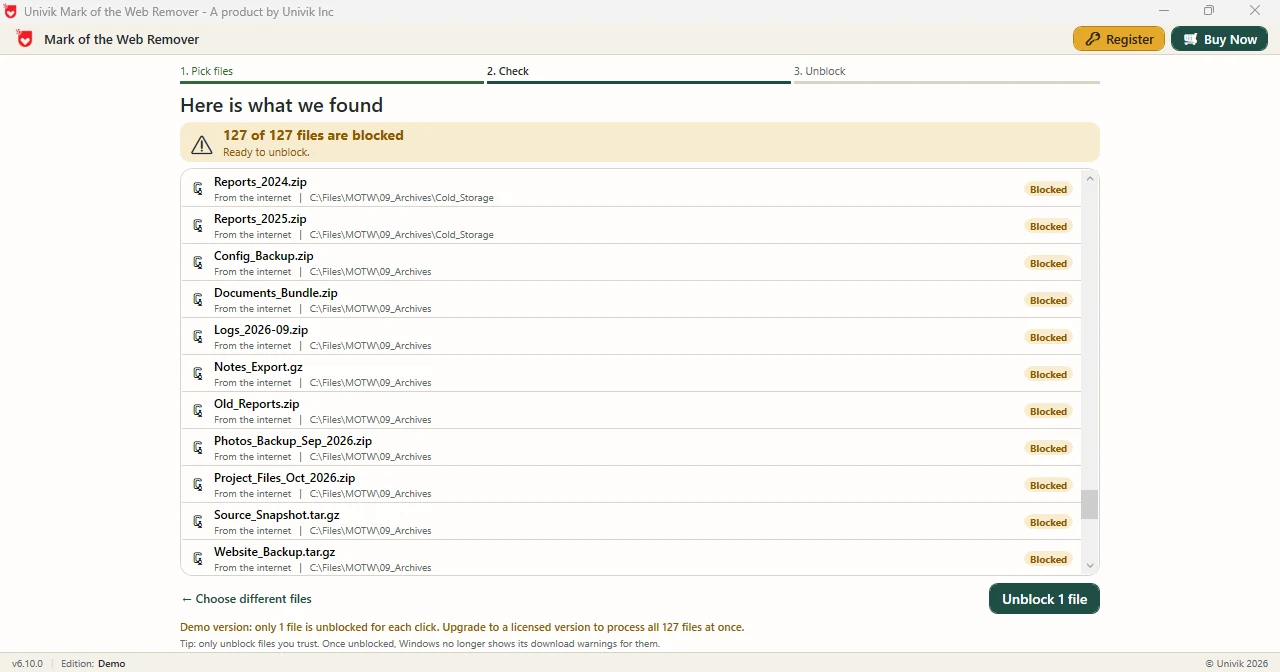
Opening Properties on every file only tells you about one file at a time. Univik Mark of the Web Remover scans a folder and lists only the files that carry a mark. On a test folder the Univik app returned rows with a Blocked badge. I counted them. Supported systems: Windows 11 and Windows 10 with .NET Framework 4.8 installed first.
- Pick the folder. Press Choose a Folder and open the directory you doubt.
- Read the count. Here is what we found lists each marked file and shows a count line. A file missing from the list carries no mark.
- Decide. Press Unblock only for files you trust. Then open View Log on All done!.
Limitations: Demo Edition clears one file per press of Unblock while full edition covers the whole list. The app edits marks only. Confirm that your administrator allows the change before you use it on a managed PC.
Choose any directory and the Univik app returns each file that holds a mark.
Download Free Demo Select a Licence - From $39Demo Edition permits a full scan plus one cleared file as a trial.
What If the Unblock Option Is Greyed Out?
Do this: A greyed option may point to missing permission on the file. Open the Security tab and check that your account can change it. Ask your administrator when the policy above is set.
Do this: A copy made by some tools may keep the mark while another tool drops it. Check the new file with dir /r instead of trusting the old Properties window.
Do this: A Microsoft support article names websites, email and messaging apps as sources of marked files. A missing option on an attachment points to a clean file or to the policies above.
Do this: Stop and verify the source. A missing Unblock option does not make a file safe. It only means that Windows holds no mark for it.
Unblock option still absent? Send the file type and the drive format to Univik support.
- Properties shows Unblock only for a file that carries Mark of the Web.
- A file saved to a FAT32 drive never receives a mark because zone marking needs NTFS.
- The policy Hide mechanisms to remove zone information hides the check box and the Unblock button.
- The policy Do not preserve zone information in file attachments stops Windows from adding marks.
- The Univik folder scan app lists exactly which files carry a mark in a folder.
FAQ: A Missing Unblock Option
Why is the unblock checkbox missing in Properties?
Properties shows Unblock only for a file that carries Mark of the Web. A clean file, a drive without NTFS or an Attachment Manager policy can each leave the option out.
Does a missing Unblock button mean the file is safe?
No. A missing button only means Windows holds no mark for that file or a policy hides the button. The file still deserves a check of its source.
Can a drive without NTFS store Mark of the Web?
No. Microsoft states that zone marking requires NTFS and fails without notice on FAT32, so Properties has nothing to offer for files there.
Which policy hides the Unblock button?
Hide mechanisms to remove zone information hides the check box and the Unblock button when enabled. It sits under User Configuration, Windows Components, Attachment Manager.
Which policy stops Windows from marking downloads?
Do not preserve zone information in file attachments stops Windows from marking attachments with their zone when enabled. Windows then cannot make proper risk assessments, per Microsoft.
How do I check whether a file has a mark?
Run dir /r on the file and look for a Zone.Identifier entry. A clean file shows no such entry.
Why is Unblock greyed out for my file?
A greyed option may come from missing permission on the file or from an administrator policy. Check the Security tab and ask your IT team before you change anything.
Can an app list which files in a folder carry a mark?
Yes. Point the Univik app at a directory and it lists each file with a mark, subfolders included.

Windows facts come from Microsoft Support and the Learn page for Attachment Manager. Screens from Univik app 6.10 back the app lines.