Quick Answer
Protected view on downloaded office files starts when Office treats a file as coming from the internet or another unsafe source. Enable Editing leaves it for that file. Microsoft lists seven causes and internet origin is only one of them.
Match your file to a cause first. Press Enable Editing only for a file whose sender you know.
A Word or Excel file from a download opens with a yellow bar and most of the buttons greyed out. That is Protected View. Microsoft documents several reasons for it and an origin on the internet is only one of them.
Microsoft's own article names each reason and this guide walks through them. You also learn what Enable Editing changes and what Microsoft leaves unsaid about Unblock.
Why Does Protected View on Downloaded Office Files Appear?
Microsoft's article What is Protected View lists seven situations in which Office opens a file read-only. Check which row in the table matches your file before you touch any of the settings.
| Cause | What Microsoft states | What to do |
|---|---|---|
| Internet origin | The file comes from the Internet | Check the source then decide on Enable Editing |
| Outlook attachment | The sender is marked unsafe by your computer policy | Ask your administrator about the policy |
| Unsafe location | The file opens from a place like the Temporary Internet Files folder | Open a copy from a folder you control |
| File Block | The file type is blocked by File Block | Ask your administrator about File Block |
| Failed validation | The file fails file validation and Office reports a problem with it | Do not edit it and ask the sender for a new copy |
| Chosen on purpose | Someone used Open in Protected View | Enable Editing when you trust the file |
| Shared OneDrive | The file sits in someone else's OneDrive and a Microsoft 365 client opens it | Expect Protected View for these files |
A file from a website or from email counts as internet origin. Microsoft's Attachment Manager page says Windows adds a mark to a download and uses it to decide whether a warning shows before the file opens. The same page says Office apps may open downloaded files in Protected View.
What Does Enable Editing Do to Protected View on Downloaded Office Files?
The yellow Message Bar offers Enable Editing. Selecting it leaves Protected View for the open file. A red Message Bar offers File then Edit Anyway in its place. Microsoft adds that a file you leave Protected View with becomes a trusted document.
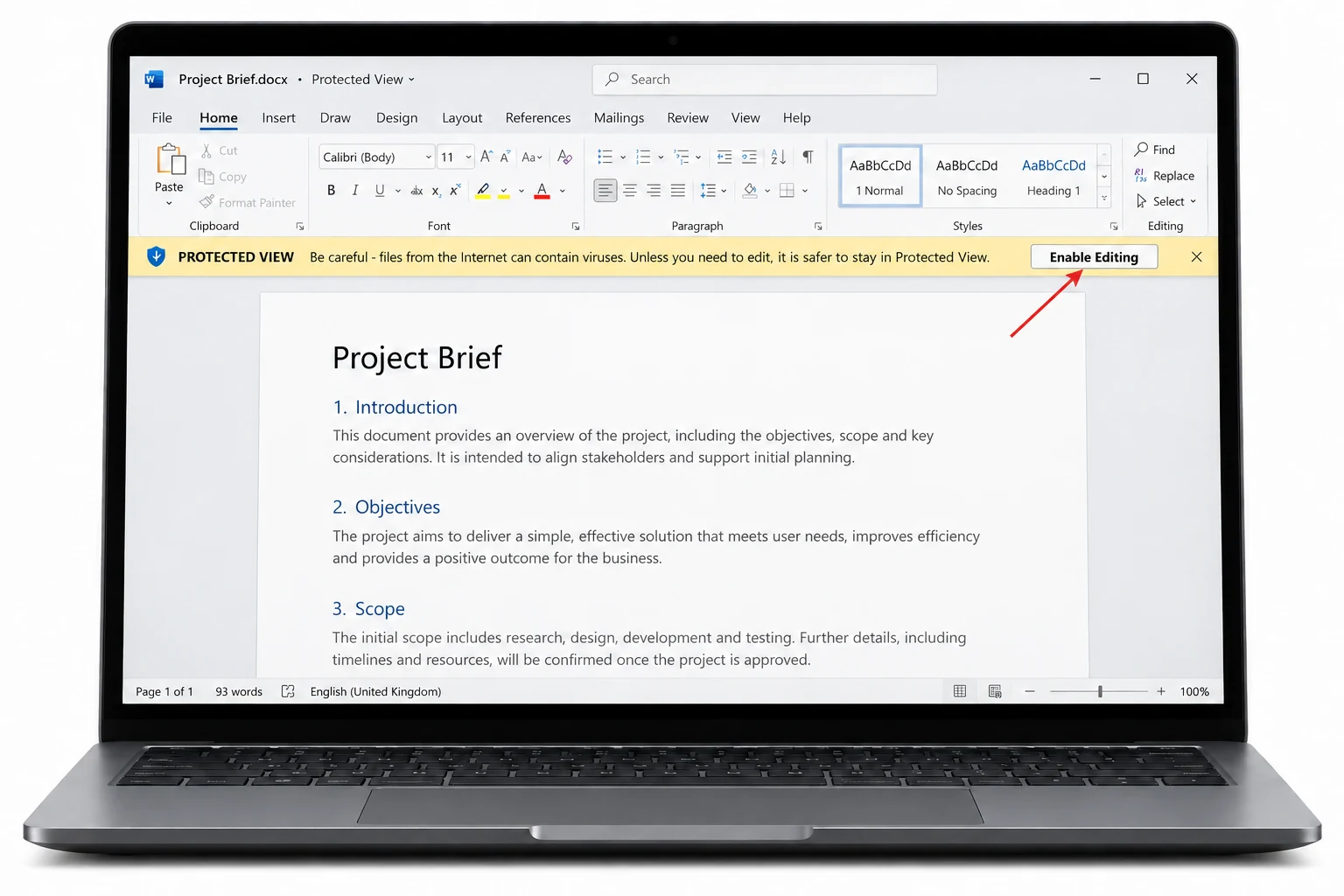
Protected View limits a file until you decide. Most editing functions are disabled. Add-ins may run and may not behave as expected. Cloud fonts that are not installed do not download so Word swaps in another font. Black boxes can appear when no swap works and Enable Editing fixes that.
Pressing the button trusts that one file from then on. Press it only for a file whose sender you know. Ask first when a stranger sent it.
Administrators can restrict how users exit Protected View and can add folders to the list of unsafe locations. A button that behaves differently on the work PC can come from that policy.

Does Unblock Help With Protected View?
Microsoft's Protected View article does not mention Unblock or Properties. Unblock is documented for the macro banner instead. The article on macros from the internet describes a SECURITY RISK banner that shows no Enable content button. Selecting Unblock in Properties removes the mark so macros can run.
Protected View and the macro banner are two different problems with two different fixes. A yellow Protected View bar asks for Enable Editing. A macro banner with no Enable content option points to Unblock. The guide to Excel macros blocked covers the macro side with each fix.
No Microsoft page in this guide says that Unblock ends Protected View for a downloaded file. Test the effect on one file you trust before you clear a whole folder. The guide to check if a file has Mark of the Web shows how to confirm that a file carries a mark.
How Do You List the Downloads That Carry a Mark?
A downloads folder holds files from many sources and Properties answers for one file at a time. Univik Mark of the Web Remover lists the files in a folder that hold a mark. On a folder of marked downloads I checked the count line in the Univik app before pressing Unblock. Install .NET Framework 4.8 first. Windows 11 and Windows 10 are the supported systems.
- Select the folder. Press Choose a Folder and point the app at your downloads directory.
- Check the findings. Under the Here is what we found heading each marked download sits above a count line. Files that hold no mark stay out of the results list.
- Clear the ones you know. Press Unblock for files from a source you trust. View Log on All done! records the run.
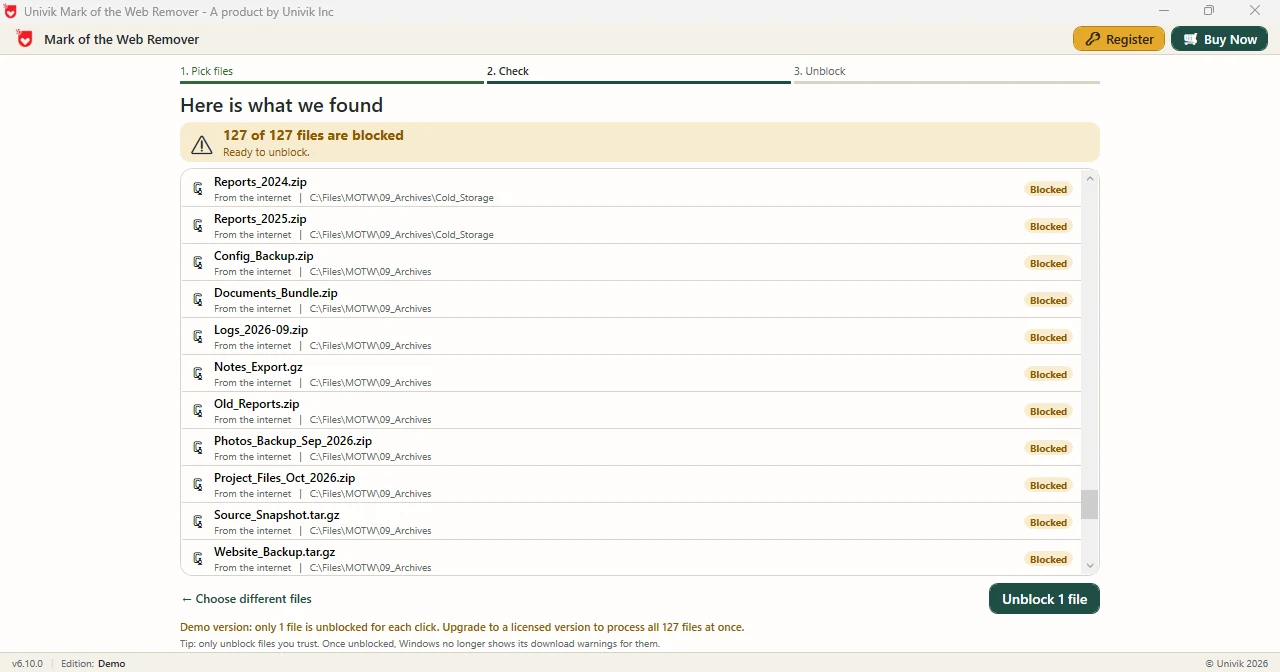
Limitations: a Demo Edition run clears one file. Full edition clears every file on the list. Clearing a mark does not replace a check of the sender. A managed PC may need approval from your administrator first.
Select your downloads folder and the Univik app shows each file with a mark.
Download Free Demo Select a Licence - From $39Demo Edition shows every marked file and clears one as a trial.
What If a File Keeps Opening in Protected View?
Do this: Office states that it has detected a problem with the file when validation fails. Skip Enable Editing and ask the sender for a fresh copy.
Do this: Your computer policy may treat the sender as unsafe. Ask your administrator before you save the attachment and open it again.
Do this: An administrator can restrict how users exit Protected View. Ask your IT team and avoid workarounds on a managed PC.
Do this: Six other causes exist besides internet origin. Match the file to the table before you clear any mark.
Still stuck on one file? Email the Office app and the message bar text to Univik support.
- Microsoft lists seven reasons for Protected View and internet origin is one of them.
- Enable Editing leaves Protected View for one file and makes it a trusted document.
- A red Message Bar uses File then Edit Anyway in place of Enable Editing.
- Microsoft documents Unblock for the macro banner and does not mention it in the Protected View article.
- The Univik app lists which downloads in a folder hold a mark.
FAQ: Protected View and Downloads
What triggers Protected View on downloaded Office files?
Protected View on downloaded Office files starts when Office treats a file as coming from the Internet. Microsoft lists six more causes that include unsafe locations and File Block.
What does Enable Editing do in Protected View?
Enable Editing leaves Protected View for the file. Microsoft states that a file you leave Protected View with becomes a trusted document.
What is the red Message Bar with Edit Anyway?
A red Message Bar replaces Enable Editing with File then Edit Anyway. Both choices leave Protected View for the open file in the same way.
Does Enable Editing make a file safe?
No. Enable Editing only leaves Protected View and makes the file a trusted document. Check the source of the file before you press it.
Does Unblock in Properties stop Protected View?
Microsoft's Protected View article does not mention Unblock. Unblock is documented for the macro banner where it removes the mark. Test one trusted file before you rely on it for Protected View.
Why do Outlook attachments open in Protected View?
Office opens an Outlook attachment read-only when the sender is marked unsafe by your computer policy. Ask your administrator about that policy.
Can an administrator change Protected View?
Yes. Microsoft states that administrators can restrict how users exit Protected View and can add folders to the list of unsafe locations.
Why do fonts turn into black boxes in Protected View?
Cloud fonts that are not installed do not download in Protected View. Word swaps in another font and black boxes can appear when no swap works. Enable Editing fixes it.

Protected View facts come from two Microsoft Support pages and one Learn page. The app lines rest on Univik app 6.10.