 Email Settings Guide
Quick answer: the Bell IMAP server is imap.bell.net on port 993 with SSL. The outgoing server is smtphm.sympatico.ca on port 587. The POP3 server is pophm.sympatico.ca on port 995 with SSL. Read those three again, because IMAP sits on a bell.net host while POP and SMTP sit on sympatico.ca hosts. Your username is the full address and the password is your ordinary Bell email password. One warning before you start: Bell only permits mail client access from 13 countries. Webmail works anywhere.
What Changed Recently#
Related email providers: Rogers email settings, Telus IMAP settings, Shaw email settings, Cogeco IMAP settings, EastLink email settings, SaskTel IMAP settings
Bell has kept its server addresses steady. What it changed quietly was who is allowed to reach them.
Latest update
Mail client access is restricted to 13 countries. Bell states this across its own support pages. Outlook, Apple Mail and any other client will only reach a bell.net, sympatico.ca or bellaliant.net mailbox from the countries on the list below. Webmail is unaffected and works from anywhere, which is what Bell recommends if you are outside the list.
Earlier change
The restriction arrived without an announcement. Users described losing access while travelling well before the country list appeared in Bell's documentation, with one Bell representative quoted saying the email vendor had begun blocking most connections from outside North America. If your setup broke on a trip and you spent an evening rechecking ports, this is why.
Earlier change
Bell publishes minimum operating software requirements. The company ties email access to running software new enough to support current security protocols. An old computer or phone that has stopped receiving updates can fail for that reason rather than anything you configured.
Before You Begin#
Two checks come before the server values. The first one catches people out in a way no other provider in this series manages.
1. Check which country you are in
Bell permits mail client connections from 13 countries and blocks the rest. Nothing about your settings or password changes that. Travelling or living abroad is the most common reason a Bell setup stops working.
Where: The country list below →
2. Note that the hosts differ
IMAP uses imap.bell.net. POP and SMTP use sympatico.ca hosts. There is no smtp.bell.net, so pattern matching from the IMAP name gives you a server that does not exist.
Where: Server tables below →
About Bell Mail#
Bell is Canada's largest telecommunications company, providing internet, TV and phone service across the country. Its mail service carries three domains, picked up as the company grew.
Sympatico was Bell's consumer internet brand for years, which is why so many Canadian mailboxes still end in sympatico.ca. Bell Aliant covered the Atlantic provinces and left bellaliant.net behind. All three now run on one mail platform. What makes Bell genuinely unusual has nothing to do with passwords or protocols. The company restricts mail client access by country, so where you are sitting matters as much as what you type.
| Service Name | Bell Mail |
| Owned By | BCE Inc., trading as Bell Canada. Bell Aliant is a division of Bell Canada |
| Launched | Sympatico was the long running consumer brand before the Bell Mail name |
| Email Domains | @bell.net, @sympatico.ca, @bellaliant.net |
| Webmail URL | bell.net |
| Protocols Supported | IMAP, POP3, SMTP, CalDAV, CardDAV. Bell recommends IMAP |
| App Password Needed | Not by default. Bell offers multi-factor authentication. With MFA on, a client may need an app-specific password instead |
| Free Storage | Bundled with the Bell service. No figure published we can verify |
imap.bell.net. POP3 lives at pophm.sympatico.ca. SMTP lives at smtphm.sympatico.ca. There is no smtp.bell.net and no imap.sympatico.ca, so working one out from another leaves you with a host that never answers. All three serve @bell.net, @sympatico.ca and @bellaliant.net addresses alike.
@mymts.net address belongs to Bell MTS, which publishes its own server names built on mail.mymts.net rather than anything on this page. The shared Bell name makes the two look interchangeable. They are not. Where your address ends in mymts.net, none of the hosts here apply.
Bell Webmail Login#
Webmail matters more here than on most providers, because it is the one route that works from anywhere in the world. Bell runs it at two addresses:
Will It Work Where You Are?#
No other provider in this series needs this section. Bell restricts mail client connections by country, so a setup that works perfectly at home can stop the moment you land somewhere else. Nothing on your device is at fault when that happens.
- Bell permits client access from 13 countries. Australia, Bahamas, Canada, France, Germany, Iceland, Ireland, Italy, Portugal, Saint Pierre and Miquelon, Spain, the United Kingdom and the United States.
- Everywhere else is blocked. Outlook, Apple Mail, Thunderbird, phone mail apps, migration tools, backup software. All of them use IMAP or POP, so all of them are refused.
- Webmail is not affected. It works from any country, which is exactly what Bell recommends if you are outside the list.
- No setting fixes this. There is no toggle, no exception request and no password change that helps. The restriction is applied at Bell's servers based on where your connection comes from.
- It applies to all three domains. bell.net, sympatico.ca and bellaliant.net alike.
Bell IMAP Settings#
IMAP is the incoming protocol to use. Bell says the same. Mail stays on the server, which keeps every device showing one inbox.
| IMAP Server | imap.bell.net, on the bell.net domain | |
| Port | 993 | |
| Encryption | SSL/TLS (required) | |
| Username | Your full email address, including @bell.net | |
| Password | Your ordinary Bell email password | |
| Authentication | Required. Also requires connecting from a permitted country |
Bell POP3 Settings#
POP3 draws mail down to a single machine. Only worth it for one computer holding a local copy. Undecided? The comparison sits below.
| POP3 Server | pophm.sympatico.ca. Note the hm and the sympatico.ca domain | |
| Port | 995 | |
| Encryption | SSL/TLS (required) | |
| Username | Your full email address | |
| Password | The same Bell email password |
Bell SMTP Settings#
SMTP carries outgoing mail. Reading fine while sending fails points here. On Bell the likeliest cause is the host name. The outgoing server sits on sympatico.ca even when your address ends in bell.net.
| SMTP Server | smtphm.sympatico.ca. Not smtp.bell.net, which does not exist | |
| Port | 587 with TLS, the value Bell publishes | |
| Alternate port | 465 with SSL is also documented for this host, worth trying where 587 is blocked | |
| Calendar and contacts | Bell offers CalDAV and CardDAV as well, using the same credentials | |
| Encryption | SSL or STARTTLS (required) | |
| Username | Your full email address | |
| Password | Same as incoming. There is no separate outgoing credential | |
| Authentication | Required. Outlook presents this as the outgoing authentication tickbox. |
Check Bell IMAP Settings Online#
You don't need to download anything to check Bell IMAP settings online. This page is the lookup: every value is verified, current and copyable straight from your browser. Not sure your address uses Bell servers? Type it below and find out instantly.
Does my email address use these settings?
Runs in your browser only. Your address is never sent anywhere or stored.
Want to verify the account itself before configuring an app? Sign in at Bell webmail, which confirms your address and password work, then confirm an app password exists. If both pass, any email app connects with the tables above.
Look Up IMAP Settings for Any Email Domain#
This page covers Bell. For every other address, work email on a company domain included, we run a free online lookup database: imapsettings.com.
imapsettings.com
Complete email settings database, by Univik
Enter any email address and get the incoming and outgoing server settings for that domain in 1 step:
The address is examined in your browser to identify the domain. It travels nowhere.
Your Bell Password and Sign In#
For most people one password covers everything here and nothing needs generating. The exception is multi-factor authentication, which Bell offers for Bell Mail. The bigger complications on this provider sit elsewhere entirely.
| Where you sign in | In a permitted country | Anywhere else |
|---|---|---|
| Bell webmail in a browser | ✓ Bell password | ✓ Still works |
| Outlook, Apple Mail, Thunderbird | ✓ Bell password | ✗ Blocked |
| Phone mail apps set up by hand | ✓ Bell password | ✗ Blocked |
| Backup and migration tools | ✓ Bell password | ✗ Blocked |
Finding or Resetting Your Bell Email Password
- Sign in to MyBell at bell.ca with your account details.
- Open the email area and find the address you want to work with. Bell documents how to look up your email address here as well, which helps if you inherited a sympatico.ca address years ago.
- Reset the password from there and follow the prompts.
- Usually nothing gets generated. Without multi-factor authentication, the password you set is the one your mail client uses.
- If you have MFA switched on, Bell publishes a multi-factor authentication page for Bell Mail. Expect your client to need an app-specific password rather than your everyday one. Check that page for the current steps before assuming the credential is wrong.
- Update every device afterwards. One password serves webmail and every client, so a reset locks out anything still holding the old one.
Set Up Bell in Email Clients#
All three Bell domains take the same hosts and the same password. Only the menus change. Pick your app:
Outlook (Windows and Mac)
- In Outlook choose File, then Add Account. New Outlook keeps it under Settings, then Accounts.
- Enter your Bell address, open Advanced options and check "Let me set up my account manually".
- Choose IMAP and enter
imap.bell.neton port993with SSL, thensmtphm.sympatico.caon port587. Two different domains, deliberately. - Enter your ordinary Bell password, then tick outgoing server authentication under More Settings.
- Write a test message to yourself at the end, which proves incoming and outgoing in a single go.
Apple Mail (macOS)
- The Apple Mail path is Settings, Accounts, Add Account.
- Choose Other Mail Account. Apple carries no Bell entry among its providers.
- Enter your name, full address and Bell password, then continue.
- Asked for hosts? Take them from the tables above, minding that they differ.
- Leave Mail ticked in the service list, then finish up.
iPhone and iPad
- The iOS path runs Settings, Apps, Mail, Mail Accounts, Add Account.
- Tap Other, then Add Mail Account. Avoid anything Microsoft branded, because the Outlook mobile app has a habit of treating Bell addresses as Outlook.com accounts and failing. Users report needing to choose "Not a Microsoft account" to escape that.
- Enter your details using your Bell password, then tap Next.
- Leave IMAP chosen, supplying both hosts if iOS prompts for them.
- Tap Save, then allow iOS a moment to check the account.
Android
- In whichever Android mail app you use, choose Add account.
- Take Other, then IMAP, as Bell is absent from the provider list.
- Enter your full address and Bell password. Where automatic setup fails, switch to Manual setup.
- Enter the servers:
imap.bell.net993 SSL incoming,smtphm.sympatico.ca587 outgoing. - Complete it, then swipe down on the inbox to start the first fetch.
Thunderbird
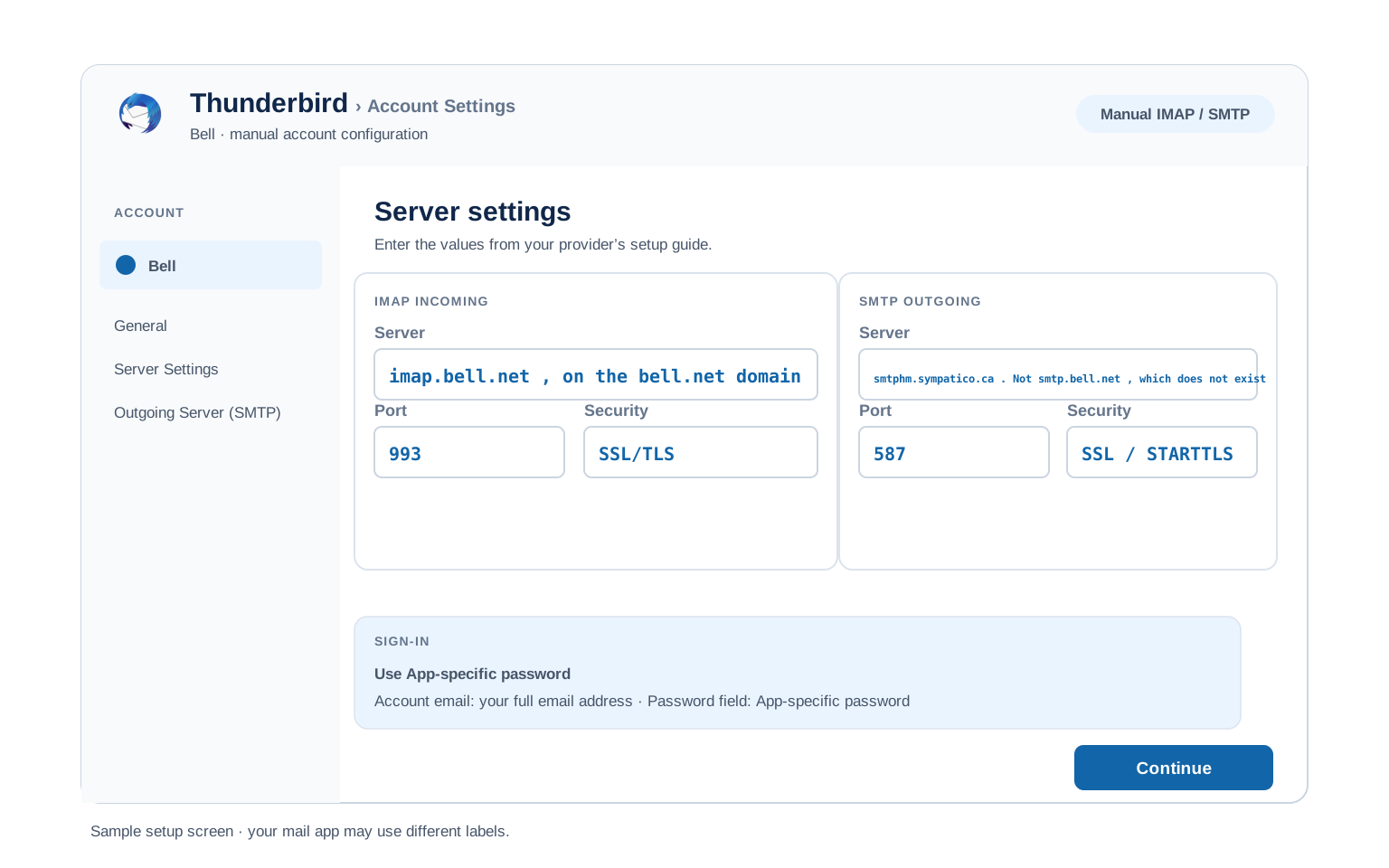
- The Thunderbird path is Account Settings, Account Actions, Add Mail Account.
- Enter your name, full address and Bell password, then select Continue.
- Check what Thunderbird detected. Automatic setup sometimes guesses a matching domain for both hosts, which is wrong on Bell. The outgoing server must be the sympatico.ca one.
- Where detection falls short, use Configure manually and type the values in.
- Choose Done. Folders appear once the first sync runs.
Bell Webmail Settings#
The values above connect your apps. This next group governs the mailbox itself. All of it lives in Bell webmail rather than in your client. Handy, given webmail is the route that works from anywhere.
Signature
Set from the webmail settings area. It applies to messages sent from the browser. Outlook, Apple Mail and Thunderbird each keep a separate one of their own, which is why people often end up writing it twice without noticing.
Vacation Auto Reply
Give the away message a start and an end date so it stops unattended. It runs on Bell's servers, so replies keep going out with every device of yours switched off. Useful if you are heading somewhere your mail client will not connect from anyway.
Filters and Folders
Rules built in webmail run on the server, sorting mail before any device collects it. A rule built inside Outlook fires only while Outlook is open. It stops entirely once you travel outside the permitted countries.
Spam and Blocked Senders
Block individual senders or whole domains from the webmail settings. Check the spam folder there first when mail goes missing, since a rule inside your client cannot retrieve what the server already filed.
Bell POP3 vs IMAP#
| Feature | IMAP | POP3 |
|---|---|---|
| Where mail lives | On the Bell server | Downloaded to 1 device |
| Multiple devices | ✅ Everything stays in sync | ❌ Each device sees different mail |
| Sent and deleted mail | ✅ Synced everywhere | ⚠️ Stays only on that device |
| Offline reading | ⚠️ Cached mail only | ✅ Full local copy |
| Server storage used | Yes, counts against your quota | Can be freed after download |
| Best for | Phone + computer, everyday use | Single PC, local archives |
Bell Access Rules and Mailbox Limits#
Bell publishes rules rather than numbers here. These are the constraints that actually affect a client setup:
| Countries permitting client access | 13. Australia, Bahamas, Canada, France, Germany, Iceland, Ireland, Italy, Portugal, Saint Pierre and Miquelon, Spain, the UK and the US |
| Webmail access | Unrestricted. Works from any country |
| Minimum software | Bell publishes operating software requirements tied to current security protocols |
| Domains covered | bell.net, sympatico.ca and bellaliant.net, all on the same servers |
| Mailbox storage | Not published in a form we can verify, so we are not guessing at a figure |
| Sending limits | Not published. Treat it as a personal mailbox rather than a sending platform |
Troubleshooting Bell Connections#
Bell failures cluster around three causes. Where you are. Which host you typed. Which app you chose. Find your symptom.
| Error you see | What it means | Fix |
|---|---|---|
| Worked at home, fails abroad | You are outside the 13 permitted countries | Nothing is misconfigured. See the country list. Use webmail while you are away, then your client again on return. |
| Cannot find server smtp.bell.net | That host does not exist | Bell's outgoing server is smtphm.sympatico.ca, on a different domain from the IMAP host. Correct it and the port to 587. |
| Outlook mobile app will not add the account | The app is treating a Bell address as an Outlook.com account | Look for the "Not a Microsoft account" option, then choose Other and enter the servers by hand. |
| Cannot connect to server | Wrong port or encryption | Check IMAP 993 SSL and SMTP 587, with 465 as a fallback. A VPN deserves special attention on Bell, since it can place your connection in a country the servers refuse. |
| Password keeps being asked | Something other than the password, usually | Check your country and the host names first, since both cause this. With multi-factor authentication enabled, the client may want an app-specific password instead. |
| Messages stuck in Outbox | SMTP authentication is off | Switch on outgoing authentication, using the same credentials as the incoming server. |
Reader Reported Fixes
A VPN putting you in the wrong country. This one is quietly common and hard to spot. A VPN set to exit somewhere outside Bell's permitted list makes your mail client look like a foreign connection, so it is refused while everything else on the machine works normally. Turning the VPN off restores mail immediately. So does moving its exit to Canada.
Guessing the outgoing host from the incoming one. People see imap.bell.net, reasonably assume smtp.bell.net, then get a server that does not resolve. Incoming mail arrives perfectly while nothing sends, which reads like an authentication problem rather than a typing one. The outgoing host lives on sympatico.ca.
Sympatico, Bell Aliant and Moving Your Mail#
Sympatico or Bell Aliant address? Both came across as Bell absorbed the brands. Both use the servers on this page unchanged. A @sympatico.ca address stays a sympatico.ca address. The one thing worth noticing is that the POP and SMTP hosts still carry the sympatico.ca name, which is a leftover from that history rather than a sign your address needs updating.
Moving mail off Bell? A migration tool is another IMAP client, so it faces the same country restriction as Outlook does. Run the transfer from inside one of the permitted countries. Otherwise it fails before it starts.
Leaving Bell entirely? Back up the mailbox first, while you are somewhere the connection is allowed. ISP mailboxes are tied to the service, so the window between cancelling and losing access is not one to spend troubleshooting a blocked connection.
Taking your mail to a new account? The Univik Email Migration Tool copies every folder from the old account to the new one. Enter the IMAP settings from this page for the Bell side and your new provider's settings for the other.
Rather not do it yourself? The Email Migration Services team maps the move, carries it out, then verifies each folder arrived.
Use These Settings in Univik Email Backup#
The same IMAP settings above let you download your complete Bell mailbox to your computer. Univik Email Backup writes the mailbox out to PST, MBOX, EML or PDF. Files on your own disk are not subject to anybody's country list.
- Put Univik Email Backup onto a Windows computer.
- Set Bell as the source. Where the name is absent, generic IMAP does the same work.
- Sign in with your full email address and your ordinary Bell password. Run this from a permitted country, since a backup tool connects over IMAP like any other client.
- If the tool asks for server details, use
imap.bell.netwith port993and SSL from the IMAP table above. - Choose an output format and a destination, then begin. Years of mail keep downloading unattended.
Univik Tools That Use These Settings#
Plenty of readers arrive part way through a move or an archive. All 3 tools run on the IMAP values above:

Email Backup
Download your complete Bell mailbox to PST, MBOX, EML or PDF before switching or closing the account.
Email Backup Tool →
Email Migration Tool
Copy every folder from Bell straight into Gmail, Microsoft 365 or any other account. No manual export needed.
Email Migration Tool →
Email Converter Tool
Sitting on MBOX, EML or OST from an earlier export? Reshape it into PST, PDF or whatever your next app reads.
Email Converter Tool →Prefer to hand the whole migration to experts?
Nobody has to become an expert in host names and country lists. The Univik migration team runs the whole job, scoping it, moving the mail, verifying the result, then providing a report of where each folder landed. We have done this since 2013, for a single mailbox or a whole company.
Email Settings Glossary#
IMAP
Internet Message Access Protocol. Reads mail left on the server, which is how folders and read marks stay matched across devices.
POP3
Post Office Protocol version 3. Downloads mail to 1 device and can remove it from the server. Older method, still useful for local archives.
SMTP
Simple Mail Transfer Protocol. Sends your outgoing mail. Every account needs it next to IMAP or POP3, which only receive.
SSL / TLS / STARTTLS
Encryption for the connection. SSL/TLS encrypts from the start (ports 993, 995, 465). STARTTLS upgrades a plain connection (port 587).
App Password
A separate code standing in for your real password inside an app, revocable on its own. On Bell these come into play once multi-factor authentication is enabled. Without MFA, your ordinary Bell email password is what the client holds.
OAuth
Signing in through a browser window rather than typing a password into the app. Several large providers have gone this way. Bell has not, so your password goes in directly.
How We Verify These Settings#
Univik has built email backup, migration and converter software since 2013. Our tools sign in to Bell over IMAP and SMTP every day for thousands of users, so a changed server, port or login rule shows up in our connection logs before most guides notice it.
Every value on this page is confirmed with 3 checks: a live IMAP and SMTP connection from Univik Email Backup, a comparison against Bell's own published support pages and a sign in run through current webmail. Any announcement triggers a recheck. We revisit the page quarterly regardless.
Screen disagreeing with this page? Send it over. We test again, correct it, then note the change in what changed recently.
 Help & Support
Frequently Asked Questions
Use imap.bell.net on port 993 with SSL, with your full address as the username and your ordinary Bell password. That covers @bell.net, @sympatico.ca and @bellaliant.net alike. Watch the outgoing host though, because it lives on a different domain. The complete table sits in the IMAP settings section.
On Bell the password is usually not the problem. Check two other things first. Are you connecting from one of the 13 permitted countries, since Bell blocks mail clients everywhere else? And are your host names right, given IMAP sits on bell.net while POP and SMTP sit on sympatico.ca? Bell issues no app password by default, though multi-factor authentication changes that where you have it enabled.
IMAP for almost everyone. It keeps your phone, computer and webmail in sync. POP3 fits only a single computer setup where you want a local download. Full comparison here.
Across devices, yes. That holds across all three Bell domains too. What changes the answer is not the device but the country you are in, because Bell permits mail client connections from 13 places and refuses the rest. The client setup guides cover the menus.
Without multi-factor authentication there is nothing of that sort on Bell, so the thing to recover is the Bell email password itself, reset through MyBell. With MFA enabled you would generate a fresh app-specific password instead. Either way, one credential change affects every device holding the old one.
Yes, on the encrypted ports listed here. Bell also sets minimum operating software requirements, tied to supporting current security protocols, so keeping the device updated is part of it. Bell also offers multi-factor authentication for Bell Mail, worth turning on given a single password otherwise covers webmail and every client.
An IMAP client pulls mail down as it syncs, though a dedicated backup tool moves quicker and writes standard files that open anywhere. Do it from inside a permitted country. See how to back up your Bell mailbox. Holding an old export in some other format? An email converter reshapes it into PST, PDF or whatever comes next.
On Bell the most likely explanation is that you moved. The company restricts mail client access to 13 countries. That restriction arrived without an announcement, so a setup can break on a trip with nothing changed on your side. A VPN can do the same thing from your own living room. See the country list.
An email migration tool copies mail directly between the 2 accounts over IMAP. You need the Bell IMAP settings and your Bell password for this side, plus the same details for the destination account. Run it from a permitted country, since the migration tool is another IMAP client. Every folder, label and date stays intact.
Where the risk is high or the mailbox count is, our managed email migration service handles everything.
Other Email Provider Settings
Summary: Bell Settings at a Glance
- IMAP: imap.bell.net, port 993, SSL/TLS
- POP3: pophm.sympatico.ca, port 995, SSL/TLS
- SMTP: smtphm.sympatico.ca, port 587
- Username is always your full email address
- Clients work from 13 countries only
- Webmail works everywhere
- IMAP on bell.net, SMTP on sympatico.ca
- Your Bell password works, unless MFA is on