Quick Answer
Foxmail to Apple Mail takes two machines: write your mail as MBOX files on a Windows PC, move the files across to your Mac, then pick File > Import Mailboxes in Mail.
Foxmail's own Export Mails command writes .eml files while Apple's import page points Windows mail to Files in mbox format, so MBOX is the file type to make. Contacts and calendars travel in separate files.
Foxmail 7.2 is a Windows program and Apple Mail belongs on the Mac, so neither program has a menu that hands mail across to the other. To move Foxmail to Mac, you write files on the PC and import them on the Mac.
An MBOX file is a mailbox format that holds many messages in one text file. RFC 4155 describes the separator line that starts each message with the word From and a space.
I read Apple's Import or export mailboxes in Mail on Mac page on 9 November 2026, along with Apple's Contacts and Calendar import pages. Every Apple menu name in this guide comes from those pages.
Does Foxmail to Apple Mail Need a Converter?
Yes, you need a conversion step, because Foxmail exports .eml files while Apple's import page names Files in mbox format for mail that comes from a Windows computer.
Foxmail's Export Mails command sits in the right-click menu of the message list. It writes one .eml file per message and handles a single folder per run, so a big account often means many runs. Our page on how to export Foxmail emails walks through that command in full.
The table compares the three routes that can bring mail into Apple Mail by what each one asks of you.
| Route | What you get | Fits when | Limit |
|---|---|---|---|
| Export Mails in Foxmail | Foxmail writes .eml files for one folder per run | Your mailbox has only a few folders | Foxmail offers no MBOX choice in the command |
| MBOX files from a converter | A converter writes MBOX files from the folders you tick | Your mail sits in a Storage folder or in a copy of it | You copy the files over and import them yourself |
| IMAP account in Apple Mail | Apple Mail downloads whatever the server still holds | The server still keeps your mail | Mail that's gone from the server can't be downloaded |
The first row suits a handful of folders while the second row suits the whole mailbox and the third row suits a server that still holds your mail.
A converter suits the second row, because it reads a copied Storage folder and writes MBOX files from the folders you tick. The guide for Foxmail to MBOX shows the same output with Thunderbird as the destination.
The third route needs no files at all. Apple's Add and manage email accounts page shows Mail > Add Account with an Other Mail Account choice. When the server no longer holds your mail, the guide on how to migrate Foxmail to IMAP covers uploading it first.
Also, Mac users who prefer Thunderbird to Mail should read the guide for Foxmail to Thunderbird instead.
How Does Foxmail to Apple Mail Work Step by Step?
The route takes seven steps: four on the Windows PC and three on the Mac.
Point Univik Foxmail Converter at a copy of the Storage folder, so your original stays safe. Look at where does Foxmail store emails to find that folder.
- Open a copy of your Foxmail data Select Open in the toolbar and then Choose Foxmail Folder. Point it at your copied Storage folder. On a PC that still runs Foxmail, Open Foxmail Configured Accounts lists the accounts for you. The folder tree appears on the left.
- Choose Export, then MBOX Select Export in the toolbar and pick MBOX in the Email Files group, where EML and PST also sit.
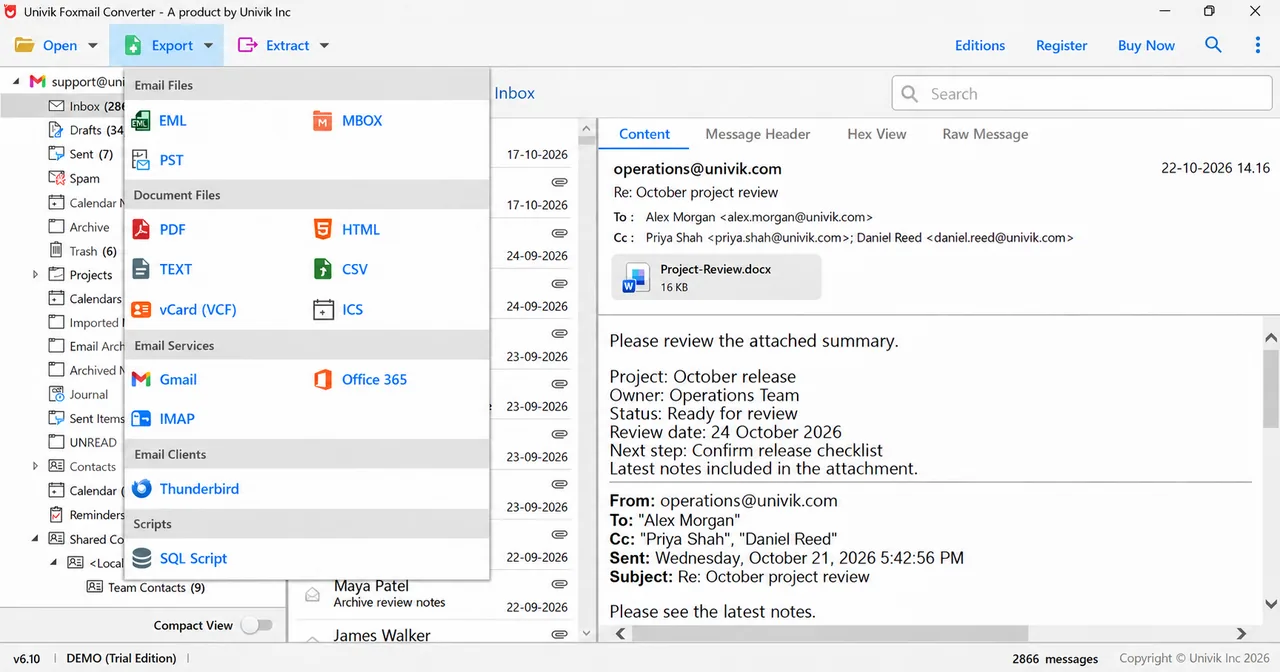
Export menu in Univik software with MBOX under Email Files. - Tick the folders and set a Location Tick the mail folders you want on your Mac. Contacts, Calendar, Reminders and Shared Contacts start unticked, while contacts and calendars have their own targets. Type a path into the Location box or select Browse to pick a folder with free space.
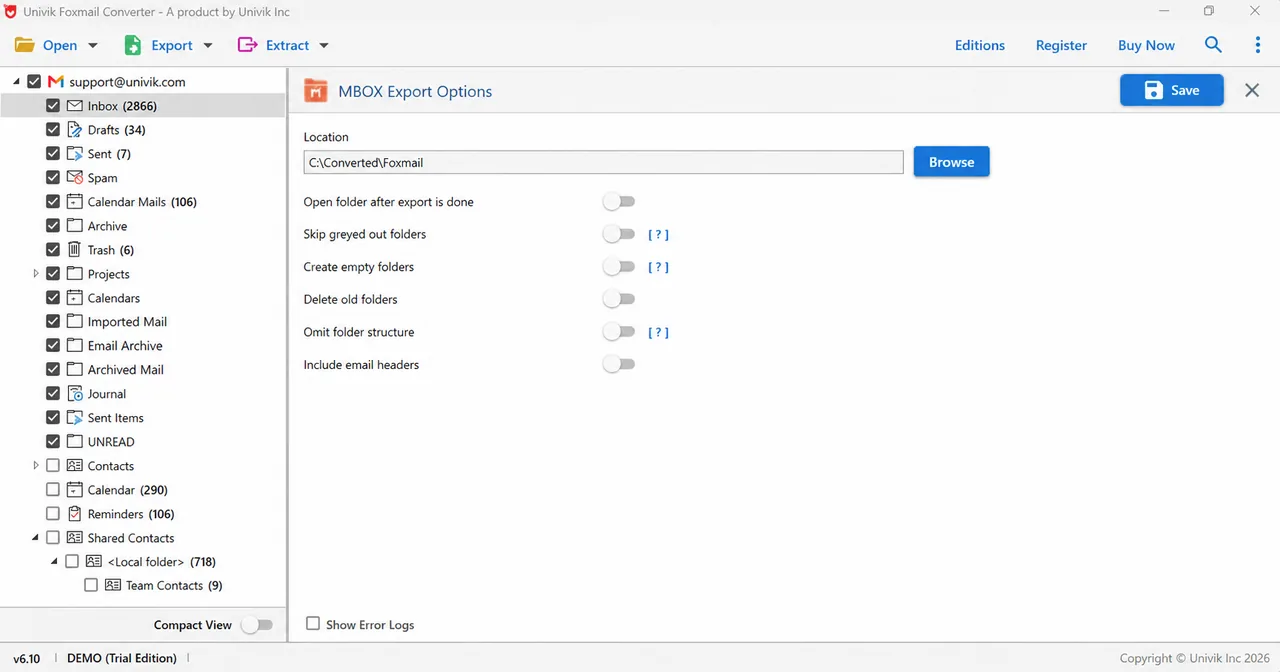
MBOX Export Options: one Location box and six switches under it. - Read the switches and select Save The six switches under Location all start off. Switch on Include email headers when you want the header details kept with each message. For a log, tick Show Error Logs in the bottom left corner. Then select Save at the top right.
- Copy the output folder to your Mac Copy the whole Location folder to your Mac on a USB drive or over the network and keep the files together. Leave the originals on the PC until Mail shows the messages.
- Choose File, then Import Mailboxes in Mail Open Mail on your Mac and choose File > Import Mailboxes. Select Files in mbox format, read the text under the list and select Continue. Then locate the folder that holds your files.
- Sort the Import mailbox Find the new mailbox called Import in the Mail sidebar. Drag folders and messages into the mailboxes you want, then delete Import once you've checked the counts.
A quick test saves time, because one small folder shows whether Mail accepts the files before you run the whole store.
Univik software reads Foxmail 7.2, 7.1, 7.0 and 6.x stores and copies. Foxmail doesn't have to be open while the software turns your mail folders into MBOX files.
Download Free Trial Select a Licence - From $39Univik software needs 64-bit Windows with .NET Framework 4.8. Each trial export stops after 10 items per folder.
How Do You Copy MBOX Files From Windows to Your Mac?
A USB drive, a network share or a cloud drive carries the whole output folder to your Mac as long as you keep the files together.
Before you copy anything, pick a USB drive format that both machines read. exFAT is a file system without a 4 GiB cap on one file. Microsoft Learn's comparison table lists 4 GiB as the largest file on FAT32 and 2^64 minus 1 bytes on exFAT, so exFAT is the safer format for one large MBOX file.
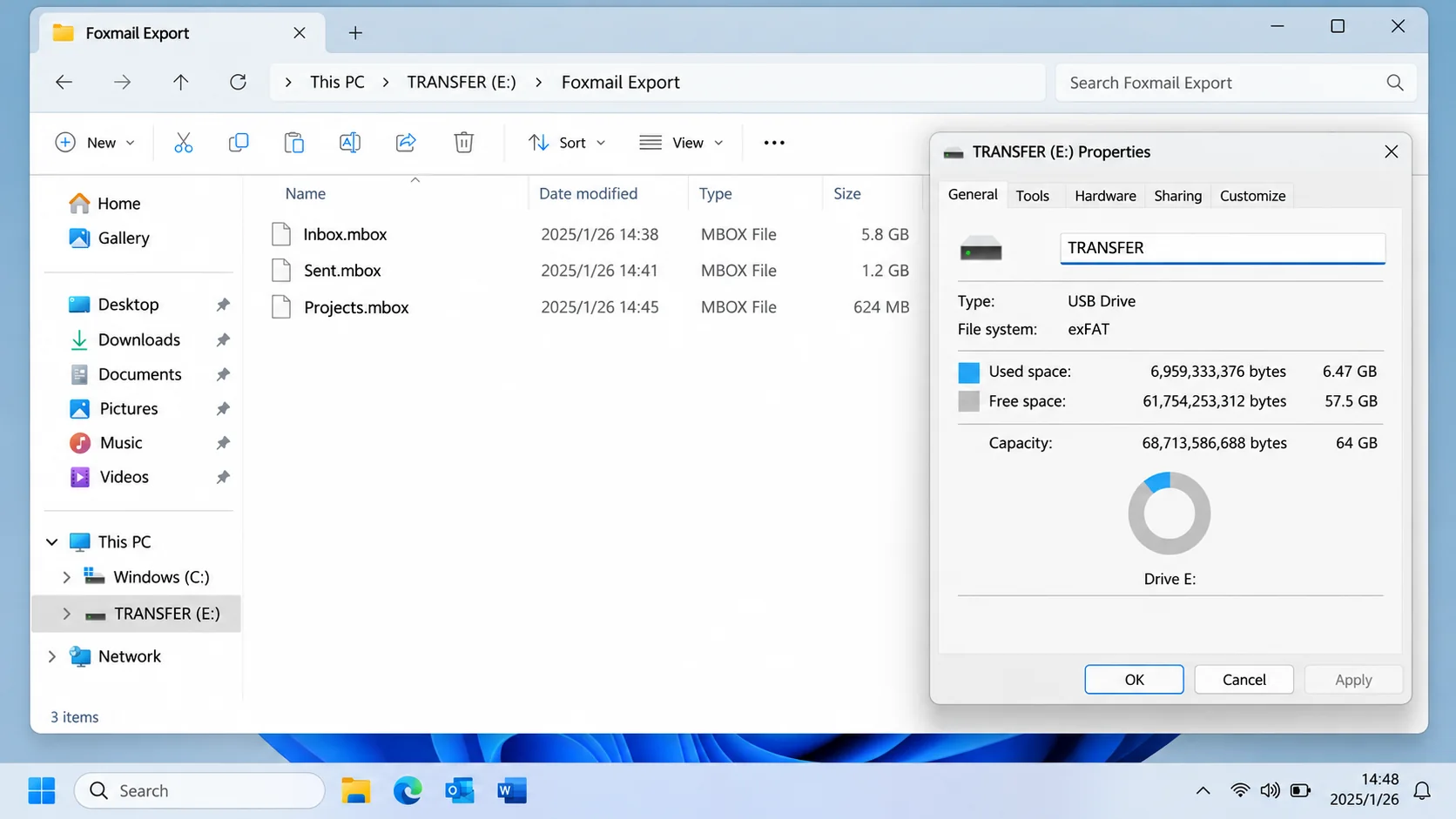
| Drive format | Largest single file |
|---|---|
| FAT32 drive | FAT32 holds a file of up to 4 GiB |
| exFAT drive | exFAT holds a file of up to 2^64 minus 1 bytes |
Apple's Disk Utility page recommends MS-DOS (FAT) for Windows volumes of 32 GB or less and exFAT for Windows volumes over 32 GB. Formatting erases a drive, so copy anything you want to keep off it first.
File sizes make a quick and safe check. Next, compare the size of each file on the PC with its size on the Mac, because a smaller copy likely didn't finish.
The online MBOX viewer opens one file in the browser of either machine, so you can read a few messages before you import. For other ways to read a file, see open an MBOX file.
How Do You Check a Foxmail MBOX to Apple Mail Import?
Check a Foxmail MBOX to Apple Mail import by comparing the message count of each folder in Mail with the count beside the same folder in Univik software's tree.
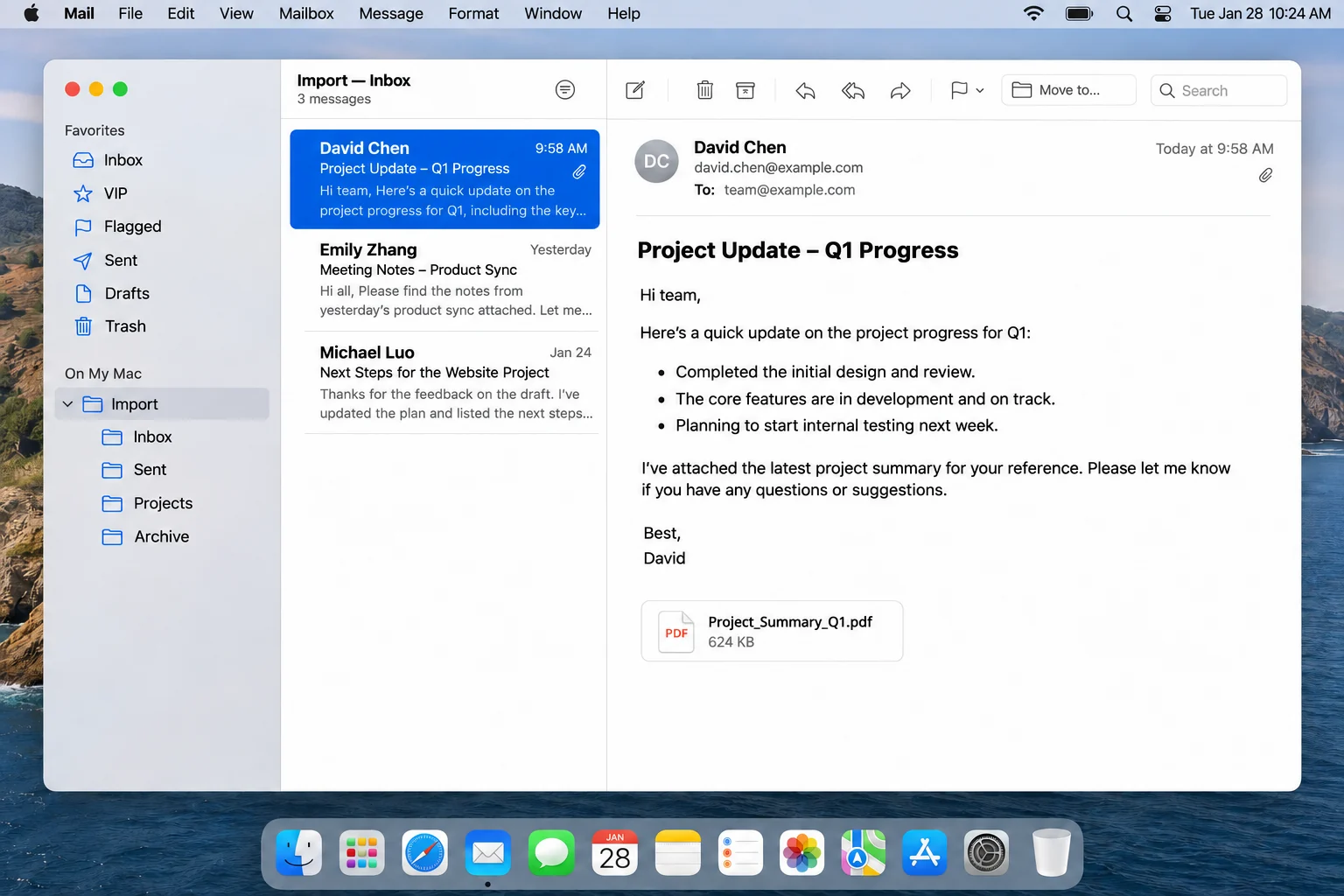
The Import mailbox in Apple Mail is where you look first, because Apple says imported messages land there. A match tells you the folder arrived whole while a gap usually means you didn't tick the folder or its file didn't copy in full.
In the 6.10 sample store the tree lists Inbox with 2866 messages, Drafts with 34 and Trash with 6, so those are the counts to match in Mail.
Apple's page says you can drag folders and messages from Import to other mailboxes and then delete Import. Then delete it last, once every folder has passed the count check.
In my test run of two accounts and 86,000 emails (about 5.8 GB), Univik software kept folder names in the files it wrote, so I expect Mail to show the same names once you open one small folder and look.
What Goes Wrong With Foxmail to Apple Mail Imports?
You can check four problems first: a file that is too large, an unticked folder, a wrong folder choice and mail left in Import.
Do this: Check the file sizes before you copy. Univik's page on the Apple Mail MBOX 2 GB limit describes a size where Mail stops. Its split steps cover large files.
Do this: Return to the tree and tick the folder. Unticked folders are skipped, so a missing folder usually needs a tick and a new run before you copy it across.
Do this: Open the folder in Finder and compare its files with the ones on your PC. Then repeat File > Import Mailboxes and choose the folder that holds them, as Apple's page describes.
Do this: Drag the folders or messages into the mailbox you want. Apple describes this step on the import page.
If a result still looks wrong, send Univik support your Foxmail version and the error log from your run.
What About Contacts and Calendars on Your Mac?
Contacts and calendars move as separate files, because the Export menu lists VCF and ICS among its Document Files targets and you choose each target separately.
Apple's Contacts page imports a vCard (.vcf) file when you choose File > Import or double-click the file. Then select Add in the dialog. Contacts also flags duplicates so you can review them. The guide on how to export Foxmail contacts covers the vCard options.
Apple's Calendar page imports an .ics file through File > Import and asks which calendar should receive the events. Apple says to create a new calendar first if you need one for them. The guide on how to export Foxmail calendar covers the ICS options.
My verdict: if the server still holds your mail, add the account to Mail first and import files only for what the server no longer has. If your mail lives only in a Storage folder, write MBOX files from a copy and import them folder by folder so you can check each one.
- Foxmail's Export Mails command saves .eml files for a single folder per run and offers no MBOX choice.
- Apple's import page names Files in mbox format as the source for mail from a Windows computer.
- Mail puts the imported messages in a new mailbox called Import. Apple says you can drag them out and delete Import afterwards.
- FAT32 holds a file of up to 4 GiB on the Microsoft Learn comparison table, so exFAT suits a large MBOX file on a USB drive.
- Contacts and calendars move as VCF and ICS files that Apple's Contacts and Calendar pages import through File > Import.
Questions and Answers
How do I move Foxmail to Apple Mail?
Write your mail as MBOX files on a Windows PC, copy the folder to the Mac and choose File > Import Mailboxes in Mail. Select Files in mbox format and locate the folder. Mail puts the messages in a new mailbox called Import and you drag them where you want.
Can I move Foxmail to Mac from a copied Storage folder?
Yes. Univik software reads a copied Storage folder on a Windows PC, so the old PC doesn't have to start. Convert the copy to MBOX files there and carry the files to your Mac.
What does Files in mbox format mean in Apple Mail?
Files in mbox format is the source that Apple names in File > Import Mailboxes for mail that comes from a Windows or UNIX machine. Choose it, select Continue and locate the folder that holds your files.
Where does Apple Mail put my imported Foxmail mail?
Mail lists a new mailbox named Import in the sidebar after the import. Your messages sit there until you drag them to other mailboxes. Apple says you can delete Import afterwards.
Which USB drive format holds a large MBOX file?
exFAT holds a file of up to 2^64 minus 1 bytes while FAT32 stops at 4 GiB per file, according to Microsoft Learn. Apple's Disk Utility page recommends exFAT for Windows volumes over 32 GB.
Do Foxmail contacts and calendars come with an MBOX file?
No. An MBOX export covers the mail folders. Contacts and calendars have their own VCF and ICS targets in the Export menu. Apple's Contacts and Calendar pages import those files through File > Import.
Can I add my Foxmail account to Apple Mail instead of importing files?
Yes, when the mail server still holds your messages. Choose Mail > Add Account and then Other Mail Account if your provider isn't in the list. Mail downloads what the server holds.
Can I test one folder before I buy?
Yes. A trial run reads 10 items from each folder, so tick one small folder, write it as MBOX and import it into Mail. A good result shows that the whole route works before you buy a licence from $39.


Checked on November 9, 2026 against the Apple Support pages for Mail, Contacts and Calendar and the Microsoft Learn file system table. Screens come from a 6.10 trial build running on a sample store.
Pages I read:
- Import or export mailboxes in Mail on Mac
- Add and manage email accounts in Mail on Mac
- Import contacts into Contacts on Mac
- Import or export calendars on Mac
- Also read: RFC 4155, Microsoft Learn's File System Functionality Comparison and Apple's Disk Utility file system formats