Quick Answer
To search Foxmail emails without Foxmail, bring a Storage copy into a converter and click the magnifier at the top right. The Advance Search panel searches by word, date range or sender across emails, calendars, contacts and tasks. Tick Regular expression for a pattern or Exclude matched result to drop matches, then click Find.
The Message Header tab shows where a result came from.
Foxmail has search of its own. Its feature list for Windows names an advanced search panel since version 7.1.3 and server search for IMAP and Exchange accounts since 7.2. That covers a mailbox that is open in Foxmail. This guide covers the other case, where your mail sits in a copy of the Storage folder and Foxmail is closed, gone or unreachable.
My sample Inbox held 2,866 messages. The Advance Search panel sat above the folder tree and left the message list and the preview in view, so a result could be read without leaving the panel.
Which Way Finds an Old Foxmail Email?
The table compares three ways to find a message, by who each one suits and what each one needs.
| Route | Suits | Needs | Limit |
|---|---|---|---|
| Foxmail's own search | A mailbox open in the client | The client running with the account | Needs a working client |
| Advance Search on a copy | A Storage folder that Foxmail no longer opens | A copy of the folder | Searches only what you loaded |
| Export first, search the files | A folder of EML files | An export run before the search | One extra step before the first result |
I'd use Foxmail's own search while the client works. I'd switch to the copy route once the client stops starting or the PC is retired, because the copy keeps working without it. The export route is worth it when you want files for another tool. The guide to exporting Foxmail emails covers it.
Who Searches a Copy Instead of the Client?
Four jobs send people to a copy instead of the client.
- A retired PC You hold a copy of Storage and nothing else.
- A dated request A manager asks for the Foxmail mail from one week of last spring.
- A pattern hunt You look for every invoice number in one format.
- A handover You check a leaver's mail for one sender before the copy is archived.
How Do You Search Foxmail Emails in a Copied Store?
Univik Foxmail Converter opens that copy on a PC where the client stays shut. Searching never needs your original, so keep it safe. If you need a path, where Foxmail stores emails lists the usual folders. Six steps follow.
- Load your copy for searching From the Open menu take Choose Foxmail Folder and select the copied Storage directory. Each account lists its folders with counts. The status bar reports a message total (2866 for my Inbox).
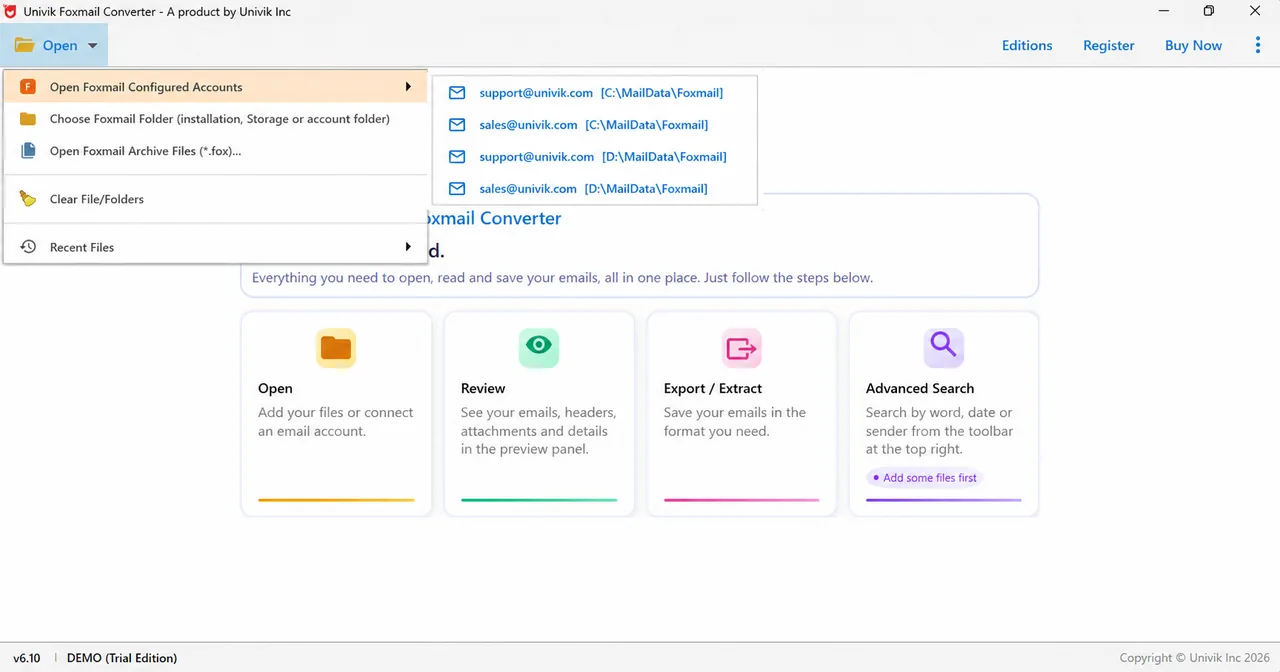
Foxmail Converter Open menu. Besides the folder entry it offers configured accounts, .fox archive files and Recent Files. - Open the Advance Search panel Click the magnifier icon at the top right of the toolbar. A panel titled Advance Search opens above the folder tree. A cross replaces the magnifier while the panel is open. Before you load files, the welcome card shows the chip Add some files first.
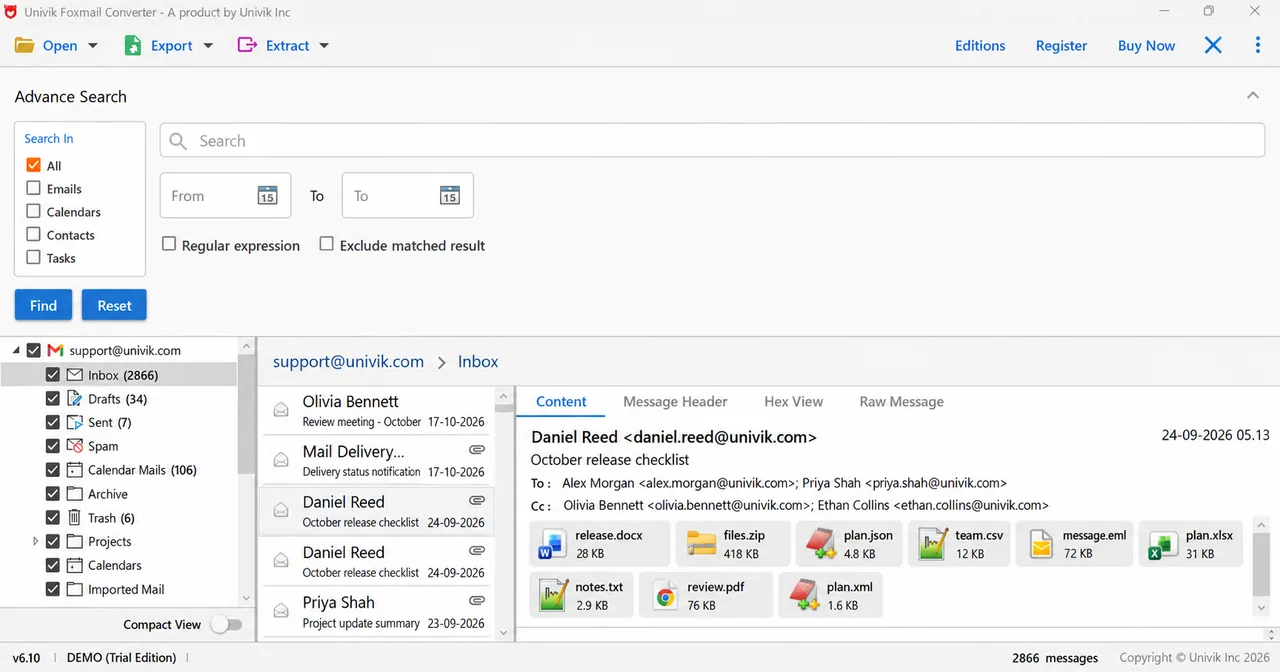
Foxmail Converter Advance Search panel. Search In lists All, Emails, Calendars, Contacts and Tasks. Date pickers, a Regular expression box and Exclude matched result sit under the Search box. - Choose what to search in The Search In box offers All, Emails, Calendars, Contacts and Tasks. All is ticked on opening. Tick Emails alone when you want mail and nothing else.
- Set the words and the dates Type a word or a sender into the Search box. Open the From and To date pickers to set a range. Two boxes sit under them: Regular expression and Exclude matched result.
- Click Find Click Find to run the search, then read what turned up in the message list and the preview beside it. Reset clears the panel for a new search.
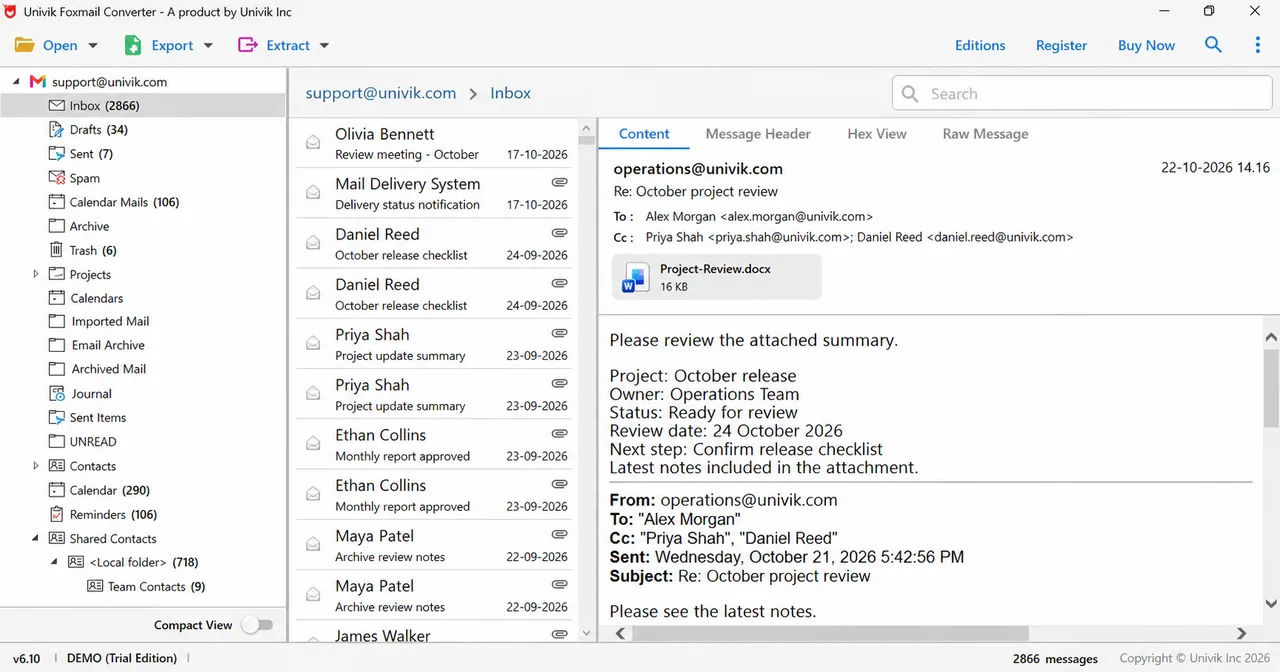
- Open the Message Header tab Select a result and open the Message Header tab beside Content. The header shows where the message came from, so you can confirm a hit before you export it.
I'd start with a narrow date range, because you can read a small result set faster than a whole Inbox. You'll also see sooner whether your words are right.
Univik Foxmail Converter handles stores from versions 6 up to 7.2, copies included. Its Advance Search panel covers emails, calendars, contacts and tasks, with a date range, a regular expression option and an Exclude matched result box.
Download Free Trial Select a Licence - From $39Needs .NET Framework 4.8 on 64-bit Windows. Load one folder and run one search before you decide.
How Do You Narrow a Search by Date, Type or Sender?
Three controls narrow a search. Search In limits the item type, so ticking only Emails leaves calendar items, contacts and tasks out. The From and To date pickers limit the dates. The Search box takes a word or a sender. The welcome card describes the same idea as a search by word, date or sender.
Use all three together when the mailbox is big. A sender name plus a one-month range plus Emails only usually leaves a short list that you can read in a minute. That quick pass beats scrolling through thousands of messages.
When Does a Regular Expression Help?
A regular expression matches a pattern instead of fixed words. It helps when the thing you want has a shape, such as an invoice number (for example INV- followed by digits). Tick Regular expression, type the pattern in the Search box and click Find.
Pattern dialects differ between programs, so test your pattern on one email you know holds a match before you trust it on the whole store. Exclude matched result works the other way round. It removes the matches, which helps when you want everything except one sender or one topic.
Can You Search Calendars, Contacts and Tasks Too?
Yes. The Search In box lists Emails, Calendars, Contacts and Tasks beside All. With All ticked, one search covers every type, which helps when you remember a name but not where it appeared. Tick a single type when the results get noisy.
Which Tab Shows Where a Found Email Came From?
The Message Header tab. Select a result, open that tab beside Content and read the header fields. You may find a sender or a date that the Content tab hides. Two further tabs hold a hex view and the raw message. They matter for forensic work and are covered in the viewer guide.
What If the Search Finds Nothing or Too Much?
Do this: Check that files are loaded, because the welcome card says Add some files first. Then widen the date range and make sure Search In includes the right type.
Do this: Add a date range and tick Emails only. A sender name in the Search box narrows the list further.
Do this: A dialect difference is the usual cause, so simplify the pattern. Start with a fixed prefix such as INV- and add the digits once that works.
Do this: Click Reset to clear the panel, then type the new search.
Does a search still behave oddly for you? Tell Univik support which Foxmail version made the copy.
- The Advance Search panel opens from the magnifier at the top right of the toolbar.
- Search In covers All, Emails, Calendars, Contacts and Tasks.
- From and To date pickers set a range. Regular expression and Exclude matched result are optional boxes.
- Find runs the search and Reset clears the panel.
- The Message Header tab shows where a found email came from.
FAQ: Search Foxmail Emails
How do I search Foxmail emails in a copy?
Bring a Storage copy into a converter, click the magnifier and use the Advance Search panel. It searches by word, date range or sender. It covers emails, calendars, contacts and tasks. Click Find to run it.
Does Foxmail have its own advanced search?
Yes. Its feature list names an advanced search panel since version 7.1.3 and server search for IMAP and Exchange accounts since 7.2. The converter panel is for the other situation, where the mail sits in a copy and the client is closed.
Can I search Foxmail emails by date?
Yes. The panel has From and To date pickers, so you can set a range and click Find.
Can I use a regular expression to search Foxmail mail?
Yes. Tick the Regular expression box and type a pattern in the Search box. Test the pattern on one known email first, because pattern dialects differ.
What does Exclude matched result do?
The box removes the matches from the outcome, which helps when you want everything except one sender or one topic.
Can I search calendars, contacts and tasks too?
Yes. The Search In box lists Emails, Calendars, Contacts and Tasks next to All, so one panel covers each type.
Do I need Foxmail installed to search a copy?
No. The converter reads a copy of Storage with the client closed or removed from the PC.
How do I see where a found email came from?
Select the result and open the Message Header tab. The hex view and the raw message sit in two further tabs, which the guide on the Foxmail email viewer explains.

Reference: the foxmail.com feature list for version 7.2.25, read October 24, 2026. Screens: demo edition 6.10 of the converter with sample mail loaded.
Pages we read: