Quick Answer
To rename exported Foxmail emails, pick the File naming option before you export, because Subject is the default and a pattern box beneath the list displays the name as a token. Location sets the output folder and the folder switches decide whether the folder tree of Foxmail is kept.
Run one small folder first, because Windows rejects some of the characters that email subjects carry.
Exported Foxmail mail arrives as one file per message. A file you can't recognise by its name costs you a search every time you need it, so a clear name and a sensible folder tree let you find a message in File Explorer without opening the file.
Foxmail keeps its own message files under numbered folders inside the Storage folder. A file called 2824 says nothing about a subject. Our guide on where Foxmail stores emails shows that layout. This page covers what you control once your mail leaves it.
I read Microsoft Learn's two file naming pages, RFC 5322 and a W3C date note on 9 November 2026 before I wrote this guide. Every Windows rule in the tables comes from those pages.
How Do You Rename Exported Foxmail Emails From the Subject?
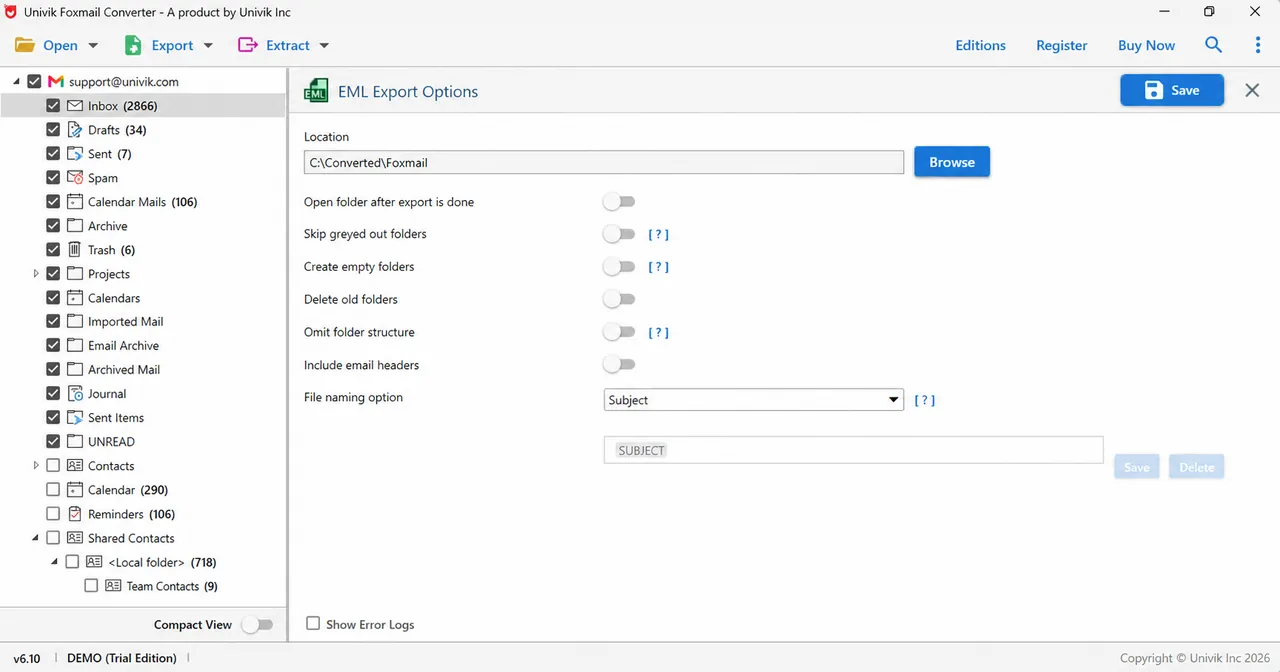
Univik software starts each export on Subject, so every file takes the name of its message subject while the File naming option list on the EML, HTML, TEXT and PDF screens lets you change that choice.
Under the list, a pattern box shows the name as a token. On the EML screen the box holds SUBJECT. Save keeps a pattern of your own and Delete removes one. Univik software lists no other tokens on screen, so this guide names SUBJECT only. Next, open the list in your copy to see what else it offers before you plan a pattern of your own.
| Format | Name control on screen | Extra control |
|---|---|---|
| EML | File naming option with Subject first and a pattern box | Save and Delete buttons keep patterns. Foxmail to EML covers the format |
| HTML | File naming option names each file | Include hex view, Include raw message and Include email headers. Foxmail to HTML covers them |
| TEXT | File naming option names each file | Create attachments folder as per the naming option |
| File naming option names each file | Show file name at top of document starts switched on | |
| MBOX | MBOX screen carries no File naming option | Include email headers is its one extra switch |
| PST | Location holds a .pst file path | Create individual PST file for each folder |
Foxmail's own Export Mails command writes the .eml files one folder at a time. For the full steps, read how to export Foxmail emails with it.
Which Windows Rules Limit a Foxmail Export File Name?
Windows sets the rules for a file name, so a subject that Foxmail accepts can still make a poor file name once your mail is saved to disk. I read Microsoft Learn's page on naming files, paths and namespaces on 9 November 2026 and it lists nine reserved characters. Replies and forwards often carry a prefix that ends in one of them, the colon.
| Windows rule | What Microsoft Learn says | What to check in your output |
|---|---|---|
| Reserved characters | The page bars nine characters: < > : " / \ | ? * | Subjects like Re: Invoice 114? carry a colon and a question mark, so you should open a few of the reply names |
| Letter case | Microsoft Learn says to treat OSCAR, Oscar and oscar as one name | Two subjects that differ only in capitals may clash, so compare the file count with the message count |
| Path length | MAX_PATH limits a local path to 260 characters, counting the drive letter, the colon, the backslashes, each name and the terminating null | A long subject inside a deep folder tree may pass 260 characters, so choose a short Location |
| Name length | The file system reports a limit for each name component, commonly 255 characters | RFC 5322 gives Subject no length limit, so a long subject can outgrow a file name |
| Longer paths | Windows 10 version 1607 and later let a program opt in to paths of up to 32,767 characters | Opt-in is a setting inside the program that Univik software doesn't state on the screen, so keep the paths short |
RFC 5322 is the standard behind the Internet Message Format of an .eml file. It describes Subject as a short string that identifies the topic of a message and sets no length limit on an unfolded header field.
Univik software doesn't show on screen what it writes when a subject holds a colon or runs past a name limit. Run one small folder with such a subject, then read the names before you export the whole store.
Should You Keep the Foxmail Export Folder Structure or Flatten It?
Keep the folder tree of Foxmail when the folder names tell you something about a message, for example Inbox, Sent or a project folder. A message you filed as Invoice in a project folder means something different from one in Spam.
In my own run over 2 accounts and 86,000 emails, every folder name from the tree came through unchanged.
Omit folder structure is the switch for the opposite choice. Its label says the folder structure is left out of the output. The screens don't state whether you then get one flat folder, so you should test a small run before you rely on a flat export of Foxmail emails.
What Do the Empty, Greyed Out and Old Folder Switches Do?
Three switches shape which folders you get in the output: Create empty folders, Skip greyed out folders and Delete old folders.
- Create empty folders asks for a folder to be written even when the folder holds no mail. Switch it on when the empty folder itself means something to you, for example a project folder you keep ready for next year.
- Skip greyed out folders tells Univik software to pass over folders shown greyed out. Read its [?] hint on screen first and leave it off for your first run.
- Delete old folders points to folders left by earlier runs, so keep it off for your first run and aim Location at an empty folder where a test can't touch your other files.
How Do You Keep Attachments Beside Their Messages?
Tick Create attachments folder as per the naming option on the TEXT screen to give each message's attachments a folder that follows the same naming. Plain text can't hold a file, so the box keeps your attachments next to a text copy. Our guide on Foxmail to text covers the other TEXT options.
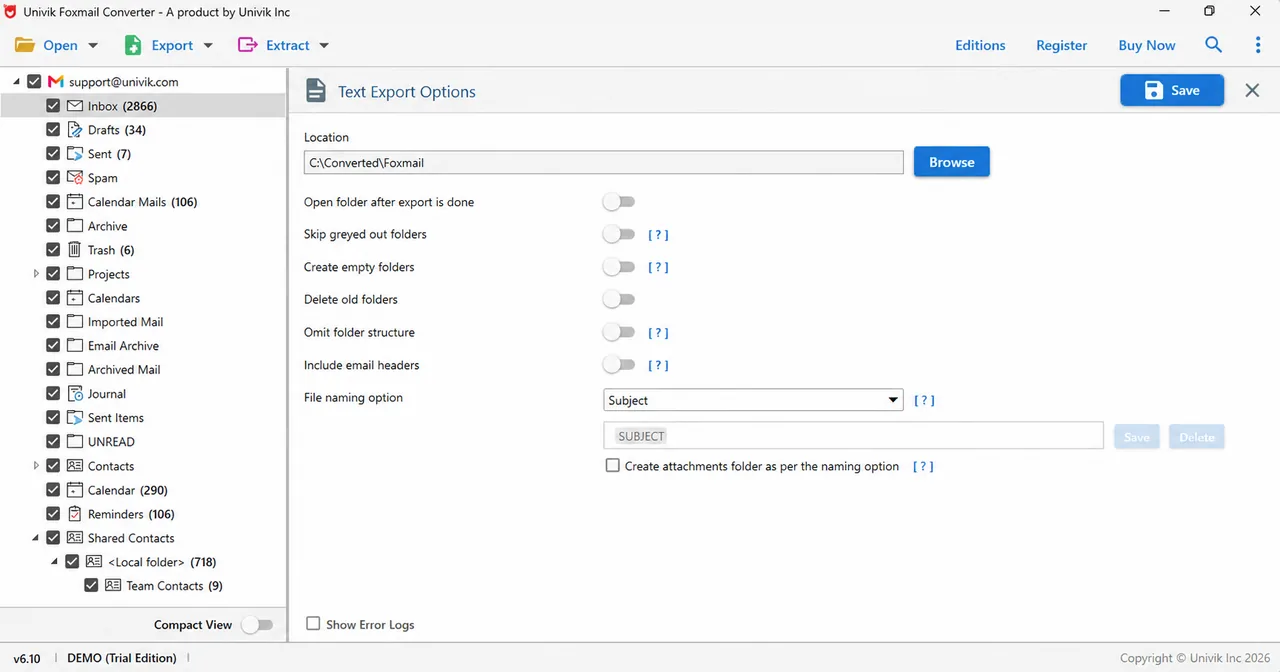
An .eml file keeps attachments inside the message so the EML screen needs no attachments folder, while PDF has a Save attachments in folder switch that writes the files beside each PDF. Foxmail to PDF explains it.
Also, to save attachment files on their own from the folders you ticked, read how to extract attachments from Foxmail.
How Do You Rename Exported Foxmail Emails in One Run?
Univik software sets the name pattern and the folder switches before you press Save, so one run covers every ticked folder. Load a copy of your Storage folder into Univik Foxmail Converter and Foxmail can stay closed. The software reads Foxmail 7.2, 7.1, 7.0 and 6.x.
- Open your copy Choose Open and then Choose Foxmail Folder. Pick your copy of Storage (the folder that holds your accounts). Work on a copy so your original stays as it is.
- Pick a format with name controls Click Export and pick EML, HTML, TEXT or PDF, because you can set the File naming option on those four screens.
- Tick the mail folders Tick the mail folders you want. The contacts and calendars aren't messages, so leave them unticked for the mail run.
- Set a short Location Click Browse and pick a folder with room for the files. A top-level folder keeps your full path well under 260 characters.
- Choose the name Open File naming option and keep Subject for your first run. The pattern box shows the SUBJECT token. Use Save to store a pattern you build and Delete to drop one.
- Set the folder switches and save Decide on the Omit folder structure, Create empty folders and Skip greyed out folders switches. Keep Delete old folders off for your first run. Tick Open folder after export is done, then click Save at the top right.
So run one small folder first, because the trial exports 10 items per folder and shows you quickly how your subjects look as file names.
Univik software opens a copied Storage folder and lets you pick the name pattern and the folder switches before one message is written.
Download Free Trial Select a Licence - From $39Runs on 64-bit Windows with .NET Framework 4.8. The trial exports 10 items per folder, so try one folder first.
How Do You Check or Rename Exported Foxmail Emails After the Run?
Open your Location in File Explorer, sort by Name and read ten names before you trust the whole run, because four quick checks cover most problems.
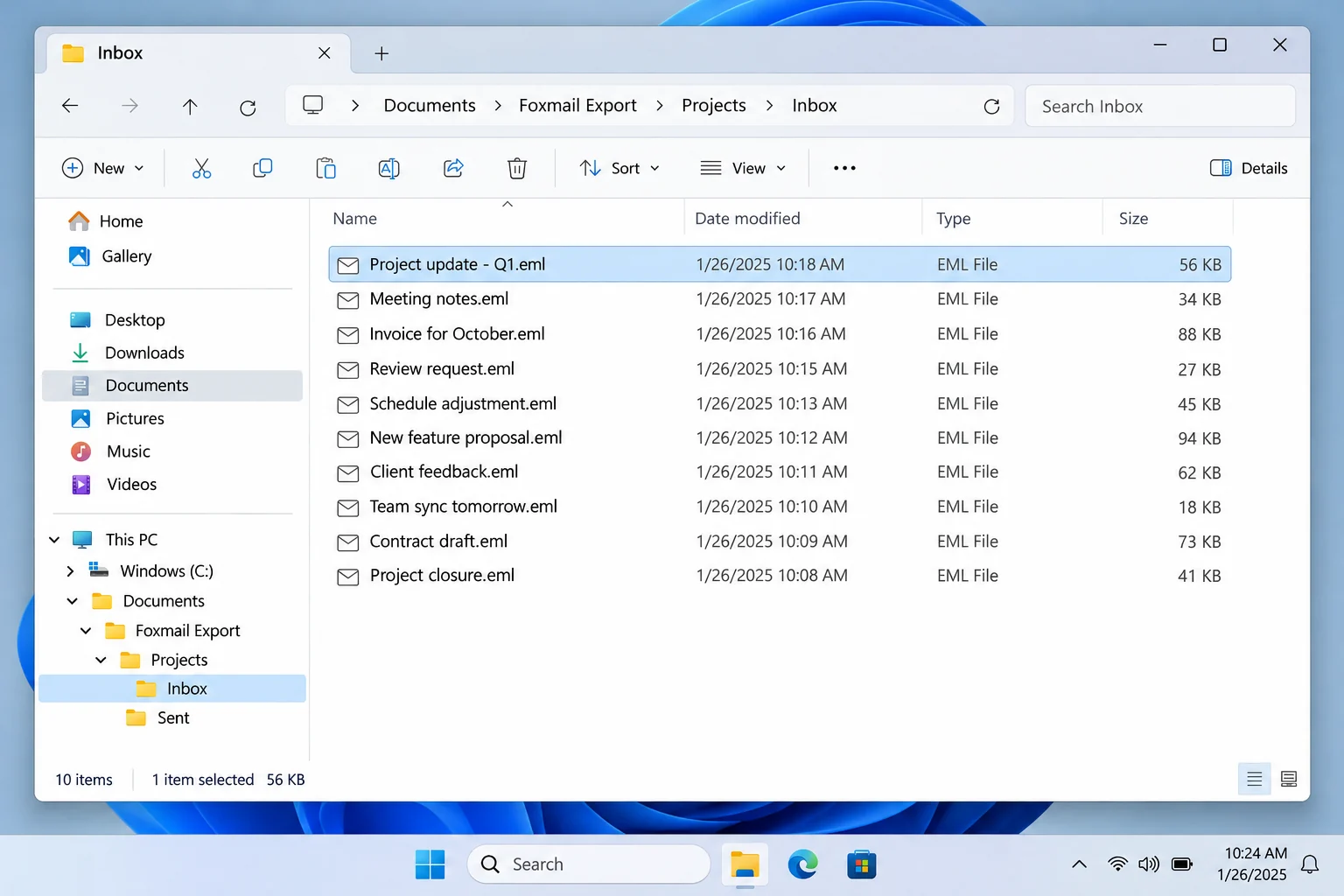
- File count: Each folder should hold as many files as its message count in the tree, which makes the count a reliable first check. A trial run writes 10 items per folder, so a lower number usually means the folder needs another look. Switch on Show Error Logs and rerun that folder.
- Odd names: A subject with a colon or a question mark should look different from its file name. Compare three or four of your names.
- Deep paths: The deepest folder should still open and show the files inside it. A failure there often points to a path near 260 characters.
- One real file: One .eml file should open in your mail program with the subject you expect.
A rename doesn't change the message inside a file because the subject lives in the Subject header field that RFC 5322 defines while the file name is a separate label. File Explorer renames one file at a time, so try any bulk rename tool on a copy of ten files first.
Finally, to find a message by its words instead of its name, see how to search Foxmail emails. For a sheet of senders and subjects, Foxmail to CSV writes one.

- The File naming option starts on Subject on the EML, HTML, TEXT and PDF screens.
- The MBOX screen has no File naming option and PST takes a .pst file path in Location.
- Windows rejects nine characters in a file name, including the colon and question mark that email subjects often carry.
- MAX_PATH limits a local path to 260 characters unless a program opts in to longer paths.
- Skip greyed out folders, Create empty folders, Delete old folders and Omit folder structure all start switched off on the EML screen.
My verdict: Keep Subject and the full folder tree for a first run. Switch on Omit folder structure only after a small test shows the flat result you want.
FAQ: Foxmail Export Names and Folders
How do I rename exported Foxmail emails?
Pick the File naming option before you export. Subject is the default and a pattern box shows the SUBJECT token. To rename files after the run, use File Explorer or a rename tool on a copy of the folder, because a file name doesn't change the message inside.
Which characters can't appear in a Foxmail export file name?
Windows rejects < > : " / \ | ? and *. A subject like Re: Quote? carries two of them, so you should check a few reply names after a small run.
Is there a flat export of Foxmail emails with no subfolders?
Omit folder structure is the switch for it, because its label says the folder structure is left out. The screens don't show the exact result, so open Location after a small run before you export the whole store.
Can I keep the Foxmail folder structure in the export?
Yes. The tree of your folders is the default result and Omit folder structure is the switch that leaves it out.
What happens when two emails have the same subject?
Microsoft Learn says to treat names that differ only in capital letters as one name. Univik software doesn't state on screen what it writes for two equal names, so you should compare the file count with the message count after a small run.
Can I add a date to the file name?
The pattern box shows the SUBJECT token and the screens list no other tokens. Open the File naming option list in your copy to see what it offers. After the run, a rename tool can add a date in year-month-day form, so a sort by name follows the calendar (for example 2026-10-21).
Do attachments get their own folder?
On the TEXT screen, Create attachments folder as per the naming option gives each message's attachments a folder with the same naming as the text file. An EML file keeps its attachments inside the message.
How long can a Foxmail export file name be?
MAX_PATH limits a local path to 260 characters and each name component is commonly limited to 255. RFC 5322 puts no length limit on Subject, so a long subject can outgrow the name. A short Location helps.

I read the two Microsoft Learn pages, RFC 5322 and the W3C date note on November 9, 2026. Screens come from the 6.10 demo build of Univik software.
Pages I read: