Quick Answer
To switch from Foxmail, choose the new app first and then move the mail, contacts and calendars as three separate jobs. Outlook takes a PST file, Thunderbird takes a profile or MBOX files, Apple Mail takes MBOX files and Gmail, Microsoft 365 or an IMAP server takes an upload.
The Export Mails command in Foxmail writes only .eml files, one folder at a time.
Foxmail keeps your mail in the Storage folder on your PC, so any new app needs the mail exported or uploaded first. The import pages of Apple and Mozilla don't name Foxmail as a source, which is why the choice of destination should come before the export.
I read the help pages of Apple, Mozilla, Microsoft and Google on 9 November 2026 to check what each app accepts. This guide compares six destinations by what moves and how, then points you to one guide for the route you pick.
What Do You Settle Before You Switch From Foxmail?
Settle three things before you start: the items you keep, the app that takes them and the device that runs the app.
- Items to keep start with mail, while contacts and calendars are separate exports, so decide early whether you need them.
- The receiving app decides the file format, because Outlook, Thunderbird, Apple Mail, Gmail, Microsoft 365 and an IMAP mailbox each take mail in a different form.
- Your device usually narrows the list, since the download page of Mozilla names Windows, Linux and macOS for Thunderbird while Apple Mail runs on a Mac.
The Export Mails command inside Foxmail can't carry the whole move alone. It writes .eml files only and works on one folder at a time, so you usually need another route when a switch covers many folders.
Which Email Client After Foxmail Fits Your Mail?
Pick Outlook or Microsoft 365 for a Microsoft account. Pick Thunderbird for a desktop app on Windows, Linux or macOS, Apple Mail for a Mac. Pick Gmail or an IMAP mailbox when you want your mail kept on a server, since the server then holds the main copy.
Among Foxmail alternatives for Windows, Outlook and Thunderbird both run on a Windows PC, so the table shows the route you take for each destination.
| Destination | What moves | Route | Full guide |
|---|---|---|---|
| Outlook | Mail as a PST file, contacts in VCF files and calendars in ICS files. | Univik software writes the PST file, then new Outlook imports it from Settings, Data files, Import. | Foxmail to Outlook |
| Thunderbird | Mail folders. Contacts and calendars come as separate files. | A Thunderbird profile target writes the folders straight in. MBOX files are the second route. | Foxmail to Thunderbird |
| Apple Mail | Mail folders as MBOX files. | MBOX files are copied to the Mac, then brought in with File, Import Mailboxes. | Foxmail to MBOX |
| Gmail | Mail over IMAP. Contacts, events and tasks go straight to Google only with Sign in with Google. | An upload with Sign in with Google switched on or with an app password. | move Foxmail emails to Gmail |
| Microsoft 365 | Mail uploaded into a Microsoft 365 mailbox. | A direct upload after a Microsoft sign-in, with three sign-in modes for one mailbox or many. | Foxmail to Office 365 |
| Any IMAP mailbox | Mail folders on the mail server. | An upload with a username, a password, a server name and a security setting. | migrate Foxmail to IMAP |
Windows PCs can reach every row, because the Apple Mail route only ends with a file copy to a Mac. Also, the guide in the last column holds the full steps for the row, so this page doesn't repeat them.
What Do Microsoft, Apple, Mozilla and Google Say About Taking Mail In?
Each vendor describes the intake path of its own app, so you can settle any doubt about what the app accepts by checking the page of the vendor.
Outlook: Microsoft Learn says new Outlook for Windows supports Microsoft 365 work and school accounts, Outlook.com, Gmail, Yahoo, iCloud and other accounts that connect over IMAP or POP. Microsoft Support adds that in new Outlook a .pst import copies the items into your mailbox, so you won't see the file under Outlook Data Files afterwards.
Thunderbird: Mozilla puts the Import tool under the menu button, then Tools, then Import. The tool takes settings and data from other Thunderbird profiles, other applications or files, while the Outlook import requires Outlook to be installed, according to Mozilla.
Apple Mail: Apple's guide puts Import Mailboxes in the File menu of Mail. The dialog offers Apple Mail and Files in mbox format, which Apple describes for messages from a Windows or UNIX computer. The imported messages land in a new mailbox named Import.
Gmail: Gmail Help says IMAP is always on, so you don't switch it on. One account connects to up to 15 email clients at a time. Google asks the client to offer Sign in with Google and calls app passwords generally unnecessary and not recommended.
How Do Contacts and Calendars Switch From Foxmail?
Contacts and calendars travel as separate files, because the Export menu of Univik software lists the vCard (VCF) and ICS formats as their own targets beside the mail formats, so you run each target on its own.
- The mail goes out as EML, MBOX or PST files or as a direct upload to Gmail, Office 365, IMAP or a Thunderbird profile.
- The contacts go out as vCard (VCF) files, which Outlook, Google and Apple apps can import according to the product page.
- The calendars go out as ICS files, since Foxmail itself has no calendar export entry.
For the steps, open the guide to export Foxmail contacts or the one to export Foxmail calendar data.
Gmail adds one extra path. When you switch on Sign in with Google, contacts, calendar events and tasks arrive in the matching Google apps. With an app password the mail alone uploads, so the other items are saved as .vcf, .ics and .txt files in the import-files folder.
In What Order Do You Switch From Foxmail?
Work in six steps: list what you keep, pick the app, copy Storage, run one folder, check it and then run the rest.
- List what you keep Note whether you need mail only or the contacts and calendars too, because each extra item is its own export target.
- Pick the destination Match your situation to a row in the table, then open the guide of that row for the full steps.
- Copy your Storage folder Copy the whole folder to a safe drive and leave the original where it is.
- Run one small folder first Export a single folder, because a short test is quick and shows the folder names and dates before a full run.
- Check the result in the new app Compare the folder names and message counts with the counts in the folder tree of Univik software.
- Run the rest and keep your copy Export the rest of the folders, then keep the Storage copy until you've used the new app for a while.
Start with the folder names, because the new tree should match the old one. Then compare the message counts for each folder, since an unticked or greyed-out folder may explain a count that looks short. Next, open a few old messages to confirm their dates, then open one message with an attachment. Contacts and calendars need their own check, so count each list after the import. Finally, keep the original untouched until you're done.
How Do You Keep Your Mail Without Installing Foxmail Again?
Copy your Storage folder to a safe drive, because Univik software reads that copy and the PC that runs the export doesn't need Foxmail installed. For the usual folder paths, read the page about where does Foxmail store emails.
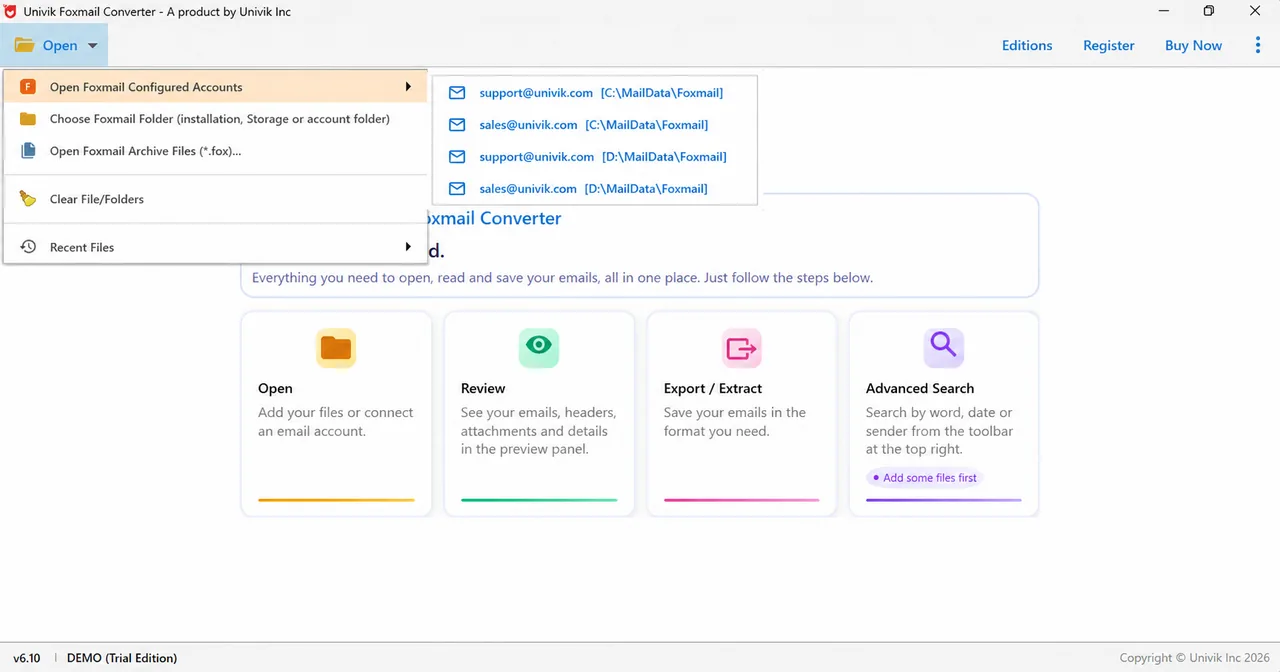
To read a copy before any move, the Choose Foxmail Folder entry in the Open menu takes a Storage folder, while the Open Foxmail Archive Files entry takes a .fox file. The Foxmail Email Viewer page covers the viewing in more detail.
- A Storage copy keeps everything in one folder and stays your safest backup until you've checked the result in the new app.
- EML files give one file per message, which the Export Mails command of Foxmail writes for a single folder.
- MBOX files give one file per folder, which Thunderbird and Apple Mail both read.
How Do You Export Foxmail Mail for Your New App?
Univik Foxmail Converter exports your Foxmail mail to the app you picked, so the target can be a file, a server or a Thunderbird profile. The software opens stores from Foxmail versions 7.2, 7.1, 7.0 and 6.x, plus a copied Storage folder. Your original stays untouched.
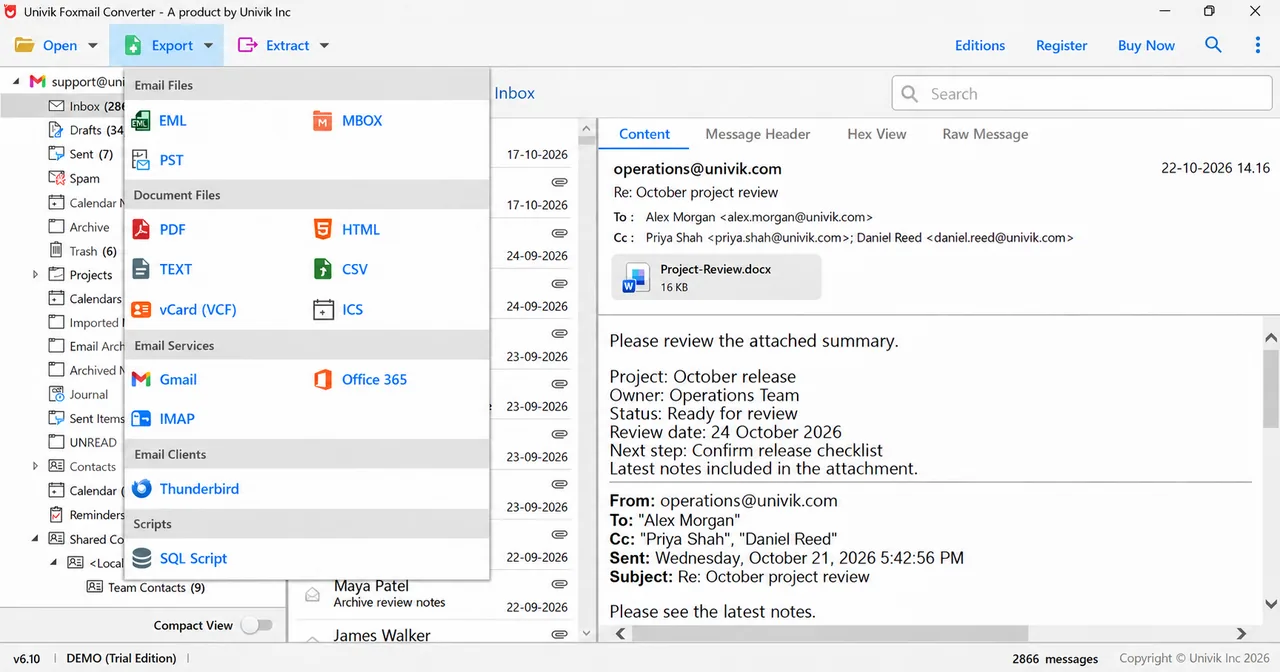
In the Export menu, Email Files hold EML, MBOX and PST, while Email Services cover Gmail, Office 365 and IMAP. Thunderbird sits under Email Clients and SQL under Scripts. Document Files holds PDF, HTML, TEXT, CSV, vCard and ICS.
In my largest test store, two accounts held 86,000 emails, about 5.8 GB. One full run took about 42 minutes and kept the folder names. The trial is a quick check. It exports 10 items per folder, so you can judge the output before you buy a licence, which starts at $39 for 2 PCs on the product page.
Univik software reads Foxmail 6 to 7.2 stores and copies, so the PC that runs the export needs no Foxmail.
Download Free Trial Select a Licence - From $39Univik software runs on 64-bit Windows with .NET Framework 4.8 and reads 10 items per folder in the trial, so a test on one folder is enough.
My verdict: Pick Outlook or Microsoft 365 if your company already runs on Microsoft. Choose Thunderbird if you want one desktop app that also runs on Linux and macOS. Apple Mail fits only when your next computer is a Mac.
- The Export Mails command in Foxmail writes .eml files one folder at a time, so most switches need another route for PST, MBOX or a direct upload.
- Outlook, Thunderbird, Apple Mail, Gmail, Microsoft 365 and IMAP mailboxes each take mail in a different form, so pick the app before the export.
- Contacts and calendars leave Foxmail through separate targets in the Export menu, with VCF files for contacts and ICS files for calendars.
- Apple's Import Mailboxes dialog offers Files in mbox format for messages that come from a Windows or UNIX computer.
- Gmail Help says IMAP is always on in Gmail and that email clients should offer Sign in with Google.
FAQ: Switching From Foxmail
How do I switch from Foxmail to another email app?
Choose the app first, copy your Storage folder and export one small folder in the format that the app takes. Outlook takes a PST, Thunderbird takes a profile or MBOX files, Apple Mail takes MBOX files and Gmail or an IMAP server takes an upload. Check the result in the new app before you run the rest.
Which email client should I use after Foxmail?
Choose Outlook or Microsoft 365 if your company runs on Microsoft. Choose Thunderbird when you want one app for Windows, Linux and macOS. Choose Apple Mail when your next computer is a Mac, since Apple Mail runs there. Gmail and IMAP mailboxes suit readers who want their mail kept on a server.
Which Foxmail alternatives for Windows can read my old mail?
Outlook and Thunderbird both run on Windows, because Microsoft Learn lists the accounts that new Outlook for Windows supports while Mozilla lists Windows for Thunderbird. Either app needs you to export your Foxmail mail first.
Do my contacts and calendars move with my mail?
No, they export separately. Univik software writes VCF files for contacts and ICS files for calendars from their own targets in the Export menu, so you run each target on its own. With Sign in with Google switched on, the Gmail target sends your contacts, events and tasks straight to Google.
Do I have to keep Foxmail installed?
No. Univik software reads a copy of your Storage folder, so Foxmail can stay installed or be removed. Keep that copy until you've checked your new app.
Can I move Foxmail mail to a Mac?
Yes, through MBOX files: export MBOX on a Windows PC, copy the files to your Mac, then choose File and Import Mailboxes in Mail. Apple's dialog offers Files in mbox format for messages from a Windows or UNIX computer.
Does Thunderbird import Foxmail mail by itself?
Mozilla's page on the Import tool names other Thunderbird profiles and Outlook as sources without naming Foxmail. Univik software writes folders into a Thunderbird profile, while MBOX files give you a second route.
How many items does the trial move?
A trial run exports 10 items per folder. That's enough to judge the folder names and the output format before you buy a licence.
Should I delete my Foxmail data after the switch?
Keep your Storage copy until you've used the new app for a while and matched the folder counts. Deleting is your choice, because a copy usually takes only the disk space of the folder.


Every claim here was checked on 9 November 2026 against the pages listed in this box. Screens come from the 6.10 trial build loaded with a sample store.
Pages I read:
- Import or export mailboxes in Mail on Mac (Apple Support)
- Supported accounts in new Outlook for Windows (Microsoft Learn)
- Import settings and data into Thunderbird (Mozilla Support)
- Add Gmail to another email client (Gmail Help)
- Also read: Microsoft Support on importing a PST file in new Outlook, the Thunderbird download page, RFC 9051 and the Foxmail for Windows page