Quick Answer
Email providers with IMAP include Gmail, Outlook.com, Yahoo Mail, iCloud Mail, mail.com, Zoho Mail, Fastmail and Proton Mail. Each one sets its own terms. The help pages for Gmail, Outlook.com, Yahoo Mail and iCloud Mail name no paid plan for IMAP.
mail.com, Fastmail and Zoho Mail tie IMAP to a paid plan. Proton Mail needs its Bridge app. Most of the others ask for an app password or an OAuth sign-in.
A mail app can read your mailbox only if the provider lets it connect over IMAP. The rules for that differ from one provider to the next. Some providers switch IMAP on by default and others hide it behind a setting. Also, a few sell it with a paid plan. This page sorts the common providers by those terms so you can choose a mailbox before you set up the app.
I read each provider's own help page on 3 November 2026, plus RFC 9051, RFC 8314 and RFC 6186. Every host name, plan rule and sign-in requirement in the table and the text comes from those pages. Rules change, so the table shows what the pages said on that day.
What Makes Email Providers With IMAP Different From Each Other?
Gmail, Outlook.com and the other providers here all run a server that speaks the same protocol. Each one still decides who may connect and how. IMAP stands for Internet Message Access Protocol and gives a mail app a way to read and manage mail that stays on the provider's server. RFC 9051 assigns an IMAP4rev2 server two ports. Port 143 is the cleartext port and port 993 is the Implicit TLS port. RFC 8314 asks mail apps to prefer 993.
Three rules set the terms. A plan rule says which subscriptions include IMAP. A switch says whether IMAP starts on or off in a new mailbox. A sign-in rule says whether the mail app may use your normal password, an app password or an OAuth sign-in.
Two providers can share the same kind of host name and still differ on all three rules, so a list of host names can't tell you whether a mailbox will connect. A provider here means any company that hosts the mailbox, from a free mail service to a business plan on a custom domain. Many also offer POP3, which treats the server copy differently, as IMAP vs POP3 explains.
Email Providers With IMAP: Host, Plan Rule and Sign-In
The table lists eight providers with the IMAP host, the plan rule and the sign-in requirement that the provider's own help page named on 3 November 2026. Every public host in it uses port 993 on those pages. Proton Mail differs because its Bridge app runs on your PC.
| Provider | IMAP host | Plan rule on the help page | Sign-in the help page names | Univik guide |
|---|---|---|---|---|
| Gmail | imap.gmail.com | Google keeps the IMAP switch always on for personal accounts since January 2025 while a Workspace admin turns it on for work accounts | Google recommends Sign in with Google and calls app passwords unnecessary in most cases | Gmail email settings |
| Outlook.com | outlook.office365.com | Microsoft starts Outlook.com with the POP and IMAP switch turned off | Microsoft requires the Modern Auth (OAuth2) sign-in | Outlook email settings |
| Yahoo Mail | imap.mail.yahoo.com | Yahoo names no plan rule on the IMAP page | Yahoo points to a generated app password | Yahoo Mail settings |
| iCloud Mail | imap.mail.me.com | Apple names no plan rule on the server settings page | Apple requires an app-specific password | iCloud Mail settings |
| mail.com | imap.mail.com | mail.com limits POP, IMAP and SMTP to paid accounts | mail.com names no separate password on the pages I read | mail.com email settings |
| Zoho Mail | imap.zoho.com and imappro.zoho.com for paid organizations | Zoho leaves IMAP access out for users who newly signed up on the Free plan | Zoho needs an application-specific password when two-factor authentication is on | Zoho Mail settings |
| Fastmail | imap.fastmail.com | Fastmail says its Basic plan does not include IMAP | Fastmail needs its own app password for every IMAP connection | Fastmail email settings |
| Proton Mail | Bridge on your own PC sets the address | Proton says Bridge is available only with a paid plan | Proton Mail Bridge connects your account to desktop mail apps | Proton Mail settings |
Work Mailboxes and the Full Provider List
Work mailboxes follow the rules of the tenant that hosts them. According to Microsoft Learn, Exchange Online turns on POP3 and IMAP4 for every user by default. Microsoft adds that security defaults switch them off. The host is also outlook.office365.com on port 993.
Our email settings folder holds a guide for each provider above and for many more.
Which IMAP Email Providers Include Free IMAP Email?
Gmail, Outlook.com, Yahoo Mail and iCloud Mail are the providers in the table whose help pages name no paid plan for free IMAP email. The pages describe a switch or a sign-in step and never a subscription. Next, Outlook.com asks you to turn on POP and IMAP access first while Gmail has no switch to turn on for a personal account.
Four other IMAP email providers tie IMAP to a plan:
- mail.com reserves POP, IMAP and SMTP for its paid plan on the support page.
- Fastmail says its Basic plan does not include IMAP, SMTP, CalDAV or CardDAV.
- Zoho Mail leaves the IMAP Access feature out for users who newly signed up on the Free plan.
- Proton Mail says Bridge is available only with a paid Proton Mail plan.
Comparison lists don't always match the provider pages. One list I read marks mail.com as an IMAP provider in its table with no plan note, while the mail.com page ties IMAP to its paid plan. Open the page of the provider before you pick a mailbox.
Which of These Providers Need an App Password or a Bridge?
Yahoo Mail, iCloud Mail, Fastmail and Zoho Mail ask for an app password in the cases their pages describe. Also, Outlook.com asks for OAuth and Proton Mail asks for Bridge. The mail app that sends your normal password gets rejected by several of these providers, even when the host and the port are right.
- App password: The Yahoo page tells you to create an app password and enter it where your account password would go. Apple lists a generated app-specific password as the password step. Fastmail says all IMAP, POP and SMTP connections need their own app password.
- OAuth: Microsoft says Outlook.com requires the Modern Auth (OAuth2) sign-in. Google recommends the Sign in with Google option. The Google Workspace page says username-and-password device sign-in stopped working for Workspace accounts from May 1, 2025.
- Bridge: Proton Mail connects to desktop mail apps through Proton Mail Bridge, which encrypts and decrypts the mail on your computer.
The kind of password that the mail app asks for has its own guide, IMAP password.
How Do You Check Email Providers With IMAP Support Beyond This List?
Provider help pages answer the question first. Then a quick connection test on port 993, which takes one command, confirms that the server answers. The help page gives the host, the port and any plan rule in one place, so read the plan rule before the host.
- Autoconfig: Mozilla's autoconfiguration page describes how Thunderbird asks the provider's own server for a settings file at a fixed address. Thunderbird then falls back to a Mozilla-hosted database.
- SRV records: RFC 6186 defines the
_imap._tcpand_imaps._tcpnames. The_imapsname marks a server where TLS starts as soon as you connect. - Direct test: RFC 9051 says a server sends one untagged CAPABILITY response, so typing
a1 CAPABILITYafter theopenssl s_clientconnection to port 993 shows whether the IMAP server answers.
Our guide on how to find IMAP server details walks through each lookup.
Save a Copy Before a Provider Changes Its IMAP Rules
A copy of your mail on your PC keeps working when a provider changes its IMAP rules. Providers do change them. The Google Workspace page says username-and-password device sign-in stopped working for Workspace accounts from May 1, 2025. A server holds the only copy of IMAP mail, so a rule change can cut the mailbox off from your mail app.
Add Your Account in the App
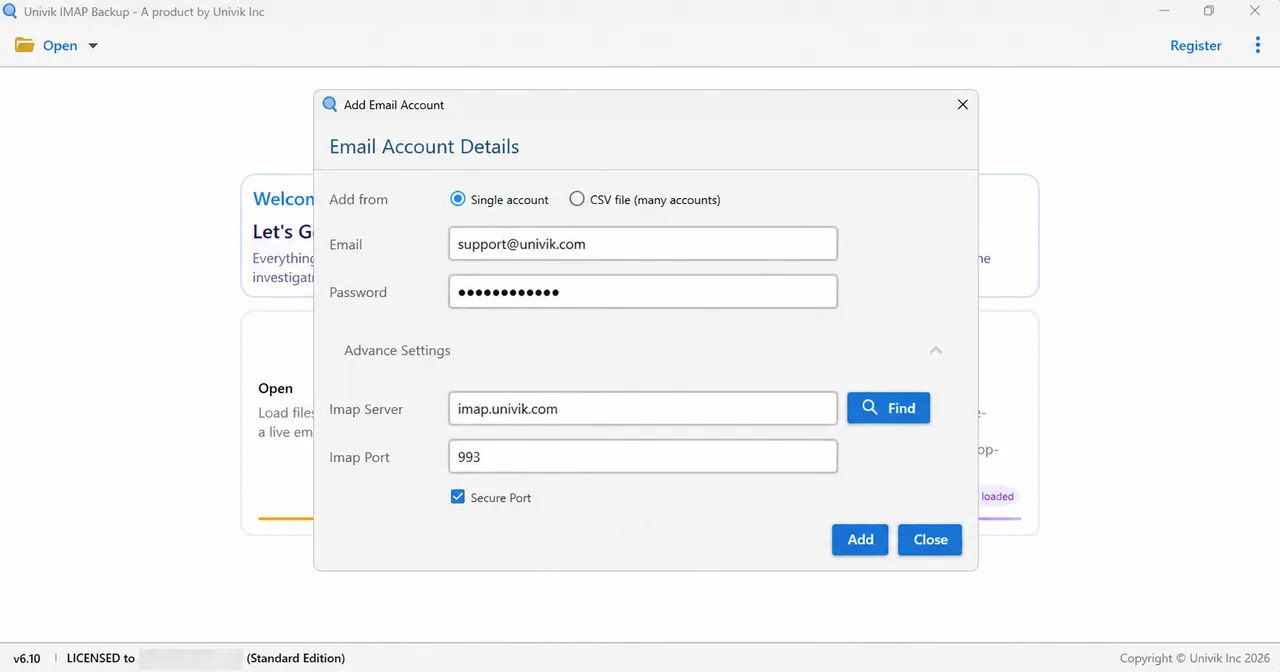
For a copy on disk, Univik IMAP Backup works as IMAP backup software on Windows and writes each ticked folder to files. You'll find Add account in the Open menu under Email Accounts. Put your address in Email and the password in Password. When the provider asks for an app password, enter that one instead.
Expand Advance Settings to reach Imap Server, Imap Port, Secure Port and Find. The default port is 993 with Secure Port ticked, which matches every public host in the table above. A Hotmail, Outlook.com or Microsoft 365 address skips the password box because Microsoft's own sign-in page opens in your browser.
Export a Copy and Check the Filter
Under Email Files in the Export menu you'll find EML, MBOX and PST. Press Save only after you've looked at Minimum Attachment Size to Export, a filter that starts switched on at 35 MB. A trial export stops at 10 items in each folder, which explains a short result.
What I Tested With Outlook.com and a Test Mailbox
On 2 November 2026 I typed an Outlook.com address into Add account in the 6.10 trial of Univik IMAP Backup. Microsoft's own sign-in page opened in the browser at once with no server fields on screen before the folder tree loaded. The same route worked with the POP and IMAP switch on Outlook.com turned off and then on. A two-step account with no app password signed in that way too, as did guest, shared and personal addresses.
On 27 October 2026 I exported a test mailbox that belongs to none of these providers to PST. The folder tree showed 173 messages. My first run wrote 0 messages because Minimum Attachment Size to Export still sat at 35 MB. Then I turned that filter off and the trial wrote 81 messages in 17 folders. That count included Trash 6 of 6 and Drafts 10 of 10.
No other step on this page was tested in the app. Host names, plan rules and sign-in requirements come from the help pages I read on 3 November 2026.
Key Takeaways and My Verdict
- The help pages for Gmail, Outlook.com, Yahoo Mail and iCloud Mail name no paid plan for IMAP.
- mail.com reserves POP, IMAP and SMTP for its paid plan.
- Fastmail's Basic plan does not include IMAP while Zoho Mail leaves IMAP access out for users who newly signed up on the Free plan.
- Proton Mail reaches desktop mail apps through Bridge, which Proton offers only with a paid plan.
- Every public host in the table uses port 993, which RFC 9051 names as the Implicit TLS port.
My verdict: if you want free IMAP email, pick Gmail, Outlook.com, Yahoo Mail or iCloud Mail and read the sign-in column first, but pick mail.com, Fastmail or Zoho Mail only when you're ready to pay for a plan that includes IMAP.
Questions and Answers
Which email providers with IMAP are there?
Gmail, Outlook.com, Yahoo Mail, iCloud Mail, mail.com, Zoho Mail, Fastmail and Proton Mail all appear on this page. Each one publishes its own plan rule and sign-in step, so read the table row before you set up a mail app.
Is there a provider that gives free IMAP email?
The help pages for Gmail, Outlook.com, Yahoo Mail and iCloud Mail name no paid plan for IMAP. Outlook.com asks you to switch on POP and IMAP access first. Yahoo and Apple ask for a generated app password.
Which providers ask for a paid plan before IMAP works?
mail.com reserves POP, IMAP and SMTP for its paid plan. Fastmail says its Basic plan does not include IMAP. Zoho Mail leaves IMAP access out for users who newly signed up on the Free plan. Proton Mail offers Bridge only with a paid plan.
Is IMAP switched on by default in Outlook.com?
Microsoft's page for Outlook.com says POP and IMAP access starts switched off, so you turn it on in the Outlook.com settings before a mail app can connect. Microsoft also requires Modern Auth (OAuth2) for that connection.
Can I use Proton Mail in an IMAP mail app?
Proton Mail works in an IMAP mail app through Proton Mail Bridge. Bridge runs on macOS, Windows and Linux and connects your account to desktop mail apps. Proton offers Bridge only with a paid Proton Mail plan.
Which of these providers need an app password?
The Yahoo help page tells you to generate an app password. Apple requires an app-specific password. Fastmail needs its own app password for every IMAP connection. Zoho Mail needs an application-specific password when two-factor authentication is on.
Do work mailboxes follow the same rules as personal ones?
A work mailbox follows the settings of its tenant. Exchange Online turns POP3 and IMAP4 on for every user by default, according to Microsoft Learn. Microsoft adds that security defaults switch them off. A Workspace admin turns IMAP on for Gmail work accounts.
How do I keep a copy of mail from any of these providers?
Add the account to a backup app that reads IMAP and store each folder in EML, MBOX or PST format on your own computer. Microsoft addresses open the sign-in page of Microsoft. Other providers take the password or app password that their page names.


Each host name, plan rule and sign-in requirement was checked against the listed pages on 3 November 2026. The export counts come from a test mailbox tied to no named provider.
Pages I read:
- Check Gmail through other email platforms
- POP, IMAP and SMTP settings for Outlook.com
- IMAP access in Zoho Mail
- Activate or deactivate POP3 and IMAP at mail.com
- Also read: Google Workspace Admin Help, Apple Support, Yahoo Help, Fastmail Help, Proton support, Microsoft Learn, Mozilla autoconfiguration, RFC 9051, RFC 8314 and RFC 6186