Quick Answer
An IMAP password is the secret your mail app sends to your mail server to sign in to a mailbox.
Depending on your provider, that secret is your normal account password, an app password or a client-specific password. A Microsoft mailbox or a Sign in with Google button needs no password in the app, because the sign-in page of the provider approves it instead.
The Password box in an account form causes most failed logins, and its label hides which secret it wants. I read RFC 9051 and the sign-in help pages of Google, Microsoft, Apple, Yahoo and cPanel on 3 November 2026.
What Is an IMAP Password and Why Does Your Mail App Ask for It?
An IMAP password is the secret that proves to the mail server that a mailbox is yours. Your mail app sends it with your user name right after the connection opens, and the server shows your folders only when the pair matches. RFC 9051 says a successful LOGIN or AUTHENTICATE command moves a connection into the authenticated state.
With IMAP your mail stays on the server, and that is why every phone, laptop and app signs in by itself. Still, each connection starts as a stranger to the server, which is why a second device asks for a login even when your first one works.
RFC 9051 sends the secret in one of two ways. LOGIN carries a plaintext password, and the standard says clients must not use it on unsecure networks. AUTHENTICATE names a SASL mechanism, and the server lists each mechanism it accepts as an AUTH= capability. Port 993 (the Implicit TLS port) starts TLS before the login, so a secret sent there is encrypted. The full comparison of methods sits in IMAP app password vs OAuth.
Most mailboxes have no separate IMAP-only password. The name belongs to the Password box of a mail app, and the secret behind that box depends on the provider.
Is Your IMAP Password the Same as Your Email Password?
Sometimes. The secret matches your account password only when the provider still accepts that password from outside apps.
| Mailbox kind | What goes in the Password box | What the provider's page says |
|---|---|---|
| Web hosting mail on cPanel | The password of that email account | cPanel documentation says to use the full email address as the user name and the email account's password. |
| Gmail and Google Workspace | An app password, or the Sign in with Google button | Google Workspace Help says IMAP, SMTP and POP no longer work with legacy passwords and that apps must use OAuth. Google Workspace Updates gives May 1, 2025 as the final date. See Gmail email settings. |
| Outlook.com and Hotmail | A Microsoft sign-in page, with no code typed into the app | Microsoft Support lists OAuth2/Modern Auth for Outlook.com and ends Basic Authentication on September 16, 2024. See Outlook.com email settings. |
| Microsoft 365 work or school mail | A Microsoft sign-in page that runs OAuth | Microsoft Learn describes OAuth for IMAP, POP and SMTP on Microsoft 365. See Microsoft 365 email settings. |
| Yahoo Mail | An app password | Yahoo describes app passwords as randomly generated codes for apps that skip its sign-in page. See Yahoo Mail settings. |
| iCloud Mail | An app-specific password | Apple says to generate an app-specific password instead of your regular login. See iCloud Mail settings. |
How to Find Your IMAP Password When Your Mail App Asks for It
You can't read an IMAP password back from the server, so finding it means remembering it or replacing it. Try these options in order, starting with the cheapest check.
- Webmail is a quick, easy first test, because it shows in seconds whether the account password still works. A login that opens webmail is the first candidate for the Password box.
- A provider reset page replaces a forgotten password. A reset can end older sign-ins, because Google and Apple cancel the app passwords when the account password changes.
- cPanel hosting can't show a mailbox password. The documentation says stored passwords can't be retrieved, so you set a new one under Email, Email Accounts, Manage and Security.
- A lost app password gets replaced and not recovered. Google says you can generate a new one anytime, and Yahoo lets you delete the lost one under External connections.
When Do You Need a Separate Code for Your Mail App?
You need an app password or a client-specific password when the provider refuses its normal login from mail apps that don't use its own sign-in page. Each provider sets its own conditions.
- Google creates an app password (a 16-digit passcode) only when 2-Step Verification is on. The step can fail for a work or school account and for security-key-only 2-Step Verification. Google calls these codes unnecessary in most cases and points to the Sign in with Google option first. You make one at myaccount.google.com/apppasswords.
- Yahoo issues its code from the Account Security page: open External connections and choose Create app password. Yahoo's page names no 2-step requirement.
- Apple needs two-factor authentication on the Apple Account. You sign in at account.apple.com, open Sign-In and Security and choose App-Specific Passwords. Apple allows 25 active codes per Apple Account.
- Tencent Exmail asks for a client-specific password once secure login is on. Tencent's help says to generate it under Settings and Mailbox binding in web mail, and turning off secure login cancels every client-specific code on the account. The guide to backup Tencent Exmail shows where that code goes in an app.
Why Does IMAP Reject Your Login?
A server rejects an IMAP login when the secret, the user name or the sign-in method doesn't match the mailbox.
| Check | What you see | Fix |
|---|---|---|
| User name form | A correct password still fails. | Use the form your provider lists. cPanel wants the full address and iCloud Mail names are usually the part before @icloud.com. |
| Normal login where a code is needed | Yahoo, iCloud and Gmail refuse the account login. | Create an app code, as the previous section describes. |
| Revoked code | A Gmail or iCloud app often asks for a login again. | Make a new code, because Google and Apple cancel old ones on a password change. |
| Typed secret on a sign-in-page service | A Hotmail, Outlook.com or Microsoft 365 login fails with the right password. | Choose the Microsoft sign-in route, since Basic Authentication ended for Outlook accounts on September 16, 2024. |
| Secure login switched on | A Tencent Exmail login refuses the normal password. | Use a client-specific code, which signed in on my 2 November test. |
| No TLS on the connection | A server that advertises LOGINDISABLED expects no plaintext LOGIN. | Use port 993 with SSL/TLS ticked, because RFC 9051 forbids LOGIN while LOGINDISABLED is advertised. |
| Wrong server | A login for one host fails on another. | Look the host up again with how to find IMAP server and enter it in the Imap Server field. |
Which Fix Is Worth Making First?
My verdict: if the provider offers a sign-in page for the app, use it and keep no password in the app. If the provider only issues codes, make one app password per app, because that is a safe habit with a clear reason: one deletion cuts off only the app that holds it.
What I Tested on Four Mailboxes
Each row in this table comes from a real run of IMAP Backup 6.10, trial edition, on the date shown.
| Mailbox | Test date | What happened |
|---|---|---|
| A Hotmail address entered in the Add Email Account window | 2 November 2026 | The Microsoft sign-in opened in my browser at once, the Imap Server fields stayed hidden and the folder tree loaded. |
| An Outlook.com mailbox with its IMAP switch off and on, and a two-step account with no app password | 2 November 2026 | The same sign-in route worked every time, so no app password was needed. |
| A Tencent Exmail mailbox with secure login on | 2 November 2026 | A client-specific password signed in and the normal password failed. Find filled in the server name. |
| A test mailbox that isn't a provider mailbox, saved as EML | 28 October 2026 | I read 14 saved .eml files back from disk, and each file holds one mail with its attachments. |
Finally, signing in with an app password for Gmail, Yahoo or iCloud is not claimed as tested, because I haven't run it yet.
Keep a Copy That Needs No Sign-In After a Reset
A reset can cut off every app that uses your mailbox, but mail saved to your PC doesn't depend on any login. The Windows program Univik IMAP Backup counts as IMAP backup software: it signs in to your mailbox and saves the folders you tick as files on your PC.
Why Does a Reset Leave Saved Mail Untouched?
IMAP keeps the working copy of your mail on the server of your provider, and a reset or a closed account changes who can reach it. Google and Apple revoke the app passwords when the account password changes. Files on your PC hold the mail itself. A saved file is a reliable copy for that reason: it opens without any sign-in because the message sits inside it.
Which Password Goes Into Add Email Account?
Add Email Account opens from the Open menu through Email Accounts and Add account. Fill the Email box with your address. For a Gmail, Yahoo or iCloud mailbox, paste the login that your provider allows for IMAP into Password. A Hotmail, Outlook.com or Microsoft 365 address needs none, because the Microsoft sign-in opens in your browser.
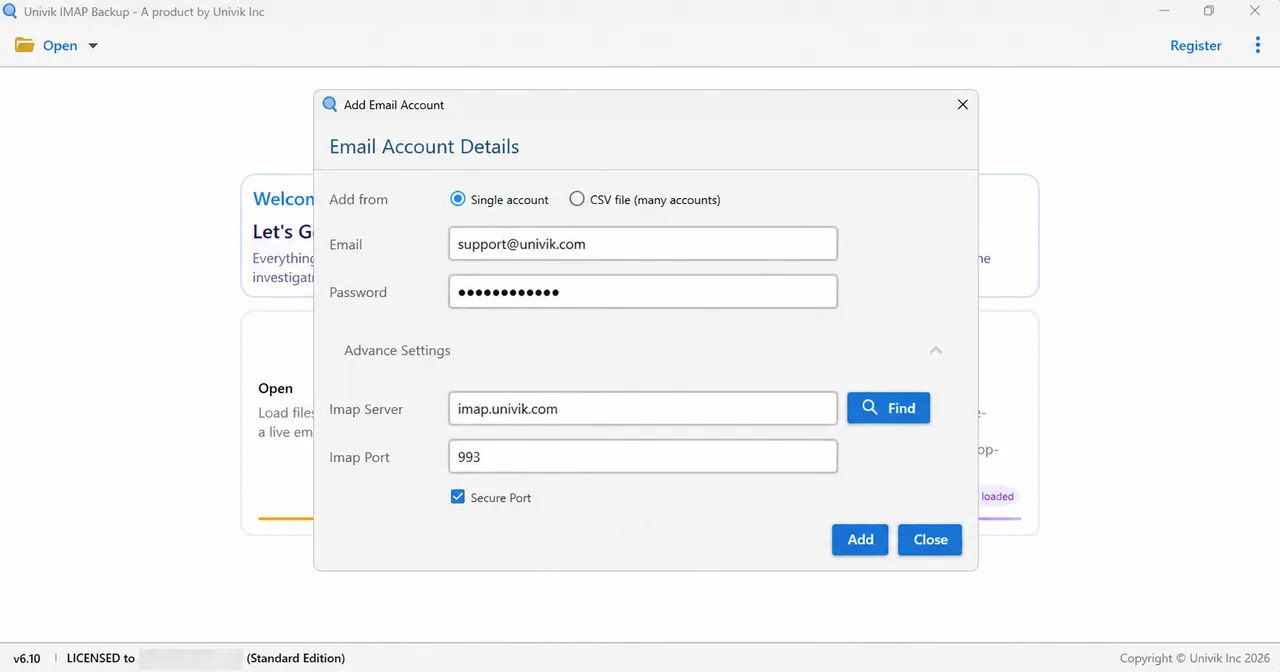
Advance Settings holds Imap Server and Imap Port, where 993 is the default, plus a Secure Port tick that starts on. Press Find and the app looks up the server name from your address.
Which Format Should You Save To?
Next, tick the folders you want to save. The Export menu then offers EML, MBOX and PST in its Email Files group. Each format has a guide: export IMAP to EML, export IMAP to MBOX and export IMAP to PST.
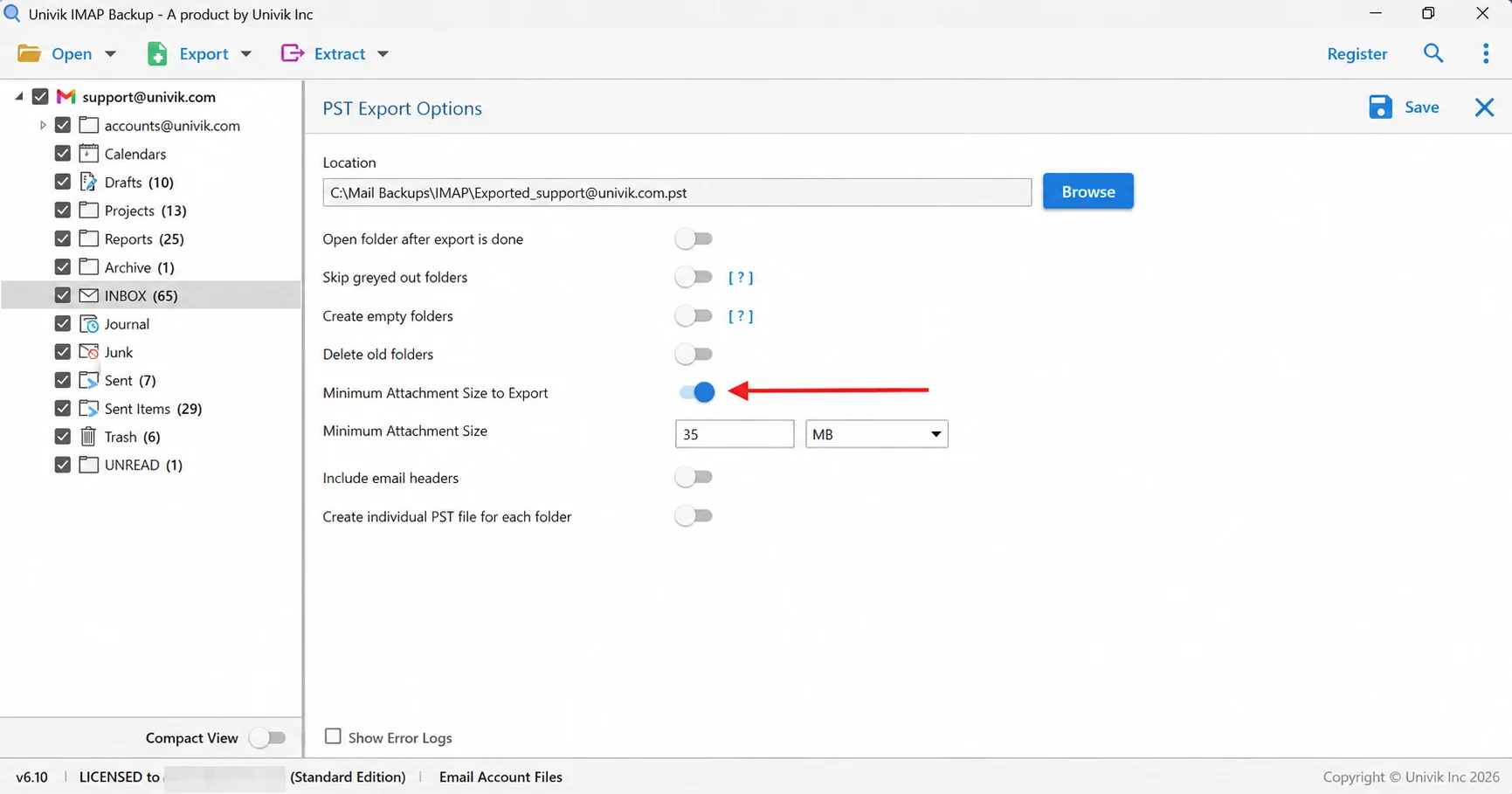
Before Save, read the 35 MB value on the Minimum Attachment Size to Export switch, since it ships turned on. Then the app writes your files. A trial exports 10 items from each folder.
- The secret in an IMAP login is whichever one the provider accepts, and it isn't always your account password.
- RFC 9051 sends the secret with LOGIN or AUTHENTICATE, and a client must not send LOGIN when the server advertises LOGINDISABLED.
- Yahoo and Apple issue app passwords for outside mail apps, and Apple requires two-factor authentication on the account first.
- Google revokes app passwords when you change your Google Account password, and Apple revokes all app-specific passwords the same way.
- Outlook accounts have refused Basic Authentication since September 16, 2024, so a typed secret can't sign in there.

FAQ: IMAP Passwords
What is an IMAP password?
An IMAP password is the secret your mail app sends to the mail server to sign in to the mailbox. It can be your account password, an app password or a client-specific password, depending on the provider. Microsoft mailboxes and Sign in with Google use the sign-in page of the provider and no password in the app.
Is my IMAP password the same as my email password?
Only when the provider still accepts your account password from outside apps. Web hosts that use cPanel accept the password of the email account. Yahoo and iCloud need an app password, and Outlook.com needs the Microsoft sign-in page.
How do I find my IMAP password?
The server won't show it to you, so test your login in the webmail of your provider first and reset it there if that fails. cPanel says stored passwords can't be retrieved and tells you to set a new one. A lost app password gets replaced with a new code from the settings of your account.
Why does my mail app keep asking for my password again?
The saved password is probably no longer accepted by the server. Google revokes app passwords when the Google Account password changes, and Apple revokes all of its app-specific passwords, so the app prompts again. Then create a new code and enter it once in the app.
When do I need an app password instead of my normal password?
You need one when the provider refuses its normal password from apps that don't use its sign-in page. Yahoo and Apple work this way, and Google asks for 2-Step Verification on the account first.
Does a Hotmail address need a password in a mail app?
No password goes into the app for a Hotmail address. Univik's app starts the Microsoft sign-in page in a browser right after you enter a Hotmail, Outlook.com or Microsoft 365 address, and the Imap Server fields stay hidden. I tested that route on 2 November 2026.
Does an IMAP password travel in plain text?
The LOGIN command carries a plaintext password, so RFC 9051 says clients must not use it on unsecure networks. Port 993 starts TLS before the login, which encrypts the password on the way to the server.
Which password goes in the Add Email Account window?
Paste the login that your provider allows for IMAP into the Password box. That login is an app password for Yahoo and iCloud. Hotmail, Outlook.com and Microsoft 365 addresses need no password in the app because the Microsoft sign-in page opens instead.

Reading for this page took place on November 3, 2026, next to IMAP Backup 6.10 test runs from October 28 and November 2, 2026.
Pages I read: